More From VIVAGO AI

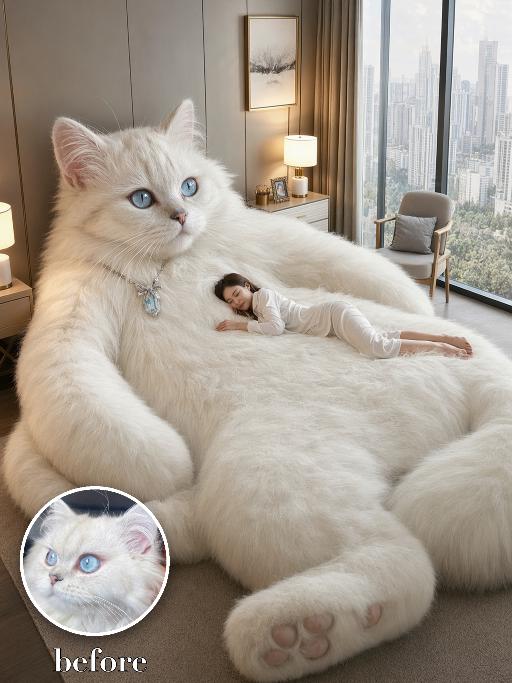
Giant Cat Bed AI effects generated image

Giant Cat Bed

Use the uploaded pet image as the only identity reference. Recreate the reference as a photorealistic surreal luxury-bedroom scene. Transform the uploaded pet into an enormous living plush pet whose oversized soft body naturally functions like a luxurious lounge bed. Strictly preserve the uploaded pet’s actual species, breed appearance, face shape, fur or coat color, markings, ear shape, eye color, nose, muzzle structure, and overall recognizability. COMPOSITION: Show the giant pet occupying nearly the entire frame, filling approximately 80–90% of the image. The pet is positioned in a relaxed semi-reclining seated pose: - head and upper body raised on the left side of the frame - face clearly visible in a three-quarter view - calm, gentle expression - huge torso and belly extending across the center like a soft mattress - one oversized front paw resting prominently in the lower foreground - another large paw or leg visible along the side - soft paw pads clearly visible - the pet’s body should feel extremely fluffy, deep, cushiony, and comfortable The pet must look alive and anatomically recognizable, not like a manufactured animal-shaped bed or stuffed toy. PERSON: Add exactly one tiny fully clothed adult person lying comfortably across the giant pet’s broad belly and torso. The person rests naturally on their side or stomach, with their head supported by the pet’s soft fur, appearing peaceful and relaxed. The person should be much smaller than the pet and used primarily to emphasize the dramatic scale difference. The pet remains the dominant subject. ENVIRONMENT: Place the scene inside a bright, upscale high-rise apartment bedroom with: - floor-to-ceiling windows - a clear modern city skyline outside - warm neutral wall panels - elegant curtains - a modern bedside table and softly glowing lamp - a framed minimalist artwork - a small lounge chair - soft neutral carpet - clean beige, cream, and warm-white interior tones Do not include a separate conventional bed. The giant pet’s body itself acts as the sleeping surface. LIGHTING AND STYLE: - photorealistic commercial interior photography - surreal but believable scale - highly detailed realistic fur - soft natural daylight from the windows - warm ambient lamp lighting - premium luxury-home aesthetic - cozy, peaceful, dreamlike atmosphere - crisp facial and fur details - realistic perspective and contact shadows - high-resolution advertising quality Vertical 3:4. IMPORTANT: - giant pet fills most of the frame - pet’s face, torso, belly, paws, and paw pads must be clearly visible - exactly one pet - exactly one adult person - no ordinary bed - no animal-shaped furniture - no stuffed-toy appearance - no duplicate limbs - no distorted anatomy - no extra people - no extra animals - no logo - no watermark

Fighting Giant

This is a scene of a combat competition ring with bright spotlights in the arena; photorealistic, high-definition details, natural colors, and the camera captures the close-quarters confrontation. The uploaded character, with an exaggerated expression, shouts loudly with an open mouth, stands barefoot on the left side of the combat ring in a fighting stance. On the right side of the ring is a tall, muscular tattooed combatant. Both of them glare and roar aggressively, facing off before the fight. The uploaded character suddenly jumps into the air, spins around to the right, and viciously kicks the combatant's head with their feet and legs. After being viciously kicked three times, the combatant is finally defeated and falls to the ground. The uploaded character smiles triumphantly and joyfully, stands in the middle of the ring to cheer and celebrate, with the surrounding audience clapping. The camera zooms in to a medium close-up to show the character's upper body.

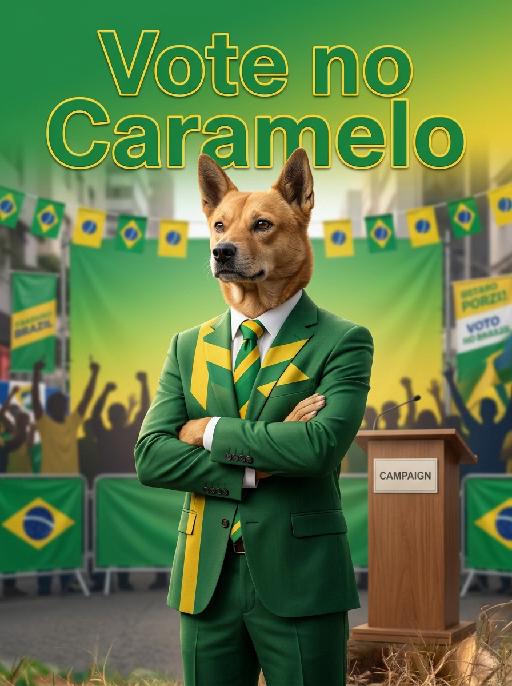
President Caramelo AI effects generated image

President Caramelo

" Image-to-image, accurately retain 100% of the original pet's fur, facial features, posture and appearance. The pet stands upright in standard anthropomorphic posture with a tall and steady aura, acting as the campaign protagonist in the exact center of the frame. The pet wears a high-grade worsted business suit with sharp three-dimensional cutting and neat shoulder lines, matched with a formal shirt and a retro tie themed with Brazilian green and yellow. The outfit is exquisitely crafted with strong business texture and fully covers the body without any exposed areas. The picture adopts top-tier hyper-realistic photographic texture, master-level cinematic color grading and layered light and shadow, with matte poster paper texture and high-definition printing effect, reaching the standard of professional Brazilian campaign posters. The background highly restores the scene of large-scale street campaign events in São Paulo. Multi-layered three-dimensional backdrops are mainly in Brazilian green and yellow, decorated with simple geometric patterns and no political party symbols. Giant campaign banners, string buntings and green-yellow balloons hang around, together with outdoor speaking platforms and display racks. The outline of urban buildings of São Paulo can be seen in the distance, and dense silhouettes of supporters raise their hands to cheer, creating a bustling and enthusiastic campaign atmosphere. Bold three-dimensional artistic characters with subtle gilded strokes are arranged in the upper part of the frame to display the large campaign title: Vote no Caramelo. The font is bold and elegant, following the classic layout of South American campaign posters. The overall composition is full and balanced with rich and high-grade color layers and delicate light and shadow contrast. It is elegant, business-style and appealing, fully reproducing the solemn and lively atmosphere of large-scale local campaign events in São Paulo."

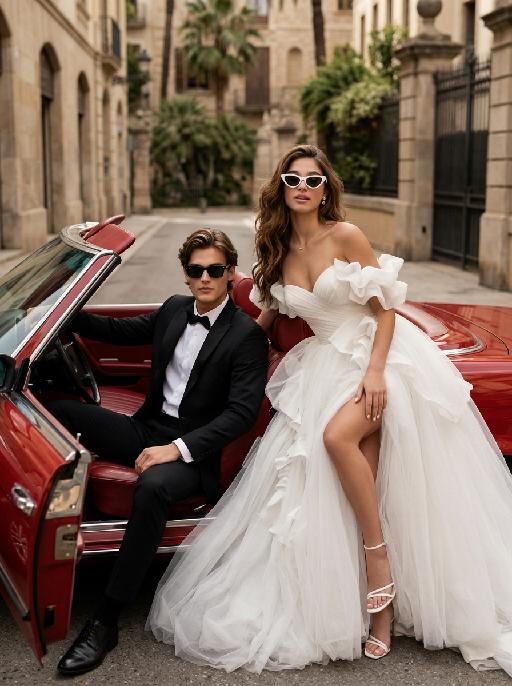
Bridal Cruise AI effects generated image

Bridal Cruise

"Create a photorealistic cinematic wedding portrait of the two subjects from the uploaded image, preserving their exact faces, ages, facial features, skin tones, hairstyles, and overall likeness as accurately as possible. Transform the two subjects into a stylish bride and groom posing in and beside a vintage red convertible car after their wedding. The scene should feel like a luxurious post-wedding street fashion editorial, romantic, confident, glamorous, and slightly rebellious. The groom sits on the left side inside the open-top vintage convertible car, wearing a black tuxedo and black sunglasses. He leans back casually in the driver’s seat or front seat, one arm resting naturally on the car door or steering wheel, with a calm, cool, confident expression. His posture should feel relaxed, elegant, and masculine, like a high-end fashion wedding photo. The bride sits or reclines on the right side beside the groom, leaning back against the red leather car seat with a confident and glamorous pose. She wears white cat-eye sunglasses and looks toward the camera with a cool, romantic, slightly playful expression. Her body language should feel relaxed, stylish, luxurious, and confident, as if enjoying a glamorous wedding getaway. Bride outfit: the bride wears a dramatic white wedding gown inspired by the reference image. The dress has a strapless or sweetheart neckline, sculptural ruffle details around the bodice or sleeves, layered soft tulle, a voluminous flowing skirt, and a high slit that subtly reveals one leg. The dress should look fashionable, romantic, luxurious, and editorial. The fabric should have realistic soft tulle texture, natural folds, and elegant volume. The bride wears white strappy high-heeled sandals, subtle bridal earrings, and a delicate pearl or diamond necklace. A soft white bridal veil may flow naturally behind her or blend into the dress, without covering her face. Groom outfit: the groom wears a classic black tuxedo, fitted and elegant, with a clean white dress shirt, black bow tie, black dress shoes, and stylish black sunglasses. The tuxedo should look sharp, formal, minimal, and high-end. Do not use a casual suit, colorful suit, necktie, or open-collar shirt. Car and background: a vintage red convertible car with a classic luxury feel, open roof, polished red exterior, red or dark leather interior, realistic steering wheel, chrome details, and an elegant retro design. The couple is parked on a quiet European-style city street or upscale residential boulevard. The background includes soft greenery, iron gates, warm stone buildings, palm trees or street trees, and sunlit urban details, softly blurred with shallow depth of field. No other people should appear in the image. Lighting and color: warm daylight wedding editorial photography, natural sunlight, soft shadows, realistic skin texture, subtle highlights on sunglasses, tuxedo, wedding dress, car paint, and chrome details. Use an elegant low-to-medium saturation color palette with warm beige tones, soft ivory whites, deep black tuxedo contrast, muted red car tones, gentle green background, and refined cinematic color grading. The image should feel expensive, fashionable, romantic, and timeless, avoiding overly vivid or neon colors. Composition: vertical portrait, medium-full or full-body framing. The couple and the red convertible car should be the central focus. The groom is on the left inside the car, the bride is on the right, leaning elegantly with her white wedding dress flowing across the car seat and lower part of the frame. The bride’s legs and white strappy heels may be visible naturally, but the pose should remain elegant and tasteful. Both faces should be sharp, recognizable, and clearly visible behind sunglasses. The overall mood should feel like a glamorous “just married getaway” moment. Ultra realistic photography, high-end wedding editorial style, luxury fashion photography, realistic car interior, realistic fabric texture, realistic tulle layers, realistic sunglasses reflections, natural facial details, soft film grain, professional camera look, high detail, cinematic muted color grading, stylish post-wedding atmosphere. Negative prompt: extra people, background people, crowd, wedding guests, driver, duplicated bride, duplicated groom, distorted faces, changed identity, inaccurate likeness, deformed hands, extra fingers, missing fingers, fused fingers, broken fingers, unnatural arms, stiff pose, awkward sitting pose, cheap modern car, closed roof car, wrong car color, missing sunglasses, sunglasses covering the entire face, missing wedding dress, wrong wedding dress, plain casual dress, colorful wedding dress, casual groom outfit, necktie instead of bow tie, open-collar shirt, plastic skin, over-smoothed face, fake CGI look, text, logo, watermark, title text, low resolution, blurry face, oversaturated colors, vivid bright colors, neon colors, harsh contrast, black and white, monochrome, grayscale."


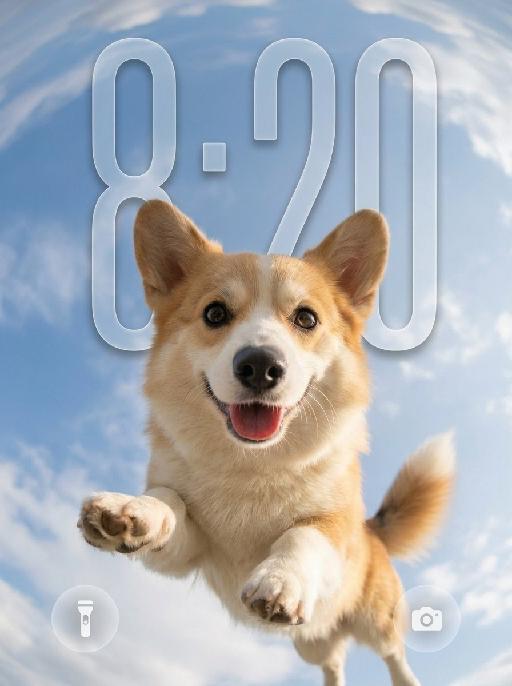
Sky Pounce AI effects generated image

Sky Pounce

"Use the uploaded pet image as the only identity reference. Create a highly realistic vertical wallpaper-style portrait of the same pet jumping toward the camera in a bright blue sky. Strictly preserve the pet’s exact species, breed, face shape, fur color, fur texture, eye color, ear shape, nose, markings, collar, and overall recognizability. Camera and composition: - extreme low-angle perspective, looking upward from directly below the pet - ultra-wide fisheye lens - the pet is centered and appears to leap or float toward the camera - the face is very close to the lens, with the nose slightly enlarged by perspective - both front paws reach naturally toward the camera with strong foreshortening - the pet’s body extends backward into the sky - joyful open-mouth expression, tongue visible, energetic and friendly - dynamic but anatomically correct pose Environment: - bright natural blue sky - soft bright white clouds - strong fisheye sky distortion around the outer edges - the sky and clouds wrap around the frame like a dreamy sky dome - bright sunlight from one side - subtle natural lens flare - clean, uplifting, playful summer atmosphere Wallpaper direction: - make the composition suitable for a phone wallpaper - keep the image clean and visually striking - allow a little breathing space in the upper area - no lock screen UI elements - no clock - no date - no username - no watermark - no extra text Important frame rule: - the fisheye effect must fill the entire image edge-to-edge - do not create any black borders - do not create any circular frame edges - do not create vignette or dark corners - do not create a lens mask effect - the sky and clouds must extend fully to all four edges of the canvas - the final image must be full-bleed and seamless Color and texture direction: - use a softer and more natural color treatment - slightly muted colors - lower saturation overall - gentle contrast - balanced highlights and shadows - natural fur tones - avoid overly vivid or neon-like blue sky - avoid oversaturated fur colors - keep the lighting bright but not harsh - maintain a clean, airy, premium wallpaper mood - use a subtle, elegant, slightly cinematic color grading Style: hyper-realistic pet photography, playful action shot, immersive fisheye perspective, crisp fur details, natural sunlight, cheerful and eye-catching wallpaper aesthetic, with refined and slightly muted color tones. Vertical composition, suitable for wallpaper."

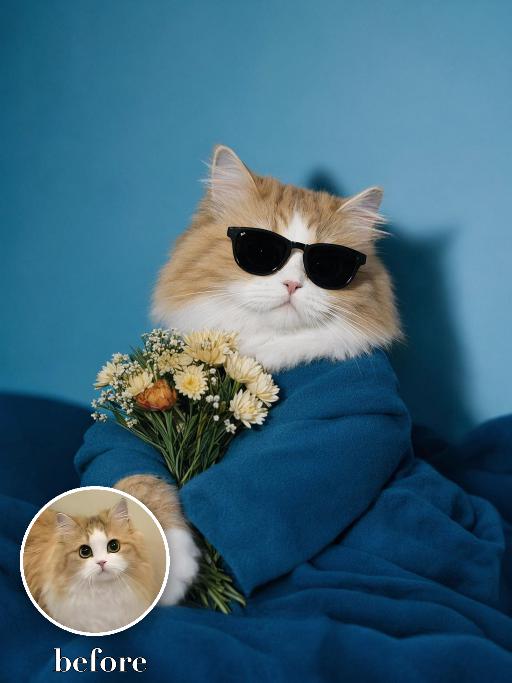
Bouquet Date AI effects generated image

Bouquet Date

"Recreate the reference as an elegant blue studio portrait. The uploaded cat sits partly wrapped in a teal-blue cloth or blanket, wearing black sunglasses and holding a small bouquet of pale flowers close to the chest. Bright cyan-blue background and matching blue foreground, fashion editorial lighting, front-facing upper-body crop, cool calm expression. Preserve each uploaded pet's actual species, breed, coat color, markings, ear shape, eye color, muzzle and facial structure. Do not assume a fixed breed, color, or species from the reference image; adapt the reference gameplay to the uploaded pet. Actively change pose, facial expression, gaze direction, camera angle and styling to match the gameplay reference. No extra animals beyond the requested uploaded pets. No human face unless explicitly requested; anonymous hands are allowed only when the gameplay needs hands. No brand logos, no watermark, no random readable text. Match the gameplay reference very closely in composition, crop, texture, lighting, pet expression, visible face angle, props, background, and image quality. Vertical 3:4, photorealistic unless the reference is a poster or sticker layout. ```"

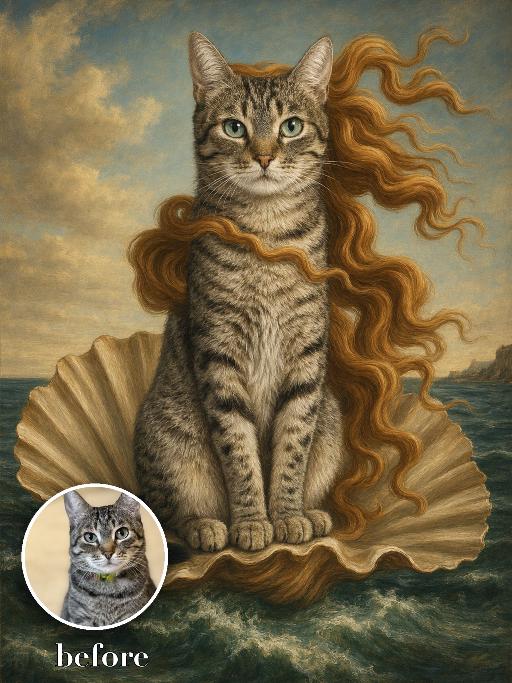
Seashell Venus Pet AI effects generated image

Seashell Venus Pet

Recreate a mythic Renaissance sea painting with the uploaded pet seated upright on a large open scallop shell rising from green-blue waves. Long flowing golden-red hair-like fur ribbons stream in the wind, pale luminous body, distant coast and soft sky behind. Tempera-like old-master texture, graceful centered composition. The subject remains an animal throughout. No people or human hands. No real character names, celebrity names, brands, logos, watermarks or readable text. Accurately preserve the uploaded pet's species, breed, coat color and markings, ear shape, muzzle and face structure, eye color, body proportions and tail. Keep it instantly recognisable as the same animal; change only pose, scene, costume and art treatment. Match the reference composition closely. Vertical 3:4, crisp detail, the pet is the unmistakable main subject.

Eid Wish AI effects generated image

Eid Wish

Maintain the exact same facial features of the person in the uploaded image, Photorealistic portrait, cinematic shot, the person wearing a white traditional thobe and white songkok hat, standing by a wooden balcony window at twilight, hands raised in gentle prayer, looking up with reverent expression, warm side lighting creating soft shadows and light contrast, background features the glowing green domes and minarets of Masjid an-Nabawi under a starry night sky with a crescent moon, floating Arabic calligraphy of "Allah" and elegant golden text "Ramadan Kareem", foreground includes an open Quran emitting soft glow, a bowl of dates, glowing incense, prayer beads, and ornate lit Ramadan lanterns, Sony A7R V camera, 8K resolution, sharp details, warm golden hour color grading, realistic texture of wood and fabric, no 3D cartoon elements, no digital art filters, pure photographic realism.

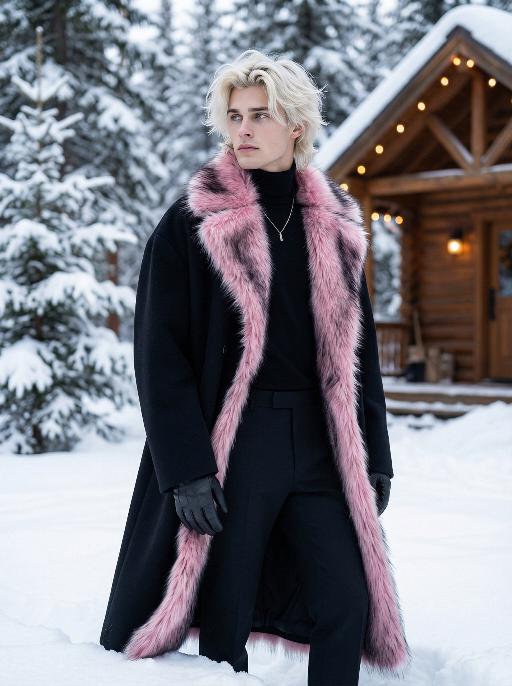
Snow Man AI effects generated image

Snow Man

Use the exact same facial features, gender, and age as the character in the uploaded image. Photorealistic fashion portrait, exact same facial features, gender and age as the character in the uploaded image. Platinum blonde, voluminous, slightly tousled hair with a wolf-cut style. Head turned to the left, gaze directed outward with a cool, ethereal expression. Dressed in an oversized, floor-length black wool coat with a dramatic, fluffy pink-and-black gradient fur trim along the edges, open to reveal a sleek black turtleneck and tailored black trousers. A delicate silver necklace adorns the neck, and black leather gloves cover the hands. The setting is a snowy, winter wonderland, with deep, fresh snow covering the ground and snow-laden evergreen trees in the background. A rustic wooden cabin with warm, glowing string lights is visible in the distance. Soft, cool natural daylight illuminates the scene, casting gentle shadows on the snow and clothing. The background is softly blurred, creating a shallow depth of field. The overall mood is avant-garde, ethereal, and effortlessly cool. High detail skin texture, cinematic lighting, 8K resolution, ultra-realistic, high-fashion editorial aesthetic, no text or watermarks.

Comic Caricature

"Use the uploaded image as the only reference. Recreate the uploaded image faithfully, only changing the visual style into a more exaggerated American hand-drawn caricature illustration. Preserve the same person, hairstyle, expression, outfit, pose, background structure, framing, and overall composition, while transforming the image into a bold, stylized, sketchy cartoon portrait. Style: American editorial caricature, expressive hand-drawn linework, loose sketch lines, painterly brush strokes, dynamic ink-like outlines, animation concept art feel, and a polished illustrated finish. Make the caricature effect clearly stronger and more obvious: enlarge the head noticeably, exaggerate the facial proportions, make the eyes larger and more expressive, emphasize the eyebrows, simplify and stylize the nose and mouth, and give the face a more dynamic cartoon-like structure. The exaggeration should be bold, playful, and immediately noticeable. Keep the subject recognizable and appealing, but push the stylization further so it feels more lively, humorous, and visually striking. The result should look like a premium American magazine caricature or an animated character design sketch. Use visible brushwork, rough elegant outlines, soft painterly shading, and a clean artistic composition. The background can be simplified into a minimal illustrated backdrop with graphic color-block elements or loose painterly shapes to support the character. No text, no logo, no watermark."

Load more

Next-Gen Multi-Model AI Video Architecture

Vivago AI isn't just one engine—it’s a unified hub for the world’s most advanced video AI. Whether you need cinematic realism or high-speed social content, we provide the right model for your creative vision.

Free Generate

Beauty and Dolphins

Vacation Time

Stellar Tear

Fish Tank Supervisor

Cinematic Quality & Precision Control

Enables 4K resolution with multi-lens motion control, generating delicate scene via text prompts for customized cinematography.​

TRY NOW

Dynamic AV Sync

Auto-generates original audio to avoid copyright issues. Build 3D immersive environments through layered sound design automatically.

TRY NOW

OpenAI Sora 2

​Advanced visual storytelling with unparalleled physics and consistency.

TRY NOW

Kling v2.6 Pro

Industry-leading cinematic image animation and motion control.

TRY NOW

Google Veo 3 & 3.1

Ultra-fast generation with enhanced realism for creative workflows.

TRY NOW

Vivago AI 2.0

Our proprietary model optimized for efficiency, speed, and cost-effective generation.

TRY NOW

Users' Voice

We listen carefully to the opinions of every user.
Free Generate
Contact Us
I tried the Lip Sync feature inside Vivago.ai’s AI Video Generator for my educational podcast, and the results were stunning! The avatar's lip movements perfectly matched my audio recording, creating a professional AI-generated video without complex editing. Compared with tools like OpenAI Sora 2 and Google Veo 3.1, Vivago Image-to-Video delivers fast, studio-quality results online. It saved me hours of post-production work.
ElenaM (Spain)
Vivago’s Image-to-Video AI transformed my marketing workflow. I uploaded a product image and described the launch scene in text, and it generated a 10-second cinematic AI video with background music and dynamic visuals. The output quality rivals Kling v2.6 Pro and Google Veo 3 Fast. It’s now my go-to AI video generator for social media ads and product campaigns.
KenjiT (Japan)
As a digital artist, I use Vivago.ai 2.0 daily for Image-to-Image and AI Image-to-Video creation. The e-book covers and animated visuals I generate for clients look cinematic and professional. Unlike many standalone AI tools, Vivago integrates multiple leading models into one platform, making it easier to create copyright-safe AI images and videos for publishing.
ChenL (China)
I tried the Lip Sync feature inside Vivago.ai’s AI Video Generator for my educational podcast, and the results were stunning! The avatar's lip movements perfectly matched my audio recording, creating a professional AI-generated video without complex editing. Compared with tools like OpenAI Sora 2 and Google Veo 3.1, Vivago Image-to-Video delivers fast, studio-quality results online. It saved me hours of post-production work.
ElenaM (Spain)
Vivago’s Image-to-Video AI transformed my marketing workflow. I uploaded a product image and described the launch scene in text, and it generated a 10-second cinematic AI video with background music and dynamic visuals. The output quality rivals Kling v2.6 Pro and Google Veo 3 Fast. It’s now my go-to AI video generator for social media ads and product campaigns.
KenjiT (Japan)
As a digital artist, I use Vivago.ai 2.0 daily for Image-to-Image and AI Image-to-Video creation. The e-book covers and animated visuals I generate for clients look cinematic and professional. Unlike many standalone AI tools, Vivago integrates multiple leading models into one platform, making it easier to create copyright-safe AI images and videos for publishing.
ChenL (China)
I absolutely love Vivago’s AI Image-to-Video Generator. As a travel blogger, static images often fail to capture real atmosphere, but Vivago helps me turn photos into vivid cinematic AI videos with motion effects. It feels comparable to OpenAI Sora 2 and Google Veo 3.1, but more accessible and faster for creators who need high-quality AI videos online.
LiamK (Australia)
I tried the Lip Sync feature inside Vivago.ai’s AI Video Generator for my educational podcast, and the results were stunning! The avatar's lip movements perfectly matched my audio recording, creating a professional AI-generated video without complex editing. Compared with tools like OpenAI Sora 2 and Google Veo 3.1, Vivago Image-to-Video delivers fast, studio-quality results online. It saved me hours of post-production work.
ElenaM (Spain)
Vivago’s Image-to-Video AI transformed my marketing workflow. I uploaded a product image and described the launch scene in text, and it generated a 10-second cinematic AI video with background music and dynamic visuals. The output quality rivals Kling v2.6 Pro and Google Veo 3 Fast. It’s now my go-to AI video generator for social media ads and product campaigns.
KenjiT (Japan)
As a digital artist, I use Vivago.ai 2.0 daily for Image-to-Image and AI Image-to-Video creation. The e-book covers and animated visuals I generate for clients look cinematic and professional. Unlike many standalone AI tools, Vivago integrates multiple leading models into one platform, making it easier to create copyright-safe AI images and videos for publishing.
ChenL (China)
I absolutely love Vivago’s AI Image-to-Video Generator. As a travel blogger, static images often fail to capture real atmosphere, but Vivago helps me turn photos into vivid cinematic AI videos with motion effects. It feels comparable to OpenAI Sora 2 and Google Veo 3.1, but more accessible and faster for creators who need high-quality AI videos online.
LiamK (Australia)
Using Vivago.ai’s Image-to-Video AI has greatly enhanced my classroom teaching. I transform textbook notes into historical AI videos with cinematic filters and dynamic animations. Compared with tools like Kling v2.6 Pro and Google Veo 3 Fast, Vivago offers faster generation and easier parameter control for educators who need reliable AI video creation.
RajivG (India)
I frequently create AI videos on Vivago and publish them on TikTok and YouTube Shorts. The AI video templates and trending content ideas help me produce viral-ready clips quickly. With Vivago’s integrated models—including advanced video engines similar to OpenAI Sora 2—I can generate anime-style and cinematic social media videos that drive high engagement.
MarieJ (Spain)
What attracts me most about Vivago.ai is not only the powerful AI Video Generator but also the active AIGC creator community. It combines AI Image-to-Video, Text-to-Video, and leading model integrations like Google Veo 3.1 into one creative platform.
TomW (India)
At first, I was hesitant about using AI video tools. But after trying Vivago Image-to-Video, I realized how easy it is to create professional AI-generated videos online. I just upload an image, add a short prompt, and adjust a few settings. The results are cinematic and copyright-safe, which is essential for commercial projects.
HectorC (Mexico)
Using Vivago.ai’s Image-to-Video AI has greatly enhanced my classroom teaching. I transform textbook notes into historical AI videos with cinematic filters and dynamic animations. Compared with tools like Kling v2.6 Pro and Google Veo 3 Fast, Vivago offers faster generation and easier parameter control for educators who need reliable AI video creation.
RajivG (India)
I frequently create AI videos on Vivago and publish them on TikTok and YouTube Shorts. The AI video templates and trending content ideas help me produce viral-ready clips quickly. With Vivago’s integrated models—including advanced video engines similar to OpenAI Sora 2—I can generate anime-style and cinematic social media videos that drive high engagement.
MarieJ (Spain)
What attracts me most about Vivago.ai is not only the powerful AI Video Generator but also the active AIGC creator community. It combines AI Image-to-Video, Text-to-Video, and leading model integrations like Google Veo 3.1 into one creative platform.
TomW (India)
At first, I was hesitant about using AI video tools. But after trying Vivago Image-to-Video, I realized how easy it is to create professional AI-generated videos online. I just upload an image, add a short prompt, and adjust a few settings. The results are cinematic and copyright-safe, which is essential for commercial projects.
HectorC (Mexico)