More From VIVAGO AI

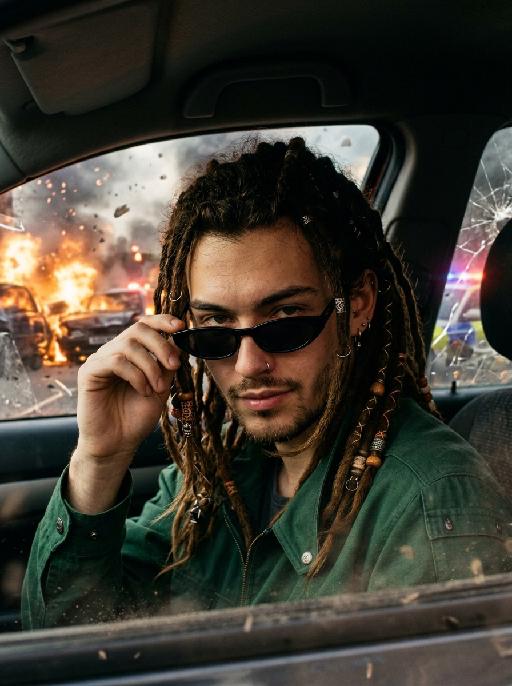
Apocalypse Chill AI effects generated image

Apocalypse Chill

"Use the uploaded image as the only identity reference. Create a cinematic apocalyptic portrait of the subject sitting inside a car, facing the camera more frontally. Strictly preserve the subject’s identity, facial features, hairstyle, clothing style, and overall recognizability from the uploaded image. The subject is wearing stylish slim black sunglasses. The pose is clear and cinematic: one hand is lightly touching the edge of the sunglasses, the head is slightly lowered, and the subject looks toward the camera from above the sunglasses. The gaze should feel cool, confident, sharp, and unbothered. The expression should not be blank or stiff. Give the subject a subtle smirk, relaxed lips, slightly raised eyebrows, and a fearless attitude, as if the apocalypse outside does not affect them at all. The subject sits inside the car while an end-of-the-world disaster unfolds outside the car window: explosions, burning vehicles, police cars, smoke, falling debris, cracked glass, emergency lights, and a chaotic ruined city or highway scene. The contrast should be strong: the subject looks stylish, calm, and completely in control inside the car, while the outside world is collapsing into chaos. Cinematic photorealistic style, dramatic lighting, realistic car interior, warm fire glow mixed with cool shadows, high detail, intense apocalyptic atmosphere, action movie still, vertical composition. No cigarette, no smoking, no blank expression, no stiff pose, no awkward hands, no text, no logo, no watermark."

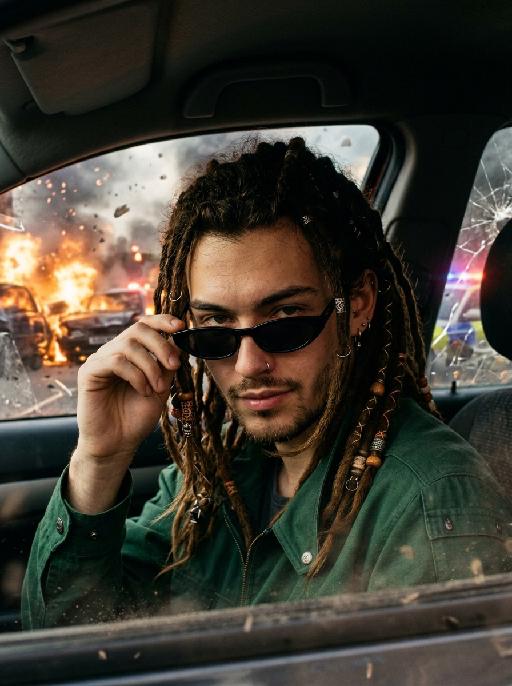
Apocalypse Chill AI effects generated image

Apocalypse Chill

"Use the uploaded image as the only identity reference. Create a cinematic apocalyptic portrait of the subject sitting inside a car, facing the camera more frontally. Strictly preserve the subject’s identity, facial features, hairstyle, clothing style, and overall recognizability from the uploaded image. The subject is wearing stylish slim black sunglasses. The pose is clear and cinematic: one hand is lightly touching the edge of the sunglasses, the head is slightly lowered, and the subject looks toward the camera from above the sunglasses. The gaze should feel cool, confident, sharp, and unbothered. The expression should not be blank or stiff. Give the subject a subtle smirk, relaxed lips, slightly raised eyebrows, and a fearless attitude, as if the apocalypse outside does not affect them at all. The subject sits inside the car while an end-of-the-world disaster unfolds outside the car window: explosions, burning vehicles, police cars, smoke, falling debris, cracked glass, emergency lights, and a chaotic ruined city or highway scene. The contrast should be strong: the subject looks stylish, calm, and completely in control inside the car, while the outside world is collapsing into chaos. Cinematic photorealistic style, dramatic lighting, realistic car interior, warm fire glow mixed with cool shadows, high detail, intense apocalyptic atmosphere, action movie still, vertical composition. No cigarette, no smoking, no blank expression, no stiff pose, no awkward hands, no text, no logo, no watermark."

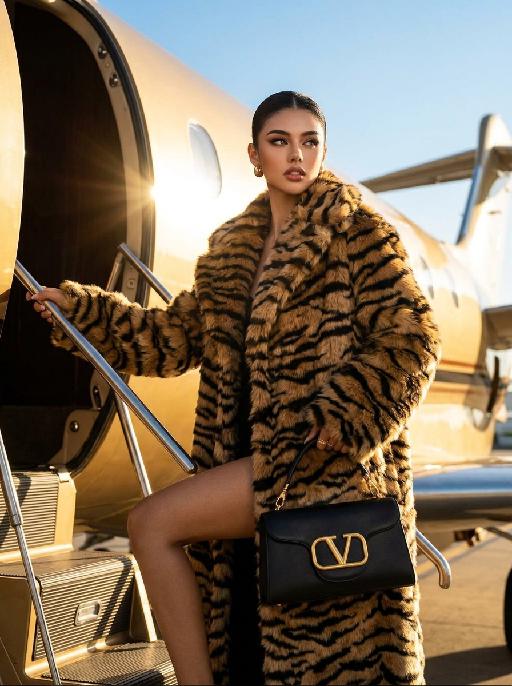
Urban Wild AI effects generated image

Urban Wild

"Keep the character's facial features from the uploaded image unchanged. High-end luxury fashion editorial photography, photorealistic, ultra-detailed, 8K resolution. A striking figure with sleek pulled-back dark hair, wearing an oversized tiger-stripe faux fur coat, holding a black leather handbag with gold V-logo hardware, stepping up the stairs of a private jet. One limb grips the handrail, one leg bent in a confident pose, gaze directed to the side with a sharp, glamorous expression. Background: the exterior of a golden private jet under a clear bright blue sky, warm golden hour sunlight with strong lens flare effects, casting a luxurious warm glow on the fur and metal surfaces. Lighting: dramatic golden backlight, high contrast, warm golden tones, lens flare from the jet engine, highlighting the texture of the fur and the sheen of the leather bag. Style: bold luxury fashion aesthetic, cinematic film grain, shallow depth of field, sharp focus on the central figure and handbag, rich textures of fur, leather and metal, glamorous and powerful vibe, shot with a professional medium format camera."

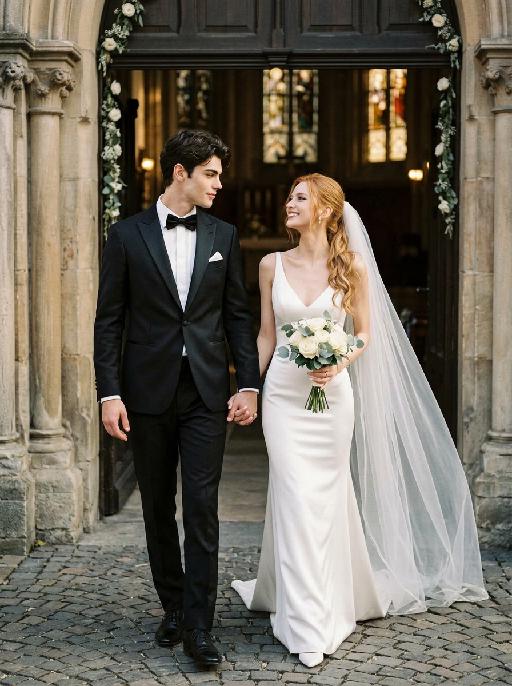
Chapel Vows AI effects generated image

Chapel Vows

"Create a photorealistic cinematic wedding portrait of the two subjects from the uploaded image, preserving their exact faces, ages, facial features, skin tones, and overall likeness as accurately as possible. Transform the two subjects into a bride and groom walking together in front of a beautiful European-style chapel. The couple should strictly follow this intimate walking wedding pose: the groom stands on the left side of the image, walking slightly forward while holding the bride's hand. The bride stands on the right side of the image, walking beside him while holding his hand. They are stepping forward together in a natural elegant walking motion, close to each other, with relaxed posture and romantic body language. The groom turns his head slightly toward the bride and looks at her with a calm, affectionate expression. The bride turns her head slightly toward the groom and looks back at him with a joyful, happy, romantic expression, a soft natural smile, bright eyes, and a warm sense of happiness. The couple's hands are clearly joined between them at waist level, creating a romantic hand-in-hand walking pose. The bride holds a small elegant bridal bouquet in her other hand, positioned naturally near her waist or chest. The bouquet should be simple and refined, made of white flowers with subtle greenery, not oversized. Bride outfit: the bride wears a minimalist white wedding gown inspired by the reference pose image. The dress is sleek, elegant, fitted, and floor-length, with a clean satin or silk texture, a graceful V-neck or softly structured neckline, thin straps or sleeveless design, and a refined modern bridal silhouette. The gown should feel simple, high-end, and editorial, not overly puffy or princess-like. The bride wears a long translucent white bridal veil attached naturally to her hair, flowing softly behind her and around her shoulders as she walks. The veil should be visible, elegant, lightweight, and romantic, without covering her face too much. The bride also wears an elegant bridal necklace around her neck, such as a delicate pearl or diamond necklace, and subtle bridal earrings. The bride's hairstyle should match the hairstyle from the uploaded image as closely as possible, while allowing for natural adjustments needed to accommodate the bridal veil. Groom outfit: the groom wears a classic black tuxedo, fitted and elegant, with a clean white dress shirt, a black bow tie, black dress shoes, and a refined formal wedding look. The tuxedo should be dark, minimal, sharp, and well-tailored. Do not use a casual suit, colorful suit, necktie, or open-collar shirt. Background: an empty, romantic old European chapel or cathedral entrance with tall arched doors, stone columns, soft warm lights, subtle floral decorations, and a sacred wedding atmosphere. The couple appears to be walking out from the chapel entrance together after the wedding ceremony. The chapel doorway or arched entrance should frame the couple beautifully, creating a symmetrical and cinematic wedding composition. The background must be completely free of any other people, guests, staff, bystanders, priests, bridesmaids, groomsmen, or figures. The couple should be the only two people in the image. Lighting and color: golden hour sunlight mixed with soft chapel light, warm cinematic glow, gentle highlights on the tuxedo, wedding dress, bouquet, and veil, natural skin texture, realistic fabric details, emotional high-end wedding photography style. Use a low-saturation color palette, muted tones, soft black, ivory white, warm beige, soft gray, and elegant film-like colors. The overall tone should feel desaturated, timeless, sophisticated, romantic, and slightly film-like. Avoid overly vivid, bright, or highly saturated colors. Composition: vertical portrait, full-body or nearly full-body framing, the couple centered in front of the chapel entrance, walking forward hand in hand. The groom is on the left, the bride is on the right. Their bodies should be close but not overlapping too much. The veil should flow naturally behind the bride and add movement to the image. The image should feel like a candid luxury wedding photo captured at the perfect moment, romantic, elegant, intimate, and timeless. Ultra realistic photography, high-end wedding editorial style, natural facial details, realistic hands and fingers, realistic walking posture, realistic fabric texture, soft film grain, professional camera look, shallow depth of field, high detail, cinematic color grading, elegant muted wedding atmosphere. Negative prompt: extra people, background people, crowd, wedding guests, staff, bystanders, priest, bridesmaids, groomsmen, duplicated bride, duplicated groom, distorted faces, changed identity, inaccurate likeness, deformed hands, extra fingers, missing fingers, hands not holding, disconnected hands, unnatural arms, stiff pose, floating bouquet, oversized bouquet, missing bouquet, missing veil, veil covering the face completely, plastic skin, over-smoothed face, fake CGI look, wrong wedding dress, princess ball gown, colorful wedding dress, casual groom outfit, necktie instead of bow tie, open-collar shirt, missing necklace, text, logo, watermark, elevator, elevator doors, hotel hallway, floor number, low resolution, blurry face, oversaturated colors, vivid bright colors, harsh contrast."


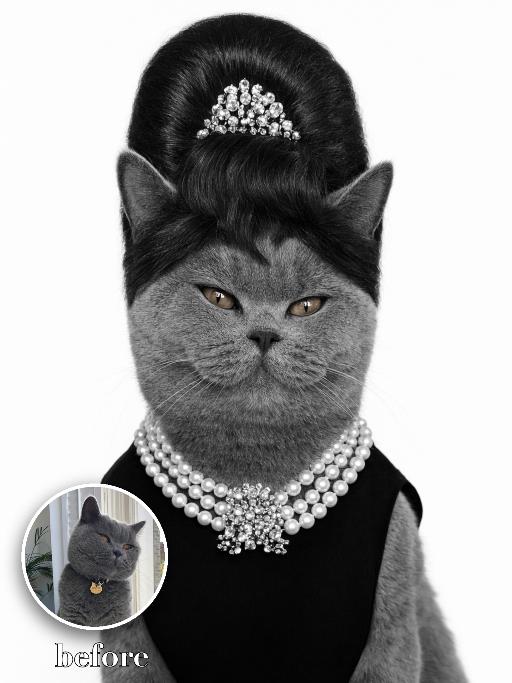
Pearl Updo Glamour AI effects generated image

Pearl Updo Glamour

Create a high-contrast vintage society portrait on a clean white background. The uploaded pet wears a tall black beehive updo wig-like accessory adapted around the ears, a small jeweled tiara, multiple pearl necklaces and a sleek black evening outfit. Front-facing chest-up crop, elegant alert eyes, crisp black-and-white glamour styling. The subject remains an animal throughout. No people or human hands. No real character names, celebrity names, brands, logos, watermarks or readable text. Accurately preserve the uploaded pet's species, breed, coat color and markings, ear shape, muzzle and face structure, eye color, body proportions and tail. Keep it instantly recognisable as the same animal; change only pose, scene, costume and art treatment. Match the reference composition closely. Vertical 3:4, crisp detail, the pet is the unmistakable main subject.

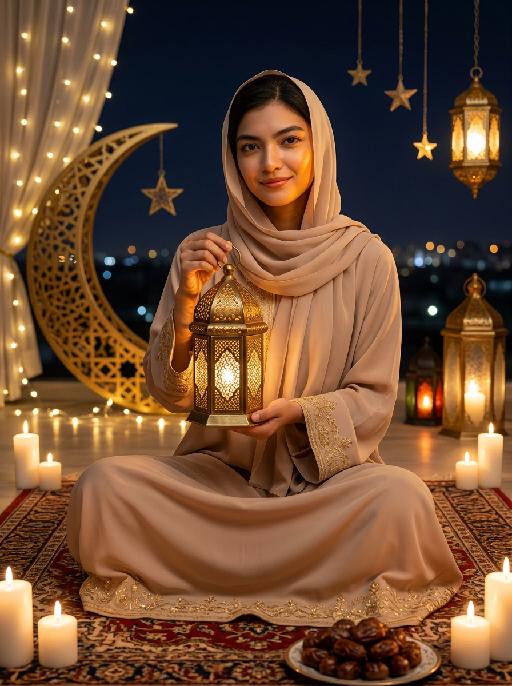
Moon&Lantern AI effects generated image

Moon&Lantern

"Maintain the exact same facial features as the person in the uploaded image. The person wearing a soft beige abaya with delicate gold embroidery on cuffs and hem, paired with a matching beige headscarf. She sits cross-legged on an ornate traditional Persian rug, holding a glowing ornate brass lantern with intricate lattice patterns in both hands, smiling gently at the camera. High contrast lighting, dramatic chiaroscuro, deep soft shadows on one side of the face, warm golden highlights on the other side, backlight creating a soft halo around hair and headscarf. Surrounding elements: lit white candles placed around the rug, a golden plate filled with plump dates in the foreground, a large decorative golden crescent moon with fairy lights, hanging star ornaments and glowing Arabic lanterns in the background, distant blurred city lights under a dark night sky. Cinematic warm lighting, photorealistic portrait, 8K, high detail, cozy and serene Ramadan/Eid atmosphere."

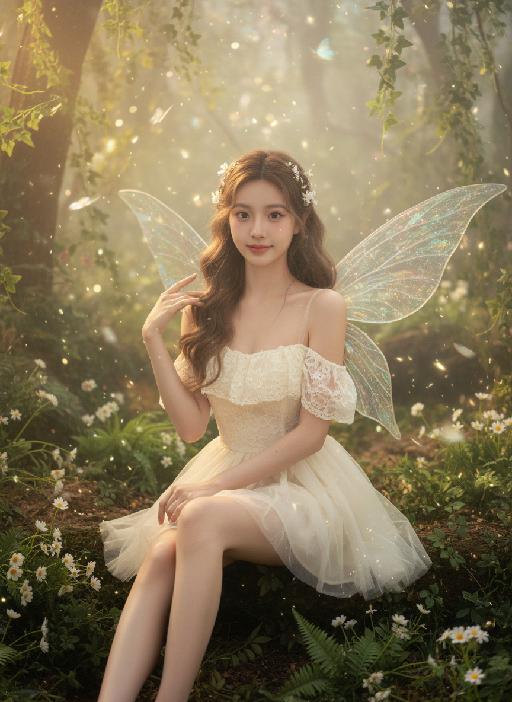
Fairy AI effects generated image

Fairy

Strictly lock the facial features of the uploaded portrait (completely preserve facial contours, native skin tone, hairstyle and age); forest elf girl with light brown curly hair and white flower hair accessories, clear nude makeup with light pink blush, facing the camera directly with a clear facial expression, lively and gentle eyes, sitting upright with fair and slender legs exposed (naturally straight or slightly bent), one hand resting gently on the leg and the other touching the elf wing; wearing an off-white lace strapless tulle dress with transparent glitter elf wings on the back, full of fairy aura; background is a forest secret realm surrounded by lush green plants, interwoven with ferns, white small flowers and vines, mist filling the forest, warm light filtering through branches to form fine light spots, butterflies and light particles flying in the air; overall forest elf + dreamy fairy atmosphere photo, soft and transparent light, low saturation forest tones, cinematic lighting, motion blur (light spots/butterflies/hair), full of details, 8K ultra-clear, realistic human photography, flawless

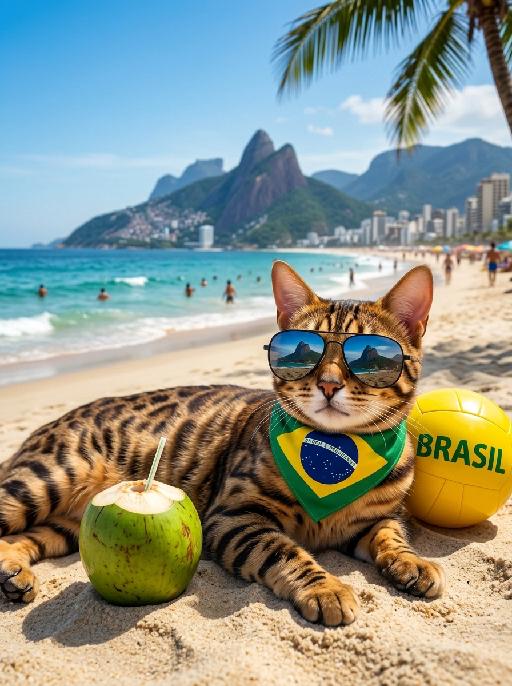
Beach Relax AI effects generated image

Beach Relax

" Masterpiece, 8K, photorealistic, sharp focus, professional photography, cinematic lighting. The uploaded animal (pet) — whose species, fur texture, facial features, ears, tail, and all animal characteristics remain completely unchanged — lying happily on the sand at Copacabana beach in Rio de Janeiro, wearing dark sunglasses reflecting the sky and Sugarloaf Mountain, and a Brazil flag-themed bandana with ""Ordem e Progresso"" text around its neck. On the sand next to the uploaded subject: a fresh green coconut with a straw, and a yellow ball with ""BRASIL"" text. Background features the iconic Sugarloaf Mountain, bright blue sky with clouds, turquoise ocean waves, city buildings along the coast, a palm tree in the corner, and people relaxing on the beach in the distance. Bright summer sunlight, vibrant colors, warm vacation vibe, realistic fur texture, wet sand details, natural light, soft shadows, shallow depth of field, cheerful atmosphere. "

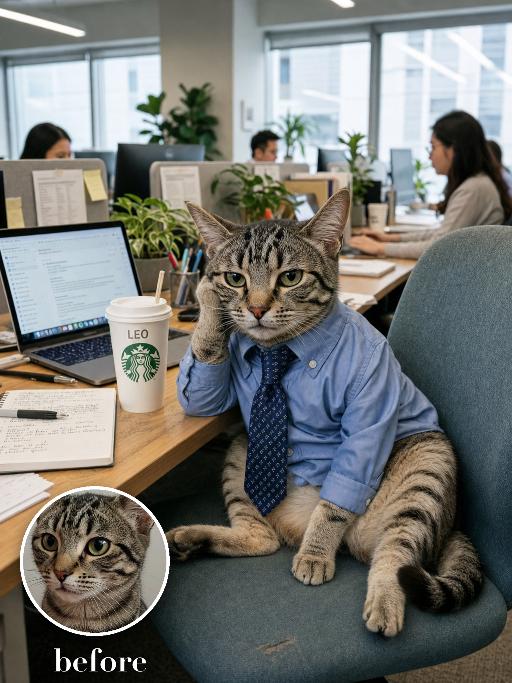
Office Manager AI effects generated image

Office Manager

Recreate the reference as a funny open-plan office worker cat photo. The uploaded cat sits upright on an office chair at a shared desk, wearing a blue button-up shirt, one paw near the chair arm, stern tired manager expression. Laptop screens, papers, plants and coworkers in the background, a Starbucks-style takeaway cup on the desk, realistic corporate daylight, slightly wide office snapshot composition. Preserve the uploaded pet's actual species, breed, coat color, markings, ear shape, eye color, muzzle and facial structure. Do not assume a fixed breed, color, or species from the reference image; adapt the exact gameplay to the uploaded pet. Actively change pose, facial expression, gaze direction, camera angle, wardrobe and styling to match the gameplay reference. Match the gameplay reference very closely in composition, crop, texture, lighting, visible pet angle, props, background, graphic layout and image quality. Vertical 3:4. Keep only the text explicitly requested in the prompt; do not add unrelated logos, watermarks or random words.

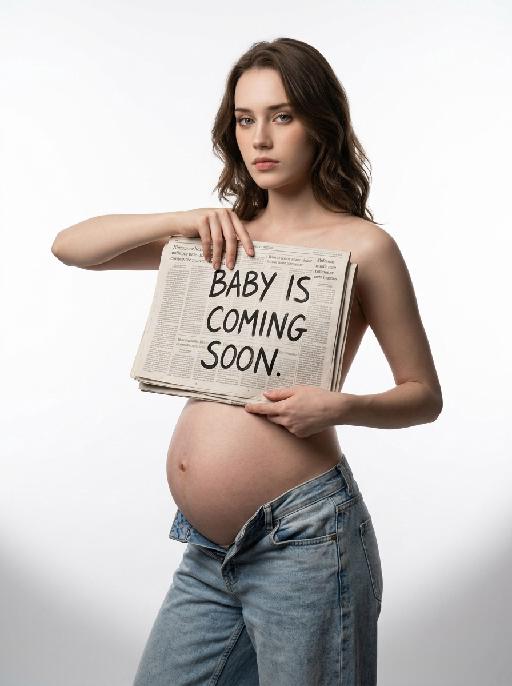
Soon Our Bump AI effects generated image

Soon Our Bump

"Highest weight rigid constraint: large-size vintage newspaper fully covers the entire chest area, the top edge of the newspaper is level with the collarbone, the bottom edge covers the underbust, fits closely to the body, no chest skin or outline exposed, sensitive parts are fully covered all the time Vertical medium shot portrait, young pregnant woman standing in 45-degree side pose, body facing left of the frame, shoulders and hips maintain natural side angle, head turned to face the camera directly, cold and detached aloof expression, facial feature ratio, face contour, hair curl, hair color and hair volume 1:1 restore the reference portrait uploaded by the user, hairstyle shape is exactly the same as the reference picture, topless upper body, wearing light blue washed distressed low-rise jeans, jeans unbuttoned and unzipped, naturally slung to the hip bone position, revealing full round pregnant belly, navel is clear and natural, right hand holds the left edge of the newspaper, left hand supports the lower right edge of the newspaper, hands are in natural and stretched posture, finger structure is normal, the newspaper is flat with slight natural wrinkles, the surface of the newspaper has real newspaper printing texture, printed with clear black handwritten text ""BABY IS COMING SOON"", pure white seamless studio cyclorama background, soft and even light gray shadow on the floor at the bottom of the frame, minimalist clean picture, professional studio soft light layout, front softbox evenly fill light, side back rim light outlines hair and shoulder neck lines, delicate and real skin texture, soft light transition without hard edges, 8K ultra HD, RAW photo quality, professional commercial maternity photography, photorealistic, sharp focus on the face"

Load more

Next-Gen Multi-Model AI Video Architecture

Vivago AI isn't just one engine—it’s a unified hub for the world’s most advanced video AI. Whether you need cinematic realism or high-speed social content, we provide the right model for your creative vision.

Free Generate

Beauty and Dolphins

Vacation Time

Stellar Tear

Fish Tank Supervisor

Cinematic Quality & Precision Control

Enables 4K resolution with multi-lens motion control, generating delicate scene via text prompts for customized cinematography.​

TRY NOW

Dynamic AV Sync

Auto-generates original audio to avoid copyright issues. Build 3D immersive environments through layered sound design automatically.

TRY NOW

OpenAI Sora 2

​Advanced visual storytelling with unparalleled physics and consistency.

TRY NOW

Kling v2.6 Pro

Industry-leading cinematic image animation and motion control.

TRY NOW

Google Veo 3 & 3.1

Ultra-fast generation with enhanced realism for creative workflows.

TRY NOW

Vivago AI 2.0

Our proprietary model optimized for efficiency, speed, and cost-effective generation.

TRY NOW

Users' Voice

We listen carefully to the opinions of every user.
Free Generate
Contact Us
I tried the Lip Sync feature inside Vivago.ai’s AI Video Generator for my educational podcast, and the results were stunning! The avatar's lip movements perfectly matched my audio recording, creating a professional AI-generated video without complex editing. Compared with tools like OpenAI Sora 2 and Google Veo 3.1, Vivago Image-to-Video delivers fast, studio-quality results online. It saved me hours of post-production work.
ElenaM (Spain)
Vivago’s Image-to-Video AI transformed my marketing workflow. I uploaded a product image and described the launch scene in text, and it generated a 10-second cinematic AI video with background music and dynamic visuals. The output quality rivals Kling v2.6 Pro and Google Veo 3 Fast. It’s now my go-to AI video generator for social media ads and product campaigns.
KenjiT (Japan)
As a digital artist, I use Vivago.ai 2.0 daily for Image-to-Image and AI Image-to-Video creation. The e-book covers and animated visuals I generate for clients look cinematic and professional. Unlike many standalone AI tools, Vivago integrates multiple leading models into one platform, making it easier to create copyright-safe AI images and videos for publishing.
ChenL (China)
I tried the Lip Sync feature inside Vivago.ai’s AI Video Generator for my educational podcast, and the results were stunning! The avatar's lip movements perfectly matched my audio recording, creating a professional AI-generated video without complex editing. Compared with tools like OpenAI Sora 2 and Google Veo 3.1, Vivago Image-to-Video delivers fast, studio-quality results online. It saved me hours of post-production work.
ElenaM (Spain)
Vivago’s Image-to-Video AI transformed my marketing workflow. I uploaded a product image and described the launch scene in text, and it generated a 10-second cinematic AI video with background music and dynamic visuals. The output quality rivals Kling v2.6 Pro and Google Veo 3 Fast. It’s now my go-to AI video generator for social media ads and product campaigns.
KenjiT (Japan)
As a digital artist, I use Vivago.ai 2.0 daily for Image-to-Image and AI Image-to-Video creation. The e-book covers and animated visuals I generate for clients look cinematic and professional. Unlike many standalone AI tools, Vivago integrates multiple leading models into one platform, making it easier to create copyright-safe AI images and videos for publishing.
ChenL (China)
I absolutely love Vivago’s AI Image-to-Video Generator. As a travel blogger, static images often fail to capture real atmosphere, but Vivago helps me turn photos into vivid cinematic AI videos with motion effects. It feels comparable to OpenAI Sora 2 and Google Veo 3.1, but more accessible and faster for creators who need high-quality AI videos online.
LiamK (Australia)
I tried the Lip Sync feature inside Vivago.ai’s AI Video Generator for my educational podcast, and the results were stunning! The avatar's lip movements perfectly matched my audio recording, creating a professional AI-generated video without complex editing. Compared with tools like OpenAI Sora 2 and Google Veo 3.1, Vivago Image-to-Video delivers fast, studio-quality results online. It saved me hours of post-production work.
ElenaM (Spain)
Vivago’s Image-to-Video AI transformed my marketing workflow. I uploaded a product image and described the launch scene in text, and it generated a 10-second cinematic AI video with background music and dynamic visuals. The output quality rivals Kling v2.6 Pro and Google Veo 3 Fast. It’s now my go-to AI video generator for social media ads and product campaigns.
KenjiT (Japan)
As a digital artist, I use Vivago.ai 2.0 daily for Image-to-Image and AI Image-to-Video creation. The e-book covers and animated visuals I generate for clients look cinematic and professional. Unlike many standalone AI tools, Vivago integrates multiple leading models into one platform, making it easier to create copyright-safe AI images and videos for publishing.
ChenL (China)
I absolutely love Vivago’s AI Image-to-Video Generator. As a travel blogger, static images often fail to capture real atmosphere, but Vivago helps me turn photos into vivid cinematic AI videos with motion effects. It feels comparable to OpenAI Sora 2 and Google Veo 3.1, but more accessible and faster for creators who need high-quality AI videos online.
LiamK (Australia)
Using Vivago.ai’s Image-to-Video AI has greatly enhanced my classroom teaching. I transform textbook notes into historical AI videos with cinematic filters and dynamic animations. Compared with tools like Kling v2.6 Pro and Google Veo 3 Fast, Vivago offers faster generation and easier parameter control for educators who need reliable AI video creation.
RajivG (India)
I frequently create AI videos on Vivago and publish them on TikTok and YouTube Shorts. The AI video templates and trending content ideas help me produce viral-ready clips quickly. With Vivago’s integrated models—including advanced video engines similar to OpenAI Sora 2—I can generate anime-style and cinematic social media videos that drive high engagement.
MarieJ (Spain)
What attracts me most about Vivago.ai is not only the powerful AI Video Generator but also the active AIGC creator community. It combines AI Image-to-Video, Text-to-Video, and leading model integrations like Google Veo 3.1 into one creative platform.
TomW (India)
At first, I was hesitant about using AI video tools. But after trying Vivago Image-to-Video, I realized how easy it is to create professional AI-generated videos online. I just upload an image, add a short prompt, and adjust a few settings. The results are cinematic and copyright-safe, which is essential for commercial projects.
HectorC (Mexico)
Using Vivago.ai’s Image-to-Video AI has greatly enhanced my classroom teaching. I transform textbook notes into historical AI videos with cinematic filters and dynamic animations. Compared with tools like Kling v2.6 Pro and Google Veo 3 Fast, Vivago offers faster generation and easier parameter control for educators who need reliable AI video creation.
RajivG (India)
I frequently create AI videos on Vivago and publish them on TikTok and YouTube Shorts. The AI video templates and trending content ideas help me produce viral-ready clips quickly. With Vivago’s integrated models—including advanced video engines similar to OpenAI Sora 2—I can generate anime-style and cinematic social media videos that drive high engagement.
MarieJ (Spain)
What attracts me most about Vivago.ai is not only the powerful AI Video Generator but also the active AIGC creator community. It combines AI Image-to-Video, Text-to-Video, and leading model integrations like Google Veo 3.1 into one creative platform.
TomW (India)
At first, I was hesitant about using AI video tools. But after trying Vivago Image-to-Video, I realized how easy it is to create professional AI-generated videos online. I just upload an image, add a short prompt, and adjust a few settings. The results are cinematic and copyright-safe, which is essential for commercial projects.
HectorC (Mexico)