Q-style

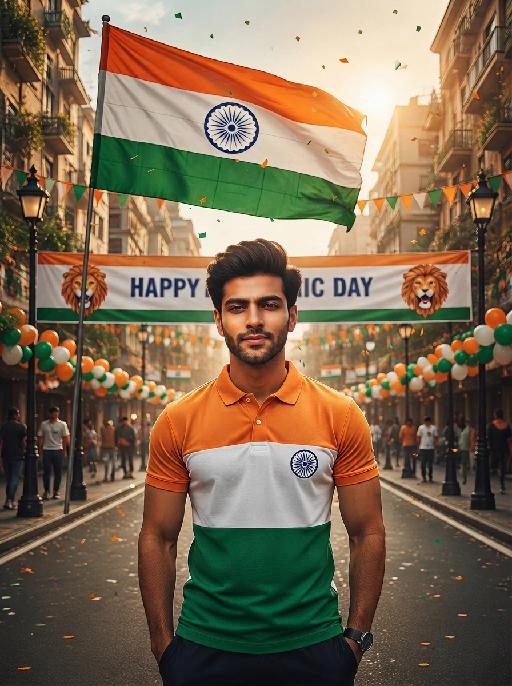
Full-body standing shot: A three-dimensional, highly realistic Q-version cute Samba dance cartoon character (with the person in the above picture as the main body, maintaining the unchanged gender characteristics of the image), wearing colorful feather headgear, dressed in Brazilian yellow and green Samba dance skirts, wearing colorful small slippers, standing naturally, with a Brazilian football field as the background, featuring green grass, a white goal, accompanied by classic Brazilian football scenes, with small national flags fluttering on the field, colorful, lively, with a cartoon and cute style, rich in details, high definition, full of vitality and festive atmosphere, with the characteristics of Disney animation and Pixar animation style.

Use Template
arrow

More From VIVAGO AI

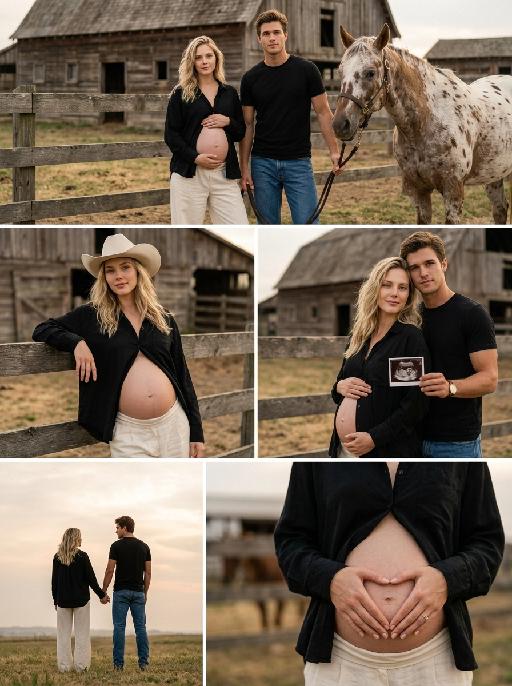
Farm Warm Us AI effects generated image

Farm Warm Us

Five-grid collage, realistic portrait of pregnant couple on American ranch, strictly follow the layout, proportion, character poses and props of the reference image. All characters wear fixed unified outfits, overall low saturation natural warm tone. The facial features, face shape, hair color and hairstyle of the man and woman fully match the reference portraits provided by the user. shtur horizontal panorama: A young pregnant woman and a man stand in front of wooden ranch fence. The pregnant woman wears a loose black draping shirt worn open to fully show her pregnant belly and off-white wide-leg trousers, holding her belly gently with both hands. The man wears a fitted black short-sleeve T-shirt and blue washed jeans, holding horse reins beside a spotted horse. Background: vast grassland and old wooden barn, soft warm light at golden hour dusk. 2.Middle left vertical half-body shot: The pregnant woman leans alone on the wooden fence, wearing an off-white wide-brim cowboy hat and the same loose black shirt worn open to expose her belly. One arm rests on the fence, one hand lies gently on her belly with relaxed posture. Background: open autumn grassland, soft dusk light. 3.Middle right vertical half-body shot: Pregnant woman in the front, man standing right behind her. The pregnant woman wears the same black shirt open to expose her belly with one hand on her abdomen. The man wears the same black short-sleeve T-shirt and holds a clear prenatal B-ultrasound photo. Background: ranch grassland, soft side light at dusk. 4.Bottom left vertical full-body back shot: The couple hold hands on the grassland, facing the setting sun. The pregnant woman wears the same black shirt and off-white wide-leg trousers. The man wears the same black short-sleeve T-shirt and blue jeans. Background: low saturation warm tone dusk sky, hazy grassland. 5.Bottom right vertical close-up: Close-up of the pregnant woman’s belly. She wears the same loose black shirt open to expose her full pregnant belly, making a heart shape with both hands on her belly. Background: blurred ranch fence and grassland, shallow depth of field. Realistic portrait photography, natural and lifelike light and shadow, delicate and transparent skin texture, overall low saturation, soft and natural colors, 8K high definition, rich details. Negative prompt: Messed up five-grid layout, wrong division proportion, inconsistent character poses, missing props; inconsistent outfits, multiple different clothes, wrong color and fabric; facial distortion, mismatched facial features and hairstyle; high saturation gaudy colors, dazzling tone, inconsistent hue; pregnant belly covered by clothes, deformed horse, blurred B-ultrasound photo; overexposure, crushed shadows, color distortion; blurry image, excessive noise, watermarks, text, logo, messy borders, deformed limbs, abnormal fingers.

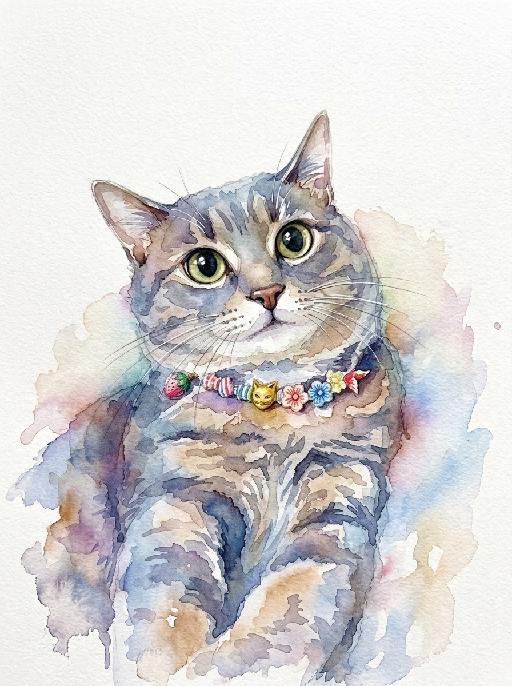
Watercolor Art AI effects generated image

Watercolor Art

A stunning watercolor painting portrait of the uploaded animal (pet) — whose species, facial features, ears, tail, and all animal characteristics remain completely unchanged — depicted in a loose and expressive watercolor style with soft wet-on-wet color blooms, natural pigment bleeding edges, and visible paper texture throughout. The subject is rendered with vibrant and richly saturated watercolor washes in a harmonious palette of soft blues, warm pinks, golden yellows, and sage greens, with colors flowing and bleeding naturally into each other in an organic, painterly way. The face and key features are rendered with slightly more detail and focus than the looser body and background. The background is clean pure white watercolor paper, allowing the colors of the subject to radiate outward with soft natural bleeding edges and delicate color halos. Occasional fine ink or pencil linework subtly defines key facial features and fur texture. The overall composition is centered, balanced, and portrait-oriented, with the subject filling the majority of the frame. Artistic, collectible, print-ready quality, vibrant and expressive watercolor illustration aesthetic, high-end art print style, 8K resolution, highly detailed.

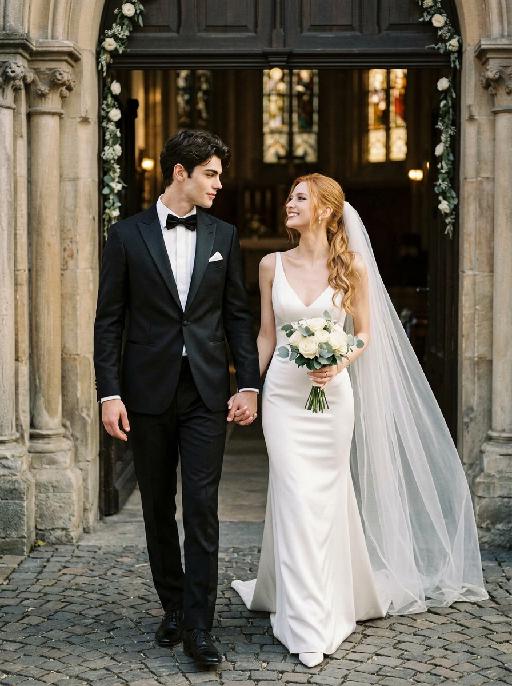
Chapel Vows AI effects generated image

Chapel Vows

"Create a photorealistic cinematic wedding portrait of the two subjects from the uploaded image, preserving their exact faces, ages, facial features, skin tones, and overall likeness as accurately as possible. Transform the two subjects into a bride and groom walking together in front of a beautiful European-style chapel. The couple should strictly follow this intimate walking wedding pose: the groom stands on the left side of the image, walking slightly forward while holding the bride's hand. The bride stands on the right side of the image, walking beside him while holding his hand. They are stepping forward together in a natural elegant walking motion, close to each other, with relaxed posture and romantic body language. The groom turns his head slightly toward the bride and looks at her with a calm, affectionate expression. The bride turns her head slightly toward the groom and looks back at him with a joyful, happy, romantic expression, a soft natural smile, bright eyes, and a warm sense of happiness. The couple's hands are clearly joined between them at waist level, creating a romantic hand-in-hand walking pose. The bride holds a small elegant bridal bouquet in her other hand, positioned naturally near her waist or chest. The bouquet should be simple and refined, made of white flowers with subtle greenery, not oversized. Bride outfit: the bride wears a minimalist white wedding gown inspired by the reference pose image. The dress is sleek, elegant, fitted, and floor-length, with a clean satin or silk texture, a graceful V-neck or softly structured neckline, thin straps or sleeveless design, and a refined modern bridal silhouette. The gown should feel simple, high-end, and editorial, not overly puffy or princess-like. The bride wears a long translucent white bridal veil attached naturally to her hair, flowing softly behind her and around her shoulders as she walks. The veil should be visible, elegant, lightweight, and romantic, without covering her face too much. The bride also wears an elegant bridal necklace around her neck, such as a delicate pearl or diamond necklace, and subtle bridal earrings. The bride's hairstyle should match the hairstyle from the uploaded image as closely as possible, while allowing for natural adjustments needed to accommodate the bridal veil. Groom outfit: the groom wears a classic black tuxedo, fitted and elegant, with a clean white dress shirt, a black bow tie, black dress shoes, and a refined formal wedding look. The tuxedo should be dark, minimal, sharp, and well-tailored. Do not use a casual suit, colorful suit, necktie, or open-collar shirt. Background: an empty, romantic old European chapel or cathedral entrance with tall arched doors, stone columns, soft warm lights, subtle floral decorations, and a sacred wedding atmosphere. The couple appears to be walking out from the chapel entrance together after the wedding ceremony. The chapel doorway or arched entrance should frame the couple beautifully, creating a symmetrical and cinematic wedding composition. The background must be completely free of any other people, guests, staff, bystanders, priests, bridesmaids, groomsmen, or figures. The couple should be the only two people in the image. Lighting and color: golden hour sunlight mixed with soft chapel light, warm cinematic glow, gentle highlights on the tuxedo, wedding dress, bouquet, and veil, natural skin texture, realistic fabric details, emotional high-end wedding photography style. Use a low-saturation color palette, muted tones, soft black, ivory white, warm beige, soft gray, and elegant film-like colors. The overall tone should feel desaturated, timeless, sophisticated, romantic, and slightly film-like. Avoid overly vivid, bright, or highly saturated colors. Composition: vertical portrait, full-body or nearly full-body framing, the couple centered in front of the chapel entrance, walking forward hand in hand. The groom is on the left, the bride is on the right. Their bodies should be close but not overlapping too much. The veil should flow naturally behind the bride and add movement to the image. The image should feel like a candid luxury wedding photo captured at the perfect moment, romantic, elegant, intimate, and timeless. Ultra realistic photography, high-end wedding editorial style, natural facial details, realistic hands and fingers, realistic walking posture, realistic fabric texture, soft film grain, professional camera look, shallow depth of field, high detail, cinematic color grading, elegant muted wedding atmosphere. Negative prompt: extra people, background people, crowd, wedding guests, staff, bystanders, priest, bridesmaids, groomsmen, duplicated bride, duplicated groom, distorted faces, changed identity, inaccurate likeness, deformed hands, extra fingers, missing fingers, hands not holding, disconnected hands, unnatural arms, stiff pose, floating bouquet, oversized bouquet, missing bouquet, missing veil, veil covering the face completely, plastic skin, over-smoothed face, fake CGI look, wrong wedding dress, princess ball gown, colorful wedding dress, casual groom outfit, necktie instead of bow tie, open-collar shirt, missing necklace, text, logo, watermark, elevator, elevator doors, hotel hallway, floor number, low resolution, blurry face, oversaturated colors, vivid bright colors, harsh contrast."

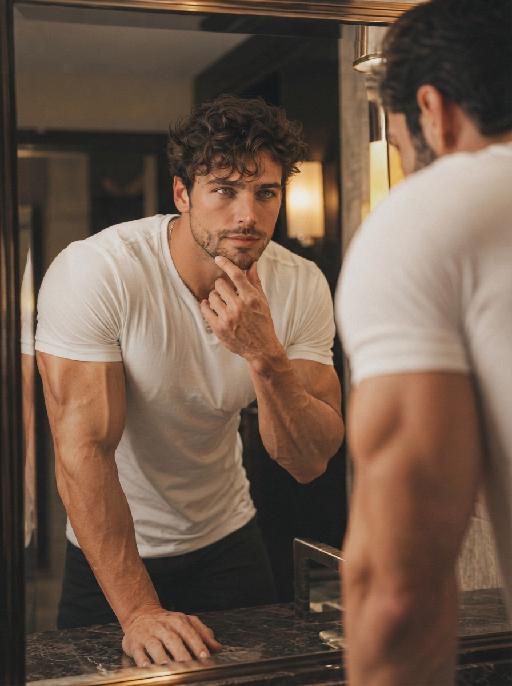
AI One-Tap Beauty

Retouch this photo. Keep background, clothing, pose, framing, and head-to-body proportions identical. Do not crop or change layout. Skin: warm golden glow, rich and radiant. Even out pigmentation and remove blemishes. PRESERVE warm golden undertone — do NOT whiten or cool the skin. Face: keep full, natural face shape. Minimal slimming only. [if female:] Makeup: bold defined brows, kohl eyeliner, warm brown/copper eyeshadow, rich berry/red lips, warm terracotta blush. Dramatic and confident. [If full makeup: Do NOT change lip color, blush, or eyeshadow.] [if male:] No makeup. Bold neat brows, dramatic alert eyes. Body: preserve full, curvy figure. Minimal slimming. Emphasize healthy, confident presence. Hair: keep style, add glossy shine. Color: warm golden tones, rich and vibrant. Enhance the warmth naturally. Same person, same face, same scene, same resolution. Do not upscale, sharpen, or add detail not in the original.

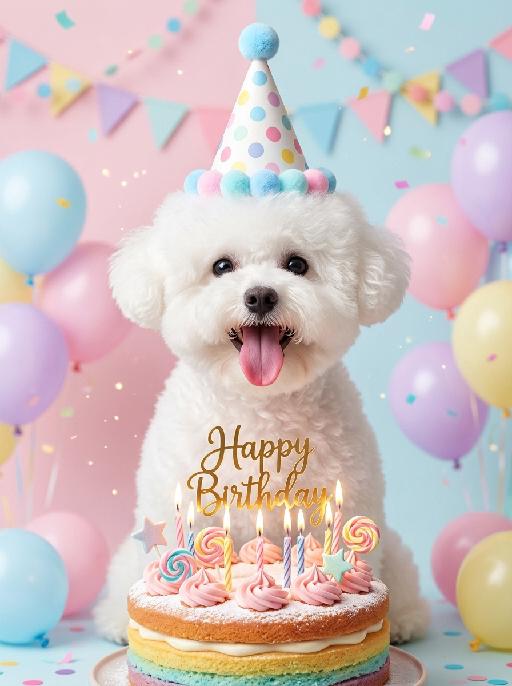
Pet's Birthday AI effects generated image

Pet's Birthday

"(Masterpiece, highest quality, 8K, ultra-fine, realistic and lifelike, professional pet portrait photography, clear focus, soft bokeh effect: 1.3) Based on the image shown in the uploaded picture (keeping the species' facial features unchanged), a happy expression, an open mouth and an extended tongue, a lively and cheerful appearance, wearing a colorful polka-dot birthday party hat with blue pompoms or a pale-colored rainbow hairband, sitting in front of a colorful birthday cake decorated with powdered sugar, pink cream, lollipops and star decorations, a golden ""Happy Birthday"" cake top decoration, and lit birthday candles, surrounded by pale-colored macaroon-colored balloons, colorful party banners, hanging garlands, falling colored confetti and sparkly particles, a soft pale pink/pale blue minimalist background, warm and soft studio lighting, bright and sweet pastel tones, shallow depth of field, birthday celebration atmosphere, warm and soothing atmosphere, clean and fresh image style, close-up shot at eye level, works shot by top photography masters."

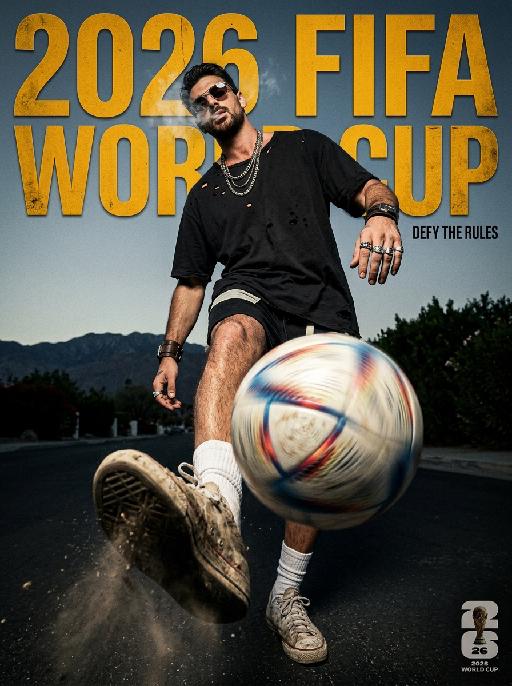
Elite Game AI effects generated image

Elite Game

" Horizontal 2026 FIFA World Cup dark high street poster, American rebellious street fashion photography, 8K UHD, heavy 35mm film grain, cinematic high contrast, dark tone color scheme: deep charcoal black, aged amber yellow, grayish sky blue. Shot with ultra-wide fisheye lens at macro ground worm's-eye view, extreme foreground compression, the sneaker and spinning football occupy 70% of the lower frame with exaggerated perspective, figure scaled down to highlight layered sense, strong rebellious visual tension. ### Core Figure (Gender-neutral, 100% retain original appearance, exotic rebellious swagger) All original facial features, skin tone and hairstyle remain unchanged, no gender modifiers. - Posture & Movement: Rebellious relaxed juggling posture, leg raised dynamically toward the camera, toe supporting a spinning football with intense radial blur and obvious light trails. Shoulders slouched severely, torso twisted in an exaggerated angle, head tilted back and sideways, eyes cold and provocative under the low-slid sunglasses. Thin wispy smoke lingers around the face to create a hazy exotic atmosphere. One arm hangs down loosely with relaxed wrist, the other arm propped casually behind the body, the whole posture lazy yet aggressive. - Outfit & Accessories (Dark niche American style): Oversized black heavy-wash distressed tee with intentional broken holes, thick fabric texture. Slim asymmetric black street shorts. Slouched white socks with faded logo. Matching dark style accessories: layered thick metal necklaces, irregular retro metal rings, rugged woven wrist cuffs, dark and niche styling with strong exotic characteristics. - Footwear & Football: Vintage sneakers with thick dirt, mud and deep scuff marks, retro worn-out texture. Football spins rapidly, with splashed fine grass and dust around it, highlighting real street sports sense. ### Background & Lighting Outdoor bright scene, grayish blue sky, distant mountain landscape with dark green shrubs. Hard and soft combined side backlight, create sharp light and shadow segmentation, strengthen cold and rebellious temperament. Background deep bokeh blur, separate foreground and background completely. ### Text Layout (American dislocation deconstruction, metal distressed texture) Font style: European and American street metal worn sans-serif font, scratch and fade texture, perspective adapted to fisheye lens, dislocation layout, no repeated words, reasonable blank layout: 1. Main title ""2026 FIFA WORLD CUP"": Dislocated placement on upper frame, part covered by the figure's body and legs, amber yellow metal texture font. 2. Slogan ""DEFY THE RULES"": Placed on the right gap between figure and frame, tiny compact font, echo the rebellious style. 3. 2026 World Cup official logo: Placed at bottom right corner, mini size, unified dark tone style. ### Technical Constraints No text distortion or AI artifacts, clear layering, extreme perspective restored, overall dark American high street style, strong exotic and rebellious personality "

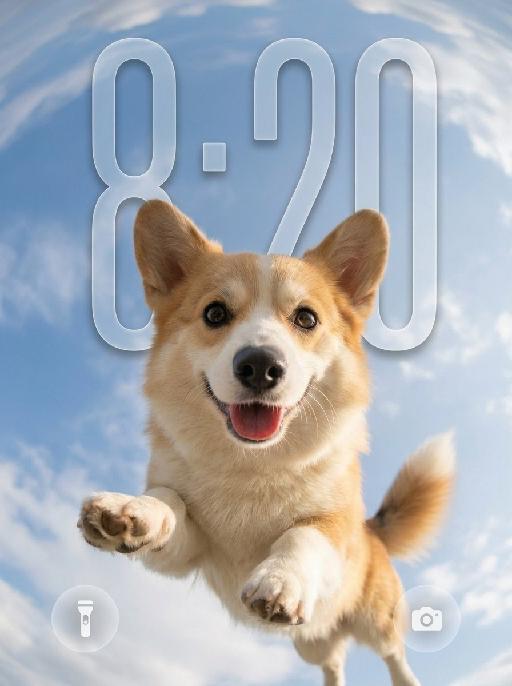
Sky Pounce AI effects generated image

Sky Pounce

"Use the uploaded pet image as the only identity reference. Create a highly realistic vertical wallpaper-style portrait of the same pet jumping toward the camera in a bright blue sky. Strictly preserve the pet’s exact species, breed, face shape, fur color, fur texture, eye color, ear shape, nose, markings, collar, and overall recognizability. Camera and composition: - extreme low-angle perspective, looking upward from directly below the pet - ultra-wide fisheye lens - the pet is centered and appears to leap or float toward the camera - the face is very close to the lens, with the nose slightly enlarged by perspective - both front paws reach naturally toward the camera with strong foreshortening - the pet’s body extends backward into the sky - joyful open-mouth expression, tongue visible, energetic and friendly - dynamic but anatomically correct pose Environment: - bright natural blue sky - soft bright white clouds - strong fisheye sky distortion around the outer edges - the sky and clouds wrap around the frame like a dreamy sky dome - bright sunlight from one side - subtle natural lens flare - clean, uplifting, playful summer atmosphere Wallpaper direction: - make the composition suitable for a phone wallpaper - keep the image clean and visually striking - allow a little breathing space in the upper area - no lock screen UI elements - no clock - no date - no username - no watermark - no extra text Important frame rule: - the fisheye effect must fill the entire image edge-to-edge - do not create any black borders - do not create any circular frame edges - do not create vignette or dark corners - do not create a lens mask effect - the sky and clouds must extend fully to all four edges of the canvas - the final image must be full-bleed and seamless Color and texture direction: - use a softer and more natural color treatment - slightly muted colors - lower saturation overall - gentle contrast - balanced highlights and shadows - natural fur tones - avoid overly vivid or neon-like blue sky - avoid oversaturated fur colors - keep the lighting bright but not harsh - maintain a clean, airy, premium wallpaper mood - use a subtle, elegant, slightly cinematic color grading Style: hyper-realistic pet photography, playful action shot, immersive fisheye perspective, crisp fur details, natural sunlight, cheerful and eye-catching wallpaper aesthetic, with refined and slightly muted color tones. Vertical composition, suitable for wallpaper."

Study Pets AI effects generated image

Study Pets

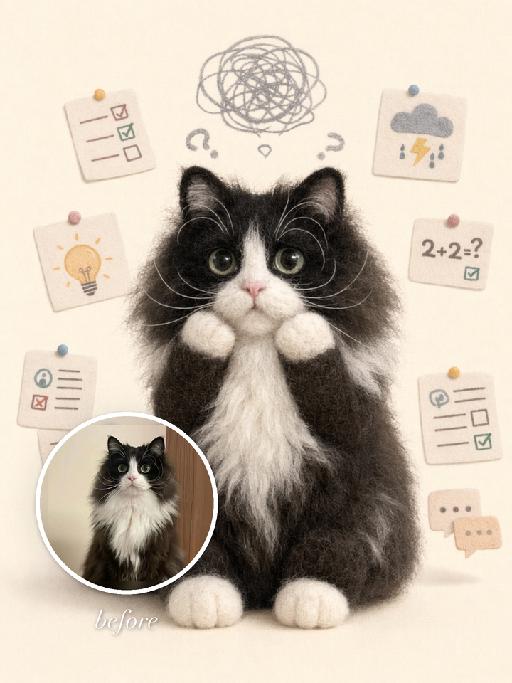
"Use the uploaded pet image as the exact identity reference. Preserve the pet's recognizable face, fur color, markings, eye color, muzzle shape and ears while transforming it into the requested gameplay style. Create a vertical 3:4 image with this exact effect: soft plush or needle-felt doll version of the pet sitting upright on a beige background, small paper notes and school worksheets floating around, scribble cloud above the head, worried cute expression, handmade wool texture, gentle pastel palette. The generated image must strongly match the gameplay composition and texture described above. Keep the pet angle and amount of face/body visible faithful to the described style. If the style is hand-drawn, watercolor, felt, plush, sticker, toy, comic, or package design, reproduce that material and texture clearly. Keep the pet identifiable as the uploaded pet even when stylized. No logos, no watermark, no Doubao AI text."

Comic Caricature

"Use the uploaded image as the only reference. Recreate the uploaded image faithfully, only changing the visual style into a more exaggerated American hand-drawn caricature illustration. Preserve the same person, hairstyle, expression, outfit, pose, background structure, framing, and overall composition, while transforming the image into a bold, stylized, sketchy cartoon portrait. Style: American editorial caricature, expressive hand-drawn linework, loose sketch lines, painterly brush strokes, dynamic ink-like outlines, animation concept art feel, and a polished illustrated finish. Make the caricature effect clearly stronger and more obvious: enlarge the head noticeably, exaggerate the facial proportions, make the eyes larger and more expressive, emphasize the eyebrows, simplify and stylize the nose and mouth, and give the face a more dynamic cartoon-like structure. The exaggeration should be bold, playful, and immediately noticeable. Keep the subject recognizable and appealing, but push the stylization further so it feels more lively, humorous, and visually striking. The result should look like a premium American magazine caricature or an animated character design sketch. Use visible brushwork, rough elegant outlines, soft painterly shading, and a clean artistic composition. The background can be simplified into a minimal illustrated backdrop with graphic color-block elements or loose painterly shapes to support the character. No text, no logo, no watermark."

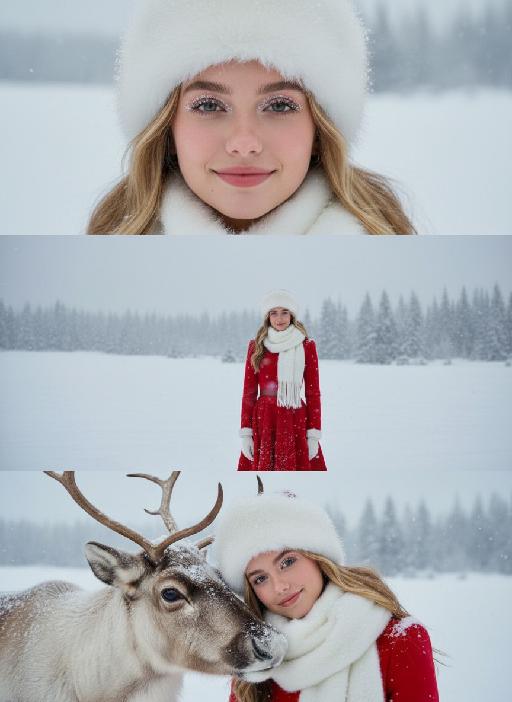
Three Frames AI effects generated image

Three Frames

"Film effect, three-screen split-frame photography (close-up, medium close-up, medium shot or long shot) in upper, middle and lower sections; cinematic Japanese-style film effect with three-screen split-frame photography in upper, middle and lower sections, set in a cold, lonely snowy scene on a clear day. A single figure with soft facial features, wearing an exquisitely tailored high-end red gown, a white mink fur hat and a white scarf, paired with sophisticated and textured accessories, stands in a vast white snowfield with snowflakes falling and snow accumulating on the scarf. The image boasts a strong cinematic texture. Upper screen: Extreme close-up of the head, with distinct individual eyelashes, fair and even skin, and snowflakes dotted on the eyelashes. Middle screen: Solo medium shot of the figure against the snowscape. Lower screen: Close-up of the figure leaning gently against a moose’s head with a soft smile, the details of the face and scarf in sharp focus, with a pale grey-blue sky and a single pine tree in the distance. Cinematic and realistic three-frame split-frame portrait: retain the facial features of the uploaded figure (with a fresh and translucent winter makeup look featuring silver shimmery eyeshadow, pink translucent blusher with fine glitter and light pink lip makeup—all on-trend winter styles in Western fashion, paired with a gentle and innocent expression, and fair, delicate skin). Soft diffused winter natural light highlights the soft texture of the skin and clothing. The figure leans affectionately beside a tame reindeer, with snow resting on the reindeer’s antlers and fur. The background features a snow-covered Christmas tree and an expanse of white snow, with fine snowflakes floating in the air. Soft natural cold light creates a fresh and translucent winter mood; a 50mm standard lens is used to preserve the delicate interactive details between the figure and the reindeer. The overall atmosphere is warm and healing, with ultra-high details and naturally saturated colors, in a horizontal composition. Avoid blurriness, disproportionate figure proportions and cluttered backgrounds."

Cool Hairstyle

"1. Basic scene and character settings: Refer to the picture where the characters are surrounded by a wide black hair salon cloth. (Mid shot) Ensure that the composition is above the person's legs. The person held a black smartphone in one hand and recorded the entire process from a first person selfie perspective. This person's expression remained unchanged throughout the entire process, uniform and natural, 4K ultra high definition, with movie like skin tone, obvious depth of field, and soft bokeh effects on the background neon lights and mirrors. 2. Core Consistency Control [Strict Lockdown]: Within 10 seconds of the entire video, the facial features of the character (facial proportions, eye color, skin texture) must remain absolutely consistent, without any distortion or deterioration. The position, grip posture, and gaze direction of the mobile phone should remain unchanged. The only change lies in the hair: each hairstyle transitions through a physical process of ""hair dissolution/natural growth"" to ensure that the texture, luster, and gravitational sagging of the hair feel realistic and natural. 3. Hairstyle Sequence and Transition (10 seconds, 8 hairstyles) Hairstyle 1 → 2 (0-1.5 seconds): Initially, the hairstyle was based on a reference person's hairstyle, gradually evolving into a modern messy hairstyle (dark brown, fluffy, ventilated feeling). Hairstyle 2 → 3 (1.5-3 seconds): Hair quickly softens, intertwines and lengthens, turning golden yellow and woven into light golden braids (hanging down to the forehead, with a street fashion vibe). Hairstyle 3 → 4 (3-4 seconds): Braids spread out like water, becoming longer and thinner, naturally hanging down, and the color deepens to jet black, forming shoulder length curly hair (smooth and glossy, velvet like curves, exuding artistic temperament). Hairstyle 4 → 5 (4-5 seconds): The long curly hair instantly shrinks and becomes shorter, the bangs slightly curl to cover the forehead, and then become short hair, with 6 long and thin braids hanging down from the edges of the hair. Hairstyle 5 → 6 (5-6 seconds): Comb and dissolve the hair, shave both sides clean, make the overall length uniform, and turn it into a tough round hairstyle (only a few millimeters, with delicate gradient contours at the back of the neck). Hairstyle 6 → 7 (6-7 seconds): Weave the hair into geometric lines close to the scalp (tie a small bun at the back with sharp lines). Then, loosen the braid and let the hair stand upright. Hairstyle 7 → 8 (7-8 seconds): The hair gradually turns silver white, the bangs are trimmed neatly, and it becomes a very short silver white spiky hairstyle. The silver white gradually disappeared, returning to dark brown, and the hair became fluffy and curly again. Hairstyle 8 → End (8-10 seconds): The hairstyle is perfectly restored to the initial reference image, and the video ends. 4. Rendering and technical features: ultra realistic rendering, ray tracing, hair level detail simulation, realistic physical dynamics, movie level lighting, 60fps, no stuttering, stable time consistency."

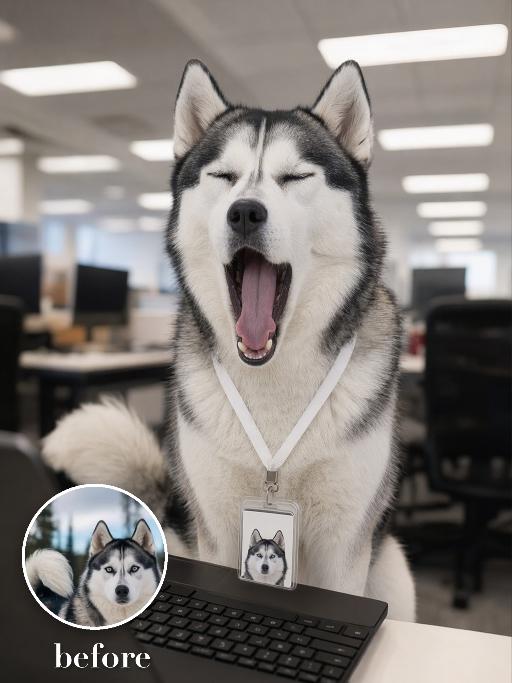
Yawn Time AI effects generated image

Yawn Time

Turn the uploaded pet into a tired corporate office worker pet: close-up behind a black laptop keyboard, mouth wide open in a big yawn, wearing a simple white lanyard ID badge that contains only a tiny photo-like pet icon and no readable text. Background is a blurred open-plan office with fluorescent ceiling panels. Candid photorealistic desk-level perspective, funny exhausted mood. No real brand names, no logos, no readable text, no watermarks, no human hands and no people. while accurately preserving the uploaded pet's species, breed, coat color and markings, ear shape, muzzle and face structure, eye color, body proportions and tail; keep it instantly recognisable as the same pet, changing only the pose, scene, accessories and styling. Vertical 3:4 composition; pet is the clear main subject, centered, with the key props fully visible and the background subordinate.

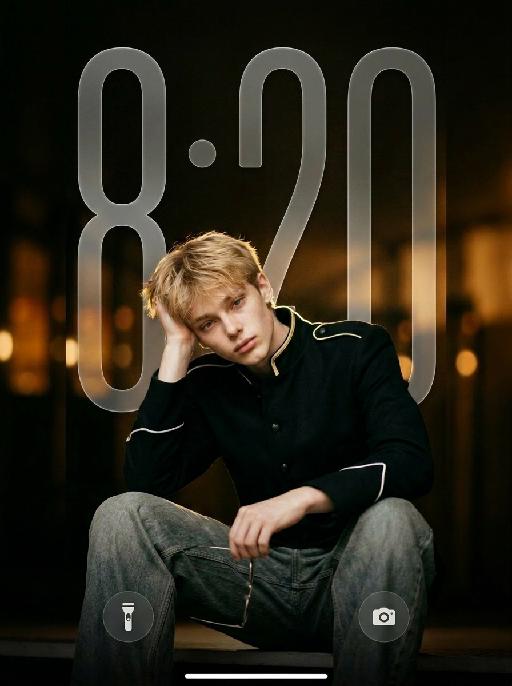
Noir Knight AI effects generated image

Noir Knight

" Vertical 9:16 medium-full fashion portrait, slightly low camera angle. Position the subject noticeably lower in the frame, anchored in the lower-middle area. The subject occupies mainly the lower two-thirds of the image, with generous clean negative space above the head. Keep the top of the hair clearly below the upper edge. One raised knee enters the lower foreground to create depth. Do not leave excessive empty space below the subject. Do not crop the head, either hand, raised knee, or gold wire-frame glasses. The subject wears a fitted black military-inspired jacket with sharp structured shoulders, a tailored waist, matte black fabric, narrow gold shoulder trim, white piping around the sleeve cuffs, and refined black buttons. The jacket is fully buttoned and neatly fastened. Pair it with loose faded gray-blue wide-leg jeans with realistic washed texture, stitching, folds, and fabric weight. Keep the outfit sharp, modern, masculine, expensive, and restrained. HAND POSITIONS — STRICTLY FIXED FROM THE SUBJECT’S OWN PERSPECTIVE: The subject’s RIGHT hand supports the right side of the head, with the palm resting gently above and slightly behind the right ear. The right hand must not hold the glasses, cover the face, touch the bangs, or enter the hair. The subject’s LEFT hand naturally holds one pair of thin gold wire-frame glasses near the raised knee or lower body. The left hand holds the glasses by one temple or the bridge. The glasses remain clearly visible and are not worn. Do not reverse the hand positions. The right hand must support the head, and the left hand must hold the glasses. Keep both hands anatomically correct, separate, fully visible, and naturally posed. Use dark cinematic low-key lighting, but keep the subject clearly brighter than the background. A large soft front-left key light and gentle frontal fill illuminate both eyes, face, hands, jacket, raised knee, jeans, and glasses. Add a subtle warm backlight along the hair, shoulders, gold trim, jacket edges, and glasses. The black jacket must remain clearly separated from the dark background, with visible matte fabric texture, tailoring, shoulder structure, seams, buttons, gold trim, white cuff piping, and natural folds. Warm amber bokeh, shallow depth of field, realistic 50–85mm portrait-lens look, and refined cinematic contrast. No subject placed near the top, no excessive empty space below, no reversed hands, no glasses in the right hand, no left hand supporting the head, no open jacket, no blazer, no leather jacket, no skinny jeans, no dark face, no shadowed eyes, no crushed black clothing, no harsh flash, no heavy bloom, no neon light, no extra fingers, no duplicated hands, and no floating glasses. "

Load more

Next-Gen Multi-Model AI Video Architecture

Vivago AI isn't just one engine—it’s a unified hub for the world’s most advanced video AI. Whether you need cinematic realism or high-speed social content, we provide the right model for your creative vision.

Free Generate

Beauty and Dolphins

Vacation Time

Stellar Tear

Fish Tank Supervisor

Cinematic Quality & Precision Control

Enables 4K resolution with multi-lens motion control, generating delicate scene via text prompts for customized cinematography.​

TRY NOW

Dynamic AV Sync

Auto-generates original audio to avoid copyright issues. Build 3D immersive environments through layered sound design automatically.

TRY NOW

OpenAI Sora 2

​Advanced visual storytelling with unparalleled physics and consistency.

TRY NOW

Kling v2.6 Pro

Industry-leading cinematic image animation and motion control.

TRY NOW

Google Veo 3 & 3.1

Ultra-fast generation with enhanced realism for creative workflows.

TRY NOW

Vivago AI 2.0

Our proprietary model optimized for efficiency, speed, and cost-effective generation.

TRY NOW

Users' Voice

We listen carefully to the opinions of every user.
Free Generate
Contact Us
I tried the Lip Sync feature inside Vivago.ai’s AI Video Generator for my educational podcast, and the results were stunning! The avatar's lip movements perfectly matched my audio recording, creating a professional AI-generated video without complex editing. Compared with tools like OpenAI Sora 2 and Google Veo 3.1, Vivago Image-to-Video delivers fast, studio-quality results online. It saved me hours of post-production work.
ElenaM (Spain)
Vivago’s Image-to-Video AI transformed my marketing workflow. I uploaded a product image and described the launch scene in text, and it generated a 10-second cinematic AI video with background music and dynamic visuals. The output quality rivals Kling v2.6 Pro and Google Veo 3 Fast. It’s now my go-to AI video generator for social media ads and product campaigns.
KenjiT (Japan)
As a digital artist, I use Vivago.ai 2.0 daily for Image-to-Image and AI Image-to-Video creation. The e-book covers and animated visuals I generate for clients look cinematic and professional. Unlike many standalone AI tools, Vivago integrates multiple leading models into one platform, making it easier to create copyright-safe AI images and videos for publishing.
ChenL (China)
I tried the Lip Sync feature inside Vivago.ai’s AI Video Generator for my educational podcast, and the results were stunning! The avatar's lip movements perfectly matched my audio recording, creating a professional AI-generated video without complex editing. Compared with tools like OpenAI Sora 2 and Google Veo 3.1, Vivago Image-to-Video delivers fast, studio-quality results online. It saved me hours of post-production work.
ElenaM (Spain)
Vivago’s Image-to-Video AI transformed my marketing workflow. I uploaded a product image and described the launch scene in text, and it generated a 10-second cinematic AI video with background music and dynamic visuals. The output quality rivals Kling v2.6 Pro and Google Veo 3 Fast. It’s now my go-to AI video generator for social media ads and product campaigns.
KenjiT (Japan)
As a digital artist, I use Vivago.ai 2.0 daily for Image-to-Image and AI Image-to-Video creation. The e-book covers and animated visuals I generate for clients look cinematic and professional. Unlike many standalone AI tools, Vivago integrates multiple leading models into one platform, making it easier to create copyright-safe AI images and videos for publishing.
ChenL (China)
I absolutely love Vivago’s AI Image-to-Video Generator. As a travel blogger, static images often fail to capture real atmosphere, but Vivago helps me turn photos into vivid cinematic AI videos with motion effects. It feels comparable to OpenAI Sora 2 and Google Veo 3.1, but more accessible and faster for creators who need high-quality AI videos online.
LiamK (Australia)
I tried the Lip Sync feature inside Vivago.ai’s AI Video Generator for my educational podcast, and the results were stunning! The avatar's lip movements perfectly matched my audio recording, creating a professional AI-generated video without complex editing. Compared with tools like OpenAI Sora 2 and Google Veo 3.1, Vivago Image-to-Video delivers fast, studio-quality results online. It saved me hours of post-production work.
ElenaM (Spain)
Vivago’s Image-to-Video AI transformed my marketing workflow. I uploaded a product image and described the launch scene in text, and it generated a 10-second cinematic AI video with background music and dynamic visuals. The output quality rivals Kling v2.6 Pro and Google Veo 3 Fast. It’s now my go-to AI video generator for social media ads and product campaigns.
KenjiT (Japan)
As a digital artist, I use Vivago.ai 2.0 daily for Image-to-Image and AI Image-to-Video creation. The e-book covers and animated visuals I generate for clients look cinematic and professional. Unlike many standalone AI tools, Vivago integrates multiple leading models into one platform, making it easier to create copyright-safe AI images and videos for publishing.
ChenL (China)
I absolutely love Vivago’s AI Image-to-Video Generator. As a travel blogger, static images often fail to capture real atmosphere, but Vivago helps me turn photos into vivid cinematic AI videos with motion effects. It feels comparable to OpenAI Sora 2 and Google Veo 3.1, but more accessible and faster for creators who need high-quality AI videos online.
LiamK (Australia)
Using Vivago.ai’s Image-to-Video AI has greatly enhanced my classroom teaching. I transform textbook notes into historical AI videos with cinematic filters and dynamic animations. Compared with tools like Kling v2.6 Pro and Google Veo 3 Fast, Vivago offers faster generation and easier parameter control for educators who need reliable AI video creation.
RajivG (India)
I frequently create AI videos on Vivago and publish them on TikTok and YouTube Shorts. The AI video templates and trending content ideas help me produce viral-ready clips quickly. With Vivago’s integrated models—including advanced video engines similar to OpenAI Sora 2—I can generate anime-style and cinematic social media videos that drive high engagement.
MarieJ (Spain)
What attracts me most about Vivago.ai is not only the powerful AI Video Generator but also the active AIGC creator community. It combines AI Image-to-Video, Text-to-Video, and leading model integrations like Google Veo 3.1 into one creative platform.
TomW (India)
At first, I was hesitant about using AI video tools. But after trying Vivago Image-to-Video, I realized how easy it is to create professional AI-generated videos online. I just upload an image, add a short prompt, and adjust a few settings. The results are cinematic and copyright-safe, which is essential for commercial projects.
HectorC (Mexico)
Using Vivago.ai’s Image-to-Video AI has greatly enhanced my classroom teaching. I transform textbook notes into historical AI videos with cinematic filters and dynamic animations. Compared with tools like Kling v2.6 Pro and Google Veo 3 Fast, Vivago offers faster generation and easier parameter control for educators who need reliable AI video creation.
RajivG (India)
I frequently create AI videos on Vivago and publish them on TikTok and YouTube Shorts. The AI video templates and trending content ideas help me produce viral-ready clips quickly. With Vivago’s integrated models—including advanced video engines similar to OpenAI Sora 2—I can generate anime-style and cinematic social media videos that drive high engagement.
MarieJ (Spain)
What attracts me most about Vivago.ai is not only the powerful AI Video Generator but also the active AIGC creator community. It combines AI Image-to-Video, Text-to-Video, and leading model integrations like Google Veo 3.1 into one creative platform.
TomW (India)
At first, I was hesitant about using AI video tools. But after trying Vivago Image-to-Video, I realized how easy it is to create professional AI-generated videos online. I just upload an image, add a short prompt, and adjust a few settings. The results are cinematic and copyright-safe, which is essential for commercial projects.
HectorC (Mexico)