Michael

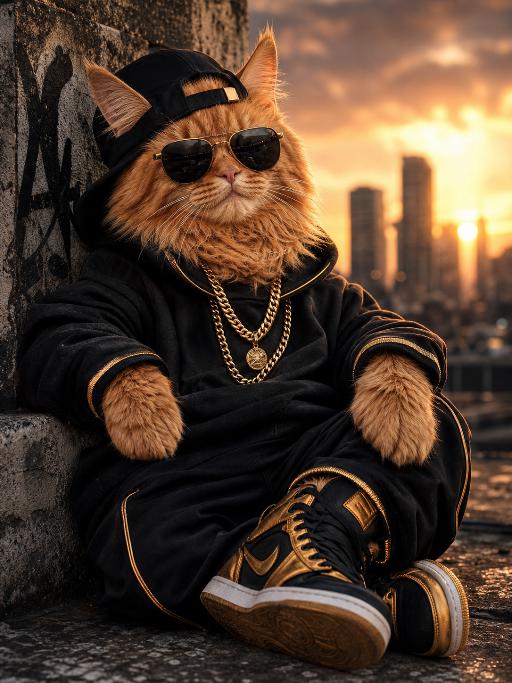
The figure in the image stands anthropomorphically (with its features unchanged), dressed in a black patent leather jacket (with silver zippers and metal buttons) paired with black leather pants and black leather boots, and wearing a small black top hat adorned with a golden anchor ornament on the front. The backdrop is a rock stage with stage lighting, boasting a cinematic texture and a shallow depth of field, with ultra-fine fur texture, realistic clothing materials, and an expression that is both cute and cool.

Use Template
arrow

More From VIVAGO AI

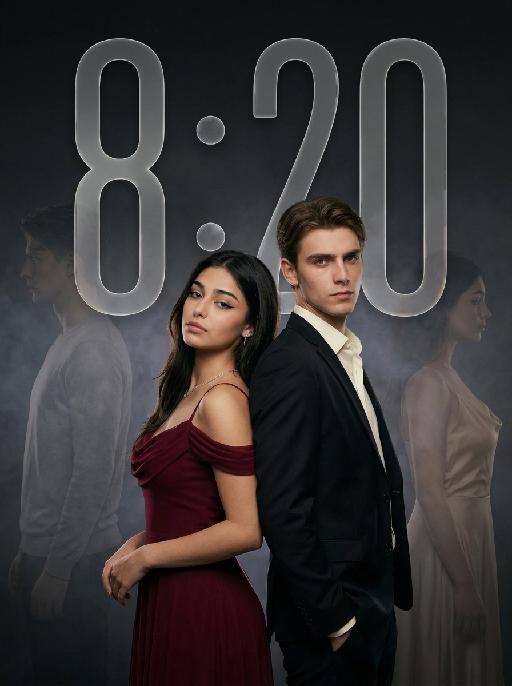
Ambiton Love AI effects generated image

Ambiton Love

" Use the uploaded image as the main reference for composition, pose, lighting, and style. Use the uploaded subject images as the only identity references. Create a photorealistic vertical 9:16 cinematic romance phone wallpaper designed for a smartphone lock screen. Strictly preserve both subjects’ exact faces, hairstyles, hair colors, body proportions, and overall recognizability. Place the central couple in the lower-middle area of the frame. Make the couple noticeably larger, using a tight waist-up composition so their faces and embrace become the main focus. The central couple should occupy approximately 70–75% of the image height while leaving the upper 20–25% as clean, dark negative space for wallpaper use. Do not add any text, clock, icons, or UI. Keep the central pose the same as the reference image: * woman on the left * man on the right * they stand closely back-to-back and embrace naturally * preserve the same body angles, head positions, and simple hand placement * both faces remain fully visible, sharp, and unobstructed CLOTHING — STRICTLY FIXED: The woman wears an elegant deep wine-red evening gown with: * a softly draped off-shoulder neckline * a fitted bodice * long, fluid fabric folds * refined satin or silk texture * subtle dark-red and burgundy highlights * one delicate thin silver necklace * small silver earrings The gown should feel romantic, luxurious, soft, and cinematic, not stiff or costume-like. The man wears: * a fitted black tailored evening suit * a crisp ivory-white dress shirt * an open shirt collar * no tie * clean, modern lapels * softly structured shoulders * visible tailoring, seams, and natural fabric folds The white shirt must remain clearly visible and create contrast between the man’s suit, the woman’s wine-red gown, and the dark background. The woman looks toward the camera with a calm, serious, slightly vulnerable expression. The man looks toward the camera with an intense, protective, emotionally restrained expression. BACKGROUND SILHOUETTES: Keep two extremely faint background silhouette echoes: * one very faint male silhouette near the far-left edge * one very faint female silhouette near the far-right edge Both silhouettes face inward toward the center, remain behind the central couple, and sit around shoulder-to-head height. The male silhouette wears a pale gray or muted beige top. The female silhouette wears a soft champagne or silver-gray outfit. Their clothing must be different from the central couple’s clothing. Make both silhouettes extremely soft, very low-opacity, lightly blurred, and deeply blended into the background. Use subtle slow-shutter smearing, soft haze, and gentle diffusion so they appear as barely visible emotional afterimages, not extra people. Do not let the silhouettes overlap the central faces. Use a minimal dark charcoal-gray studio background with soft smoky gradients, subtle cinematic light-and-shadow effects, gentle haze, and a restrained vignette. Use soft cinematic lighting. Keep the central couple bright, sharp, and dimensional. Add subtle contour light along the hair, shoulders, wine-red gown, black suit, and white shirt so the subjects remain clearly separated from each other and from the background. Style: photorealistic premium romance-drama key art, intimate, elegant, mature, mysterious, refined cinematic contrast, realistic skin and fabric texture, subtle film grain. No text, title, logo, watermark, border, frame lines, corner marks, UI, clock, icons, extra people, extra limbs, duplicated hands, blurred central faces, prominent silhouettes, cartoon, illustration, anime, or CGI."

Cute Double AI effects generated image

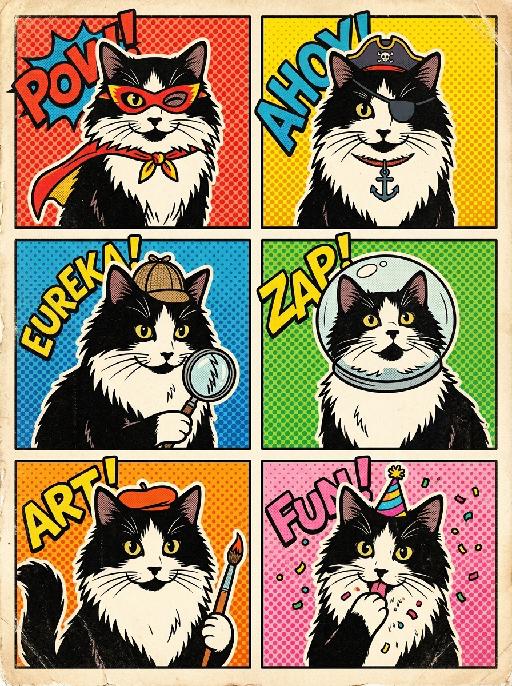
Cute Double

Use the uploaded pet image as the exact identity reference. Create a vertical 3:4 aspect ratio image rendered as a bright retro pop-comic poster with six colorful square panels. The grid must contain six different instances of the SAME pet (the uploaded cat) in various cute costumes and expressions, following the pattern and style seen in [reference image, though no reference image is present in this prompt]. Key elements for each panel must include bold flat colors, thick black outlines, and playful graphic text-like shapes but no readable words or numbers. Reproduce a strong vintage sticker-comic texture with halftone patterns and minor distress. The pet angle and amount of face/body visible must be faithful to the cute, stylized comic presentation. Ensure absolutely no logos, no watermarks, and no Doubao AI text. This must look like a collectible, hand-printed comic book cover on aged paper.

Editorial Cover AI effects generated image

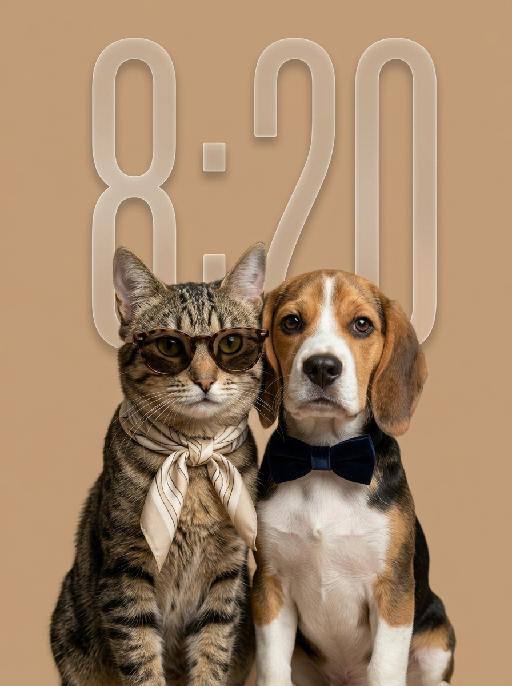
Editorial Cover

"Use the uploaded pet image or images as the only identity reference for each pet. Create one cohesive, hyper-realistic studio fashion photograph featuring the same two pets together in a single naturally photographed scene. Strictly preserve each pet’s original species, breed, facial structure, fur color, fur markings, fur texture, eye shape and color, ear shape, nose, muzzle, body proportions, and overall recognizability. The final result must look like one authentic photograph captured during a real luxury pet-fashion photoshoot, not two separately generated portraits placed next to each other. SCENE COHERENCE — VERY IMPORTANT: * both pets must exist naturally within the same physical studio space * photograph both pets simultaneously with one camera and one unified lighting setup * use one consistent camera angle, focal length, perspective, depth of field, color temperature, and exposure * both pets must share the same ground plane and the same focal plane * create natural spatial depth between them rather than placing them flatly on one line * allow subtle, realistic overlap between their shoulders, fur, or accessories * their bodies may sit slightly angled toward one another * include physically accurate contact shadows and soft cast shadows * ensure the shadows fall in the same direction and have the same softness * fur edges must integrate naturally with the background * no cutout edges, pasted-on appearance, floating subjects, duplicated lighting, mismatched scale, or separate portrait-panel effect COMPOSITION: * vertical 9:16 fashion editorial portrait * intimate two-pet portrait photographed as one connected group * medium-close half-body framing, from the head to the chest or upper torso * keep both faces clearly visible and close enough to show facial details * the pets should occupy most of the frame without feeling cramped * use an elegant, slightly asymmetrical composition rather than perfect mirror symmetry * position one pet a few centimeters subtly forward and the other slightly behind * vary their head angles naturally * keep their shoulders visually connected * avoid rigid side-by-side passport-photo positioning * do not show full bodies, full legs, lower abdomen, crotch area, or private parts * preserve a small amount of clean breathing room around the ears and sides NATURAL GROUP POSE: * both pets sit close together as if photographed during the same real session * their bodies are gently angled inward * one pet may lean slightly toward the other * include a subtle sense of companionship and shared presence * poses should feel calm, spontaneous, believable, and physically comfortable * avoid identical mirrored poses * avoid perfectly matching head height or unnaturally synchronized expressions FASHION STYLING: * use restrained, coordinated luxury styling rather than dressing each pet as a separate character * choose one shared visual styling concept and complementary muted colors * one pet may wear refined sunglasses with a loosely tied silk neck scarf * the other may wear a minimal tailored bow tie or understated optical glasses * accessories must follow the anatomy of the head, ears, neck, and fur * glasses must rest naturally on the nose and align correctly with the eyes * scarves and bow ties must wrap naturally around the neck with realistic folds, tension, weight, and partial fur coverage * accessories should not appear digitally attached, oversized, rigid, floating, or perfectly isolated * keep the number of accessories limited * styling should feel sophisticated, playful, understated, and editorial EXPRESSION: * calm, composed, confident expressions * subtle individual differences between the two pets * elegant but naturally cute * no exaggerated human facial expressions * both pets should remain recognizably themselves BACKGROUND: * one continuous warm beige or soft cream seamless studio backdrop * subtle tonal variation and natural studio falloff * not a perfectly flat digital color fill * no dividing line between the pets * no frames, panels, collage sections, graphic shapes, decorative borders, props, furniture, or environment details LIGHTING: * one large soft key light illuminating both pets from the same direction * subtle shared fill light * soft, believable shadows beneath the chins and between the two bodies * gentle highlights on fur and accessories * consistent catchlights in both pets’ eyes * realistic light interaction where one pet slightly blocks light from reaching the other * soft editorial contrast * no separate spotlight on each pet * no artificial rim-light cutout effect * no mismatched highlights or shadow directions PHOTOGRAPHIC STYLE: * photographed with a professional full-frame camera * realistic medium-telephoto portrait lens perspective * shallow but coherent depth of field * both faces remain sharp while the background falls softly out of focus * natural optical rendering * realistic fur strands and depth * subtle skin, nose, whisker, and eye details * authentic fabric textures * tasteful muted color grading * warm neutral palette * slightly low saturation * premium contemporary pet-fashion editorial photography * polished but believable * no excessive retouching * no artificial plastic texture ABSOLUTE CONSTRAINTS: * no text * no letters * no words * no magazine masthead * no cover lines * no logo * no watermark * no branding * no collage * no diptych * no split-screen * no separate portrait panels * no duplicated subjects * no isolated cutout appearance * no sticker-like edges * no floating accessories * no mismatched scale * no mismatched lighting * no perfect mirror symmetry * no cartoon * no illustration * no CGI appearance * no full body * no visible private body areas "

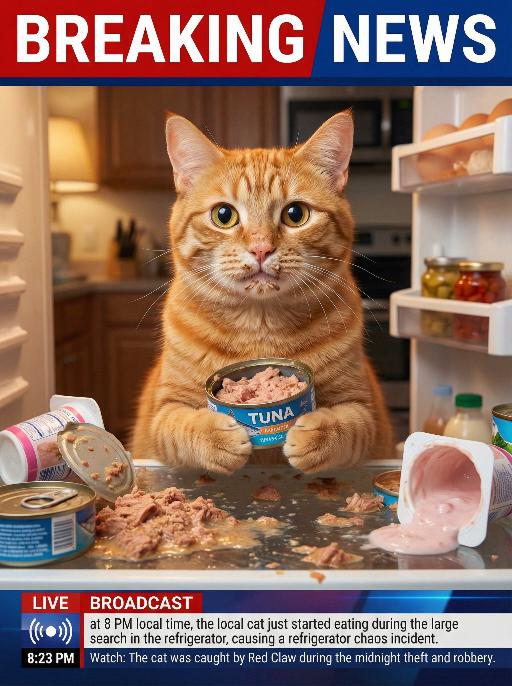
Thief Cat AI effects generated image

Thief Cat

The real-life footage of this news scene is extremely realistic, featuring some close-up shots that captured the image of the pet in the uploaded picture (the pet's features and species remained unchanged). The pet was sitting in an open and messy refrigerator, located in the center of the frame, occupying 80% of it. Its face was smeared with some cat food, and its paws were holding a half-eaten tuna can. Its eyes were wide open, looking very innocent, as if nothing had happened. The refrigerator was in a messy state, with cat food scattered everywhere, along with spilled wet food and overturned yogurt cups. The background of the kitchen was somewhat blurry, and the indoor light was warm. Above it was a prominent large red and white news headline: BREAKING NEWS. In the following picture, there was a news headline: LIVE BROADCAST, 8:23 PM, Watch: This pet was discovered stealing and robbing during the midnight snack search operation with red-claw's assistance.

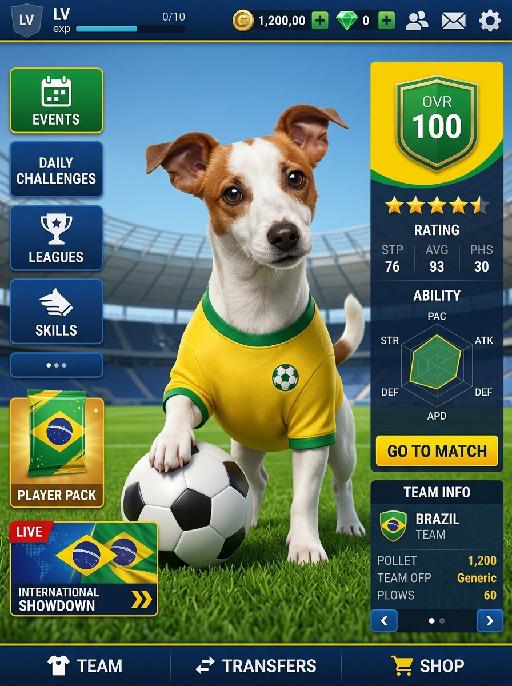
Hero Lineup AI effects generated image

Hero Lineup

Positive: Image-to-image, universal template. The character’s facial features and overall appearance must 100% preserve the original identity of Reference Image 1 without modification. Create a Brazil-themed football mobile game main interface, using the composition and interface structure of Reference Image 2 as the layout reference. Overall scene and layout: - the character is positioned in the center of the frame - standing on the natural green grass of a football field - stadium stands in the background - bright clear blue sky above - the whole image should look like a football mobile game home screen - retain a complete game UI structure with a polished and professional football game interface layout - realistic 3D game texture - high-definition picture quality - all interface elements should be clean, organized, and proportionally balanced Character styling: - the character wears a Brazil-inspired football kit - bright yellow football jersey with green trim - matching blue shorts only - the shorts must always be blue - do not use white shorts - blue shorts are mandatory - long football socks - realistic football boots - instead of any crest or official logo, place a small football icon or embroidered football patch on the chest - the football symbol should look like part of the jersey design, simple, clean, and realistic - the character holds a football with one hand - the standing pose should match the general pose and placement of Reference Image 2 - the overall appearance should feel like a star player from a Brazil-themed football game Left-side vertical function buttons: - EVENTS - SEASON PASS - STORE - DAILY LOGIN - DAILY CHALLENGES - CLUB - TRAINING - below them, place a SPECIAL OFFER player pack - below that, place a LIVE EVENT tournament card - the event card should evoke a major international football competition atmosphere, but not use any official copyrighted tournament branding Right information panel: - large OVR score number at the top - star-quality badge or rating badge near the OVR - PLAYER STATS panel in the middle - ability radar chart in the middle section - red or green START MATCH button near the lower section - TEAM POWER and formation information at the bottom right - all text and interface panels should be styled like a realistic football mobile game dashboard Top status bar: - LV level indicator - experience bar - coin / gold currency value - gem / diamond currency value - social icon - settings icon Bottom navigation bar: - HOME - SQUAD - TRANSFERS - and other standard football game navigation entries Visual style: - premium football mobile game home screen - Brazil supporter color accents: yellow, green, blue - realistic 3D sports-game presentation - clean UI hierarchy - polished interface design - balanced spacing and element proportions - stadium and player should feel immersive and dynamic, but the UI must remain clear and readable Important design rule: - do not directly copy or reproduce any official copyrighted game logo, publisher mark, club badge, or tournament logo - use original, generic, football-game-style UI graphics - evoke a Brazil football game atmosphere without using trademarked branding - use a football icon on the jersey chest instead of any team crest or federation badge Negative: facial deformation, identity drift from Reference Image 1, missing UI elements, messy layout proportions, clothing inconsistent with Brazil football uniform style, wrong football-field scene, low-resolution image, blurry textures, cheap-looking interface, extra watermarks, random debris, off-theme colors, official copyrighted logos, exact game branding, distorted body pose, crest logos, federation badges, white shorts, missing shorts, incorrect shorts color

Noble Girl AI effects generated image

Noble Girl

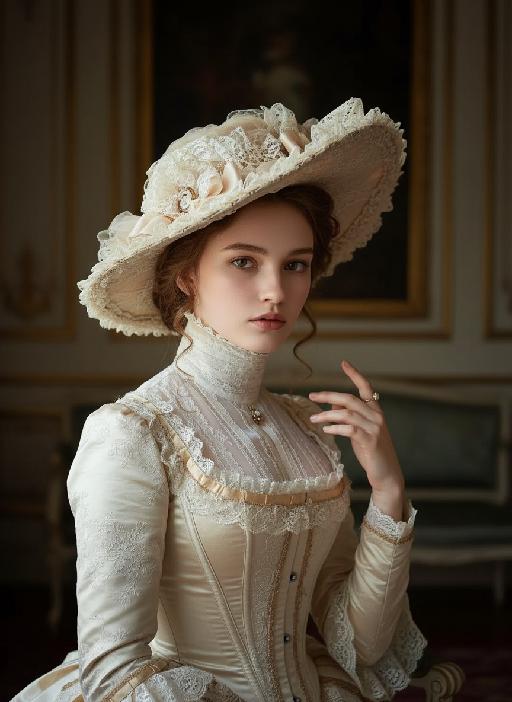
"Drawing on the facial features, facial proportion, hair styling direction, skin tone and age range of the uploaded avatar (with no emphasis on modern identity traits), the overall temperament is reimagined as that of a noble Victorian lady of the 19th century. The composition frames the figure from the top of the head to just below the chest, with the shot pulled back slightly and the subject occupying a relatively small portion of the frame. The height of the head accounts for approximately a quarter of the total frame height, positioned in the lower-middle area with natural proportions and no stretching or distortion, presenting an elegant and solemn classical portrait composition. She sits in a dignified and upright posture, her head turned gently to the right with her face in a three-quarter view and her chin slightly tucked. Her eyes are almost directly facing the camera, her gaze calm and restrained, reserved and introverted; her expression is solemn yet elegant, her lips naturally closed, and her facial features are distinct with well-proportioned contours. She wears an exquisite Victorian noble wide-brimmed hat that conforms to the aesthetic of European high society in the 19th century, crafted from pieced cream or ivory lace and fabric. The brim is adorned with delicate lace, ribbons and small ornaments, its structure elegantly intricate yet understated. Her hair is styled into a classic feminine coiffure of the same era, with soft, natural strands; a few curled tresses fall beside her temples and cheeks, blending seamlessly with the hat, boasting a delicate texture with a realistic sheen. She is dressed in a historically authentic Victorian court-style gown, featuring a high neckline that fits closely to the neck and a structured corseted bodice. The fabric is selected from silk, lace or brocade, in hues of cream, pale champagne or ivory. The cuffs, neckline and bust are embellished with elaborate lace and decorative details, with a precise cut and rich layering that fully embodies noble bearing. One of her hands is naturally raised near her face or gently resting on her chest, her fingers posed in an elegant and restrained manner. She adorns herself with a pearl ring or classical court-style jewelry, the ornaments understated and exquisite, in perfect harmony with the overall aesthetic. The lighting adopts the style of European classical court portrait painting: the key light shines softly from the upper left of the frame, with the subject’s face and upper body as the visual focal point, while the background is bathed in softer, dimmer light. The light and shadow contrast is clear with delicate gradations, recreating the light and texture of 19th-century academic and court portrait paintings. The background is set as a palace-style interior space, where the outlines of decorated walls, drapery and classical furniture can be faintly seen. The details are rendered in an understated way so as not to distract from the subject, and the background is softly blurred, creating a solemn and elegant aristocratic atmosphere. The entire image fuses ultra-realistic photography with the style of European classical oil painting, boasting a stable composition, ample negative space, rich textures and exquisite details. The low-saturation color palette is imbued with a retro charm, presenting a museum-grade visual effect of a court portrait—elegant, grand and historically authentic. It adheres to a vintage portrait photography style."

Lucky Charm AI effects generated image

Lucky Charm

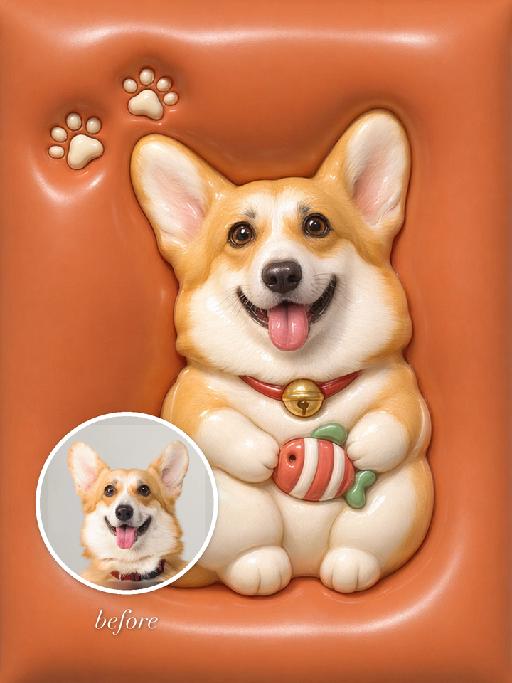
"Use the uploaded pet image as the exact identity reference. Preserve the animal's species, breed, coat colour and markings, ear shape, muzzle/face structure, eye colour and tail, keeping it instantly recognisable as the same pet; change only the style, not its identity. Create a vertical 3:4 image with this exact effect: glossy 3D soft charm icon on a warm orange rounded-square background, the uploaded pet as a lucky-cat-style kawaii mascot sitting upright and holding a tiny striped candy or ball. Smooth inflated vinyl texture, rounded paws, tiny bell collar, soft highlights, cute product-icon framing. No brand marks or readable text. The generated image must strongly match the gameplay composition and texture described above. Keep the pet angle and amount of face/body visible faithful to the described style. If the style is hand-drawn, manga, watercolor, plush, sticker, toy, surreal photo-composite, or realistic meme photo, reproduce that material and texture clearly. No logos, no watermark, no Doubao AI text."

Christmas Eve

"System Role: You are an expert AI Image Editing Assistant. Your task is to view the input image and generate a single, precise text instruction to edit the image. Logic Requirements: Analyze Identity: Identify the main subject. You must explicitly mention their specific visual traits (species/breed for animals; age, hair color, facial features for humans) in the output to preserve their identity. Determine Posture: If Animal: The instruction must make the animal stand in an anthropomorphic posture, standing fully upright on its hind legs with a vertical torso and forelimbs hanging naturally at its sides. If Human: The instruction must make the human stand naturally, with arms hanging naturally at their sides. Apply Scene & Costume: Wearing a red Christmas hat, a red sweater with white snowflake patterns, a vintage checked Christmas skirt, and Christmas boots, standing naturally in the center of the frame. The scene is set in a snow-covered rural cabin, with a decorated Christmas tree with colored lights and balls in the background, and piles of beautifully wrapped Christmas gifts on the ground. Snow is swirling in the air. The scene is illuminated by warm yellow lights (the string lights of the cabin + the lights of the Christmas tree), creating a cozy and dreamy Christmas night atmosphere. Style: Shot with an 85mm lens, highlighting the soft texture of the imagined hair, the knitting texture of the sweater, and the delicate details of the snowflakes. 8K resolution, warm and saturated colors. Realistic photography, panoramic shooting, revealing the full body of the figure in the uploaded image."

Cathedral Selfie AI effects generated image

Cathedral Selfie

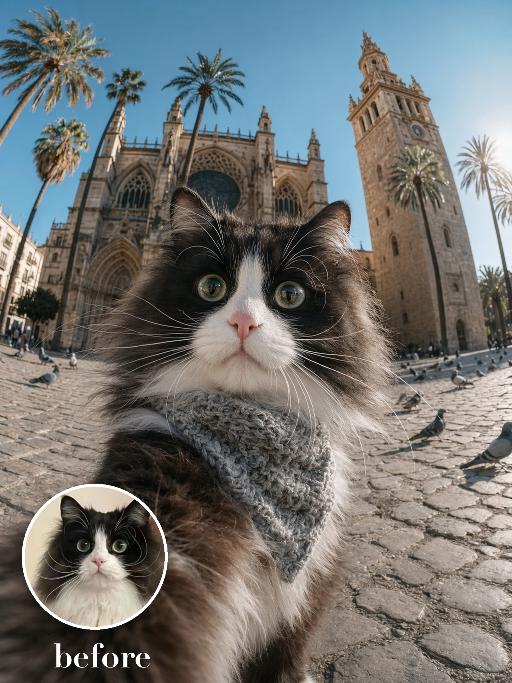
Create a dramatic wide-angle plaza selfie matching the reference. The uploaded pet's face is very close to the camera in the lower foreground, wearing a textured gray neck scarf; a grand historic cathedral with towers and palm trees rises behind. Bright daylight, cobblestone square, strong fisheye perspective and curious wide-eyed expression. The subject remains an animal throughout. No people or human hands. No real brands, logos, watermarks or readable text. Accurately preserve the uploaded pet's species, breed, coat color and markings, ear shape, muzzle and face structure, eye color and body proportions. Keep it instantly recognisable as the same animal; change only pose, scene, clothing and accessories. Vertical 3:4, photorealistic, crisp detail, with the pet as the unmistakable main subject.

Viral Dance

"Photorealistic film portrait photography, horizontal rectangular frame, fixed composition rule: 【Character】 is strictly centered in frame, the bottom cropping edge of frame cuts exactly at the character's knees, a thin strip of light beige flat ceiling is reserved on the top of frame; Precise Scene Details Background structure: A vertical square cream solid partition pillar right behind 【Character】, two identical dark walnut solid wood full-height open bookshelves symmetrically placed on both sides of pillar, each shelf built with fixed 5 layers; every shelf densely packed with multicolored hardcover books, most books stand vertically, small stacks of horizontally placed thick books on right part of each shelf with mixed red, blue, brown, off-white book spines; Left side of frame: Off-white fabric single armchair at bottom-left with short dark timber legs, one light khaki square linen cushion leans against seat; a floor lamp with thin metal pole + tapered white fabric lampshade stands in the gap between sofa and left bookshelf; Right side of frame: Partial curved edge of matte white round low coffee table is visible behind character’s right hip; Floor design: Full floor covered with oat beige short loop pile carpet, soft subtle natural shadows from bookshelf and armchair on carpet surface; Lighting & Quality Soft diffused front indoor natural lighting, neutral warm white color temperature, no harsh sharp hard shadows, natural layered ambient shadow; 8K ultra-realistic high definition, intricate textures of wood grain, book spine print and fabric weave, minimalist American home study interior, no extra redundant ornaments inside the whole scene."

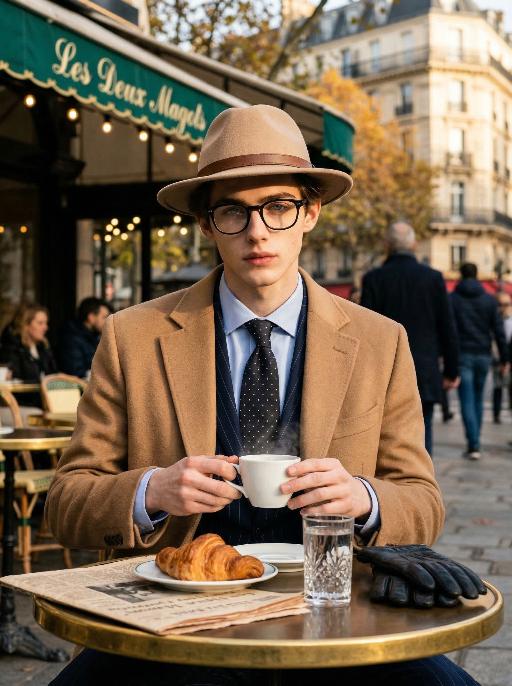
Cafe Gent AI effects generated image

Cafe Gent

"Preserve the character's facial features and hairstyle exactly as in the reference image. He wears sophisticated black-rimmed glasses, a timeless beige fedora with a refined brown leather band, a tailored camel cashmere overcoat, a dark navy subtle pinstripe suit, a crisp light blue dress shirt, a dark silk polka-dot tie, and black leather gloves resting on the table. He is seated at an outdoor table at the iconic Les Deux Magots café in Paris, gently holding a white ceramic coffee cup with both hands, delicate steam curling upward. Table details: round polished brass tabletop, a crystal glass of still water, a half-eaten buttery croissant on a porcelain plate, a vintage French newspaper, and elegant black leather gloves. Background: the signature green awning of Les Deux Magots, warm vintage string lights, softly blurred Parisian pedestrians, rich autumnal foliage, classic Haussmannian architecture in gentle bokeh. Lighting & Style: strong golden hour light and shadow contrast, dramatic chiaroscuro lighting on the face, partial sunlight gilding one side of his face while the other remains in soft shadow, high contrast key light, warm muted color grading, ultra-shallow depth of field, cinematic film photography, quiet luxury & old money aesthetic, hyper-realistic textures, intricate details, 8K, professional high-end fashion & travel editorial photography, shot on Sony A7R IV with 85mm f/1.4 lens, film grain, elegant composition, sophisticated atmosphere."

Load more

Next-Gen Multi-Model AI Video Architecture

Vivago AI isn't just one engine—it’s a unified hub for the world’s most advanced video AI. Whether you need cinematic realism or high-speed social content, we provide the right model for your creative vision.

Free Generate

Beauty and Dolphins

Vacation Time

Stellar Tear

Fish Tank Supervisor

Cinematic Quality & Precision Control

Enables 4K resolution with multi-lens motion control, generating delicate scene via text prompts for customized cinematography.​

TRY NOW

Dynamic AV Sync

Auto-generates original audio to avoid copyright issues. Build 3D immersive environments through layered sound design automatically.

TRY NOW

OpenAI Sora 2

​Advanced visual storytelling with unparalleled physics and consistency.

TRY NOW

Kling v2.6 Pro

Industry-leading cinematic image animation and motion control.

TRY NOW

Google Veo 3 & 3.1

Ultra-fast generation with enhanced realism for creative workflows.

TRY NOW

Vivago AI 2.0

Our proprietary model optimized for efficiency, speed, and cost-effective generation.

TRY NOW

Users' Voice

We listen carefully to the opinions of every user.
Free Generate
Contact Us
I tried the Lip Sync feature inside Vivago.ai’s AI Video Generator for my educational podcast, and the results were stunning! The avatar's lip movements perfectly matched my audio recording, creating a professional AI-generated video without complex editing. Compared with tools like OpenAI Sora 2 and Google Veo 3.1, Vivago Image-to-Video delivers fast, studio-quality results online. It saved me hours of post-production work.
ElenaM (Spain)
Vivago’s Image-to-Video AI transformed my marketing workflow. I uploaded a product image and described the launch scene in text, and it generated a 10-second cinematic AI video with background music and dynamic visuals. The output quality rivals Kling v2.6 Pro and Google Veo 3 Fast. It’s now my go-to AI video generator for social media ads and product campaigns.
KenjiT (Japan)
As a digital artist, I use Vivago.ai 2.0 daily for Image-to-Image and AI Image-to-Video creation. The e-book covers and animated visuals I generate for clients look cinematic and professional. Unlike many standalone AI tools, Vivago integrates multiple leading models into one platform, making it easier to create copyright-safe AI images and videos for publishing.
ChenL (China)
I tried the Lip Sync feature inside Vivago.ai’s AI Video Generator for my educational podcast, and the results were stunning! The avatar's lip movements perfectly matched my audio recording, creating a professional AI-generated video without complex editing. Compared with tools like OpenAI Sora 2 and Google Veo 3.1, Vivago Image-to-Video delivers fast, studio-quality results online. It saved me hours of post-production work.
ElenaM (Spain)
Vivago’s Image-to-Video AI transformed my marketing workflow. I uploaded a product image and described the launch scene in text, and it generated a 10-second cinematic AI video with background music and dynamic visuals. The output quality rivals Kling v2.6 Pro and Google Veo 3 Fast. It’s now my go-to AI video generator for social media ads and product campaigns.
KenjiT (Japan)
As a digital artist, I use Vivago.ai 2.0 daily for Image-to-Image and AI Image-to-Video creation. The e-book covers and animated visuals I generate for clients look cinematic and professional. Unlike many standalone AI tools, Vivago integrates multiple leading models into one platform, making it easier to create copyright-safe AI images and videos for publishing.
ChenL (China)
I absolutely love Vivago’s AI Image-to-Video Generator. As a travel blogger, static images often fail to capture real atmosphere, but Vivago helps me turn photos into vivid cinematic AI videos with motion effects. It feels comparable to OpenAI Sora 2 and Google Veo 3.1, but more accessible and faster for creators who need high-quality AI videos online.
LiamK (Australia)
I tried the Lip Sync feature inside Vivago.ai’s AI Video Generator for my educational podcast, and the results were stunning! The avatar's lip movements perfectly matched my audio recording, creating a professional AI-generated video without complex editing. Compared with tools like OpenAI Sora 2 and Google Veo 3.1, Vivago Image-to-Video delivers fast, studio-quality results online. It saved me hours of post-production work.
ElenaM (Spain)
Vivago’s Image-to-Video AI transformed my marketing workflow. I uploaded a product image and described the launch scene in text, and it generated a 10-second cinematic AI video with background music and dynamic visuals. The output quality rivals Kling v2.6 Pro and Google Veo 3 Fast. It’s now my go-to AI video generator for social media ads and product campaigns.
KenjiT (Japan)
As a digital artist, I use Vivago.ai 2.0 daily for Image-to-Image and AI Image-to-Video creation. The e-book covers and animated visuals I generate for clients look cinematic and professional. Unlike many standalone AI tools, Vivago integrates multiple leading models into one platform, making it easier to create copyright-safe AI images and videos for publishing.
ChenL (China)
I absolutely love Vivago’s AI Image-to-Video Generator. As a travel blogger, static images often fail to capture real atmosphere, but Vivago helps me turn photos into vivid cinematic AI videos with motion effects. It feels comparable to OpenAI Sora 2 and Google Veo 3.1, but more accessible and faster for creators who need high-quality AI videos online.
LiamK (Australia)
Using Vivago.ai’s Image-to-Video AI has greatly enhanced my classroom teaching. I transform textbook notes into historical AI videos with cinematic filters and dynamic animations. Compared with tools like Kling v2.6 Pro and Google Veo 3 Fast, Vivago offers faster generation and easier parameter control for educators who need reliable AI video creation.
RajivG (India)
I frequently create AI videos on Vivago and publish them on TikTok and YouTube Shorts. The AI video templates and trending content ideas help me produce viral-ready clips quickly. With Vivago’s integrated models—including advanced video engines similar to OpenAI Sora 2—I can generate anime-style and cinematic social media videos that drive high engagement.
MarieJ (Spain)
What attracts me most about Vivago.ai is not only the powerful AI Video Generator but also the active AIGC creator community. It combines AI Image-to-Video, Text-to-Video, and leading model integrations like Google Veo 3.1 into one creative platform.
TomW (India)
At first, I was hesitant about using AI video tools. But after trying Vivago Image-to-Video, I realized how easy it is to create professional AI-generated videos online. I just upload an image, add a short prompt, and adjust a few settings. The results are cinematic and copyright-safe, which is essential for commercial projects.
HectorC (Mexico)
Using Vivago.ai’s Image-to-Video AI has greatly enhanced my classroom teaching. I transform textbook notes into historical AI videos with cinematic filters and dynamic animations. Compared with tools like Kling v2.6 Pro and Google Veo 3 Fast, Vivago offers faster generation and easier parameter control for educators who need reliable AI video creation.
RajivG (India)
I frequently create AI videos on Vivago and publish them on TikTok and YouTube Shorts. The AI video templates and trending content ideas help me produce viral-ready clips quickly. With Vivago’s integrated models—including advanced video engines similar to OpenAI Sora 2—I can generate anime-style and cinematic social media videos that drive high engagement.
MarieJ (Spain)
What attracts me most about Vivago.ai is not only the powerful AI Video Generator but also the active AIGC creator community. It combines AI Image-to-Video, Text-to-Video, and leading model integrations like Google Veo 3.1 into one creative platform.
TomW (India)
At first, I was hesitant about using AI video tools. But after trying Vivago Image-to-Video, I realized how easy it is to create professional AI-generated videos online. I just upload an image, add a short prompt, and adjust a few settings. The results are cinematic and copyright-safe, which is essential for commercial projects.
HectorC (Mexico)