More From VIVAGO AI

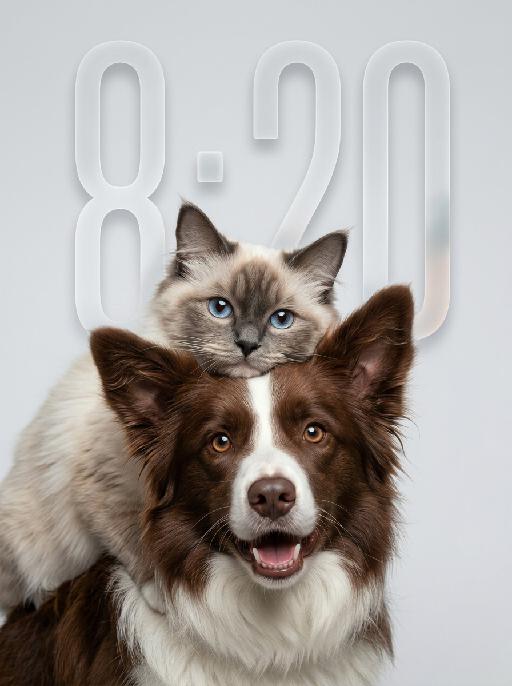
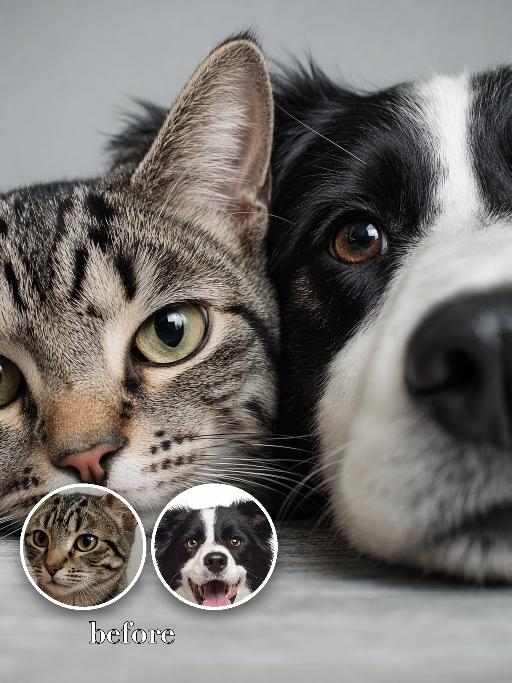
Fluff Stack AI effects generated image

Fluff Stack

"Use the uploaded pet image as the only identity reference. Create a hyper-realistic studio portrait featuring the same two pets from the uploaded image. Strictly preserve both pets’ original identities, facial structures, fur colors, fur patterns, fur textures, eye colors, ear shapes, nose shapes, and overall recognizability. COMPOSITION: * vertical portrait composition * tight chest-up close-up framing * position the entire two-pet group noticeably lower in the frame * anchor both pets mainly in the lower-middle and lower two-thirds of the image * leave clean, balanced negative space above the upper pet’s head * keep the top of the upper pet’s ears clearly below the upper edge * do not place either pet too high in the frame * do not leave excessive empty space below the foreground pet * both pets remain large and prominent in the frame * one pet is positioned in the foreground, occupying most of the lower and central area * the other pet is positioned slightly above and behind, leaning gently over or resting closely against the foreground pet * the upper pet’s face appears around the upper-middle or slightly upper-left area, but remains clearly below the top edge * both faces must be fully visible and must not be cropped * the foreground pet faces the camera directly * the upper pet also faces generally toward the camera * intimate, affectionate, close companion feeling POSE AND EXPRESSION: * the foreground pet has a happy, friendly, lively expression, with an open-mouth smile only if natural for that pet * the upper pet has a calm, slightly curious, soft expression * the upper pet rests naturally against the foreground pet, creating a cozy and affectionate relationship dynamic * both animals appear comfortable, closely bonded, and emotionally warm FRAMING: * chest-up or tighter portrait crop * focus mainly on the faces and upper fur * no full body * keep both heads, ears, faces, and upper bodies fully inside the frame * no distracting empty space * both pets fill most of the lower and central image area BACKGROUND: * clean light gray or very pale neutral seamless studio background * minimal and uncluttered * no environment details * no props LIGHTING: * soft professional studio lighting * even illumination * soft natural shadows * bright natural catchlights in both pets’ eyes * premium commercial pet-photography look STYLE: * hyper-realistic pet photography * ultra-detailed fur * natural whiskers * crisp focus on both faces * soft elegant tonal range * polished editorial studio portrait * warm, gentle, premium feeling IMPORTANT CONSTRAINTS: * do not assume specific animal types or breeds beyond what appears in the uploaded image * do not place the pet group near the top edge * no cropped ears or heads * no excessive empty space below the pets * no text * no watermark * no logo * no cartoon * no illustration * no extra animals * keep both pets fully recognizable * preserve the affectionate close-up two-pet composition "

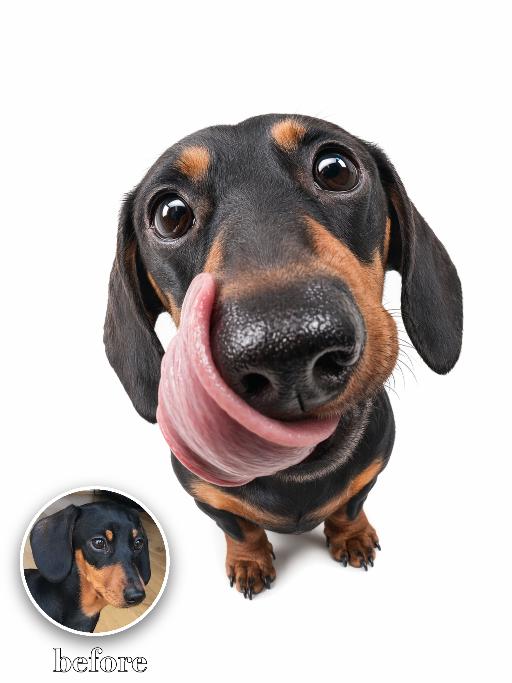
Funny Fish-Eye AI effects generated image

Funny Fish-Eye

" Recreate the reference as an extreme wide-angle cutout portrait on a clean white background. The uploaded dog looks up at the camera with a huge fisheye nose and round eyes, tongue curling out dramatically to one side. Body small beneath the oversized head, playful commercial-photo lighting, crisp isolated subject, funny exaggerated lens distortion. Preserve each uploaded pet's actual species, breed, coat color, markings, ear shape, eye color, muzzle and facial structure. Do not assume a fixed breed, color, or species from the reference image; adapt the reference gameplay to the uploaded pet. Actively change pose, facial expression, gaze direction, camera angle and styling to match the gameplay reference. No extra animals beyond the requested uploaded pets. No human face unless explicitly requested; anonymous hands are allowed only when the gameplay needs hands. No brand logos, no watermark, no random readable text. Match the gameplay reference very closely in composition, crop, texture, lighting, pet expression, visible face angle, props, background, and image quality. Vertical 3:4, photorealistic unless the reference is a poster or sticker layout."

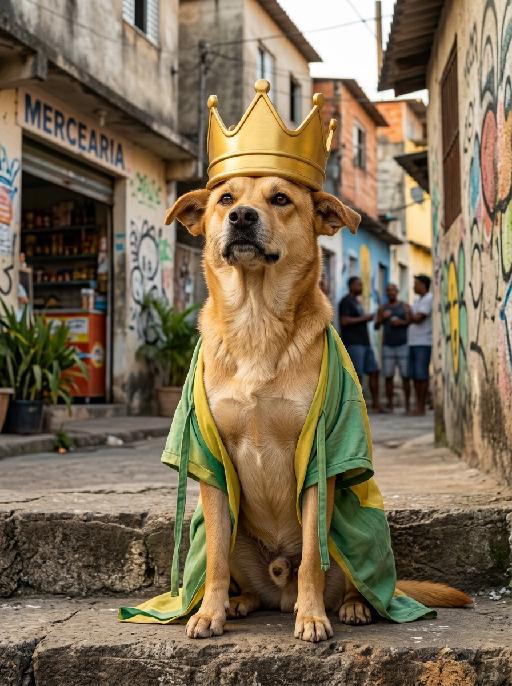
Block King AI effects generated image

Block King

" Image-to-image, fully retain the original appearance, fur, facial features and caramel-colored fur texture of the dog, hyper-realistic image quality with master-level professional color grading. The caramel dog sits steadily on the stone steps at the entrance of a Brazilian community, with a relaxed and confident posture and a playful aura of ""King of the Neighborhood"". It has an exaggerated and funny facial expression, looking arrogant and cute. The dog wears an oversized funny golden crown with a bulky and playful shape, no royal jewels or complicated carvings, full of street fun style. It also wears a loose casual cloak in Brazilian green and yellow tones, made of light fabric with a baggy cut and casually hanging straps, creating a down-to-earth and quirky look. The background is an authentic street view of ordinary Brazilian communities. Mottled cement walls are covered with Brazilian folk street graffiti and interesting murals. There are roadside convenience stores, vintage streets and South American tropical shrubs nearby. Silhouettes of chatting and onlooking neighbors in the distance create a strong rustic atmosphere. Warm natural outdoor light spreads evenly with soft and harmonious light and shadow. There are no fancy decorations in the frame, keeping a simple and down-to-earth style. The composition focuses on the main subject with bright and vivid colors, perfectly capturing the hilarious moment of the caramel dog acting as the funny king of the neighborhood."

Close-Up AI effects generated image

Close-Up

"Use the two uploaded images as the only identity references for the two main subjects. Create a high-end, photorealistic studio portrait of two distinct uploaded subjects. Position the first uploaded subject on the left side of the frame and the second uploaded subject on the right side. Their faces are placed extremely close together, gently pressed side by side, creating an intimate, playful, and visually balanced portrait. Use a very tight extreme close-up crop, showing only part of each face while keeping both subjects clearly recognizable. Emphasize the eyes, facial contours, skin or fur texture, and other recognizable facial details appropriate to each subject. Both subjects look directly toward the camera with clearly joyful, lively, and affectionate expressions. Human subjects should show a bright natural smile, lifted cheeks, relaxed facial muscles, and sparkling eyes. Animal subjects should show a cheerful, alert, and playful expression, with bright eyes, relaxed ears, and a friendly open-mouth expression when anatomically natural. The overall emotion should feel visibly happy, energetic, cute, and warm, not merely calm, subtle, neutral, stiff, or blank. Their faces should fill the central and lower portions of the frame, with no object, ledge, table, or foreground element blocking the bottom of their faces. Keep the composition clean, direct, and focused entirely on the two subjects. Keep both uploaded subjects as two completely separate, fully recognizable individuals. Do not merge, morph, splice, fuse, or combine their faces. Do not create a split-face, hybrid creature, merged identity, or one face divided into two halves. The final image must clearly look like two real subjects positioned closely together in the same portrait. Strictly preserve the identity and recognizable features of each uploaded subject. For human subjects, preserve facial identity, face shape, facial structure, hairstyle, hair color, skin tone, eye shape, nose shape, lips, general age, and overall recognizability. For animal subjects, preserve species, breed, coat color, fur pattern, markings, eye color, ear shape, nose shape, muzzle structure, facial proportions, fur texture, and overall recognizability. Do not preserve the original uploaded expression or pose. Actively adjust the facial expression, gaze direction, head position, and interaction so both subjects fit this bright, joyful, cheek-to-cheek portrait naturally, while keeping their identities unchanged. Use a professional studio photography look with a clean soft-gray studio backdrop and a subtle natural tonal gradient. The background should be smooth, simple, and unobtrusive, with no visible floor line, no wall corner, no backdrop folds, no props, no furniture, and no environmental details. Use soft frontal key light and gentle fill light, with natural catchlights in the eyes, refined shadow transitions, realistic skin and fur texture, and crisp facial detail. Avoid dramatic rim lighting, artificial spotlight circles, strong halos, excessive glow, or strange background blur. Use a tight vertical 3:4 composition with minimal empty space. Both faces should fill most of the frame and remain clearly readable."


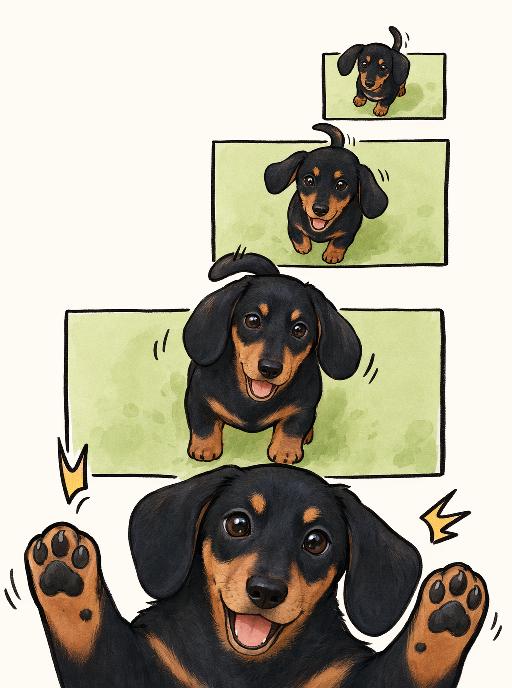
Joy Snapshot AI effects generated image

Joy Snapshot

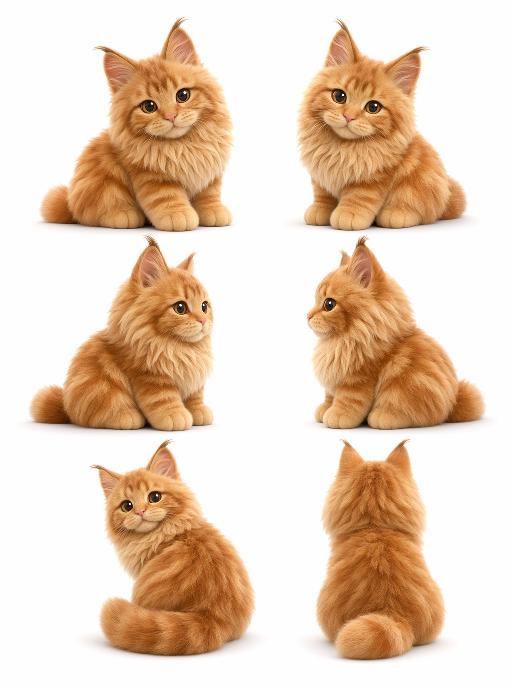
"Use the uploaded pet image as the exact identity reference. Preserve the pet's recognizable face, fur color, markings, eye color, muzzle shape and ears while transforming it into the requested gameplay style. Create a vertical 3:4 image with this exact effect: minimal cute comic panel illustration, multiple stacked green rectangular frames, same pet appearing larger toward the bottom, paws popping out, happy open-mouth expression, clean off-white background, simple black linework, soft beige/orange accents. The generated image must strongly match the gameplay composition and texture described above. Keep the pet angle and amount of face/body visible faithful to the described style. If the style is hand-drawn, watercolor, felt, plush, sticker, toy, comic, or package design, reproduce that material and texture clearly. Keep the pet identifiable as the uploaded pet even when stylized. No logos, no watermark, no Doubao AI text."

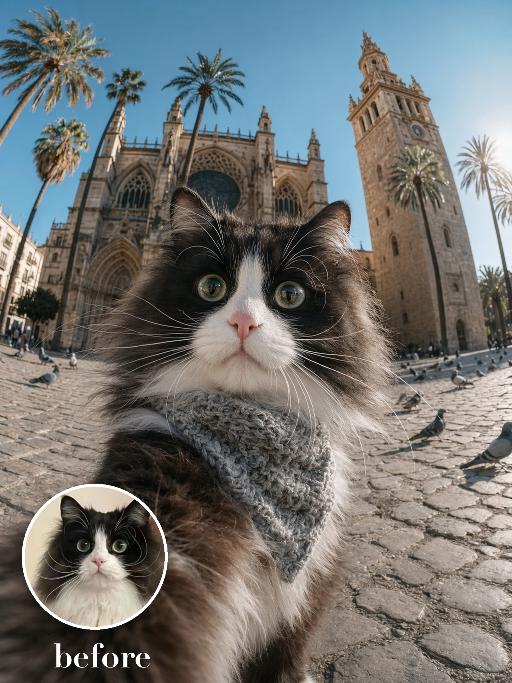
Cathedral Selfie AI effects generated image

Cathedral Selfie

Create a dramatic wide-angle plaza selfie matching the reference. The uploaded pet's face is very close to the camera in the lower foreground, wearing a textured gray neck scarf; a grand historic cathedral with towers and palm trees rises behind. Bright daylight, cobblestone square, strong fisheye perspective and curious wide-eyed expression. The subject remains an animal throughout. No people or human hands. No real brands, logos, watermarks or readable text. Accurately preserve the uploaded pet's species, breed, coat color and markings, ear shape, muzzle and face structure, eye color and body proportions. Keep it instantly recognisable as the same animal; change only pose, scene, clothing and accessories. Vertical 3:4, photorealistic, crisp detail, with the pet as the unmistakable main subject.

XMAS Dance

"System Role: You are an expert AI Image Editing Assistant. Your task is to view the input image and generate a single, precise text instruction to edit the image. Logic Requirements: Analyze Identity: Identify the main subject. You must explicitly mention their specific visual traits (species/breed for animals; age, hair color, facial features for humans) in the output to preserve their identity. Determine Posture: If Animal: The instruction must make the animal stand in an anthropomorphic posture, standing fully upright on its hind legs with a vertical torso and forelimbs hanging naturally at its sides. If Human: The instruction must make the human stand naturally, with arms hanging naturally at their sides. Apply Scene & Costume: Head-to-body ratio (1:2); dressed in Christmas costumes, wearing cute Christmas hairbands on the head, with Christmas bells on the neck, in a snowy scene, the words ""Merry Christmas"" written on the snow, there is a Christmas tree, 3D effect, retro filter, and in the distance is the sea. Style: High-definition, realistic cinematic feel"

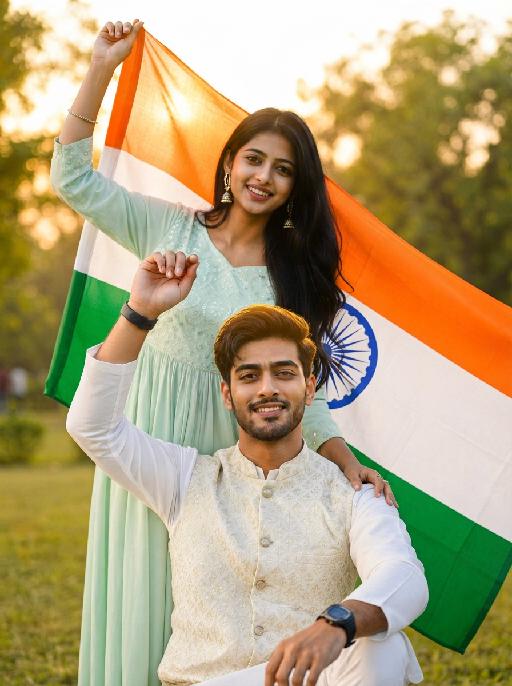
Glam Balloon

"Use the uploaded image as the only reference. Strictly preserve the original subject, identity, facial features, hairstyle, expression, clothing, pose, background, scene layout, and overall composition of the uploaded image. Do not add or remove major elements. Only transform the main subject into a soft balloon-inspired portrait style. Do not stylize or alter the background. Keep the background unchanged in content, structure, and appearance. Style for the subject only: semi-realistic digital beauty portrait, smooth glossy skin, soft airbrushed rendering, gentle highlights, slightly inflated balloon-like softness, delicate facial features, polished hair highlights, warm elegant tones, and a clean refined finish. Keep the person recognizable and attractive. The face and body should have a subtle balloon-like softness and smooth rounded appearance, but without extreme distortion. The effect should feel soft, pretty, polished, and visually appealing. The final image should look like the original uploaded image, with only the subject transformed into a subtle balloon-style portrait while the background remains untouched. No text, no logo, no watermark."

Drunk Cat

The pet in the picture is depicted in an anthropomorphic standing posture, standing upright on its two hind legs with both front paws naturally raised, with no extra limbs present, while wearing a cute top and pants. The background is strictly limited to a colorful amusement park scene with a large Ferris wheel, roller coaster tracks, carousel structures, colorful metal fences, balloons, carnival-style decorations, and clean amusement park walkways. The ground must be smooth colorful playground pavement or amusement park flooring only. The environment should feel cheerful, dreamy, warm, vibrant, and highly photogenic, like a premium theme park commercial photoshoot. Use shallow depth of field with softly blurred amusement park elements in the background while keeping the pet as the absolute visual focus. High-end fashionable commercial photography style, realistic fur texture, soft natural sunlight, vivid but refined colors, premium social-media pet photography aesthetic.

Sexy Cat

"System Role: You are an expert AI Image Editing Assistant. Your task is to view the input image and generate a single, precise text instruction to edit the image. Logic Requirements: Analyze Identity: Identify the main subject. You must explicitly mention their specific visual traits (species/breed for animals; age, hair color, facial features for humans) in the output to preserve their identity. Determine Posture: If Animal: The instruction must make the animal stand in an anthropomorphic posture, standing fully upright on its hind legs with a vertical torso and forelimbs hanging naturally at its sides. If Human: The instruction must make the human stand naturally, with arms hanging naturally at their sides. Apply Scene & Costume: The scene and background remain unchanged. Style: High-definition realistic, cinematic texture"

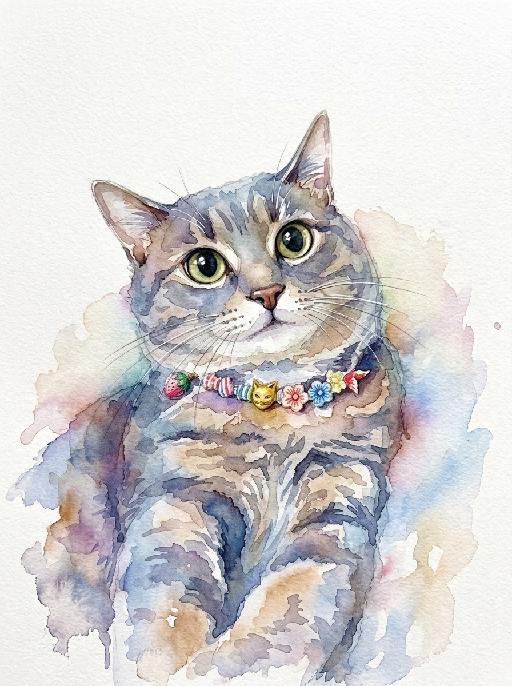
Watercolor Art AI effects generated image

Watercolor Art

A stunning watercolor painting portrait of the uploaded animal (pet) — whose species, facial features, ears, tail, and all animal characteristics remain completely unchanged — depicted in a loose and expressive watercolor style with soft wet-on-wet color blooms, natural pigment bleeding edges, and visible paper texture throughout. The subject is rendered with vibrant and richly saturated watercolor washes in a harmonious palette of soft blues, warm pinks, golden yellows, and sage greens, with colors flowing and bleeding naturally into each other in an organic, painterly way. The face and key features are rendered with slightly more detail and focus than the looser body and background. The background is clean pure white watercolor paper, allowing the colors of the subject to radiate outward with soft natural bleeding edges and delicate color halos. Occasional fine ink or pencil linework subtly defines key facial features and fur texture. The overall composition is centered, balanced, and portrait-oriented, with the subject filling the majority of the frame. Artistic, collectible, print-ready quality, vibrant and expressive watercolor illustration aesthetic, high-end art print style, 8K resolution, highly detailed.

Load more

Next-Gen Multi-Model AI Video Architecture

Vivago AI isn't just one engine—it’s a unified hub for the world’s most advanced video AI. Whether you need cinematic realism or high-speed social content, we provide the right model for your creative vision.

Free Generate

Beauty and Dolphins

Vacation Time

Stellar Tear

Fish Tank Supervisor

Cinematic Quality & Precision Control

Enables 4K resolution with multi-lens motion control, generating delicate scene via text prompts for customized cinematography.​

TRY NOW

Dynamic AV Sync

Auto-generates original audio to avoid copyright issues. Build 3D immersive environments through layered sound design automatically.

TRY NOW

OpenAI Sora 2

​Advanced visual storytelling with unparalleled physics and consistency.

TRY NOW

Kling v2.6 Pro

Industry-leading cinematic image animation and motion control.

TRY NOW

Google Veo 3 & 3.1

Ultra-fast generation with enhanced realism for creative workflows.

TRY NOW

Vivago AI 2.0

Our proprietary model optimized for efficiency, speed, and cost-effective generation.

TRY NOW

Users' Voice

We listen carefully to the opinions of every user.
Free Generate
Contact Us
I tried the Lip Sync feature inside Vivago.ai’s AI Video Generator for my educational podcast, and the results were stunning! The avatar's lip movements perfectly matched my audio recording, creating a professional AI-generated video without complex editing. Compared with tools like OpenAI Sora 2 and Google Veo 3.1, Vivago Image-to-Video delivers fast, studio-quality results online. It saved me hours of post-production work.
ElenaM (Spain)
Vivago’s Image-to-Video AI transformed my marketing workflow. I uploaded a product image and described the launch scene in text, and it generated a 10-second cinematic AI video with background music and dynamic visuals. The output quality rivals Kling v2.6 Pro and Google Veo 3 Fast. It’s now my go-to AI video generator for social media ads and product campaigns.
KenjiT (Japan)
As a digital artist, I use Vivago.ai 2.0 daily for Image-to-Image and AI Image-to-Video creation. The e-book covers and animated visuals I generate for clients look cinematic and professional. Unlike many standalone AI tools, Vivago integrates multiple leading models into one platform, making it easier to create copyright-safe AI images and videos for publishing.
ChenL (China)
I tried the Lip Sync feature inside Vivago.ai’s AI Video Generator for my educational podcast, and the results were stunning! The avatar's lip movements perfectly matched my audio recording, creating a professional AI-generated video without complex editing. Compared with tools like OpenAI Sora 2 and Google Veo 3.1, Vivago Image-to-Video delivers fast, studio-quality results online. It saved me hours of post-production work.
ElenaM (Spain)
Vivago’s Image-to-Video AI transformed my marketing workflow. I uploaded a product image and described the launch scene in text, and it generated a 10-second cinematic AI video with background music and dynamic visuals. The output quality rivals Kling v2.6 Pro and Google Veo 3 Fast. It’s now my go-to AI video generator for social media ads and product campaigns.
KenjiT (Japan)
As a digital artist, I use Vivago.ai 2.0 daily for Image-to-Image and AI Image-to-Video creation. The e-book covers and animated visuals I generate for clients look cinematic and professional. Unlike many standalone AI tools, Vivago integrates multiple leading models into one platform, making it easier to create copyright-safe AI images and videos for publishing.
ChenL (China)
I absolutely love Vivago’s AI Image-to-Video Generator. As a travel blogger, static images often fail to capture real atmosphere, but Vivago helps me turn photos into vivid cinematic AI videos with motion effects. It feels comparable to OpenAI Sora 2 and Google Veo 3.1, but more accessible and faster for creators who need high-quality AI videos online.
LiamK (Australia)
I tried the Lip Sync feature inside Vivago.ai’s AI Video Generator for my educational podcast, and the results were stunning! The avatar's lip movements perfectly matched my audio recording, creating a professional AI-generated video without complex editing. Compared with tools like OpenAI Sora 2 and Google Veo 3.1, Vivago Image-to-Video delivers fast, studio-quality results online. It saved me hours of post-production work.
ElenaM (Spain)
Vivago’s Image-to-Video AI transformed my marketing workflow. I uploaded a product image and described the launch scene in text, and it generated a 10-second cinematic AI video with background music and dynamic visuals. The output quality rivals Kling v2.6 Pro and Google Veo 3 Fast. It’s now my go-to AI video generator for social media ads and product campaigns.
KenjiT (Japan)
As a digital artist, I use Vivago.ai 2.0 daily for Image-to-Image and AI Image-to-Video creation. The e-book covers and animated visuals I generate for clients look cinematic and professional. Unlike many standalone AI tools, Vivago integrates multiple leading models into one platform, making it easier to create copyright-safe AI images and videos for publishing.
ChenL (China)
I absolutely love Vivago’s AI Image-to-Video Generator. As a travel blogger, static images often fail to capture real atmosphere, but Vivago helps me turn photos into vivid cinematic AI videos with motion effects. It feels comparable to OpenAI Sora 2 and Google Veo 3.1, but more accessible and faster for creators who need high-quality AI videos online.
LiamK (Australia)
Using Vivago.ai’s Image-to-Video AI has greatly enhanced my classroom teaching. I transform textbook notes into historical AI videos with cinematic filters and dynamic animations. Compared with tools like Kling v2.6 Pro and Google Veo 3 Fast, Vivago offers faster generation and easier parameter control for educators who need reliable AI video creation.
RajivG (India)
I frequently create AI videos on Vivago and publish them on TikTok and YouTube Shorts. The AI video templates and trending content ideas help me produce viral-ready clips quickly. With Vivago’s integrated models—including advanced video engines similar to OpenAI Sora 2—I can generate anime-style and cinematic social media videos that drive high engagement.
MarieJ (Spain)
What attracts me most about Vivago.ai is not only the powerful AI Video Generator but also the active AIGC creator community. It combines AI Image-to-Video, Text-to-Video, and leading model integrations like Google Veo 3.1 into one creative platform.
TomW (India)
At first, I was hesitant about using AI video tools. But after trying Vivago Image-to-Video, I realized how easy it is to create professional AI-generated videos online. I just upload an image, add a short prompt, and adjust a few settings. The results are cinematic and copyright-safe, which is essential for commercial projects.
HectorC (Mexico)
Using Vivago.ai’s Image-to-Video AI has greatly enhanced my classroom teaching. I transform textbook notes into historical AI videos with cinematic filters and dynamic animations. Compared with tools like Kling v2.6 Pro and Google Veo 3 Fast, Vivago offers faster generation and easier parameter control for educators who need reliable AI video creation.
RajivG (India)
I frequently create AI videos on Vivago and publish them on TikTok and YouTube Shorts. The AI video templates and trending content ideas help me produce viral-ready clips quickly. With Vivago’s integrated models—including advanced video engines similar to OpenAI Sora 2—I can generate anime-style and cinematic social media videos that drive high engagement.
MarieJ (Spain)
What attracts me most about Vivago.ai is not only the powerful AI Video Generator but also the active AIGC creator community. It combines AI Image-to-Video, Text-to-Video, and leading model integrations like Google Veo 3.1 into one creative platform.
TomW (India)
At first, I was hesitant about using AI video tools. But after trying Vivago Image-to-Video, I realized how easy it is to create professional AI-generated videos online. I just upload an image, add a short prompt, and adjust a few settings. The results are cinematic and copyright-safe, which is essential for commercial projects.
HectorC (Mexico)