More From VIVAGO AI

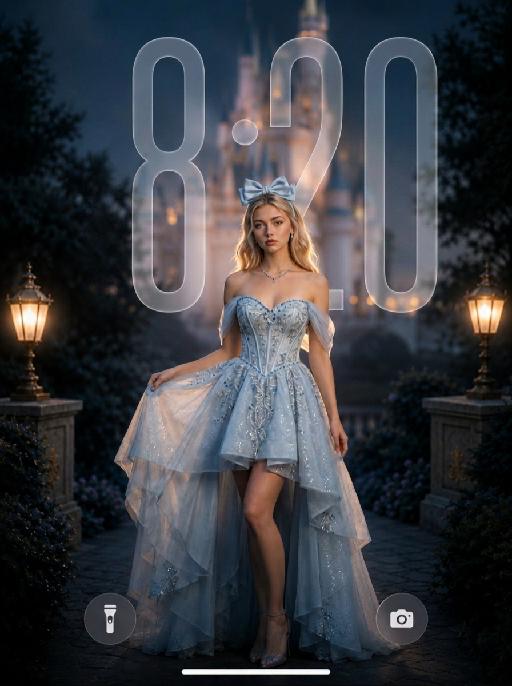
Starlit Princess AI effects generated image

Starlit Princess

" Use the uploaded image as the ONLY identity reference for the subject. Create a photorealistic dreamy cinematic fantasy fashion portrait of the same subject, closely matching the reference image in identity, composition, dress silhouette, lighting, soft-focus quality, color palette, and photographic texture. Strictly preserve the subject’s exact face, age, facial structure, skin tone, hairstyle, hair length, hair color, and overall recognizability. Do not replace the face with a generic beauty-model face. Keep natural facial proportions, realistic skin texture, and subtle professional retouching without plastic smoothing or excessive reshaping. Create this as a vertical 9:16 wallpaper composition. Frame the subject in a three-quarter body portrait from the head to below the knees. Position the subject slightly lower in the frame, anchored in the lower-middle area, with more clean negative space above the head. Keep generous open space in the upper portion of the image so the wallpaper can accommodate a phone clock area without the subject or major visual elements blocking it. Do not place the subject too high in the frame. The subject stands slightly right of center, with the body turned gently at a three-quarter angle and the face looking toward the camera. One hand lightly lifts the left side of the skirt, the other arm hangs naturally beside the body, and one leg is visible through the high-low opening. The posture should feel graceful, relaxed, elegant, and photogenic. Photographed with a full-frame camera and an 85mm portrait lens, using very shallow depth of field and a subtle 1/8 Black Pro-Mist diffusion filter. Keep the eyes and facial identity clear, while gently softening skin transitions, hair edges, fabric highlights, and bright details. The image should have visible soft-focus diffusion, creamy bokeh, subtle halation, soft highlight bloom, and a velvety dreamy finish. Do not make the image digitally blurry or smeared. The subject wears a luxurious icy-blue and silver couture fantasy gown with a structured off-the-shoulder corset bodice, sweetheart neckline, fitted waist, refined silver embroidery, blue crystal beadwork, delicate sequins, sheer tulle drapes around the upper arms, and an asymmetrical high-low layered skirt. The front is shorter and reveals one leg naturally, while the back and side layers flow longer. Use pale icy-blue, silver-white, and translucent organza with realistic folds, transparency, weight, and movement. The dress must remain bright icy blue, airy, dimensional, and expensive-looking, not dark gray, not a wedding gown, tutu, or cheap costume. Accessories include a large pale-blue satin bow headband, delicate silver-and-blue necklace, and small crystal earrings. No gloves, crown, tiara, or oversized jewelry. Place a large softly illuminated fantasy castle in the upper-center and upper-right background, but keep it softly blurred and atmospheric. Its towers and glowing amber windows remain recognizable but softened by optical blur, warm haze, and creamy bokeh. Dark trees, rocky terrain, and foliage frame the scene. Use deep brown, charcoal, muted navy, warm amber, and burnt-gold background tones. No bright blue sky, stars, moon, floating particles, or recognizable copyrighted castle design. LIGHTING — VERY IMPORTANT: Expose for the subject, not the dark background. The subject must be clearly brighter than the surroundings, approximately one stop brighter than the background. Use a large soft diffused key light from the front-left to fully illuminate the face, eyes, neck, shoulders, bodice, exposed leg, and foreground skirt. Add a gentle frontal fill light near the camera to open shadows under the eyes, chin, hair, and neckline. Both eyes must be clearly visible with soft catchlights. The face must look luminous, warm, and naturally dimensional, never dark, gray, or underexposed. Add a controlled warm amber rim light from behind and slightly above, tracing the hair, shoulders, arms, waist, and dress edges, as though coming from the glowing castle. Use subtle cool fill in the dress shadows to preserve its icy-blue color and fabric detail. Keep shadows soft and open. Add gentle bloom around castle lights, hair highlights, crystals, and dress edges, without creating an artificial glowing outline. Use cinematic blue-and-gold grading: icy blue and pale silver dress, warm amber and burnt-gold background, natural warm skin, slightly muted saturation, gentle contrast, bright skin midtones, lifted subject shadows, and a darker but detailed background. Avoid harsh contrast, crushed blacks, muddy skin, purple cast, oversaturated cyan, neon lighting, HDR, over-sharpening, excessive clarity, CGI texture, or heavy beauty filtering. Wallpaper composition rule: - leave clear breathing room above the subject - keep the upper area visually cleaner and less busy - avoid placing the subject’s head, bow, or bright castle details too close to the top edge - avoid major bright objects directly where a phone clock would usually appear - make the wallpaper feel balanced, elegant, and practical for a lockscreen background - the subject should remain the main focus, but the composition should still work comfortably as a wallpaper Overall mood: romantic, elegant, magical, luminous, refined, and dreamy. The dreamy effect must come from realistic lens diffusion, shallow depth of field, warm bokeh, atmospheric haze, and softly blooming highlights, while maintaining a real professional fashion-photography appearance. NEGATIVE: generic face, identity drift, dark subject, underexposed face, shadowed eyes, gray skin, muddy skin tone, dark dress, dull blue dress, subject placed too high, head too close to the top edge, cluttered upper background, blocked clock area, crushed shadows, harsh contrast, hard digital sharpness, excessive clarity, sharp castle background, plastic skin, doll face, cartoon, anime, illustration, CGI, 3D render, cheap costume, tutu, wedding gown, feathers, gloves, crown, tiara, floating particles, bright blue sky, purple cast, neon light, harsh flash, distorted hands, extra fingers, duplicate limbs, malformed skirt, text, logo, watermark, UI "


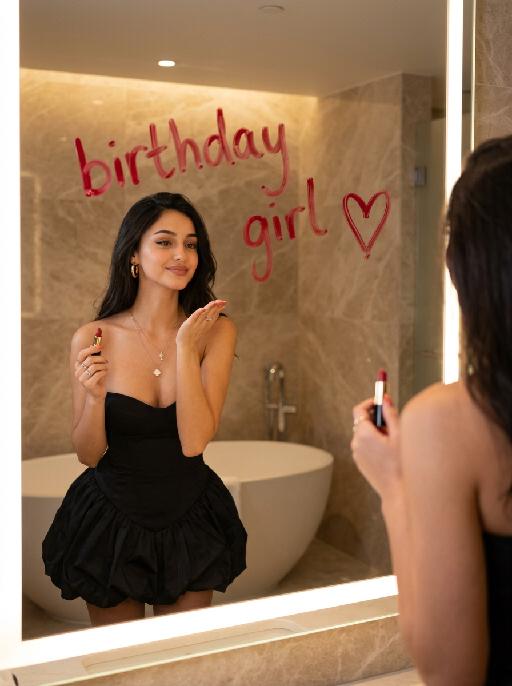
Image Quality Restoration

Retouch this image. Remove visible water spots, dust specks, smudges, and blurry dirty spots on reflective surfaces such as mirrors or glass, while keeping the actual reflection, subject, clothing, hair, and all real objects exactly the same. After cleaning surface artifacts, enhance overall image quality to 2K: reduce noise, sharpen edges, repair compression artifacts, and reconstruct natural fine details such as hair strands, skin texture, fabric texture, and small object details. Do not change the person's appearance, expression, identity, or pose. Do not add, remove, or alter any real objects. Do not change the overall colors, lighting style, or atmosphere. Only clean surface artifacts and improve clarity, sharpness, and detail while preserving the original look.

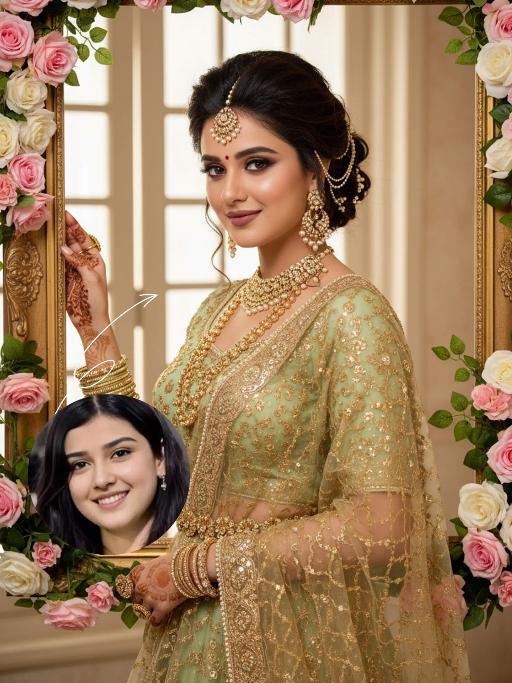
Blossom Queen AI effects generated image

Blossom Queen

"The identity of the uploaded portrait is strictly preserved (retaining facial contours, authentic Indian skin tone, hairstyle and age). This is a bust portrait with a 3:4 aspect ratio, featuring a stunning Indian bride with exquisitely delicate makeup: deep defined eye makeup paired with a matte bean paste red lip, and a red crystal bindi adorned on her forehead. Her hair is styled into a vintage voluminous updo dotted with golden beading, and an ornate maang tikka inlaid with pearls and micro-diamonds sits atop her head. She is dressed in a fresh light-luxury teal Lehenga Choli: the blouse is a slim-fit short-sleeve style fully embellished with intricate golden heavy hand-embroidery and tiny crystal accents, edged with a delicate pearl trim. A golden tulle dupatta is draped over her shoulders and back, emanating a soft inherent luster; a matching golden carved waist chain cinches her waist. Around her neck, she wears layered gold beaded necklaces, with dangling openwork gold earrings at her ears, and more than ten layers of golden bangles and rings adorning her hands. She strikes an elegant pose, lifting one hand to gently brush the edge of a golden photo frame, her eyes looking softly at the camera. The backdrop features a large vintage carved golden photo frame encircled by pink-and-white gradient roses and fresh green vines, set against a soft indoor space where natural light filtering through the window lattice creates a bright and fresh atmosphere. Soft natural lighting is adopted: warm-toned light illuminates the bride’s face and attire, highlighting the luster of the embroidery and the translucency of the tulle dupatta, crafting an overall romantic and fresh ambiance. The style is a light-luxury romantic Indian bridal portrait, boasting ultra-high definition and delicate details, fresh and soft hues, and rich, well-rounded textures that perfectly capture the dreamy and elegant atmosphere."

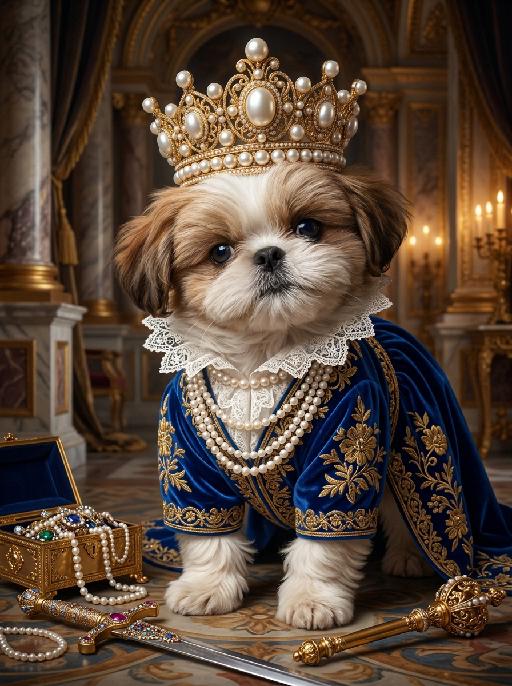
Glory Pearls AI effects generated image

Glory Pearls

"Ultra-high-definition 8K resolution photorealistic portrait of the uploaded animal (pet) — whose species, fur texture, facial features, ears, tail, and all animal characteristics remain completely unchanged — standing naturally on all fours in its own species-appropriate pose, facing forward with a proud and regal expression. The uploaded subject wears an opulent deep royal blue robe embroidered all over with intricate golden floral patterns, layered white lace collar ruffles cascading at the neck, and multiple strands of a lustrous pearl necklace. Upon its head sits a magnificent golden pearl crown adorned with rows of large lustrous white pearls set in intricate golden filigree frames, with a grand central pearl centerpiece and delicate gold detailing throughout, radiating elegance and grandeur. Arranged around the subject on the floor are regal royal props: an ornate gilded jewelry box overflowing with gems and pearls, a gleaming jewel-encrusted sword with a golden hilt, and an elaborate golden scepter adorned with precious stones, all catching the warm candlelight and adding to the opulent royal atmosphere. Its expression is solemn, commanding, and regal — as if surveying its own kingdom. The overall presence is that of a noble figure from a grand royal court. The background features a grand baroque royal court interior with marble columns, rich velvet drapery, gilded architectural details, and warm candlelit ambient light. Dramatic chiaroscuro lighting with soft warm key light illuminating the subject's face and fur, rich and saturated color palette. Ultra-realistic fur texture with individual hair strands visible, sharp focus on the face and crown details, shallow depth of field, cinematic lighting, masterpiece."

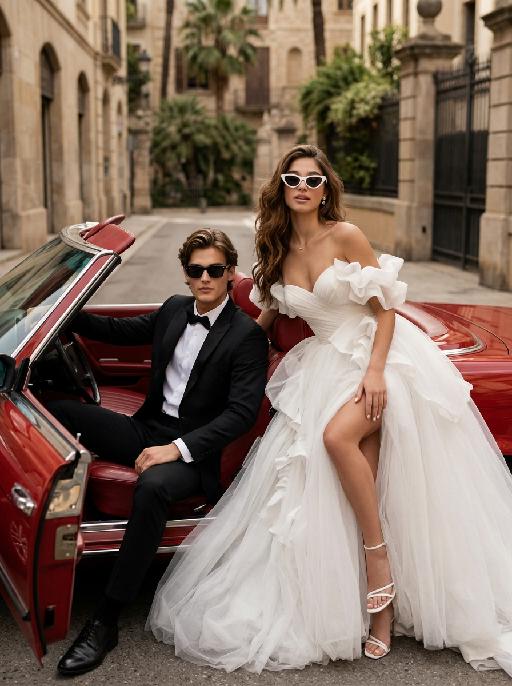
Bridal Cruise AI effects generated image

Bridal Cruise

"Create a photorealistic cinematic wedding portrait of the two subjects from the uploaded image, preserving their exact faces, ages, facial features, skin tones, hairstyles, and overall likeness as accurately as possible. Transform the two subjects into a stylish bride and groom posing in and beside a vintage red convertible car after their wedding. The scene should feel like a luxurious post-wedding street fashion editorial, romantic, confident, glamorous, and slightly rebellious. The groom sits on the left side inside the open-top vintage convertible car, wearing a black tuxedo and black sunglasses. He leans back casually in the driver’s seat or front seat, one arm resting naturally on the car door or steering wheel, with a calm, cool, confident expression. His posture should feel relaxed, elegant, and masculine, like a high-end fashion wedding photo. The bride sits or reclines on the right side beside the groom, leaning back against the red leather car seat with a confident and glamorous pose. She wears white cat-eye sunglasses and looks toward the camera with a cool, romantic, slightly playful expression. Her body language should feel relaxed, stylish, luxurious, and confident, as if enjoying a glamorous wedding getaway. Bride outfit: the bride wears a dramatic white wedding gown inspired by the reference image. The dress has a strapless or sweetheart neckline, sculptural ruffle details around the bodice or sleeves, layered soft tulle, a voluminous flowing skirt, and a high slit that subtly reveals one leg. The dress should look fashionable, romantic, luxurious, and editorial. The fabric should have realistic soft tulle texture, natural folds, and elegant volume. The bride wears white strappy high-heeled sandals, subtle bridal earrings, and a delicate pearl or diamond necklace. A soft white bridal veil may flow naturally behind her or blend into the dress, without covering her face. Groom outfit: the groom wears a classic black tuxedo, fitted and elegant, with a clean white dress shirt, black bow tie, black dress shoes, and stylish black sunglasses. The tuxedo should look sharp, formal, minimal, and high-end. Do not use a casual suit, colorful suit, necktie, or open-collar shirt. Car and background: a vintage red convertible car with a classic luxury feel, open roof, polished red exterior, red or dark leather interior, realistic steering wheel, chrome details, and an elegant retro design. The couple is parked on a quiet European-style city street or upscale residential boulevard. The background includes soft greenery, iron gates, warm stone buildings, palm trees or street trees, and sunlit urban details, softly blurred with shallow depth of field. No other people should appear in the image. Lighting and color: warm daylight wedding editorial photography, natural sunlight, soft shadows, realistic skin texture, subtle highlights on sunglasses, tuxedo, wedding dress, car paint, and chrome details. Use an elegant low-to-medium saturation color palette with warm beige tones, soft ivory whites, deep black tuxedo contrast, muted red car tones, gentle green background, and refined cinematic color grading. The image should feel expensive, fashionable, romantic, and timeless, avoiding overly vivid or neon colors. Composition: vertical portrait, medium-full or full-body framing. The couple and the red convertible car should be the central focus. The groom is on the left inside the car, the bride is on the right, leaning elegantly with her white wedding dress flowing across the car seat and lower part of the frame. The bride’s legs and white strappy heels may be visible naturally, but the pose should remain elegant and tasteful. Both faces should be sharp, recognizable, and clearly visible behind sunglasses. The overall mood should feel like a glamorous “just married getaway” moment. Ultra realistic photography, high-end wedding editorial style, luxury fashion photography, realistic car interior, realistic fabric texture, realistic tulle layers, realistic sunglasses reflections, natural facial details, soft film grain, professional camera look, high detail, cinematic muted color grading, stylish post-wedding atmosphere. Negative prompt: extra people, background people, crowd, wedding guests, driver, duplicated bride, duplicated groom, distorted faces, changed identity, inaccurate likeness, deformed hands, extra fingers, missing fingers, fused fingers, broken fingers, unnatural arms, stiff pose, awkward sitting pose, cheap modern car, closed roof car, wrong car color, missing sunglasses, sunglasses covering the entire face, missing wedding dress, wrong wedding dress, plain casual dress, colorful wedding dress, casual groom outfit, necktie instead of bow tie, open-collar shirt, plastic skin, over-smoothed face, fake CGI look, text, logo, watermark, title text, low resolution, blurry face, oversaturated colors, vivid bright colors, neon colors, harsh contrast, black and white, monochrome, grayscale."

Pet Samba

"Medium shot close-up: In the uploaded photo (while maintaining the facial features, gender, age and species of the person in the uploaded image, and setting the background as a beach scene in Brazil), the main figure presents a super cute anthropomorphic standing posture (with the front two paws raised and the back two legs standing). Accessories: Beach attire in the style of the Brazilian Carnival: Wearing a cute bikini top and a short skirt, with a colorful feather headdress on the head (green and yellow), and a garland around the neck (yellow hibiscus and white flowers); Scene: The scene of a tropical Brazilian beach: - Underfoot is the golden fine sand, the azure waves gently lapping against the shore. In the distance, the palm trees sway in the gentle breeze. Soft white clouds float in the blue sky. In the warm afternoon, the golden sunlight gently falls on the river otters and the beach. Style and lighting: Vivid and cheerful color combination (main colors are yellow, green, blue, and orange), 8K high resolution, highlighting the main subject, shallow depth of field to blur the background of the beach; Composition: Medium shot. The main figure is centered in the frame, wearing small slippers on their feet, which match the color scheme of the clothing."

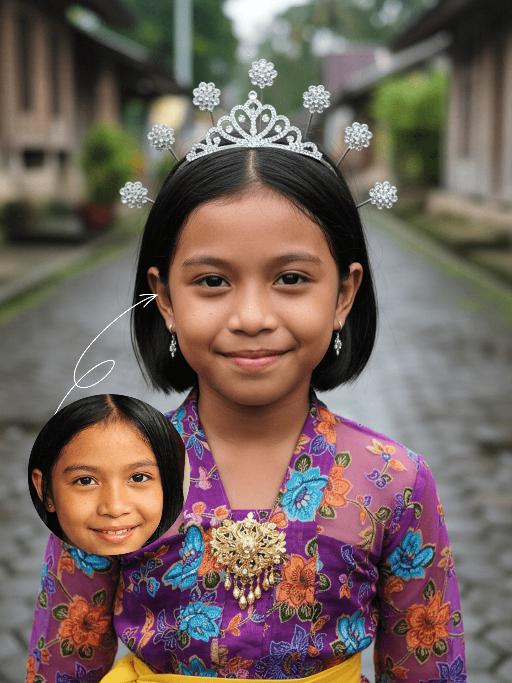
Princess AI effects generated image

Princess

Strictly lock the facial features of the uploaded portrait (preserve facial contours, native Indonesian skin tone, hairstyle and age). Extreme close-up composition, maximum frame filling, the subject’s face and upper body completely fill the vertical frame with zero negative space above the head, seamless top edge; the crown of the head is slightly cropped to maximize the facial close-up. Strictly lock the facial features of the uploaded portrait (preserve facial contours, native Indonesian skin tone, hairstyle and age). Tight Bust Shot, hyper-realistic style, 4K ultra-high definition, soft diffused natural daylight (post-rain outdoor lighting), authentic Indonesian rural cultural festival atmosphere | An 8-10 year old Indonesian girl, facing the camera with a sweet and gentle smile, wearing a vibrant purple traditional Indonesian children’s top with blue, orange and green floral patterns, paired with a bright yellow fabric waist sash (only the upper edge visible), an exquisite gold embroidered brooch at the neckline, a sparkling silver mini tiara on her head, small delicate silver drop earrings, and her hair styled up with metallic feather-shaped hair ornaments. She stands on a wet dark gray stone-paved alley in a traditional Indonesian village, with the background (traditional wooden houses and lush tropical greenery) rendered with extreme bokeh blur to draw the visual focus entirely to her oversized facial close-up. Focus on her vivid and warm facial features, the rich texture of the traditional fabric, and the fresh, natural colors of the frame

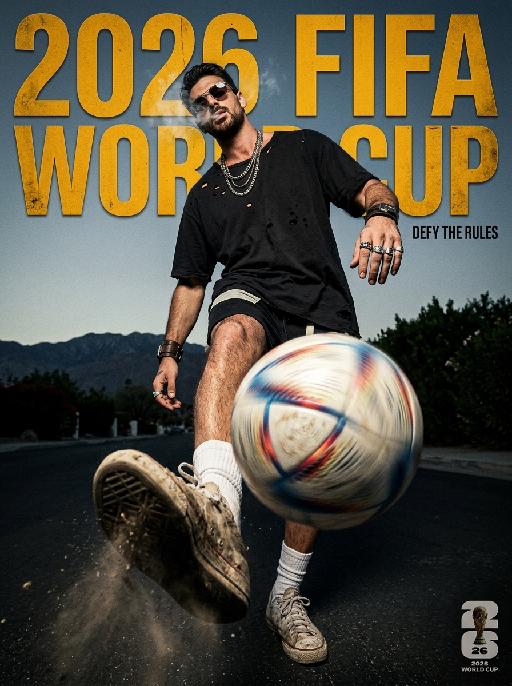
Elite Game AI effects generated image

Elite Game

" Horizontal 2026 FIFA World Cup dark high street poster, American rebellious street fashion photography, 8K UHD, heavy 35mm film grain, cinematic high contrast, dark tone color scheme: deep charcoal black, aged amber yellow, grayish sky blue. Shot with ultra-wide fisheye lens at macro ground worm's-eye view, extreme foreground compression, the sneaker and spinning football occupy 70% of the lower frame with exaggerated perspective, figure scaled down to highlight layered sense, strong rebellious visual tension. ### Core Figure (Gender-neutral, 100% retain original appearance, exotic rebellious swagger) All original facial features, skin tone and hairstyle remain unchanged, no gender modifiers. - Posture & Movement: Rebellious relaxed juggling posture, leg raised dynamically toward the camera, toe supporting a spinning football with intense radial blur and obvious light trails. Shoulders slouched severely, torso twisted in an exaggerated angle, head tilted back and sideways, eyes cold and provocative under the low-slid sunglasses. Thin wispy smoke lingers around the face to create a hazy exotic atmosphere. One arm hangs down loosely with relaxed wrist, the other arm propped casually behind the body, the whole posture lazy yet aggressive. - Outfit & Accessories (Dark niche American style): Oversized black heavy-wash distressed tee with intentional broken holes, thick fabric texture. Slim asymmetric black street shorts. Slouched white socks with faded logo. Matching dark style accessories: layered thick metal necklaces, irregular retro metal rings, rugged woven wrist cuffs, dark and niche styling with strong exotic characteristics. - Footwear & Football: Vintage sneakers with thick dirt, mud and deep scuff marks, retro worn-out texture. Football spins rapidly, with splashed fine grass and dust around it, highlighting real street sports sense. ### Background & Lighting Outdoor bright scene, grayish blue sky, distant mountain landscape with dark green shrubs. Hard and soft combined side backlight, create sharp light and shadow segmentation, strengthen cold and rebellious temperament. Background deep bokeh blur, separate foreground and background completely. ### Text Layout (American dislocation deconstruction, metal distressed texture) Font style: European and American street metal worn sans-serif font, scratch and fade texture, perspective adapted to fisheye lens, dislocation layout, no repeated words, reasonable blank layout: 1. Main title ""2026 FIFA WORLD CUP"": Dislocated placement on upper frame, part covered by the figure's body and legs, amber yellow metal texture font. 2. Slogan ""DEFY THE RULES"": Placed on the right gap between figure and frame, tiny compact font, echo the rebellious style. 3. 2026 World Cup official logo: Placed at bottom right corner, mini size, unified dark tone style. ### Technical Constraints No text distortion or AI artifacts, clear layering, extreme perspective restored, overall dark American high street style, strong exotic and rebellious personality "

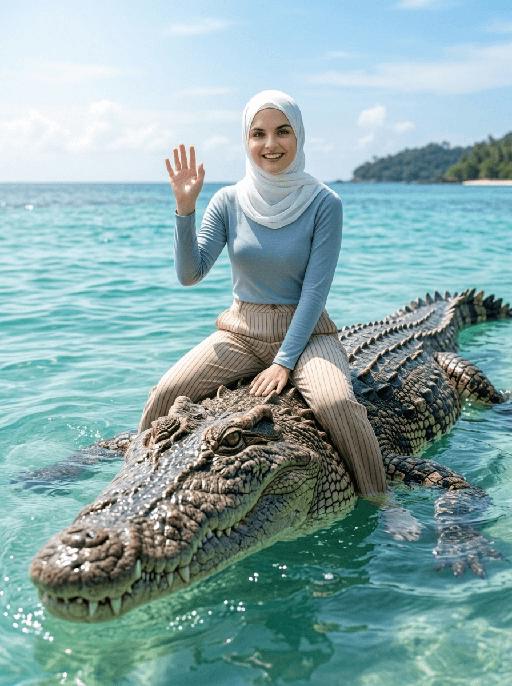
Crocodile Voyage AI effects generated image

Crocodile Voyage

"[Strictly preserve the exact same subjects, same species, same faces, original appearance features, and the full style of clothing and costume details from the reference images unchanged;] photorealistic photograph, the subject from the reference image is straddling and riding on the back of a massive, realistic saltwater crocodile floating in crystal clear tropical turquoise sea water, legs naturally parted to sit across the crocodile body, and waving cheerfully at the camera. If the figure is female, she must wear long-sleeve top, long trousers and white sneakers. The background is a bright blue sky with soft white clouds, a distant lush tropical island shrouded in light mist, bright natural sunlight, sharp focus, ultra-detailed crocodile scales, realistic water reflections, 4K resolution, cinematic lighting, no deformities, consistent lighting on the subject matching the environment."

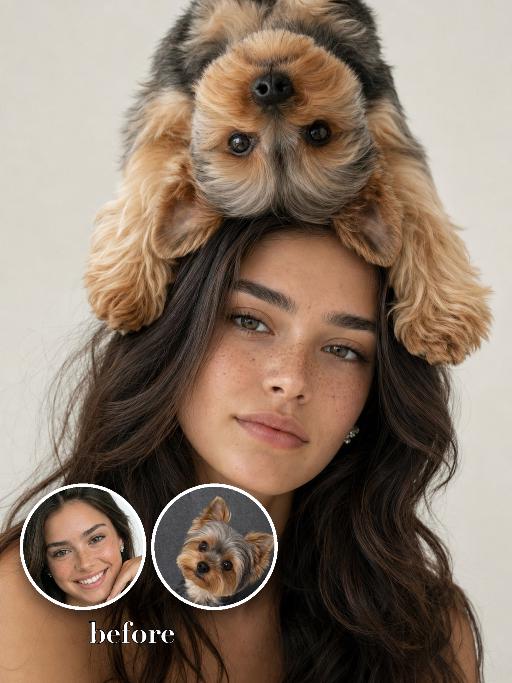
Pet On Head AI effects generated image

Pet On Head

Use the two uploaded images as the only identity references for the two main subjects. Create a photorealistic fashion studio portrait of exactly two subjects: the uploaded young woman the uploaded small dog The woman faces the camera directly in a vertical close portrait composition. She has long hair and a bright, happy, naturally cheerful expression, with a soft smile or joyful smile. Her mood should feel lively, warm, and charming rather than calm or neutral. The small dog is positioned playfully on top of the woman’s head, either upside down or draped across the top of her head in a surreal but believable way. The dog’s paws, fluffy fur, and body frame the woman’s hair and forehead, creating a whimsical fashion portrait. The dog should feel naturally balanced and closely connected to the woman, not floating or detached. The composition should be tight and stylish, with both subjects filling most of the frame. The woman remains the main focus, while the dog acts as a playful surreal fashion element. Keep both subjects fully separate, clearly recognizable, and anatomically believable. Strictly preserve the identity and recognizable features of each uploaded subject. For the human subject, preserve facial identity, hair color, hairstyle, skin tone, facial structure, and general age. For the dog, preserve species, breed, coat color, fur texture, markings, facial structure, and recognizable features. Do not preserve the original uploaded pose or expression. Actively change the pose, expression, gaze direction, and interaction to match this joyful fashion portrait concept. Use a bright, clean studio background with soft even lighting, crisp photorealistic detail, realistic skin and fur texture, premium fashion photography quality, and a surreal but realistic mood.

Missing You AI effects generated image

Missing You

Cute emoticon stickers, with the image shown in the uploaded picture as the main pattern (with the facial features remaining unchanged), have big, round and moist eyes, with tear-drop-shaped marks at the corners, presenting a sad and longing expression, containing gentle nostalgic emotions, with innocent and fragile expressions, creating a cute contrast effect. It uses a warm color combination - soft cream yellow, peach pink and light orange, paired with a simple white solid background, with a soft and warm halo effect. The circular Portuguese text "Saudade de você" is presented in a cute round hand-drawn font, creating a warm atmosphere. The light is soft, with a real photography style, delicate and soft hair textures, creating a soothing and warm atmosphere. The clear white irregular border, without any unnecessary clutter elements, has a Brazilian online sticker style, presented in ultra-high-definition 8K format.

Load more

Next-Gen Multi-Model AI Video Architecture

Vivago AI isn't just one engine—it’s a unified hub for the world’s most advanced video AI. Whether you need cinematic realism or high-speed social content, we provide the right model for your creative vision.

Free Generate

Beauty and Dolphins

Vacation Time

Stellar Tear

Fish Tank Supervisor

Cinematic Quality & Precision Control

Enables 4K resolution with multi-lens motion control, generating delicate scene via text prompts for customized cinematography.​

TRY NOW

Dynamic AV Sync

Auto-generates original audio to avoid copyright issues. Build 3D immersive environments through layered sound design automatically.

TRY NOW

OpenAI Sora 2

​Advanced visual storytelling with unparalleled physics and consistency.

TRY NOW

Kling v2.6 Pro

Industry-leading cinematic image animation and motion control.

TRY NOW

Google Veo 3 & 3.1

Ultra-fast generation with enhanced realism for creative workflows.

TRY NOW

Vivago AI 2.0

Our proprietary model optimized for efficiency, speed, and cost-effective generation.

TRY NOW

Users' Voice

We listen carefully to the opinions of every user.
Free Generate
Contact Us
I tried the Lip Sync feature inside Vivago.ai’s AI Video Generator for my educational podcast, and the results were stunning! The avatar's lip movements perfectly matched my audio recording, creating a professional AI-generated video without complex editing. Compared with tools like OpenAI Sora 2 and Google Veo 3.1, Vivago Image-to-Video delivers fast, studio-quality results online. It saved me hours of post-production work.
ElenaM (Spain)
Vivago’s Image-to-Video AI transformed my marketing workflow. I uploaded a product image and described the launch scene in text, and it generated a 10-second cinematic AI video with background music and dynamic visuals. The output quality rivals Kling v2.6 Pro and Google Veo 3 Fast. It’s now my go-to AI video generator for social media ads and product campaigns.
KenjiT (Japan)
As a digital artist, I use Vivago.ai 2.0 daily for Image-to-Image and AI Image-to-Video creation. The e-book covers and animated visuals I generate for clients look cinematic and professional. Unlike many standalone AI tools, Vivago integrates multiple leading models into one platform, making it easier to create copyright-safe AI images and videos for publishing.
ChenL (China)
I tried the Lip Sync feature inside Vivago.ai’s AI Video Generator for my educational podcast, and the results were stunning! The avatar's lip movements perfectly matched my audio recording, creating a professional AI-generated video without complex editing. Compared with tools like OpenAI Sora 2 and Google Veo 3.1, Vivago Image-to-Video delivers fast, studio-quality results online. It saved me hours of post-production work.
ElenaM (Spain)
Vivago’s Image-to-Video AI transformed my marketing workflow. I uploaded a product image and described the launch scene in text, and it generated a 10-second cinematic AI video with background music and dynamic visuals. The output quality rivals Kling v2.6 Pro and Google Veo 3 Fast. It’s now my go-to AI video generator for social media ads and product campaigns.
KenjiT (Japan)
As a digital artist, I use Vivago.ai 2.0 daily for Image-to-Image and AI Image-to-Video creation. The e-book covers and animated visuals I generate for clients look cinematic and professional. Unlike many standalone AI tools, Vivago integrates multiple leading models into one platform, making it easier to create copyright-safe AI images and videos for publishing.
ChenL (China)
I absolutely love Vivago’s AI Image-to-Video Generator. As a travel blogger, static images often fail to capture real atmosphere, but Vivago helps me turn photos into vivid cinematic AI videos with motion effects. It feels comparable to OpenAI Sora 2 and Google Veo 3.1, but more accessible and faster for creators who need high-quality AI videos online.
LiamK (Australia)
I tried the Lip Sync feature inside Vivago.ai’s AI Video Generator for my educational podcast, and the results were stunning! The avatar's lip movements perfectly matched my audio recording, creating a professional AI-generated video without complex editing. Compared with tools like OpenAI Sora 2 and Google Veo 3.1, Vivago Image-to-Video delivers fast, studio-quality results online. It saved me hours of post-production work.
ElenaM (Spain)
Vivago’s Image-to-Video AI transformed my marketing workflow. I uploaded a product image and described the launch scene in text, and it generated a 10-second cinematic AI video with background music and dynamic visuals. The output quality rivals Kling v2.6 Pro and Google Veo 3 Fast. It’s now my go-to AI video generator for social media ads and product campaigns.
KenjiT (Japan)
As a digital artist, I use Vivago.ai 2.0 daily for Image-to-Image and AI Image-to-Video creation. The e-book covers and animated visuals I generate for clients look cinematic and professional. Unlike many standalone AI tools, Vivago integrates multiple leading models into one platform, making it easier to create copyright-safe AI images and videos for publishing.
ChenL (China)
I absolutely love Vivago’s AI Image-to-Video Generator. As a travel blogger, static images often fail to capture real atmosphere, but Vivago helps me turn photos into vivid cinematic AI videos with motion effects. It feels comparable to OpenAI Sora 2 and Google Veo 3.1, but more accessible and faster for creators who need high-quality AI videos online.
LiamK (Australia)
Using Vivago.ai’s Image-to-Video AI has greatly enhanced my classroom teaching. I transform textbook notes into historical AI videos with cinematic filters and dynamic animations. Compared with tools like Kling v2.6 Pro and Google Veo 3 Fast, Vivago offers faster generation and easier parameter control for educators who need reliable AI video creation.
RajivG (India)
I frequently create AI videos on Vivago and publish them on TikTok and YouTube Shorts. The AI video templates and trending content ideas help me produce viral-ready clips quickly. With Vivago’s integrated models—including advanced video engines similar to OpenAI Sora 2—I can generate anime-style and cinematic social media videos that drive high engagement.
MarieJ (Spain)
What attracts me most about Vivago.ai is not only the powerful AI Video Generator but also the active AIGC creator community. It combines AI Image-to-Video, Text-to-Video, and leading model integrations like Google Veo 3.1 into one creative platform.
TomW (India)
At first, I was hesitant about using AI video tools. But after trying Vivago Image-to-Video, I realized how easy it is to create professional AI-generated videos online. I just upload an image, add a short prompt, and adjust a few settings. The results are cinematic and copyright-safe, which is essential for commercial projects.
HectorC (Mexico)
Using Vivago.ai’s Image-to-Video AI has greatly enhanced my classroom teaching. I transform textbook notes into historical AI videos with cinematic filters and dynamic animations. Compared with tools like Kling v2.6 Pro and Google Veo 3 Fast, Vivago offers faster generation and easier parameter control for educators who need reliable AI video creation.
RajivG (India)
I frequently create AI videos on Vivago and publish them on TikTok and YouTube Shorts. The AI video templates and trending content ideas help me produce viral-ready clips quickly. With Vivago’s integrated models—including advanced video engines similar to OpenAI Sora 2—I can generate anime-style and cinematic social media videos that drive high engagement.
MarieJ (Spain)
What attracts me most about Vivago.ai is not only the powerful AI Video Generator but also the active AIGC creator community. It combines AI Image-to-Video, Text-to-Video, and leading model integrations like Google Veo 3.1 into one creative platform.
TomW (India)
At first, I was hesitant about using AI video tools. But after trying Vivago Image-to-Video, I realized how easy it is to create professional AI-generated videos online. I just upload an image, add a short prompt, and adjust a few settings. The results are cinematic and copyright-safe, which is essential for commercial projects.
HectorC (Mexico)