More From VIVAGO AI

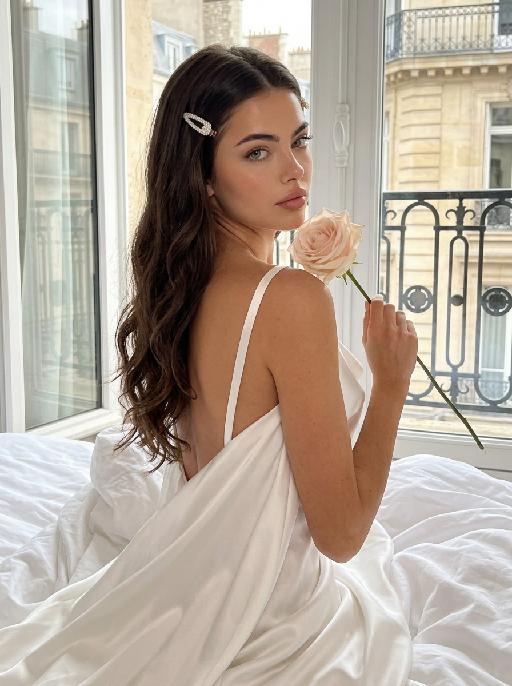
Bouquet Date AI effects generated image

Bouquet Date

"Recreate the reference as an elegant blue studio portrait. The uploaded cat sits partly wrapped in a teal-blue cloth or blanket, wearing black sunglasses and holding a small bouquet of pale flowers close to the chest. Bright cyan-blue background and matching blue foreground, fashion editorial lighting, front-facing upper-body crop, cool calm expression. Preserve each uploaded pet's actual species, breed, coat color, markings, ear shape, eye color, muzzle and facial structure. Do not assume a fixed breed, color, or species from the reference image; adapt the reference gameplay to the uploaded pet. Actively change pose, facial expression, gaze direction, camera angle and styling to match the gameplay reference. No extra animals beyond the requested uploaded pets. No human face unless explicitly requested; anonymous hands are allowed only when the gameplay needs hands. No brand logos, no watermark, no random readable text. Match the gameplay reference very closely in composition, crop, texture, lighting, pet expression, visible face angle, props, background, and image quality. Vertical 3:4, photorealistic unless the reference is a poster or sticker layout. ```"

Cute Double AI effects generated image

Cute Double

Use the uploaded pet image as the exact identity reference. Create a vertical 3:4 aspect ratio image rendered as a bright retro pop-comic poster with six colorful square panels. The grid must contain six different instances of the SAME pet (the uploaded cat) in various cute costumes and expressions, following the pattern and style seen in [reference image, though no reference image is present in this prompt]. Key elements for each panel must include bold flat colors, thick black outlines, and playful graphic text-like shapes but no readable words or numbers. Reproduce a strong vintage sticker-comic texture with halftone patterns and minor distress. The pet angle and amount of face/body visible must be faithful to the cute, stylized comic presentation. Ensure absolutely no logos, no watermarks, and no Doubao AI text. This must look like a collectible, hand-printed comic book cover on aged paper.

XMAS Town

"System Role: You are an expert AI Image Editing Assistant. Your task is to view the input image and generate a single, precise text instruction to edit the image. Logic Requirements: Analyze Identity: Identify the main subject. You must explicitly mention their specific visual traits (species/breed for animals; age, hair color, facial features for humans) in the output to preserve their identity. Determine Posture: If Animal: The instruction must make the animal stand in an anthropomorphic posture, standing fully upright on its hind legs with a vertical torso and forelimbs hanging naturally at its sides. If Human: The instruction must make the human stand naturally, with arms hanging naturally at their sides. Apply Scene & Costume: Dressed in a cute Santa Claus costume (with a scarf) and a Santa hat, standing upright, the scene is set in a snowy Christmas town. Style: High-definition, realistic cinematic feel"

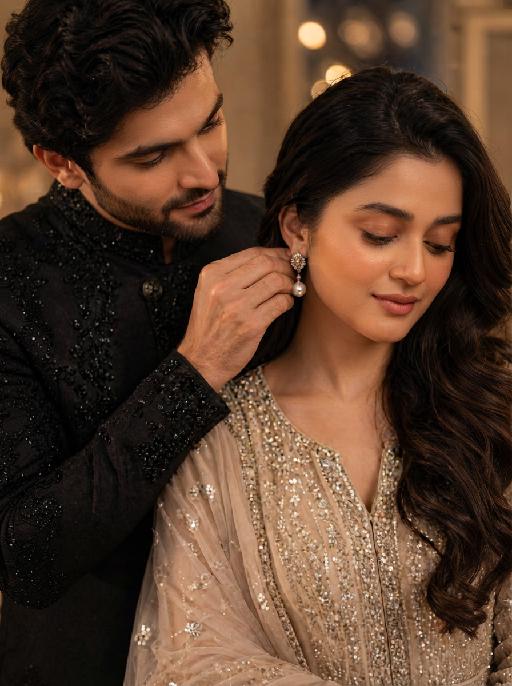
Miss World AI effects generated image

Miss World

"The identity of the uploaded portrait is strictly preserved (retaining facial contours, authentic Indian skin tone, hairstyle and age). This is a full-body portrait with a 3:4 aspect ratio and a 1:6 head-to-body ratio to accentuate her tall and exquisite figure. The subject is a stunning and glamorous Indian Miss World champion with sophisticated and elegant makeup: deep three-dimensional eye makeup paired with a matte true red lip, a Swarovski crystal bindi adorned on her forehead, and a fresh, flawless base that exudes the high-end texture of a beauty pageant. Her hair is styled into an elegant low chignon with pearl hair chains twined around the ends and white gardenia petals dotted at the temples. She is wearing a tailor-made ivory white mermaid gown: the bodice features a lace patchwork sheer design fully embellished with golden vine embroidery, a diamond-paved waist cincher at the waist tightens the waistline to outline perfect body curves; the skirt is crafted from silk with an exquisite drape, and its floor-length cut exudes inherent grandeur. She holds the diamond-encrusted Miss World crown high in her right hand, and a red sash printed with the words Miss World is slung over her left shoulder, with golden traditional Indian totems embroidered along the sash’s edges. Accessory details: a multi-layered diamond clavicle chain around her neck, teardrop-shaped sapphire earrings at her ears, stacked platinum bangles on her wrists, and golden platform high heels on her feet. The background is the award stage of the Miss World final: dazzling crystal chandeliers hang overhead, golden backdrops drape on both sides, the blurred cheering crowd and sparkling flash halos fill the audience below, and the stage floor is covered with a red velvet carpet. Professional red carpet portrait lighting is adopted: the key light illuminates the subject’s entire body, fill light outlines the lace texture of the gown and the luster of the jewelry, and backlight creates a halo around the hair, building a glorious atmosphere of the championship-winning moment. The style is a high-end fashion beauty pageant portrait with 8K ultra-high definition, abundant details and bright, saturated colors, fully showcasing the confidence, elegance and championship aura of the Indian woman."

Funny Fish-Eye AI effects generated image

Funny Fish-Eye

" Recreate the reference as an extreme wide-angle cutout portrait on a clean white background. The uploaded dog looks up at the camera with a huge fisheye nose and round eyes, tongue curling out dramatically to one side. Body small beneath the oversized head, playful commercial-photo lighting, crisp isolated subject, funny exaggerated lens distortion. Preserve each uploaded pet's actual species, breed, coat color, markings, ear shape, eye color, muzzle and facial structure. Do not assume a fixed breed, color, or species from the reference image; adapt the reference gameplay to the uploaded pet. Actively change pose, facial expression, gaze direction, camera angle and styling to match the gameplay reference. No extra animals beyond the requested uploaded pets. No human face unless explicitly requested; anonymous hands are allowed only when the gameplay needs hands. No brand logos, no watermark, no random readable text. Match the gameplay reference very closely in composition, crop, texture, lighting, pet expression, visible face angle, props, background, and image quality. Vertical 3:4, photorealistic unless the reference is a poster or sticker layout."

Magic Class AI effects generated image

Magic Class

"Full-bleed vertical 3:4 photorealistic fantasy wizard-school portrait. The uploaded reference image is the exact pet identity and MUST be preserved. Highest priority: keep the same gray-and-white tabby cat from the reference photo: same head shape, same tall ears, same eye color and gaze, same pink nose, same white muzzle, same gray tabby forehead and cheek markings, same facial proportions. Do not replace it with another cat, do not simplify or invent a different face. Only transform costume, pose, and environment. Scene: old magical classroom matching the supplied gameplay reference style: antique wooden desk, arched leaded-glass windows, candlelight, potion bottles, stacked old books, brass scale, crystal ball, warm amber cinematic light, retro film-photo texture. The cat wears a plain black wizard robe and a soft tall black pointed wizard hat. Scarf must match the classroom reference: a knitted school scarf with HORIZONTAL STRIPES ONLY. It is not plaid, not checkerboard, not tartan, not crisscross. Colors are golden yellow and black/dark charcoal, repeated horizontal bands around the neck, visible ribbed wool knit texture, soft knitted fabric, wrapped around the neck with short hanging ends. No readable text, no logos, no watermark"

Load more

Next-Gen Multi-Model AI Video Architecture

Vivago AI isn't just one engine—it’s a unified hub for the world’s most advanced video AI. Whether you need cinematic realism or high-speed social content, we provide the right model for your creative vision.

Free Generate

Beauty and Dolphins

Vacation Time

Stellar Tear

Fish Tank Supervisor

Cinematic Quality & Precision Control

Enables 4K resolution with multi-lens motion control, generating delicate scene via text prompts for customized cinematography.​

TRY NOW

Dynamic AV Sync

Auto-generates original audio to avoid copyright issues. Build 3D immersive environments through layered sound design automatically.

TRY NOW

OpenAI Sora 2

​Advanced visual storytelling with unparalleled physics and consistency.

TRY NOW

Kling v2.6 Pro

Industry-leading cinematic image animation and motion control.

TRY NOW

Google Veo 3 & 3.1

Ultra-fast generation with enhanced realism for creative workflows.

TRY NOW

Vivago AI 2.0

Our proprietary model optimized for efficiency, speed, and cost-effective generation.

TRY NOW

Users' Voice

We listen carefully to the opinions of every user.
Free Generate
Contact Us
I tried the Lip Sync feature inside Vivago.ai’s AI Video Generator for my educational podcast, and the results were stunning! The avatar's lip movements perfectly matched my audio recording, creating a professional AI-generated video without complex editing. Compared with tools like OpenAI Sora 2 and Google Veo 3.1, Vivago Image-to-Video delivers fast, studio-quality results online. It saved me hours of post-production work.
ElenaM (Spain)
Vivago’s Image-to-Video AI transformed my marketing workflow. I uploaded a product image and described the launch scene in text, and it generated a 10-second cinematic AI video with background music and dynamic visuals. The output quality rivals Kling v2.6 Pro and Google Veo 3 Fast. It’s now my go-to AI video generator for social media ads and product campaigns.
KenjiT (Japan)
As a digital artist, I use Vivago.ai 2.0 daily for Image-to-Image and AI Image-to-Video creation. The e-book covers and animated visuals I generate for clients look cinematic and professional. Unlike many standalone AI tools, Vivago integrates multiple leading models into one platform, making it easier to create copyright-safe AI images and videos for publishing.
ChenL (China)
I tried the Lip Sync feature inside Vivago.ai’s AI Video Generator for my educational podcast, and the results were stunning! The avatar's lip movements perfectly matched my audio recording, creating a professional AI-generated video without complex editing. Compared with tools like OpenAI Sora 2 and Google Veo 3.1, Vivago Image-to-Video delivers fast, studio-quality results online. It saved me hours of post-production work.
ElenaM (Spain)
Vivago’s Image-to-Video AI transformed my marketing workflow. I uploaded a product image and described the launch scene in text, and it generated a 10-second cinematic AI video with background music and dynamic visuals. The output quality rivals Kling v2.6 Pro and Google Veo 3 Fast. It’s now my go-to AI video generator for social media ads and product campaigns.
KenjiT (Japan)
As a digital artist, I use Vivago.ai 2.0 daily for Image-to-Image and AI Image-to-Video creation. The e-book covers and animated visuals I generate for clients look cinematic and professional. Unlike many standalone AI tools, Vivago integrates multiple leading models into one platform, making it easier to create copyright-safe AI images and videos for publishing.
ChenL (China)
I absolutely love Vivago’s AI Image-to-Video Generator. As a travel blogger, static images often fail to capture real atmosphere, but Vivago helps me turn photos into vivid cinematic AI videos with motion effects. It feels comparable to OpenAI Sora 2 and Google Veo 3.1, but more accessible and faster for creators who need high-quality AI videos online.
LiamK (Australia)
I tried the Lip Sync feature inside Vivago.ai’s AI Video Generator for my educational podcast, and the results were stunning! The avatar's lip movements perfectly matched my audio recording, creating a professional AI-generated video without complex editing. Compared with tools like OpenAI Sora 2 and Google Veo 3.1, Vivago Image-to-Video delivers fast, studio-quality results online. It saved me hours of post-production work.
ElenaM (Spain)
Vivago’s Image-to-Video AI transformed my marketing workflow. I uploaded a product image and described the launch scene in text, and it generated a 10-second cinematic AI video with background music and dynamic visuals. The output quality rivals Kling v2.6 Pro and Google Veo 3 Fast. It’s now my go-to AI video generator for social media ads and product campaigns.
KenjiT (Japan)
As a digital artist, I use Vivago.ai 2.0 daily for Image-to-Image and AI Image-to-Video creation. The e-book covers and animated visuals I generate for clients look cinematic and professional. Unlike many standalone AI tools, Vivago integrates multiple leading models into one platform, making it easier to create copyright-safe AI images and videos for publishing.
ChenL (China)
I absolutely love Vivago’s AI Image-to-Video Generator. As a travel blogger, static images often fail to capture real atmosphere, but Vivago helps me turn photos into vivid cinematic AI videos with motion effects. It feels comparable to OpenAI Sora 2 and Google Veo 3.1, but more accessible and faster for creators who need high-quality AI videos online.
LiamK (Australia)
Using Vivago.ai’s Image-to-Video AI has greatly enhanced my classroom teaching. I transform textbook notes into historical AI videos with cinematic filters and dynamic animations. Compared with tools like Kling v2.6 Pro and Google Veo 3 Fast, Vivago offers faster generation and easier parameter control for educators who need reliable AI video creation.
RajivG (India)
I frequently create AI videos on Vivago and publish them on TikTok and YouTube Shorts. The AI video templates and trending content ideas help me produce viral-ready clips quickly. With Vivago’s integrated models—including advanced video engines similar to OpenAI Sora 2—I can generate anime-style and cinematic social media videos that drive high engagement.
MarieJ (Spain)
What attracts me most about Vivago.ai is not only the powerful AI Video Generator but also the active AIGC creator community. It combines AI Image-to-Video, Text-to-Video, and leading model integrations like Google Veo 3.1 into one creative platform.
TomW (India)
At first, I was hesitant about using AI video tools. But after trying Vivago Image-to-Video, I realized how easy it is to create professional AI-generated videos online. I just upload an image, add a short prompt, and adjust a few settings. The results are cinematic and copyright-safe, which is essential for commercial projects.
HectorC (Mexico)
Using Vivago.ai’s Image-to-Video AI has greatly enhanced my classroom teaching. I transform textbook notes into historical AI videos with cinematic filters and dynamic animations. Compared with tools like Kling v2.6 Pro and Google Veo 3 Fast, Vivago offers faster generation and easier parameter control for educators who need reliable AI video creation.
RajivG (India)
I frequently create AI videos on Vivago and publish them on TikTok and YouTube Shorts. The AI video templates and trending content ideas help me produce viral-ready clips quickly. With Vivago’s integrated models—including advanced video engines similar to OpenAI Sora 2—I can generate anime-style and cinematic social media videos that drive high engagement.
MarieJ (Spain)
What attracts me most about Vivago.ai is not only the powerful AI Video Generator but also the active AIGC creator community. It combines AI Image-to-Video, Text-to-Video, and leading model integrations like Google Veo 3.1 into one creative platform.
TomW (India)
At first, I was hesitant about using AI video tools. But after trying Vivago Image-to-Video, I realized how easy it is to create professional AI-generated videos online. I just upload an image, add a short prompt, and adjust a few settings. The results are cinematic and copyright-safe, which is essential for commercial projects.
HectorC (Mexico)