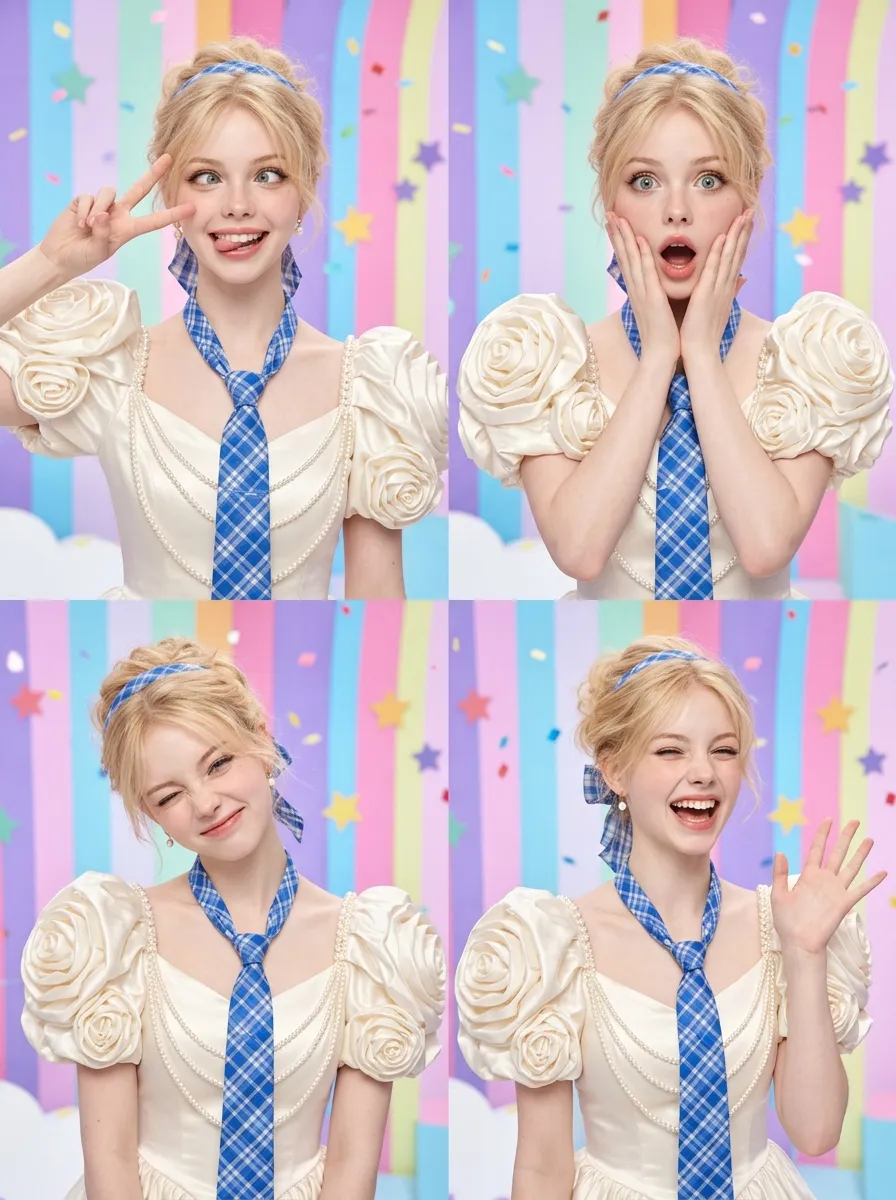
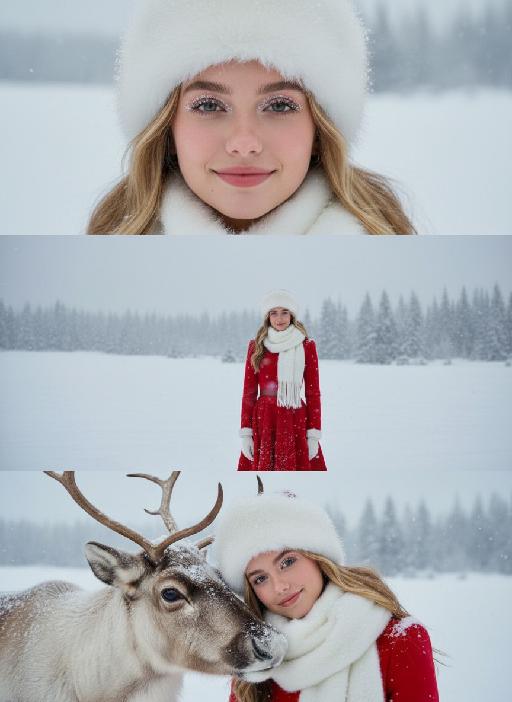
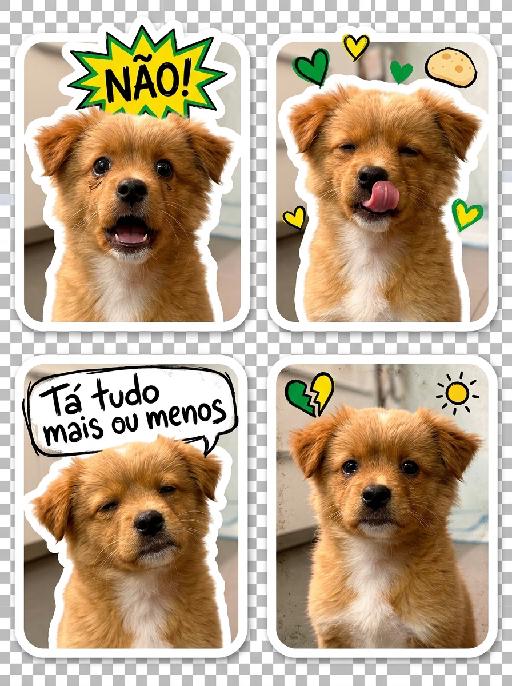
4 Cute Snaps

"Use the original single photo of the subject. Create a 2×2 grid of 4 hyper-realistic portrait photos, NO sticker style, NO die-cut outline, NO emojis/speech bubbles. The subject wears the exact reference-style wedding dress: ivory satin gown with dramatic 3D rose puff sleeves, cascading pearl chains, and blue-and-white checkered accents (necktie + hair ribbon). Keep the subject's face, hair, skin texture completely unchanged, strictly maintain realistic photography style, no cartoonization, keep the face true to the original photo. Expressions & poses: super lively and goofy, like a K-pop idol's variety show behind-the-scenes, full of playful chaos. 1. Cross-eyed silly grin, tongue sticking out slightly, one hand making a peace sign near the face 2. Dramatic gasp with wide eyes, hands covering cheeks, exaggerated ""shocked"" cute expression 3. Winking hard with one eye, the other squinted, head tilted 45 degrees, playful and silly 4. Full-on big laugh, mouth open, eyes crinkled shut, one hand waving like cheering Background: vibrant variety show set background, pastel color-block stripes, floating confetti and star cutouts, bright and cheerful like a live stage. Lighting: bright, even studio lighting, soft but vivid, enhancing the lively and bubbly energy. High quality, 8K resolution, sharp details, consistent style across all 4 photos."

Use Template
arrow
4 Cute Snaps

More From VIVAGO AI

Soccer Glory AI effects generated image

Soccer Glory

"Vertical retro art sports magazine cover, vintage 1990s print aesthetic, professional stadium sports photography, 8K ultra-high definition, print-level textured matte finish, cool-toned vintage color grading (muted ice blue, faded red, off-white), soft cool stadium lighting, sharp focus on the central subject, shallow depth of field with blurred background, no lens distortion, retro offset print layout. Subject & Scene (unchanged): The subject retains 100% of the original facial features, hairstyle, skin tone, and physical characteristics, no gender-specific modifiers. Pose matches reference image 2 exactly: kneeling on the right knee, left leg bent for support, right arm raised with index finger pointing up, left hand resting naturally on the thigh. Wearing cold-toned long-sleeve jersey without any emblems or logos on the chest, subtle grass stains on the fabric. Background is a blurred cool-toned stadium night match scene with a subtle vintage grain effect, no tournament branding or official marks anywhere. Typography & Layout (Retro Print Art Style): Top Left: Vintage solid red square logo, printed with white serif text ""VICTORY GLORY"", paired with small handwritten-style text ""THE GOLDEN ERA"" below. Left Vertical Area: Vintage white serif uppercase letters ""GODS’ TWILIGHT"", arranged vertically with moderate letter spacing, paired with thin retro decorative lines, with subtle halftone print texture. Right Central Area: Scattered layout divided by thin retro decorative lines, three parts in total: Top: Small white handwritten-style text ""VICTORY SPECIAL ISSUE"" with subtle faded effect. Middle: Large vintage serif bold text ""GODS’ TWILIGHT"", paired with small English serif text ""THE FINAL CHAPTER"" below, with subtle halftone dot texture on the edges. Bottom: Two lines of small white serif text ""VICTORY MOMENTS | THE STARS’ LAST STAND"", separated by thin retro decorative lines. Bottom Left: Faded red circular logo, printed with white serif text ""VICTORY"" with subtle worn texture. Bottom Banner: Vintage off-white full-width strip, printed with black serif text ""PREMIUM SPORTS MAGAZINE | VICTORY SEASON"", paired with retro decorative patterns, with subtle embossed print texture. Top Right: Vintage worn barcode with subtle halftone texture. Technical Rules: No distorted text or AI artifacts, the vintage halftone effect is moderate and does not obscure the subject, the combination of serif and handwritten fonts is harmonious, the overall tone is retro and cool, with a high-end vintage print texture that is different from ordinary modern magazines, no official sports logos, event emblems, trophy symbols or brand sensitive marks present in the whole picture."

My Treasure AI effects generated image

My Treasure

" Use the uploaded images as the only identity references for the two adult subjects. Create a photorealistic vertical 9:16 intimate cinematic couple portrait designed as a phone wallpaper. Strictly preserve both subjects’ exact faces, ages, facial features, skin tones, hairstyles, hair colors, and overall recognizability. Do not replace either face with a generic model face. COMPOSITION AND POSE: Create an extremely tight close-up composition showing mainly both faces, the male subject’s hand, and a small portion of their shoulders. Shift the entire couple composition slightly downward in the frame so the subjects sit lower than center, leaving clean negative space above their heads for a phone wallpaper layout. The male subject is positioned on the left in a three-quarter side profile. He leans very close toward the female subject and gently kisses the side of her cheek near the corner of her lips. His eyes are softly closed. His expression is tender, calm, and intimate. The male subject’s hand gently supports the female subject’s lower face: * his palm rests along the side of her jaw * his fingers wrap softly beneath her chin and along her cheek * his thumb rests lightly near the lower lip or chin * the hand must look natural, protective, and elegant * do not cover the female subject’s eyes or nose The female subject is positioned on the right and faces the camera directly. She looks straight into the lens with a calm, slightly surprised, emotionally restrained expression. Her eyes remain wide, clear, and sharply focused. Her lips are relaxed and softly closed or slightly parted. Keep both faces extremely close together, with the male subject’s nose and lips near the female subject’s cheek. WALLPAPER FRAMING: * vertical 9:16 phone-wallpaper composition * place the couple slightly lower than the visual center * leave clean dark space above the heads * keep the upper area simple and unobstructed * do not place the faces too close to the top edge * do not crop the male hand, the female chin, or the top of the hair * keep the female face as the main focal point * keep the male profile and hand large and intimate in frame CLOTHING AND ACCESSORIES: The male subject wears a refined black formal jacket with a muted champagne-beige satin inner collar or cuff detail. Add one delicate silver ring with a small clear gemstone on the male subject’s finger. The female subject wears a minimal dark outfit, mostly outside the frame. Add only a small refined earring if visible. CAMERA AND FRAMING: * extreme close-up * male face occupies most of the left side * female face occupies most of the right side * keep the female subject’s full eyes, nose, lips, jawline, and chin visible * keep the male subject’s hand fully visible * do not crop important fingers * realistic 85mm to 105mm portrait-lens look * very shallow depth of field * sharpest focus on the female subject’s eyes, lips, and the male subject’s hand * male profile remains slightly softer but still recognizable BACKGROUND: Use a plain dark olive-gray, charcoal-gray, or muted taupe studio background. Keep the background smooth, minimal, softly blurred, and free of visible environment details. LIGHTING: Use soft low-key studio lighting with a gentle frontal key light. The female subject’s face should be clearly illuminated with soft highlights on the eyes, nose bridge, lips, and cheekbones. The male subject’s profile remains slightly darker but still detailed. Use smooth shadow transitions, subtle facial dimension, restrained highlights, and no harsh flash. PHOTOGRAPHIC TEXTURE: * photorealistic intimate beauty photography * soft cinematic editorial finish * realistic skin pores and fine facial details * natural lips and eyelashes * subtle film grain * slightly muted warm-neutral color grading * soft highlight roll-off * elegant, tender, sensual, and refined * no plastic skin * no excessive smoothing * no CGI appearance IMPORTANT CONSTRAINTS: * male subject on the left * female subject on the right * male subject gently kisses the female subject’s cheek near the corner of her lips * female subject looks directly at the camera * male subject’s hand supports her jaw and chin * shift the composition slightly downward for wallpaper use * keep clean space above the heads * keep both identities fully recognizable * no open-mouth kissing * no exaggerated passion * no extra fingers * no duplicated hands * no distorted jaw * no merged faces * no blocked eyes * no text * no logo * no watermark * no cartoon * no illustration"

Ambiton Love AI effects generated image

Ambiton Love

" Use the uploaded image as the main reference for composition, pose, lighting, and style. Use the uploaded subject images as the only identity references. Create a photorealistic vertical 9:16 cinematic romance phone wallpaper designed for a smartphone lock screen. Strictly preserve both subjects’ exact faces, hairstyles, hair colors, body proportions, and overall recognizability. Place the central couple in the lower-middle area of the frame. Make the couple noticeably larger, using a tight waist-up composition so their faces and embrace become the main focus. The central couple should occupy approximately 70–75% of the image height while leaving the upper 20–25% as clean, dark negative space for wallpaper use. Do not add any text, clock, icons, or UI. Keep the central pose the same as the reference image: * woman on the left * man on the right * they stand closely back-to-back and embrace naturally * preserve the same body angles, head positions, and simple hand placement * both faces remain fully visible, sharp, and unobstructed CLOTHING — STRICTLY FIXED: The woman wears an elegant deep wine-red evening gown with: * a softly draped off-shoulder neckline * a fitted bodice * long, fluid fabric folds * refined satin or silk texture * subtle dark-red and burgundy highlights * one delicate thin silver necklace * small silver earrings The gown should feel romantic, luxurious, soft, and cinematic, not stiff or costume-like. The man wears: * a fitted black tailored evening suit * a crisp ivory-white dress shirt * an open shirt collar * no tie * clean, modern lapels * softly structured shoulders * visible tailoring, seams, and natural fabric folds The white shirt must remain clearly visible and create contrast between the man’s suit, the woman’s wine-red gown, and the dark background. The woman looks toward the camera with a calm, serious, slightly vulnerable expression. The man looks toward the camera with an intense, protective, emotionally restrained expression. BACKGROUND SILHOUETTES: Keep two extremely faint background silhouette echoes: * one very faint male silhouette near the far-left edge * one very faint female silhouette near the far-right edge Both silhouettes face inward toward the center, remain behind the central couple, and sit around shoulder-to-head height. The male silhouette wears a pale gray or muted beige top. The female silhouette wears a soft champagne or silver-gray outfit. Their clothing must be different from the central couple’s clothing. Make both silhouettes extremely soft, very low-opacity, lightly blurred, and deeply blended into the background. Use subtle slow-shutter smearing, soft haze, and gentle diffusion so they appear as barely visible emotional afterimages, not extra people. Do not let the silhouettes overlap the central faces. Use a minimal dark charcoal-gray studio background with soft smoky gradients, subtle cinematic light-and-shadow effects, gentle haze, and a restrained vignette. Use soft cinematic lighting. Keep the central couple bright, sharp, and dimensional. Add subtle contour light along the hair, shoulders, wine-red gown, black suit, and white shirt so the subjects remain clearly separated from each other and from the background. Style: photorealistic premium romance-drama key art, intimate, elegant, mature, mysterious, refined cinematic contrast, realistic skin and fabric texture, subtle film grain. No text, title, logo, watermark, border, frame lines, corner marks, UI, clock, icons, extra people, extra limbs, duplicated hands, blurred central faces, prominent silhouettes, cartoon, illustration, anime, or CGI."

Clown Villain Portrait AI effects generated image

Clown Villain Portrait

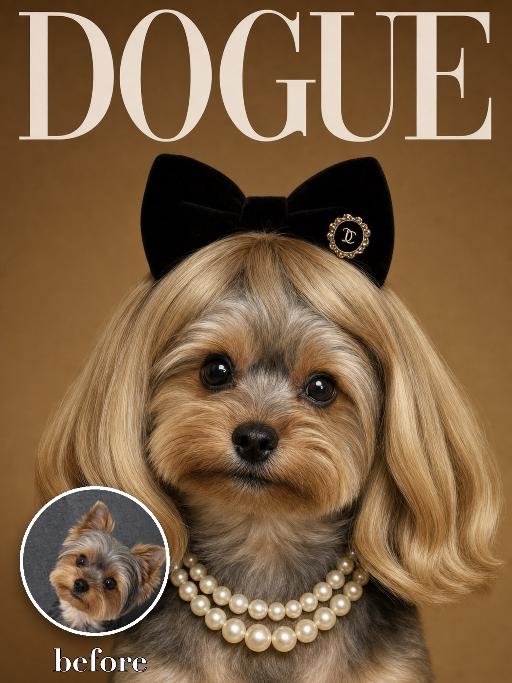
Create a theatrical stage-character pet portrait based on the reference. The uploaded pet wears a deep red suit jacket over a dark green vest and shirt, with abstract red and blue face-paint markings adapted around the animal face. Dark city-studio background, close chest-up framing, serious expressive gaze, cinematic realism. The subject remains an animal throughout. No people or human hands. No real character names, celebrity names, brands, logos, watermarks or readable text. Accurately preserve the uploaded pet's species, breed, coat color and markings, ear shape, muzzle and face structure, eye color, body proportions and tail. Keep it instantly recognisable as the same animal; change only pose, scene, costume and art treatment. Match the reference composition closely. Vertical 3:4, crisp detail, the pet is the unmistakable main subject.

Football Legend

"Subject: The reference character is personified as a football player, wearing a green football jersey. Scene: A packed and brilliantly lit giant professional World Cup stadium, with stands filled with football fans shouting and cheering, creating a lively atmosphere. Style: Cinematic realism, High Dynamic Range (HDR), rich and dramatic cinematography. Detailed action and landscape description for each shot [Shot 1: Confrontation of Destinies] Shot type and perspective: Panoramic shot, low-angle overhead shot. Picture content: In the distant view, there is a huge stadium with a brightly lit dome and a sea of spectators in the stands. In the near view, the reference figure is wearing a football shirt and standing with his back to the camera in front of the penalty spot. Opponent's performance: In the foreground, six defenders from different football teams, each with distinct appearances, are standing shoulder to shoulder, forming a formidable human wall. These six individuals have varying facial features: some have long noses and thick eyebrows, while others have deep-set eyes and thin, short eyebrows. Some have full lips, while others have thin lips with double eyelids. All six wear black clothing and maintain a resolute and prepared demeanor. Environmental dynamic effect: A football lies quietly on the grass, illuminated by a ring of glaring white searchlights, creating a sense of oppression as if war is about to break out. [Shot 2: Highlights of the Hero] Shot and Perspective: Front view of the face, looking straight ahead. Image content: Close-up of the front face of the reference figure. Action details: Amidst the frenzied cheers on the scene, the reference figure slightly bows their head, shifting their gaze from looking straight ahead to fixedly staring at the football. Their eyes reveal a calmness and determination that surpasses their age. The background is presented with a cinematic blur effect. [Shot Three: The Fatal Kick] Shot and Perspective: Medium close-up, side low-angle following shot. Image content: Refer to the figure, with the left foot providing support, the right foot forming a striking pose, exerting full body strength to push and strike the bottom of the football. Visual effect: The moment the sneaker comes into contact with the football, the white powder of the lines on the turf and the fragments of broken grass are lifted by the strong impact force, immediately creating a dynamic effect. [Shot 4: Covering the Human Wall] Shot and Perspective: Medium shot, viewed from the front facing the human wall. Screen content: A football, with a strong upward spin, draws a sharp arc in the air. The six opponents, with different faces but wearing identical black clothes, collectively leap into the air, trying their best. However, a football just flies through the gap above their heads and heads straight for the dead corner of the goal. [Shot 5: Absolute dead angle and breaking the door] Shot composition and perspective: Top shot of the inside corner of the net (from the goalkeeper's perspective). Picture content: A football goalkeeper dressed in black is desperately diving to the side, stretching his arms as far as possible. However, the football is moving at such a high speed that it grazes the top left corner of the goal (an absolute theoretical dead angle) and crashes fiercely into the net. Dynamic effect of the net: The net is raised high, and in the background, the entire stadium of football fans erupts in an instant, wildly waving their arms and colorful ribbons flying. [Shot 6: Wild Celebration] Shot and Perspective: Medium shot, front-facing dynamic follow shot (sliding track shot). Image content: Referring to the picture, the character is running wildly on the lush green field, celebrating. He is shouting fervently with his mouth wide open, his hands spread out, and his eyes brimming with triumphant ecstasy and pride."

Lavender Moment AI effects generated image

Lavender Moment

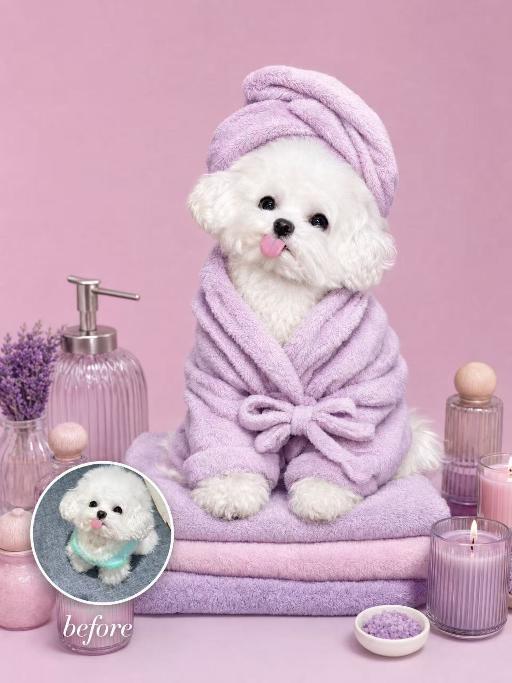
Turn the uploaded pet into a pampered spa-day portrait: wrapped in a fluffy pastel-coloured bathrobe with a matching soft towel turban on its head, sitting upright and relaxed atop a neatly stacked pile of plush towels. Around the pet, place a curated arrangement of spa accessories — small lit aromatherapy candles in glass holders, elegant glass bottles with wooden caps, and a sleek pump dispenser. The entire scene is unified by a cohesive soft pastel-lavender or pastel-pink colour palette; the background is a seamless solid pastel tone matching the towels. Soft diffused studio lighting, clean product-photography aesthetic, high-resolution photorealistic. The pet occupies 60–75% of the frame height, centered, head and full body clearly visible; background subordinate and not obstructing the pet. No logos, brand names, or readable text. While accurately preserving the animal's species, breed, coat colour and markings, ear shape, muzzle/face structure, eye colour and tail — keep it instantly recognisable as the same pet; change only the style and setting, not its identity.

Sticker Collage

"Use the uploaded image as the only identity reference. Create a sketchbook-style illustrated collage page based on the uploaded image. Layout: - clean white background - 1 main full-body illustration placed in the center as the focal point - several smaller illustrations arranged around the central figure in a balanced collage layout - include drawings in the top left, top right, middle left, middle right, bottom left, and bottom right areas so the page feels full and visually organized Content: - the center should show one main full-body drawing of the same subject or subjects from the uploaded image - the surrounding smaller illustrations should show the same subject or subjects in a mix of close-up portraits, half-body views, side views, back views, and relaxed or expressive moments - include a variety of expressions and poses while keeping the identity consistent - all drawings should clearly represent the same subject or same group from the uploaded image Style: soft hand-drawn digital illustration, sketchbook aesthetic, sticker-sheet composition, clean linework, polished coloring, slightly stylized cartoon look, expressive and lively, warm and charming mood. Add rich scrapbook-style decorative elements across the page, including: - a small sticky note in the top-right corner - pieces of decorative tape holding some elements in place - sticker-like cutout decorations - handwritten English notes and captions - small labels and mini paper notes - hearts, stars, flowers, sparkles, and tiny icons - little speech bubbles - layered paper scraps and stationery-style details Keep these decorative elements playful, cute, and visually integrated, making the page feel like a personal scrapbook, memo board, or illustrated journal page. Add a few handwritten English phrases such as: ""My Sketchbook"" ""Happy Day"" ""Love this"" ""So cute"" ""Best moment"" ""Hello!"" ""Sweet vibes"" Keep the identity, hairstyle, facial features, clothing style, and overall appearance consistent across all drawings. The final page should look like a polished illustrated scrapbook collage: cute, organized, expressive, rich in detail, and aesthetically pleasing. No logo, no watermark. "

Load more

Next-Gen Multi-Model AI Video Architecture

Vivago AI isn't just one engine—it’s a unified hub for the world’s most advanced video AI. Whether you need cinematic realism or high-speed social content, we provide the right model for your creative vision.

Free Generate

Beauty and Dolphins

Vacation Time

Stellar Tear

Fish Tank Supervisor

Cinematic Quality & Precision Control

Enables 4K resolution with multi-lens motion control, generating delicate scene via text prompts for customized cinematography.​

TRY NOW

Dynamic AV Sync

Auto-generates original audio to avoid copyright issues. Build 3D immersive environments through layered sound design automatically.

TRY NOW

OpenAI Sora 2

​Advanced visual storytelling with unparalleled physics and consistency.

TRY NOW

Kling v2.6 Pro

Industry-leading cinematic image animation and motion control.

TRY NOW

Google Veo 3 & 3.1

Ultra-fast generation with enhanced realism for creative workflows.

TRY NOW

Vivago AI 2.0

Our proprietary model optimized for efficiency, speed, and cost-effective generation.

TRY NOW

Users' Voice

We listen carefully to the opinions of every user.
Free Generate
Contact Us
I tried the Lip Sync feature inside Vivago.ai’s AI Video Generator for my educational podcast, and the results were stunning! The avatar's lip movements perfectly matched my audio recording, creating a professional AI-generated video without complex editing. Compared with tools like OpenAI Sora 2 and Google Veo 3.1, Vivago Image-to-Video delivers fast, studio-quality results online. It saved me hours of post-production work.
ElenaM (Spain)
Vivago’s Image-to-Video AI transformed my marketing workflow. I uploaded a product image and described the launch scene in text, and it generated a 10-second cinematic AI video with background music and dynamic visuals. The output quality rivals Kling v2.6 Pro and Google Veo 3 Fast. It’s now my go-to AI video generator for social media ads and product campaigns.
KenjiT (Japan)
As a digital artist, I use Vivago.ai 2.0 daily for Image-to-Image and AI Image-to-Video creation. The e-book covers and animated visuals I generate for clients look cinematic and professional. Unlike many standalone AI tools, Vivago integrates multiple leading models into one platform, making it easier to create copyright-safe AI images and videos for publishing.
ChenL (China)
I tried the Lip Sync feature inside Vivago.ai’s AI Video Generator for my educational podcast, and the results were stunning! The avatar's lip movements perfectly matched my audio recording, creating a professional AI-generated video without complex editing. Compared with tools like OpenAI Sora 2 and Google Veo 3.1, Vivago Image-to-Video delivers fast, studio-quality results online. It saved me hours of post-production work.
ElenaM (Spain)
Vivago’s Image-to-Video AI transformed my marketing workflow. I uploaded a product image and described the launch scene in text, and it generated a 10-second cinematic AI video with background music and dynamic visuals. The output quality rivals Kling v2.6 Pro and Google Veo 3 Fast. It’s now my go-to AI video generator for social media ads and product campaigns.
KenjiT (Japan)
As a digital artist, I use Vivago.ai 2.0 daily for Image-to-Image and AI Image-to-Video creation. The e-book covers and animated visuals I generate for clients look cinematic and professional. Unlike many standalone AI tools, Vivago integrates multiple leading models into one platform, making it easier to create copyright-safe AI images and videos for publishing.
ChenL (China)
I absolutely love Vivago’s AI Image-to-Video Generator. As a travel blogger, static images often fail to capture real atmosphere, but Vivago helps me turn photos into vivid cinematic AI videos with motion effects. It feels comparable to OpenAI Sora 2 and Google Veo 3.1, but more accessible and faster for creators who need high-quality AI videos online.
LiamK (Australia)
I tried the Lip Sync feature inside Vivago.ai’s AI Video Generator for my educational podcast, and the results were stunning! The avatar's lip movements perfectly matched my audio recording, creating a professional AI-generated video without complex editing. Compared with tools like OpenAI Sora 2 and Google Veo 3.1, Vivago Image-to-Video delivers fast, studio-quality results online. It saved me hours of post-production work.
ElenaM (Spain)
Vivago’s Image-to-Video AI transformed my marketing workflow. I uploaded a product image and described the launch scene in text, and it generated a 10-second cinematic AI video with background music and dynamic visuals. The output quality rivals Kling v2.6 Pro and Google Veo 3 Fast. It’s now my go-to AI video generator for social media ads and product campaigns.
KenjiT (Japan)
As a digital artist, I use Vivago.ai 2.0 daily for Image-to-Image and AI Image-to-Video creation. The e-book covers and animated visuals I generate for clients look cinematic and professional. Unlike many standalone AI tools, Vivago integrates multiple leading models into one platform, making it easier to create copyright-safe AI images and videos for publishing.
ChenL (China)
I absolutely love Vivago’s AI Image-to-Video Generator. As a travel blogger, static images often fail to capture real atmosphere, but Vivago helps me turn photos into vivid cinematic AI videos with motion effects. It feels comparable to OpenAI Sora 2 and Google Veo 3.1, but more accessible and faster for creators who need high-quality AI videos online.
LiamK (Australia)
Using Vivago.ai’s Image-to-Video AI has greatly enhanced my classroom teaching. I transform textbook notes into historical AI videos with cinematic filters and dynamic animations. Compared with tools like Kling v2.6 Pro and Google Veo 3 Fast, Vivago offers faster generation and easier parameter control for educators who need reliable AI video creation.
RajivG (India)
I frequently create AI videos on Vivago and publish them on TikTok and YouTube Shorts. The AI video templates and trending content ideas help me produce viral-ready clips quickly. With Vivago’s integrated models—including advanced video engines similar to OpenAI Sora 2—I can generate anime-style and cinematic social media videos that drive high engagement.
MarieJ (Spain)
What attracts me most about Vivago.ai is not only the powerful AI Video Generator but also the active AIGC creator community. It combines AI Image-to-Video, Text-to-Video, and leading model integrations like Google Veo 3.1 into one creative platform.
TomW (India)
At first, I was hesitant about using AI video tools. But after trying Vivago Image-to-Video, I realized how easy it is to create professional AI-generated videos online. I just upload an image, add a short prompt, and adjust a few settings. The results are cinematic and copyright-safe, which is essential for commercial projects.
HectorC (Mexico)
Using Vivago.ai’s Image-to-Video AI has greatly enhanced my classroom teaching. I transform textbook notes into historical AI videos with cinematic filters and dynamic animations. Compared with tools like Kling v2.6 Pro and Google Veo 3 Fast, Vivago offers faster generation and easier parameter control for educators who need reliable AI video creation.
RajivG (India)
I frequently create AI videos on Vivago and publish them on TikTok and YouTube Shorts. The AI video templates and trending content ideas help me produce viral-ready clips quickly. With Vivago’s integrated models—including advanced video engines similar to OpenAI Sora 2—I can generate anime-style and cinematic social media videos that drive high engagement.
MarieJ (Spain)
What attracts me most about Vivago.ai is not only the powerful AI Video Generator but also the active AIGC creator community. It combines AI Image-to-Video, Text-to-Video, and leading model integrations like Google Veo 3.1 into one creative platform.
TomW (India)
At first, I was hesitant about using AI video tools. But after trying Vivago Image-to-Video, I realized how easy it is to create professional AI-generated videos online. I just upload an image, add a short prompt, and adjust a few settings. The results are cinematic and copyright-safe, which is essential for commercial projects.
HectorC (Mexico)