More From VIVAGO AI

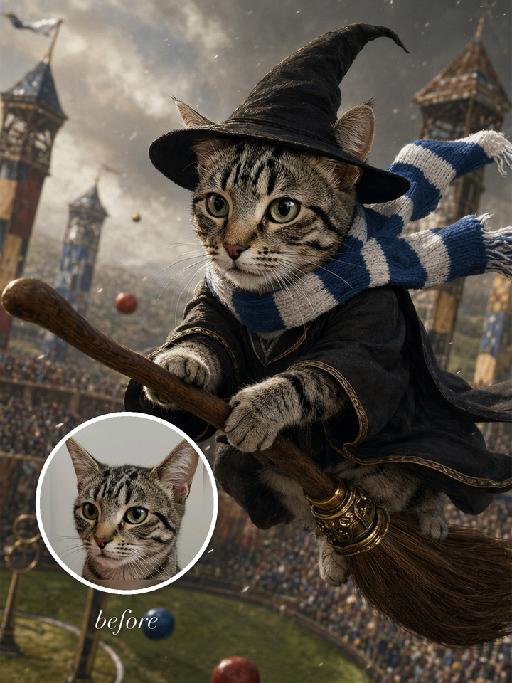
Broom Flight AI effects generated image

Broom Flight

"Full-bleed vertical 3:4 photorealistic fantasy wizard flying-broom stadium scene. The uploaded reference image is the exact pet identity and MUST be preserved. Highest priority: keep the same gray tabby cat from the reference photo: same gray striped forehead and cheeks, same greenish eyes, pink nose, muzzle shape, ear shape, face proportions and fur markings. Do not replace it with another cat. Transform only costume, pose, and environment. Scene must strictly follow the flying broom gameplay reference from the Feishu document: magical sports stadium / castle arena, the cat riding a wooden broom in midair, black wizard hat, black robe with gold decorative trim if visible, golden flying broom details and colorful balls in the stadium, dramatic cinematic retro film texture, pet face sharp and readable. Scarf color and style MUST match the broom reference image exactly: blue and white alternating stripes. A knitted school scarf with clear blue-and-white horizontal bands, soft ribbed wool texture, scarf trailing in flight. Do NOT use red, burgundy, yellow, gold, green, silver, or black-yellow on the scarf. No readable text, no logos, no watermark,"

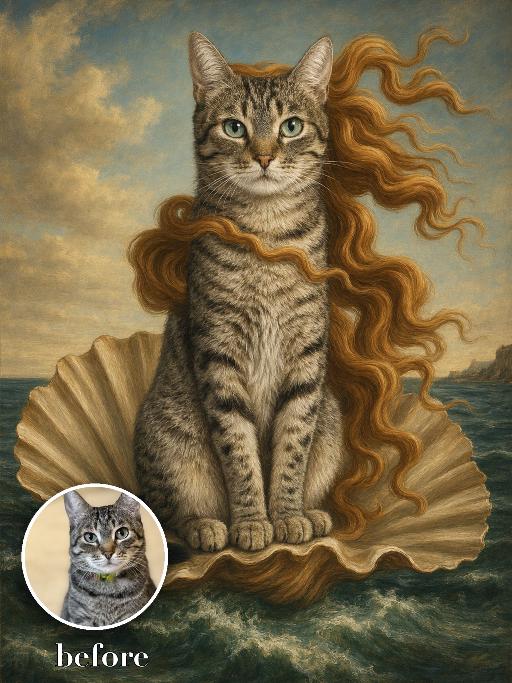
Seashell Venus Pet AI effects generated image

Seashell Venus Pet

Recreate a mythic Renaissance sea painting with the uploaded pet seated upright on a large open scallop shell rising from green-blue waves. Long flowing golden-red hair-like fur ribbons stream in the wind, pale luminous body, distant coast and soft sky behind. Tempera-like old-master texture, graceful centered composition. The subject remains an animal throughout. No people or human hands. No real character names, celebrity names, brands, logos, watermarks or readable text. Accurately preserve the uploaded pet's species, breed, coat color and markings, ear shape, muzzle and face structure, eye color, body proportions and tail. Keep it instantly recognisable as the same animal; change only pose, scene, costume and art treatment. Match the reference composition closely. Vertical 3:4, crisp detail, the pet is the unmistakable main subject.

Coffe Master AI effects generated image

Coffe Master

A 3D rendered surreal photograph, shot from a frontal view (full-face orientation), evoking a whimsical micro-world scale effect. THE CENTRAL FOCAL POINT IS THE EXACT UNMODIFIED SUBJECT FROM THE UPLOADED REFERENCE IMAGE, ENLARGED AND CLOSER IN THE FRAME, PRESERVING EVERY DETAIL of their face, age, and most importantly, their exact clothing, textures, colors, and features (whether they are a specific human or an animal). The subject maintains their precise expression from the uploaded image and faces the camera directly. Crucially, the subject is interacting with giant everyday items: they are standing on a large wooden tabletop, using both hands/paws to hold a giant, oversized silver serving spoon and actively stirring a massive, giant white ceramic teacup filled with steaming tea. The background is a dense, beautifully detailed micro-environment of a bakery or afternoon tea, featuring huge, towering stacks of assorted fresh-baked bread, large biscuits, and pastries. Scattered across the wooden tabletop and the saucer around the massive cup are giant individual roasted coffee beans, oversized cinnamon sticks, and loose cookies, all meticulously scaled. Warm, soft, sunlit daylight filtering from a window. Whimsical, creative, and high-quality artistic composition.

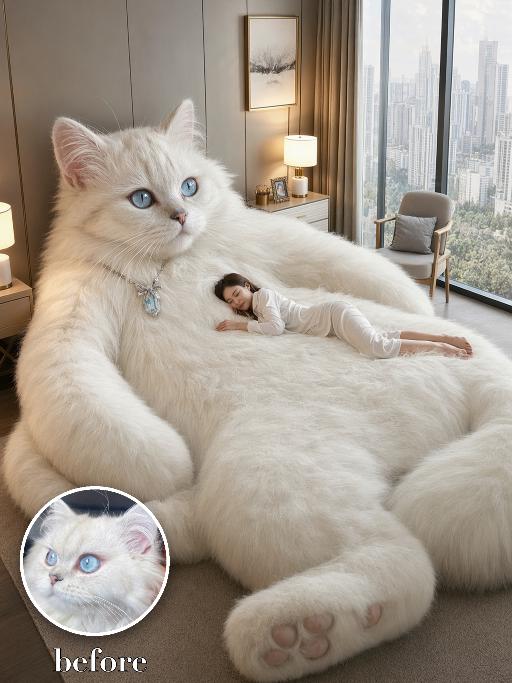
Giant Cat Bed AI effects generated image

Giant Cat Bed

Use the uploaded pet image as the only identity reference. Recreate the reference as a photorealistic surreal luxury-bedroom scene. Transform the uploaded pet into an enormous living plush pet whose oversized soft body naturally functions like a luxurious lounge bed. Strictly preserve the uploaded pet’s actual species, breed appearance, face shape, fur or coat color, markings, ear shape, eye color, nose, muzzle structure, and overall recognizability. COMPOSITION: Show the giant pet occupying nearly the entire frame, filling approximately 80–90% of the image. The pet is positioned in a relaxed semi-reclining seated pose: - head and upper body raised on the left side of the frame - face clearly visible in a three-quarter view - calm, gentle expression - huge torso and belly extending across the center like a soft mattress - one oversized front paw resting prominently in the lower foreground - another large paw or leg visible along the side - soft paw pads clearly visible - the pet’s body should feel extremely fluffy, deep, cushiony, and comfortable The pet must look alive and anatomically recognizable, not like a manufactured animal-shaped bed or stuffed toy. PERSON: Add exactly one tiny fully clothed adult person lying comfortably across the giant pet’s broad belly and torso. The person rests naturally on their side or stomach, with their head supported by the pet’s soft fur, appearing peaceful and relaxed. The person should be much smaller than the pet and used primarily to emphasize the dramatic scale difference. The pet remains the dominant subject. ENVIRONMENT: Place the scene inside a bright, upscale high-rise apartment bedroom with: - floor-to-ceiling windows - a clear modern city skyline outside - warm neutral wall panels - elegant curtains - a modern bedside table and softly glowing lamp - a framed minimalist artwork - a small lounge chair - soft neutral carpet - clean beige, cream, and warm-white interior tones Do not include a separate conventional bed. The giant pet’s body itself acts as the sleeping surface. LIGHTING AND STYLE: - photorealistic commercial interior photography - surreal but believable scale - highly detailed realistic fur - soft natural daylight from the windows - warm ambient lamp lighting - premium luxury-home aesthetic - cozy, peaceful, dreamlike atmosphere - crisp facial and fur details - realistic perspective and contact shadows - high-resolution advertising quality Vertical 3:4. IMPORTANT: - giant pet fills most of the frame - pet’s face, torso, belly, paws, and paw pads must be clearly visible - exactly one pet - exactly one adult person - no ordinary bed - no animal-shaped furniture - no stuffed-toy appearance - no duplicate limbs - no distorted anatomy - no extra people - no extra animals - no logo - no watermark

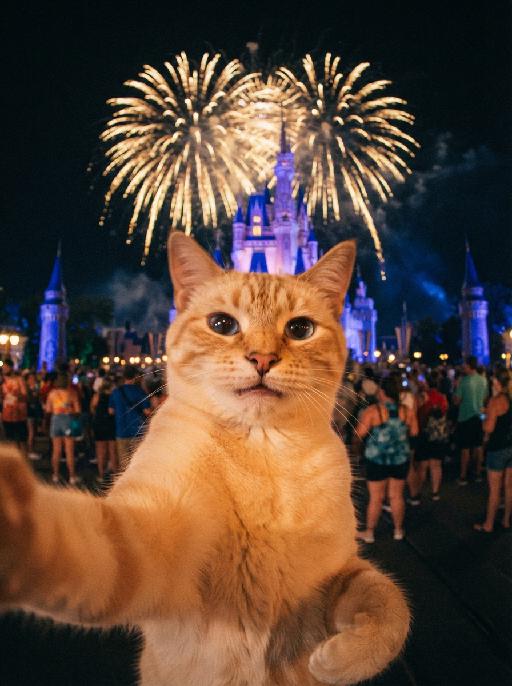
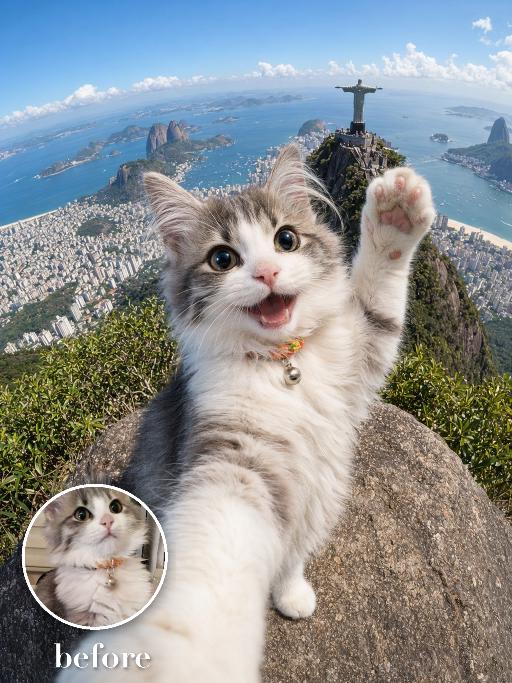
Check-in at Christ AI effects generated image

Check-in at Christ

Create an extreme wide-angle travel selfie of the uploaded pet at a high scenic landmark viewpoint: the pet is very close to the camera, smiling with one front paw raised as if waving, while a famous mountaintop city panorama, ocean bay and distant statue-like monument appear far behind. Use action-camera perspective, bright daylight, dramatic tourist snapshot energy, clear sky and depth. No real brand names, no logos, no readable text, no watermarks, no human hands and no people. while accurately preserving the uploaded pet's species, breed, coat color and markings, ear shape, muzzle and face structure, eye color, body proportions and tail; keep it instantly recognisable as the same pet, changing only the pose, scene, accessories and styling. Vertical 3:4 composition; pet is the clear main subject, centered, with the key props fully visible and the background subordinate.

Load more

Next-Gen Multi-Model AI Video Architecture

Vivago AI isn't just one engine—it’s a unified hub for the world’s most advanced video AI. Whether you need cinematic realism or high-speed social content, we provide the right model for your creative vision.

Free Generate

Beauty and Dolphins

Vacation Time

Stellar Tear

Fish Tank Supervisor

Cinematic Quality & Precision Control

Enables 4K resolution with multi-lens motion control, generating delicate scene via text prompts for customized cinematography.​

TRY NOW

Dynamic AV Sync

Auto-generates original audio to avoid copyright issues. Build 3D immersive environments through layered sound design automatically.

TRY NOW

OpenAI Sora 2

​Advanced visual storytelling with unparalleled physics and consistency.

TRY NOW

Kling v2.6 Pro

Industry-leading cinematic image animation and motion control.

TRY NOW

Google Veo 3 & 3.1

Ultra-fast generation with enhanced realism for creative workflows.

TRY NOW

Vivago AI 2.0

Our proprietary model optimized for efficiency, speed, and cost-effective generation.
TRY NOW

Users' Voice

We listen carefully to the opinions of every user.
Free Generate
Contact Us
I tried the Lip Sync feature inside Vivago.ai’s AI Video Generator for my educational podcast, and the results were stunning! The avatar's lip movements perfectly matched my audio recording, creating a professional AI-generated video without complex editing. Compared with tools like OpenAI Sora 2 and Google Veo 3.1, Vivago Image-to-Video delivers fast, studio-quality results online. It saved me hours of post-production work.
ElenaM (Spain)
Vivago’s Image-to-Video AI transformed my marketing workflow. I uploaded a product image and described the launch scene in text, and it generated a 10-second cinematic AI video with background music and dynamic visuals. The output quality rivals Kling v2.6 Pro and Google Veo 3 Fast. It’s now my go-to AI video generator for social media ads and product campaigns.
KenjiT (Japan)
As a digital artist, I use Vivago.ai 2.0 daily for Image-to-Image and AI Image-to-Video creation. The e-book covers and animated visuals I generate for clients look cinematic and professional. Unlike many standalone AI tools, Vivago integrates multiple leading models into one platform, making it easier to create copyright-safe AI images and videos for publishing.
ChenL (China)
I tried the Lip Sync feature inside Vivago.ai’s AI Video Generator for my educational podcast, and the results were stunning! The avatar's lip movements perfectly matched my audio recording, creating a professional AI-generated video without complex editing. Compared with tools like OpenAI Sora 2 and Google Veo 3.1, Vivago Image-to-Video delivers fast, studio-quality results online. It saved me hours of post-production work.
ElenaM (Spain)
Vivago’s Image-to-Video AI transformed my marketing workflow. I uploaded a product image and described the launch scene in text, and it generated a 10-second cinematic AI video with background music and dynamic visuals. The output quality rivals Kling v2.6 Pro and Google Veo 3 Fast. It’s now my go-to AI video generator for social media ads and product campaigns.
KenjiT (Japan)
As a digital artist, I use Vivago.ai 2.0 daily for Image-to-Image and AI Image-to-Video creation. The e-book covers and animated visuals I generate for clients look cinematic and professional. Unlike many standalone AI tools, Vivago integrates multiple leading models into one platform, making it easier to create copyright-safe AI images and videos for publishing.
ChenL (China)
I absolutely love Vivago’s AI Image-to-Video Generator. As a travel blogger, static images often fail to capture real atmosphere, but Vivago helps me turn photos into vivid cinematic AI videos with motion effects. It feels comparable to OpenAI Sora 2 and Google Veo 3.1, but more accessible and faster for creators who need high-quality AI videos online.
LiamK (Australia)
I tried the Lip Sync feature inside Vivago.ai’s AI Video Generator for my educational podcast, and the results were stunning! The avatar's lip movements perfectly matched my audio recording, creating a professional AI-generated video without complex editing. Compared with tools like OpenAI Sora 2 and Google Veo 3.1, Vivago Image-to-Video delivers fast, studio-quality results online. It saved me hours of post-production work.
ElenaM (Spain)
Vivago’s Image-to-Video AI transformed my marketing workflow. I uploaded a product image and described the launch scene in text, and it generated a 10-second cinematic AI video with background music and dynamic visuals. The output quality rivals Kling v2.6 Pro and Google Veo 3 Fast. It’s now my go-to AI video generator for social media ads and product campaigns.
KenjiT (Japan)
As a digital artist, I use Vivago.ai 2.0 daily for Image-to-Image and AI Image-to-Video creation. The e-book covers and animated visuals I generate for clients look cinematic and professional. Unlike many standalone AI tools, Vivago integrates multiple leading models into one platform, making it easier to create copyright-safe AI images and videos for publishing.
ChenL (China)
I absolutely love Vivago’s AI Image-to-Video Generator. As a travel blogger, static images often fail to capture real atmosphere, but Vivago helps me turn photos into vivid cinematic AI videos with motion effects. It feels comparable to OpenAI Sora 2 and Google Veo 3.1, but more accessible and faster for creators who need high-quality AI videos online.
LiamK (Australia)
Using Vivago.ai’s Image-to-Video AI has greatly enhanced my classroom teaching. I transform textbook notes into historical AI videos with cinematic filters and dynamic animations. Compared with tools like Kling v2.6 Pro and Google Veo 3 Fast, Vivago offers faster generation and easier parameter control for educators who need reliable AI video creation.
RajivG (India)
I frequently create AI videos on Vivago and publish them on TikTok and YouTube Shorts. The AI video templates and trending content ideas help me produce viral-ready clips quickly. With Vivago’s integrated models—including advanced video engines similar to OpenAI Sora 2—I can generate anime-style and cinematic social media videos that drive high engagement.
MarieJ (Spain)
What attracts me most about Vivago.ai is not only the powerful AI Video Generator but also the active AIGC creator community. It combines AI Image-to-Video, Text-to-Video, and leading model integrations like Google Veo 3.1 into one creative platform.
TomW (India)
At first, I was hesitant about using AI video tools. But after trying Vivago Image-to-Video, I realized how easy it is to create professional AI-generated videos online. I just upload an image, add a short prompt, and adjust a few settings. The results are cinematic and copyright-safe, which is essential for commercial projects.
HectorC (Mexico)
Using Vivago.ai’s Image-to-Video AI has greatly enhanced my classroom teaching. I transform textbook notes into historical AI videos with cinematic filters and dynamic animations. Compared with tools like Kling v2.6 Pro and Google Veo 3 Fast, Vivago offers faster generation and easier parameter control for educators who need reliable AI video creation.
RajivG (India)
I frequently create AI videos on Vivago and publish them on TikTok and YouTube Shorts. The AI video templates and trending content ideas help me produce viral-ready clips quickly. With Vivago’s integrated models—including advanced video engines similar to OpenAI Sora 2—I can generate anime-style and cinematic social media videos that drive high engagement.
MarieJ (Spain)
What attracts me most about Vivago.ai is not only the powerful AI Video Generator but also the active AIGC creator community. It combines AI Image-to-Video, Text-to-Video, and leading model integrations like Google Veo 3.1 into one creative platform.
TomW (India)
At first, I was hesitant about using AI video tools. But after trying Vivago Image-to-Video, I realized how easy it is to create professional AI-generated videos online. I just upload an image, add a short prompt, and adjust a few settings. The results are cinematic and copyright-safe, which is essential for commercial projects.
HectorC (Mexico)