More From VIVAGO AI

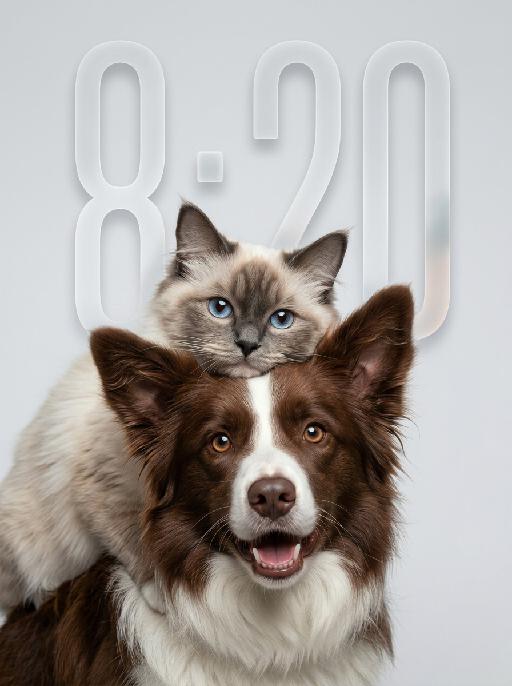
Fluff Stack AI effects generated image

Fluff Stack

"Use the uploaded pet image as the only identity reference. Create a hyper-realistic studio portrait featuring the same two pets from the uploaded image. Strictly preserve both pets’ original identities, facial structures, fur colors, fur patterns, fur textures, eye colors, ear shapes, nose shapes, and overall recognizability. COMPOSITION: * vertical portrait composition * tight chest-up close-up framing * position the entire two-pet group noticeably lower in the frame * anchor both pets mainly in the lower-middle and lower two-thirds of the image * leave clean, balanced negative space above the upper pet’s head * keep the top of the upper pet’s ears clearly below the upper edge * do not place either pet too high in the frame * do not leave excessive empty space below the foreground pet * both pets remain large and prominent in the frame * one pet is positioned in the foreground, occupying most of the lower and central area * the other pet is positioned slightly above and behind, leaning gently over or resting closely against the foreground pet * the upper pet’s face appears around the upper-middle or slightly upper-left area, but remains clearly below the top edge * both faces must be fully visible and must not be cropped * the foreground pet faces the camera directly * the upper pet also faces generally toward the camera * intimate, affectionate, close companion feeling POSE AND EXPRESSION: * the foreground pet has a happy, friendly, lively expression, with an open-mouth smile only if natural for that pet * the upper pet has a calm, slightly curious, soft expression * the upper pet rests naturally against the foreground pet, creating a cozy and affectionate relationship dynamic * both animals appear comfortable, closely bonded, and emotionally warm FRAMING: * chest-up or tighter portrait crop * focus mainly on the faces and upper fur * no full body * keep both heads, ears, faces, and upper bodies fully inside the frame * no distracting empty space * both pets fill most of the lower and central image area BACKGROUND: * clean light gray or very pale neutral seamless studio background * minimal and uncluttered * no environment details * no props LIGHTING: * soft professional studio lighting * even illumination * soft natural shadows * bright natural catchlights in both pets’ eyes * premium commercial pet-photography look STYLE: * hyper-realistic pet photography * ultra-detailed fur * natural whiskers * crisp focus on both faces * soft elegant tonal range * polished editorial studio portrait * warm, gentle, premium feeling IMPORTANT CONSTRAINTS: * do not assume specific animal types or breeds beyond what appears in the uploaded image * do not place the pet group near the top edge * no cropped ears or heads * no excessive empty space below the pets * no text * no watermark * no logo * no cartoon * no illustration * no extra animals * keep both pets fully recognizable * preserve the affectionate close-up two-pet composition "

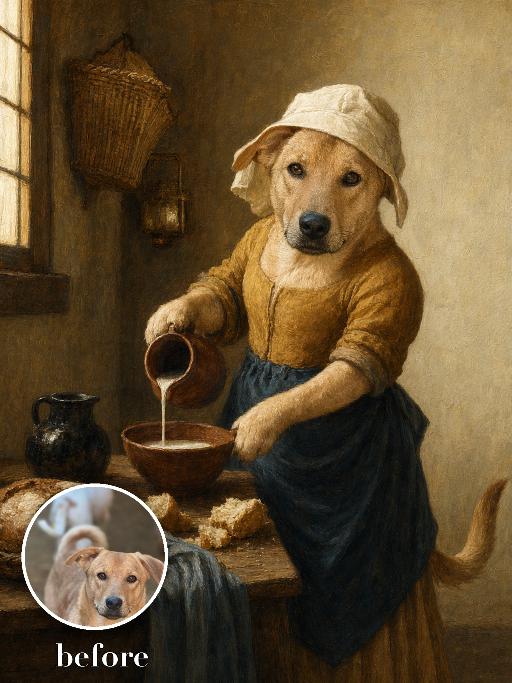
Milkmaid Pet Painting AI effects generated image

Milkmaid Pet Painting

Render the uploaded pet as a quiet seventeenth-century domestic oil painting. The pet stands upright at a wooden table wearing a cream linen head covering, mustard-brown bodice and blue apron, carefully pouring milk from a ceramic jug into a bowl. Sunlit plaster kitchen, bread and simple crockery, warm natural window light and precise old-master texture. The subject remains an animal throughout. No people or human hands. No real character names, celebrity names, brands, logos, watermarks or readable text. Accurately preserve the uploaded pet's species, breed, coat color and markings, ear shape, muzzle and face structure, eye color, body proportions and tail. Keep it instantly recognisable as the same animal; change only pose, scene, costume and art treatment. Match the reference composition closely. Vertical 3:4, crisp detail, the pet is the unmistakable main subject.

Document AI effects generated image

Document

An official reference document marked with "Violation of Agreement" contains a black-and-white photo with a retro movie-like texture (accounting for 60% of the overall picture): In the photo, there is a successful person dressed in stylish black high-end clothing (with the original figure as the main subject, without any changes to facial features) standing alone, with palm trees and the setting sun in the background. The document is made from an old newspaper and placed on a wooden tabletop background (accounting for 95% of the overall picture). This scene is both realistic and ironic. This is an official notice issued by the fictional "International Culinary Standards Department", with the event report number "Awaiting Diplomatic Apology" and the status "Pending Processing". This event is described in bold as a ridiculous culinary "crime" (ordering chicken nuggets at an upscale dinner party). The text has been modified with a red marker. The circular official seal features an eagle's emblem and the words "Culinary Crime". The title part is covered with a leather sticker with a retro printed pattern. It has a retro printed texture and clear focus. The resolution is 8K. It adopts a retro design style, with a humorous, satirical style and a retro artistic beauty.

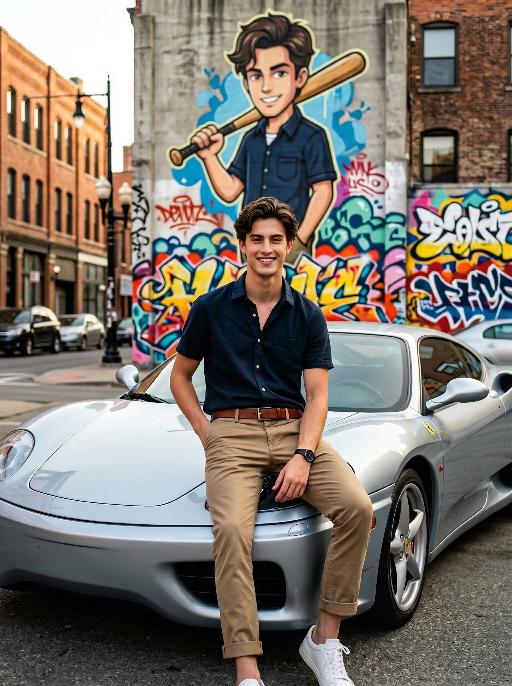
Cars - Graffiti AI effects generated image

Cars - Graffiti

"Maintain the exact same facial features, gender, and age as the person in the uploaded image. Photorealistic photo of a handsome young man with neatly styled brown hair, smiling brightly at the camera. He wears a dark navy short-sleeve button-up shirt, khaki casual pants with rolled cuffs, a brown leather belt, and white sneakers, with a black watch on his left wrist. He sits casually on the hood of a stylish silver Ferrari sports car parked on an urban street, one hand in his pocket and the other resting on his knee. Behind him is a large, vibrant graffiti mural on a concrete building wall, depicting a cartoon version of himself in the same outfit, holding a wooden baseball bat over his shoulder, surrounded by colorful street art tags and patterns. Background: urban street scene with brick buildings, street lamps, and distant cars, natural daylight, soft warm lighting, shallow depth of field. No logos, watermarks, or text overlays in the image. Cinematic composition, 8K resolution, shot with a Sony A7R V camera and 50mm f/1.8 lens, hyper-detailed textures, sharp focus on the man and the car, capturing a playful and stylish atmosphere that matches the mural behind him."

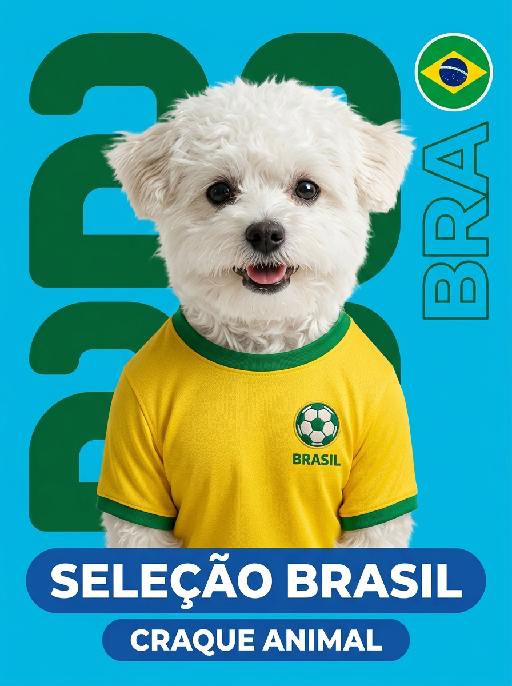
Pet Star Card AI effects generated image

Pet Star Card

"Use the uploaded pet image as the only identity reference. Create a highly detailed collectible football trading card poster featuring the uploaded pet, wearing a Brazil national-team-inspired soccer jersey, based strictly on the reference image. Strictly preserve the pet's identity, fur pattern, facial features, eye color, ear shape, nose markings, and overall recognizability. Do not alter the animal identity. The pet should appear with a complete, natural upper body. Do not crop the body too tightly at the neck or chest. Show the full head, neck, shoulders, chest, and the full visible upper torso of the pet, so the jersey is clearly and fully displayed. If the uploaded image does not show the complete body, naturally reconstruct the missing body parts so the pet's upper body looks anatomically complete and visually coherent. The pet is shown in a front-facing portrait with a slight head turn to the right, matching a professional trading card composition. The subject should be centered, sharp, and clearly visible. The pet wears a bright yellow Brazil national-team-inspired football jersey with green collar and green sleeve trim. The jersey includes a realistic fabric texture, a small embroidered football icon badge on the left chest, and the word "BRASIL" below the badge. BACKGROUND / LAYOUT (STRICT) Use a bright cyan-blue full background Add large dark-green abstract rounded geometric number-like shapes behind the pet Maintain a bold, flat, graphic sports-card design DO NOT include any yellow background blocks, yellow squares, or yellow panels Yellow is ONLY allowed in the jersey and small flag details RIGHT SIDE DESIGN Include a circular Brazil flag badge on the right side Include large vertical outlined "BRA" lettering along the right edge Keep placement aligned with a modern sports trading card layout BOTTOM NAME BARS Place two horizontal rounded blue nameplates at the bottom: upper larger bar: "SELEÇÃO BRASIL" in bold white uppercase letters lower smaller bar: "CRAQUE ANIMAL" in bold white uppercase letters BOTTOM-RIGHT CORNER (STRICT) Do NOT include any brand logos or stickers. Completely remove any PANINI-style logo, mascot label, or trading card branding. This area must remain clean and part of the blue background design. STYLE Premium football collectible sticker card aesthetic, clean graphic layout, sharp focus, high contrast, modern sports poster design, professional trading card composition, polished print-like finish, balanced typography, vibrant Brazil-inspired color scheme. IMPORTANT CONSTRAINTS The pet's upper body must be complete and naturally reconstructed if necessary The jersey must be fully visible on the pet's body No yellow background elements No PANINI logo or any brand marks No additional objects or extra animals No layout redesign; follow reference structure closely Keep composition clean, centered, and visually balanced Maintain consistent trading card hierarchy and spacing"

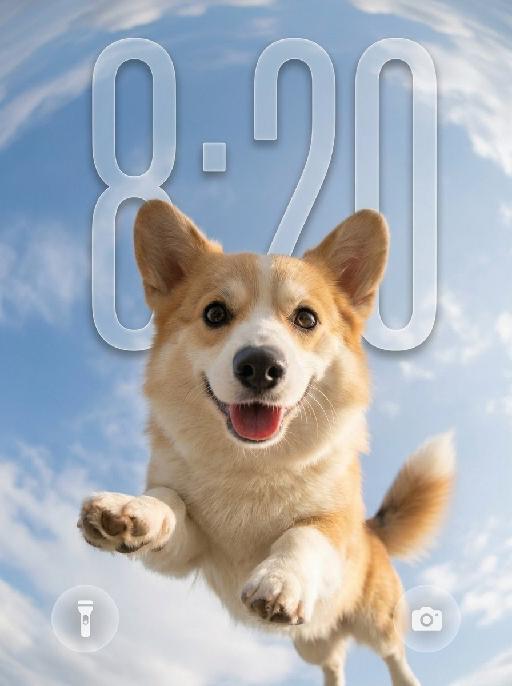
Sky Pounce AI effects generated image

Sky Pounce

"Use the uploaded pet image as the only identity reference. Create a highly realistic vertical wallpaper-style portrait of the same pet jumping toward the camera in a bright blue sky. Strictly preserve the pet’s exact species, breed, face shape, fur color, fur texture, eye color, ear shape, nose, markings, collar, and overall recognizability. Camera and composition: - extreme low-angle perspective, looking upward from directly below the pet - ultra-wide fisheye lens - the pet is centered and appears to leap or float toward the camera - the face is very close to the lens, with the nose slightly enlarged by perspective - both front paws reach naturally toward the camera with strong foreshortening - the pet’s body extends backward into the sky - joyful open-mouth expression, tongue visible, energetic and friendly - dynamic but anatomically correct pose Environment: - bright natural blue sky - soft bright white clouds - strong fisheye sky distortion around the outer edges - the sky and clouds wrap around the frame like a dreamy sky dome - bright sunlight from one side - subtle natural lens flare - clean, uplifting, playful summer atmosphere Wallpaper direction: - make the composition suitable for a phone wallpaper - keep the image clean and visually striking - allow a little breathing space in the upper area - no lock screen UI elements - no clock - no date - no username - no watermark - no extra text Important frame rule: - the fisheye effect must fill the entire image edge-to-edge - do not create any black borders - do not create any circular frame edges - do not create vignette or dark corners - do not create a lens mask effect - the sky and clouds must extend fully to all four edges of the canvas - the final image must be full-bleed and seamless Color and texture direction: - use a softer and more natural color treatment - slightly muted colors - lower saturation overall - gentle contrast - balanced highlights and shadows - natural fur tones - avoid overly vivid or neon-like blue sky - avoid oversaturated fur colors - keep the lighting bright but not harsh - maintain a clean, airy, premium wallpaper mood - use a subtle, elegant, slightly cinematic color grading Style: hyper-realistic pet photography, playful action shot, immersive fisheye perspective, crisp fur details, natural sunlight, cheerful and eye-catching wallpaper aesthetic, with refined and slightly muted color tones. Vertical composition, suitable for wallpaper."

Load more

Next-Gen Multi-Model AI Video Architecture

Vivago AI isn't just one engine—it’s a unified hub for the world’s most advanced video AI. Whether you need cinematic realism or high-speed social content, we provide the right model for your creative vision.

Free Generate

Beauty and Dolphins

Vacation Time

Stellar Tear

Fish Tank Supervisor

Cinematic Quality & Precision Control

Enables 4K resolution with multi-lens motion control, generating delicate scene via text prompts for customized cinematography.​

TRY NOW

Dynamic AV Sync

Auto-generates original audio to avoid copyright issues. Build 3D immersive environments through layered sound design automatically.

TRY NOW

OpenAI Sora 2

​Advanced visual storytelling with unparalleled physics and consistency.

TRY NOW

Kling v2.6 Pro

Industry-leading cinematic image animation and motion control.

TRY NOW

Google Veo 3 & 3.1

Ultra-fast generation with enhanced realism for creative workflows.

TRY NOW

Vivago AI 2.0

Our proprietary model optimized for efficiency, speed, and cost-effective generation.

TRY NOW

Users' Voice

We listen carefully to the opinions of every user.
Free Generate
Contact Us
I tried the Lip Sync feature inside Vivago.ai’s AI Video Generator for my educational podcast, and the results were stunning! The avatar's lip movements perfectly matched my audio recording, creating a professional AI-generated video without complex editing. Compared with tools like OpenAI Sora 2 and Google Veo 3.1, Vivago Image-to-Video delivers fast, studio-quality results online. It saved me hours of post-production work.
ElenaM (Spain)
Vivago’s Image-to-Video AI transformed my marketing workflow. I uploaded a product image and described the launch scene in text, and it generated a 10-second cinematic AI video with background music and dynamic visuals. The output quality rivals Kling v2.6 Pro and Google Veo 3 Fast. It’s now my go-to AI video generator for social media ads and product campaigns.
KenjiT (Japan)
As a digital artist, I use Vivago.ai 2.0 daily for Image-to-Image and AI Image-to-Video creation. The e-book covers and animated visuals I generate for clients look cinematic and professional. Unlike many standalone AI tools, Vivago integrates multiple leading models into one platform, making it easier to create copyright-safe AI images and videos for publishing.
ChenL (China)
I tried the Lip Sync feature inside Vivago.ai’s AI Video Generator for my educational podcast, and the results were stunning! The avatar's lip movements perfectly matched my audio recording, creating a professional AI-generated video without complex editing. Compared with tools like OpenAI Sora 2 and Google Veo 3.1, Vivago Image-to-Video delivers fast, studio-quality results online. It saved me hours of post-production work.
ElenaM (Spain)
Vivago’s Image-to-Video AI transformed my marketing workflow. I uploaded a product image and described the launch scene in text, and it generated a 10-second cinematic AI video with background music and dynamic visuals. The output quality rivals Kling v2.6 Pro and Google Veo 3 Fast. It’s now my go-to AI video generator for social media ads and product campaigns.
KenjiT (Japan)
As a digital artist, I use Vivago.ai 2.0 daily for Image-to-Image and AI Image-to-Video creation. The e-book covers and animated visuals I generate for clients look cinematic and professional. Unlike many standalone AI tools, Vivago integrates multiple leading models into one platform, making it easier to create copyright-safe AI images and videos for publishing.
ChenL (China)
I absolutely love Vivago’s AI Image-to-Video Generator. As a travel blogger, static images often fail to capture real atmosphere, but Vivago helps me turn photos into vivid cinematic AI videos with motion effects. It feels comparable to OpenAI Sora 2 and Google Veo 3.1, but more accessible and faster for creators who need high-quality AI videos online.
LiamK (Australia)
I tried the Lip Sync feature inside Vivago.ai’s AI Video Generator for my educational podcast, and the results were stunning! The avatar's lip movements perfectly matched my audio recording, creating a professional AI-generated video without complex editing. Compared with tools like OpenAI Sora 2 and Google Veo 3.1, Vivago Image-to-Video delivers fast, studio-quality results online. It saved me hours of post-production work.
ElenaM (Spain)
Vivago’s Image-to-Video AI transformed my marketing workflow. I uploaded a product image and described the launch scene in text, and it generated a 10-second cinematic AI video with background music and dynamic visuals. The output quality rivals Kling v2.6 Pro and Google Veo 3 Fast. It’s now my go-to AI video generator for social media ads and product campaigns.
KenjiT (Japan)
As a digital artist, I use Vivago.ai 2.0 daily for Image-to-Image and AI Image-to-Video creation. The e-book covers and animated visuals I generate for clients look cinematic and professional. Unlike many standalone AI tools, Vivago integrates multiple leading models into one platform, making it easier to create copyright-safe AI images and videos for publishing.
ChenL (China)
I absolutely love Vivago’s AI Image-to-Video Generator. As a travel blogger, static images often fail to capture real atmosphere, but Vivago helps me turn photos into vivid cinematic AI videos with motion effects. It feels comparable to OpenAI Sora 2 and Google Veo 3.1, but more accessible and faster for creators who need high-quality AI videos online.
LiamK (Australia)
Using Vivago.ai’s Image-to-Video AI has greatly enhanced my classroom teaching. I transform textbook notes into historical AI videos with cinematic filters and dynamic animations. Compared with tools like Kling v2.6 Pro and Google Veo 3 Fast, Vivago offers faster generation and easier parameter control for educators who need reliable AI video creation.
RajivG (India)
I frequently create AI videos on Vivago and publish them on TikTok and YouTube Shorts. The AI video templates and trending content ideas help me produce viral-ready clips quickly. With Vivago’s integrated models—including advanced video engines similar to OpenAI Sora 2—I can generate anime-style and cinematic social media videos that drive high engagement.
MarieJ (Spain)
What attracts me most about Vivago.ai is not only the powerful AI Video Generator but also the active AIGC creator community. It combines AI Image-to-Video, Text-to-Video, and leading model integrations like Google Veo 3.1 into one creative platform.
TomW (India)
At first, I was hesitant about using AI video tools. But after trying Vivago Image-to-Video, I realized how easy it is to create professional AI-generated videos online. I just upload an image, add a short prompt, and adjust a few settings. The results are cinematic and copyright-safe, which is essential for commercial projects.
HectorC (Mexico)
Using Vivago.ai’s Image-to-Video AI has greatly enhanced my classroom teaching. I transform textbook notes into historical AI videos with cinematic filters and dynamic animations. Compared with tools like Kling v2.6 Pro and Google Veo 3 Fast, Vivago offers faster generation and easier parameter control for educators who need reliable AI video creation.
RajivG (India)
I frequently create AI videos on Vivago and publish them on TikTok and YouTube Shorts. The AI video templates and trending content ideas help me produce viral-ready clips quickly. With Vivago’s integrated models—including advanced video engines similar to OpenAI Sora 2—I can generate anime-style and cinematic social media videos that drive high engagement.
MarieJ (Spain)
What attracts me most about Vivago.ai is not only the powerful AI Video Generator but also the active AIGC creator community. It combines AI Image-to-Video, Text-to-Video, and leading model integrations like Google Veo 3.1 into one creative platform.
TomW (India)
At first, I was hesitant about using AI video tools. But after trying Vivago Image-to-Video, I realized how easy it is to create professional AI-generated videos online. I just upload an image, add a short prompt, and adjust a few settings. The results are cinematic and copyright-safe, which is essential for commercial projects.
HectorC (Mexico)