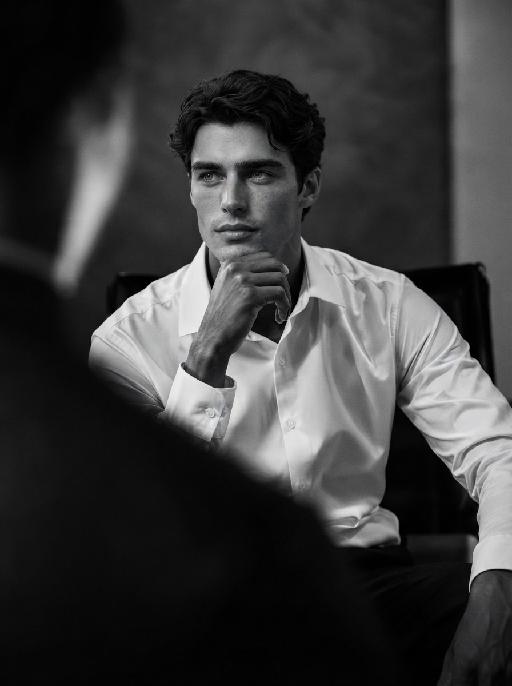
More From VIVAGO AI

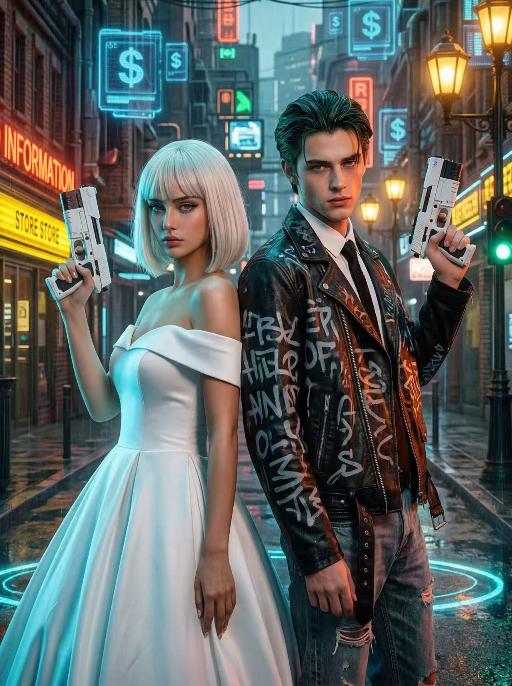
Cyber Couple AI effects generated image

Cyber Couple

"High-end photorealistic cyberpunk-style portrait, strictly preserving the original facial features, gender, and age of the two individuals: The woman has short platinum-blonde hair with blunt bangs, delicate makeup, and a cold, sharp gaze; the man has dark greenish-black slicked-back hair, sharp facial features, and a stern expression. They stand back-to-back, each holding a futuristic white sci-fi firearm raised in their hands, looking directly at the camera with a cool, slightly detached demeanor. The woman wears a white off-the-shoulder ball gown wedding dress, elegant and minimalist, creating a stark contrast with the cyberpunk style. The man dons a black vintage riveted leather jacket printed with graffiti letters, layered over a white shirt and black tie, paired with vintage ripped jeans for a strong streetwear vibe. Background: A rainy neon-lit cyberpunk city street blending retro and futuristic elements: old brick buildings, glowing neon signs (red ""RED INFORMATION"", yellow reflective store signs, green traffic lights), floating blue holographic projections (dollar sign UI elements) in the air, warm yellow vintage street lamps interwoven with cool-toned electronic lights, and wet ground reflecting neon halos. Dense pipelines, electronic screens, and retro architectural details create a dystopian urban atmosphere. Lighting: High-contrast neon cyberpunk lighting, dominated by cyan-blue, orange-red, and warm yellow tones: cool side lighting outlines the figures, warm neon lights illuminate their faces, the ambient light is filled with grain and halos to simulate the diffuse reflection of humid rainy air, and strong light-dark contrast emphasizes the layering between the characters and the neon background. 8K ultra-realistic, cinematic quality, cyberpunk aesthetic, shot with a Sony A7R V camera paired with an 85mm f/1.4 lens, shallow depth of field, ultra-clear details of skin, hair, and clothing textures, with subtle film grain, no watermarks, no text, and no logos."

Cool Hairstyle

"1. Basic scene and character settings: Refer to the picture where the characters are surrounded by a wide black hair salon cloth. (Mid shot) Ensure that the composition is above the person's legs. The person held a black smartphone in one hand and recorded the entire process from a first person selfie perspective. This person's expression remained unchanged throughout the entire process, uniform and natural, 4K ultra high definition, with movie like skin tone, obvious depth of field, and soft bokeh effects on the background neon lights and mirrors. 2. Core Consistency Control [Strict Lockdown]: Within 10 seconds of the entire video, the facial features of the character (facial proportions, eye color, skin texture) must remain absolutely consistent, without any distortion or deterioration. The position, grip posture, and gaze direction of the mobile phone should remain unchanged. The only change lies in the hair: each hairstyle transitions through a physical process of ""hair dissolution/natural growth"" to ensure that the texture, luster, and gravitational sagging of the hair feel realistic and natural. 3. Hairstyle Sequence and Transition (10 seconds, 8 hairstyles) Hairstyle 1 → 2 (0-1.5 seconds): Initially, the hairstyle was based on a reference person's hairstyle, gradually evolving into a modern messy hairstyle (dark brown, fluffy, ventilated feeling). Hairstyle 2 → 3 (1.5-3 seconds): Hair quickly softens, intertwines and lengthens, turning golden yellow and woven into light golden braids (hanging down to the forehead, with a street fashion vibe). Hairstyle 3 → 4 (3-4 seconds): Braids spread out like water, becoming longer and thinner, naturally hanging down, and the color deepens to jet black, forming shoulder length curly hair (smooth and glossy, velvet like curves, exuding artistic temperament). Hairstyle 4 → 5 (4-5 seconds): The long curly hair instantly shrinks and becomes shorter, the bangs slightly curl to cover the forehead, and then become short hair, with 6 long and thin braids hanging down from the edges of the hair. Hairstyle 5 → 6 (5-6 seconds): Comb and dissolve the hair, shave both sides clean, make the overall length uniform, and turn it into a tough round hairstyle (only a few millimeters, with delicate gradient contours at the back of the neck). Hairstyle 6 → 7 (6-7 seconds): Weave the hair into geometric lines close to the scalp (tie a small bun at the back with sharp lines). Then, loosen the braid and let the hair stand upright. Hairstyle 7 → 8 (7-8 seconds): The hair gradually turns silver white, the bangs are trimmed neatly, and it becomes a very short silver white spiky hairstyle. The silver white gradually disappeared, returning to dark brown, and the hair became fluffy and curly again. Hairstyle 8 → End (8-10 seconds): The hairstyle is perfectly restored to the initial reference image, and the video ends. 4. Rendering and technical features: ultra realistic rendering, ray tracing, hair level detail simulation, realistic physical dynamics, movie level lighting, 60fps, no stuttering, stable time consistency."

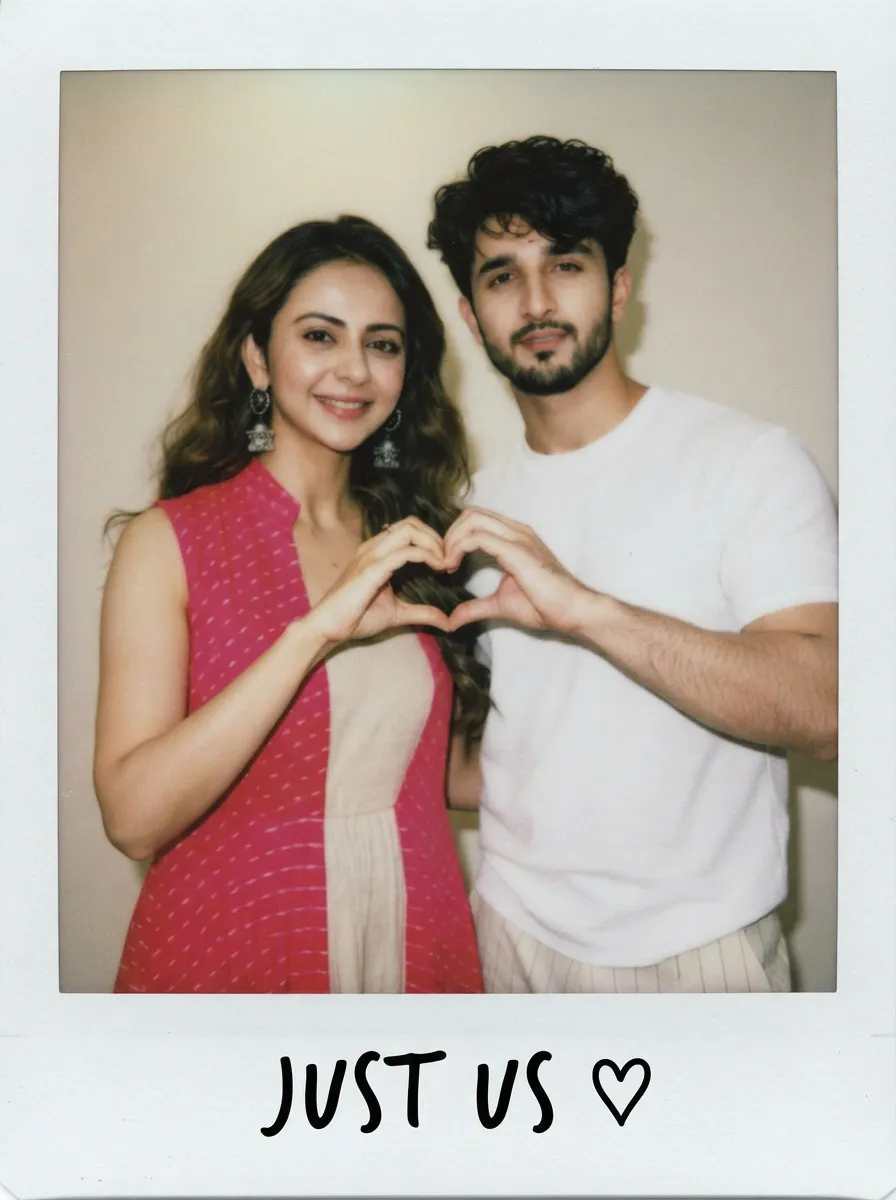
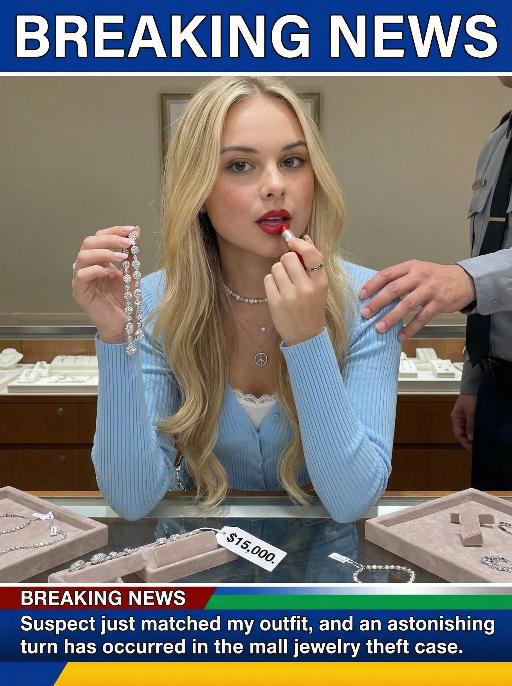
Jewelry Theft AI effects generated image

Jewelry Theft

An interesting breaking news photo has been released. In the picture, the person depicted (with their facial features, gender and age remaining unchanged) is caught in the act of stealing when she is captured on camera. One hand is holding a string of diamond earrings, and the other hand is holding a lipstick, as if nothing has happened as she is applying it to her lips. The main figure occupies 80% of the overall picture. The jewelry counter is in a mess, with velvet jewelry pads scattered around, and a fallen price tag that reads "$15,000". Outside the frame, a security guard's hand is reaching towards her shoulder. Above the picture, there is a prominent large headline text (blue background with white characters): BREAKING NEWS;Below the picture, there is a news text (in red, blue and black color combination): Suspect just matched my outfit and an astonishing turn has occurred in the mall jewelry theft case.

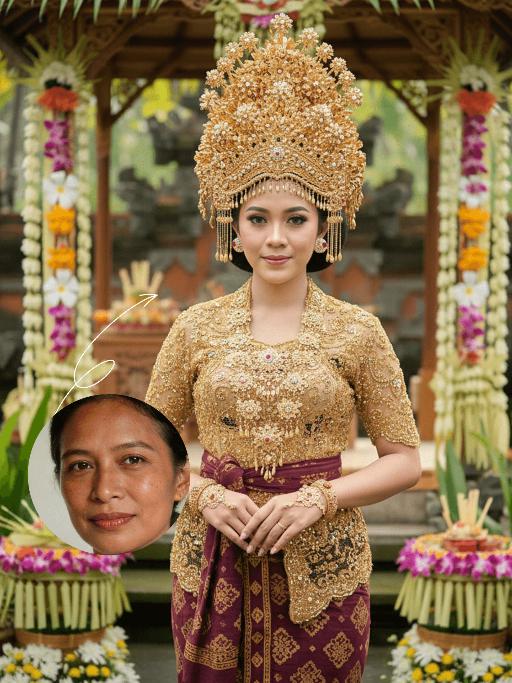
Bali Queen AI effects generated image

Bali Queen

Strictly lock the facial features of the uploaded portrait (preserve facial contours, native Indonesian skin tone, hairstyle and age). Half-body portrait photography, the subject is centered in the frame, not positioned too low, hyper-realistic style, 4K ultra-high definition, soft warm tropical daylight, authentic Balinese wedding cultural atmosphere | A young Indonesian Balinese woman with a poised, elegant expression, standing front-facing in a traditional Balinese bridal outfit. She wears an extremely elaborate, oversized golden beaded and embroidered ceremonial headdress (Bali crown) adorned with intricate floral and gem details, a matching golden beaded and embroidered short-sleeve top, and a deep maroon batik-patterned sarong skirt with gold trim. She accessorizes with layered golden necklaces, bracelets, and a ceremonial handpiece, with her hands gracefully clasped in front of her torso. The background is a softly blurred authentic Balinese wedding ceremony setting: a sacred bamboo and palm-frond ceremonial pavilion (bale agung) decorated with vibrant tropical flowers (frangipani, orchids, and jasmine), a carved wooden altar adorned with traditional offerings, and lush green tropical foliage, creating a romantic and culturally immersive wedding atmosphere. Focus on the intricate details of the golden beadwork, the ornate headdress, and the timeless cultural elegance of the Balinese wedding tradition, with warm diffused sunlight enhancing the opulence of the bridal attire

Glam Balloon

"Use the uploaded image as the only reference. Strictly preserve the original subject, identity, facial features, hairstyle, expression, clothing, pose, background, scene layout, and overall composition of the uploaded image. Do not add or remove major elements. Only transform the main subject into a soft balloon-inspired portrait style. Do not stylize or alter the background. Keep the background unchanged in content, structure, and appearance. Style for the subject only: semi-realistic digital beauty portrait, smooth glossy skin, soft airbrushed rendering, gentle highlights, slightly inflated balloon-like softness, delicate facial features, polished hair highlights, warm elegant tones, and a clean refined finish. Keep the person recognizable and attractive. The face and body should have a subtle balloon-like softness and smooth rounded appearance, but without extreme distortion. The effect should feel soft, pretty, polished, and visually appealing. The final image should look like the original uploaded image, with only the subject transformed into a subtle balloon-style portrait while the background remains untouched. No text, no logo, no watermark."

Load more

Next-Gen Multi-Model AI Video Architecture

Vivago AI isn't just one engine—it’s a unified hub for the world’s most advanced video AI. Whether you need cinematic realism or high-speed social content, we provide the right model for your creative vision.

Free Generate

Beauty and Dolphins

Vacation Time

Stellar Tear

Fish Tank Supervisor

Cinematic Quality & Precision Control

Enables 4K resolution with multi-lens motion control, generating delicate scene via text prompts for customized cinematography.​

TRY NOW

Dynamic AV Sync

Auto-generates original audio to avoid copyright issues. Build 3D immersive environments through layered sound design automatically.

TRY NOW

OpenAI Sora 2

​Advanced visual storytelling with unparalleled physics and consistency.

TRY NOW

Kling v2.6 Pro

Industry-leading cinematic image animation and motion control.

TRY NOW

Google Veo 3 & 3.1

Ultra-fast generation with enhanced realism for creative workflows.

TRY NOW

Vivago AI 2.0

Our proprietary model optimized for efficiency, speed, and cost-effective generation.

TRY NOW

Users' Voice

We listen carefully to the opinions of every user.
Free Generate
Contact Us
I tried the Lip Sync feature inside Vivago.ai’s AI Video Generator for my educational podcast, and the results were stunning! The avatar's lip movements perfectly matched my audio recording, creating a professional AI-generated video without complex editing. Compared with tools like OpenAI Sora 2 and Google Veo 3.1, Vivago Image-to-Video delivers fast, studio-quality results online. It saved me hours of post-production work.
ElenaM (Spain)
Vivago’s Image-to-Video AI transformed my marketing workflow. I uploaded a product image and described the launch scene in text, and it generated a 10-second cinematic AI video with background music and dynamic visuals. The output quality rivals Kling v2.6 Pro and Google Veo 3 Fast. It’s now my go-to AI video generator for social media ads and product campaigns.
KenjiT (Japan)
As a digital artist, I use Vivago.ai 2.0 daily for Image-to-Image and AI Image-to-Video creation. The e-book covers and animated visuals I generate for clients look cinematic and professional. Unlike many standalone AI tools, Vivago integrates multiple leading models into one platform, making it easier to create copyright-safe AI images and videos for publishing.
ChenL (China)
I tried the Lip Sync feature inside Vivago.ai’s AI Video Generator for my educational podcast, and the results were stunning! The avatar's lip movements perfectly matched my audio recording, creating a professional AI-generated video without complex editing. Compared with tools like OpenAI Sora 2 and Google Veo 3.1, Vivago Image-to-Video delivers fast, studio-quality results online. It saved me hours of post-production work.
ElenaM (Spain)
Vivago’s Image-to-Video AI transformed my marketing workflow. I uploaded a product image and described the launch scene in text, and it generated a 10-second cinematic AI video with background music and dynamic visuals. The output quality rivals Kling v2.6 Pro and Google Veo 3 Fast. It’s now my go-to AI video generator for social media ads and product campaigns.
KenjiT (Japan)
As a digital artist, I use Vivago.ai 2.0 daily for Image-to-Image and AI Image-to-Video creation. The e-book covers and animated visuals I generate for clients look cinematic and professional. Unlike many standalone AI tools, Vivago integrates multiple leading models into one platform, making it easier to create copyright-safe AI images and videos for publishing.
ChenL (China)
I absolutely love Vivago’s AI Image-to-Video Generator. As a travel blogger, static images often fail to capture real atmosphere, but Vivago helps me turn photos into vivid cinematic AI videos with motion effects. It feels comparable to OpenAI Sora 2 and Google Veo 3.1, but more accessible and faster for creators who need high-quality AI videos online.
LiamK (Australia)
I tried the Lip Sync feature inside Vivago.ai’s AI Video Generator for my educational podcast, and the results were stunning! The avatar's lip movements perfectly matched my audio recording, creating a professional AI-generated video without complex editing. Compared with tools like OpenAI Sora 2 and Google Veo 3.1, Vivago Image-to-Video delivers fast, studio-quality results online. It saved me hours of post-production work.
ElenaM (Spain)
Vivago’s Image-to-Video AI transformed my marketing workflow. I uploaded a product image and described the launch scene in text, and it generated a 10-second cinematic AI video with background music and dynamic visuals. The output quality rivals Kling v2.6 Pro and Google Veo 3 Fast. It’s now my go-to AI video generator for social media ads and product campaigns.
KenjiT (Japan)
As a digital artist, I use Vivago.ai 2.0 daily for Image-to-Image and AI Image-to-Video creation. The e-book covers and animated visuals I generate for clients look cinematic and professional. Unlike many standalone AI tools, Vivago integrates multiple leading models into one platform, making it easier to create copyright-safe AI images and videos for publishing.
ChenL (China)
I absolutely love Vivago’s AI Image-to-Video Generator. As a travel blogger, static images often fail to capture real atmosphere, but Vivago helps me turn photos into vivid cinematic AI videos with motion effects. It feels comparable to OpenAI Sora 2 and Google Veo 3.1, but more accessible and faster for creators who need high-quality AI videos online.
LiamK (Australia)
Using Vivago.ai’s Image-to-Video AI has greatly enhanced my classroom teaching. I transform textbook notes into historical AI videos with cinematic filters and dynamic animations. Compared with tools like Kling v2.6 Pro and Google Veo 3 Fast, Vivago offers faster generation and easier parameter control for educators who need reliable AI video creation.
RajivG (India)
I frequently create AI videos on Vivago and publish them on TikTok and YouTube Shorts. The AI video templates and trending content ideas help me produce viral-ready clips quickly. With Vivago’s integrated models—including advanced video engines similar to OpenAI Sora 2—I can generate anime-style and cinematic social media videos that drive high engagement.
MarieJ (Spain)
What attracts me most about Vivago.ai is not only the powerful AI Video Generator but also the active AIGC creator community. It combines AI Image-to-Video, Text-to-Video, and leading model integrations like Google Veo 3.1 into one creative platform.
TomW (India)
At first, I was hesitant about using AI video tools. But after trying Vivago Image-to-Video, I realized how easy it is to create professional AI-generated videos online. I just upload an image, add a short prompt, and adjust a few settings. The results are cinematic and copyright-safe, which is essential for commercial projects.
HectorC (Mexico)
Using Vivago.ai’s Image-to-Video AI has greatly enhanced my classroom teaching. I transform textbook notes into historical AI videos with cinematic filters and dynamic animations. Compared with tools like Kling v2.6 Pro and Google Veo 3 Fast, Vivago offers faster generation and easier parameter control for educators who need reliable AI video creation.
RajivG (India)
I frequently create AI videos on Vivago and publish them on TikTok and YouTube Shorts. The AI video templates and trending content ideas help me produce viral-ready clips quickly. With Vivago’s integrated models—including advanced video engines similar to OpenAI Sora 2—I can generate anime-style and cinematic social media videos that drive high engagement.
MarieJ (Spain)
What attracts me most about Vivago.ai is not only the powerful AI Video Generator but also the active AIGC creator community. It combines AI Image-to-Video, Text-to-Video, and leading model integrations like Google Veo 3.1 into one creative platform.
TomW (India)
At first, I was hesitant about using AI video tools. But after trying Vivago Image-to-Video, I realized how easy it is to create professional AI-generated videos online. I just upload an image, add a short prompt, and adjust a few settings. The results are cinematic and copyright-safe, which is essential for commercial projects.
HectorC (Mexico)