More From VIVAGO AI

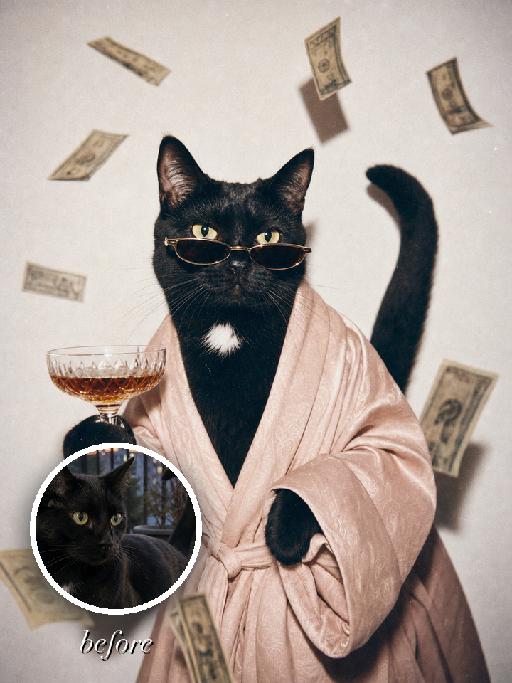
Chic Party AI effects generated image

Chic Party

" Turn the uploaded pet into a full-bleed retro flash fashion portrait of a glamorous party pet. The pet remains an animal throughout, wearing a flowing pale blush robe and narrow dark sunglasses, holding a glass of amber pet-safe mocktail in one paw while stylized non-readable banknote-like shapes float through the air as editorial set dressing. Use a white studio background, direct flash, 1980s luxury snapshot mood, warm faded colors, soft focus, visible film grain, tiny dust specks, and matte photo print texture. Preserve the uploaded pet's species, breed, coat colour and markings, ear shape, muzzle and face structure, eye colour and tail; keep it instantly recognisable as the same pet. Change only the scene, outfit and pose, not its identity. The pet is the only living subject. Fill the entire 3:4 vertical frame edge to edge. No border, no Polaroid frame, no white margin. No people, no human hands, no logos, no readable text, no watermark, no Doubao AI text."

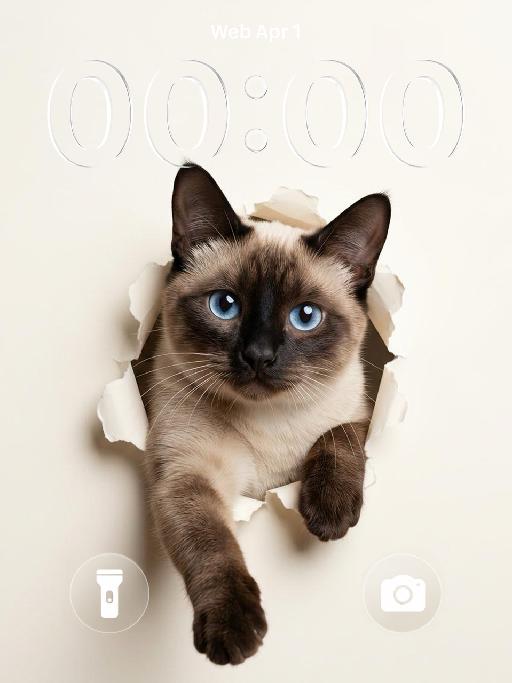
Peek Face AI effects generated image

Peek Face

"Use the uploaded pet image as the only identity reference. Create a clean, minimalist studio-style portrait of the same pet appearing to break through a sheet of paper. Strictly preserve the pet’s original species, face shape, fur color, fur texture, eye shape, ear shape, nose shape, markings, and overall recognizability. Composition: - square or vertical composition - large clean negative space - the pet is centered or slightly lower than center - only the head, upper chest, and front paws are visible - the pet is emerging through a ripped paper hole - one front paw reaches farther out toward the viewer - the other front paw rests near the torn opening - the pet looks directly at the camera - cute, curious, slightly playful expression - a slight head tilt for a charming look Background: - a soft light creamy off-white paper background - the paper should feel smooth, clean, and minimal - a realistic torn hole in the paper around the pet - the ripped paper edges should be clearly visible and slightly curled outward - the hole should feel realistic, as if the pet pushed through the paper - keep the background plain and uncluttered with no extra objects Style: - hyper-realistic pet photography - commercial studio aesthetic - crisp fur detail - soft softbox lighting - subtle shadow around the torn paper opening and under the paws - polished, playful, modern poster feel - elegant neutral color palette - slightly soft, refined, and premium mood Lighting: - soft even studio lighting - clean highlights in the eyes - gentle shadows for depth - bright, tidy, high-key look Important constraints: - no full body - no extra props - no text - no watermark - no logo - no cartoon style - no illustration style - keep the pet realistic and adorable "

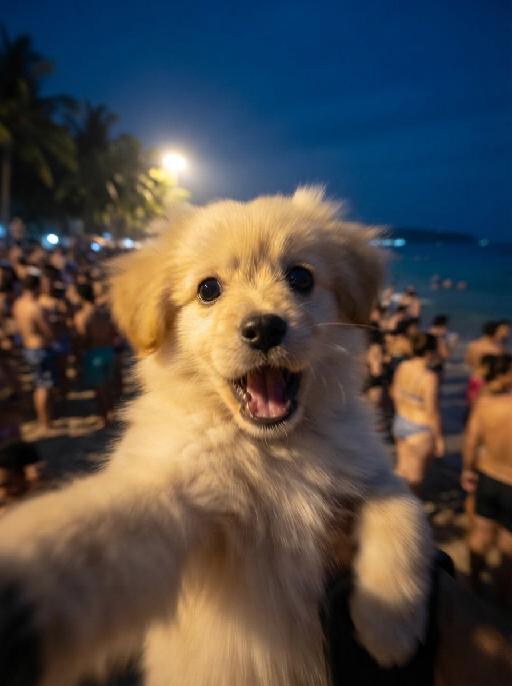
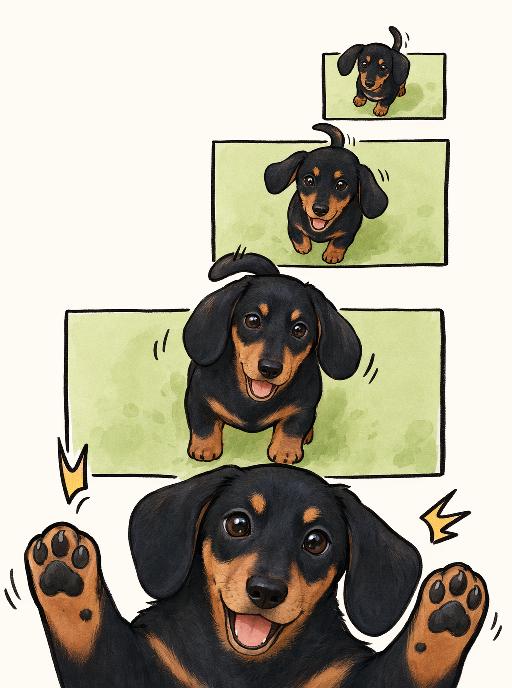
Joy Snapshot AI effects generated image

Joy Snapshot

"Use the uploaded pet image as the exact identity reference. Preserve the pet's recognizable face, fur color, markings, eye color, muzzle shape and ears while transforming it into the requested gameplay style. Create a vertical 3:4 image with this exact effect: minimal cute comic panel illustration, multiple stacked green rectangular frames, same pet appearing larger toward the bottom, paws popping out, happy open-mouth expression, clean off-white background, simple black linework, soft beige/orange accents. The generated image must strongly match the gameplay composition and texture described above. Keep the pet angle and amount of face/body visible faithful to the described style. If the style is hand-drawn, watercolor, felt, plush, sticker, toy, comic, or package design, reproduce that material and texture clearly. Keep the pet identifiable as the uploaded pet even when stylized. No logos, no watermark, no Doubao AI text."

Load more

Next-Gen Multi-Model AI Video Architecture

Vivago AI isn't just one engine—it’s a unified hub for the world’s most advanced video AI. Whether you need cinematic realism or high-speed social content, we provide the right model for your creative vision.

Free Generate

Beauty and Dolphins

Vacation Time

Stellar Tear

Fish Tank Supervisor

Cinematic Quality & Precision Control

Enables 4K resolution with multi-lens motion control, generating delicate scene via text prompts for customized cinematography.​

TRY NOW

Dynamic AV Sync

Auto-generates original audio to avoid copyright issues. Build 3D immersive environments through layered sound design automatically.

TRY NOW

OpenAI Sora 2

​Advanced visual storytelling with unparalleled physics and consistency.

TRY NOW

Kling v2.6 Pro

Industry-leading cinematic image animation and motion control.

TRY NOW

Google Veo 3 & 3.1

Ultra-fast generation with enhanced realism for creative workflows.

TRY NOW

Vivago AI 2.0

Our proprietary model optimized for efficiency, speed, and cost-effective generation.
TRY NOW

Users' Voice

We listen carefully to the opinions of every user.
Free Generate
Contact Us
I tried the Lip Sync feature inside Vivago.ai’s AI Video Generator for my educational podcast, and the results were stunning! The avatar's lip movements perfectly matched my audio recording, creating a professional AI-generated video without complex editing. Compared with tools like OpenAI Sora 2 and Google Veo 3.1, Vivago Image-to-Video delivers fast, studio-quality results online. It saved me hours of post-production work.
ElenaM (Spain)
Vivago’s Image-to-Video AI transformed my marketing workflow. I uploaded a product image and described the launch scene in text, and it generated a 10-second cinematic AI video with background music and dynamic visuals. The output quality rivals Kling v2.6 Pro and Google Veo 3 Fast. It’s now my go-to AI video generator for social media ads and product campaigns.
KenjiT (Japan)
As a digital artist, I use Vivago.ai 2.0 daily for Image-to-Image and AI Image-to-Video creation. The e-book covers and animated visuals I generate for clients look cinematic and professional. Unlike many standalone AI tools, Vivago integrates multiple leading models into one platform, making it easier to create copyright-safe AI images and videos for publishing.
ChenL (China)
I tried the Lip Sync feature inside Vivago.ai’s AI Video Generator for my educational podcast, and the results were stunning! The avatar's lip movements perfectly matched my audio recording, creating a professional AI-generated video without complex editing. Compared with tools like OpenAI Sora 2 and Google Veo 3.1, Vivago Image-to-Video delivers fast, studio-quality results online. It saved me hours of post-production work.
ElenaM (Spain)
Vivago’s Image-to-Video AI transformed my marketing workflow. I uploaded a product image and described the launch scene in text, and it generated a 10-second cinematic AI video with background music and dynamic visuals. The output quality rivals Kling v2.6 Pro and Google Veo 3 Fast. It’s now my go-to AI video generator for social media ads and product campaigns.
KenjiT (Japan)
As a digital artist, I use Vivago.ai 2.0 daily for Image-to-Image and AI Image-to-Video creation. The e-book covers and animated visuals I generate for clients look cinematic and professional. Unlike many standalone AI tools, Vivago integrates multiple leading models into one platform, making it easier to create copyright-safe AI images and videos for publishing.
ChenL (China)
I absolutely love Vivago’s AI Image-to-Video Generator. As a travel blogger, static images often fail to capture real atmosphere, but Vivago helps me turn photos into vivid cinematic AI videos with motion effects. It feels comparable to OpenAI Sora 2 and Google Veo 3.1, but more accessible and faster for creators who need high-quality AI videos online.
LiamK (Australia)
I tried the Lip Sync feature inside Vivago.ai’s AI Video Generator for my educational podcast, and the results were stunning! The avatar's lip movements perfectly matched my audio recording, creating a professional AI-generated video without complex editing. Compared with tools like OpenAI Sora 2 and Google Veo 3.1, Vivago Image-to-Video delivers fast, studio-quality results online. It saved me hours of post-production work.
ElenaM (Spain)
Vivago’s Image-to-Video AI transformed my marketing workflow. I uploaded a product image and described the launch scene in text, and it generated a 10-second cinematic AI video with background music and dynamic visuals. The output quality rivals Kling v2.6 Pro and Google Veo 3 Fast. It’s now my go-to AI video generator for social media ads and product campaigns.
KenjiT (Japan)
As a digital artist, I use Vivago.ai 2.0 daily for Image-to-Image and AI Image-to-Video creation. The e-book covers and animated visuals I generate for clients look cinematic and professional. Unlike many standalone AI tools, Vivago integrates multiple leading models into one platform, making it easier to create copyright-safe AI images and videos for publishing.
ChenL (China)
I absolutely love Vivago’s AI Image-to-Video Generator. As a travel blogger, static images often fail to capture real atmosphere, but Vivago helps me turn photos into vivid cinematic AI videos with motion effects. It feels comparable to OpenAI Sora 2 and Google Veo 3.1, but more accessible and faster for creators who need high-quality AI videos online.
LiamK (Australia)
Using Vivago.ai’s Image-to-Video AI has greatly enhanced my classroom teaching. I transform textbook notes into historical AI videos with cinematic filters and dynamic animations. Compared with tools like Kling v2.6 Pro and Google Veo 3 Fast, Vivago offers faster generation and easier parameter control for educators who need reliable AI video creation.
RajivG (India)
I frequently create AI videos on Vivago and publish them on TikTok and YouTube Shorts. The AI video templates and trending content ideas help me produce viral-ready clips quickly. With Vivago’s integrated models—including advanced video engines similar to OpenAI Sora 2—I can generate anime-style and cinematic social media videos that drive high engagement.
MarieJ (Spain)
What attracts me most about Vivago.ai is not only the powerful AI Video Generator but also the active AIGC creator community. It combines AI Image-to-Video, Text-to-Video, and leading model integrations like Google Veo 3.1 into one creative platform.
TomW (India)
At first, I was hesitant about using AI video tools. But after trying Vivago Image-to-Video, I realized how easy it is to create professional AI-generated videos online. I just upload an image, add a short prompt, and adjust a few settings. The results are cinematic and copyright-safe, which is essential for commercial projects.
HectorC (Mexico)
Using Vivago.ai’s Image-to-Video AI has greatly enhanced my classroom teaching. I transform textbook notes into historical AI videos with cinematic filters and dynamic animations. Compared with tools like Kling v2.6 Pro and Google Veo 3 Fast, Vivago offers faster generation and easier parameter control for educators who need reliable AI video creation.
RajivG (India)
I frequently create AI videos on Vivago and publish them on TikTok and YouTube Shorts. The AI video templates and trending content ideas help me produce viral-ready clips quickly. With Vivago’s integrated models—including advanced video engines similar to OpenAI Sora 2—I can generate anime-style and cinematic social media videos that drive high engagement.
MarieJ (Spain)
What attracts me most about Vivago.ai is not only the powerful AI Video Generator but also the active AIGC creator community. It combines AI Image-to-Video, Text-to-Video, and leading model integrations like Google Veo 3.1 into one creative platform.
TomW (India)
At first, I was hesitant about using AI video tools. But after trying Vivago Image-to-Video, I realized how easy it is to create professional AI-generated videos online. I just upload an image, add a short prompt, and adjust a few settings. The results are cinematic and copyright-safe, which is essential for commercial projects.
HectorC (Mexico)