More From VIVAGO AI

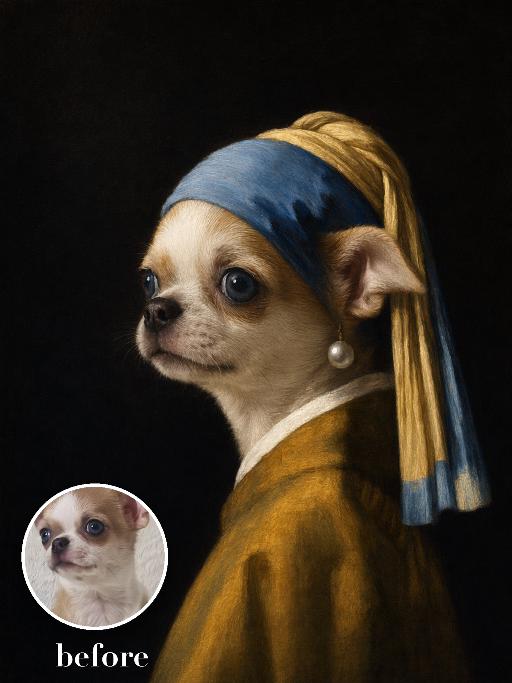
Pearl Headscarf Dog AI effects generated image

Pearl Headscarf Dog

Render the uploaded pet as a Dutch golden-age oil portrait: side-facing head-and-neck pose against black, blue-and-gold cloth headscarf wrapped around the ears, one oversized pearl ornament near the visible ear, mustard robe, luminous soft side light and smooth painterly glazing. The subject remains an animal throughout. No people or human hands. No real character names, celebrity names, brands, logos, watermarks or readable text. Accurately preserve the uploaded pet's species, breed, coat color and markings, ear shape, muzzle and face structure, eye color, body proportions and tail. Keep it instantly recognisable as the same animal; change only pose, scene, costume and art treatment. Match the reference composition closely. Vertical 3:4, crisp detail, the pet is the unmistakable main subject.

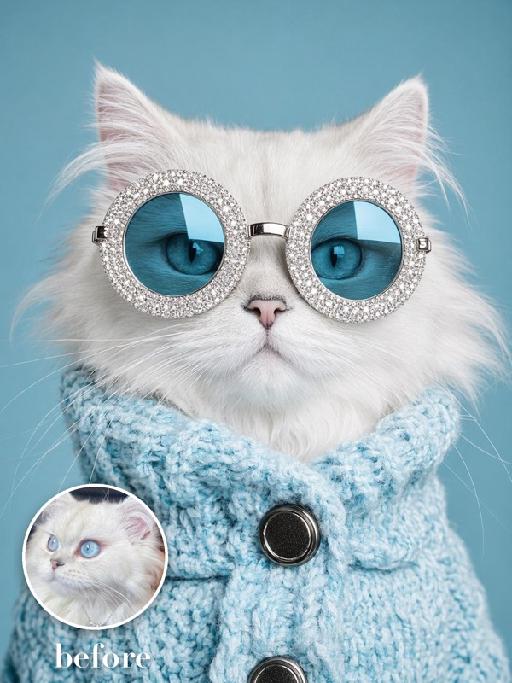
Jewel Glasses AI effects generated image

Jewel Glasses

Recreate the quirky blue studio portrait. The uploaded pet faces forward wearing enormous round silver rhinestone sunglasses with blue mirrored lenses and a chunky sky-blue knitted turtleneck sweater with large dark buttons. Solid cyan background, close chest-up crop, humorous high-fashion expression, crisp knit and gem texture. The subject remains an animal throughout. No people or human hands. No real brands, logos, watermarks or readable text. Accurately preserve the uploaded pet's species, breed, coat color and markings, ear shape, muzzle and face structure, eye color and body proportions. Keep it instantly recognisable as the same animal; change only pose, scene, clothing and accessories. Vertical 3:4, photorealistic, crisp detail, with the pet as the unmistakable main subject.

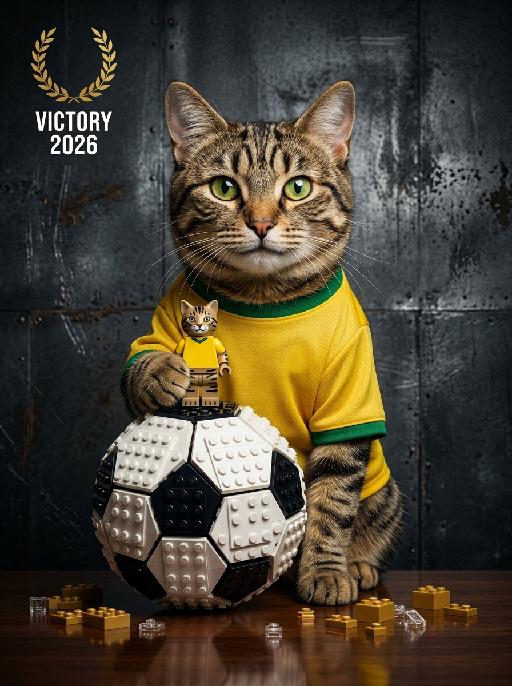
Paw Trophy AI effects generated image

Paw Trophy

"Photorealistic studio portrait, cinematic low-key lighting. Subject: the subject from the uploaded image, preserving their exact face, age, and attire details including all textures and patterns, wearing a classic yellow home football jersey with green trim, free of any brand logos or official team crests, sitting at a dark reflective wooden table, warm bright joyful expression with a big smile, looking directly at the camera. Their left hand gently holds a small Lego-style minifigure that replicates the subject's appearance, standing on top of the large Lego-built classic football on the table. The football adopts a traditional black-and-white paneled design with no logos, trademarks or proprietary markings. The football is extra large and towering, taking up nearly half of the frame height, much taller and bulkier than the minifigure, with the subject’s hand and the minifigure positioned just above it, matching the reference photo’s object-to-subject scale. Table details: scattered small golden Lego bricks and pieces on the reflective dark table surface around the football, matching the reference photo’s subtle tabletop details. Background: dark textured industrial metal wall with a rough, slightly scratched weathered finish, moody gritty studio atmosphere. Lighting: dramatic key light from front-left, soft shadows on face and background, highlighting facial features, jersey details, and the texture of the Lego football and minifigure. Style: hyperrealistic, sharp focus, high contrast, professional sports portrait photography, 8K, no distortion, no artifacts, no official event-related text anywhere in the frame. The left-upper corner features a minimalist golden victory-themed emblem, with stacked white text ""VICTORY 2026"" below it. Crisp focus, professional portrait photography style."

Image Quality Restoration

Retouch this image. Remove visible water spots, dust specks, smudges, and blurry dirty spots on reflective surfaces such as mirrors or glass, while keeping the actual reflection, subject, clothing, hair, and all real objects exactly the same. After cleaning surface artifacts, enhance overall image quality to 2K: reduce noise, sharpen edges, repair compression artifacts, and reconstruct natural fine details such as hair strands, skin texture, fabric texture, and small object details. Do not change the person's appearance, expression, identity, or pose. Do not add, remove, or alter any real objects. Do not change the overall colors, lighting style, or atmosphere. Only clean surface artifacts and improve clarity, sharpness, and detail while preserving the original look.

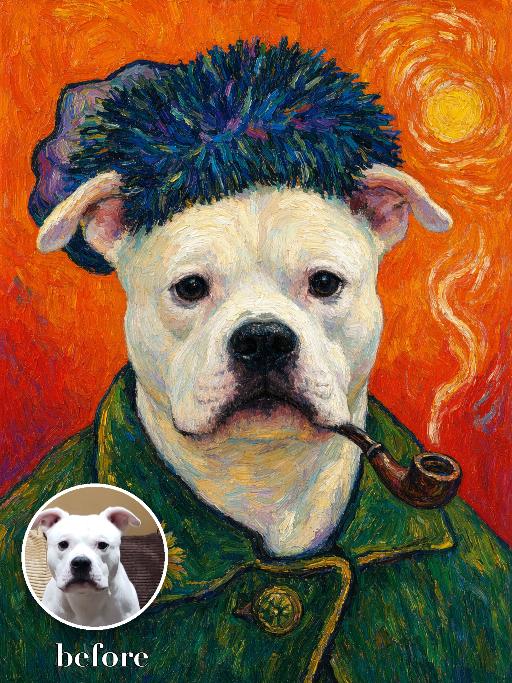
Sunflower Artist Portrait AI effects generated image

Sunflower Artist Portrait

Create a bold post-impressionist artist self-portrait of the uploaded pet: frontal chest-up pose, thick blue-green textured hat, green work coat, small pipe, saturated orange background with swirling brush marks and a sunflower-like yellow disk. Heavy impasto, vivid complementary colors and energetic outlines. The subject remains an animal throughout. No people or human hands. No real character names, celebrity names, brands, logos, watermarks or readable text. Accurately preserve the uploaded pet's species, breed, coat color and markings, ear shape, muzzle and face structure, eye color, body proportions and tail. Keep it instantly recognisable as the same animal; change only pose, scene, costume and art treatment. Match the reference composition closely. Vertical 3:4, crisp detail, the pet is the unmistakable main subject.

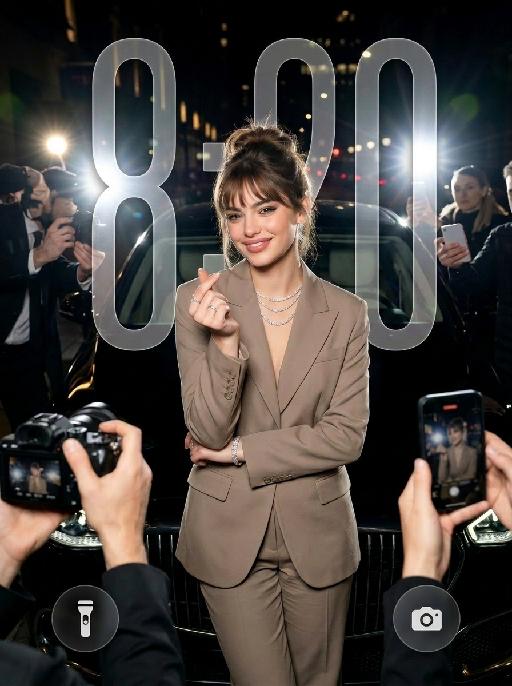
Heart Spotlight AI effects generated image

Heart Spotlight

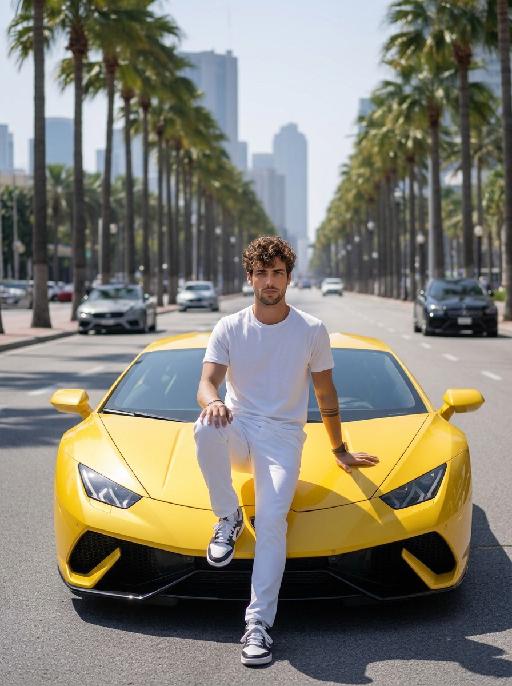
" Use the uploaded image as the only identity reference for the subject. Create a photorealistic vertical 4:5 high-fashion celebrity editorial portrait of the same subject. Strictly preserve the subject’s exact face, age, facial features, skin tone, hairstyle, hair color, and overall recognizability. Do not replace the face with a generic model face. SCENE: The subject stands confidently at night in front of a luxury black car, as if arriving at a high-profile fashion event or exclusive after-party. The setting feels like a glamorous city street at night, with a chic paparazzi atmosphere. POSE AND EXPRESSION: The subject stands centered in front of the car in a poised, fashion-forward stance. She raises both hands in front of her chest and forms a heart shape with her fingers. Her expression is stylish, playful, and confident, with a cool celebrity attitude. She can have softly closed eyes or a slightly squinting glamorous expression, with softly puckered lips or a chic subtle pout. STYLING: The subject wears a tailored taupe-beige or champagne-toned luxury suit with a sharp structured silhouette and elegant fitted waist. The outfit should feel like designer fashion, sleek, expensive, and editorial. Add sparkling high-end jewelry: - layered diamond necklace - statement earrings - bracelet - rings The styling should feel glamorous, feminine, modern, and celebrity-level luxurious. CAMERA AND PAPARAZZI ELEMENTS: Several hands holding professional cameras and smartphones appear around the edges of the frame, photographing the subject. Some phones may show the subject on their screens. Add strong paparazzi flash effects and bright camera flashes from multiple directions. The flashes should create a dramatic night-event atmosphere, with bright bursts of light, glossy highlights on the car, sparkling reflections on the jewelry, and a high-fashion celebrity feel. Keep the subject’s face and heart-hand gesture clearly visible. The surrounding cameras and phones should frame the subject without blocking her. BACKGROUND: - nighttime city-street setting - luxury black car directly behind the subject - dark elegant atmosphere - subtle out-of-focus city lights or event lights - refined red-carpet / fashion-event arrival mood - no cluttered street details LIGHTING: - strong flash photography aesthetic - multiple paparazzi flash bursts - subject brightly illuminated against a darker night background - glamorous high-contrast lighting - glossy highlights on hair, suit fabric, jewelry, and car surface - clean, premium editorial finish - cinematic night luxury mood STYLE: - photorealistic luxury fashion editorial photography - celebrity paparazzi aesthetic - high-end magazine campaign feel - glamorous night-event atmosphere - polished retouching - realistic skin texture - premium contrast - chic, stylish, expensive, and dramatic IMPORTANT CONSTRAINTS: - no text - no logo - no watermark - no distorted hands - no extra fingers - no deformed cameras - no blocked face - no cartoon - no illustration - no CGI appearance "

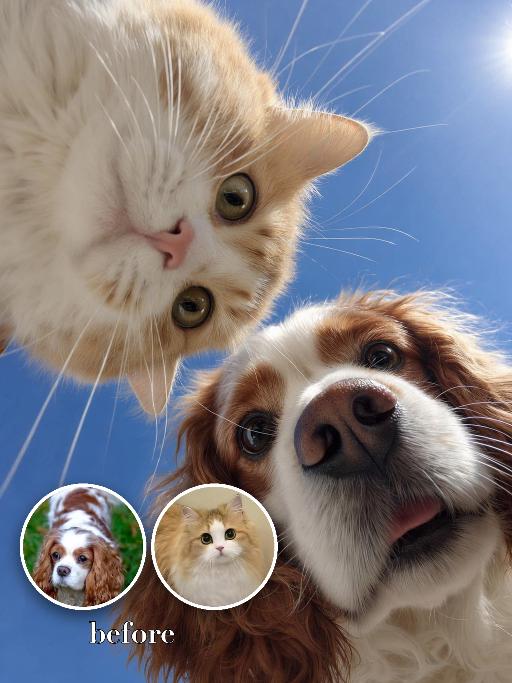
Looking Down AI effects generated image

Looking Down

"Use the two uploaded images as the only identity references for the two main subjects. Create a photorealistic low-angle upward-looking selfie portrait of exactly two uploaded subjects: the uploaded dog and the uploaded cat. The camera is positioned very low below them, pointing straight upward, so both subjects lean over the lens from opposite sides and look downward into it. Place the dog on one side of the frame and the cat on the other side, both leaning inward toward the center. Their noses are very close to the lens, creating a playful exaggerated perspective. Both subjects should have curious, funny, lively expressions, as if they are investigating the camera below them. Use an ultra-wide selfie perspective with slight fisheye-style lens distortion. The noses may appear larger and closer to the camera, while the eyes, muzzle, ears, and facial features remain clearly recognizable and natural. The distortion should feel playful and realistic, not broken or grotesque. Keep both uploaded subjects as two completely separate, fully recognizable individuals. Do not merge, morph, splice, fuse, or create any hybrid appearance. Strictly preserve each uploaded subject’s identity and recognizable features. For animal subjects, preserve species, breed, coat color, fur pattern, markings, eye color, ear shape, nose shape, muzzle structure, facial proportions, and overall recognizability. For human subjects, preserve facial identity, hair color, skin tone, facial structure, and general age. Do not preserve the original uploaded pose or expression. Actively change the facial expression, gaze direction, body pose, and interaction so both subjects fit this playful low-angle selfie composition naturally. Use a clean bright blue sky background with no distracting elements. The overall image should feel fresh, funny, dynamic, and visually striking."

Load more

Next-Gen Multi-Model AI Video Architecture

Vivago AI isn't just one engine—it’s a unified hub for the world’s most advanced video AI. Whether you need cinematic realism or high-speed social content, we provide the right model for your creative vision.

Free Generate

Beauty and Dolphins

Vacation Time

Stellar Tear

Fish Tank Supervisor

Cinematic Quality & Precision Control

Enables 4K resolution with multi-lens motion control, generating delicate scene via text prompts for customized cinematography.​

TRY NOW

Dynamic AV Sync

Auto-generates original audio to avoid copyright issues. Build 3D immersive environments through layered sound design automatically.

TRY NOW

OpenAI Sora 2

​Advanced visual storytelling with unparalleled physics and consistency.

TRY NOW

Kling v2.6 Pro

Industry-leading cinematic image animation and motion control.

TRY NOW

Google Veo 3 & 3.1

Ultra-fast generation with enhanced realism for creative workflows.

TRY NOW

Vivago AI 2.0

Our proprietary model optimized for efficiency, speed, and cost-effective generation.

TRY NOW

Users' Voice

We listen carefully to the opinions of every user.
Free Generate
Contact Us
I tried the Lip Sync feature inside Vivago.ai’s AI Video Generator for my educational podcast, and the results were stunning! The avatar's lip movements perfectly matched my audio recording, creating a professional AI-generated video without complex editing. Compared with tools like OpenAI Sora 2 and Google Veo 3.1, Vivago Image-to-Video delivers fast, studio-quality results online. It saved me hours of post-production work.
ElenaM (Spain)
Vivago’s Image-to-Video AI transformed my marketing workflow. I uploaded a product image and described the launch scene in text, and it generated a 10-second cinematic AI video with background music and dynamic visuals. The output quality rivals Kling v2.6 Pro and Google Veo 3 Fast. It’s now my go-to AI video generator for social media ads and product campaigns.
KenjiT (Japan)
As a digital artist, I use Vivago.ai 2.0 daily for Image-to-Image and AI Image-to-Video creation. The e-book covers and animated visuals I generate for clients look cinematic and professional. Unlike many standalone AI tools, Vivago integrates multiple leading models into one platform, making it easier to create copyright-safe AI images and videos for publishing.
ChenL (China)
I tried the Lip Sync feature inside Vivago.ai’s AI Video Generator for my educational podcast, and the results were stunning! The avatar's lip movements perfectly matched my audio recording, creating a professional AI-generated video without complex editing. Compared with tools like OpenAI Sora 2 and Google Veo 3.1, Vivago Image-to-Video delivers fast, studio-quality results online. It saved me hours of post-production work.
ElenaM (Spain)
Vivago’s Image-to-Video AI transformed my marketing workflow. I uploaded a product image and described the launch scene in text, and it generated a 10-second cinematic AI video with background music and dynamic visuals. The output quality rivals Kling v2.6 Pro and Google Veo 3 Fast. It’s now my go-to AI video generator for social media ads and product campaigns.
KenjiT (Japan)
As a digital artist, I use Vivago.ai 2.0 daily for Image-to-Image and AI Image-to-Video creation. The e-book covers and animated visuals I generate for clients look cinematic and professional. Unlike many standalone AI tools, Vivago integrates multiple leading models into one platform, making it easier to create copyright-safe AI images and videos for publishing.
ChenL (China)
I absolutely love Vivago’s AI Image-to-Video Generator. As a travel blogger, static images often fail to capture real atmosphere, but Vivago helps me turn photos into vivid cinematic AI videos with motion effects. It feels comparable to OpenAI Sora 2 and Google Veo 3.1, but more accessible and faster for creators who need high-quality AI videos online.
LiamK (Australia)
I tried the Lip Sync feature inside Vivago.ai’s AI Video Generator for my educational podcast, and the results were stunning! The avatar's lip movements perfectly matched my audio recording, creating a professional AI-generated video without complex editing. Compared with tools like OpenAI Sora 2 and Google Veo 3.1, Vivago Image-to-Video delivers fast, studio-quality results online. It saved me hours of post-production work.
ElenaM (Spain)
Vivago’s Image-to-Video AI transformed my marketing workflow. I uploaded a product image and described the launch scene in text, and it generated a 10-second cinematic AI video with background music and dynamic visuals. The output quality rivals Kling v2.6 Pro and Google Veo 3 Fast. It’s now my go-to AI video generator for social media ads and product campaigns.
KenjiT (Japan)
As a digital artist, I use Vivago.ai 2.0 daily for Image-to-Image and AI Image-to-Video creation. The e-book covers and animated visuals I generate for clients look cinematic and professional. Unlike many standalone AI tools, Vivago integrates multiple leading models into one platform, making it easier to create copyright-safe AI images and videos for publishing.
ChenL (China)
I absolutely love Vivago’s AI Image-to-Video Generator. As a travel blogger, static images often fail to capture real atmosphere, but Vivago helps me turn photos into vivid cinematic AI videos with motion effects. It feels comparable to OpenAI Sora 2 and Google Veo 3.1, but more accessible and faster for creators who need high-quality AI videos online.
LiamK (Australia)
Using Vivago.ai’s Image-to-Video AI has greatly enhanced my classroom teaching. I transform textbook notes into historical AI videos with cinematic filters and dynamic animations. Compared with tools like Kling v2.6 Pro and Google Veo 3 Fast, Vivago offers faster generation and easier parameter control for educators who need reliable AI video creation.
RajivG (India)
I frequently create AI videos on Vivago and publish them on TikTok and YouTube Shorts. The AI video templates and trending content ideas help me produce viral-ready clips quickly. With Vivago’s integrated models—including advanced video engines similar to OpenAI Sora 2—I can generate anime-style and cinematic social media videos that drive high engagement.
MarieJ (Spain)
What attracts me most about Vivago.ai is not only the powerful AI Video Generator but also the active AIGC creator community. It combines AI Image-to-Video, Text-to-Video, and leading model integrations like Google Veo 3.1 into one creative platform.
TomW (India)
At first, I was hesitant about using AI video tools. But after trying Vivago Image-to-Video, I realized how easy it is to create professional AI-generated videos online. I just upload an image, add a short prompt, and adjust a few settings. The results are cinematic and copyright-safe, which is essential for commercial projects.
HectorC (Mexico)
Using Vivago.ai’s Image-to-Video AI has greatly enhanced my classroom teaching. I transform textbook notes into historical AI videos with cinematic filters and dynamic animations. Compared with tools like Kling v2.6 Pro and Google Veo 3 Fast, Vivago offers faster generation and easier parameter control for educators who need reliable AI video creation.
RajivG (India)
I frequently create AI videos on Vivago and publish them on TikTok and YouTube Shorts. The AI video templates and trending content ideas help me produce viral-ready clips quickly. With Vivago’s integrated models—including advanced video engines similar to OpenAI Sora 2—I can generate anime-style and cinematic social media videos that drive high engagement.
MarieJ (Spain)
What attracts me most about Vivago.ai is not only the powerful AI Video Generator but also the active AIGC creator community. It combines AI Image-to-Video, Text-to-Video, and leading model integrations like Google Veo 3.1 into one creative platform.
TomW (India)
At first, I was hesitant about using AI video tools. But after trying Vivago Image-to-Video, I realized how easy it is to create professional AI-generated videos online. I just upload an image, add a short prompt, and adjust a few settings. The results are cinematic and copyright-safe, which is essential for commercial projects.
HectorC (Mexico)