More From VIVAGO AI

Fighting Giant

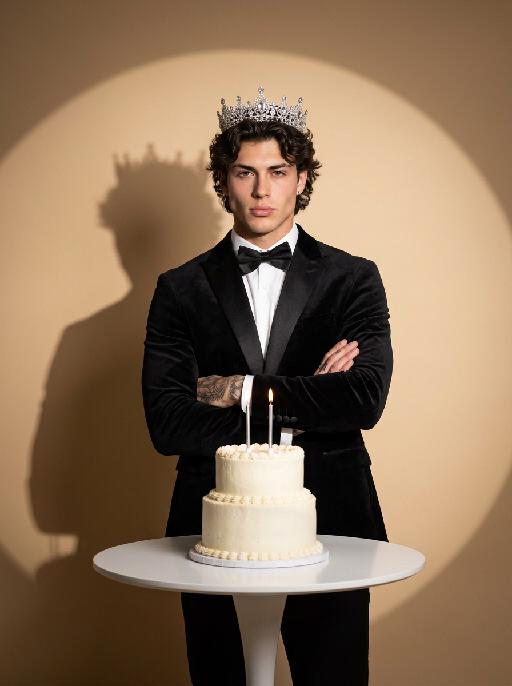
This is a scene of a combat competition ring with bright spotlights in the arena; photorealistic, high-definition details, natural colors, and the camera captures the close-quarters confrontation. The uploaded character, with an exaggerated expression, shouts loudly with an open mouth, stands barefoot on the left side of the combat ring in a fighting stance. On the right side of the ring is a tall, muscular tattooed combatant. Both of them glare and roar aggressively, facing off before the fight. The uploaded character suddenly jumps into the air, spins around to the right, and viciously kicks the combatant's head with their feet and legs. After being viciously kicked three times, the combatant is finally defeated and falls to the ground. The uploaded character smiles triumphantly and joyfully, stands in the middle of the ring to cheer and celebrate, with the surrounding audience clapping. The camera zooms in to a medium close-up to show the character's upper body.

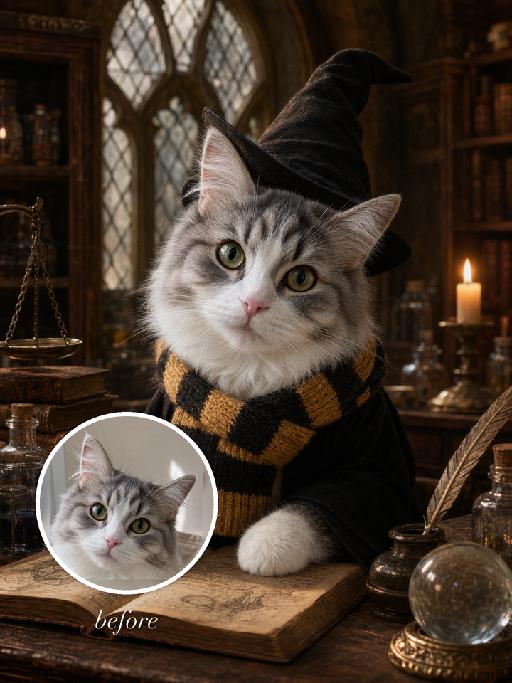
Magic Class AI effects generated image

Magic Class

"Full-bleed vertical 3:4 photorealistic fantasy wizard-school portrait. The uploaded reference image is the exact pet identity and MUST be preserved. Highest priority: keep the same gray-and-white tabby cat from the reference photo: same head shape, same tall ears, same eye color and gaze, same pink nose, same white muzzle, same gray tabby forehead and cheek markings, same facial proportions. Do not replace it with another cat, do not simplify or invent a different face. Only transform costume, pose, and environment. Scene: old magical classroom matching the supplied gameplay reference style: antique wooden desk, arched leaded-glass windows, candlelight, potion bottles, stacked old books, brass scale, crystal ball, warm amber cinematic light, retro film-photo texture. The cat wears a plain black wizard robe and a soft tall black pointed wizard hat. Scarf must match the classroom reference: a knitted school scarf with HORIZONTAL STRIPES ONLY. It is not plaid, not checkerboard, not tartan, not crisscross. Colors are golden yellow and black/dark charcoal, repeated horizontal bands around the neck, visible ribbed wool knit texture, soft knitted fabric, wrapped around the neck with short hanging ends. No readable text, no logos, no watermark"

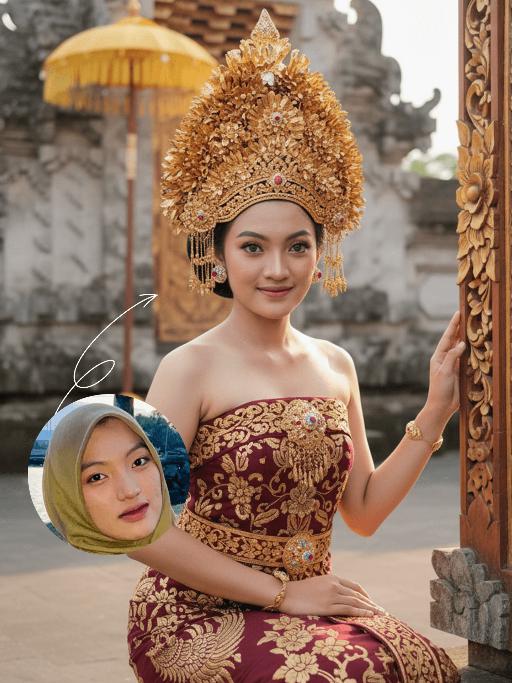
Bali Bride AI effects generated image

Bali Bride

Strictly lock the facial features of the uploaded portrait (preserve facial contours, native Indonesian skin tone, hairstyle and age). Extremely minimal negative space, the subject occupies 90% of the vertical frame, tight half-body portrait photography, hyper-realistic style, 4K ultra-high definition, soft warm tropical daylight, authentic Balinese cultural ceremony atmosphere . A young Indonesian Balinese woman with delicate features and a gentle warm smile, half-squatting in a sacred Balinese temple courtyard (close framing) . She wears an elaborate traditional Balinese ceremonial outfit: deep maroon strapless dress with intricate golden floral & phoenix embroidery, ornate hand-carved golden headdress, golden necklace, drop earrings and bracelet . Her right hand rests on an intricately carved Balinese wooden frame decorated with gold, blue and pink floral motifs . Background (weathered temple stone walls, traditional yellow Balinese payung) is extremely softly blurred to highlight the subject. Warm diffused sunlight creates a glowing golden tone throughout the scene, sharp focus on her facial expression, the rich texture of the golden embroidery and intricate headdress details. Capture the vibrant authentic Balinese cultural ambiance

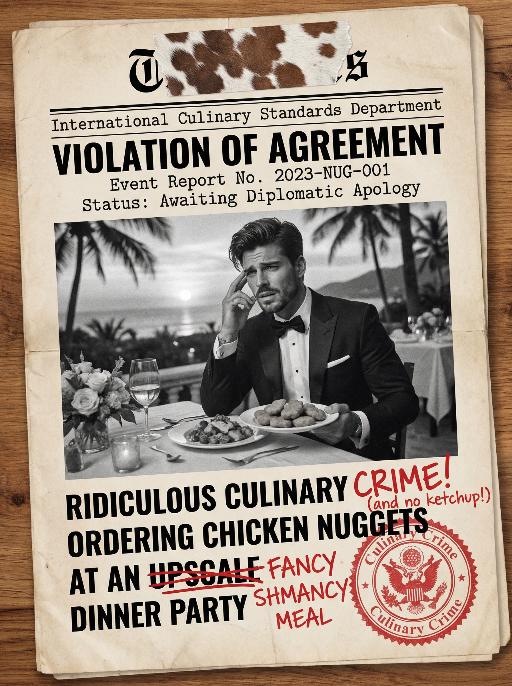
Document AI effects generated image

Document

An official reference document marked with "Violation of Agreement" contains a black-and-white photo with a retro movie-like texture (accounting for 60% of the overall picture): In the photo, there is a successful person dressed in stylish black high-end clothing (with the original figure as the main subject, without any changes to facial features) standing alone, with palm trees and the setting sun in the background. The document is made from an old newspaper and placed on a wooden tabletop background (accounting for 95% of the overall picture). This scene is both realistic and ironic. This is an official notice issued by the fictional "International Culinary Standards Department", with the event report number "Awaiting Diplomatic Apology" and the status "Pending Processing". This event is described in bold as a ridiculous culinary "crime" (ordering chicken nuggets at an upscale dinner party). The text has been modified with a red marker. The circular official seal features an eagle's emblem and the words "Culinary Crime". The title part is covered with a leather sticker with a retro printed pattern. It has a retro printed texture and clear focus. The resolution is 8K. It adopts a retro design style, with a humorous, satirical style and a retro artistic beauty.

Super Sticker AI effects generated image

Super Sticker

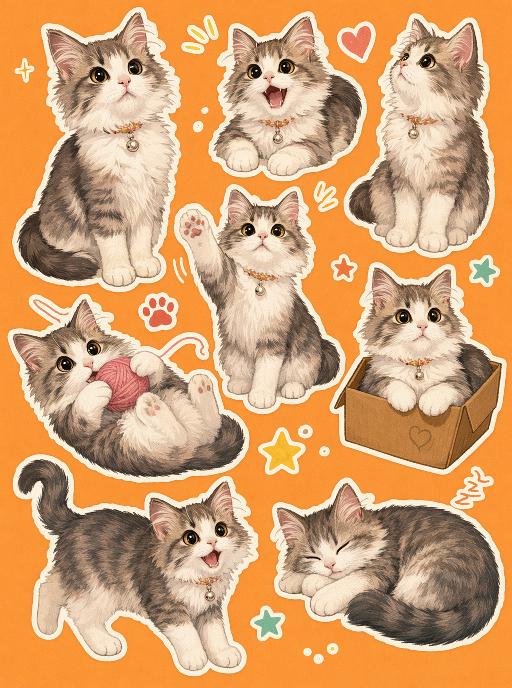
Use the uploaded pet image as the exact identity reference. Preserve the pet's recognizable face, fur color, markings, eye color, muzzle shape and ears while transforming it into the requested gameplay style. Create a vertical 3:4 image with this exact effect: orange background sticker sheet, multiple hand-drawn poses of the same pet, playful everyday gestures, thick white sticker borders, expressive cartoon eyes, bold simple linework, warm retro palette, sticker-pack composition. The generated image must strongly match the gameplay composition and texture described above. Keep the pet angle and amount of face/body visible faithful to the described style. If the style is hand-drawn, watercolor, felt, plush, sticker, toy, comic, or package design, reproduce that material and texture clearly. Keep the pet identifiable as the uploaded pet even when stylized. No logos, no watermark, no Doubao AI text.

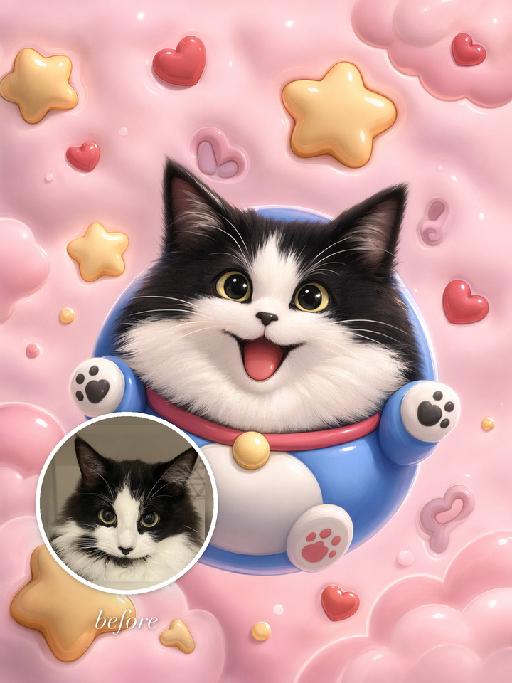
Soft Dream AI effects generated image

Soft Dream

"Use the uploaded pet image as the exact identity reference. Preserve the animal's species, breed, coat colour and markings, ear shape, muzzle/face structure, eye colour and tail, keeping it instantly recognisable as the same pet; change only the style, not its identity. Create a vertical 3:4 image with this exact effect: playful pastel mobile-wallpaper illustration, the uploaded pet restyled as a round blue cartoon mascot with a big joyful face, floating among puffy stars, hearts and soft pink clouds. Glossy sticker-like 3D shading, dreamy pink-and-blue palette, rounded cheeks, simple vertical wallpaper composition. Avoid copying any copyrighted character design exactly; make it an original pet mascot. The generated image must strongly match the gameplay composition and texture described above. Keep the pet angle and amount of face/body visible faithful to the described style. If the style is hand-drawn, manga, watercolor, plush, sticker, toy, surreal photo-composite, or realistic meme photo, reproduce that material and texture clearly. No logos, no watermark, no Doubao AI text."

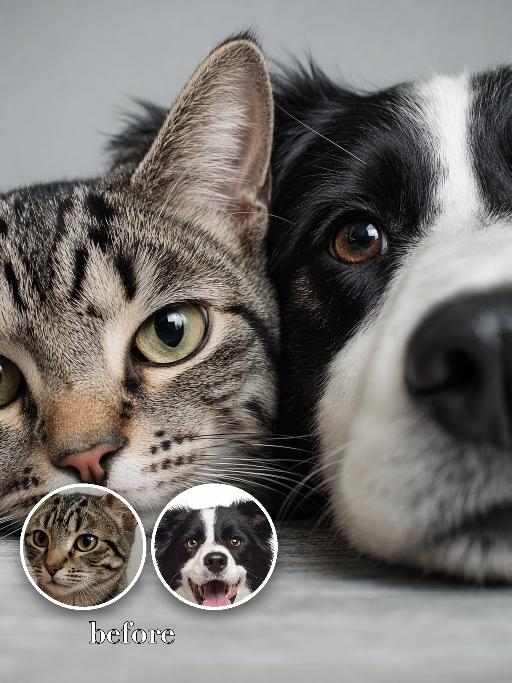
Close-Up AI effects generated image

Close-Up

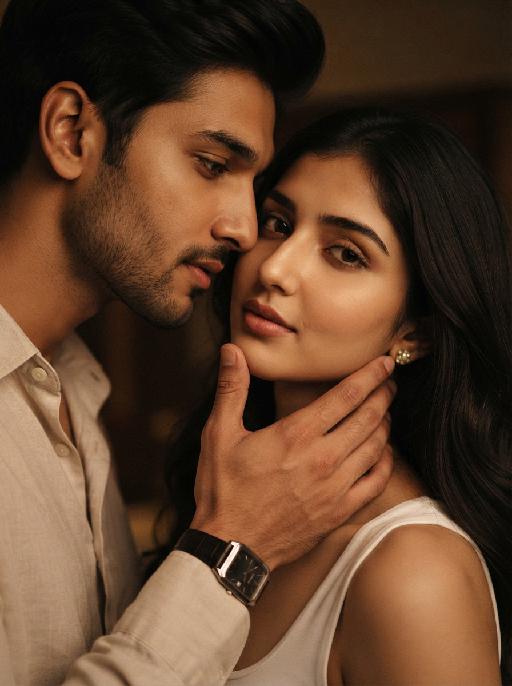
"Use the two uploaded images as the only identity references for the two main subjects. Create a high-end, photorealistic studio portrait of two distinct uploaded subjects. Position the first uploaded subject on the left side of the frame and the second uploaded subject on the right side. Their faces are placed extremely close together, gently pressed side by side, creating an intimate, playful, and visually balanced portrait. Use a very tight extreme close-up crop, showing only part of each face while keeping both subjects clearly recognizable. Emphasize the eyes, facial contours, skin or fur texture, and other recognizable facial details appropriate to each subject. Both subjects look directly toward the camera with clearly joyful, lively, and affectionate expressions. Human subjects should show a bright natural smile, lifted cheeks, relaxed facial muscles, and sparkling eyes. Animal subjects should show a cheerful, alert, and playful expression, with bright eyes, relaxed ears, and a friendly open-mouth expression when anatomically natural. The overall emotion should feel visibly happy, energetic, cute, and warm, not merely calm, subtle, neutral, stiff, or blank. Their faces should fill the central and lower portions of the frame, with no object, ledge, table, or foreground element blocking the bottom of their faces. Keep the composition clean, direct, and focused entirely on the two subjects. Keep both uploaded subjects as two completely separate, fully recognizable individuals. Do not merge, morph, splice, fuse, or combine their faces. Do not create a split-face, hybrid creature, merged identity, or one face divided into two halves. The final image must clearly look like two real subjects positioned closely together in the same portrait. Strictly preserve the identity and recognizable features of each uploaded subject. For human subjects, preserve facial identity, face shape, facial structure, hairstyle, hair color, skin tone, eye shape, nose shape, lips, general age, and overall recognizability. For animal subjects, preserve species, breed, coat color, fur pattern, markings, eye color, ear shape, nose shape, muzzle structure, facial proportions, fur texture, and overall recognizability. Do not preserve the original uploaded expression or pose. Actively adjust the facial expression, gaze direction, head position, and interaction so both subjects fit this bright, joyful, cheek-to-cheek portrait naturally, while keeping their identities unchanged. Use a professional studio photography look with a clean soft-gray studio backdrop and a subtle natural tonal gradient. The background should be smooth, simple, and unobtrusive, with no visible floor line, no wall corner, no backdrop folds, no props, no furniture, and no environmental details. Use soft frontal key light and gentle fill light, with natural catchlights in the eyes, refined shadow transitions, realistic skin and fur texture, and crisp facial detail. Avoid dramatic rim lighting, artificial spotlight circles, strong halos, excessive glow, or strange background blur. Use a tight vertical 3:4 composition with minimal empty space. Both faces should fill most of the frame and remain clearly readable."

Load more

Next-Gen Multi-Model AI Video Architecture

Vivago AI isn't just one engine—it’s a unified hub for the world’s most advanced video AI. Whether you need cinematic realism or high-speed social content, we provide the right model for your creative vision.

Free Generate

Beauty and Dolphins

Vacation Time

Stellar Tear

Fish Tank Supervisor

Cinematic Quality & Precision Control

Enables 4K resolution with multi-lens motion control, generating delicate scene via text prompts for customized cinematography.​

TRY NOW

Dynamic AV Sync

Auto-generates original audio to avoid copyright issues. Build 3D immersive environments through layered sound design automatically.

TRY NOW

OpenAI Sora 2

​Advanced visual storytelling with unparalleled physics and consistency.

TRY NOW

Kling v2.6 Pro

Industry-leading cinematic image animation and motion control.

TRY NOW

Google Veo 3 & 3.1

Ultra-fast generation with enhanced realism for creative workflows.

TRY NOW

Vivago AI 2.0

Our proprietary model optimized for efficiency, speed, and cost-effective generation.

TRY NOW

Users' Voice

We listen carefully to the opinions of every user.
Free Generate
Contact Us
I tried the Lip Sync feature inside Vivago.ai’s AI Video Generator for my educational podcast, and the results were stunning! The avatar's lip movements perfectly matched my audio recording, creating a professional AI-generated video without complex editing. Compared with tools like OpenAI Sora 2 and Google Veo 3.1, Vivago Image-to-Video delivers fast, studio-quality results online. It saved me hours of post-production work.
ElenaM (Spain)
Vivago’s Image-to-Video AI transformed my marketing workflow. I uploaded a product image and described the launch scene in text, and it generated a 10-second cinematic AI video with background music and dynamic visuals. The output quality rivals Kling v2.6 Pro and Google Veo 3 Fast. It’s now my go-to AI video generator for social media ads and product campaigns.
KenjiT (Japan)
As a digital artist, I use Vivago.ai 2.0 daily for Image-to-Image and AI Image-to-Video creation. The e-book covers and animated visuals I generate for clients look cinematic and professional. Unlike many standalone AI tools, Vivago integrates multiple leading models into one platform, making it easier to create copyright-safe AI images and videos for publishing.
ChenL (China)
I tried the Lip Sync feature inside Vivago.ai’s AI Video Generator for my educational podcast, and the results were stunning! The avatar's lip movements perfectly matched my audio recording, creating a professional AI-generated video without complex editing. Compared with tools like OpenAI Sora 2 and Google Veo 3.1, Vivago Image-to-Video delivers fast, studio-quality results online. It saved me hours of post-production work.
ElenaM (Spain)
Vivago’s Image-to-Video AI transformed my marketing workflow. I uploaded a product image and described the launch scene in text, and it generated a 10-second cinematic AI video with background music and dynamic visuals. The output quality rivals Kling v2.6 Pro and Google Veo 3 Fast. It’s now my go-to AI video generator for social media ads and product campaigns.
KenjiT (Japan)
As a digital artist, I use Vivago.ai 2.0 daily for Image-to-Image and AI Image-to-Video creation. The e-book covers and animated visuals I generate for clients look cinematic and professional. Unlike many standalone AI tools, Vivago integrates multiple leading models into one platform, making it easier to create copyright-safe AI images and videos for publishing.
ChenL (China)
I absolutely love Vivago’s AI Image-to-Video Generator. As a travel blogger, static images often fail to capture real atmosphere, but Vivago helps me turn photos into vivid cinematic AI videos with motion effects. It feels comparable to OpenAI Sora 2 and Google Veo 3.1, but more accessible and faster for creators who need high-quality AI videos online.
LiamK (Australia)
I tried the Lip Sync feature inside Vivago.ai’s AI Video Generator for my educational podcast, and the results were stunning! The avatar's lip movements perfectly matched my audio recording, creating a professional AI-generated video without complex editing. Compared with tools like OpenAI Sora 2 and Google Veo 3.1, Vivago Image-to-Video delivers fast, studio-quality results online. It saved me hours of post-production work.
ElenaM (Spain)
Vivago’s Image-to-Video AI transformed my marketing workflow. I uploaded a product image and described the launch scene in text, and it generated a 10-second cinematic AI video with background music and dynamic visuals. The output quality rivals Kling v2.6 Pro and Google Veo 3 Fast. It’s now my go-to AI video generator for social media ads and product campaigns.
KenjiT (Japan)
As a digital artist, I use Vivago.ai 2.0 daily for Image-to-Image and AI Image-to-Video creation. The e-book covers and animated visuals I generate for clients look cinematic and professional. Unlike many standalone AI tools, Vivago integrates multiple leading models into one platform, making it easier to create copyright-safe AI images and videos for publishing.
ChenL (China)
I absolutely love Vivago’s AI Image-to-Video Generator. As a travel blogger, static images often fail to capture real atmosphere, but Vivago helps me turn photos into vivid cinematic AI videos with motion effects. It feels comparable to OpenAI Sora 2 and Google Veo 3.1, but more accessible and faster for creators who need high-quality AI videos online.
LiamK (Australia)
Using Vivago.ai’s Image-to-Video AI has greatly enhanced my classroom teaching. I transform textbook notes into historical AI videos with cinematic filters and dynamic animations. Compared with tools like Kling v2.6 Pro and Google Veo 3 Fast, Vivago offers faster generation and easier parameter control for educators who need reliable AI video creation.
RajivG (India)
I frequently create AI videos on Vivago and publish them on TikTok and YouTube Shorts. The AI video templates and trending content ideas help me produce viral-ready clips quickly. With Vivago’s integrated models—including advanced video engines similar to OpenAI Sora 2—I can generate anime-style and cinematic social media videos that drive high engagement.
MarieJ (Spain)
What attracts me most about Vivago.ai is not only the powerful AI Video Generator but also the active AIGC creator community. It combines AI Image-to-Video, Text-to-Video, and leading model integrations like Google Veo 3.1 into one creative platform.
TomW (India)
At first, I was hesitant about using AI video tools. But after trying Vivago Image-to-Video, I realized how easy it is to create professional AI-generated videos online. I just upload an image, add a short prompt, and adjust a few settings. The results are cinematic and copyright-safe, which is essential for commercial projects.
HectorC (Mexico)
Using Vivago.ai’s Image-to-Video AI has greatly enhanced my classroom teaching. I transform textbook notes into historical AI videos with cinematic filters and dynamic animations. Compared with tools like Kling v2.6 Pro and Google Veo 3 Fast, Vivago offers faster generation and easier parameter control for educators who need reliable AI video creation.
RajivG (India)
I frequently create AI videos on Vivago and publish them on TikTok and YouTube Shorts. The AI video templates and trending content ideas help me produce viral-ready clips quickly. With Vivago’s integrated models—including advanced video engines similar to OpenAI Sora 2—I can generate anime-style and cinematic social media videos that drive high engagement.
MarieJ (Spain)
What attracts me most about Vivago.ai is not only the powerful AI Video Generator but also the active AIGC creator community. It combines AI Image-to-Video, Text-to-Video, and leading model integrations like Google Veo 3.1 into one creative platform.
TomW (India)
At first, I was hesitant about using AI video tools. But after trying Vivago Image-to-Video, I realized how easy it is to create professional AI-generated videos online. I just upload an image, add a short prompt, and adjust a few settings. The results are cinematic and copyright-safe, which is essential for commercial projects.
HectorC (Mexico)