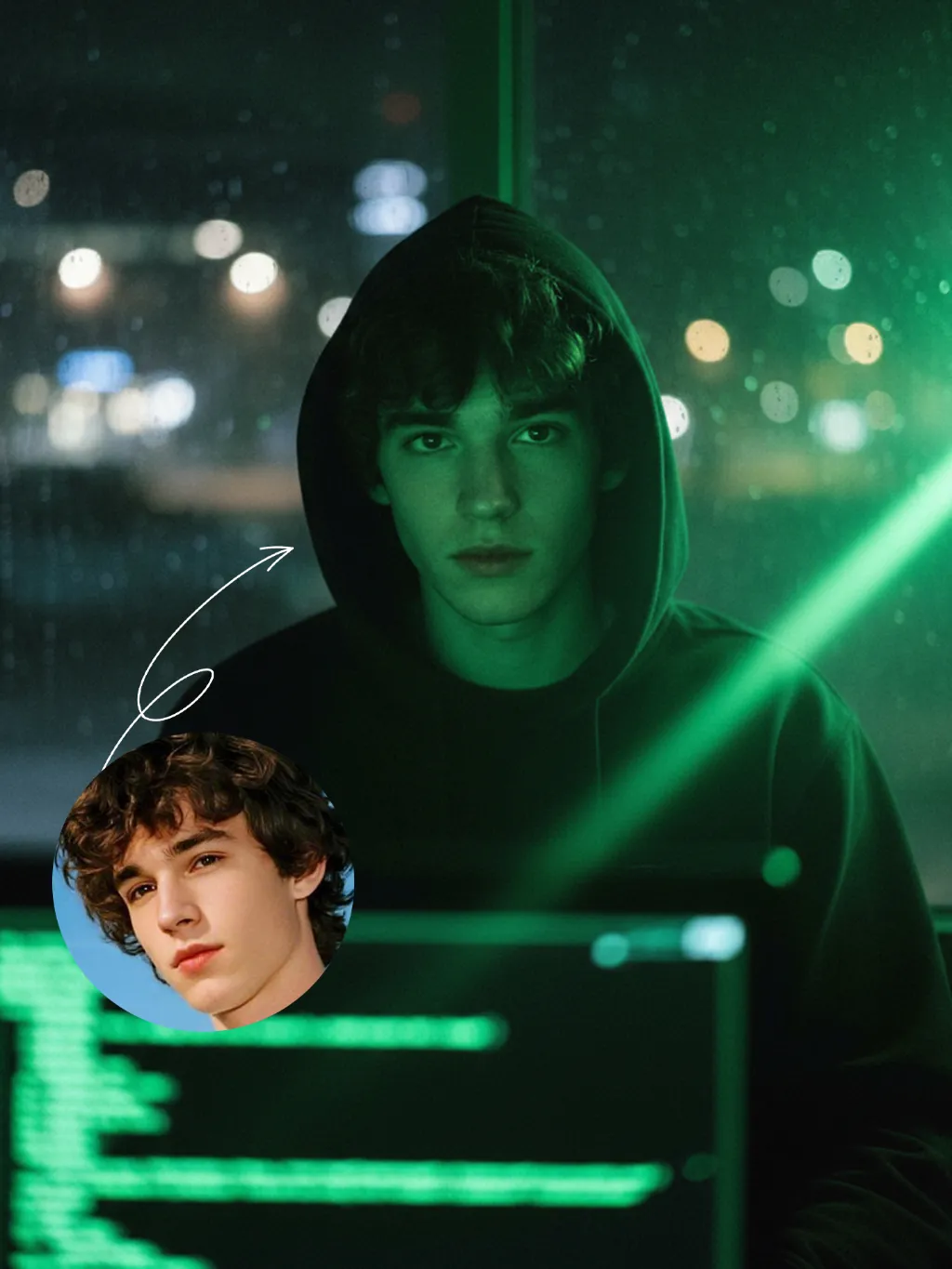
Hacker

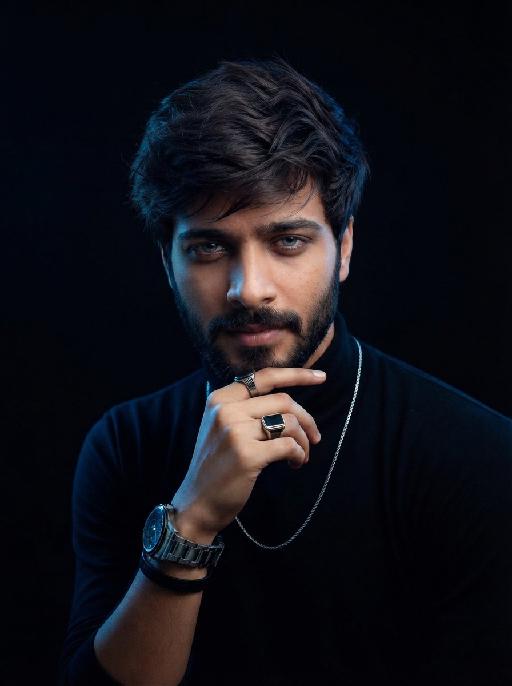
A straight-on close-up headshot of the figure from the uploaded image (with unchanged facial features, age and gender), who sits centered and faces the camera directly, wearing a black hoodie with the hood up, their expression calm and focused. The figure’s face is cast in the green glow of code from a computer screen. A broad wash of soft, bright green side light slants in from the right side of the frame, creating a large-scale Tyndall effect that outlines their facial contours. The background features a blurred night view of the city in the rain outside the window (with traces of raindrops sliding down the glass), accompanied by warm bokeh lights; the foreground consists of a computer screen with glowing green code on it. Shot at eye level with a low-light, dark-toned palette, it embodies the dark-toned aesthetic of cyberpunk style. Main colors: black, blue-gray, neon green, low-saturation cool tones. Shallow depth of field blurs both the foreground and background, with the face in sharp focus. The work features an avant-garde fashion photography style, a film-like filter effect, and dramatic contrast between light and shadow.

Use Template
arrow
Hacker

More From VIVAGO AI

Little Promise AI effects generated image

Little Promise

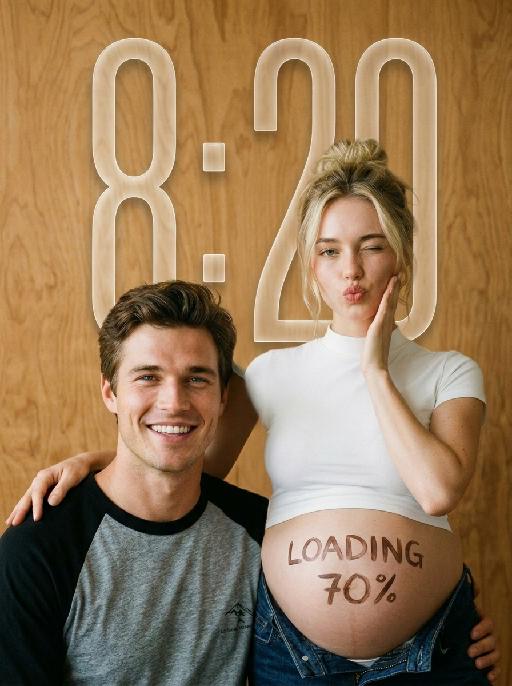
"Use the uploaded images as the only identity references for the two adult subjects. Create a photorealistic verticalmaternity couple portrait. Strictly preserve both subjects’ exact faces, ages, skin tones, facial features, face shapes, hairstyles, hairlines, hair lengths, hair textures, hair colors, bangs, overall appearance, body proportions, and overall recognizability. Follow the uploaded reference images closely. Do not replace either subject with a generic model face. Do not significantly change the hairstyle, hair color, or facial structure of either subject. COMPOSITION AND POSE: Use a warm indoor studio setting with a plain honey-brown plywood wall as the entire background. The pregnant woman stands slightly behind and to the right. The man sits lower in the foreground on the left, close beside her pregnant belly. The woman wears a fitted white short-sleeve mock-neck cropped T-shirt and dark indigo denim jeans lowered naturally beneath the belly. Her round pregnant belly is fully visible. She places one hand gently on the man’s shoulder. Her other hand rests lightly against her cheek. She winks one eye and makes a playful kissy expression toward the camera. The man sits casually in front of her, leaning slightly toward her body. He looks directly at the camera with a wide, bright, natural smile showing his teeth. IDENTITY AND HAIR PRESERVATION — STRICT: The woman’s hairstyle, hair color, hair volume, bangs or loose strands, and overall tied-up styling must remain consistent with the uploaded reference image. The man’s hairstyle, hair length, fringe shape, hair texture, and hair color must remain consistent with the uploaded reference image. Do not restyle either subject with a different haircut, different bangs, different hair color, or a different overall vibe. Keep both subjects looking like the exact same couple from the uploaded reference images. MALE CLOTHING — STRICTLY PRESERVE: The man wears a casual raglan baseball T-shirt with: * a heather-gray cotton body * solid black three-quarter raglan sleeves * a black ribbed crew neckline * relaxed youthful fit * soft slightly worn cotton texture * subtle natural fabric folds * no jacket * no button-up shirt * no plain black T-shirt * no formal clothing Add only a very small understated dark graphic or lettering near the lower front of the shirt if needed. Do not add a large logo. BELLY LETTERING: Write “LOADING 70%” by hand across the center of the pregnant belly using dark brown cosmetic paint or chocolate-colored body paint. The letters should look casually handwritten, slightly imperfect, playful, and clearly readable. Do not add any other text anywhere in the image. PHOTOGRAPHIC TEXTURE: Create the look of an intimate late-1990s or early-2000s analog studio portrait photographed on 35mm color film. Use: * warm honey-brown and amber tones * soft directional light from the upper-left * gentle natural shadows along the faces and bodies * slightly muted colors * soft highlight roll-off * subtle fine film grain * mild lens softness * natural skin texture * restrained contrast * slightly creamy skin tones * realistic cotton and denim texture * no glossy commercial retouching * no artificial HDR clarity * no plastic or porcelain skin The image should feel candid, youthful, intimate, playful, and emotionally warm, like a personal maternity portrait photographed in a small independent studio. IMPORTANT CONSTRAINTS: * keep the man seated lower than the woman * keep the pregnant belly prominent and unobstructed * preserve the gray-body black-sleeve raglan baseball T-shirt * strictly preserve both subjects’ hairstyles and hair colors from the reference image * strictly preserve both subjects’ facial identity and overall vibe * no extra people * no additional hands * no deformed fingers * no high-fashion styling * no luxury studio background * no modern bright-white beauty lighting * no excessive blur * no cartoon * no illustration * no logo * no watermark "

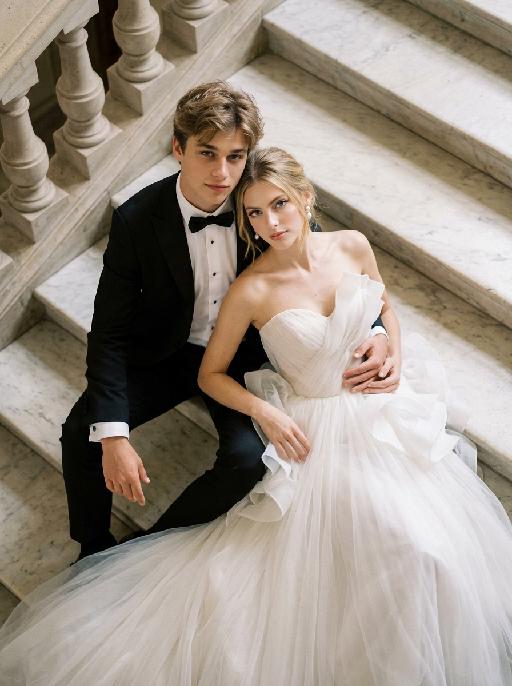
Ivory Grace AI effects generated image

Ivory Grace

"Create a photorealistic cinematic wedding portrait of the two subjects from the uploaded image, preserving their exact faces, ages, facial features, skin tones, hairstyles, and overall likeness as accurately as possible. Transform the two subjects into a stylish bride and groom posing together on grand marble steps in a luxurious castle-like setting. Keep the same relaxed, fashionable, editorial body language as the reference image, but replace the car with elegant marble stairs. The scene should be captured from a high-angle overhead perspective, looking down at the couple from above. The groom is positioned on the left side, seated or reclining in a relaxed way on the marble steps, with one arm stretched outward or resting naturally along the step edge, looking up toward the camera with a calm, confident, elegant expression. The bride is positioned on the right side, reclining closely beside him in a glamorous, relaxed pose, leaning naturally against the steps and slightly toward the groom. Her body language should feel soft, luxurious, and intimate. Both subjects should look upward toward the camera. Their posture should feel effortlessly stylish, romantic, and editorial, like a high-end wedding fashion photo. Both subjects should not wear sunglasses. Their faces should be fully visible, sharp, and clearly recognizable. Their expressions should feel calm, confident, romantic, and slightly cool, with a relaxed luxury wedding mood. Bride outfit: the bride wears a dramatic white wedding gown inspired by the reference image. The dress has a strapless or sweetheart neckline, sculptural ruffle details around the bodice or shoulders, layered soft tulle, and a voluminous flowing skirt. The dress should look fashionable, romantic, luxurious, and editorial. The fabric should have realistic soft tulle texture, natural folds, and elegant volume. The bride wears subtle bridal earrings and a delicate pearl or diamond necklace. A soft white bridal veil may flow naturally behind her or spread softly across the marble steps, without covering her face. Groom outfit: the groom wears a classic black tuxedo, fitted and elegant, with a clean white dress shirt, black bow tie, and black dress shoes. The tuxedo should look sharp, formal, minimal, and high-end. Do not use a casual suit, colorful suit, necktie, or open-collar shirt. Background: grand marble steps in front of a castle-like or palace-like estate. The environment should include refined stone textures, elegant balustrades or railings, and partial architectural details such as arches, columns, or a grand doorway, creating a luxurious European castle atmosphere. The background should support the castle mood but remain secondary to the couple. No other people should appear in the image. Lighting and color: warm natural daylight or soft golden daylight, realistic skin texture, subtle highlights on the wedding dress, tuxedo, marble steps, and veil. Use an elegant low-saturation color palette with soft ivory whites, muted stone beige tones, deep black tuxedo contrast, subtle greenery, and refined cinematic color grading. The image should feel expensive, fashionable, romantic, and timeless, avoiding overly vivid or neon colors. Composition: high-angle overhead shot, medium shot framing. Capture both subjects from approximately the upper body down to around the thighs or knees, while still clearly showing that they are reclining on the marble staircase. The bride’s dress should spread naturally across part of the steps and remain visible in the frame. The groom is on the left and the bride is on the right. Their faces should remain sharp, recognizable, and clearly visible. The overall image should feel glamorous, romantic, editorial, and castle-like. Ultra realistic photography, high-end wedding editorial style, luxury fashion photography, realistic marble texture, realistic fabric texture, realistic tulle layers, natural facial details, soft film grain, professional camera look, high detail, cinematic muted color grading, stylish luxury wedding atmosphere. Negative prompt: extra people, background people, crowd, wedding guests, duplicated bride, duplicated groom, distorted faces, changed identity, inaccurate likeness, deformed hands, extra fingers, missing fingers, fused fingers, broken fingers, unnatural arms, stiff pose, awkward sitting pose, car, convertible, vehicle interior, sunglasses, missing wedding dress, wrong wedding dress, plain casual dress, colorful wedding dress, casual groom outfit, necktie instead of bow tie, open-collar shirt, plastic skin, over-smoothed face, fake CGI look, text, logo, watermark, title text, low resolution, blurry face, oversaturated colors, vivid bright colors, neon colors, harsh contrast, black and white, monochrome, grayscale."

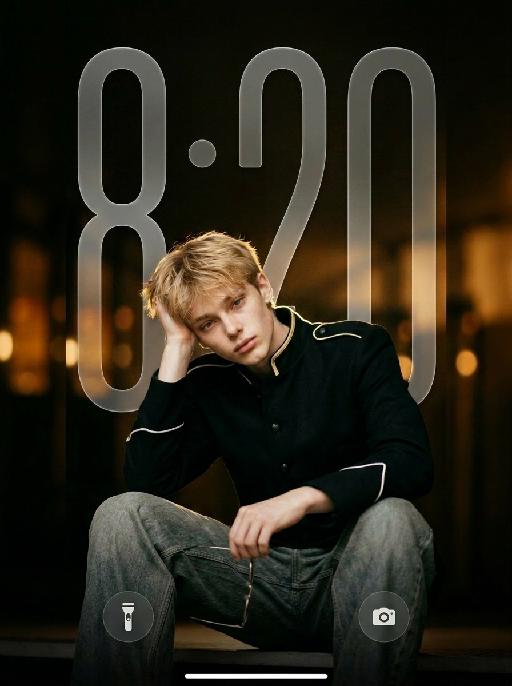
Noir Knight AI effects generated image

Noir Knight

" Vertical 9:16 medium-full fashion portrait, slightly low camera angle. Position the subject noticeably lower in the frame, anchored in the lower-middle area. The subject occupies mainly the lower two-thirds of the image, with generous clean negative space above the head. Keep the top of the hair clearly below the upper edge. One raised knee enters the lower foreground to create depth. Do not leave excessive empty space below the subject. Do not crop the head, either hand, raised knee, or gold wire-frame glasses. The subject wears a fitted black military-inspired jacket with sharp structured shoulders, a tailored waist, matte black fabric, narrow gold shoulder trim, white piping around the sleeve cuffs, and refined black buttons. The jacket is fully buttoned and neatly fastened. Pair it with loose faded gray-blue wide-leg jeans with realistic washed texture, stitching, folds, and fabric weight. Keep the outfit sharp, modern, masculine, expensive, and restrained. HAND POSITIONS — STRICTLY FIXED FROM THE SUBJECT’S OWN PERSPECTIVE: The subject’s RIGHT hand supports the right side of the head, with the palm resting gently above and slightly behind the right ear. The right hand must not hold the glasses, cover the face, touch the bangs, or enter the hair. The subject’s LEFT hand naturally holds one pair of thin gold wire-frame glasses near the raised knee or lower body. The left hand holds the glasses by one temple or the bridge. The glasses remain clearly visible and are not worn. Do not reverse the hand positions. The right hand must support the head, and the left hand must hold the glasses. Keep both hands anatomically correct, separate, fully visible, and naturally posed. Use dark cinematic low-key lighting, but keep the subject clearly brighter than the background. A large soft front-left key light and gentle frontal fill illuminate both eyes, face, hands, jacket, raised knee, jeans, and glasses. Add a subtle warm backlight along the hair, shoulders, gold trim, jacket edges, and glasses. The black jacket must remain clearly separated from the dark background, with visible matte fabric texture, tailoring, shoulder structure, seams, buttons, gold trim, white cuff piping, and natural folds. Warm amber bokeh, shallow depth of field, realistic 50–85mm portrait-lens look, and refined cinematic contrast. No subject placed near the top, no excessive empty space below, no reversed hands, no glasses in the right hand, no left hand supporting the head, no open jacket, no blazer, no leather jacket, no skinny jeans, no dark face, no shadowed eyes, no crushed black clothing, no harsh flash, no heavy bloom, no neon light, no extra fingers, no duplicated hands, and no floating glasses. "

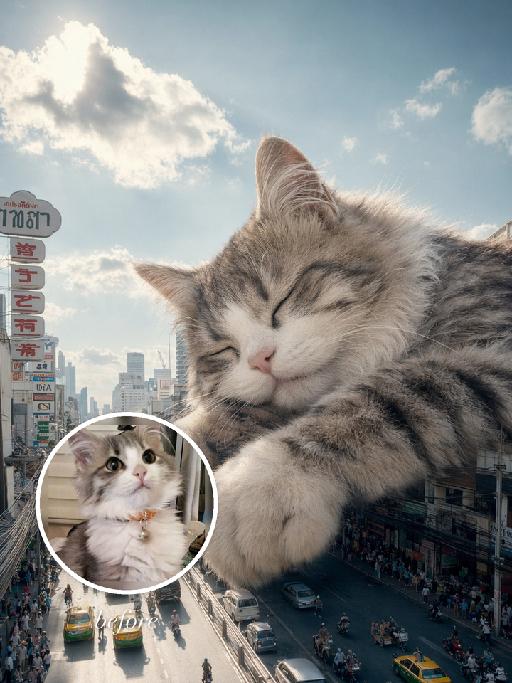
City Nap AI effects generated image

City Nap

"Use the uploaded pet image as the exact identity reference. Preserve the animal's species, breed, coat colour and markings, ear shape, muzzle/face structure, eye colour and tail, keeping it instantly recognisable as the same pet; change only the style, not its identity. Create a vertical 3:4 image with this exact effect: dreamy surreal city photo-composite, the uploaded pet as a gigantic sleepy animal resting over a downtown street canyon between tall buildings. Eyes closed, paws relaxed, soft clouds and bright blue sky, tiny cars and pedestrians below for scale, cozy peaceful giant-pet mood, realistic fur and sunlight. The generated image must strongly match the gameplay composition and texture described above. Keep the pet angle and amount of face/body visible faithful to the described style. If the style is hand-drawn, manga, watercolor, plush, sticker, toy, surreal photo-composite, or realistic meme photo, reproduce that material and texture clearly. No logos, no watermark, no Doubao AI text."

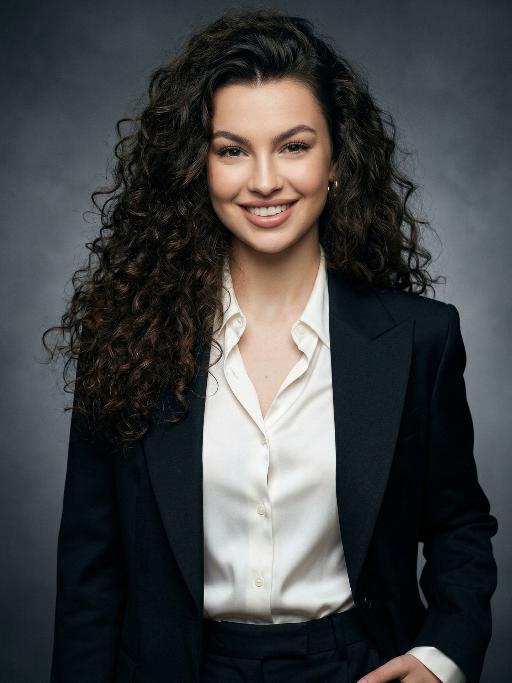
Simple Black AI effects generated image

Simple Black

Extreme close-up portrait,Head and shoulders close-up portrait (shot precisely to the chest): Shot by professional fashion editors and photographers, with an upscale and luxurious style. The person in the uploaded picture (with their facial features, gender, hairstyle and age remaining unchanged), has a refined makeup, elegant and generous accessories, is smiling naturally, wearing a well-tailored dark black luxurious suit (a fashionable and avant-garde professional workwear style), a pure white silk shirt, one hand in the pocket, with a confident and sharp expression, a dignified and powerful posture. This photo is a product of the Japanese high-end photography style, using soft diffused film-like lighting, delicate contour lighting, transparent and hazy dark gray studio background, low-key and exquisite color palette, ultra-fine skin texture (using Japanese-style clear photo editing processing), clear and prominent facial features and suit fabric, 8K ultra-high-definition quality, professional fashion photography, elegant and powerful aura, simple high-end aesthetics, subtle 35mm film grain.

Garden Cutie AI effects generated image

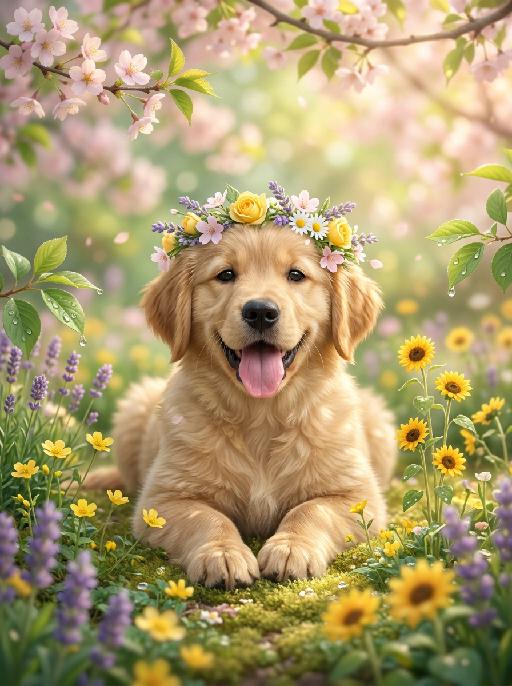
Garden Cutie

The aforementioned pet is the main character of this painting (its facial features and species remain unchanged), comfortably lying in a lush spring garden filled with blooming flowers, wearing a flower wreath made of flowers; around it are yellow small flowers, golden sunflowers and purple lavender, as well as tender green leaves dotted with crystal dewdrops; the gentle and natural golden spring sunlight filters through the branches and leaves, forming dreamy warm diffused light spots, shallow depth of field and blurry green garden background, creating a refreshing and soothing atmosphere; the soft green tones, combined with pale pink and yellow, complement the realistic soft fur texture, highlighting on this main pet's face; it exudes a rich Brazilian spring atmosphere, captured by a Canon 5D Mark IV professional digital single-lens reflex camera, with a Japanese photography style, aperture of f/1.8, soft diffused light, 8K ultra-high detail, presenting a clear and bright aesthetic effect.

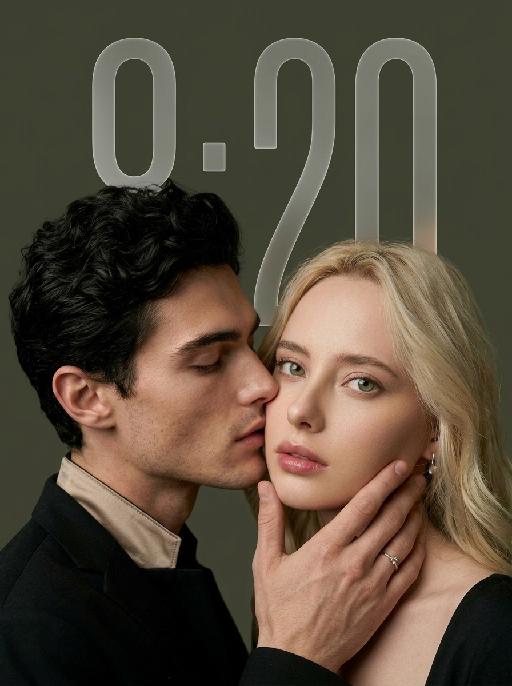
My Treasure AI effects generated image

My Treasure

" Use the uploaded images as the only identity references for the two adult subjects. Create a photorealistic vertical 9:16 intimate cinematic couple portrait designed as a phone wallpaper. Strictly preserve both subjects’ exact faces, ages, facial features, skin tones, hairstyles, hair colors, and overall recognizability. Do not replace either face with a generic model face. COMPOSITION AND POSE: Create an extremely tight close-up composition showing mainly both faces, the male subject’s hand, and a small portion of their shoulders. Shift the entire couple composition slightly downward in the frame so the subjects sit lower than center, leaving clean negative space above their heads for a phone wallpaper layout. The male subject is positioned on the left in a three-quarter side profile. He leans very close toward the female subject and gently kisses the side of her cheek near the corner of her lips. His eyes are softly closed. His expression is tender, calm, and intimate. The male subject’s hand gently supports the female subject’s lower face: * his palm rests along the side of her jaw * his fingers wrap softly beneath her chin and along her cheek * his thumb rests lightly near the lower lip or chin * the hand must look natural, protective, and elegant * do not cover the female subject’s eyes or nose The female subject is positioned on the right and faces the camera directly. She looks straight into the lens with a calm, slightly surprised, emotionally restrained expression. Her eyes remain wide, clear, and sharply focused. Her lips are relaxed and softly closed or slightly parted. Keep both faces extremely close together, with the male subject’s nose and lips near the female subject’s cheek. WALLPAPER FRAMING: * vertical 9:16 phone-wallpaper composition * place the couple slightly lower than the visual center * leave clean dark space above the heads * keep the upper area simple and unobstructed * do not place the faces too close to the top edge * do not crop the male hand, the female chin, or the top of the hair * keep the female face as the main focal point * keep the male profile and hand large and intimate in frame CLOTHING AND ACCESSORIES: The male subject wears a refined black formal jacket with a muted champagne-beige satin inner collar or cuff detail. Add one delicate silver ring with a small clear gemstone on the male subject’s finger. The female subject wears a minimal dark outfit, mostly outside the frame. Add only a small refined earring if visible. CAMERA AND FRAMING: * extreme close-up * male face occupies most of the left side * female face occupies most of the right side * keep the female subject’s full eyes, nose, lips, jawline, and chin visible * keep the male subject’s hand fully visible * do not crop important fingers * realistic 85mm to 105mm portrait-lens look * very shallow depth of field * sharpest focus on the female subject’s eyes, lips, and the male subject’s hand * male profile remains slightly softer but still recognizable BACKGROUND: Use a plain dark olive-gray, charcoal-gray, or muted taupe studio background. Keep the background smooth, minimal, softly blurred, and free of visible environment details. LIGHTING: Use soft low-key studio lighting with a gentle frontal key light. The female subject’s face should be clearly illuminated with soft highlights on the eyes, nose bridge, lips, and cheekbones. The male subject’s profile remains slightly darker but still detailed. Use smooth shadow transitions, subtle facial dimension, restrained highlights, and no harsh flash. PHOTOGRAPHIC TEXTURE: * photorealistic intimate beauty photography * soft cinematic editorial finish * realistic skin pores and fine facial details * natural lips and eyelashes * subtle film grain * slightly muted warm-neutral color grading * soft highlight roll-off * elegant, tender, sensual, and refined * no plastic skin * no excessive smoothing * no CGI appearance IMPORTANT CONSTRAINTS: * male subject on the left * female subject on the right * male subject gently kisses the female subject’s cheek near the corner of her lips * female subject looks directly at the camera * male subject’s hand supports her jaw and chin * shift the composition slightly downward for wallpaper use * keep clean space above the heads * keep both identities fully recognizable * no open-mouth kissing * no exaggerated passion * no extra fingers * no duplicated hands * no distorted jaw * no merged faces * no blocked eyes * no text * no logo * no watermark * no cartoon * no illustration"

Travelling pets

"System Role: You are an expert AI Image Editing Assistant. Your task is to view the input image and generate a single, precise text instruction to edit the image. Logic Requirements: Analyze Identity: Identify the main subject. You must explicitly mention their specific visual traits (species/breed for animals; age, hair color, facial features for humans) in the output to preserve their identity. Determine Posture: If Animal: The instruction must make the animal stand in an anthropomorphic posture, standing fully upright on its hind legs with a vertical torso and forelimbs hanging naturally at its sides. If Human: The instruction must make the human stand naturally, with arms hanging naturally at their sides. Apply Scene & Costume: Wearing a fitted black parka, khaki shorts, vintage hiking boots, a fishing hat, and black-framed sun-protective sunglasses, the background is changed to the Sunlight Mountain in Western Sichuan. In front of the mountain is a shimmering lake that reflects the mountain. The figure in the picture is standing on the shore of the lake. Style: Ultra-realistic photography style, avant-garde and fashionable pioneering pet photography style"

World Cup AI effects generated image

World Cup

"Hyper-realistic FIFA World Cup sports poster, 1:1 match reference image, professional stadium action photography, 8K ultra HD, RAW photo quality, high contrast, vibrant saturated colors, shot with an ultra-wide fisheye lens from an extremely low ground-level worm's-eye view, extreme foreground compression and barrel distortion, capturing an exaggerated split kick action. ## Core Subject (Gender-Neutral, 100% Retain Original Appearance) The central athlete retains all original facial features, bone structure, skin texture and physical appearance from the reference image, no gender-specific modifiers, fully compatible with universal templates. The athlete wears a generic FIFA World Cup team kit: bright yellow short-sleeve jersey with green trim, matching yellow shorts, yellow football socks with green stripes, all heavily caked in mud, grass stains and pitch debris. The athlete is captured mid-max horizontal split kick, body leaning almost parallel to the grass, legs stretched to the sides: one leg fully extended forward with the sole of the muddy white cleat facing directly at the camera (dominating the left foreground, exaggerated by fisheye distortion to appear oversized), the other leg stretched out behind on the pitch. One arm raised high for balance, the other arm extended out to the side, body low to the ground with maximum leg spread. The face shows intense focus, with visible sweat and mud on skin and uniform. ## Football & Dynamic Effects A classic black-and-white leather football suspended mid-air just above the athlete, heavily soiled with mud, surrounded by exploding flying grass clippings, mud particles and pitch debris captured mid-splash, with motion blur on debris to convey extreme speed. ## Text Elements (Enhanced Perspective & Depth) 1. **Giant Side Text**: Oversized bold bright yellow sans-serif letters framing the image, with strong one-point perspective distortion matching the fisheye lens (leaning inward with depth, foreground letters larger, background letters smaller): ""WORLD"" on the left, ""CUP"" on the right. The letters have a distressed, worn texture with scratches, scuffs and dirt smudges, semi-transparent overlay effect, warped slightly to match the lens curvature, framing the central action without obscuring it. 2. **Top Banner Text**: Repeating yellow uppercase sans-serif text along the top edge, with slight perspective distortion to match the lens: ""WORLD CUP ♦ STAY LOUD ♦ WORLD CUP ♦ STAY LOUD ♦ WORLD CUP ♦ STAY LOUD ♦ WORLD CUP ♦ STAY LOUD ♦ STAY LOUD"", separated by small yellow diamond symbols, matching the distressed style of the main text. ## Background & Environment Lush green natural grass pitch, large open-air FIFA World Cup stadium in the background, bright daytime with vivid blue sky and scattered white clouds, stadium floodlights visible in the upper right corner. Blurred out-of-focus spectator stands filled with crowds, shallow depth of field to keep focus on the foreground action, with a subtle vignette effect to draw focus to the center. ## Technical Constraints No AI artifacts, no distorted text or elements, sharp focus on the cleat, athlete and football, all text is clear and undistorted, perspective matches the reference exactly, colors are true to the reference's vibrant palette, perfect 1:1 replication. "

Batida Forte

Medium and long-range realistic photography. Strictly preserve the same subject, same species, same identity, same face and facial structure, fur color or skin tone, markings and patterns, body proportions, eye color, ears, nose, mouth details, hairstyle or fur length and texture, age impression, gender vibe, and all recognizable identity features from the reference image. The subject must remain instantly recognizable as the exact same subject. Do not change the species or replace the face. If the subject is an animal or pet, transform it into a cute anthropomorphic standing pose, with both front paws raised and both hind legs standing on the ground, with no extra legs or limbs present, while keeping all original animal traits unchanged. Only change the pose, clothing, accessories, expression styling, and camera language. Dress the subject in a bright Brazil football carnival-style outfit. The clothing should include a vivid green sporty football fan jersey combined with bold yellow and blue stripes, festive tropical carnival-inspired graphics, sporty sleeve trim, football-style patches, geometric patterns, and energetic supporter-style details. The fabric should look realistic, soft, breathable, and high-quality, like a premium football celebration shirt. Pair it with cute small shorts or a naturally fitted lower garment in matching green, yellow, and blue colors. The clothing must fully and modestly cover the body, with no exposed private areas or exposed lower body. The overall outfit should feel cheerful, festive, colorful, playful, slightly exaggerated, clean, refined, and perfectly fitted to the subject’s body shape. Add a woven straw festival hat or carnival-style round straw hat with natural straw texture, colorful woven decorations, tropical celebration atmosphere, Brazil-inspired festival details, and a cute photogenic appearance. The hat should fit naturally on the head without covering the eyes or important facial features. Place the subject in a warm Brazilian tropical countryside environment with earthy ground, soft natural tropical vegetation, warm golden sunlight, and a softly blurred background. The atmosphere should feel cheerful, tropical, festive, clean, and highly photogenic, while keeping the subject as the clear main visual focus. Use soft natural lighting with realistic rendering and high-end commercial photography polish. The image should feature ultra-detailed realistic fur or skin texture, detailed clothing fabric, vivid festive colors without oversaturation, shallow depth of field, cute commercial portrait style, high-end social media pet photography aesthetic, warm healing atmosphere, and premium photorealistic quality.

Load more

Next-Gen Multi-Model AI Video Architecture

Vivago AI isn't just one engine—it’s a unified hub for the world’s most advanced video AI. Whether you need cinematic realism or high-speed social content, we provide the right model for your creative vision.

Free Generate

Beauty and Dolphins

Vacation Time

Stellar Tear

Fish Tank Supervisor

Cinematic Quality & Precision Control

Enables 4K resolution with multi-lens motion control, generating delicate scene via text prompts for customized cinematography.​

TRY NOW

Dynamic AV Sync

Auto-generates original audio to avoid copyright issues. Build 3D immersive environments through layered sound design automatically.

TRY NOW

OpenAI Sora 2

​Advanced visual storytelling with unparalleled physics and consistency.

TRY NOW

Kling v2.6 Pro

Industry-leading cinematic image animation and motion control.

TRY NOW

Google Veo 3 & 3.1

Ultra-fast generation with enhanced realism for creative workflows.

TRY NOW

Vivago AI 2.0

Our proprietary model optimized for efficiency, speed, and cost-effective generation.

TRY NOW

Users' Voice

We listen carefully to the opinions of every user.
Free Generate
Contact Us
I tried the Lip Sync feature inside Vivago.ai’s AI Video Generator for my educational podcast, and the results were stunning! The avatar's lip movements perfectly matched my audio recording, creating a professional AI-generated video without complex editing. Compared with tools like OpenAI Sora 2 and Google Veo 3.1, Vivago Image-to-Video delivers fast, studio-quality results online. It saved me hours of post-production work.
ElenaM (Spain)
Vivago’s Image-to-Video AI transformed my marketing workflow. I uploaded a product image and described the launch scene in text, and it generated a 10-second cinematic AI video with background music and dynamic visuals. The output quality rivals Kling v2.6 Pro and Google Veo 3 Fast. It’s now my go-to AI video generator for social media ads and product campaigns.
KenjiT (Japan)
As a digital artist, I use Vivago.ai 2.0 daily for Image-to-Image and AI Image-to-Video creation. The e-book covers and animated visuals I generate for clients look cinematic and professional. Unlike many standalone AI tools, Vivago integrates multiple leading models into one platform, making it easier to create copyright-safe AI images and videos for publishing.
ChenL (China)
I tried the Lip Sync feature inside Vivago.ai’s AI Video Generator for my educational podcast, and the results were stunning! The avatar's lip movements perfectly matched my audio recording, creating a professional AI-generated video without complex editing. Compared with tools like OpenAI Sora 2 and Google Veo 3.1, Vivago Image-to-Video delivers fast, studio-quality results online. It saved me hours of post-production work.
ElenaM (Spain)
Vivago’s Image-to-Video AI transformed my marketing workflow. I uploaded a product image and described the launch scene in text, and it generated a 10-second cinematic AI video with background music and dynamic visuals. The output quality rivals Kling v2.6 Pro and Google Veo 3 Fast. It’s now my go-to AI video generator for social media ads and product campaigns.
KenjiT (Japan)
As a digital artist, I use Vivago.ai 2.0 daily for Image-to-Image and AI Image-to-Video creation. The e-book covers and animated visuals I generate for clients look cinematic and professional. Unlike many standalone AI tools, Vivago integrates multiple leading models into one platform, making it easier to create copyright-safe AI images and videos for publishing.
ChenL (China)
I absolutely love Vivago’s AI Image-to-Video Generator. As a travel blogger, static images often fail to capture real atmosphere, but Vivago helps me turn photos into vivid cinematic AI videos with motion effects. It feels comparable to OpenAI Sora 2 and Google Veo 3.1, but more accessible and faster for creators who need high-quality AI videos online.
LiamK (Australia)
I tried the Lip Sync feature inside Vivago.ai’s AI Video Generator for my educational podcast, and the results were stunning! The avatar's lip movements perfectly matched my audio recording, creating a professional AI-generated video without complex editing. Compared with tools like OpenAI Sora 2 and Google Veo 3.1, Vivago Image-to-Video delivers fast, studio-quality results online. It saved me hours of post-production work.
ElenaM (Spain)
Vivago’s Image-to-Video AI transformed my marketing workflow. I uploaded a product image and described the launch scene in text, and it generated a 10-second cinematic AI video with background music and dynamic visuals. The output quality rivals Kling v2.6 Pro and Google Veo 3 Fast. It’s now my go-to AI video generator for social media ads and product campaigns.
KenjiT (Japan)
As a digital artist, I use Vivago.ai 2.0 daily for Image-to-Image and AI Image-to-Video creation. The e-book covers and animated visuals I generate for clients look cinematic and professional. Unlike many standalone AI tools, Vivago integrates multiple leading models into one platform, making it easier to create copyright-safe AI images and videos for publishing.
ChenL (China)
I absolutely love Vivago’s AI Image-to-Video Generator. As a travel blogger, static images often fail to capture real atmosphere, but Vivago helps me turn photos into vivid cinematic AI videos with motion effects. It feels comparable to OpenAI Sora 2 and Google Veo 3.1, but more accessible and faster for creators who need high-quality AI videos online.
LiamK (Australia)
Using Vivago.ai’s Image-to-Video AI has greatly enhanced my classroom teaching. I transform textbook notes into historical AI videos with cinematic filters and dynamic animations. Compared with tools like Kling v2.6 Pro and Google Veo 3 Fast, Vivago offers faster generation and easier parameter control for educators who need reliable AI video creation.
RajivG (India)
I frequently create AI videos on Vivago and publish them on TikTok and YouTube Shorts. The AI video templates and trending content ideas help me produce viral-ready clips quickly. With Vivago’s integrated models—including advanced video engines similar to OpenAI Sora 2—I can generate anime-style and cinematic social media videos that drive high engagement.
MarieJ (Spain)
What attracts me most about Vivago.ai is not only the powerful AI Video Generator but also the active AIGC creator community. It combines AI Image-to-Video, Text-to-Video, and leading model integrations like Google Veo 3.1 into one creative platform.
TomW (India)
At first, I was hesitant about using AI video tools. But after trying Vivago Image-to-Video, I realized how easy it is to create professional AI-generated videos online. I just upload an image, add a short prompt, and adjust a few settings. The results are cinematic and copyright-safe, which is essential for commercial projects.
HectorC (Mexico)
Using Vivago.ai’s Image-to-Video AI has greatly enhanced my classroom teaching. I transform textbook notes into historical AI videos with cinematic filters and dynamic animations. Compared with tools like Kling v2.6 Pro and Google Veo 3 Fast, Vivago offers faster generation and easier parameter control for educators who need reliable AI video creation.
RajivG (India)
I frequently create AI videos on Vivago and publish them on TikTok and YouTube Shorts. The AI video templates and trending content ideas help me produce viral-ready clips quickly. With Vivago’s integrated models—including advanced video engines similar to OpenAI Sora 2—I can generate anime-style and cinematic social media videos that drive high engagement.
MarieJ (Spain)
What attracts me most about Vivago.ai is not only the powerful AI Video Generator but also the active AIGC creator community. It combines AI Image-to-Video, Text-to-Video, and leading model integrations like Google Veo 3.1 into one creative platform.
TomW (India)
At first, I was hesitant about using AI video tools. But after trying Vivago Image-to-Video, I realized how easy it is to create professional AI-generated videos online. I just upload an image, add a short prompt, and adjust a few settings. The results are cinematic and copyright-safe, which is essential for commercial projects.
HectorC (Mexico)