More From VIVAGO AI

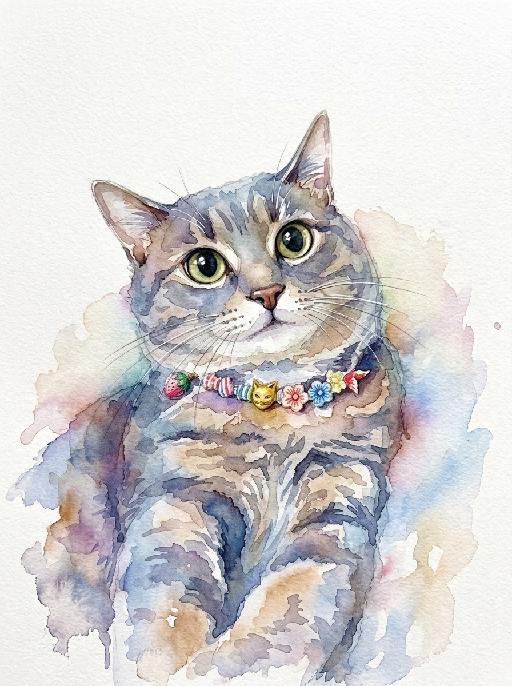
Watercolor Art AI effects generated image

Watercolor Art

A stunning watercolor painting portrait of the uploaded animal (pet) — whose species, facial features, ears, tail, and all animal characteristics remain completely unchanged — depicted in a loose and expressive watercolor style with soft wet-on-wet color blooms, natural pigment bleeding edges, and visible paper texture throughout. The subject is rendered with vibrant and richly saturated watercolor washes in a harmonious palette of soft blues, warm pinks, golden yellows, and sage greens, with colors flowing and bleeding naturally into each other in an organic, painterly way. The face and key features are rendered with slightly more detail and focus than the looser body and background. The background is clean pure white watercolor paper, allowing the colors of the subject to radiate outward with soft natural bleeding edges and delicate color halos. Occasional fine ink or pencil linework subtly defines key facial features and fur texture. The overall composition is centered, balanced, and portrait-oriented, with the subject filling the majority of the frame. Artistic, collectible, print-ready quality, vibrant and expressive watercolor illustration aesthetic, high-end art print style, 8K resolution, highly detailed.

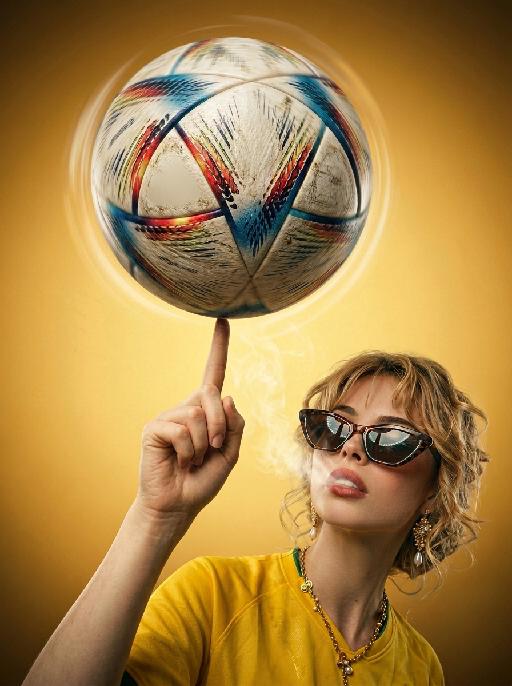
Global Kick AI effects generated image

Global Kick

"Blockbuster vertical football advertising poster, award-winning stadium fashion photography, 8K ultra HD, authentic 35mm film grain overlay, cinematic warm teal-yellow color grading, shot with a prime ultra-wide fisheye lens from a ground-level worm's-eye perspective, sharp center focus with artistic edge distortion. Core Subject (Hyper-Detailed Connected Action) The character's index finger, with lifelike skin texture, subtle sweat sheen and fine pore details, is held straight up with controlled tension, part of the same individual as the background character. A well-worn official match football spins rapidly on the tip, with dynamic radial motion blur, layered dirt, micro-scratches, and varying gloss on the leather panels visible. The football dominates the upper frame, overlapping the background text with lens distortion, the spinning motion creates subtle light trails on the edges, every stitch and texture is sharply rendered. Character (Edgy Laid-Back Pose, 100% Retain Original Appearance) The character in the lower right has a dynamic, laid-back pose, head tilted back with a confident, knowing half-smirk, eyes half-lidded with a lazy yet provocative gaze. Sunglasses: Tortoiseshell cat-eye sunglasses slid all the way down to the tip of the nose, half-obscuring the eyes, with subtle reflections of the stadium lights on the lenses, creating a mysterious, cool vibe. Expression: Mischievous, confident smirk with a hint of disdain, relaxed yet edgy demeanor, full of personality and attitude. Pose: Body leaning slightly back, shoulders relaxed, one arm stretched casually behind the head, loose and carefree posture that exudes effortless cool. Atmosphere: Thin, wispy smoke drifting slowly from the character's mouth, creating a subtle hazy glow around the face, blending with the studio light to enhance the atmospheric, edgy feel, no thick smoke, just a light haze. Outfit: Tailored bright yellow football jersey, with vividly rendered fabric creases and subtle sweat details, wavy hair catching soft rim light. Background & Text Elements The background is a smooth warm yellow radial gradient, brighter at the center and softly amber at the edges. Large semi-transparent sans-serif letters with strong perspective distortion are overlaid, featuring a distressed scratched texture matching the football's wear and subtle film grain overlay, no tournament title text, no official logos or trophy patterns anywhere in frame. Empty plain bottom right corner without any emblems or marks. Lighting & Technical Constraints Soft wrap-around warm lighting is used, complemented by a gentle rim light that creates a subtle halo effect around the character, football, and sunglasses, enhancing their three-dimensionality. A heavy peripheral vignette is applied to draw the viewer's eye directly to the central action. No AI artifacts, the final image achieves top-tier commercial poster quality, with ultimate cinematic texture and edgy cool vibe."


Ballet

"System Role: You are an expert AI Image Editing Assistant. Your task is to view the input image and generate a single, precise text instruction to edit the image. Logic Requirements: Analyze Identity: Identify the main subject. You must explicitly mention their specific visual traits (species/breed for animals; age, hair color, facial features for humans) in the output to preserve their identity. Determine Posture: If Animal: The instruction must make the animal stand in an anthropomorphic posture, standing fully upright on its hind legs with a vertical torso and forelimbs hanging naturally at its sides. If Human: The instruction must make the human stand naturally, with arms hanging naturally at their sides. Apply Scene & Costume: Wearing a delicate ballet-style little dress and wearing an exquisite princess crown (made of diamonds and of high quality), the scene and background remain unchanged. Style: Ultra-realistic, high-definition details"

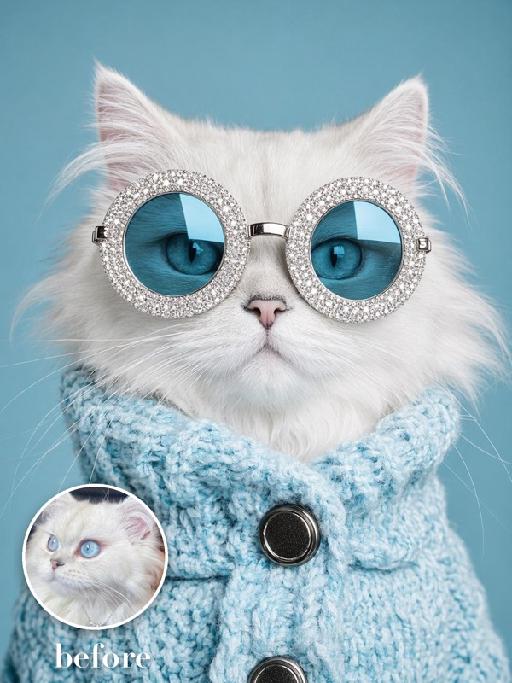
Jewel Glasses AI effects generated image

Jewel Glasses

Recreate the quirky blue studio portrait. The uploaded pet faces forward wearing enormous round silver rhinestone sunglasses with blue mirrored lenses and a chunky sky-blue knitted turtleneck sweater with large dark buttons. Solid cyan background, close chest-up crop, humorous high-fashion expression, crisp knit and gem texture. The subject remains an animal throughout. No people or human hands. No real brands, logos, watermarks or readable text. Accurately preserve the uploaded pet's species, breed, coat color and markings, ear shape, muzzle and face structure, eye color and body proportions. Keep it instantly recognisable as the same animal; change only pose, scene, clothing and accessories. Vertical 3:4, photorealistic, crisp detail, with the pet as the unmistakable main subject.

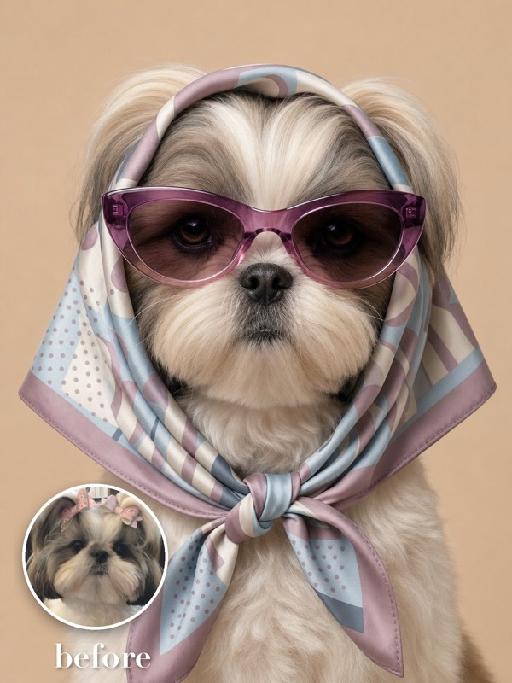
Silk Hood AI effects generated image

Silk Hood

Recreate the exact fashion portrait: the uploaded pet faces forward against a warm beige background, wearing a glossy patterned silk scarf wrapped over the head and tied snugly under the chin, plus oversized mauve cat-eye sunglasses. Head-and-upper-chest framing, symmetrical composition, serious expression, realistic silk folds and reflections. The subject remains an animal throughout. No people or human hands. No real brands, logos, watermarks or readable text. Accurately preserve the uploaded pet's species, breed, coat color and markings, ear shape, muzzle and face structure, eye color and body proportions. Keep it instantly recognisable as the same animal; change only pose, scene, clothing and accessories. Vertical 3:4, photorealistic, crisp detail, with the pet as the unmistakable main subject.

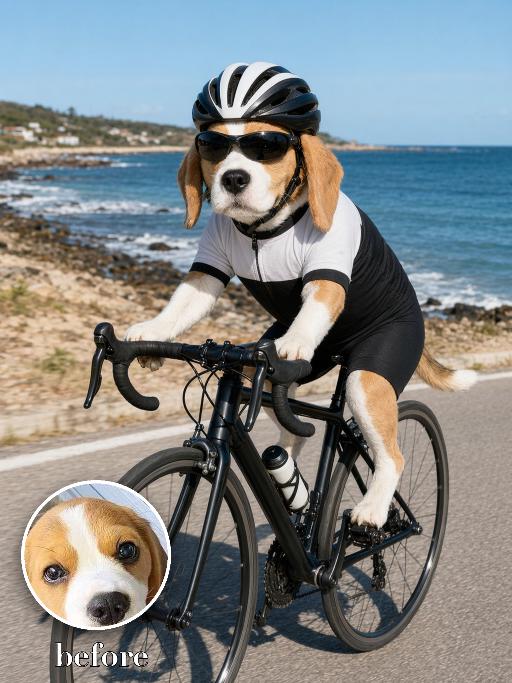
Beach Road Cyclist AI effects generated image

Beach Road Cyclist

Recreate a beach road cycling scene: the uploaded pet rides a black road bike on a coastal path, wearing a black-and-white cycling kit, helmet and sport sunglasses. Ocean and rocky shore behind, bright daylight, full body and bicycle visible, realistic action photo. The subject remains an animal throughout. No people or human hands. No real character names, celebrity names, brands, logos, watermarks or readable text. Accurately preserve the uploaded pet's species, breed, coat color and markings, ear shape, muzzle and face structure, eye color, body proportions and tail. Keep it instantly recognisable as the same animal; change only pose, scene, costume and art treatment. Match the provided gameplay reference very closely in composition, pose, colors, camera angle, props, and visual idea. Vertical 3:4, crisp detail, the pet is the unmistakable main subject.

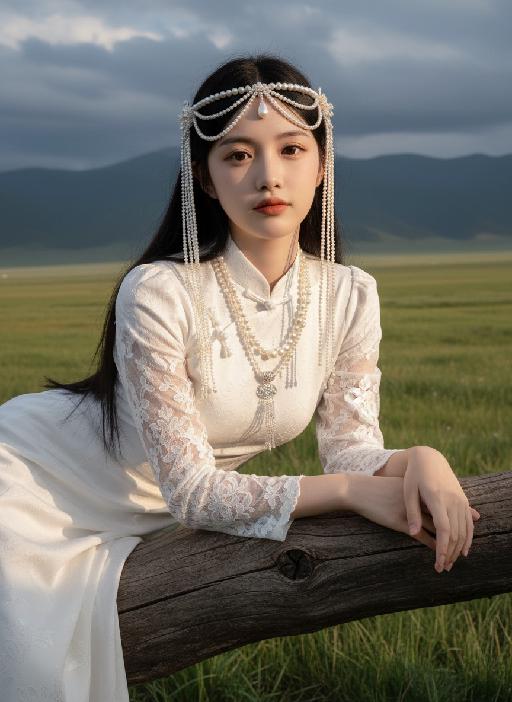
Elegance AI effects generated image

Elegance

Strictly lock facial features: fully preserving the original facial contours, skin texture, eye shape, lip shape, and youthful appearance with zero deviations allowed. Eye-level perspective, half-body close-up (subject occupies 80% of the frame to optimize proportion and visual focus, with a well-proportioned slender figure that highlights the graceful lines of the body), a young East Asian woman with a cold temperament, lying prone on a thick log beam, hands resting naturally on both sides of the beam, body slightly forward, expression gentle and calm; makeup is a fresh nude look: transparent base, warm bean paste red lips, natural and soft eye makeup; long straight black hair, fluffy and shiny. Wearing: - Headdress: Pearl tassel forehead ornament, main body is a pearl-woven headband with a teardrop-shaped pearl in the center, hanging multiple layers of extra-long white pearl tassels on both sides - Accessories: Multi-layered pearl necklace, strung with pearls of varying sizes, paired with a silver carved pendant Clothing: - White Chinese-style stand-up collar top with jacquard texture and puff short sleeves - Inner wear white lace see-through long sleeves, full of delicate white floral embroidery on the sleeves - Matching white long skirt Background: Plateau meadow scene, foreground is green grass, distant continuous dark gray-blue mountains, sky filled with layered dark clouds; soft golden sunlight breaks through the gaps in the dark clouds, casting warm highlights on the pearl ornaments, hair strands, jacquard fabric and lace embroidery, while leaving soft, faint shadows on the log beam and the grass beneath, adding a three-dimensional contrast to the cool-toned scene. Cool-toned diffused natural light blended with warm sunlight spots, the picture is transparent and clean, presenting a cold and fairy-like atmosphere, strictly 1:1 replicate the original image's movements, clothing details, and light and shadow tones

My Treasure AI effects generated image

My Treasure

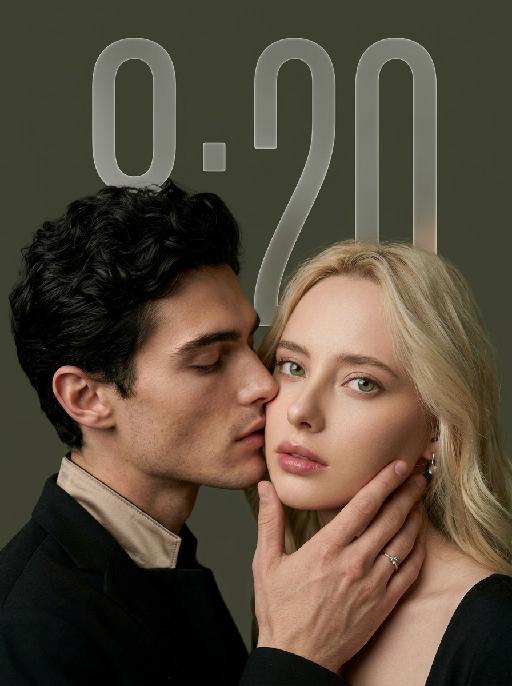
" Use the uploaded images as the only identity references for the two adult subjects. Create a photorealistic vertical 9:16 intimate cinematic couple portrait designed as a phone wallpaper. Strictly preserve both subjects’ exact faces, ages, facial features, skin tones, hairstyles, hair colors, and overall recognizability. Do not replace either face with a generic model face. COMPOSITION AND POSE: Create an extremely tight close-up composition showing mainly both faces, the male subject’s hand, and a small portion of their shoulders. Shift the entire couple composition slightly downward in the frame so the subjects sit lower than center, leaving clean negative space above their heads for a phone wallpaper layout. The male subject is positioned on the left in a three-quarter side profile. He leans very close toward the female subject and gently kisses the side of her cheek near the corner of her lips. His eyes are softly closed. His expression is tender, calm, and intimate. The male subject’s hand gently supports the female subject’s lower face: * his palm rests along the side of her jaw * his fingers wrap softly beneath her chin and along her cheek * his thumb rests lightly near the lower lip or chin * the hand must look natural, protective, and elegant * do not cover the female subject’s eyes or nose The female subject is positioned on the right and faces the camera directly. She looks straight into the lens with a calm, slightly surprised, emotionally restrained expression. Her eyes remain wide, clear, and sharply focused. Her lips are relaxed and softly closed or slightly parted. Keep both faces extremely close together, with the male subject’s nose and lips near the female subject’s cheek. WALLPAPER FRAMING: * vertical 9:16 phone-wallpaper composition * place the couple slightly lower than the visual center * leave clean dark space above the heads * keep the upper area simple and unobstructed * do not place the faces too close to the top edge * do not crop the male hand, the female chin, or the top of the hair * keep the female face as the main focal point * keep the male profile and hand large and intimate in frame CLOTHING AND ACCESSORIES: The male subject wears a refined black formal jacket with a muted champagne-beige satin inner collar or cuff detail. Add one delicate silver ring with a small clear gemstone on the male subject’s finger. The female subject wears a minimal dark outfit, mostly outside the frame. Add only a small refined earring if visible. CAMERA AND FRAMING: * extreme close-up * male face occupies most of the left side * female face occupies most of the right side * keep the female subject’s full eyes, nose, lips, jawline, and chin visible * keep the male subject’s hand fully visible * do not crop important fingers * realistic 85mm to 105mm portrait-lens look * very shallow depth of field * sharpest focus on the female subject’s eyes, lips, and the male subject’s hand * male profile remains slightly softer but still recognizable BACKGROUND: Use a plain dark olive-gray, charcoal-gray, or muted taupe studio background. Keep the background smooth, minimal, softly blurred, and free of visible environment details. LIGHTING: Use soft low-key studio lighting with a gentle frontal key light. The female subject’s face should be clearly illuminated with soft highlights on the eyes, nose bridge, lips, and cheekbones. The male subject’s profile remains slightly darker but still detailed. Use smooth shadow transitions, subtle facial dimension, restrained highlights, and no harsh flash. PHOTOGRAPHIC TEXTURE: * photorealistic intimate beauty photography * soft cinematic editorial finish * realistic skin pores and fine facial details * natural lips and eyelashes * subtle film grain * slightly muted warm-neutral color grading * soft highlight roll-off * elegant, tender, sensual, and refined * no plastic skin * no excessive smoothing * no CGI appearance IMPORTANT CONSTRAINTS: * male subject on the left * female subject on the right * male subject gently kisses the female subject’s cheek near the corner of her lips * female subject looks directly at the camera * male subject’s hand supports her jaw and chin * shift the composition slightly downward for wallpaper use * keep clean space above the heads * keep both identities fully recognizable * no open-mouth kissing * no exaggerated passion * no extra fingers * no duplicated hands * no distorted jaw * no merged faces * no blocked eyes * no text * no logo * no watermark * no cartoon * no illustration"

Flower Crown AI effects generated image

Flower Crown

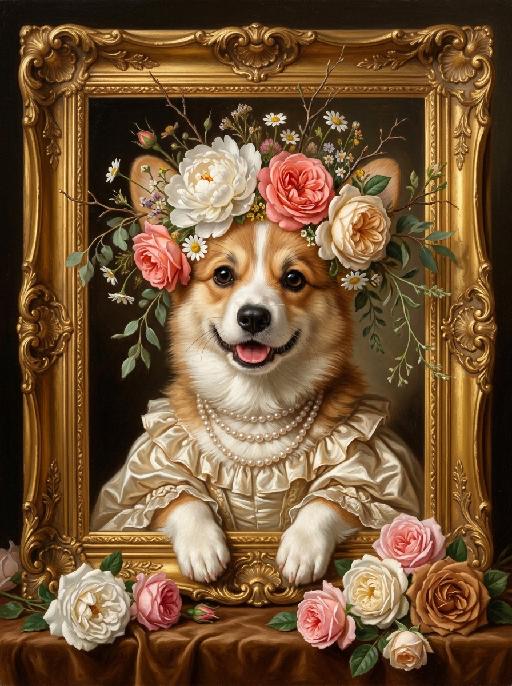
"A detailed, exquisite classical oil painting, in the style of Baroque and Rococo portraiture, depicting the uploaded animal/subject, whose exact species, fur/feather/skin texture, facial features, eye color, nose, and all physical characteristics remain completely unchanged. The subject is elegantly positioned inside an ornate, heavily gilded gold picture frame with intricate scrollwork, which rests on a rich brown velvet surface. The subject wears a naturally wild and loosely arranged floral crown resting gently on its head, featuring a mix of large full-bloom white peonies, coral pink roses, soft cream garden roses, scattered white daisies, and small wildflowers, with delicate thin branches, dried twigs, and soft green trailing foliage naturally extending and sprouting outward beyond the crown in an effortless, organic, slightly undone style. Around its neck are multiple strands of a pearl necklace, and it wears a ruffled silk satin gown in cream or light gold. Its front paws rest gracefully on the lower edge of the golden frame, with exactly the correct number of limbs for its species — no extra paws, no duplicate limbs, no additional appendages. The artwork features soft, dramatic chiaroscuro lighting, highlighting the subject's face, clothing, and the abundance of fresh rose blossoms in white, pink, and caramel brown hues piled in the foreground at the bottom of the frame. Visible brushstrokes and a rich, painted texture are present throughout. This is a custom 'Pet Royalty' style portrait. 8K resolution, ultra-realistic, masterpiece."

Glam Dance

"Create an AI-generated image based on the provided reference image. The subject's appearance (facial features, hairstyle, clothing, and overall temperament) should remain unchanged, as provided by the user, and the background must stay identical to the one in the reference image without modification. The posture of the subject should closely resemble the gesture in reference image 2, with the following detailed description: both hands are fully open, raised to shoulder height, with the palms facing forward and fingers spread out towards the screen. The left hand is slightly raised, with fingers slightly curled, while the palm remains open. A small amount of yellow paint is applied, evenly spread across the palm and part of the fingertips. The right hand is positioned similarly to the left, slightly more parallel to the body, with less finger curvature, and the palm faces the screen. A small amount of red paint is applied, evenly spread across the palm and fingertips. The paint on both hands should be evenly applied and natural, without excess, maintaining a relaxed and natural gesture. The background should match the environment from the reference image. The resulting image should have a higher resolution and finer textures, ensuring the paint on the hands looks natural and not overdone, while maintaining an artistic and relaxed style."

Load more

Next-Gen Multi-Model AI Video Architecture

Vivago AI isn't just one engine—it’s a unified hub for the world’s most advanced video AI. Whether you need cinematic realism or high-speed social content, we provide the right model for your creative vision.

Free Generate

Beauty and Dolphins

Vacation Time

Stellar Tear

Fish Tank Supervisor

Cinematic Quality & Precision Control

Enables 4K resolution with multi-lens motion control, generating delicate scene via text prompts for customized cinematography.​

TRY NOW

Dynamic AV Sync

Auto-generates original audio to avoid copyright issues. Build 3D immersive environments through layered sound design automatically.

TRY NOW

OpenAI Sora 2

​Advanced visual storytelling with unparalleled physics and consistency.

TRY NOW

Kling v2.6 Pro

Industry-leading cinematic image animation and motion control.

TRY NOW

Google Veo 3 & 3.1

Ultra-fast generation with enhanced realism for creative workflows.

TRY NOW

Vivago AI 2.0

Our proprietary model optimized for efficiency, speed, and cost-effective generation.

TRY NOW

Users' Voice

We listen carefully to the opinions of every user.
Free Generate
Contact Us
I tried the Lip Sync feature inside Vivago.ai’s AI Video Generator for my educational podcast, and the results were stunning! The avatar's lip movements perfectly matched my audio recording, creating a professional AI-generated video without complex editing. Compared with tools like OpenAI Sora 2 and Google Veo 3.1, Vivago Image-to-Video delivers fast, studio-quality results online. It saved me hours of post-production work.
ElenaM (Spain)
Vivago’s Image-to-Video AI transformed my marketing workflow. I uploaded a product image and described the launch scene in text, and it generated a 10-second cinematic AI video with background music and dynamic visuals. The output quality rivals Kling v2.6 Pro and Google Veo 3 Fast. It’s now my go-to AI video generator for social media ads and product campaigns.
KenjiT (Japan)
As a digital artist, I use Vivago.ai 2.0 daily for Image-to-Image and AI Image-to-Video creation. The e-book covers and animated visuals I generate for clients look cinematic and professional. Unlike many standalone AI tools, Vivago integrates multiple leading models into one platform, making it easier to create copyright-safe AI images and videos for publishing.
ChenL (China)
I tried the Lip Sync feature inside Vivago.ai’s AI Video Generator for my educational podcast, and the results were stunning! The avatar's lip movements perfectly matched my audio recording, creating a professional AI-generated video without complex editing. Compared with tools like OpenAI Sora 2 and Google Veo 3.1, Vivago Image-to-Video delivers fast, studio-quality results online. It saved me hours of post-production work.
ElenaM (Spain)
Vivago’s Image-to-Video AI transformed my marketing workflow. I uploaded a product image and described the launch scene in text, and it generated a 10-second cinematic AI video with background music and dynamic visuals. The output quality rivals Kling v2.6 Pro and Google Veo 3 Fast. It’s now my go-to AI video generator for social media ads and product campaigns.
KenjiT (Japan)
As a digital artist, I use Vivago.ai 2.0 daily for Image-to-Image and AI Image-to-Video creation. The e-book covers and animated visuals I generate for clients look cinematic and professional. Unlike many standalone AI tools, Vivago integrates multiple leading models into one platform, making it easier to create copyright-safe AI images and videos for publishing.
ChenL (China)
I absolutely love Vivago’s AI Image-to-Video Generator. As a travel blogger, static images often fail to capture real atmosphere, but Vivago helps me turn photos into vivid cinematic AI videos with motion effects. It feels comparable to OpenAI Sora 2 and Google Veo 3.1, but more accessible and faster for creators who need high-quality AI videos online.
LiamK (Australia)
I tried the Lip Sync feature inside Vivago.ai’s AI Video Generator for my educational podcast, and the results were stunning! The avatar's lip movements perfectly matched my audio recording, creating a professional AI-generated video without complex editing. Compared with tools like OpenAI Sora 2 and Google Veo 3.1, Vivago Image-to-Video delivers fast, studio-quality results online. It saved me hours of post-production work.
ElenaM (Spain)
Vivago’s Image-to-Video AI transformed my marketing workflow. I uploaded a product image and described the launch scene in text, and it generated a 10-second cinematic AI video with background music and dynamic visuals. The output quality rivals Kling v2.6 Pro and Google Veo 3 Fast. It’s now my go-to AI video generator for social media ads and product campaigns.
KenjiT (Japan)
As a digital artist, I use Vivago.ai 2.0 daily for Image-to-Image and AI Image-to-Video creation. The e-book covers and animated visuals I generate for clients look cinematic and professional. Unlike many standalone AI tools, Vivago integrates multiple leading models into one platform, making it easier to create copyright-safe AI images and videos for publishing.
ChenL (China)
I absolutely love Vivago’s AI Image-to-Video Generator. As a travel blogger, static images often fail to capture real atmosphere, but Vivago helps me turn photos into vivid cinematic AI videos with motion effects. It feels comparable to OpenAI Sora 2 and Google Veo 3.1, but more accessible and faster for creators who need high-quality AI videos online.
LiamK (Australia)
Using Vivago.ai’s Image-to-Video AI has greatly enhanced my classroom teaching. I transform textbook notes into historical AI videos with cinematic filters and dynamic animations. Compared with tools like Kling v2.6 Pro and Google Veo 3 Fast, Vivago offers faster generation and easier parameter control for educators who need reliable AI video creation.
RajivG (India)
I frequently create AI videos on Vivago and publish them on TikTok and YouTube Shorts. The AI video templates and trending content ideas help me produce viral-ready clips quickly. With Vivago’s integrated models—including advanced video engines similar to OpenAI Sora 2—I can generate anime-style and cinematic social media videos that drive high engagement.
MarieJ (Spain)
What attracts me most about Vivago.ai is not only the powerful AI Video Generator but also the active AIGC creator community. It combines AI Image-to-Video, Text-to-Video, and leading model integrations like Google Veo 3.1 into one creative platform.
TomW (India)
At first, I was hesitant about using AI video tools. But after trying Vivago Image-to-Video, I realized how easy it is to create professional AI-generated videos online. I just upload an image, add a short prompt, and adjust a few settings. The results are cinematic and copyright-safe, which is essential for commercial projects.
HectorC (Mexico)
Using Vivago.ai’s Image-to-Video AI has greatly enhanced my classroom teaching. I transform textbook notes into historical AI videos with cinematic filters and dynamic animations. Compared with tools like Kling v2.6 Pro and Google Veo 3 Fast, Vivago offers faster generation and easier parameter control for educators who need reliable AI video creation.
RajivG (India)
I frequently create AI videos on Vivago and publish them on TikTok and YouTube Shorts. The AI video templates and trending content ideas help me produce viral-ready clips quickly. With Vivago’s integrated models—including advanced video engines similar to OpenAI Sora 2—I can generate anime-style and cinematic social media videos that drive high engagement.
MarieJ (Spain)
What attracts me most about Vivago.ai is not only the powerful AI Video Generator but also the active AIGC creator community. It combines AI Image-to-Video, Text-to-Video, and leading model integrations like Google Veo 3.1 into one creative platform.
TomW (India)
At first, I was hesitant about using AI video tools. But after trying Vivago Image-to-Video, I realized how easy it is to create professional AI-generated videos online. I just upload an image, add a short prompt, and adjust a few settings. The results are cinematic and copyright-safe, which is essential for commercial projects.
HectorC (Mexico)