Cool Hairstyle

"1. Basic scene and character settings: Refer to the picture where the characters are surrounded by a wide black hair salon cloth. (Mid shot) Ensure that the composition is above the person's legs. The person held a black smartphone in one hand and recorded the entire process from a first person selfie perspective. This person's expression remained unchanged throughout the entire process, uniform and natural, 4K ultra high definition, with movie like skin tone, obvious depth of field, and soft bokeh effects on the background neon lights and mirrors. 2. Core Consistency Control [Strict Lockdown]: Within 10 seconds of the entire video, the facial features of the character (facial proportions, eye color, skin texture) must remain absolutely consistent, without any distortion or deterioration. The position, grip posture, and gaze direction of the mobile phone should remain unchanged. The only change lies in the hair: each hairstyle transitions through a physical process of ""hair dissolution/natural growth"" to ensure that the texture, luster, and gravitational sagging of the hair feel realistic and natural. 3. Hairstyle Sequence and Transition (10 seconds, 8 hairstyles) Hairstyle 1 → 2 (0-1.5 seconds): Initially, the hairstyle was based on a reference person's hairstyle, gradually evolving into a modern messy hairstyle (dark brown, fluffy, ventilated feeling). Hairstyle 2 → 3 (1.5-3 seconds): Hair quickly softens, intertwines and lengthens, turning golden yellow and woven into light golden braids (hanging down to the forehead, with a street fashion vibe). Hairstyle 3 → 4 (3-4 seconds): Braids spread out like water, becoming longer and thinner, naturally hanging down, and the color deepens to jet black, forming shoulder length curly hair (smooth and glossy, velvet like curves, exuding artistic temperament). Hairstyle 4 → 5 (4-5 seconds): The long curly hair instantly shrinks and becomes shorter, the bangs slightly curl to cover the forehead, and then become short hair, with 6 long and thin braids hanging down from the edges of the hair. Hairstyle 5 → 6 (5-6 seconds): Comb and dissolve the hair, shave both sides clean, make the overall length uniform, and turn it into a tough round hairstyle (only a few millimeters, with delicate gradient contours at the back of the neck). Hairstyle 6 → 7 (6-7 seconds): Weave the hair into geometric lines close to the scalp (tie a small bun at the back with sharp lines). Then, loosen the braid and let the hair stand upright. Hairstyle 7 → 8 (7-8 seconds): The hair gradually turns silver white, the bangs are trimmed neatly, and it becomes a very short silver white spiky hairstyle. The silver white gradually disappeared, returning to dark brown, and the hair became fluffy and curly again. Hairstyle 8 → End (8-10 seconds): The hairstyle is perfectly restored to the initial reference image, and the video ends. 4. Rendering and technical features: ultra realistic rendering, ray tracing, hair level detail simulation, realistic physical dynamics, movie level lighting, 60fps, no stuttering, stable time consistency."


Use Template
arrow

More From VIVAGO AI

Merry Christmas AI effects generated image

Merry Christmas

The medium shot shows the image in the uploaded picture (with the facial features of the species remaining unchanged). It is sitting upright, wearing a classic red Christmas hat with white fluffy decorations and a white pompom; this image is dressed in festive red and green Christmas attire: a green vest with golden circular buttons, a red snowflake-patterned skirt and sleeves, and a bright red velvet bow tie; it is sitting on a soft white fluffy carpet, which is covered with light brown wooden flooring, and around it are cinnamon sticks, pinecones, and a gingerbread man cookie wearing a mini Christmas hat; the background is a blurry Christmas tree with warm golden blurry fairy lights, warm comfortable indoor lighting, shallow depth of field, ultra-realistic fine hair texture, and above the picture there is handwritten golden exquisite artistic design font "Feliz Natal!", the entire room is filled with a warm festive Christmas atmosphere, brimming with the warmness of Brazilian festivals, this is a realistic pet portrait, captured with a digital single-lens reflex camera, clearly showing the dog's face, with 8K high-definition details.

Pink Cake AI effects generated image

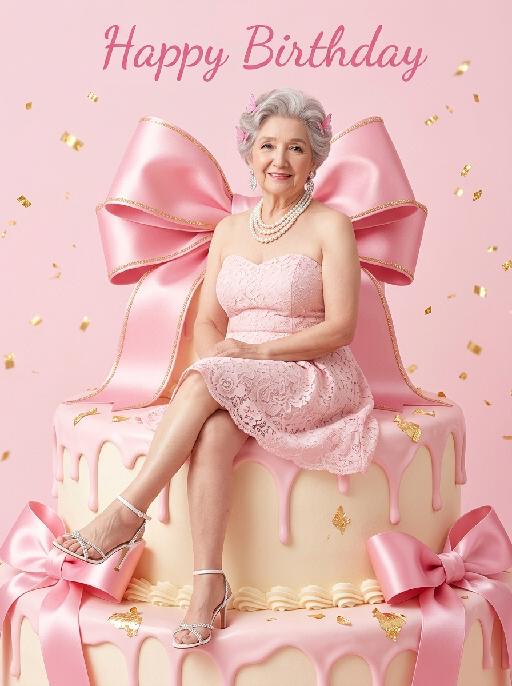
Pink Cake

"(The masterpiece, highest quality, 8K resolution, ultra-fine, realistic and lifelike, commercial fashion photography, clear focus, vivid and saturated colors: 1.3) The figure in the above picture is the main character (maintaining the facial features, gender, age, hairstyle and hair color of the person), with a sweet Barbie-style face, exquisite Korean makeup, natural skin effect with smoothing, pink small ornaments点缀 on the hair, exquisite and sweet makeup, bright smile, large and clear eyes, fair and smooth skin, a light pink strapless lace short skirt, exquisite white high-heeled sandals, exquisite luxurious high-end accessories, sitting on a huge cream-colored birthday cake, in a relaxed posture, one leg slightly raised, looking directly at the viewer, behind the main character there is a huge bright pink ribbon-embroidered bow, the huge pink birthday cake drips pink cream frosting, the cake is decorated with pink ribbons, a pure and pure pink background, floating golden glittering confetti in the air, at the top of the picture there is cute pink cursive text ""Happy Birthday"", bright and uniform studio lighting, soft pink tone aesthetics, Barbie style, sweet and cute birthday atmosphere, simple minimalist background, a style work shot by a top photography master)"

Hacker AI effects generated image

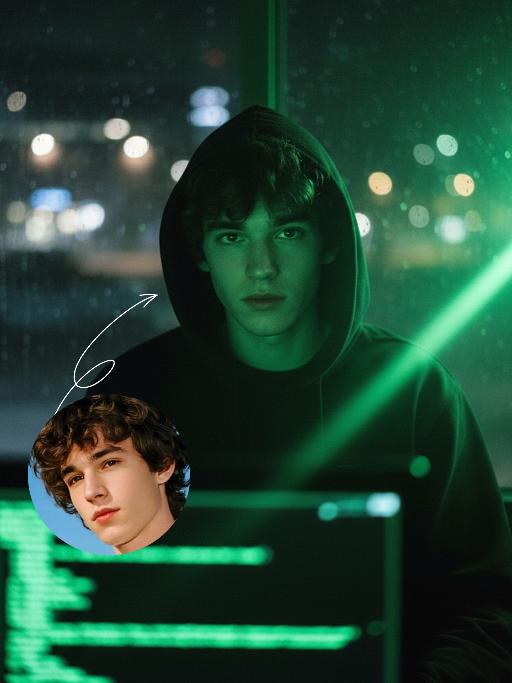
Hacker

A straight-on close-up headshot of the figure from the uploaded image (with unchanged facial features, age and gender), who sits centered and faces the camera directly, wearing a black hoodie with the hood up, their expression calm and focused. The figure’s face is cast in the green glow of code from a computer screen. A broad wash of soft, bright green side light slants in from the right side of the frame, creating a large-scale Tyndall effect that outlines their facial contours. The background features a blurred night view of the city in the rain outside the window (with traces of raindrops sliding down the glass), accompanied by warm bokeh lights; the foreground consists of a computer screen with glowing green code on it. Shot at eye level with a low-light, dark-toned palette, it embodies the dark-toned aesthetic of cyberpunk style. Main colors: black, blue-gray, neon green, low-saturation cool tones. Shallow depth of field blurs both the foreground and background, with the face in sharp focus. The work features an avant-garde fashion photography style, a film-like filter effect, and dramatic contrast between light and shadow.

Bob Hair Salon AI effects generated image

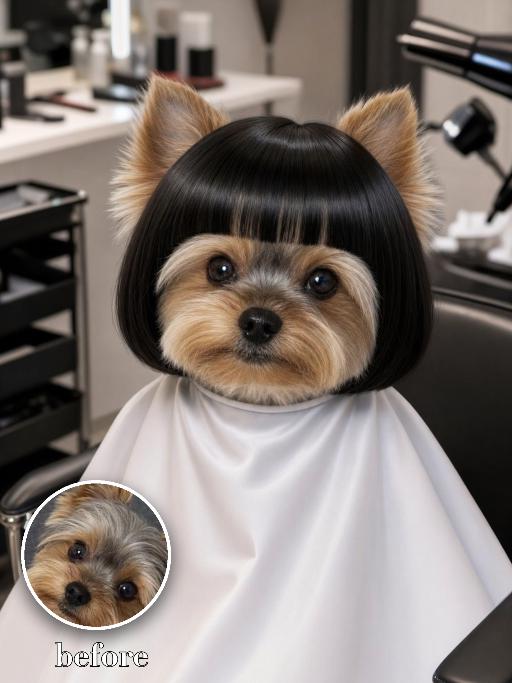
Bob Hair Salon

Recreate the salon haircut scene: the uploaded pet wears a glossy straight black bob wig with blunt bangs, seated under a white salon cape while grooming tools appear blurred near the sides. Close front-facing portrait, indoor salon background, cute serious expression, soft realistic lighting. The subject remains an animal throughout. No people or human hands. No real character names, celebrity names, brands, logos, watermarks or readable text. Accurately preserve the uploaded pet's species, breed, coat color and markings, ear shape, muzzle and face structure, eye color, body proportions and tail. Keep it instantly recognisable as the same animal; change only pose, scene, costume and art treatment. Match the provided gameplay reference very closely in composition, pose, colors, camera angle, props, and visual idea. Vertical 3:4, crisp detail, the pet is the unmistakable main subject.

Block King AI effects generated image

Block King

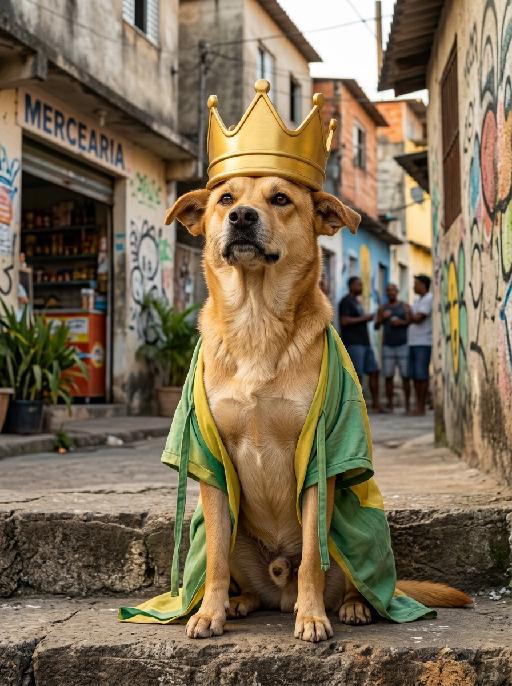
" Image-to-image, fully retain the original appearance, fur, facial features and caramel-colored fur texture of the dog, hyper-realistic image quality with master-level professional color grading. The caramel dog sits steadily on the stone steps at the entrance of a Brazilian community, with a relaxed and confident posture and a playful aura of ""King of the Neighborhood"". It has an exaggerated and funny facial expression, looking arrogant and cute. The dog wears an oversized funny golden crown with a bulky and playful shape, no royal jewels or complicated carvings, full of street fun style. It also wears a loose casual cloak in Brazilian green and yellow tones, made of light fabric with a baggy cut and casually hanging straps, creating a down-to-earth and quirky look. The background is an authentic street view of ordinary Brazilian communities. Mottled cement walls are covered with Brazilian folk street graffiti and interesting murals. There are roadside convenience stores, vintage streets and South American tropical shrubs nearby. Silhouettes of chatting and onlooking neighbors in the distance create a strong rustic atmosphere. Warm natural outdoor light spreads evenly with soft and harmonious light and shadow. There are no fancy decorations in the frame, keeping a simple and down-to-earth style. The composition focuses on the main subject with bright and vivid colors, perfectly capturing the hilarious moment of the caramel dog acting as the funny king of the neighborhood."

Emoji Plog AI effects generated image

Emoji Plog

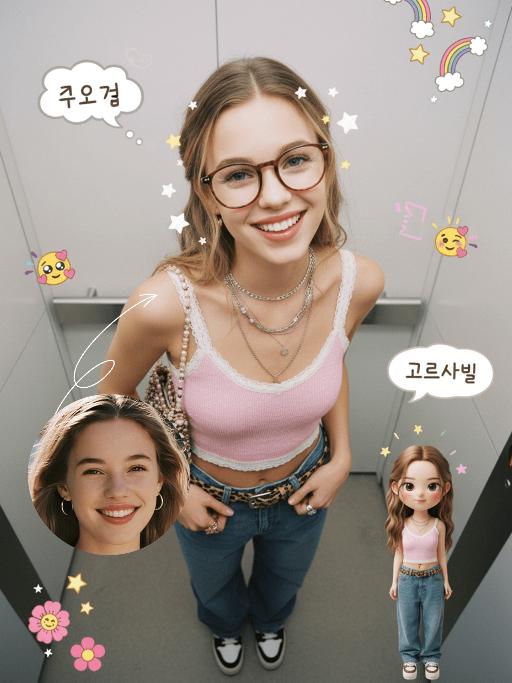
"The figure from the uploaded image (unchanged facial features, age and gender), create an image in a portrait photography style: a realistic Korean-style sweet and cool young girl (wearing brown-framed glasses, trendy Y2K clothing, and Y2K accessories including necklaces and rings) stands in the center of the frame, shot from a bird’s-eye view, with natural facial retouching and a fresh sheer makeup look. Her head takes up a large proportion of the frame with a strong sense of perspective, featuring the style of casual Instagram selfies plus a subtle decorative texture of cute Instagram emojis. The figure occupies 70% of the frame as the main subject; the negative space is dotted with cute light decorations such as colorful stars and doodles (iPhone emojis). In the bottom right corner is a large, cute 3D cartoon doppelgänger of the girl with the same outfit and pose, accounting for a quarter of the entire frame. Add white/yellow star stickers, cloud emoji speech bubbles with cute Korean text, and a number of lovely emojis to the frame. The scene is set inside an elevator with soft indoor natural light; the decorative elements include white/yellow stars. The work features an avant-garde fashion photography style and a magazine art cover aesthetic, with even soft indoor natural light and no harsh shadows, creating a warm and daily atmosphere. The main color palette is a soft low-saturation scheme (white/light gray/black), accented with bright shades of pink/yellow/leopard brown. The overall image is clean and bright, with a fresh film-like filter effect."

Women Surround AI effects generated image

Women Surround

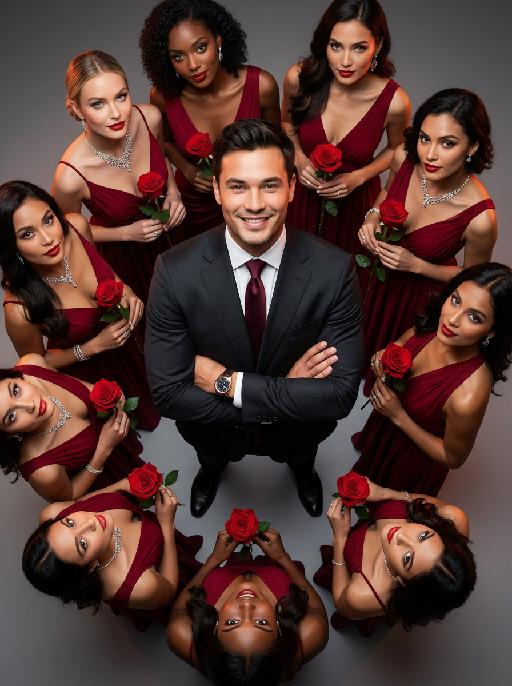
"The main figure in the uploaded picture, who is smiling confidently (with unchanged facial features, gender and age), is the subject. He is wearing a well-tailored high-end custom suit, with a red bow tie, a high-end watch, and crossed arms. Surrounding her are 8 to 9 beautiful women in fashionable red high-end custom dresses (wearing luxurious accessories), each holding a fresh red rose. These women are arranged in a circular pattern around the central figure on a deep purple red solid background. The color scheme indicates: high-intensity cinematic lighting effects, soft yet dramatic shadows, moderate contrast, rich depth of field effects, smooth skin texture, luxurious and romantic atmosphere, with a faint highlight on the facial features. Color hint: Predominantly rich deep red and dark black, natural and transparent skin tones, high saturation but not overexposed colors, unified and high-end color combinations with warm tones, bright light and shadow contrast. Style supplement: Fashion-forward art, fashion portrait photography, elegant and charming atmosphere, reminiscent of a luxurious Valentine's Day social event."

Load more

Next-Gen Multi-Model AI Video Architecture

Vivago AI isn't just one engine—it’s a unified hub for the world’s most advanced video AI. Whether you need cinematic realism or high-speed social content, we provide the right model for your creative vision.

Free Generate

Beauty and Dolphins

Vacation Time

Stellar Tear

Fish Tank Supervisor

Cinematic Quality & Precision Control

Enables 4K resolution with multi-lens motion control, generating delicate scene via text prompts for customized cinematography.​

TRY NOW

Dynamic AV Sync

Auto-generates original audio to avoid copyright issues. Build 3D immersive environments through layered sound design automatically.

TRY NOW

OpenAI Sora 2

​Advanced visual storytelling with unparalleled physics and consistency.

TRY NOW

Kling v2.6 Pro

Industry-leading cinematic image animation and motion control.

TRY NOW

Google Veo 3 & 3.1

Ultra-fast generation with enhanced realism for creative workflows.

TRY NOW

Vivago AI 2.0

Our proprietary model optimized for efficiency, speed, and cost-effective generation.

TRY NOW

Users' Voice

We listen carefully to the opinions of every user.
Free Generate
Contact Us
I tried the Lip Sync feature inside Vivago.ai’s AI Video Generator for my educational podcast, and the results were stunning! The avatar's lip movements perfectly matched my audio recording, creating a professional AI-generated video without complex editing. Compared with tools like OpenAI Sora 2 and Google Veo 3.1, Vivago Image-to-Video delivers fast, studio-quality results online. It saved me hours of post-production work.
ElenaM (Spain)
Vivago’s Image-to-Video AI transformed my marketing workflow. I uploaded a product image and described the launch scene in text, and it generated a 10-second cinematic AI video with background music and dynamic visuals. The output quality rivals Kling v2.6 Pro and Google Veo 3 Fast. It’s now my go-to AI video generator for social media ads and product campaigns.
KenjiT (Japan)
As a digital artist, I use Vivago.ai 2.0 daily for Image-to-Image and AI Image-to-Video creation. The e-book covers and animated visuals I generate for clients look cinematic and professional. Unlike many standalone AI tools, Vivago integrates multiple leading models into one platform, making it easier to create copyright-safe AI images and videos for publishing.
ChenL (China)
I tried the Lip Sync feature inside Vivago.ai’s AI Video Generator for my educational podcast, and the results were stunning! The avatar's lip movements perfectly matched my audio recording, creating a professional AI-generated video without complex editing. Compared with tools like OpenAI Sora 2 and Google Veo 3.1, Vivago Image-to-Video delivers fast, studio-quality results online. It saved me hours of post-production work.
ElenaM (Spain)
Vivago’s Image-to-Video AI transformed my marketing workflow. I uploaded a product image and described the launch scene in text, and it generated a 10-second cinematic AI video with background music and dynamic visuals. The output quality rivals Kling v2.6 Pro and Google Veo 3 Fast. It’s now my go-to AI video generator for social media ads and product campaigns.
KenjiT (Japan)
As a digital artist, I use Vivago.ai 2.0 daily for Image-to-Image and AI Image-to-Video creation. The e-book covers and animated visuals I generate for clients look cinematic and professional. Unlike many standalone AI tools, Vivago integrates multiple leading models into one platform, making it easier to create copyright-safe AI images and videos for publishing.
ChenL (China)
I absolutely love Vivago’s AI Image-to-Video Generator. As a travel blogger, static images often fail to capture real atmosphere, but Vivago helps me turn photos into vivid cinematic AI videos with motion effects. It feels comparable to OpenAI Sora 2 and Google Veo 3.1, but more accessible and faster for creators who need high-quality AI videos online.
LiamK (Australia)
I tried the Lip Sync feature inside Vivago.ai’s AI Video Generator for my educational podcast, and the results were stunning! The avatar's lip movements perfectly matched my audio recording, creating a professional AI-generated video without complex editing. Compared with tools like OpenAI Sora 2 and Google Veo 3.1, Vivago Image-to-Video delivers fast, studio-quality results online. It saved me hours of post-production work.
ElenaM (Spain)
Vivago’s Image-to-Video AI transformed my marketing workflow. I uploaded a product image and described the launch scene in text, and it generated a 10-second cinematic AI video with background music and dynamic visuals. The output quality rivals Kling v2.6 Pro and Google Veo 3 Fast. It’s now my go-to AI video generator for social media ads and product campaigns.
KenjiT (Japan)
As a digital artist, I use Vivago.ai 2.0 daily for Image-to-Image and AI Image-to-Video creation. The e-book covers and animated visuals I generate for clients look cinematic and professional. Unlike many standalone AI tools, Vivago integrates multiple leading models into one platform, making it easier to create copyright-safe AI images and videos for publishing.
ChenL (China)
I absolutely love Vivago’s AI Image-to-Video Generator. As a travel blogger, static images often fail to capture real atmosphere, but Vivago helps me turn photos into vivid cinematic AI videos with motion effects. It feels comparable to OpenAI Sora 2 and Google Veo 3.1, but more accessible and faster for creators who need high-quality AI videos online.
LiamK (Australia)
Using Vivago.ai’s Image-to-Video AI has greatly enhanced my classroom teaching. I transform textbook notes into historical AI videos with cinematic filters and dynamic animations. Compared with tools like Kling v2.6 Pro and Google Veo 3 Fast, Vivago offers faster generation and easier parameter control for educators who need reliable AI video creation.
RajivG (India)
I frequently create AI videos on Vivago and publish them on TikTok and YouTube Shorts. The AI video templates and trending content ideas help me produce viral-ready clips quickly. With Vivago’s integrated models—including advanced video engines similar to OpenAI Sora 2—I can generate anime-style and cinematic social media videos that drive high engagement.
MarieJ (Spain)
What attracts me most about Vivago.ai is not only the powerful AI Video Generator but also the active AIGC creator community. It combines AI Image-to-Video, Text-to-Video, and leading model integrations like Google Veo 3.1 into one creative platform.
TomW (India)
At first, I was hesitant about using AI video tools. But after trying Vivago Image-to-Video, I realized how easy it is to create professional AI-generated videos online. I just upload an image, add a short prompt, and adjust a few settings. The results are cinematic and copyright-safe, which is essential for commercial projects.
HectorC (Mexico)
Using Vivago.ai’s Image-to-Video AI has greatly enhanced my classroom teaching. I transform textbook notes into historical AI videos with cinematic filters and dynamic animations. Compared with tools like Kling v2.6 Pro and Google Veo 3 Fast, Vivago offers faster generation and easier parameter control for educators who need reliable AI video creation.
RajivG (India)
I frequently create AI videos on Vivago and publish them on TikTok and YouTube Shorts. The AI video templates and trending content ideas help me produce viral-ready clips quickly. With Vivago’s integrated models—including advanced video engines similar to OpenAI Sora 2—I can generate anime-style and cinematic social media videos that drive high engagement.
MarieJ (Spain)
What attracts me most about Vivago.ai is not only the powerful AI Video Generator but also the active AIGC creator community. It combines AI Image-to-Video, Text-to-Video, and leading model integrations like Google Veo 3.1 into one creative platform.
TomW (India)
At first, I was hesitant about using AI video tools. But after trying Vivago Image-to-Video, I realized how easy it is to create professional AI-generated videos online. I just upload an image, add a short prompt, and adjust a few settings. The results are cinematic and copyright-safe, which is essential for commercial projects.
HectorC (Mexico)