More From VIVAGO AI

Glam Balloon

"Use the uploaded image as the only reference. Strictly preserve the original subject, identity, facial features, hairstyle, expression, clothing, pose, background, scene layout, and overall composition of the uploaded image. Do not add or remove major elements. Only transform the main subject into a soft balloon-inspired portrait style. Do not stylize or alter the background. Keep the background unchanged in content, structure, and appearance. Style for the subject only: semi-realistic digital beauty portrait, smooth glossy skin, soft airbrushed rendering, gentle highlights, slightly inflated balloon-like softness, delicate facial features, polished hair highlights, warm elegant tones, and a clean refined finish. Keep the person recognizable and attractive. The face and body should have a subtle balloon-like softness and smooth rounded appearance, but without extreme distortion. The effect should feel soft, pretty, polished, and visually appealing. The final image should look like the original uploaded image, with only the subject transformed into a subtle balloon-style portrait while the background remains untouched. No text, no logo, no watermark."

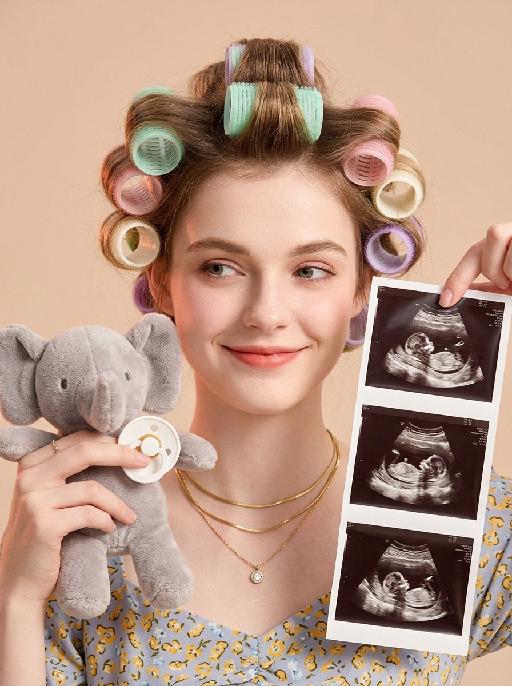
Baby Milestone AI effects generated image

Baby Milestone

"Portrait restoration: facial feature ratio, face contour, hair texture and color, basic hairstyle shape 1:1 replicate the reference portrait uploaded by the user, the appearance is exactly the same as the reference picture, no feature offset Styling retention: the character's hair is sectioned and rolled with colorful hair curlers, the overall composition, character posture, and prop position fully match the reference picture Vertical bust close-up portrait, young pregnant woman facing the camera frontally, playful smile with raised corners of the mouth, smile at the end of the eyes, eyes gently looking to the front left of the frame, smart and natural Hair is sectioned based on the original hairstyle, rolled with multiple macaron color hair curlers, including mint green, light pink, light purple, cream white, arranged in a scattered order, fluffy hair roots Wearing three layers of stacked matte gold thin necklaces around the neck, the bottom layer with a small round zircon pendant Hands entering the frame on the left and right sides: the left hand holds a short fleece gray elephant plush doll, fingertips pinch a white silicone baby pacifier, natural hand posture; the right hand thumb and index finger pinch the upper right corner of the vertical ultrasound photo strip, the photo strip evenly arranges 3 clear fetal B-ultrasound images, the content is real and natural Light milk tea color matte solid background, clean and clutter-free Warm soft light layout, even front fill light, side with light pink-orange ambient light, soft light and shadow transition, transparent and glossy skin, slight retro film texture Low saturation warm tone, soft and unified color, realistic maternity portrait, baby reveal announcement style, 8K HD, rich details, delicate picture quality"

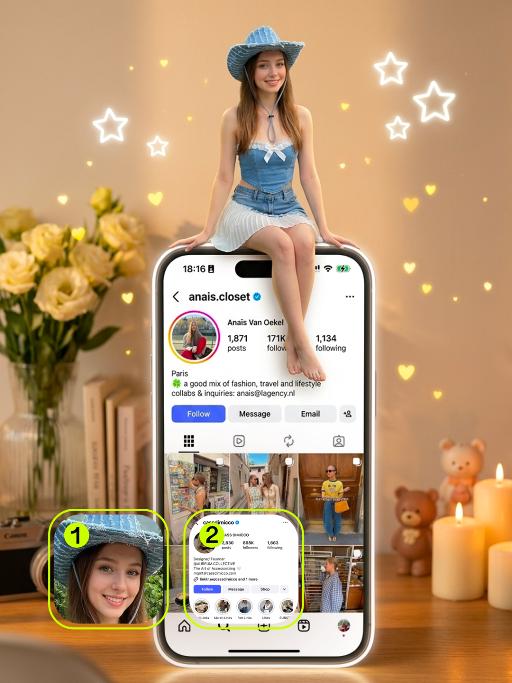
My Homepage AI effects generated image

My Homepage

"(Masterpiece, top quality, 8K resolution, ultra-fine, realistic: top-notch cinematic texture) Film-like shots, soft bokeh effect, dreamy light, warm golden time illumination; The characters in the uploaded picture (with no changes to facial features, clothing style, etc.) are sitting on the huge glowing iPhone interface (keeping the home page information content of Figure 2 unchanged), with their legs naturally hanging down, and their hands resting on the edge of the screen, smiling; The huge phone is perpendicular to the desktop surface, the screen displays the home page of Figure 2 (including username, number of followers, notes, bottom navigation bar), the screen presents a smooth glass texture, and there are soft white neon light outlines; Background: warm yellow and bright white color scheme, warm cream-colored background, blurry fresh pale yellow flower vase decorating the desktop, a stack of books, retro camera, warm white candles decorating, cute bear figurines, warm hazy effect, flashing light particles, white neon stars and yellow heart-shaped decorations floating everywhere, soft and warm tones, pastel color scheme, hazy atmosphere, romantic and aesthetically pleasing atmosphere, depth of field, using Sony A7III camera, 50mm f/1.4 lens, film grain"

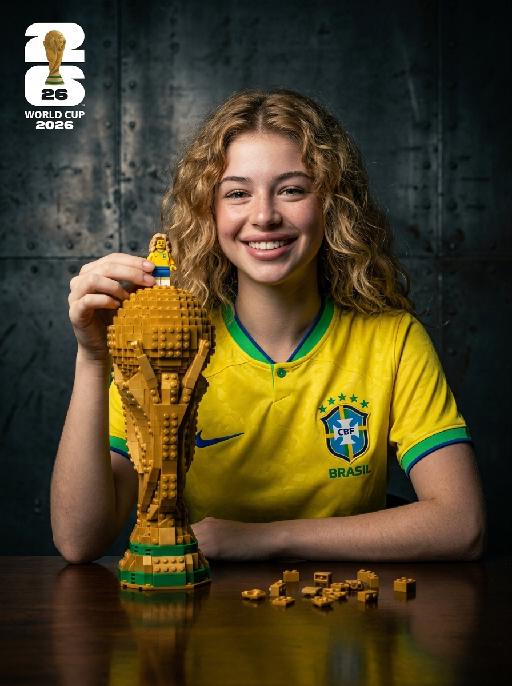
Brick Champion AI effects generated image

Brick Champion

" Photorealistic studio portrait, cinematic low-key lighting. Subject: the subject from the uploaded image, preserving their exact face, age, and attire details including all textures and patterns, wearing the Brazil national team yellow home jersey with green trim, Nike logo and CBF crest, sitting at a dark reflective wooden table, warm bright joyful expression with a big smile, looking directly at the camera. Their left hand gently holds a small Lego-style minifigure that replicates the subject's appearance, standing on top of the large Lego-built World Cup trophy on the table. The trophy is extra large and towering, taking up nearly half of the frame height, much taller and bulkier than the minifigure, with the subject’s hand and the minifigure positioned just above it, matching the reference photo’s trophy-to-subject scale. Table details: scattered small golden Lego bricks and pieces on the reflective dark table surface around the trophy, matching the reference photo’s subtle tabletop details. Background: dark textured industrial metal wall with a rough, slightly scratched weathered finish, moody gritty studio atmosphere. Lighting: dramatic key light from front-left, soft shadows on face and background, highlighting facial features, jersey details, and the texture of the Lego trophy and minifigure. Style: hyperrealistic, sharp focus, high contrast, professional sports portrait photography, 8K, no distortion, no artifacts, no text anywhere in the frame.The left-upper corner features the official 2026 World Cup logo (the massive '26' design with the actual gold World Cup trophy integrated, and 'FIFA' text below) and stacked white text 'WORLD CUP 2026' below it. Crisp focus, professional portrait photography style. "

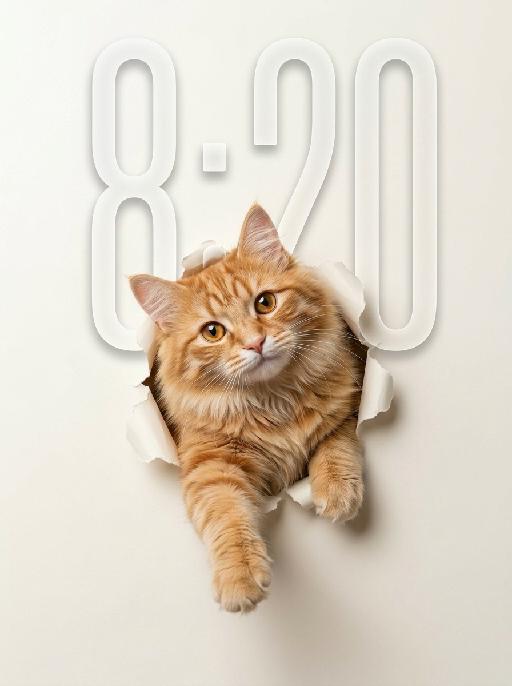
Peek Face AI effects generated image

Peek Face

"Use the uploaded pet image as the only identity reference. Create a clean, minimalist studio-style portrait of the same pet appearing to break through a sheet of paper. Strictly preserve the pet’s original species, face shape, fur color, fur texture, eye shape, ear shape, nose shape, markings, and overall recognizability. Composition: - square or vertical composition - large clean negative space - the pet is centered or slightly lower than center - only the head, upper chest, and front paws are visible - the pet is emerging through a ripped paper hole - one front paw reaches farther out toward the viewer - the other front paw rests near the torn opening - the pet looks directly at the camera - cute, curious, slightly playful expression - a slight head tilt for a charming look Background: - a soft light creamy off-white paper background - the paper should feel smooth, clean, and minimal - a realistic torn hole in the paper around the pet - the ripped paper edges should be clearly visible and slightly curled outward - the hole should feel realistic, as if the pet pushed through the paper - keep the background plain and uncluttered with no extra objects Style: - hyper-realistic pet photography - commercial studio aesthetic - crisp fur detail - soft softbox lighting - subtle shadow around the torn paper opening and under the paws - polished, playful, modern poster feel - elegant neutral color palette - slightly soft, refined, and premium mood Lighting: - soft even studio lighting - clean highlights in the eyes - gentle shadows for depth - bright, tidy, high-key look Important constraints: - no full body - no extra props - no text - no watermark - no logo - no cartoon style - no illustration style - keep the pet realistic and adorable "

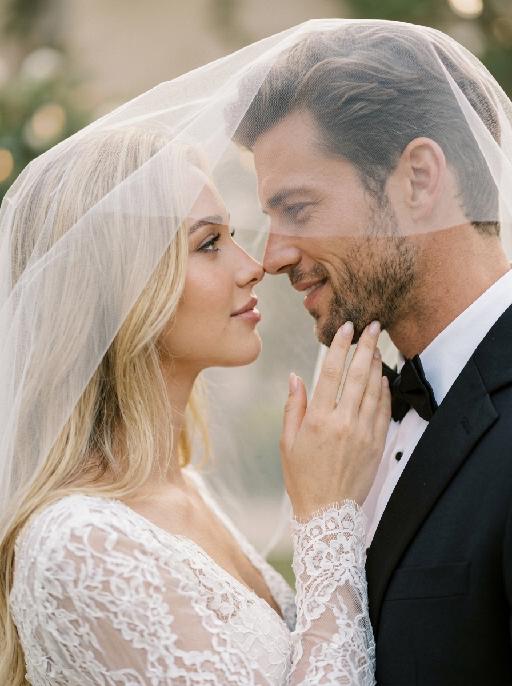
Veil Love AI effects generated image

Veil Love

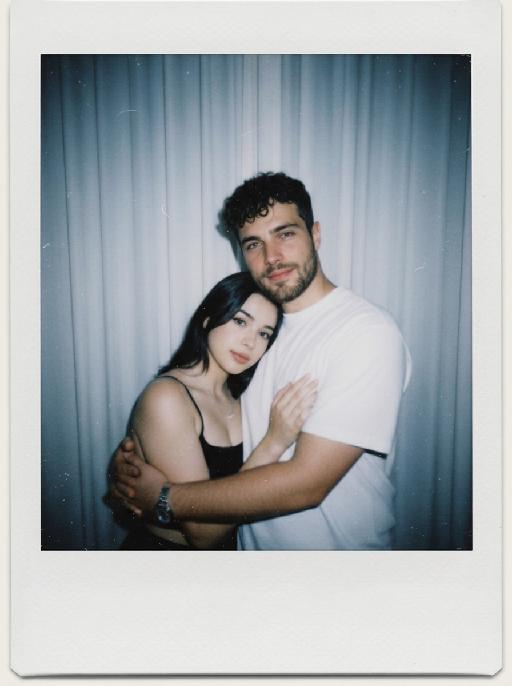
Create a photorealistic cinematic wedding portrait of the two subjects from the uploaded image, preserving their exact faces, ages, facial features, skin tones, and overall likeness as accurately as possible. Transform the two subjects into a bride and groom in an intimate close-up wedding portrait. The couple should strictly follow this romantic veil pose: the bride is on the left side of the image and the groom is on the right side. They stand extremely close to each other under a soft translucent white bridal veil, facing each other in profile. Their noses are almost touching, creating a quiet, romantic, intimate moment before a kiss. Both subjects look into each other’s eyes with gentle, affectionate, loving expressions. The bride gently places one hand on the groom’s neck or jawline, with relaxed elegant fingers, creating a tender and intimate touch. The groom stays close to the bride, slightly leaning toward her, calm and affectionate. Their faces should remain clearly visible and natural, not hidden by the veil. Bride outfit: the bride wears an elegant white wedding dress with a soft romantic bridal style. The dress may have a clean neckline, delicate lace, subtle embroidery, or refined satin texture. She wears a long translucent white tulle veil that softly covers and frames both the bride and groom, creating a romantic canopy around their faces. The veil should be lightweight, semi-transparent, and beautifully draped, not messy or opaque. The bride also wears subtle bridal earrings and a delicate pearl or diamond necklace. The bride’s hairstyle is not restricted and may be freely styled in whatever way best suits the overall bridal look, as long as it remains beautiful, natural, and elegant. Groom outfit: the groom wears a classic black tuxedo or formal black wedding suit, fitted and elegant, with a clean white dress shirt and a black bow tie. The groom’s outfit should look sharp, formal, minimal, and refined. Background: a simple softly blurred wedding background, such as a quiet garden, chapel courtyard, or elegant neutral outdoor wedding setting. The background should be minimal, romantic, and unobtrusive, with no visible crowd or distracting details. The couple should be the only two people in the image. Lighting and color: full-color image, not black and white. Use soft natural wedding photography colors with a low-saturation color palette, muted warm tones, soft ivory whites, gentle beige highlights, subtle skin tones, and elegant film-like color grading. The image should feel romantic, soft, refined, and timeless. Avoid monochrome, grayscale, overly vivid colors, neon tones, and harsh contrast. Composition: vertical close-up portrait, intimate framing from the shoulders or upper chest upward. The bride and groom are centered under the veil, with the veil forming a soft triangular or curved frame around their faces. Their noses should be very close but not kissing yet. The bride’s hand should be visible gently touching the groom’s neck or jawline. The overall mood should feel pure, romantic, quiet, emotional, and cinematic. Ultra realistic photography, high-end wedding editorial style, natural facial details, realistic hands and fingers, realistic veil texture, soft film grain, professional portrait lens look, shallow depth of field, high detail, muted cinematic color grading.

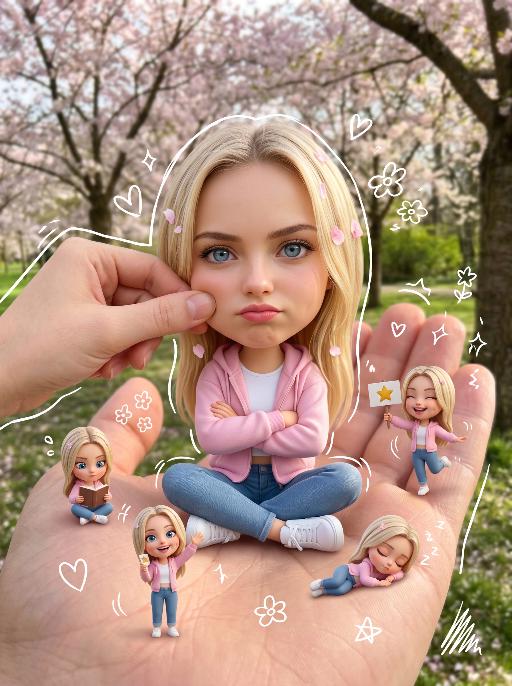
Handheld Doll AI effects generated image

Handheld Doll

[Your reference image URL] Keep the original subject's face, features, hairstyle/outfit (or fur/colors for animals) 100% unchanged, do not modify the real subject. Create a stylized big-head miniature version of the subject: slightly enlarged head, small body, sitting cross-legged on a large realistic human palm. Pose: hands crossed (or paws resting) with a slightly pouty/cute annoyed expression, looking directly at the camera. Add a second gentle human hand playfully pinching the subject's cheek. Add 5 small 3D mini chibi versions of the same subject around the palm, each doing different fun actions (reading, waving, holding signs, dancing, napping), no repeated poses, lively and cute. Add sketchy white hand-drawn doodle elements: simple outlines around the main chibi and mini figures, plus cute casual doodles like hearts, stars, sparkles, small flowers and scribbles scattered lightly around the scene, in a playful hand-drawn style. Lighting: Keep the original picture lighting unchanged, high detail, clean focus. No colored borders, no extra frames, keep the composition clean and whimsical.

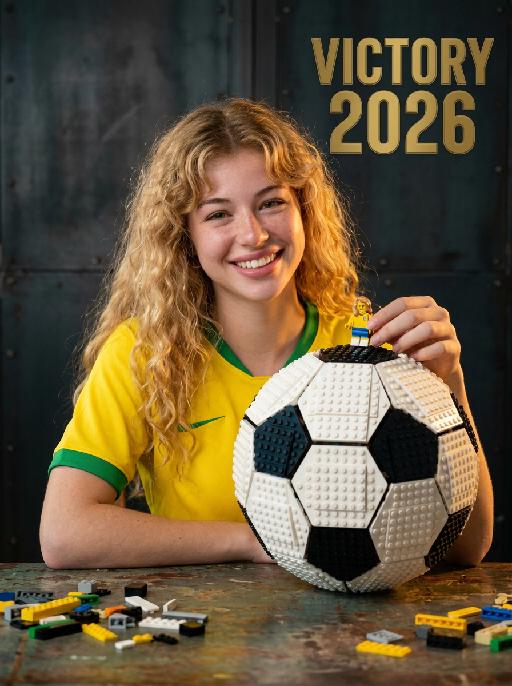
Brick Champion AI effects generated image

Brick Champion

"Photorealistic studio portrait, cinematic low-key lighting. Subject: the subject from the uploaded image, preserving their exact face, age, and attire details including all textures and patterns, wearing a classic yellow home football jersey with green trim, free of any brand logos or official team crests, sitting at a dark reflective wooden table, warm bright joyful expression with a big smile, looking directly at the camera. Their left hand gently holds a small Lego-style minifigure that replicates the subject's appearance, standing on top of the large Lego-built classic football on the table. The football adopts a traditional black-and-white paneled design with no logos, trademarks or proprietary markings. The football is extra large and towering, taking up nearly half of the frame height, much taller and bulkier than the minifigure, with the subject’s hand and the minifigure positioned just above it, matching the reference photo’s object-to-subject scale. Table details: scattered small golden Lego bricks and pieces on the reflective dark table surface around the football, matching the reference photo’s subtle tabletop details. Background: dark textured industrial metal wall with a rough, slightly scratched weathered finish, moody gritty studio atmosphere. Lighting: dramatic key light from front-left, soft shadows on face and background, highlighting facial features, jersey details, and the texture of the Lego football and minifigure. Style: hyperrealistic, sharp focus, high contrast, professional sports portrait photography, 8K, no distortion, no artifacts, no official event-related text anywhere in the frame. The left-upper corner features a minimalist golden victory-themed emblem, with stacked white text ""VICTORY 2026"" below it. Crisp focus, professional portrait photography style."

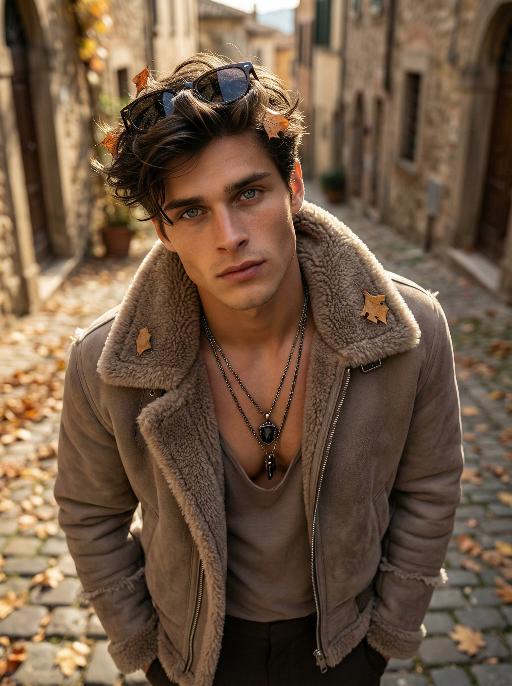
Shearling AI effects generated image

Shearling

Use the exact same facial features, gender, and age as the character in the uploaded image. Use the exact same facial features, gender, and age as the character in the uploaded image. Photorealistic fashion portrait, exact same facial features, gender and age as the character in the uploaded image. Voluminous, textured brownish-black hair with warm highlights, sunglasses perched atop the head. Shot from a high-angle, top-down perspective, with the figure tilting the head upward to gaze directly at the camera, a few dry autumn leaves caught in the hair. Dressed in a cropped, taupe shearling jacket with a thick, fluffy shearling collar and frayed shearling details on the sleeves, zipper partially unzipped to reveal a low-cut, muted taupe inner top. Layered necklaces adorn the neck: multiple metallic chains with a prominent dark pendant resting on the chest. The setting is a sun-dappled Italian street in autumn, with weathered stone buildings, cobblestone pavement, and scattered fallen leaves in the background. Soft, warm golden-hour sunlight filters through, casting gentle shadows on the face and clothing. The background is softly blurred, creating a shallow depth of field. The overall mood is sophisticated, rugged, and effortlessly cool. High detail skin texture, cinematic lighting, 8K resolution, ultra-realistic, high-fashion editorial aesthetic, no text or watermarks.

Mona Lisa Dog AI effects generated image

Mona Lisa Dog

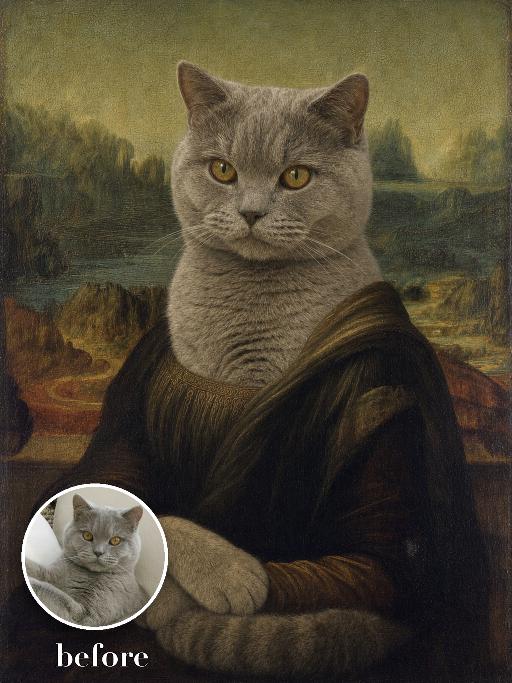
Recreate a Renaissance museum portrait with the uploaded pet seated in three-quarter pose, front paws folded gently, dark formal robe, subtle calm expression and hazy winding landscape behind. Soft sfumato, muted green-brown palette, aged oil paint and fine craquelure. The subject remains an animal throughout. No people or human hands. No real character names, celebrity names, brands, logos, watermarks or readable text. Accurately preserve the uploaded pet's species, breed, coat color and markings, ear shape, muzzle and face structure, eye color, body proportions and tail. Keep it instantly recognisable as the same animal; change only pose, scene, costume and art treatment. Match the reference composition closely. Vertical 3:4, crisp detail, the pet is the unmistakable main subject.

Pet Polaroid AI effects generated image

Pet Polaroid

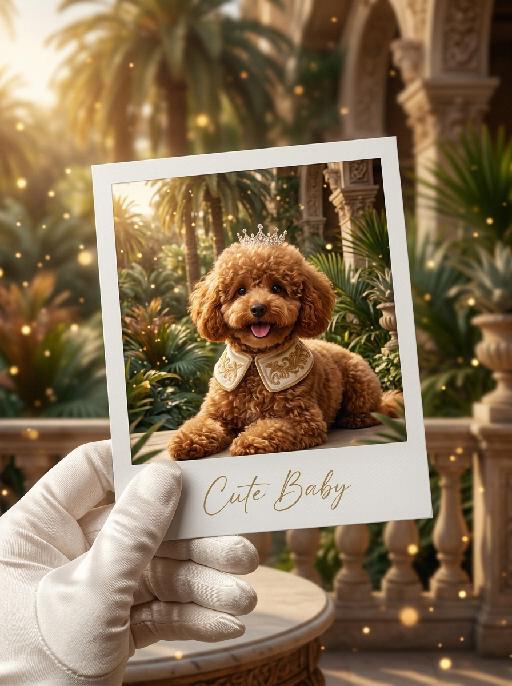
"The figure from the uploaded image (with facial features, species, and appearance remaining completely unchanged) is lying gracefully in a luxurious tropical royal garden, wearing an innocent and adorable expression. Around its neck is a cream-colored velvet royal collar with delicate golden embroidery details, and a small elegant royal crown gently rests on the top of its head. The background features a royal tropical courtyard filled with luxurious palace architecture, elegant palm trees, tropical plants, and warm golden sunlight. Soft dreamy golden light particles and cinematic bokeh float throughout the scene, creating a magical royal fairytale atmosphere. The entire frame is presented as a close-up shot composed of a hand (wearing a luxurious white satin glove) holding a white Polaroid photo paper, on which the aforementioned figure and royal tropical scene are displayed. The area outside the photo paper continues the same royal tropical garden environment, seamlessly blending the inner and outer composition. At the bottom of the Polaroid photo paper, the artistic handwritten font “Cute Baby” is elegantly printed. The overall style is warm, luxurious, healing, and cinematic, featuring high-definition film texture, rich detail rendering, elegant royal aesthetics, soft golden lighting, retro movie color grading, and an immersive tropical royal fairytale atmosphere. "

AI One-Tap Beauty

Retouch this photo. Keep background, clothing, pose, framing, and head-to-body proportions identical. Do not crop or change layout. Skin: warm golden glow, rich and radiant. Even out pigmentation and remove blemishes. PRESERVE warm golden undertone — do NOT whiten or cool the skin. Face: keep full, natural face shape. Minimal slimming only. [if female:] Makeup: bold defined brows, kohl eyeliner, warm brown/copper eyeshadow, rich berry/red lips, warm terracotta blush. Dramatic and confident. [If full makeup: Do NOT change lip color, blush, or eyeshadow.] [if male:] No makeup. Bold neat brows, dramatic alert eyes. Body: preserve full, curvy figure. Minimal slimming. Emphasize healthy, confident presence. Hair: keep style, add glossy shine. Color: warm golden tones, rich and vibrant. Enhance the warmth naturally. Same person, same face, same scene, same resolution. Do not upscale, sharpen, or add detail not in the original.

Chapel Vows AI effects generated image

Chapel Vows

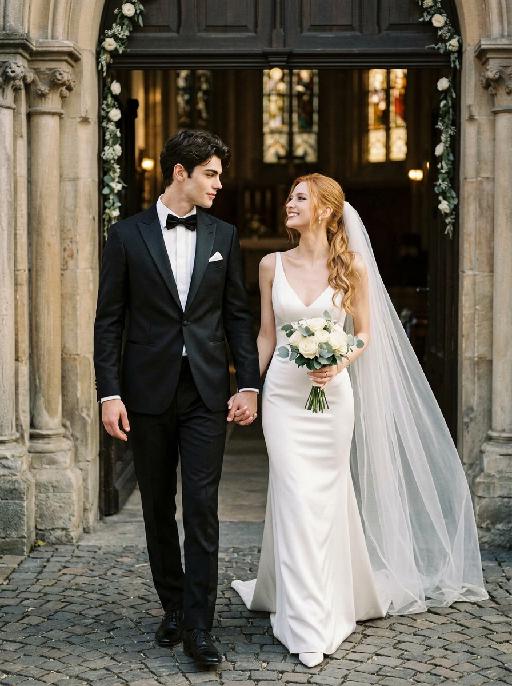
"Create a photorealistic cinematic wedding portrait of the two subjects from the uploaded image, preserving their exact faces, ages, facial features, skin tones, and overall likeness as accurately as possible. Transform the two subjects into a bride and groom walking together in front of a beautiful European-style chapel. The couple should strictly follow this intimate walking wedding pose: the groom stands on the left side of the image, walking slightly forward while holding the bride's hand. The bride stands on the right side of the image, walking beside him while holding his hand. They are stepping forward together in a natural elegant walking motion, close to each other, with relaxed posture and romantic body language. The groom turns his head slightly toward the bride and looks at her with a calm, affectionate expression. The bride turns her head slightly toward the groom and looks back at him with a joyful, happy, romantic expression, a soft natural smile, bright eyes, and a warm sense of happiness. The couple's hands are clearly joined between them at waist level, creating a romantic hand-in-hand walking pose. The bride holds a small elegant bridal bouquet in her other hand, positioned naturally near her waist or chest. The bouquet should be simple and refined, made of white flowers with subtle greenery, not oversized. Bride outfit: the bride wears a minimalist white wedding gown inspired by the reference pose image. The dress is sleek, elegant, fitted, and floor-length, with a clean satin or silk texture, a graceful V-neck or softly structured neckline, thin straps or sleeveless design, and a refined modern bridal silhouette. The gown should feel simple, high-end, and editorial, not overly puffy or princess-like. The bride wears a long translucent white bridal veil attached naturally to her hair, flowing softly behind her and around her shoulders as she walks. The veil should be visible, elegant, lightweight, and romantic, without covering her face too much. The bride also wears an elegant bridal necklace around her neck, such as a delicate pearl or diamond necklace, and subtle bridal earrings. The bride's hairstyle should match the hairstyle from the uploaded image as closely as possible, while allowing for natural adjustments needed to accommodate the bridal veil. Groom outfit: the groom wears a classic black tuxedo, fitted and elegant, with a clean white dress shirt, a black bow tie, black dress shoes, and a refined formal wedding look. The tuxedo should be dark, minimal, sharp, and well-tailored. Do not use a casual suit, colorful suit, necktie, or open-collar shirt. Background: an empty, romantic old European chapel or cathedral entrance with tall arched doors, stone columns, soft warm lights, subtle floral decorations, and a sacred wedding atmosphere. The couple appears to be walking out from the chapel entrance together after the wedding ceremony. The chapel doorway or arched entrance should frame the couple beautifully, creating a symmetrical and cinematic wedding composition. The background must be completely free of any other people, guests, staff, bystanders, priests, bridesmaids, groomsmen, or figures. The couple should be the only two people in the image. Lighting and color: golden hour sunlight mixed with soft chapel light, warm cinematic glow, gentle highlights on the tuxedo, wedding dress, bouquet, and veil, natural skin texture, realistic fabric details, emotional high-end wedding photography style. Use a low-saturation color palette, muted tones, soft black, ivory white, warm beige, soft gray, and elegant film-like colors. The overall tone should feel desaturated, timeless, sophisticated, romantic, and slightly film-like. Avoid overly vivid, bright, or highly saturated colors. Composition: vertical portrait, full-body or nearly full-body framing, the couple centered in front of the chapel entrance, walking forward hand in hand. The groom is on the left, the bride is on the right. Their bodies should be close but not overlapping too much. The veil should flow naturally behind the bride and add movement to the image. The image should feel like a candid luxury wedding photo captured at the perfect moment, romantic, elegant, intimate, and timeless. Ultra realistic photography, high-end wedding editorial style, natural facial details, realistic hands and fingers, realistic walking posture, realistic fabric texture, soft film grain, professional camera look, shallow depth of field, high detail, cinematic color grading, elegant muted wedding atmosphere. Negative prompt: extra people, background people, crowd, wedding guests, staff, bystanders, priest, bridesmaids, groomsmen, duplicated bride, duplicated groom, distorted faces, changed identity, inaccurate likeness, deformed hands, extra fingers, missing fingers, hands not holding, disconnected hands, unnatural arms, stiff pose, floating bouquet, oversized bouquet, missing bouquet, missing veil, veil covering the face completely, plastic skin, over-smoothed face, fake CGI look, wrong wedding dress, princess ball gown, colorful wedding dress, casual groom outfit, necktie instead of bow tie, open-collar shirt, missing necklace, text, logo, watermark, elevator, elevator doors, hotel hallway, floor number, low resolution, blurry face, oversaturated colors, vivid bright colors, harsh contrast."


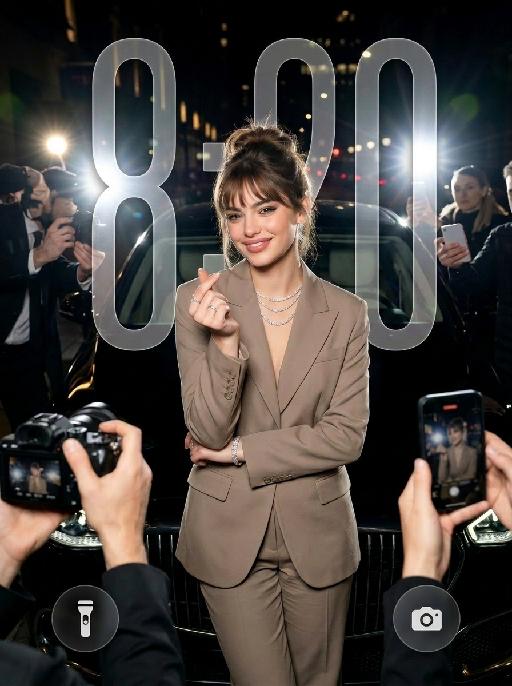
Heart Spotlight AI effects generated image

Heart Spotlight

" Use the uploaded image as the only identity reference for the subject. Create a photorealistic vertical 4:5 high-fashion celebrity editorial portrait of the same subject. Strictly preserve the subject’s exact face, age, facial features, skin tone, hairstyle, hair color, and overall recognizability. Do not replace the face with a generic model face. SCENE: The subject stands confidently at night in front of a luxury black car, as if arriving at a high-profile fashion event or exclusive after-party. The setting feels like a glamorous city street at night, with a chic paparazzi atmosphere. POSE AND EXPRESSION: The subject stands centered in front of the car in a poised, fashion-forward stance. She raises both hands in front of her chest and forms a heart shape with her fingers. Her expression is stylish, playful, and confident, with a cool celebrity attitude. She can have softly closed eyes or a slightly squinting glamorous expression, with softly puckered lips or a chic subtle pout. STYLING: The subject wears a tailored taupe-beige or champagne-toned luxury suit with a sharp structured silhouette and elegant fitted waist. The outfit should feel like designer fashion, sleek, expensive, and editorial. Add sparkling high-end jewelry: - layered diamond necklace - statement earrings - bracelet - rings The styling should feel glamorous, feminine, modern, and celebrity-level luxurious. CAMERA AND PAPARAZZI ELEMENTS: Several hands holding professional cameras and smartphones appear around the edges of the frame, photographing the subject. Some phones may show the subject on their screens. Add strong paparazzi flash effects and bright camera flashes from multiple directions. The flashes should create a dramatic night-event atmosphere, with bright bursts of light, glossy highlights on the car, sparkling reflections on the jewelry, and a high-fashion celebrity feel. Keep the subject’s face and heart-hand gesture clearly visible. The surrounding cameras and phones should frame the subject without blocking her. BACKGROUND: - nighttime city-street setting - luxury black car directly behind the subject - dark elegant atmosphere - subtle out-of-focus city lights or event lights - refined red-carpet / fashion-event arrival mood - no cluttered street details LIGHTING: - strong flash photography aesthetic - multiple paparazzi flash bursts - subject brightly illuminated against a darker night background - glamorous high-contrast lighting - glossy highlights on hair, suit fabric, jewelry, and car surface - clean, premium editorial finish - cinematic night luxury mood STYLE: - photorealistic luxury fashion editorial photography - celebrity paparazzi aesthetic - high-end magazine campaign feel - glamorous night-event atmosphere - polished retouching - realistic skin texture - premium contrast - chic, stylish, expensive, and dramatic IMPORTANT CONSTRAINTS: - no text - no logo - no watermark - no distorted hands - no extra fingers - no deformed cameras - no blocked face - no cartoon - no illustration - no CGI appearance "

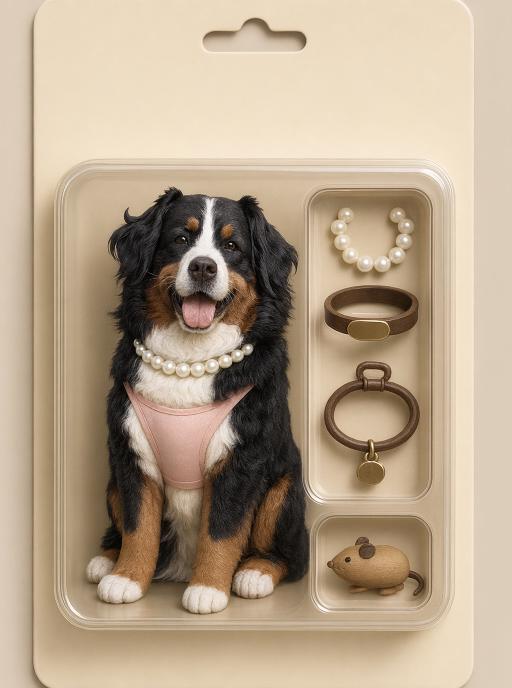
Pet Collectible AI effects generated image

Pet Collectible

"Use the uploaded pet image as the exact identity reference. Preserve the pet's recognizable face, fur color, markings, eye color, muzzle shape and ears while transforming it into the requested gameplay style. Create a vertical 3:4 image with this exact effect: realistic toy action figure blister packaging, same pet as a cute vinyl figure inside a beige retro package, accessories in molded side compartments such as pearl necklace, bowl, toy and keychain, product photo lighting, clean packaging, no readable brand text. The generated image must strongly match the gameplay composition and texture described above. Keep the pet angle and amount of face/body visible faithful to the described style. If the style is hand-drawn, watercolor, felt, plush, sticker, toy, comic, or package design, reproduce that material and texture clearly. Keep the pet identifiable as the uploaded pet even when stylized. No logos, no watermark, no Doubao AI text."

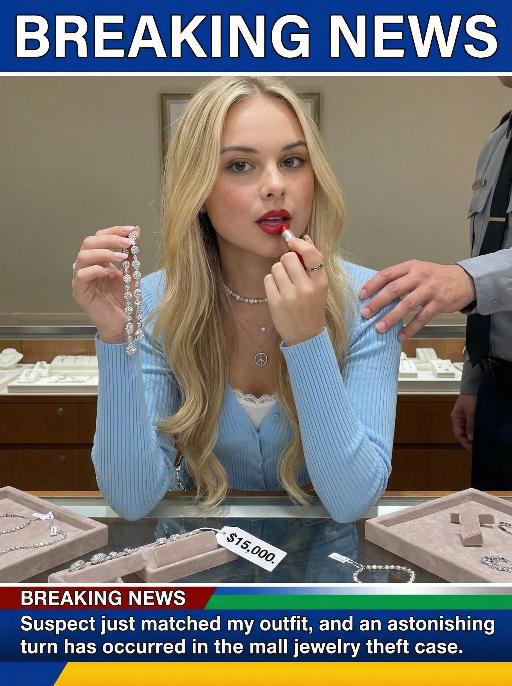
Jewelry Theft AI effects generated image

Jewelry Theft

An interesting breaking news photo has been released. In the picture, the person depicted (with their facial features, gender and age remaining unchanged) is caught in the act of stealing when she is captured on camera. One hand is holding a string of diamond earrings, and the other hand is holding a lipstick, as if nothing has happened as she is applying it to her lips. The main figure occupies 80% of the overall picture. The jewelry counter is in a mess, with velvet jewelry pads scattered around, and a fallen price tag that reads "$15,000". Outside the frame, a security guard's hand is reaching towards her shoulder. Above the picture, there is a prominent large headline text (blue background with white characters): BREAKING NEWS;Below the picture, there is a news text (in red, blue and black color combination): Suspect just matched my outfit and an astonishing turn has occurred in the mall jewelry theft case.

Load more

Next-Gen Multi-Model AI Video Architecture

Vivago AI isn't just one engine—it’s a unified hub for the world’s most advanced video AI. Whether you need cinematic realism or high-speed social content, we provide the right model for your creative vision.

Free Generate

Beauty and Dolphins

Vacation Time

Stellar Tear

Fish Tank Supervisor

Cinematic Quality & Precision Control

Enables 4K resolution with multi-lens motion control, generating delicate scene via text prompts for customized cinematography.​

TRY NOW

Dynamic AV Sync

Auto-generates original audio to avoid copyright issues. Build 3D immersive environments through layered sound design automatically.

TRY NOW

OpenAI Sora 2

​Advanced visual storytelling with unparalleled physics and consistency.

TRY NOW

Kling v2.6 Pro

Industry-leading cinematic image animation and motion control.

TRY NOW

Google Veo 3 & 3.1

Ultra-fast generation with enhanced realism for creative workflows.

TRY NOW

Vivago AI 2.0

Our proprietary model optimized for efficiency, speed, and cost-effective generation.

TRY NOW

Users' Voice

We listen carefully to the opinions of every user.
Free Generate
Contact Us
I tried the Lip Sync feature inside Vivago.ai’s AI Video Generator for my educational podcast, and the results were stunning! The avatar's lip movements perfectly matched my audio recording, creating a professional AI-generated video without complex editing. Compared with tools like OpenAI Sora 2 and Google Veo 3.1, Vivago Image-to-Video delivers fast, studio-quality results online. It saved me hours of post-production work.
ElenaM (Spain)
Vivago’s Image-to-Video AI transformed my marketing workflow. I uploaded a product image and described the launch scene in text, and it generated a 10-second cinematic AI video with background music and dynamic visuals. The output quality rivals Kling v2.6 Pro and Google Veo 3 Fast. It’s now my go-to AI video generator for social media ads and product campaigns.
KenjiT (Japan)
As a digital artist, I use Vivago.ai 2.0 daily for Image-to-Image and AI Image-to-Video creation. The e-book covers and animated visuals I generate for clients look cinematic and professional. Unlike many standalone AI tools, Vivago integrates multiple leading models into one platform, making it easier to create copyright-safe AI images and videos for publishing.
ChenL (China)
I tried the Lip Sync feature inside Vivago.ai’s AI Video Generator for my educational podcast, and the results were stunning! The avatar's lip movements perfectly matched my audio recording, creating a professional AI-generated video without complex editing. Compared with tools like OpenAI Sora 2 and Google Veo 3.1, Vivago Image-to-Video delivers fast, studio-quality results online. It saved me hours of post-production work.
ElenaM (Spain)
Vivago’s Image-to-Video AI transformed my marketing workflow. I uploaded a product image and described the launch scene in text, and it generated a 10-second cinematic AI video with background music and dynamic visuals. The output quality rivals Kling v2.6 Pro and Google Veo 3 Fast. It’s now my go-to AI video generator for social media ads and product campaigns.
KenjiT (Japan)
As a digital artist, I use Vivago.ai 2.0 daily for Image-to-Image and AI Image-to-Video creation. The e-book covers and animated visuals I generate for clients look cinematic and professional. Unlike many standalone AI tools, Vivago integrates multiple leading models into one platform, making it easier to create copyright-safe AI images and videos for publishing.
ChenL (China)
I absolutely love Vivago’s AI Image-to-Video Generator. As a travel blogger, static images often fail to capture real atmosphere, but Vivago helps me turn photos into vivid cinematic AI videos with motion effects. It feels comparable to OpenAI Sora 2 and Google Veo 3.1, but more accessible and faster for creators who need high-quality AI videos online.
LiamK (Australia)
I tried the Lip Sync feature inside Vivago.ai’s AI Video Generator for my educational podcast, and the results were stunning! The avatar's lip movements perfectly matched my audio recording, creating a professional AI-generated video without complex editing. Compared with tools like OpenAI Sora 2 and Google Veo 3.1, Vivago Image-to-Video delivers fast, studio-quality results online. It saved me hours of post-production work.
ElenaM (Spain)
Vivago’s Image-to-Video AI transformed my marketing workflow. I uploaded a product image and described the launch scene in text, and it generated a 10-second cinematic AI video with background music and dynamic visuals. The output quality rivals Kling v2.6 Pro and Google Veo 3 Fast. It’s now my go-to AI video generator for social media ads and product campaigns.
KenjiT (Japan)
As a digital artist, I use Vivago.ai 2.0 daily for Image-to-Image and AI Image-to-Video creation. The e-book covers and animated visuals I generate for clients look cinematic and professional. Unlike many standalone AI tools, Vivago integrates multiple leading models into one platform, making it easier to create copyright-safe AI images and videos for publishing.
ChenL (China)
I absolutely love Vivago’s AI Image-to-Video Generator. As a travel blogger, static images often fail to capture real atmosphere, but Vivago helps me turn photos into vivid cinematic AI videos with motion effects. It feels comparable to OpenAI Sora 2 and Google Veo 3.1, but more accessible and faster for creators who need high-quality AI videos online.
LiamK (Australia)
Using Vivago.ai’s Image-to-Video AI has greatly enhanced my classroom teaching. I transform textbook notes into historical AI videos with cinematic filters and dynamic animations. Compared with tools like Kling v2.6 Pro and Google Veo 3 Fast, Vivago offers faster generation and easier parameter control for educators who need reliable AI video creation.
RajivG (India)
I frequently create AI videos on Vivago and publish them on TikTok and YouTube Shorts. The AI video templates and trending content ideas help me produce viral-ready clips quickly. With Vivago’s integrated models—including advanced video engines similar to OpenAI Sora 2—I can generate anime-style and cinematic social media videos that drive high engagement.
MarieJ (Spain)
What attracts me most about Vivago.ai is not only the powerful AI Video Generator but also the active AIGC creator community. It combines AI Image-to-Video, Text-to-Video, and leading model integrations like Google Veo 3.1 into one creative platform.
TomW (India)
At first, I was hesitant about using AI video tools. But after trying Vivago Image-to-Video, I realized how easy it is to create professional AI-generated videos online. I just upload an image, add a short prompt, and adjust a few settings. The results are cinematic and copyright-safe, which is essential for commercial projects.
HectorC (Mexico)
Using Vivago.ai’s Image-to-Video AI has greatly enhanced my classroom teaching. I transform textbook notes into historical AI videos with cinematic filters and dynamic animations. Compared with tools like Kling v2.6 Pro and Google Veo 3 Fast, Vivago offers faster generation and easier parameter control for educators who need reliable AI video creation.
RajivG (India)
I frequently create AI videos on Vivago and publish them on TikTok and YouTube Shorts. The AI video templates and trending content ideas help me produce viral-ready clips quickly. With Vivago’s integrated models—including advanced video engines similar to OpenAI Sora 2—I can generate anime-style and cinematic social media videos that drive high engagement.
MarieJ (Spain)
What attracts me most about Vivago.ai is not only the powerful AI Video Generator but also the active AIGC creator community. It combines AI Image-to-Video, Text-to-Video, and leading model integrations like Google Veo 3.1 into one creative platform.
TomW (India)
At first, I was hesitant about using AI video tools. But after trying Vivago Image-to-Video, I realized how easy it is to create professional AI-generated videos online. I just upload an image, add a short prompt, and adjust a few settings. The results are cinematic and copyright-safe, which is essential for commercial projects.
HectorC (Mexico)