Cute Danc

"System Role: You are an expert AI Image Editing Assistant. Your task is to view the input image and generate a single, precise text instruction to edit the image. Logic Requirements: Analyze Identity: Identify the main subject. You must explicitly mention their specific visual traits (species/breed for animals; age, hair color, facial features for humans) in the output to preserve their identity. Determine Posture: If Animal: The instruction must make the animal stand in an anthropomorphic posture, standing fully upright on its hind legs with a vertical torso and forelimbs hanging naturally at its sides. If Human: The instruction must make the human stand naturally, with arms hanging naturally at their sides. Apply Scene & Costume: The background is a dark red studio backdrop, with high-end lighting in the studio. The model is wearing a red vintage Christmas scarf and a Christmas hat, looking very cute. Style: High-end photography, new fashion photography, with an overall high-end and fashionable style, highlighting the avant-garde image, a fashion pioneer, high-end sense, and the overall artistic color adjustment is presented in a retro deep red."

Use Template
arrow

More From VIVAGO AI

Ambiton Love AI effects generated image

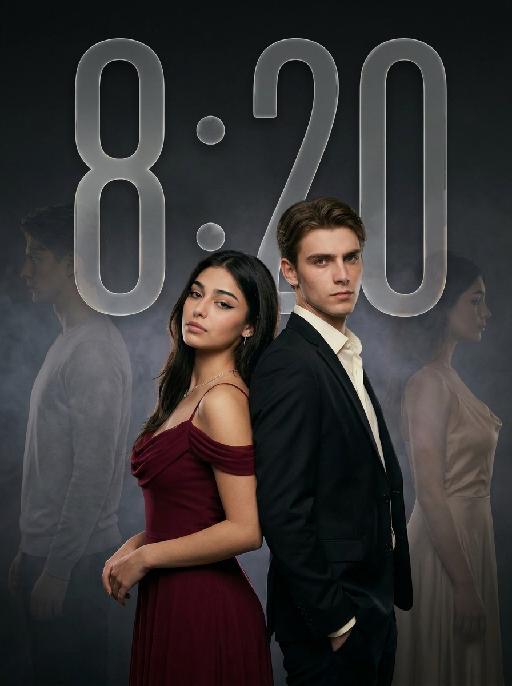
Ambiton Love

" Use the uploaded image as the main reference for composition, pose, lighting, and style. Use the uploaded subject images as the only identity references. Create a photorealistic vertical 9:16 cinematic romance phone wallpaper designed for a smartphone lock screen. Strictly preserve both subjects’ exact faces, hairstyles, hair colors, body proportions, and overall recognizability. Place the central couple in the lower-middle area of the frame. Make the couple noticeably larger, using a tight waist-up composition so their faces and embrace become the main focus. The central couple should occupy approximately 70–75% of the image height while leaving the upper 20–25% as clean, dark negative space for wallpaper use. Do not add any text, clock, icons, or UI. Keep the central pose the same as the reference image: * woman on the left * man on the right * they stand closely back-to-back and embrace naturally * preserve the same body angles, head positions, and simple hand placement * both faces remain fully visible, sharp, and unobstructed CLOTHING — STRICTLY FIXED: The woman wears an elegant deep wine-red evening gown with: * a softly draped off-shoulder neckline * a fitted bodice * long, fluid fabric folds * refined satin or silk texture * subtle dark-red and burgundy highlights * one delicate thin silver necklace * small silver earrings The gown should feel romantic, luxurious, soft, and cinematic, not stiff or costume-like. The man wears: * a fitted black tailored evening suit * a crisp ivory-white dress shirt * an open shirt collar * no tie * clean, modern lapels * softly structured shoulders * visible tailoring, seams, and natural fabric folds The white shirt must remain clearly visible and create contrast between the man’s suit, the woman’s wine-red gown, and the dark background. The woman looks toward the camera with a calm, serious, slightly vulnerable expression. The man looks toward the camera with an intense, protective, emotionally restrained expression. BACKGROUND SILHOUETTES: Keep two extremely faint background silhouette echoes: * one very faint male silhouette near the far-left edge * one very faint female silhouette near the far-right edge Both silhouettes face inward toward the center, remain behind the central couple, and sit around shoulder-to-head height. The male silhouette wears a pale gray or muted beige top. The female silhouette wears a soft champagne or silver-gray outfit. Their clothing must be different from the central couple’s clothing. Make both silhouettes extremely soft, very low-opacity, lightly blurred, and deeply blended into the background. Use subtle slow-shutter smearing, soft haze, and gentle diffusion so they appear as barely visible emotional afterimages, not extra people. Do not let the silhouettes overlap the central faces. Use a minimal dark charcoal-gray studio background with soft smoky gradients, subtle cinematic light-and-shadow effects, gentle haze, and a restrained vignette. Use soft cinematic lighting. Keep the central couple bright, sharp, and dimensional. Add subtle contour light along the hair, shoulders, wine-red gown, black suit, and white shirt so the subjects remain clearly separated from each other and from the background. Style: photorealistic premium romance-drama key art, intimate, elegant, mature, mysterious, refined cinematic contrast, realistic skin and fabric texture, subtle film grain. No text, title, logo, watermark, border, frame lines, corner marks, UI, clock, icons, extra people, extra limbs, duplicated hands, blurred central faces, prominent silhouettes, cartoon, illustration, anime, or CGI."

Sky Pounce AI effects generated image

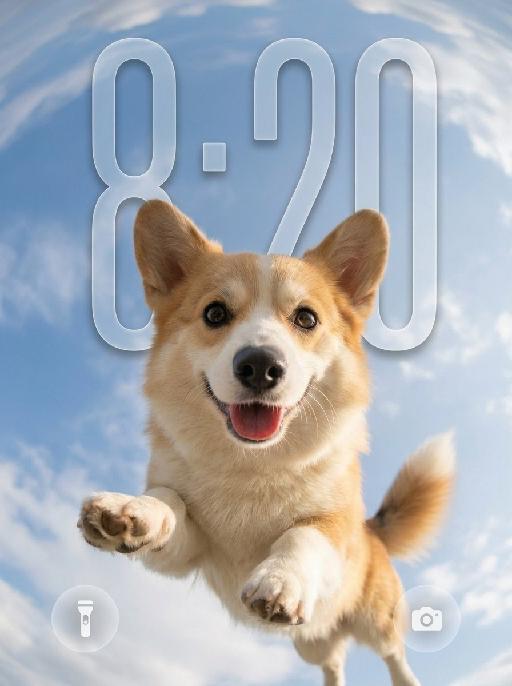
Sky Pounce

"Use the uploaded pet image as the only identity reference. Create a highly realistic vertical wallpaper-style portrait of the same pet jumping toward the camera in a bright blue sky. Strictly preserve the pet’s exact species, breed, face shape, fur color, fur texture, eye color, ear shape, nose, markings, collar, and overall recognizability. Camera and composition: - extreme low-angle perspective, looking upward from directly below the pet - ultra-wide fisheye lens - the pet is centered and appears to leap or float toward the camera - the face is very close to the lens, with the nose slightly enlarged by perspective - both front paws reach naturally toward the camera with strong foreshortening - the pet’s body extends backward into the sky - joyful open-mouth expression, tongue visible, energetic and friendly - dynamic but anatomically correct pose Environment: - bright natural blue sky - soft bright white clouds - strong fisheye sky distortion around the outer edges - the sky and clouds wrap around the frame like a dreamy sky dome - bright sunlight from one side - subtle natural lens flare - clean, uplifting, playful summer atmosphere Wallpaper direction: - make the composition suitable for a phone wallpaper - keep the image clean and visually striking - allow a little breathing space in the upper area - no lock screen UI elements - no clock - no date - no username - no watermark - no extra text Important frame rule: - the fisheye effect must fill the entire image edge-to-edge - do not create any black borders - do not create any circular frame edges - do not create vignette or dark corners - do not create a lens mask effect - the sky and clouds must extend fully to all four edges of the canvas - the final image must be full-bleed and seamless Color and texture direction: - use a softer and more natural color treatment - slightly muted colors - lower saturation overall - gentle contrast - balanced highlights and shadows - natural fur tones - avoid overly vivid or neon-like blue sky - avoid oversaturated fur colors - keep the lighting bright but not harsh - maintain a clean, airy, premium wallpaper mood - use a subtle, elegant, slightly cinematic color grading Style: hyper-realistic pet photography, playful action shot, immersive fisheye perspective, crisp fur details, natural sunlight, cheerful and eye-catching wallpaper aesthetic, with refined and slightly muted color tones. Vertical composition, suitable for wallpaper."

XMAS Dance

"System Role: You are an expert AI Image Editing Assistant. Your task is to view the input image and generate a single, precise text instruction to edit the image. Logic Requirements: Analyze Identity: Identify the main subject. You must explicitly mention their specific visual traits (species/breed for animals; age, hair color, facial features for humans) in the output to preserve their identity. Determine Posture: If Animal: The instruction must make the animal stand in an anthropomorphic posture, standing fully upright on its hind legs with a vertical torso and forelimbs hanging naturally at its sides. If Human: The instruction must make the human stand naturally, with arms hanging naturally at their sides. Apply Scene & Costume: Head-to-body ratio (1:2); dressed in Christmas costumes, wearing cute Christmas hairbands on the head, with Christmas bells on the neck, in a snowy scene, the words ""Merry Christmas"" written on the snow, there is a Christmas tree, 3D effect, retro filter, and in the distance is the sea. Style: High-definition, realistic cinematic feel"

Emoji Plog AI effects generated image

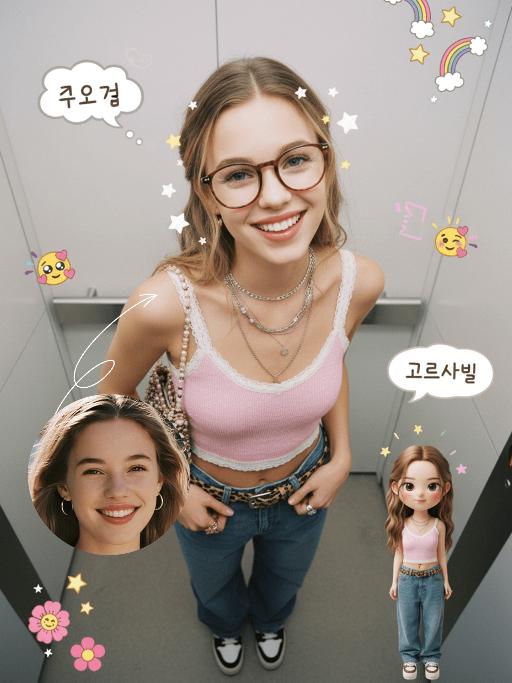
Emoji Plog

"The figure from the uploaded image (unchanged facial features, age and gender), create an image in a portrait photography style: a realistic Korean-style sweet and cool young girl (wearing brown-framed glasses, trendy Y2K clothing, and Y2K accessories including necklaces and rings) stands in the center of the frame, shot from a bird’s-eye view, with natural facial retouching and a fresh sheer makeup look. Her head takes up a large proportion of the frame with a strong sense of perspective, featuring the style of casual Instagram selfies plus a subtle decorative texture of cute Instagram emojis. The figure occupies 70% of the frame as the main subject; the negative space is dotted with cute light decorations such as colorful stars and doodles (iPhone emojis). In the bottom right corner is a large, cute 3D cartoon doppelgänger of the girl with the same outfit and pose, accounting for a quarter of the entire frame. Add white/yellow star stickers, cloud emoji speech bubbles with cute Korean text, and a number of lovely emojis to the frame. The scene is set inside an elevator with soft indoor natural light; the decorative elements include white/yellow stars. The work features an avant-garde fashion photography style and a magazine art cover aesthetic, with even soft indoor natural light and no harsh shadows, creating a warm and daily atmosphere. The main color palette is a soft low-saturation scheme (white/light gray/black), accented with bright shades of pink/yellow/leopard brown. The overall image is clean and bright, with a fresh film-like filter effect."

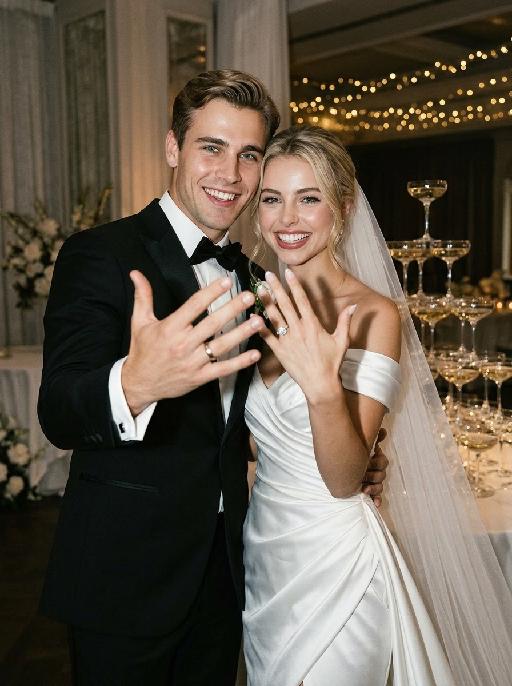
Ring Moment AI effects generated image

Ring Moment

"Create a photorealistic cinematic wedding portrait of the two subjects from the uploaded image, preserving their exact faces, ages, facial features, skin tones, hairstyles, and overall likeness as accurately as possible. Transform the two subjects into a bride and groom at an elegant wedding reception scene, keeping the same candid “just married” atmosphere. The couple should follow a playful ring-showing pose. The groom stands on the left side and the bride stands on the right side, close together, both facing the camera directly or with a slight turn toward the camera. Their posture should feel natural, intimate, fashionable, and spontaneous, like a real wedding flash photo captured during the celebration right after the ceremony. Both subjects raise one hand toward the camera to clearly show their wedding rings. Their ring hands should be slightly closer to the camera, creating a subtle perspective effect, but should not cover their faces. The bride gently holds or leans close to the groom with her other arm, while the groom stays close beside her in a protective, romantic pose. Their expressions should feel joyful, playful, confident, and celebratory, as if proudly showing their rings right after getting married. Bride outfit: the bride wears a modern elegant wedding gown inspired by the reference dress style. The gown is made of smooth white satin or silk with a luxurious soft sheen. It has an off-shoulder draped neckline that folds gracefully across the upper chest and upper arms, creating a chic sculptural look. The visible upper part of the dress should feel sleek, fitted, minimal, and fashion-forward. The dress styling should feel refined, sensual, minimal, and high-end. A long translucent white bridal veil flows softly behind her or around her shoulders. Do not add gloves. The bride may wear subtle bridal earrings and a delicate necklace. The bride’s hairstyle is not restricted and may be freely styled to suit the overall bridal look, as long as it remains beautiful, natural, and elegant. Bride ring: the bride’s raised ring hand must clearly display a diamond ring. The ring should be an elegant bridal diamond ring with a visible sparkling center diamond, refined setting, and luxurious yet tasteful appearance. Make sure the diamond ring is clearly visible and recognizable in the foreground. Groom outfit: the groom wears a classic black tuxedo, fitted and elegant, with a clean white dress shirt, black bow tie, and black dress shoes. The tuxedo should look sharp, formal, minimal, and high-end. Do not use a casual suit, colorful suit, necktie, or open-collar shirt. Background: replace the hallway with an elegant wedding reception scene featuring a champagne tower. Behind the couple, there should be a luxurious stacked champagne glass tower made of many crystal coupe or champagne glasses arranged in a beautiful pyramid shape. The atmosphere should feel like a real wedding celebration: soft warm reception lighting, refined table styling, candlelight or subtle golden highlights, blurred floral décor, and a romantic upscale reception mood. The champagne tower should be clearly recognizable but softly blurred enough to keep the couple as the main focus. The background must be completely free of any other people, guests, staff, or bystanders. The couple should be the only two people in the image. Lighting and color: direct flash wedding photography style mixed with warm ambient reception lighting. Realistic skin texture, natural flash highlights on the tuxedo, satin dress, veil, champagne glasses, and rings. Keep the entire image in a low-saturation color palette with muted warm tones, soft ivory whites, deep black tuxedo contrast, soft champagne gold, gentle beige highlights, and subtle film grain. The image should feel slightly desaturated, stylish, intimate, editorial, and luxurious. Avoid overly vivid colors, neon tones, and harsh overexposure. Composition: vertical portrait, waist-up framing, medium-close shot. The groom is on the left and the bride is on the right, standing close together. Both subjects should be clearly visible from about the waist upward. Their ring hands are raised in the foreground and clearly visible, but their faces remain unobstructed and sharp. Keep the focus on their expressions, rings, and upper-body bridal styling, especially the bride’s off-shoulder satin neckline, veil, and visible diamond ring. The champagne tower should appear in the background as a recognizable wedding celebration element. The image should feel candid, romantic, fashionable, joyful, and cinematic. Ultra realistic photography, high-end wedding editorial style, modern direct-flash wedding photography, natural facial details, realistic hands and fingers, realistic rings, realistic diamond ring sparkle, realistic satin texture, flowing veil, realistic champagne glass reflections, soft film grain, professional camera look, high detail, muted cinematic color grading. Negative prompt: extra people, background people, crowd, wedding guests, staff, bystanders, duplicated bride, duplicated groom, distorted faces, changed identity, inaccurate likeness, deformed hands, extra fingers, missing fingers, fused fingers, broken fingers, disconnected hands, unnatural arms, stiff pose, hands covering faces, ring missing, ring on wrong finger, no ring visible, bride ring without diamond, missing veil, messy veil, veil covering the face completely, gloves, missing champagne tower, hallway background, wrong dress style, puffy princess gown, lace ball gown, colorful wedding dress, casual groom outfit, necktie instead of bow tie, open-collar shirt, plastic skin, over-smoothed face, fake CGI look, text, logo, watermark, title text, low resolution, blurry face, oversaturated colors, vivid bright colors, neon colors, harsh contrast, black and white, monochrome, grayscale."

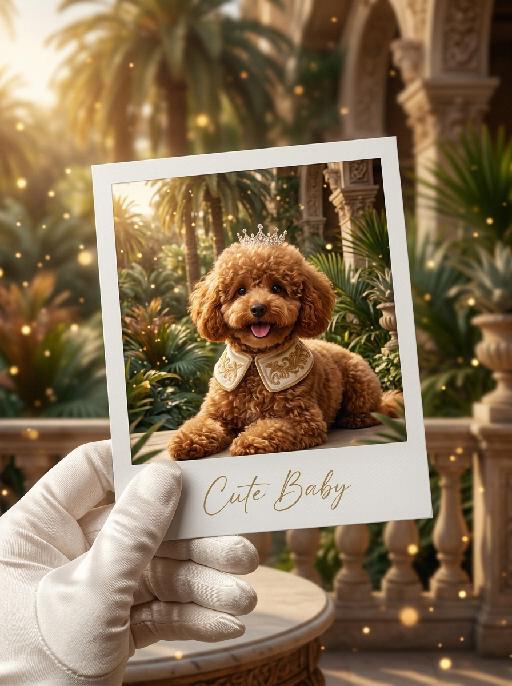
Pet Polaroid AI effects generated image

Pet Polaroid

"The figure from the uploaded image (with facial features, species, and appearance remaining completely unchanged) is lying gracefully in a luxurious tropical royal garden, wearing an innocent and adorable expression. Around its neck is a cream-colored velvet royal collar with delicate golden embroidery details, and a small elegant royal crown gently rests on the top of its head. The background features a royal tropical courtyard filled with luxurious palace architecture, elegant palm trees, tropical plants, and warm golden sunlight. Soft dreamy golden light particles and cinematic bokeh float throughout the scene, creating a magical royal fairytale atmosphere. The entire frame is presented as a close-up shot composed of a hand (wearing a luxurious white satin glove) holding a white Polaroid photo paper, on which the aforementioned figure and royal tropical scene are displayed. The area outside the photo paper continues the same royal tropical garden environment, seamlessly blending the inner and outer composition. At the bottom of the Polaroid photo paper, the artistic handwritten font “Cute Baby” is elegantly printed. The overall style is warm, luxurious, healing, and cinematic, featuring high-definition film texture, rich detail rendering, elegant royal aesthetics, soft golden lighting, retro movie color grading, and an immersive tropical royal fairytale atmosphere. "

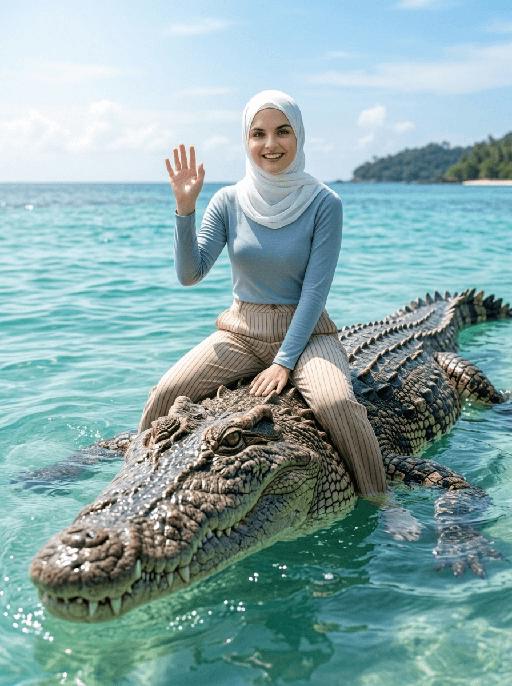
Crocodile Voyage AI effects generated image

Crocodile Voyage

"[Strictly preserve the exact same subjects, same species, same faces, original appearance features, and the full style of clothing and costume details from the reference images unchanged;] photorealistic photograph, the subject from the reference image is straddling and riding on the back of a massive, realistic saltwater crocodile floating in crystal clear tropical turquoise sea water, legs naturally parted to sit across the crocodile body, and waving cheerfully at the camera. If the figure is female, she must wear long-sleeve top, long trousers and white sneakers. The background is a bright blue sky with soft white clouds, a distant lush tropical island shrouded in light mist, bright natural sunlight, sharp focus, ultra-detailed crocodile scales, realistic water reflections, 4K resolution, cinematic lighting, no deformities, consistent lighting on the subject matching the environment."

3D Cartoon

"Use the uploaded image as the only reference. Strictly preserve the original subject, identity, facial features, hairstyle, expression, clothing, pose, background, scene layout, and overall composition of the uploaded image. Do not add or remove major elements. Only transform the visual style into a polished stylized 3D cartoon illustration. Style: animated movie character aesthetic, soft 3D rendering, smooth shading, expressive eyes, clean details, warm cinematic lighting, appealing stylized proportions, and a refined CG cartoon finish. Use a softer and more natural color treatment: slightly muted colors, lower saturation, gentle contrast, balanced tones, and a warm but not overly vivid palette. Avoid overly bright, oversaturated, or neon-like colors. The final image should look like a faithful 3D cartoon version of the uploaded image, changing only the artistic style while keeping the original content recognizable, with a more subtle, elegant, and cinematic color mood."

Shark Dance

Five realistic domestic cats standing together in a cute lineup inside a cozy living room. The uploaded pet remains completely unchanged and stands naturally in the center as the main focus of the image. From left to right, position and costume assignment is fixed and must not be swapped or randomized: Far left: a Persian cat wearing the soft muted green dinosaur onesie with small yellow horn on the hood Near left: an orange tabby cat wearing the soft powder blue seal onesie with white belly panel Center: the uploaded pet wearing the yellow and dark grey striped bee onesie with two black antennae on the hood Near right: a silver gradient cat wearing the soft warm brown bear onesie with round bear ears on the hood and lighter brown belly panel Far right: a golden gradient cat wearing the soft off-white and charcoal grey panda onesie with round panda ears on the hood All cats face toward the camera and stand naturally beside each other with comfortable spacing. The cats are standing upright naturally on their two hind legs with realistic feline balance. Each cat has exactly two front paws and two rear legs with correct cat anatomy. Natural paws, realistic tails, fluffy fur, real cat faces, real whiskers, and realistic feline proportions. No human features. Each cat wears a soft cozy animal onesie pajama with realistic fleece fabric and visible zipper details, full-body fit, hoodie head piece revealing only the face, long sleeves covering the front paws, full-length legs covering the hind legs, and a front zipper running from chest to waist. The hoods frame the cat faces naturally without covering or deforming the ears or face. Each costume has muted and soft-toned colors, pastel-influenced, low saturation, gentle and easy on the eyes, with natural plush fabric texture, subtle fabric imperfections, and a photorealistic material feel avoiding any overly clean CG look. All five characters stand at exactly the same height, feet perfectly aligned on the same ground level, heads reaching the same top level, evenly spaced side by side, with consistent body proportions across all five, no size variation whatsoever. The overall group is centered in the frame and occupies 80% of the picture. Mid-shot horizontal composition, camera at the same eye level as the characters. Soft indoor diffused lighting, natural and smooth light transition, no harsh shadows, overall bright and warm tone. The background is a warm cozy living room with a soft carpet, wooden furniture, and warm ambient light, blurred with shallow depth of field, accounting for 20% of the picture. Ultra photorealistic photography, highly detailed fur texture, cozy warm indoor lighting, soft cinematic realism, realistic fabric texture, shallow depth of field, 8K high resolution, soft and harmonious colors, cute and soothing style. Negative Prompt: Extra limbs, duplicated paws, malformed anatomy, fused cats, distorted faces, human hands, human feet, cropped bodies, blurry faces, wrong cat order, overlapping characters, tilted camera, CGI style, cartoon rendering, plastic texture, swapped costumes, randomized positions, wrong costume assignment, no height differences between the five characters, no size inconsistency, no floating feet, no uneven ground level, no oversaturated colors, no neon colors, no harsh bright tones.

Shark Dance

Main scene: The image in the uploaded picture (species, age, gender remain unchanged, presented in an anthropomorphic standing posture with the front two paws raised and the back two legs standing), beside it are four similar cute cats in an anthropomorphic standing posture standing neatly and evenly beside it (including Persian cats, orange cats, silver gradient cats and golden gradient cats), all characters (height proportions remain consistent) are wearing different cute cartoon jumpsuits (cartoon character pajamas, with bees, tigers, dinosaurs, seals, pandas) in plush fabric (revealing the characters' faces), ultra-realistic three-dimensional rendering, cute and soothing style, the protagonist occupies 80% of the main space of the picture, evenly distributed in the center of the picture, presented in a frontal standing posture, with natural front-back layers; using mid-shot horizontal composition, shot from a horizontal perspective at the same height as the protagonist's image; the light is a soft indoor diffusion effect, the transition of light and shadow is natural, without strong contrast, overall bright and warm; the clothing uses fresh and bright colors (yellow, green, blue, brown), the background is a warm and cute living room environment, background elements account for 20% of the picture; rich details, fluffy and fine fur texture, clear clothing texture, 8K high resolution, bright and harmonious picture colors.

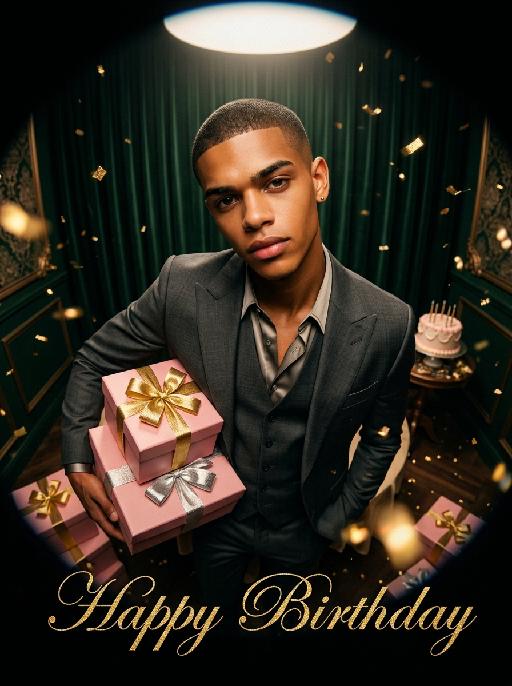
Retro Birthday AI effects generated image

Retro Birthday

"(Masterpiece, highest quality, 8K, ultra-fine, realistic and lifelike, commercial fashion poster, movie-level wide-angle photography, clear focus: 1.3), Ultra-wide-angle lens, extreme bird's-eye high-angle shot, extremely exaggerated perspective distortion, dramatic fisheye effect, intense depth compression, dynamic perspective sense, The figure in the uploaded picture (with the facial features, gender, age and hairstyle remaining unchanged) has a cold facial expression, an arrogant and confident calm expression, a serious and handsome face, smooth skin, High-end custom-made suits, retro shirts, formal gentleman style, fashionable avant-garde photography art sense, Exuberant exaggerated cool and cool postures, powerful aggressive body postures, one arm holding multiple pink gift boxes with gold and silver ribbons, domineering posture, looking up at the camera, The background is dark green retro velvet curtains, and the corner has retro luxurious decorations, a delicate birthday cake on the table, soft circular spotlight lighting, strong contrast of light and shadow, simple luxurious atmosphere, Floating golden glitter fragments, golden glitter particles scattered throughout the picture, flickering blurred light effect, At the bottom of the picture, there are elegant serif golden glitter cursive text ""Happy Birthday"" in English, high-end texture, theme birthday elements, dramatic studio lighting, deep color adjustment, fashionable dressing style, retro film texture, top-notch photography master's work."

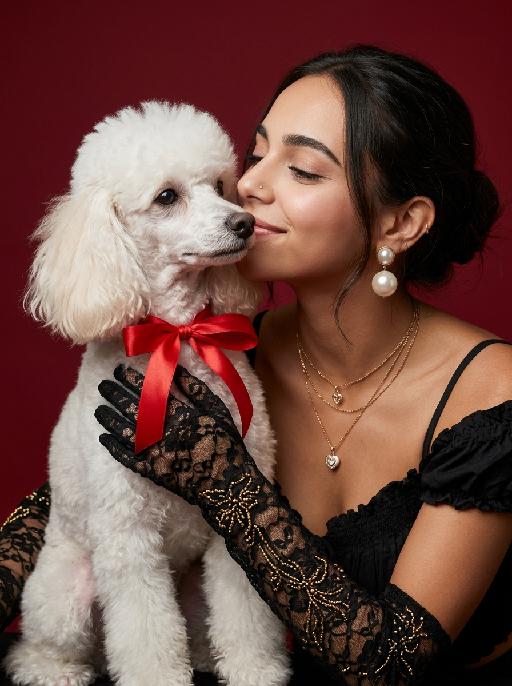
Family Moment AI effects generated image

Family Moment

A medium-distance close-up portrait, with the main subjects being the person and the pet (keeping both characters in the same frame), the person has a delicate and soft makeup, with slightly closed eyes, gently kissing the pet in the picture; this pet has a bright red ribbon tied around its neck, close to the person's face; the person is wearing a black lace shoulder strap top, wearing round pearl earrings, and wearing long black floral-patterned lace opera gloves, decorated with small gold beads; a pure black matte deep red background, soft diffused light from the professional studio, subtle shadow transitions, fine and realistic skin textures, ultra-soft fur details, high-end luxurious retro style, simple and clean background, commercial portrait photography, shot with Canon EOS R5, aperture f/2.2, facial features sharply focused, 8K ultra-high resolution, smooth skin rendering, elegant and romantic atmosphere.

Load more

Next-Gen Multi-Model AI Video Architecture

Vivago AI isn't just one engine—it’s a unified hub for the world’s most advanced video AI. Whether you need cinematic realism or high-speed social content, we provide the right model for your creative vision.

Free Generate

Beauty and Dolphins

Vacation Time

Stellar Tear

Fish Tank Supervisor

Cinematic Quality & Precision Control

Enables 4K resolution with multi-lens motion control, generating delicate scene via text prompts for customized cinematography.​

TRY NOW

Dynamic AV Sync

Auto-generates original audio to avoid copyright issues. Build 3D immersive environments through layered sound design automatically.

TRY NOW

OpenAI Sora 2

​Advanced visual storytelling with unparalleled physics and consistency.

TRY NOW

Kling v2.6 Pro

Industry-leading cinematic image animation and motion control.

TRY NOW

Google Veo 3 & 3.1

Ultra-fast generation with enhanced realism for creative workflows.

TRY NOW

Vivago AI 2.0

Our proprietary model optimized for efficiency, speed, and cost-effective generation.

TRY NOW

Users' Voice

We listen carefully to the opinions of every user.
Free Generate
Contact Us
I tried the Lip Sync feature inside Vivago.ai’s AI Video Generator for my educational podcast, and the results were stunning! The avatar's lip movements perfectly matched my audio recording, creating a professional AI-generated video without complex editing. Compared with tools like OpenAI Sora 2 and Google Veo 3.1, Vivago Image-to-Video delivers fast, studio-quality results online. It saved me hours of post-production work.
ElenaM (Spain)
Vivago’s Image-to-Video AI transformed my marketing workflow. I uploaded a product image and described the launch scene in text, and it generated a 10-second cinematic AI video with background music and dynamic visuals. The output quality rivals Kling v2.6 Pro and Google Veo 3 Fast. It’s now my go-to AI video generator for social media ads and product campaigns.
KenjiT (Japan)
As a digital artist, I use Vivago.ai 2.0 daily for Image-to-Image and AI Image-to-Video creation. The e-book covers and animated visuals I generate for clients look cinematic and professional. Unlike many standalone AI tools, Vivago integrates multiple leading models into one platform, making it easier to create copyright-safe AI images and videos for publishing.
ChenL (China)
I tried the Lip Sync feature inside Vivago.ai’s AI Video Generator for my educational podcast, and the results were stunning! The avatar's lip movements perfectly matched my audio recording, creating a professional AI-generated video without complex editing. Compared with tools like OpenAI Sora 2 and Google Veo 3.1, Vivago Image-to-Video delivers fast, studio-quality results online. It saved me hours of post-production work.
ElenaM (Spain)
Vivago’s Image-to-Video AI transformed my marketing workflow. I uploaded a product image and described the launch scene in text, and it generated a 10-second cinematic AI video with background music and dynamic visuals. The output quality rivals Kling v2.6 Pro and Google Veo 3 Fast. It’s now my go-to AI video generator for social media ads and product campaigns.
KenjiT (Japan)
As a digital artist, I use Vivago.ai 2.0 daily for Image-to-Image and AI Image-to-Video creation. The e-book covers and animated visuals I generate for clients look cinematic and professional. Unlike many standalone AI tools, Vivago integrates multiple leading models into one platform, making it easier to create copyright-safe AI images and videos for publishing.
ChenL (China)
I absolutely love Vivago’s AI Image-to-Video Generator. As a travel blogger, static images often fail to capture real atmosphere, but Vivago helps me turn photos into vivid cinematic AI videos with motion effects. It feels comparable to OpenAI Sora 2 and Google Veo 3.1, but more accessible and faster for creators who need high-quality AI videos online.
LiamK (Australia)
I tried the Lip Sync feature inside Vivago.ai’s AI Video Generator for my educational podcast, and the results were stunning! The avatar's lip movements perfectly matched my audio recording, creating a professional AI-generated video without complex editing. Compared with tools like OpenAI Sora 2 and Google Veo 3.1, Vivago Image-to-Video delivers fast, studio-quality results online. It saved me hours of post-production work.
ElenaM (Spain)
Vivago’s Image-to-Video AI transformed my marketing workflow. I uploaded a product image and described the launch scene in text, and it generated a 10-second cinematic AI video with background music and dynamic visuals. The output quality rivals Kling v2.6 Pro and Google Veo 3 Fast. It’s now my go-to AI video generator for social media ads and product campaigns.
KenjiT (Japan)
As a digital artist, I use Vivago.ai 2.0 daily for Image-to-Image and AI Image-to-Video creation. The e-book covers and animated visuals I generate for clients look cinematic and professional. Unlike many standalone AI tools, Vivago integrates multiple leading models into one platform, making it easier to create copyright-safe AI images and videos for publishing.
ChenL (China)
I absolutely love Vivago’s AI Image-to-Video Generator. As a travel blogger, static images often fail to capture real atmosphere, but Vivago helps me turn photos into vivid cinematic AI videos with motion effects. It feels comparable to OpenAI Sora 2 and Google Veo 3.1, but more accessible and faster for creators who need high-quality AI videos online.
LiamK (Australia)
Using Vivago.ai’s Image-to-Video AI has greatly enhanced my classroom teaching. I transform textbook notes into historical AI videos with cinematic filters and dynamic animations. Compared with tools like Kling v2.6 Pro and Google Veo 3 Fast, Vivago offers faster generation and easier parameter control for educators who need reliable AI video creation.
RajivG (India)
I frequently create AI videos on Vivago and publish them on TikTok and YouTube Shorts. The AI video templates and trending content ideas help me produce viral-ready clips quickly. With Vivago’s integrated models—including advanced video engines similar to OpenAI Sora 2—I can generate anime-style and cinematic social media videos that drive high engagement.
MarieJ (Spain)
What attracts me most about Vivago.ai is not only the powerful AI Video Generator but also the active AIGC creator community. It combines AI Image-to-Video, Text-to-Video, and leading model integrations like Google Veo 3.1 into one creative platform.
TomW (India)
At first, I was hesitant about using AI video tools. But after trying Vivago Image-to-Video, I realized how easy it is to create professional AI-generated videos online. I just upload an image, add a short prompt, and adjust a few settings. The results are cinematic and copyright-safe, which is essential for commercial projects.
HectorC (Mexico)
Using Vivago.ai’s Image-to-Video AI has greatly enhanced my classroom teaching. I transform textbook notes into historical AI videos with cinematic filters and dynamic animations. Compared with tools like Kling v2.6 Pro and Google Veo 3 Fast, Vivago offers faster generation and easier parameter control for educators who need reliable AI video creation.
RajivG (India)
I frequently create AI videos on Vivago and publish them on TikTok and YouTube Shorts. The AI video templates and trending content ideas help me produce viral-ready clips quickly. With Vivago’s integrated models—including advanced video engines similar to OpenAI Sora 2—I can generate anime-style and cinematic social media videos that drive high engagement.
MarieJ (Spain)
What attracts me most about Vivago.ai is not only the powerful AI Video Generator but also the active AIGC creator community. It combines AI Image-to-Video, Text-to-Video, and leading model integrations like Google Veo 3.1 into one creative platform.
TomW (India)
At first, I was hesitant about using AI video tools. But after trying Vivago Image-to-Video, I realized how easy it is to create professional AI-generated videos online. I just upload an image, add a short prompt, and adjust a few settings. The results are cinematic and copyright-safe, which is essential for commercial projects.
HectorC (Mexico)