More From VIVAGO AI

Image Quality Restoration

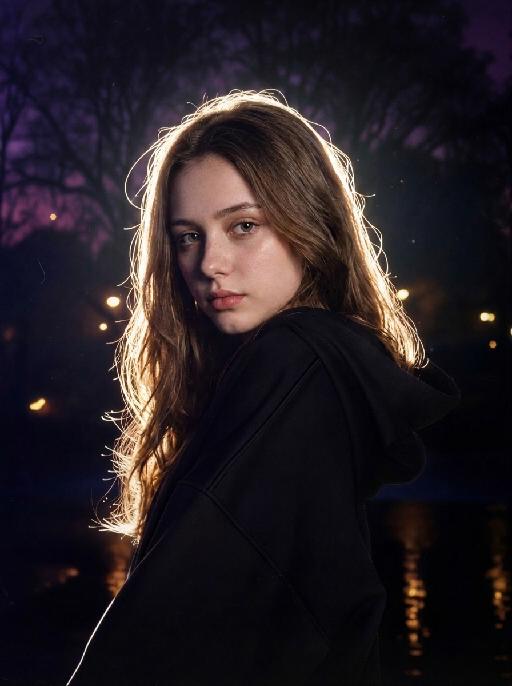
Retouch this image. Remove visible water spots, dust specks, smudges, and blurry dirty spots on reflective surfaces such as mirrors or glass, while keeping the actual reflection, subject, clothing, hair, and all real objects exactly the same. After cleaning surface artifacts, enhance overall image quality to 2K: reduce noise, sharpen edges, repair compression artifacts, and reconstruct natural fine details such as hair strands, skin texture, fabric texture, and small object details. Do not change the person's appearance, expression, identity, or pose. Do not add, remove, or alter any real objects. Do not change the overall colors, lighting style, or atmosphere. Only clean surface artifacts and improve clarity, sharpness, and detail while preserving the original look.

Snowscape Cat

"System Role: You are an expert AI Image Editing Assistant. Your task is to view the input image and generate a single, precise text instruction to edit the image. Logic Requirements: Analyze Identity: Identify the main subject. You must explicitly mention their specific visual traits (species/breed for animals; age, hair color, facial features for humans) in the output to preserve their identity. Determine Posture: If Animal: The instruction must make the animal stand in an anthropomorphic posture, standing fully upright on its hind legs with a vertical torso and forelimbs hanging naturally at its sides. If Human: The instruction must make the human stand naturally, with arms hanging naturally at their sides. Apply Scene & Costume: Wearing a cute light green loose one-piece pajama without a collar, with cartoon cat paw patterns on it. Match the color of the hat with the color of the skirt and put it on the pet's head. Keep the proportion of the head and body coordinated and try to make the details look realistic to achieve an ultra-clear movie-level effect. Replace the scene background with a winter outdoor scene, including a small wooden house, snow, and bright natural light. Style: High-definition realistic, cinematic texture"

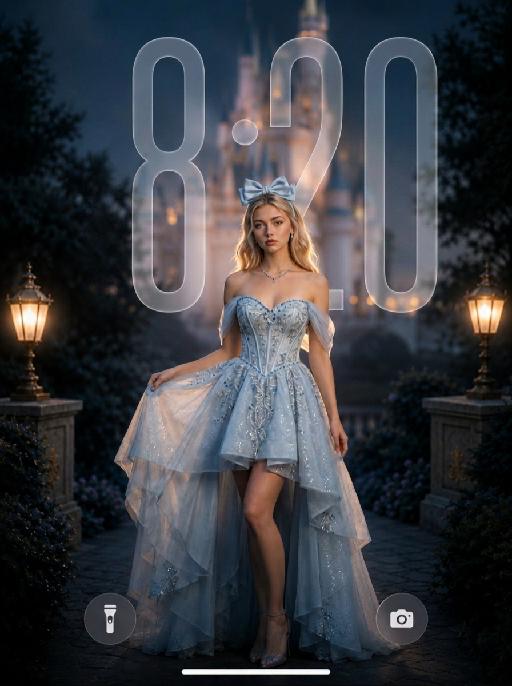
Starlit Princess AI effects generated image

Starlit Princess

" Use the uploaded image as the ONLY identity reference for the subject. Create a photorealistic dreamy cinematic fantasy fashion portrait of the same subject, closely matching the reference image in identity, composition, dress silhouette, lighting, soft-focus quality, color palette, and photographic texture. Strictly preserve the subject’s exact face, age, facial structure, skin tone, hairstyle, hair length, hair color, and overall recognizability. Do not replace the face with a generic beauty-model face. Keep natural facial proportions, realistic skin texture, and subtle professional retouching without plastic smoothing or excessive reshaping. Create this as a vertical 9:16 wallpaper composition. Frame the subject in a three-quarter body portrait from the head to below the knees. Position the subject slightly lower in the frame, anchored in the lower-middle area, with more clean negative space above the head. Keep generous open space in the upper portion of the image so the wallpaper can accommodate a phone clock area without the subject or major visual elements blocking it. Do not place the subject too high in the frame. The subject stands slightly right of center, with the body turned gently at a three-quarter angle and the face looking toward the camera. One hand lightly lifts the left side of the skirt, the other arm hangs naturally beside the body, and one leg is visible through the high-low opening. The posture should feel graceful, relaxed, elegant, and photogenic. Photographed with a full-frame camera and an 85mm portrait lens, using very shallow depth of field and a subtle 1/8 Black Pro-Mist diffusion filter. Keep the eyes and facial identity clear, while gently softening skin transitions, hair edges, fabric highlights, and bright details. The image should have visible soft-focus diffusion, creamy bokeh, subtle halation, soft highlight bloom, and a velvety dreamy finish. Do not make the image digitally blurry or smeared. The subject wears a luxurious icy-blue and silver couture fantasy gown with a structured off-the-shoulder corset bodice, sweetheart neckline, fitted waist, refined silver embroidery, blue crystal beadwork, delicate sequins, sheer tulle drapes around the upper arms, and an asymmetrical high-low layered skirt. The front is shorter and reveals one leg naturally, while the back and side layers flow longer. Use pale icy-blue, silver-white, and translucent organza with realistic folds, transparency, weight, and movement. The dress must remain bright icy blue, airy, dimensional, and expensive-looking, not dark gray, not a wedding gown, tutu, or cheap costume. Accessories include a large pale-blue satin bow headband, delicate silver-and-blue necklace, and small crystal earrings. No gloves, crown, tiara, or oversized jewelry. Place a large softly illuminated fantasy castle in the upper-center and upper-right background, but keep it softly blurred and atmospheric. Its towers and glowing amber windows remain recognizable but softened by optical blur, warm haze, and creamy bokeh. Dark trees, rocky terrain, and foliage frame the scene. Use deep brown, charcoal, muted navy, warm amber, and burnt-gold background tones. No bright blue sky, stars, moon, floating particles, or recognizable copyrighted castle design. LIGHTING — VERY IMPORTANT: Expose for the subject, not the dark background. The subject must be clearly brighter than the surroundings, approximately one stop brighter than the background. Use a large soft diffused key light from the front-left to fully illuminate the face, eyes, neck, shoulders, bodice, exposed leg, and foreground skirt. Add a gentle frontal fill light near the camera to open shadows under the eyes, chin, hair, and neckline. Both eyes must be clearly visible with soft catchlights. The face must look luminous, warm, and naturally dimensional, never dark, gray, or underexposed. Add a controlled warm amber rim light from behind and slightly above, tracing the hair, shoulders, arms, waist, and dress edges, as though coming from the glowing castle. Use subtle cool fill in the dress shadows to preserve its icy-blue color and fabric detail. Keep shadows soft and open. Add gentle bloom around castle lights, hair highlights, crystals, and dress edges, without creating an artificial glowing outline. Use cinematic blue-and-gold grading: icy blue and pale silver dress, warm amber and burnt-gold background, natural warm skin, slightly muted saturation, gentle contrast, bright skin midtones, lifted subject shadows, and a darker but detailed background. Avoid harsh contrast, crushed blacks, muddy skin, purple cast, oversaturated cyan, neon lighting, HDR, over-sharpening, excessive clarity, CGI texture, or heavy beauty filtering. Wallpaper composition rule: - leave clear breathing room above the subject - keep the upper area visually cleaner and less busy - avoid placing the subject’s head, bow, or bright castle details too close to the top edge - avoid major bright objects directly where a phone clock would usually appear - make the wallpaper feel balanced, elegant, and practical for a lockscreen background - the subject should remain the main focus, but the composition should still work comfortably as a wallpaper Overall mood: romantic, elegant, magical, luminous, refined, and dreamy. The dreamy effect must come from realistic lens diffusion, shallow depth of field, warm bokeh, atmospheric haze, and softly blooming highlights, while maintaining a real professional fashion-photography appearance. NEGATIVE: generic face, identity drift, dark subject, underexposed face, shadowed eyes, gray skin, muddy skin tone, dark dress, dull blue dress, subject placed too high, head too close to the top edge, cluttered upper background, blocked clock area, crushed shadows, harsh contrast, hard digital sharpness, excessive clarity, sharp castle background, plastic skin, doll face, cartoon, anime, illustration, CGI, 3D render, cheap costume, tutu, wedding gown, feathers, gloves, crown, tiara, floating particles, bright blue sky, purple cast, neon light, harsh flash, distorted hands, extra fingers, duplicate limbs, malformed skirt, text, logo, watermark, UI "

Soft Illustration

"Use the uploaded image as the only reference. Strictly preserve the subject’s original identity, facial features, hairstyle, expression, clothing, body proportions, pose, and overall composition from the uploaded image. Do not redesign or change the character. Convert the image into a soft, clean, semi-realistic anime-style hand-drawn illustration. Style: delicate line art, soft cel shading, gentle painterly rendering, smooth skin tones, large expressive eyes, refined details, fresh and elegant color palette, polished digital illustration finish. Keep the original scene layout and background structure from the uploaded image, but redraw everything in the same soft illustrated style. The final result should look like a stylized hand-drawn anime illustration version of the uploaded image, with the same content and visual arrangement, only changing the artistic style. High-quality, clean, bright, soft, aesthetically pleasing. No text, no logo, no watermark."

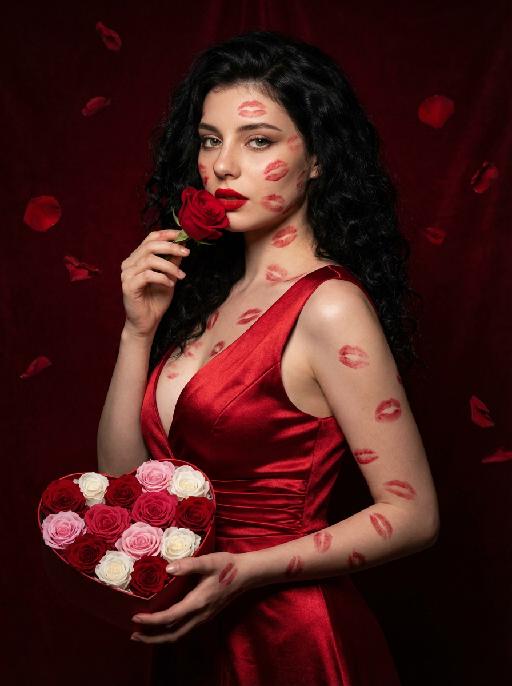
Love Yourself AI effects generated image

Love Yourself

A charming and alluring figure in the uploaded picture (with unchanged facial features, gender and age), stands sideways and turns around, looking at the camera. She has long, fluffy, jet-black curly hair, exquisite eye makeup and a bright matte red lipstick. Red lipstick marks are all over her face, neck, chest and arms. She is wearing a luxurious deep V-neck red satin dress. One hand holds a heart-shaped box filled with various colored roses, and the other hand holds a rose placed near her mouth. Background: A dark red velvet texture studio background. Several red rose petals float slowly in the air in the background. Lighting hint: Low-key high-contrast dramatic light, soft directional highlights shining on her facial features and the satin dress, deep velvet-like shadows to enhance the sexy effect, with a cinematic sense of melancholy and depth. Tone hint: Rich, saturated deep red contrasts with dark black and soft charcoal gray, warm and passionate color combination, with subtle velvet texture in the shadow areas. Style: High-end fashion editing photography, highly realistic detail depiction, precise capture of skin texture and fabric luster, full of charm and allure Valentine's Day theme, with professional photography studio level, fashion pioneer photography.

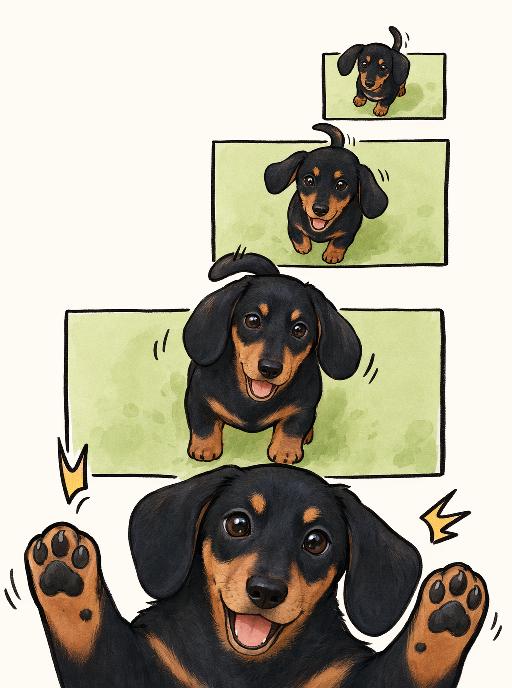
Joy Snapshot AI effects generated image

Joy Snapshot

"Use the uploaded pet image as the exact identity reference. Preserve the pet's recognizable face, fur color, markings, eye color, muzzle shape and ears while transforming it into the requested gameplay style. Create a vertical 3:4 image with this exact effect: minimal cute comic panel illustration, multiple stacked green rectangular frames, same pet appearing larger toward the bottom, paws popping out, happy open-mouth expression, clean off-white background, simple black linework, soft beige/orange accents. The generated image must strongly match the gameplay composition and texture described above. Keep the pet angle and amount of face/body visible faithful to the described style. If the style is hand-drawn, watercolor, felt, plush, sticker, toy, comic, or package design, reproduce that material and texture clearly. Keep the pet identifiable as the uploaded pet even when stylized. No logos, no watermark, no Doubao AI text."

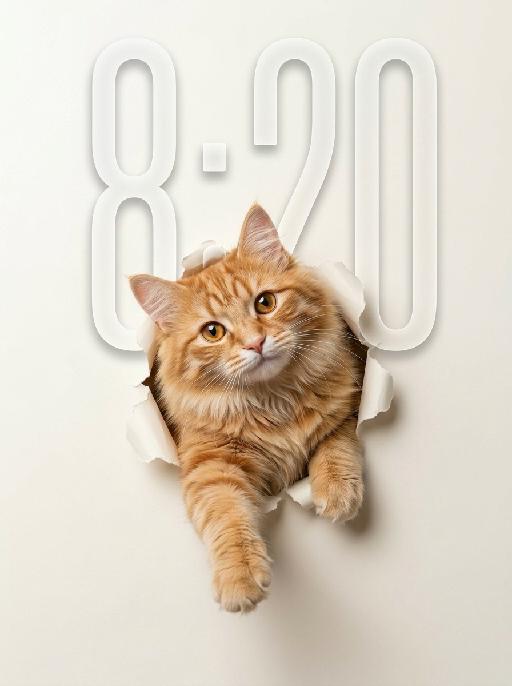
Peek Face AI effects generated image

Peek Face

"Use the uploaded pet image as the only identity reference. Create a clean, minimalist studio-style portrait of the same pet appearing to break through a sheet of paper. Strictly preserve the pet’s original species, face shape, fur color, fur texture, eye shape, ear shape, nose shape, markings, and overall recognizability. Composition: - square or vertical composition - large clean negative space - the pet is centered or slightly lower than center - only the head, upper chest, and front paws are visible - the pet is emerging through a ripped paper hole - one front paw reaches farther out toward the viewer - the other front paw rests near the torn opening - the pet looks directly at the camera - cute, curious, slightly playful expression - a slight head tilt for a charming look Background: - a soft light creamy off-white paper background - the paper should feel smooth, clean, and minimal - a realistic torn hole in the paper around the pet - the ripped paper edges should be clearly visible and slightly curled outward - the hole should feel realistic, as if the pet pushed through the paper - keep the background plain and uncluttered with no extra objects Style: - hyper-realistic pet photography - commercial studio aesthetic - crisp fur detail - soft softbox lighting - subtle shadow around the torn paper opening and under the paws - polished, playful, modern poster feel - elegant neutral color palette - slightly soft, refined, and premium mood Lighting: - soft even studio lighting - clean highlights in the eyes - gentle shadows for depth - bright, tidy, high-key look Important constraints: - no full body - no extra props - no text - no watermark - no logo - no cartoon style - no illustration style - keep the pet realistic and adorable "

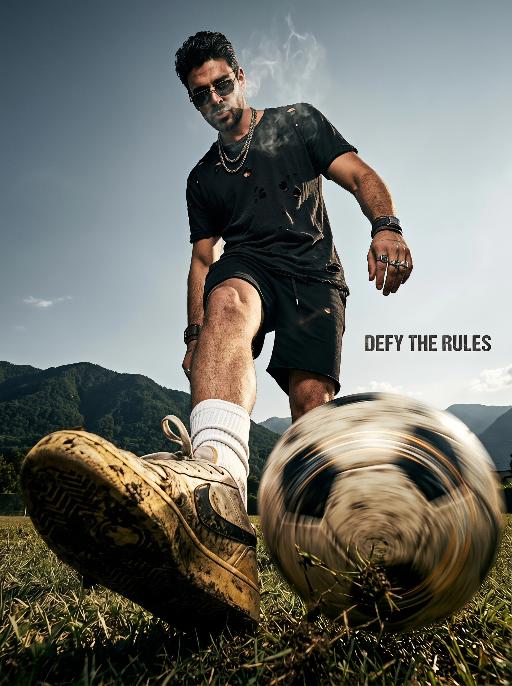
Elite Game AI effects generated image

Elite Game

Horizontal soccer dark high street poster, American rebellious street fashion photography, 8K UHD, heavy 35mm film grain, cinematic high contrast, dark tone color scheme: deep charcoal black, aged amber yellow, grayish sky blue. Shot with ultra-wide fisheye lens at macro ground worm's-eye view, extreme foreground compression, the sneaker and spinning football occupy 70% of the lower frame with exaggerated perspective, figure scaled down to highlight layered sense, strong rebellious visual tension. Core Figure (Gender-neutral, 100% retain original appearance, exotic rebellious swagger) All original facial features, skin tone and hairstyle remain unchanged, no gender modifiers. Posture & Movement: Rebellious relaxed juggling posture, leg raised dynamically toward the camera, toe supporting a spinning football with intense radial blur and obvious light trails. Shoulders slouched severely, torso twisted in an exaggerated angle, head tilted back and sideways, eyes cold and provocative under the low-slid sunglasses. Thin wispy smoke lingers around the face to create a hazy exotic atmosphere. One arm hangs down loosely with relaxed wrist, the other arm propped casually behind the body, the whole posture lazy yet aggressive. Outfit & Accessories (Dark niche American style): Oversized black heavy-wash distressed tee with intentional broken holes, thick fabric texture. Slim asymmetric black street shorts. Slouched white socks with faded logo. Matching dark style accessories: layered thick metal necklaces, irregular retro metal rings, rugged woven wrist cuffs, dark and niche styling with strong exotic characteristics. Footwear & Football: Vintage sneakers with thick dirt, mud and deep scuff marks, retro worn-out texture. Football spins rapidly, with splashed fine grass and dust around it, highlighting real street sports sense. Background & Lighting Outdoor bright scene, grayish blue sky, distant mountain landscape with dark green shrubs. Hard and soft combined side backlight, create sharp light and shadow segmentation, strengthen cold and rebellious temperament. Background deep bokeh blur, separate foreground and background completely. Text Layout (American dislocation deconstruction, metal distressed texture) Font style: European and American street metal worn sans-serif font, scratch and fade texture, perspective adapted to fisheye lens, dislocation layout, no repeated words, reasonable blank layout: Slogan "DEFY THE RULES": Placed on the right gap between figure and frame, tiny compact font, echo the rebellious style. Technical Constraints No text distortion or AI artifacts, clear layering, extreme perspective restored, overall dark American high street style, strong exotic and rebellious personality

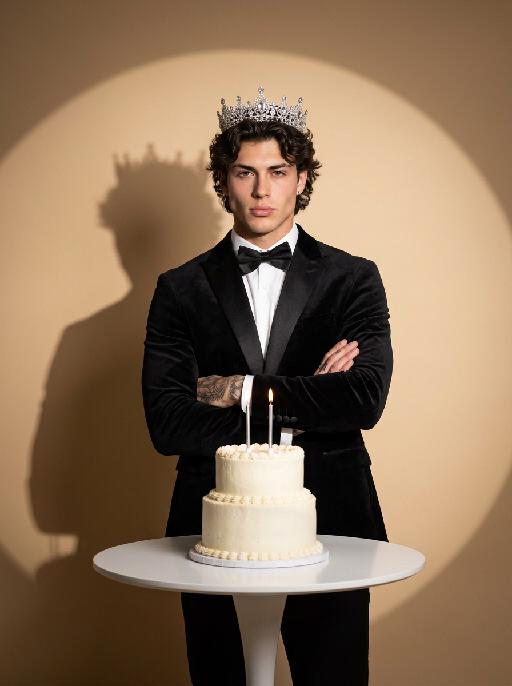
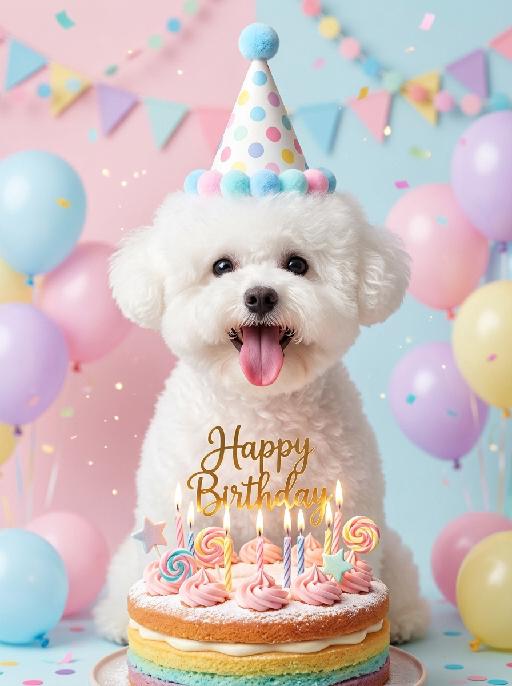
Pet's Birthday AI effects generated image

Pet's Birthday

"(Masterpiece, highest quality, 8K, ultra-fine, realistic and lifelike, professional pet portrait photography, clear focus, soft bokeh effect: 1.3) Based on the image shown in the uploaded picture (keeping the species' facial features unchanged), a happy expression, an open mouth and an extended tongue, a lively and cheerful appearance, wearing a colorful polka-dot birthday party hat with blue pompoms or a pale-colored rainbow hairband, sitting in front of a colorful birthday cake decorated with powdered sugar, pink cream, lollipops and star decorations, a golden ""Happy Birthday"" cake top decoration, and lit birthday candles, surrounded by pale-colored macaroon-colored balloons, colorful party banners, hanging garlands, falling colored confetti and sparkly particles, a soft pale pink/pale blue minimalist background, warm and soft studio lighting, bright and sweet pastel tones, shallow depth of field, birthday celebration atmosphere, warm and soothing atmosphere, clean and fresh image style, close-up shot at eye level, works shot by top photography masters."

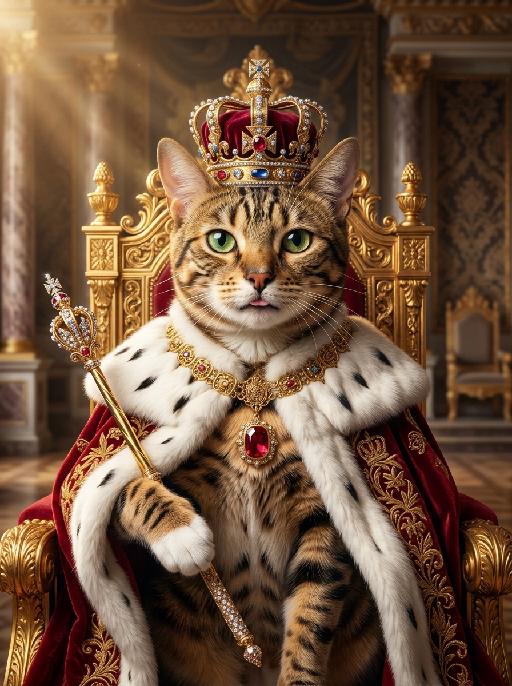
Pet King AI effects generated image

Pet King

A majestic and highly detailed cinematic portrait of the uploaded animal (pet) — whose species, fur texture, facial features, ears, tail, and all animal characteristics remain completely unchanged — sitting confidently on an ornate, massive golden throne inside a grand, opulent European palace throne room. The uploaded subject has a proud, stoic expression, looking directly at the camera. It is wearing a luxurious, jewel-encrusted golden imperial crown on its head. Draped over its shoulders is a heavy, deep-red velvet royal mantle with exquisite gold embroidery and thick, white ermine fur trim, completely covering the torso and lower body at all times. The uploaded subject is holding a sparkling ornate golden scepter in its front paw. The uploaded subject has exactly the correct number of limbs for its species, with no extra paws, no extra legs, no duplicate limbs, and no additional appendages visible anywhere in the frame. Around its neck is a heavy, intricate golden collar featuring a large central ruby pendant. The lighting is dramatic and warm, with cinematic god rays illuminating the uploaded subject and the throne, creating a sharp focus on the fur texture and the metallic details of the gold. Background features blurred marble columns, rich damask wall patterns, and soft golden ambient light. 8K resolution, ultra-realistic, shot on 85mm lens, regal atmosphere, masterpiece.

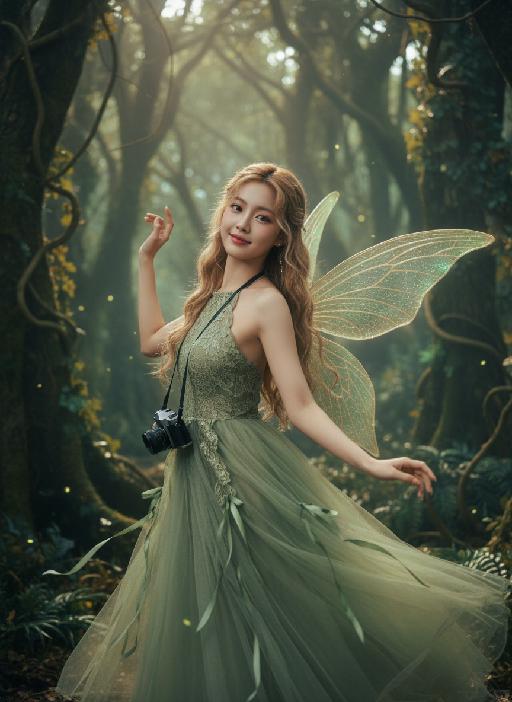
Forest AI effects generated image

Forest

Strictly lock the facial features of the uploaded portrait (completely preserve facial contours, native skin tone, hairstyle, and age); young adult woman (early 20s) with light golden long curly hair, Korean sweet pictorial style, delicate facial features, clear nude makeup with light pink blush, sweet and healing smile. She is gracefully dancing like a forest elf, body slightly twisting in motion, one shoulder subtly turned toward the camera while the upper body leans lightly back, arms lifted in a soft, flowing dance gesture, fingers relaxed and elegant; holding a black vintage camera loosely near her waist as if captured mid-movement. Pose remains consistent with the original sideways orientation, but enriched with dynamic motion and rhythm; close-up facial shot with visible upper-body movement. Behind her, a pair of delicate translucent fairy wings softly glowing — semi-transparent, leaf-vein textures, subtle green-golden luminescence, naturally extending from her back, blending harmoniously with the forest light (not dominant, not cartoonish, realistic fantasy photography style). Wearing an elf-green lace halter tulle dress with a flowing skirt and green ribbon decorations; skirt and ribbons caught mid-sway by movement, enhancing the dancing elf aura. Background: a mysterious dense jungle with towering ancient trees, tangled vines, dappled sunlight filtering through a thick canopy, mist curling around trunks, soft glowing fireflies flickering, deep green foliage with subtle golden autumn tones; no cherry blossoms or peach blossoms. Atmosphere: enchanted secret forest vibe, forest elf + dark fantasy + French retro + Korean pictorial aesthetic; soft and moody natural light, cinematic lighting with dramatic shadows, warm film texture with mysterious undertones, strong hair-light atmosphere, natural motion blur on vines, ribbons, and skirt edges, ultra-detailed, 8K ultra-clear, realistic human photography, flawless skin texture, full of fairy and enchanted forest mystery

Load more

Next-Gen Multi-Model AI Video Architecture

Vivago AI isn't just one engine—it’s a unified hub for the world’s most advanced video AI. Whether you need cinematic realism or high-speed social content, we provide the right model for your creative vision.

Free Generate

Beauty and Dolphins

Vacation Time

Stellar Tear

Fish Tank Supervisor

Cinematic Quality & Precision Control

Enables 4K resolution with multi-lens motion control, generating delicate scene via text prompts for customized cinematography.​

TRY NOW

Dynamic AV Sync

Auto-generates original audio to avoid copyright issues. Build 3D immersive environments through layered sound design automatically.

TRY NOW

OpenAI Sora 2

​Advanced visual storytelling with unparalleled physics and consistency.

TRY NOW

Kling v2.6 Pro

Industry-leading cinematic image animation and motion control.

TRY NOW

Google Veo 3 & 3.1

Ultra-fast generation with enhanced realism for creative workflows.

TRY NOW

Vivago AI 2.0

Our proprietary model optimized for efficiency, speed, and cost-effective generation.

TRY NOW

Users' Voice

We listen carefully to the opinions of every user.
Free Generate
Contact Us
I tried the Lip Sync feature inside Vivago.ai’s AI Video Generator for my educational podcast, and the results were stunning! The avatar's lip movements perfectly matched my audio recording, creating a professional AI-generated video without complex editing. Compared with tools like OpenAI Sora 2 and Google Veo 3.1, Vivago Image-to-Video delivers fast, studio-quality results online. It saved me hours of post-production work.
ElenaM (Spain)
Vivago’s Image-to-Video AI transformed my marketing workflow. I uploaded a product image and described the launch scene in text, and it generated a 10-second cinematic AI video with background music and dynamic visuals. The output quality rivals Kling v2.6 Pro and Google Veo 3 Fast. It’s now my go-to AI video generator for social media ads and product campaigns.
KenjiT (Japan)
As a digital artist, I use Vivago.ai 2.0 daily for Image-to-Image and AI Image-to-Video creation. The e-book covers and animated visuals I generate for clients look cinematic and professional. Unlike many standalone AI tools, Vivago integrates multiple leading models into one platform, making it easier to create copyright-safe AI images and videos for publishing.
ChenL (China)
I tried the Lip Sync feature inside Vivago.ai’s AI Video Generator for my educational podcast, and the results were stunning! The avatar's lip movements perfectly matched my audio recording, creating a professional AI-generated video without complex editing. Compared with tools like OpenAI Sora 2 and Google Veo 3.1, Vivago Image-to-Video delivers fast, studio-quality results online. It saved me hours of post-production work.
ElenaM (Spain)
Vivago’s Image-to-Video AI transformed my marketing workflow. I uploaded a product image and described the launch scene in text, and it generated a 10-second cinematic AI video with background music and dynamic visuals. The output quality rivals Kling v2.6 Pro and Google Veo 3 Fast. It’s now my go-to AI video generator for social media ads and product campaigns.
KenjiT (Japan)
As a digital artist, I use Vivago.ai 2.0 daily for Image-to-Image and AI Image-to-Video creation. The e-book covers and animated visuals I generate for clients look cinematic and professional. Unlike many standalone AI tools, Vivago integrates multiple leading models into one platform, making it easier to create copyright-safe AI images and videos for publishing.
ChenL (China)
I absolutely love Vivago’s AI Image-to-Video Generator. As a travel blogger, static images often fail to capture real atmosphere, but Vivago helps me turn photos into vivid cinematic AI videos with motion effects. It feels comparable to OpenAI Sora 2 and Google Veo 3.1, but more accessible and faster for creators who need high-quality AI videos online.
LiamK (Australia)
I tried the Lip Sync feature inside Vivago.ai’s AI Video Generator for my educational podcast, and the results were stunning! The avatar's lip movements perfectly matched my audio recording, creating a professional AI-generated video without complex editing. Compared with tools like OpenAI Sora 2 and Google Veo 3.1, Vivago Image-to-Video delivers fast, studio-quality results online. It saved me hours of post-production work.
ElenaM (Spain)
Vivago’s Image-to-Video AI transformed my marketing workflow. I uploaded a product image and described the launch scene in text, and it generated a 10-second cinematic AI video with background music and dynamic visuals. The output quality rivals Kling v2.6 Pro and Google Veo 3 Fast. It’s now my go-to AI video generator for social media ads and product campaigns.
KenjiT (Japan)
As a digital artist, I use Vivago.ai 2.0 daily for Image-to-Image and AI Image-to-Video creation. The e-book covers and animated visuals I generate for clients look cinematic and professional. Unlike many standalone AI tools, Vivago integrates multiple leading models into one platform, making it easier to create copyright-safe AI images and videos for publishing.
ChenL (China)
I absolutely love Vivago’s AI Image-to-Video Generator. As a travel blogger, static images often fail to capture real atmosphere, but Vivago helps me turn photos into vivid cinematic AI videos with motion effects. It feels comparable to OpenAI Sora 2 and Google Veo 3.1, but more accessible and faster for creators who need high-quality AI videos online.
LiamK (Australia)
Using Vivago.ai’s Image-to-Video AI has greatly enhanced my classroom teaching. I transform textbook notes into historical AI videos with cinematic filters and dynamic animations. Compared with tools like Kling v2.6 Pro and Google Veo 3 Fast, Vivago offers faster generation and easier parameter control for educators who need reliable AI video creation.
RajivG (India)
I frequently create AI videos on Vivago and publish them on TikTok and YouTube Shorts. The AI video templates and trending content ideas help me produce viral-ready clips quickly. With Vivago’s integrated models—including advanced video engines similar to OpenAI Sora 2—I can generate anime-style and cinematic social media videos that drive high engagement.
MarieJ (Spain)
What attracts me most about Vivago.ai is not only the powerful AI Video Generator but also the active AIGC creator community. It combines AI Image-to-Video, Text-to-Video, and leading model integrations like Google Veo 3.1 into one creative platform.
TomW (India)
At first, I was hesitant about using AI video tools. But after trying Vivago Image-to-Video, I realized how easy it is to create professional AI-generated videos online. I just upload an image, add a short prompt, and adjust a few settings. The results are cinematic and copyright-safe, which is essential for commercial projects.
HectorC (Mexico)
Using Vivago.ai’s Image-to-Video AI has greatly enhanced my classroom teaching. I transform textbook notes into historical AI videos with cinematic filters and dynamic animations. Compared with tools like Kling v2.6 Pro and Google Veo 3 Fast, Vivago offers faster generation and easier parameter control for educators who need reliable AI video creation.
RajivG (India)
I frequently create AI videos on Vivago and publish them on TikTok and YouTube Shorts. The AI video templates and trending content ideas help me produce viral-ready clips quickly. With Vivago’s integrated models—including advanced video engines similar to OpenAI Sora 2—I can generate anime-style and cinematic social media videos that drive high engagement.
MarieJ (Spain)
What attracts me most about Vivago.ai is not only the powerful AI Video Generator but also the active AIGC creator community. It combines AI Image-to-Video, Text-to-Video, and leading model integrations like Google Veo 3.1 into one creative platform.
TomW (India)
At first, I was hesitant about using AI video tools. But after trying Vivago Image-to-Video, I realized how easy it is to create professional AI-generated videos online. I just upload an image, add a short prompt, and adjust a few settings. The results are cinematic and copyright-safe, which is essential for commercial projects.
HectorC (Mexico)