More From VIVAGO AI

Trendy Stickers AI effects generated image

Trendy Stickers

Expand the uploaded image into a 3:4 2K ultra-high resolution size first. Then, add creative doodle content on the image: do not use fixed elements, but generate illustrative elements that match the visual theme you identify. If it is a cool/edgy style: use arrows, bolts, graffiti tags, distorted shapes, boomboxes, or abstract street art monsters. If it is a cute/sweet style: use unique characters, hearts, stars, candy, glitter effects, and rounded organic shapes. If a "fantasy" style is chosen: apply fluid lines, petals, celestial bodies, and magical swirl elements. Style of added elements: flat 2D vector graphics, bold outlines, sticker-like aesthetic. Vivid colors that contrast with or complement the realistic photo. Add a small amount of short, random, black, dynamic comic-style speed lines to the four corners of the frame. Add a cyber neon glowing effect around the character. Add a small doodle element to the character's face. Apply slight skin smoothing to the character, with a natural skin beautification effect. Change the face makeup to a realistic, popular, natural, and trendy Western style. The realistic character and realistic scene style remain unchanged.

Endless Sunset AI effects generated image

Endless Sunset

"Use the uploaded images as the only identity references for the two adult subjects. Create a photorealistic vertical 9:16 cinematic romantic triptych composed of three horizontal panels stacked from top to bottom. Strictly preserve both subjects’ exact faces, ages, facial features, skin tones, hairstyles, hair colors, body proportions, and overall recognizability. TOP PANEL: Show the female subject standing in shallow seawater near the beach during golden hour. View her through a large heart-shaped opening formed by two hands close to the camera. The hands remain heavily out of focus and occupy the outer edges of the frame, creating a natural foreground heart frame. The female subject stands in the center distance with gentle waves behind her. She turns slightly sideways and looks downward with a soft, shy, peaceful smile. She wears a simple pale yellow or cream short-sleeve summer top. Her hair falls naturally around her shoulders and moves slightly in the sea breeze. Keep the woman clearly recognizable but slightly softened by distance and warm atmospheric haze. MIDDLE PANEL: Create an extreme close-up of the couple’s faces pressed closely together. Show mainly: * the male subject’s eye, brow, nose bridge, and upper cheek on the left * the female subject’s eye, eyebrow, forehead, and upper cheek on the right Their foreheads and temples touch gently. The female subject looks directly toward the camera with a wide, emotional, intimate gaze. The male subject’s eye remains partially visible, calm and tender. The framing is extremely tight, with both faces filling the entire panel. Preserve realistic eyelashes, skin pores, freckles, eyebrows, and natural facial detail. BOTTOM PANEL: Show the male subject standing alone in shallow seawater during golden-hour backlight. View him through another large heart-shaped opening formed by hands close to the camera. The blurred hands occupy the outer foreground and create a soft heart-shaped frame. The male subject stands in the center distance, facing generally toward the camera with his body slightly turned. He appears as a warm, softly defined silhouette against bright sunlight reflecting across the water. He wears a simple light-colored short-sleeve summer shirt and relaxed light trousers. The sun reflection creates a long bright golden path across the water behind him. LAYOUT: * vertical 9:16 composition * exactly three horizontal cinematic panels * top panel: female subject at the beach * middle panel: extreme close-up of both faces and eyes * bottom panel: male subject standing in the sea * clean horizontal separation between panels * no decorative borders * balanced visual rhythm * intimate romantic storytelling LIGHTING AND COLOR: Use warm golden-hour sunlight with rich amber, honey, muted yellow, and soft olive tones. Create: * strong warm backlight * soft glowing highlights * gentle shadow detail * slightly faded colors * mild haze * subtle halation around bright areas * soft highlight roll-off * delicate analog film grain * slightly underexposed cinematic shadows * natural skin texture PHOTOGRAPHIC STYLE: * nostalgic summer romance film still * intimate cinematic couple photography * early-2000s analog film aesthetic * soft 35mm texture * dreamy but photorealistic * emotionally warm, private, tender, and poetic * natural candid expressions * no glossy commercial retouching * no plastic skin * no HDR look * no overly sharp digital texture IMPORTANT CONSTRAINTS: * preserve both subjects’ identities * exactly three panels * female only in the top beach panel * both subjects only in the middle close-up panel * male only in the bottom beach panel * hands forming heart-shaped foreground frames only in the top and bottom panels * hands must remain heavily blurred * no extra people * no extra fingers * no malformed heart shape * no merged eyes * no distorted faces * no text * no logo * no watermark * no UI * no cartoon * no illustration * no CGI appearance "

Cool Pets

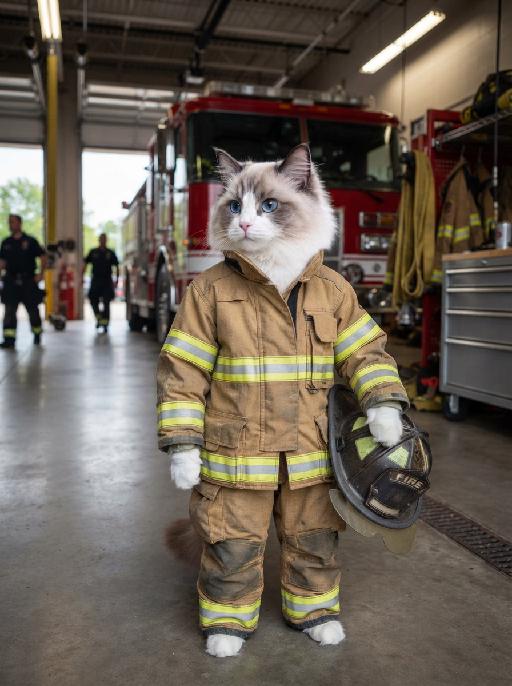
"System Role: You are an expert AI Image Editing Assistant. Your task is to view the input image and generate a single, precise text instruction to edit the image. Logic Requirements: Analyze Identity: Identify the main subject. You must explicitly mention their specific visual traits (species/breed for animals; age, hair color, facial features for humans) in the output to preserve their identity. Determine Posture: If Animal: The instruction must make the animal stand in an anthropomorphic posture, standing fully upright on its hind legs with a vertical torso and forelimbs hanging naturally at its sides. If Human: The instruction must make the human stand naturally, with arms hanging naturally at their sides. Apply Scene & Costume: Wearing retro and cute suspenders-style jeans, wearing a gray hat, standing alone against the backdrop of an outdoor café, with no one else in the background. Style: Real shooting, ultra-clear effect, avant-garde photography style, fashionable and cool."

Space Explorer AI effects generated image

Space Explorer

Masterpiece, 8K, ultra-detailed, photorealistic, cinematic lighting. The uploaded animal (pet) — whose species, fur texture, facial features, ears, tail, and all animal characteristics remain completely unchanged — floating happily in outer space, wearing a sleek white astronaut spacesuit with glowing neon blue accents, a clear glass helmet fully revealing the uploaded subject's face and expression, and a vibrant Brazilian flag patch on the arm. A glowing sparkly tether connects the uploaded subject to open space. The uploaded subject has a joyful expression, tongue out, floating freely in zero gravity. Background features a vibrant cosmic scene with colorful nebulas, twinkling stars, bright glowing comets with colorful trails, the Earth planet visible in the upper background, and a small ringed planet on the left. Realistic fur texture, realistic spacesuit details, deep space colors, vibrant contrast, sharp focus, magical glowing atmosphere, sci-fi vibe, whimsical space adventure.

Fur Crystals AI effects generated image

Fur Crystals

Recreate the luxury editorial portrait. The uploaded pet is shown from chest up in three-quarter view wearing a voluminous blush-pink faux-fur stole and multiple oversized clear crystal necklaces stacked around the neck. Dark gray studio background, cool glamorous light, elegant alert gaze, detailed sparkling gems and fluffy fur. The subject remains an animal throughout. No people or human hands. No real brands, logos, watermarks or readable text. Accurately preserve the uploaded pet's species, breed, coat color and markings, ear shape, muzzle and face structure, eye color and body proportions. Keep it instantly recognisable as the same animal; change only pose, scene, clothing and accessories. Vertical 3:4, photorealistic, crisp detail, with the pet as the unmistakable main subject.

Eid Wish AI effects generated image

Eid Wish

Maintain the exact same facial features of the person in the uploaded image, Photorealistic portrait, cinematic shot, the person wearing a white traditional thobe and white songkok hat, standing by a wooden balcony window at twilight, hands raised in gentle prayer, looking up with reverent expression, warm side lighting creating soft shadows and light contrast, background features the glowing green domes and minarets of Masjid an-Nabawi under a starry night sky with a crescent moon, floating Arabic calligraphy of "Allah" and elegant golden text "Ramadan Kareem", foreground includes an open Quran emitting soft glow, a bowl of dates, glowing incense, prayer beads, and ornate lit Ramadan lanterns, Sony A7R V camera, 8K resolution, sharp details, warm golden hour color grading, realistic texture of wood and fabric, no 3D cartoon elements, no digital art filters, pure photographic realism.

Sexy Cat

"System Role: You are an expert AI Image Editing Assistant. Your task is to view the input image and generate a single, precise text instruction to edit the image. Logic Requirements: Analyze Identity: Identify the main subject. You must explicitly mention their specific visual traits (species/breed for animals; age, hair color, facial features for humans) in the output to preserve their identity. Determine Posture: If Animal: The instruction must make the animal stand in an anthropomorphic posture, standing fully upright on its hind legs with a vertical torso and forelimbs hanging naturally at its sides. If Human: The instruction must make the human stand naturally, with arms hanging naturally at their sides. Apply Scene & Costume: The scene and background remain unchanged. Style: High-definition realistic, cinematic texture"

Nobleman

"Cinematic shot transition with frontal angle throughout, capturing the full process smoothly: starting with the uploaded character standing frontally on the deck of a luxury cruise ship, one beautiful Indonesian woman stands directly beside him (frontal view) and attentively helps him put on a black and gold haute couture suit—gently slipping the jacket over his shoulders from the front, adjusting the lapel face-on, fastening cufflinks with delicate frontal movements, and arranging the black bow tie in full frontal perspective. Four other beautiful Indonesian women stand quietly in a neat frontal formation beside them, wearing luxurious gold sequined and embroidered traditional kebaya with matching songket skirts, holding small accessories to assist in the frontal frame. The scene transitions naturally in the same frontal angle: the character, now fully dressed, sits down slowly on a gold-embellished throne-like armchair (frontal view of the chair and character), picking up a champagne glass in one hand. The five Indonesian women then gather around him in a frontal arrangement—one stays directly beside him to tidy the suit hem from the front, while the others take elegant frontal postures around the armchair, forming a graceful frontal cluster. All people are adorned with exquisite gold jewelry and ornaments, fully displayed in frontal perspective. Bright natural daylight bathes the frontal scene, high-quality commercial photography, opulent and noble atmosphere, high-end luxury magazine cover style, cinematic lighting and shadows that highlight the frontal dynamic process and details. Dynamic and vivid frontal character movements, 4K ultra-high definition intricate details—capturing fabric texture, jewelry luster, and subtle facial expressions from the front. Photorealistic texture, steady focus that follows the frontal action flow, ensuring smooth shot transition without any circling or walking movements, emphasizing the frontal suit-fitting process, seating action, and final frontal clustered composition."

Mini Monroe AI effects generated image

Mini Monroe

" Turn the uploaded pet into a full-bleed retro flash fashion portrait of a tiny glamorous old-Hollywood movie star. The pet remains an animal throughout, wearing a tasteful wind-swept white pleated dress with a soft curled vintage styling effect while staying clearly recognisable as the same pet. Use a clean pale studio background, 1950s pin-up photography influence, direct flash, warm faded colors, soft focus, visible film grain, tiny dust specks, and matte photo print texture. Preserve the uploaded pet's species, breed, coat colour and markings, ear shape, muzzle and face structure, eye colour and tail; keep it instantly recognisable as the same pet. Change only the scene, outfit and pose, not its identity. The pet is the only living subject. Fill the entire 3:4 vertical frame edge to edge. No border, no Polaroid frame, no white margin. No people, no human hands, no logos, no readable text, no watermark, no Doubao AI text. ## Cover Requirement Use the generated after image as the full-bleed 3:4 hero image. Put the original pet head in a lower-left circular inset. The circle should contain only the pet's unobstructed head and face, centered and clearly visible. Keep the lowercase `before` label under the circle."

Noble Girl AI effects generated image

Noble Girl

"Drawing on the facial features, facial proportion, hair styling direction, skin tone and age range of the uploaded avatar (with no emphasis on modern identity traits), the overall temperament is reimagined as that of a noble Victorian lady of the 19th century. The composition frames the figure from the top of the head to just below the chest, with the shot pulled back slightly and the subject occupying a relatively small portion of the frame. The height of the head accounts for approximately a quarter of the total frame height, positioned in the lower-middle area with natural proportions and no stretching or distortion, presenting an elegant and solemn classical portrait composition. She sits in a dignified and upright posture, her head turned gently to the right with her face in a three-quarter view and her chin slightly tucked. Her eyes are almost directly facing the camera, her gaze calm and restrained, reserved and introverted; her expression is solemn yet elegant, her lips naturally closed, and her facial features are distinct with well-proportioned contours. She wears an exquisite Victorian noble wide-brimmed hat that conforms to the aesthetic of European high society in the 19th century, crafted from pieced cream or ivory lace and fabric. The brim is adorned with delicate lace, ribbons and small ornaments, its structure elegantly intricate yet understated. Her hair is styled into a classic feminine coiffure of the same era, with soft, natural strands; a few curled tresses fall beside her temples and cheeks, blending seamlessly with the hat, boasting a delicate texture with a realistic sheen. She is dressed in a historically authentic Victorian court-style gown, featuring a high neckline that fits closely to the neck and a structured corseted bodice. The fabric is selected from silk, lace or brocade, in hues of cream, pale champagne or ivory. The cuffs, neckline and bust are embellished with elaborate lace and decorative details, with a precise cut and rich layering that fully embodies noble bearing. One of her hands is naturally raised near her face or gently resting on her chest, her fingers posed in an elegant and restrained manner. She adorns herself with a pearl ring or classical court-style jewelry, the ornaments understated and exquisite, in perfect harmony with the overall aesthetic. The lighting adopts the style of European classical court portrait painting: the key light shines softly from the upper left of the frame, with the subject’s face and upper body as the visual focal point, while the background is bathed in softer, dimmer light. The light and shadow contrast is clear with delicate gradations, recreating the light and texture of 19th-century academic and court portrait paintings. The background is set as a palace-style interior space, where the outlines of decorated walls, drapery and classical furniture can be faintly seen. The details are rendered in an understated way so as not to distract from the subject, and the background is softly blurred, creating a solemn and elegant aristocratic atmosphere. The entire image fuses ultra-realistic photography with the style of European classical oil painting, boasting a stable composition, ample negative space, rich textures and exquisite details. The low-saturation color palette is imbued with a retro charm, presenting a museum-grade visual effect of a court portrait—elegant, grand and historically authentic. It adheres to a vintage portrait photography style."

Load more

Next-Gen Multi-Model AI Video Architecture

Vivago AI isn't just one engine—it’s a unified hub for the world’s most advanced video AI. Whether you need cinematic realism or high-speed social content, we provide the right model for your creative vision.

Free Generate

Beauty and Dolphins

Vacation Time

Stellar Tear

Fish Tank Supervisor

Cinematic Quality & Precision Control

Enables 4K resolution with multi-lens motion control, generating delicate scene via text prompts for customized cinematography.​

TRY NOW

Dynamic AV Sync

Auto-generates original audio to avoid copyright issues. Build 3D immersive environments through layered sound design automatically.

TRY NOW

OpenAI Sora 2

​Advanced visual storytelling with unparalleled physics and consistency.

TRY NOW

Kling v2.6 Pro

Industry-leading cinematic image animation and motion control.

TRY NOW

Google Veo 3 & 3.1

Ultra-fast generation with enhanced realism for creative workflows.

TRY NOW

Vivago AI 2.0

Our proprietary model optimized for efficiency, speed, and cost-effective generation.
TRY NOW

Users' Voice

We listen carefully to the opinions of every user.
Free Generate
Contact Us
I tried the Lip Sync feature inside Vivago.ai’s AI Video Generator for my educational podcast, and the results were stunning! The avatar's lip movements perfectly matched my audio recording, creating a professional AI-generated video without complex editing. Compared with tools like OpenAI Sora 2 and Google Veo 3.1, Vivago Image-to-Video delivers fast, studio-quality results online. It saved me hours of post-production work.
ElenaM (Spain)
Vivago’s Image-to-Video AI transformed my marketing workflow. I uploaded a product image and described the launch scene in text, and it generated a 10-second cinematic AI video with background music and dynamic visuals. The output quality rivals Kling v2.6 Pro and Google Veo 3 Fast. It’s now my go-to AI video generator for social media ads and product campaigns.
KenjiT (Japan)
As a digital artist, I use Vivago.ai 2.0 daily for Image-to-Image and AI Image-to-Video creation. The e-book covers and animated visuals I generate for clients look cinematic and professional. Unlike many standalone AI tools, Vivago integrates multiple leading models into one platform, making it easier to create copyright-safe AI images and videos for publishing.
ChenL (China)
I tried the Lip Sync feature inside Vivago.ai’s AI Video Generator for my educational podcast, and the results were stunning! The avatar's lip movements perfectly matched my audio recording, creating a professional AI-generated video without complex editing. Compared with tools like OpenAI Sora 2 and Google Veo 3.1, Vivago Image-to-Video delivers fast, studio-quality results online. It saved me hours of post-production work.
ElenaM (Spain)
Vivago’s Image-to-Video AI transformed my marketing workflow. I uploaded a product image and described the launch scene in text, and it generated a 10-second cinematic AI video with background music and dynamic visuals. The output quality rivals Kling v2.6 Pro and Google Veo 3 Fast. It’s now my go-to AI video generator for social media ads and product campaigns.
KenjiT (Japan)
As a digital artist, I use Vivago.ai 2.0 daily for Image-to-Image and AI Image-to-Video creation. The e-book covers and animated visuals I generate for clients look cinematic and professional. Unlike many standalone AI tools, Vivago integrates multiple leading models into one platform, making it easier to create copyright-safe AI images and videos for publishing.
ChenL (China)
I absolutely love Vivago’s AI Image-to-Video Generator. As a travel blogger, static images often fail to capture real atmosphere, but Vivago helps me turn photos into vivid cinematic AI videos with motion effects. It feels comparable to OpenAI Sora 2 and Google Veo 3.1, but more accessible and faster for creators who need high-quality AI videos online.
LiamK (Australia)
I tried the Lip Sync feature inside Vivago.ai’s AI Video Generator for my educational podcast, and the results were stunning! The avatar's lip movements perfectly matched my audio recording, creating a professional AI-generated video without complex editing. Compared with tools like OpenAI Sora 2 and Google Veo 3.1, Vivago Image-to-Video delivers fast, studio-quality results online. It saved me hours of post-production work.
ElenaM (Spain)
Vivago’s Image-to-Video AI transformed my marketing workflow. I uploaded a product image and described the launch scene in text, and it generated a 10-second cinematic AI video with background music and dynamic visuals. The output quality rivals Kling v2.6 Pro and Google Veo 3 Fast. It’s now my go-to AI video generator for social media ads and product campaigns.
KenjiT (Japan)
As a digital artist, I use Vivago.ai 2.0 daily for Image-to-Image and AI Image-to-Video creation. The e-book covers and animated visuals I generate for clients look cinematic and professional. Unlike many standalone AI tools, Vivago integrates multiple leading models into one platform, making it easier to create copyright-safe AI images and videos for publishing.
ChenL (China)
I absolutely love Vivago’s AI Image-to-Video Generator. As a travel blogger, static images often fail to capture real atmosphere, but Vivago helps me turn photos into vivid cinematic AI videos with motion effects. It feels comparable to OpenAI Sora 2 and Google Veo 3.1, but more accessible and faster for creators who need high-quality AI videos online.
LiamK (Australia)
Using Vivago.ai’s Image-to-Video AI has greatly enhanced my classroom teaching. I transform textbook notes into historical AI videos with cinematic filters and dynamic animations. Compared with tools like Kling v2.6 Pro and Google Veo 3 Fast, Vivago offers faster generation and easier parameter control for educators who need reliable AI video creation.
RajivG (India)
I frequently create AI videos on Vivago and publish them on TikTok and YouTube Shorts. The AI video templates and trending content ideas help me produce viral-ready clips quickly. With Vivago’s integrated models—including advanced video engines similar to OpenAI Sora 2—I can generate anime-style and cinematic social media videos that drive high engagement.
MarieJ (Spain)
What attracts me most about Vivago.ai is not only the powerful AI Video Generator but also the active AIGC creator community. It combines AI Image-to-Video, Text-to-Video, and leading model integrations like Google Veo 3.1 into one creative platform.
TomW (India)
At first, I was hesitant about using AI video tools. But after trying Vivago Image-to-Video, I realized how easy it is to create professional AI-generated videos online. I just upload an image, add a short prompt, and adjust a few settings. The results are cinematic and copyright-safe, which is essential for commercial projects.
HectorC (Mexico)
Using Vivago.ai’s Image-to-Video AI has greatly enhanced my classroom teaching. I transform textbook notes into historical AI videos with cinematic filters and dynamic animations. Compared with tools like Kling v2.6 Pro and Google Veo 3 Fast, Vivago offers faster generation and easier parameter control for educators who need reliable AI video creation.
RajivG (India)
I frequently create AI videos on Vivago and publish them on TikTok and YouTube Shorts. The AI video templates and trending content ideas help me produce viral-ready clips quickly. With Vivago’s integrated models—including advanced video engines similar to OpenAI Sora 2—I can generate anime-style and cinematic social media videos that drive high engagement.
MarieJ (Spain)
What attracts me most about Vivago.ai is not only the powerful AI Video Generator but also the active AIGC creator community. It combines AI Image-to-Video, Text-to-Video, and leading model integrations like Google Veo 3.1 into one creative platform.
TomW (India)
At first, I was hesitant about using AI video tools. But after trying Vivago Image-to-Video, I realized how easy it is to create professional AI-generated videos online. I just upload an image, add a short prompt, and adjust a few settings. The results are cinematic and copyright-safe, which is essential for commercial projects.
HectorC (Mexico)