More From VIVAGO AI

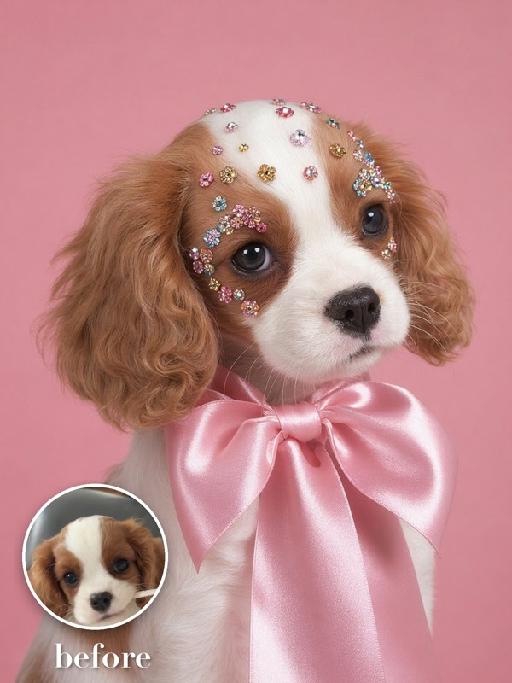
Floral Gem AI effects generated image

Floral Gem

Recreate the reference as a pastel-pink high-fashion studio portrait. The uploaded pet is shown from chest up in three-quarter profile, wearing a large glossy pale-pink satin bow tied around the neck. Delicate colorful flower-shaped gems and tiny crystal appliques are arranged symmetrically around both eyes and across the forehead. Smooth pink seamless background, refined softbox lighting, calm elegant expression, exact close crop and styling. The subject remains an animal throughout. No people or human hands. No real brands, logos, watermarks or readable text. Accurately preserve the uploaded pet's species, breed, coat color and markings, ear shape, muzzle and face structure, eye color and body proportions. Keep it instantly recognisable as the same animal; change only pose, scene, clothing and accessories. Vertical 3:4, photorealistic, crisp detail, with the pet as the unmistakable main subject.

Global Kick AI effects generated image

Global Kick

"Blockbuster vertical FIFA World Cup advertising poster, award-winning stadium fashion photography, 8K ultra HD, authentic 35mm film grain overlay, cinematic warm teal-yellow color grading, shot with a prime ultra-wide fisheye lens from a ground-level worm's-eye perspective, sharp center focus with artistic edge distortion. ### Core Subject (Hyper-Detailed Connected Action) The character's index finger, with lifelike skin texture, subtle sweat sheen and fine pore details, is held straight up with controlled tension, part of the same individual as the background character. A well-worn official FIFA World Cup match football spins rapidly on the tip, with dynamic radial motion blur, layered dirt, micro-scratches, and varying gloss on the leather panels visible. The football dominates the upper frame, overlapping the background text with lens distortion, the spinning motion creates subtle light trails on the edges, every stitch and texture is sharply rendered. ### Character (Edgy Laid-Back Pose, 100% Retain Original Appearance) The character in the lower right has a dynamic, laid-back pose, head tilted back with a confident, knowing half-smirk, eyes half-lidded with a lazy yet provocative gaze. - **Sunglasses**: Tortoiseshell cat-eye sunglasses slid all the way down to the tip of the nose, half-obscuring the eyes, with subtle reflections of the stadium lights on the lenses, creating a mysterious, cool vibe. - **Expression**: Mischievous, confident smirk with a hint of disdain, relaxed yet edgy demeanor, full of personality and attitude. - **Pose**: Body leaning slightly back, shoulders relaxed, one arm stretched casually behind the head, loose and carefree posture that exudes effortless cool. - **Atmosphere**: Thin, wispy smoke drifting slowly from the character's mouth, creating a subtle hazy glow around the face, blending with the studio light to enhance the atmospheric, edgy feel, no thick smoke, just a light haze. - **Outfit**: Tailored bright yellow World Cup jersey, with vividly rendered fabric creases and subtle sweat details, wavy hair catching soft rim light. ### Background & Text Elements The background is a smooth warm yellow radial gradient, brighter at the center and softly amber at the edges. Large semi-transparent ""WORLD CUP"" sans-serif letters with strong perspective distortion are overlaid, featuring a distressed scratched texture matching the football's wear and subtle film grain overlay. A small official 2026 FIFA World Cup logo with an exquisite metallic brushed texture is placed in the bottom right corner. ### Lighting & Technical Constraints Soft wrap-around warm lighting is used, complemented by a gentle rim light that creates a subtle halo effect around the character, football, and sunglasses, enhancing their three-dimensionality. A heavy peripheral vignette is applied to draw the viewer's eye directly to the central action. No AI artifacts, the final image achieves top-tier commercial poster quality, with ultimate cinematic texture and edgy cool vibe. "

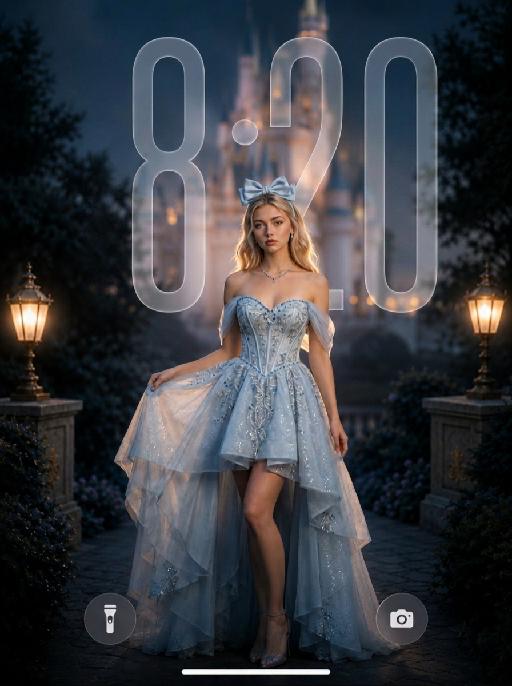
Starlit Princess AI effects generated image

Starlit Princess

" Use the uploaded image as the ONLY identity reference for the subject. Create a photorealistic dreamy cinematic fantasy fashion portrait of the same subject, closely matching the reference image in identity, composition, dress silhouette, lighting, soft-focus quality, color palette, and photographic texture. Strictly preserve the subject’s exact face, age, facial structure, skin tone, hairstyle, hair length, hair color, and overall recognizability. Do not replace the face with a generic beauty-model face. Keep natural facial proportions, realistic skin texture, and subtle professional retouching without plastic smoothing or excessive reshaping. Create this as a vertical 9:16 wallpaper composition. Frame the subject in a three-quarter body portrait from the head to below the knees. Position the subject slightly lower in the frame, anchored in the lower-middle area, with more clean negative space above the head. Keep generous open space in the upper portion of the image so the wallpaper can accommodate a phone clock area without the subject or major visual elements blocking it. Do not place the subject too high in the frame. The subject stands slightly right of center, with the body turned gently at a three-quarter angle and the face looking toward the camera. One hand lightly lifts the left side of the skirt, the other arm hangs naturally beside the body, and one leg is visible through the high-low opening. The posture should feel graceful, relaxed, elegant, and photogenic. Photographed with a full-frame camera and an 85mm portrait lens, using very shallow depth of field and a subtle 1/8 Black Pro-Mist diffusion filter. Keep the eyes and facial identity clear, while gently softening skin transitions, hair edges, fabric highlights, and bright details. The image should have visible soft-focus diffusion, creamy bokeh, subtle halation, soft highlight bloom, and a velvety dreamy finish. Do not make the image digitally blurry or smeared. The subject wears a luxurious icy-blue and silver couture fantasy gown with a structured off-the-shoulder corset bodice, sweetheart neckline, fitted waist, refined silver embroidery, blue crystal beadwork, delicate sequins, sheer tulle drapes around the upper arms, and an asymmetrical high-low layered skirt. The front is shorter and reveals one leg naturally, while the back and side layers flow longer. Use pale icy-blue, silver-white, and translucent organza with realistic folds, transparency, weight, and movement. The dress must remain bright icy blue, airy, dimensional, and expensive-looking, not dark gray, not a wedding gown, tutu, or cheap costume. Accessories include a large pale-blue satin bow headband, delicate silver-and-blue necklace, and small crystal earrings. No gloves, crown, tiara, or oversized jewelry. Place a large softly illuminated fantasy castle in the upper-center and upper-right background, but keep it softly blurred and atmospheric. Its towers and glowing amber windows remain recognizable but softened by optical blur, warm haze, and creamy bokeh. Dark trees, rocky terrain, and foliage frame the scene. Use deep brown, charcoal, muted navy, warm amber, and burnt-gold background tones. No bright blue sky, stars, moon, floating particles, or recognizable copyrighted castle design. LIGHTING — VERY IMPORTANT: Expose for the subject, not the dark background. The subject must be clearly brighter than the surroundings, approximately one stop brighter than the background. Use a large soft diffused key light from the front-left to fully illuminate the face, eyes, neck, shoulders, bodice, exposed leg, and foreground skirt. Add a gentle frontal fill light near the camera to open shadows under the eyes, chin, hair, and neckline. Both eyes must be clearly visible with soft catchlights. The face must look luminous, warm, and naturally dimensional, never dark, gray, or underexposed. Add a controlled warm amber rim light from behind and slightly above, tracing the hair, shoulders, arms, waist, and dress edges, as though coming from the glowing castle. Use subtle cool fill in the dress shadows to preserve its icy-blue color and fabric detail. Keep shadows soft and open. Add gentle bloom around castle lights, hair highlights, crystals, and dress edges, without creating an artificial glowing outline. Use cinematic blue-and-gold grading: icy blue and pale silver dress, warm amber and burnt-gold background, natural warm skin, slightly muted saturation, gentle contrast, bright skin midtones, lifted subject shadows, and a darker but detailed background. Avoid harsh contrast, crushed blacks, muddy skin, purple cast, oversaturated cyan, neon lighting, HDR, over-sharpening, excessive clarity, CGI texture, or heavy beauty filtering. Wallpaper composition rule: - leave clear breathing room above the subject - keep the upper area visually cleaner and less busy - avoid placing the subject’s head, bow, or bright castle details too close to the top edge - avoid major bright objects directly where a phone clock would usually appear - make the wallpaper feel balanced, elegant, and practical for a lockscreen background - the subject should remain the main focus, but the composition should still work comfortably as a wallpaper Overall mood: romantic, elegant, magical, luminous, refined, and dreamy. The dreamy effect must come from realistic lens diffusion, shallow depth of field, warm bokeh, atmospheric haze, and softly blooming highlights, while maintaining a real professional fashion-photography appearance. NEGATIVE: generic face, identity drift, dark subject, underexposed face, shadowed eyes, gray skin, muddy skin tone, dark dress, dull blue dress, subject placed too high, head too close to the top edge, cluttered upper background, blocked clock area, crushed shadows, harsh contrast, hard digital sharpness, excessive clarity, sharp castle background, plastic skin, doll face, cartoon, anime, illustration, CGI, 3D render, cheap costume, tutu, wedding gown, feathers, gloves, crown, tiara, floating particles, bright blue sky, purple cast, neon light, harsh flash, distorted hands, extra fingers, duplicate limbs, malformed skirt, text, logo, watermark, UI "


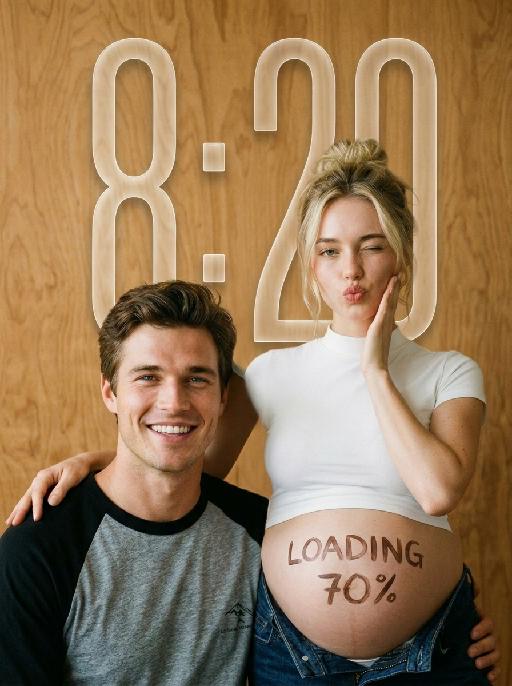
Little Promise AI effects generated image

Little Promise

"Use the uploaded images as the only identity references for the two adult subjects. Create a photorealistic verticalmaternity couple portrait. Strictly preserve both subjects’ exact faces, ages, skin tones, facial features, face shapes, hairstyles, hairlines, hair lengths, hair textures, hair colors, bangs, overall appearance, body proportions, and overall recognizability. Follow the uploaded reference images closely. Do not replace either subject with a generic model face. Do not significantly change the hairstyle, hair color, or facial structure of either subject. COMPOSITION AND POSE: Use a warm indoor studio setting with a plain honey-brown plywood wall as the entire background. The pregnant woman stands slightly behind and to the right. The man sits lower in the foreground on the left, close beside her pregnant belly. The woman wears a fitted white short-sleeve mock-neck cropped T-shirt and dark indigo denim jeans lowered naturally beneath the belly. Her round pregnant belly is fully visible. She places one hand gently on the man’s shoulder. Her other hand rests lightly against her cheek. She winks one eye and makes a playful kissy expression toward the camera. The man sits casually in front of her, leaning slightly toward her body. He looks directly at the camera with a wide, bright, natural smile showing his teeth. IDENTITY AND HAIR PRESERVATION — STRICT: The woman’s hairstyle, hair color, hair volume, bangs or loose strands, and overall tied-up styling must remain consistent with the uploaded reference image. The man’s hairstyle, hair length, fringe shape, hair texture, and hair color must remain consistent with the uploaded reference image. Do not restyle either subject with a different haircut, different bangs, different hair color, or a different overall vibe. Keep both subjects looking like the exact same couple from the uploaded reference images. MALE CLOTHING — STRICTLY PRESERVE: The man wears a casual raglan baseball T-shirt with: * a heather-gray cotton body * solid black three-quarter raglan sleeves * a black ribbed crew neckline * relaxed youthful fit * soft slightly worn cotton texture * subtle natural fabric folds * no jacket * no button-up shirt * no plain black T-shirt * no formal clothing Add only a very small understated dark graphic or lettering near the lower front of the shirt if needed. Do not add a large logo. BELLY LETTERING: Write “LOADING 70%” by hand across the center of the pregnant belly using dark brown cosmetic paint or chocolate-colored body paint. The letters should look casually handwritten, slightly imperfect, playful, and clearly readable. Do not add any other text anywhere in the image. PHOTOGRAPHIC TEXTURE: Create the look of an intimate late-1990s or early-2000s analog studio portrait photographed on 35mm color film. Use: * warm honey-brown and amber tones * soft directional light from the upper-left * gentle natural shadows along the faces and bodies * slightly muted colors * soft highlight roll-off * subtle fine film grain * mild lens softness * natural skin texture * restrained contrast * slightly creamy skin tones * realistic cotton and denim texture * no glossy commercial retouching * no artificial HDR clarity * no plastic or porcelain skin The image should feel candid, youthful, intimate, playful, and emotionally warm, like a personal maternity portrait photographed in a small independent studio. IMPORTANT CONSTRAINTS: * keep the man seated lower than the woman * keep the pregnant belly prominent and unobstructed * preserve the gray-body black-sleeve raglan baseball T-shirt * strictly preserve both subjects’ hairstyles and hair colors from the reference image * strictly preserve both subjects’ facial identity and overall vibe * no extra people * no additional hands * no deformed fingers * no high-fashion styling * no luxury studio background * no modern bright-white beauty lighting * no excessive blur * no cartoon * no illustration * no logo * no watermark "

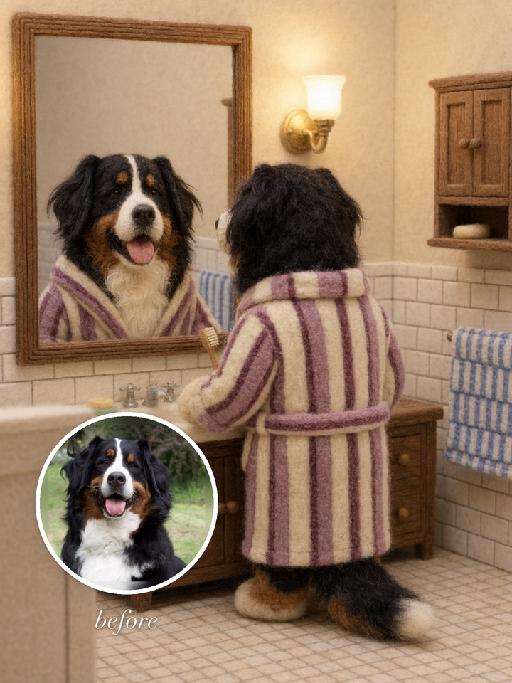
Felt Mirror AI effects generated image

Felt Mirror

"Use the uploaded pet image as the exact identity reference. Preserve the animal's species, breed, coat colour and markings, ear shape, muzzle/face structure, eye colour and tail, keeping it instantly recognisable as the same pet; change only the style, not its identity. Create a vertical 3:4 image with this exact effect: cozy needle-felt stop-motion style bathroom scene matching the reference: the uploaded pet becomes a soft felted toy dog standing with its back to the viewer at a bathroom sink, wearing a loose vertical striped bathrobe in muted pink, purple and cream. A wooden framed wall mirror above the sink shows the same felt pet's front-facing face clearly and recognizably. Warm wall lamp, cream tiled walls, wooden vanity, towel details, handmade wool fibers, rounded felt paws and ears, miniature storybook texture. No readable text, no logos, no watermark; remove any words from the mirror. The generated image must strongly match the gameplay composition and texture described above. Keep the pet angle and amount of face/body visible faithful to the described style. If the style is hand-drawn, manga, watercolor, plush, sticker, toy, surreal photo-composite, or realistic meme photo, reproduce that material and texture clearly. No logos, no watermark, no Doubao AI text."

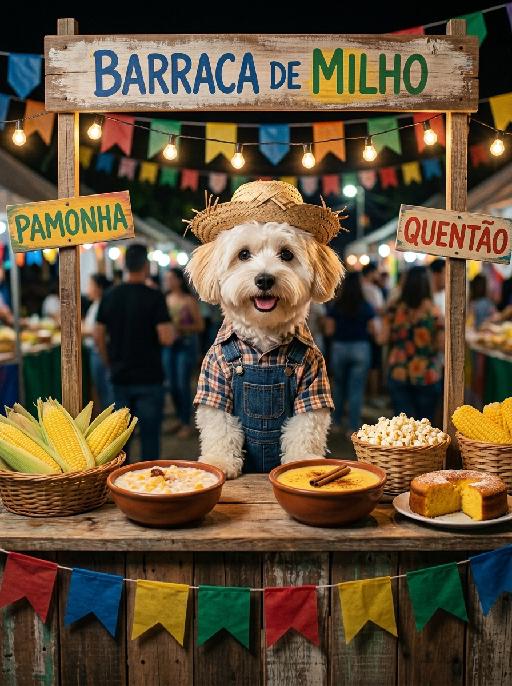
Paw Vendor AI effects generated image

Paw Vendor

"A documentary-style commercial photograph of the uploaded pet, preserving its exact species, fur texture, eye color, ear shape, and all facial features completely unchanged. The pet stands naturally upright behind a traditional Brazilian Festa Junina corn food stall (Barraca de Milho), acting as the proud and joyful stall owner. Shot on Canon EOS R5, 50mm f/2.0 lens, natural slight grain, real-world imperfect sharpness, subtle chromatic aberration at edges. Fur: individually rendered hair strands with natural directional growth, visible skin texture beneath thin areas, slight fur compression where clothing sits — zero plastic sheen, zero CGI smoothness, zero wax finish. Clothing: plaid shirt and denim overalls with real fabric weight, gravity-pulled wrinkles, worn thread texture, natural color fading — clothing drapes and sits on the body with authentic physical weight. Straw hat shows real straw fiber detail and slight weathering. Expression: naturally asymmetric warm smile, bright eyes with genuine muscle tension around them, slightly open mouth — organic and lively, not perfectly mirrored or digitally smoothed. The stall: authentically aged wooden counter with real wood grain, paint chipping, slight moisture stains. Decorated with hand-hung Bandeirinhas, mismatched lanterns, rustic handwritten wood signs, scattered hay bales — imperfect and lived-in, not artificially arranged. Food counter: naturally placed Pamonha in corn husks, bowls of Canjica with realistic liquid texture, Curau with authentic pudding surface, fresh corn cobs with real husk fiber detail, popcorn with irregular natural shapes, corn cakes with real baked texture — food styled naturally, not CGI-perfect. Lighting: warm uneven festival string lights with natural hotspots and slight flicker glow, imperfect golden spill across the counter, soft natural shadows with slight inconsistency — NOT flat studio lighting. Full body visible behind the stall. Vertical composition. Aspect ratio 3:4. Kodak Portra 800 color grading, subtle film grain, warm natural color shifts, authentic festive Brazilian market atmosphere."

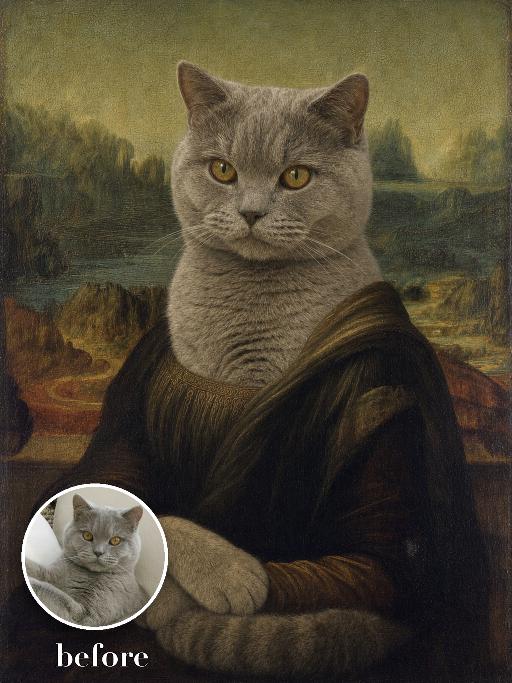
Mona Lisa Dog AI effects generated image

Mona Lisa Dog

Recreate a Renaissance museum portrait with the uploaded pet seated in three-quarter pose, front paws folded gently, dark formal robe, subtle calm expression and hazy winding landscape behind. Soft sfumato, muted green-brown palette, aged oil paint and fine craquelure. The subject remains an animal throughout. No people or human hands. No real character names, celebrity names, brands, logos, watermarks or readable text. Accurately preserve the uploaded pet's species, breed, coat color and markings, ear shape, muzzle and face structure, eye color, body proportions and tail. Keep it instantly recognisable as the same animal; change only pose, scene, costume and art treatment. Match the reference composition closely. Vertical 3:4, crisp detail, the pet is the unmistakable main subject.

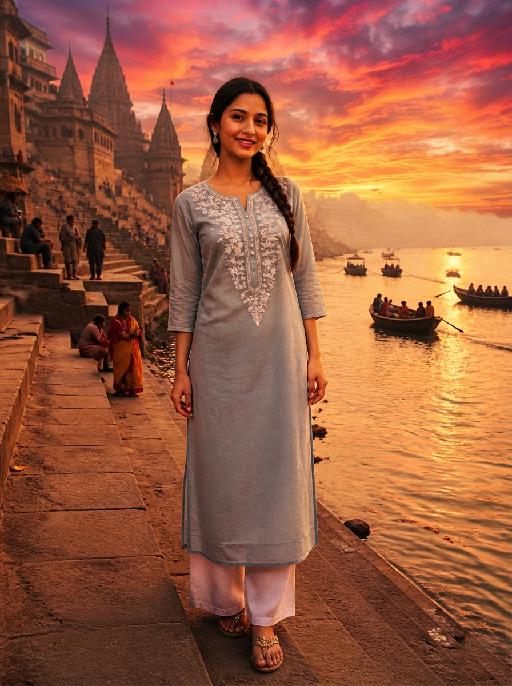
Dance With her

Model’s original facial features, facial contour and hairstyle are 100% preserved in their entirety, extremely smooth cinematic visual transition, natural narrative pacing, 4K ultra-high resolution, photorealistic skin & fabric textures, cinematic color grading, warm soft natural light, highly saturated vivid colors, exquisite lifelike details, strong cinematic texture, seamless scene fusion, smooth lens-like visual connection, no abrupt frame or element changes, **fixed medium close-up perspective throughout, the camera follows the characters' dancing movements smoothly without pulling back or zooming out. The picture presents a natural lens narrative with a fixed medium close-up: the uploaded character is in the core visual area, initially wearing original daily wear with a relaxed posture and slight face-to-camera, facial features in sharp focus, warm soft light bathing the whole body; the background fades and blends naturally from a simple base into a traditional Indonesian interior, with Persian-patterned carpets and painted carved pillars emerging gradually to lay a seamless spatial foundation, the scene expansion is gentle and fits the lens follow rhythm without any perspective pullback. The traditional Indonesian interior scene is fully presented with rich layers—Persian-patterned carpets covering the ground, painted carved stone pillars standing tall, warm wall sconces emitting soft light, the entire space is bright with distinct light and shadow levels. A gorgeous and attractive young Indonesian woman enters the frame in a smooth, natural way matching the scene fusion rhythm; she has long thick black double braids, a bright and seductive smile, and is barefoot, wearing a luxurious traditional Indonesian kebaya (color-blocked embroidered sequined corset with turquoise tulle lantern skirt, decorated with pearl tassels and gold-thread embroidery) and ornate Indonesian ethnic gold jewelry (necklace, earrings, bangles). The uploaded character stands up naturally and gracefully in the visual transition, the two hold hands tightly in the center of the Indonesian interior space, spinning and dancing joyfully with light, vivid and smooth movements; the camera follows the two characters' spinning and dancing trajectory in a steady medium close-up, with the lens moving naturally and slightly to fit their body movements, always keeping both characters in the core of the frame without pulling back or changing the perspective**. Warm wall sconce light blends with soft natural light, perfectly highlighting the intricate embroidery details of the two's costumes, the bright luster of gold jewelry and the joyful, vivid facial expressions of both characters, highly saturated colors amplify the gorgeous and lively atmosphere of the scene, all character and costume details are clear and realistic due to the fixed medium close-up follow shot; the whole picture realizes seamless connection of scene fading, character entry and dance movement, the lens follow is smooth and natural, and the narrative layering is rich without disorder.

Load more

Next-Gen Multi-Model AI Video Architecture

Vivago AI isn't just one engine—it’s a unified hub for the world’s most advanced video AI. Whether you need cinematic realism or high-speed social content, we provide the right model for your creative vision.

Free Generate

Beauty and Dolphins

Vacation Time

Stellar Tear

Fish Tank Supervisor

Cinematic Quality & Precision Control

Enables 4K resolution with multi-lens motion control, generating delicate scene via text prompts for customized cinematography.​

TRY NOW

Dynamic AV Sync

Auto-generates original audio to avoid copyright issues. Build 3D immersive environments through layered sound design automatically.

TRY NOW

OpenAI Sora 2

​Advanced visual storytelling with unparalleled physics and consistency.

TRY NOW

Kling v2.6 Pro

Industry-leading cinematic image animation and motion control.

TRY NOW

Google Veo 3 & 3.1

Ultra-fast generation with enhanced realism for creative workflows.

TRY NOW

Vivago AI 2.0

Our proprietary model optimized for efficiency, speed, and cost-effective generation.

TRY NOW

Users' Voice

We listen carefully to the opinions of every user.
Free Generate
Contact Us
I tried the Lip Sync feature inside Vivago.ai’s AI Video Generator for my educational podcast, and the results were stunning! The avatar's lip movements perfectly matched my audio recording, creating a professional AI-generated video without complex editing. Compared with tools like OpenAI Sora 2 and Google Veo 3.1, Vivago Image-to-Video delivers fast, studio-quality results online. It saved me hours of post-production work.
ElenaM (Spain)
Vivago’s Image-to-Video AI transformed my marketing workflow. I uploaded a product image and described the launch scene in text, and it generated a 10-second cinematic AI video with background music and dynamic visuals. The output quality rivals Kling v2.6 Pro and Google Veo 3 Fast. It’s now my go-to AI video generator for social media ads and product campaigns.
KenjiT (Japan)
As a digital artist, I use Vivago.ai 2.0 daily for Image-to-Image and AI Image-to-Video creation. The e-book covers and animated visuals I generate for clients look cinematic and professional. Unlike many standalone AI tools, Vivago integrates multiple leading models into one platform, making it easier to create copyright-safe AI images and videos for publishing.
ChenL (China)
I tried the Lip Sync feature inside Vivago.ai’s AI Video Generator for my educational podcast, and the results were stunning! The avatar's lip movements perfectly matched my audio recording, creating a professional AI-generated video without complex editing. Compared with tools like OpenAI Sora 2 and Google Veo 3.1, Vivago Image-to-Video delivers fast, studio-quality results online. It saved me hours of post-production work.
ElenaM (Spain)
Vivago’s Image-to-Video AI transformed my marketing workflow. I uploaded a product image and described the launch scene in text, and it generated a 10-second cinematic AI video with background music and dynamic visuals. The output quality rivals Kling v2.6 Pro and Google Veo 3 Fast. It’s now my go-to AI video generator for social media ads and product campaigns.
KenjiT (Japan)
As a digital artist, I use Vivago.ai 2.0 daily for Image-to-Image and AI Image-to-Video creation. The e-book covers and animated visuals I generate for clients look cinematic and professional. Unlike many standalone AI tools, Vivago integrates multiple leading models into one platform, making it easier to create copyright-safe AI images and videos for publishing.
ChenL (China)
I absolutely love Vivago’s AI Image-to-Video Generator. As a travel blogger, static images often fail to capture real atmosphere, but Vivago helps me turn photos into vivid cinematic AI videos with motion effects. It feels comparable to OpenAI Sora 2 and Google Veo 3.1, but more accessible and faster for creators who need high-quality AI videos online.
LiamK (Australia)
I tried the Lip Sync feature inside Vivago.ai’s AI Video Generator for my educational podcast, and the results were stunning! The avatar's lip movements perfectly matched my audio recording, creating a professional AI-generated video without complex editing. Compared with tools like OpenAI Sora 2 and Google Veo 3.1, Vivago Image-to-Video delivers fast, studio-quality results online. It saved me hours of post-production work.
ElenaM (Spain)
Vivago’s Image-to-Video AI transformed my marketing workflow. I uploaded a product image and described the launch scene in text, and it generated a 10-second cinematic AI video with background music and dynamic visuals. The output quality rivals Kling v2.6 Pro and Google Veo 3 Fast. It’s now my go-to AI video generator for social media ads and product campaigns.
KenjiT (Japan)
As a digital artist, I use Vivago.ai 2.0 daily for Image-to-Image and AI Image-to-Video creation. The e-book covers and animated visuals I generate for clients look cinematic and professional. Unlike many standalone AI tools, Vivago integrates multiple leading models into one platform, making it easier to create copyright-safe AI images and videos for publishing.
ChenL (China)
I absolutely love Vivago’s AI Image-to-Video Generator. As a travel blogger, static images often fail to capture real atmosphere, but Vivago helps me turn photos into vivid cinematic AI videos with motion effects. It feels comparable to OpenAI Sora 2 and Google Veo 3.1, but more accessible and faster for creators who need high-quality AI videos online.
LiamK (Australia)
Using Vivago.ai’s Image-to-Video AI has greatly enhanced my classroom teaching. I transform textbook notes into historical AI videos with cinematic filters and dynamic animations. Compared with tools like Kling v2.6 Pro and Google Veo 3 Fast, Vivago offers faster generation and easier parameter control for educators who need reliable AI video creation.
RajivG (India)
I frequently create AI videos on Vivago and publish them on TikTok and YouTube Shorts. The AI video templates and trending content ideas help me produce viral-ready clips quickly. With Vivago’s integrated models—including advanced video engines similar to OpenAI Sora 2—I can generate anime-style and cinematic social media videos that drive high engagement.
MarieJ (Spain)
What attracts me most about Vivago.ai is not only the powerful AI Video Generator but also the active AIGC creator community. It combines AI Image-to-Video, Text-to-Video, and leading model integrations like Google Veo 3.1 into one creative platform.
TomW (India)
At first, I was hesitant about using AI video tools. But after trying Vivago Image-to-Video, I realized how easy it is to create professional AI-generated videos online. I just upload an image, add a short prompt, and adjust a few settings. The results are cinematic and copyright-safe, which is essential for commercial projects.
HectorC (Mexico)
Using Vivago.ai’s Image-to-Video AI has greatly enhanced my classroom teaching. I transform textbook notes into historical AI videos with cinematic filters and dynamic animations. Compared with tools like Kling v2.6 Pro and Google Veo 3 Fast, Vivago offers faster generation and easier parameter control for educators who need reliable AI video creation.
RajivG (India)
I frequently create AI videos on Vivago and publish them on TikTok and YouTube Shorts. The AI video templates and trending content ideas help me produce viral-ready clips quickly. With Vivago’s integrated models—including advanced video engines similar to OpenAI Sora 2—I can generate anime-style and cinematic social media videos that drive high engagement.
MarieJ (Spain)
What attracts me most about Vivago.ai is not only the powerful AI Video Generator but also the active AIGC creator community. It combines AI Image-to-Video, Text-to-Video, and leading model integrations like Google Veo 3.1 into one creative platform.
TomW (India)
At first, I was hesitant about using AI video tools. But after trying Vivago Image-to-Video, I realized how easy it is to create professional AI-generated videos online. I just upload an image, add a short prompt, and adjust a few settings. The results are cinematic and copyright-safe, which is essential for commercial projects.
HectorC (Mexico)