More From VIVAGO AI

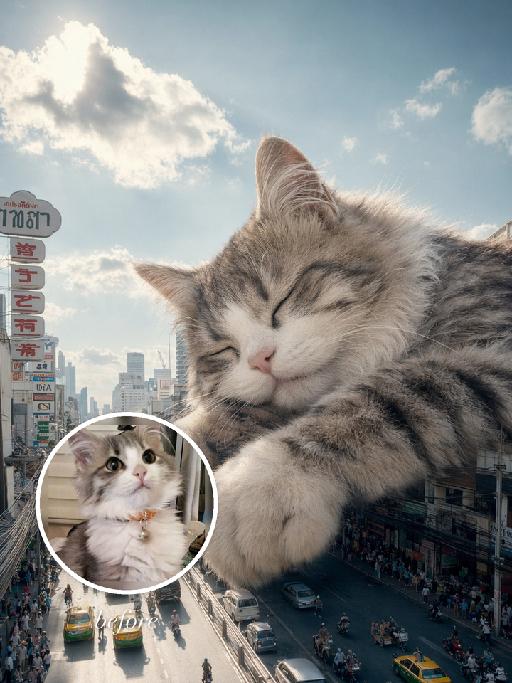
City Nap AI effects generated image

City Nap

"Use the uploaded pet image as the exact identity reference. Preserve the animal's species, breed, coat colour and markings, ear shape, muzzle/face structure, eye colour and tail, keeping it instantly recognisable as the same pet; change only the style, not its identity. Create a vertical 3:4 image with this exact effect: dreamy surreal city photo-composite, the uploaded pet as a gigantic sleepy animal resting over a downtown street canyon between tall buildings. Eyes closed, paws relaxed, soft clouds and bright blue sky, tiny cars and pedestrians below for scale, cozy peaceful giant-pet mood, realistic fur and sunlight. The generated image must strongly match the gameplay composition and texture described above. Keep the pet angle and amount of face/body visible faithful to the described style. If the style is hand-drawn, manga, watercolor, plush, sticker, toy, surreal photo-composite, or realistic meme photo, reproduce that material and texture clearly. No logos, no watermark, no Doubao AI text."

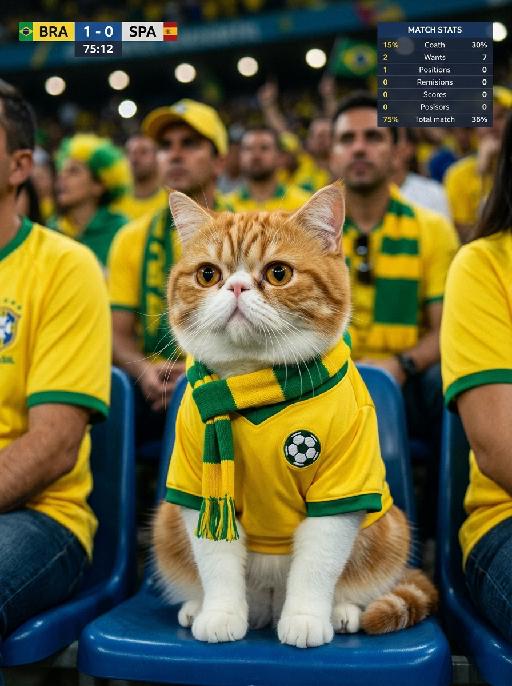
Cheering Paws AI effects generated image

Cheering Paws

"Live broadcast shooting of a major football event, medium close-up shot of the spectator area, with a realistic sports-broadcast camera angle similar to a televised football match. The camera focuses on the upper body of the subject in the uploaded picture, transformed into the same pet from the uploaded image while strictly preserving its original identity, species, facial features, fur texture, fur color, ear shape, eye shape, nose shape, and overall recognizability. Main subject: - the pet is sitting naturally on the football stadium spectator seats - the pet is shown in a natural supporter moment during the match - expression should feel attentive, lively, and gently excited - avoid exaggerated cheering or dramatic overacting - the face should show a subtle sense of engagement, like quietly reacting to the game - the mouth may be slightly open only if it looks natural for the pet - the eyes should feel alert, focused, and naturally expressive - body posture should be relaxed and believable - the pet should appear comfortably seated, with a calm but emotionally involved presence - if any paw is visible, it should rest naturally in a relaxed position rather than making an exaggerated cheering gesture - overall action and body language should feel candid, spontaneous, and natural, like a real live-broadcast audience shot Clothing and accessories: - the pet wears a Brazil-inspired football supporter outfit - bright yellow short-sleeved football jersey - dark green collar - subtle green sleeve edging - a yellow-and-green striped supporter scarf tied around the neck - instead of any official crest or logo, place a small football icon (⚽) or embroidered football patch on the chest area - the football symbol should look like part of the jersey design, simple and realistic, not a brand logo Scene and background: - crowded football stadium spectator area - blue or neutral stadium seats - other fans in the background are wearing yellow and green supporter clothing - lively football audience atmosphere - shallow depth of field - background naturally blurred - the background crowd feels festive, energetic, and immersive Broadcast / live TV interface: - add a realistic football live-broadcast UI overlay - the interface should feel like a real sports broadcast, but use only generic and original graphics - upper left corner: a football scoreboard panel showing Brazil vs Spain, current match score, and match time - upper right corner: a small match statistics panel, such as possession, shots, or goal attempts - use a low-key semi-transparent interface that does not cover the pet’s face - no official broadcaster branding - no copyrighted tournament graphics - no real TV network logos - all UI elements should be clean, modern, and original Visual quality and atmosphere: - ultra-realistic live-broadcast texture - 8K ultra-high definition - cinematic realistic texture - slight camera shake effect - natural film grain - subtle live-broadcast noise - football stadium lights with mixed warm and cool tones - fine layers of light and shadow - realistic fur texture - no excessive smoothing - high-detail rendering - authentic televised sports atmosphere Important constraints: - keep the pet fully recognizable - make the pet clearly feel like a real supporter in the audience - keep the expression and action natural, understated, and believable - avoid exaggerated cheering gestures or theatrical expressions - no cartoon style - no illustration style - no watermark - no real broadcaster logo - no official FIFA or World Cup branding "


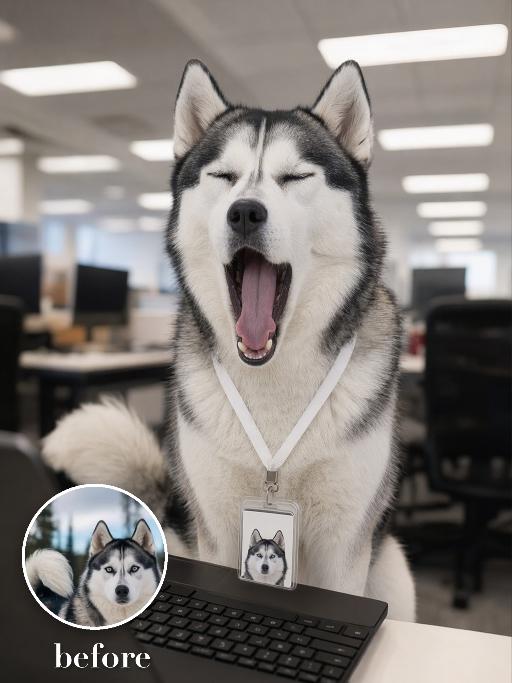
Yawn Time AI effects generated image

Yawn Time

Turn the uploaded pet into a tired corporate office worker pet: close-up behind a black laptop keyboard, mouth wide open in a big yawn, wearing a simple white lanyard ID badge that contains only a tiny photo-like pet icon and no readable text. Background is a blurred open-plan office with fluorescent ceiling panels. Candid photorealistic desk-level perspective, funny exhausted mood. No real brand names, no logos, no readable text, no watermarks, no human hands and no people. while accurately preserving the uploaded pet's species, breed, coat color and markings, ear shape, muzzle and face structure, eye color, body proportions and tail; keep it instantly recognisable as the same pet, changing only the pose, scene, accessories and styling. Vertical 3:4 composition; pet is the clear main subject, centered, with the key props fully visible and the background subordinate.

Comic Caricature

"Use the uploaded image as the only reference. Recreate the uploaded image faithfully, only changing the visual style into a more exaggerated American hand-drawn caricature illustration. Preserve the same person, hairstyle, expression, outfit, pose, background structure, framing, and overall composition, while transforming the image into a bold, stylized, sketchy cartoon portrait. Style: American editorial caricature, expressive hand-drawn linework, loose sketch lines, painterly brush strokes, dynamic ink-like outlines, animation concept art feel, and a polished illustrated finish. Make the caricature effect clearly stronger and more obvious: enlarge the head noticeably, exaggerate the facial proportions, make the eyes larger and more expressive, emphasize the eyebrows, simplify and stylize the nose and mouth, and give the face a more dynamic cartoon-like structure. The exaggeration should be bold, playful, and immediately noticeable. Keep the subject recognizable and appealing, but push the stylization further so it feels more lively, humorous, and visually striking. The result should look like a premium American magazine caricature or an animated character design sketch. Use visible brushwork, rough elegant outlines, soft painterly shading, and a clean artistic composition. The background can be simplified into a minimal illustrated backdrop with graphic color-block elements or loose painterly shapes to support the character. No text, no logo, no watermark."

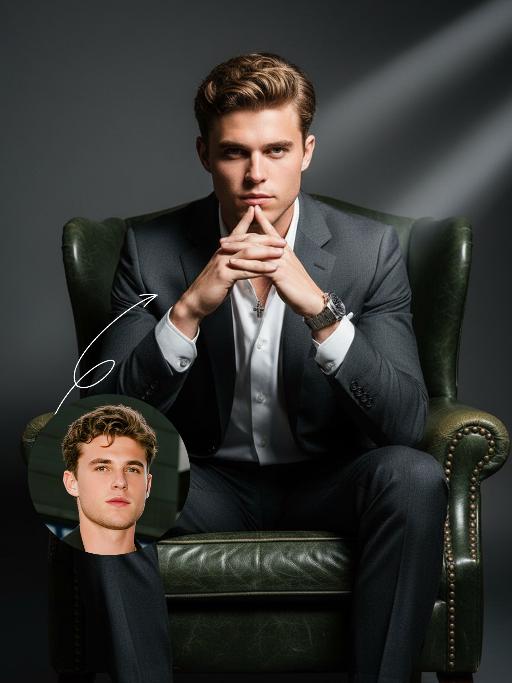
Domineering CEO AI effects generated image

Domineering CEO

Strict identity verification is conducted using the first uploaded portrait (maintaining consistency in facial features, hairstyle, skin tone and age). An executive with outstanding poise is dressed in a haute couture suit paired with a white dress shirt (with the collar slightly unbuttoned), and a high-end mechanical watch adorns his wrist. He sits elegantly in a dark green vintage leather armchair (exquisitely embellished with delicate rivets and rich textured detailing) against a minimalist dark gray gradient background. His face exudes wisdom and focus with a sharp gaze; his hands are folded beneath his chin in a posture brimming with authority. His facial expression is confident and composed, and his eyes are piercing and decisive. A full-shot perspective is adopted to capture the subject in full view. The overall style adheres to high-end fashion commercial photography with an exquisitely fine texture. The clear texture of the suit and intricate details of the watch are sharply rendered, crafting the image of a professional, wise and self-assured corporate executive. Boasting ultra-high resolution, photorealistic detail, an editorial aesthetic, contemporary fashion photography sensibilities and avant-garde fashion photography style, the portrait features professional studio lighting with stark contrast and a dramatic dark-toned lighting effect. A broad wash of soft side light slants in from the right side of the frame, creating a large-scale Tyndall effect that outlines his facial contours with precision.

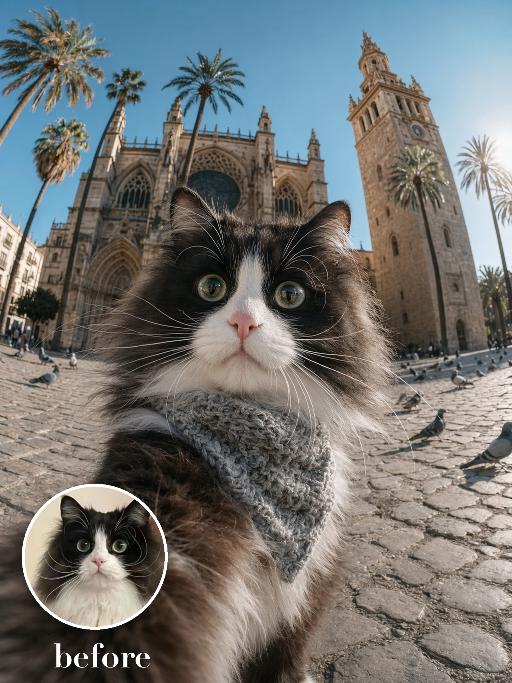
Cathedral Selfie AI effects generated image

Cathedral Selfie

Create a dramatic wide-angle plaza selfie matching the reference. The uploaded pet's face is very close to the camera in the lower foreground, wearing a textured gray neck scarf; a grand historic cathedral with towers and palm trees rises behind. Bright daylight, cobblestone square, strong fisheye perspective and curious wide-eyed expression. The subject remains an animal throughout. No people or human hands. No real brands, logos, watermarks or readable text. Accurately preserve the uploaded pet's species, breed, coat color and markings, ear shape, muzzle and face structure, eye color and body proportions. Keep it instantly recognisable as the same animal; change only pose, scene, clothing and accessories. Vertical 3:4, photorealistic, crisp detail, with the pet as the unmistakable main subject.

Load more

Next-Gen Multi-Model AI Video Architecture

Vivago AI isn't just one engine—it’s a unified hub for the world’s most advanced video AI. Whether you need cinematic realism or high-speed social content, we provide the right model for your creative vision.

Free Generate

Beauty and Dolphins

Vacation Time

Stellar Tear

Fish Tank Supervisor

Cinematic Quality & Precision Control

Enables 4K resolution with multi-lens motion control, generating delicate scene via text prompts for customized cinematography.​

TRY NOW

Dynamic AV Sync

Auto-generates original audio to avoid copyright issues. Build 3D immersive environments through layered sound design automatically.

TRY NOW

OpenAI Sora 2

​Advanced visual storytelling with unparalleled physics and consistency.

TRY NOW

Kling v2.6 Pro

Industry-leading cinematic image animation and motion control.

TRY NOW

Google Veo 3 & 3.1

Ultra-fast generation with enhanced realism for creative workflows.

TRY NOW

Vivago AI 2.0

Our proprietary model optimized for efficiency, speed, and cost-effective generation.

TRY NOW

Users' Voice

We listen carefully to the opinions of every user.
Free Generate
Contact Us
I tried the Lip Sync feature inside Vivago.ai’s AI Video Generator for my educational podcast, and the results were stunning! The avatar's lip movements perfectly matched my audio recording, creating a professional AI-generated video without complex editing. Compared with tools like OpenAI Sora 2 and Google Veo 3.1, Vivago Image-to-Video delivers fast, studio-quality results online. It saved me hours of post-production work.
ElenaM (Spain)
Vivago’s Image-to-Video AI transformed my marketing workflow. I uploaded a product image and described the launch scene in text, and it generated a 10-second cinematic AI video with background music and dynamic visuals. The output quality rivals Kling v2.6 Pro and Google Veo 3 Fast. It’s now my go-to AI video generator for social media ads and product campaigns.
KenjiT (Japan)
As a digital artist, I use Vivago.ai 2.0 daily for Image-to-Image and AI Image-to-Video creation. The e-book covers and animated visuals I generate for clients look cinematic and professional. Unlike many standalone AI tools, Vivago integrates multiple leading models into one platform, making it easier to create copyright-safe AI images and videos for publishing.
ChenL (China)
I tried the Lip Sync feature inside Vivago.ai’s AI Video Generator for my educational podcast, and the results were stunning! The avatar's lip movements perfectly matched my audio recording, creating a professional AI-generated video without complex editing. Compared with tools like OpenAI Sora 2 and Google Veo 3.1, Vivago Image-to-Video delivers fast, studio-quality results online. It saved me hours of post-production work.
ElenaM (Spain)
Vivago’s Image-to-Video AI transformed my marketing workflow. I uploaded a product image and described the launch scene in text, and it generated a 10-second cinematic AI video with background music and dynamic visuals. The output quality rivals Kling v2.6 Pro and Google Veo 3 Fast. It’s now my go-to AI video generator for social media ads and product campaigns.
KenjiT (Japan)
As a digital artist, I use Vivago.ai 2.0 daily for Image-to-Image and AI Image-to-Video creation. The e-book covers and animated visuals I generate for clients look cinematic and professional. Unlike many standalone AI tools, Vivago integrates multiple leading models into one platform, making it easier to create copyright-safe AI images and videos for publishing.
ChenL (China)
I absolutely love Vivago’s AI Image-to-Video Generator. As a travel blogger, static images often fail to capture real atmosphere, but Vivago helps me turn photos into vivid cinematic AI videos with motion effects. It feels comparable to OpenAI Sora 2 and Google Veo 3.1, but more accessible and faster for creators who need high-quality AI videos online.
LiamK (Australia)
I tried the Lip Sync feature inside Vivago.ai’s AI Video Generator for my educational podcast, and the results were stunning! The avatar's lip movements perfectly matched my audio recording, creating a professional AI-generated video without complex editing. Compared with tools like OpenAI Sora 2 and Google Veo 3.1, Vivago Image-to-Video delivers fast, studio-quality results online. It saved me hours of post-production work.
ElenaM (Spain)
Vivago’s Image-to-Video AI transformed my marketing workflow. I uploaded a product image and described the launch scene in text, and it generated a 10-second cinematic AI video with background music and dynamic visuals. The output quality rivals Kling v2.6 Pro and Google Veo 3 Fast. It’s now my go-to AI video generator for social media ads and product campaigns.
KenjiT (Japan)
As a digital artist, I use Vivago.ai 2.0 daily for Image-to-Image and AI Image-to-Video creation. The e-book covers and animated visuals I generate for clients look cinematic and professional. Unlike many standalone AI tools, Vivago integrates multiple leading models into one platform, making it easier to create copyright-safe AI images and videos for publishing.
ChenL (China)
I absolutely love Vivago’s AI Image-to-Video Generator. As a travel blogger, static images often fail to capture real atmosphere, but Vivago helps me turn photos into vivid cinematic AI videos with motion effects. It feels comparable to OpenAI Sora 2 and Google Veo 3.1, but more accessible and faster for creators who need high-quality AI videos online.
LiamK (Australia)
Using Vivago.ai’s Image-to-Video AI has greatly enhanced my classroom teaching. I transform textbook notes into historical AI videos with cinematic filters and dynamic animations. Compared with tools like Kling v2.6 Pro and Google Veo 3 Fast, Vivago offers faster generation and easier parameter control for educators who need reliable AI video creation.
RajivG (India)
I frequently create AI videos on Vivago and publish them on TikTok and YouTube Shorts. The AI video templates and trending content ideas help me produce viral-ready clips quickly. With Vivago’s integrated models—including advanced video engines similar to OpenAI Sora 2—I can generate anime-style and cinematic social media videos that drive high engagement.
MarieJ (Spain)
What attracts me most about Vivago.ai is not only the powerful AI Video Generator but also the active AIGC creator community. It combines AI Image-to-Video, Text-to-Video, and leading model integrations like Google Veo 3.1 into one creative platform.
TomW (India)
At first, I was hesitant about using AI video tools. But after trying Vivago Image-to-Video, I realized how easy it is to create professional AI-generated videos online. I just upload an image, add a short prompt, and adjust a few settings. The results are cinematic and copyright-safe, which is essential for commercial projects.
HectorC (Mexico)
Using Vivago.ai’s Image-to-Video AI has greatly enhanced my classroom teaching. I transform textbook notes into historical AI videos with cinematic filters and dynamic animations. Compared with tools like Kling v2.6 Pro and Google Veo 3 Fast, Vivago offers faster generation and easier parameter control for educators who need reliable AI video creation.
RajivG (India)
I frequently create AI videos on Vivago and publish them on TikTok and YouTube Shorts. The AI video templates and trending content ideas help me produce viral-ready clips quickly. With Vivago’s integrated models—including advanced video engines similar to OpenAI Sora 2—I can generate anime-style and cinematic social media videos that drive high engagement.
MarieJ (Spain)
What attracts me most about Vivago.ai is not only the powerful AI Video Generator but also the active AIGC creator community. It combines AI Image-to-Video, Text-to-Video, and leading model integrations like Google Veo 3.1 into one creative platform.
TomW (India)
At first, I was hesitant about using AI video tools. But after trying Vivago Image-to-Video, I realized how easy it is to create professional AI-generated videos online. I just upload an image, add a short prompt, and adjust a few settings. The results are cinematic and copyright-safe, which is essential for commercial projects.
HectorC (Mexico)