More From VIVAGO AI

Little Promise AI effects generated image

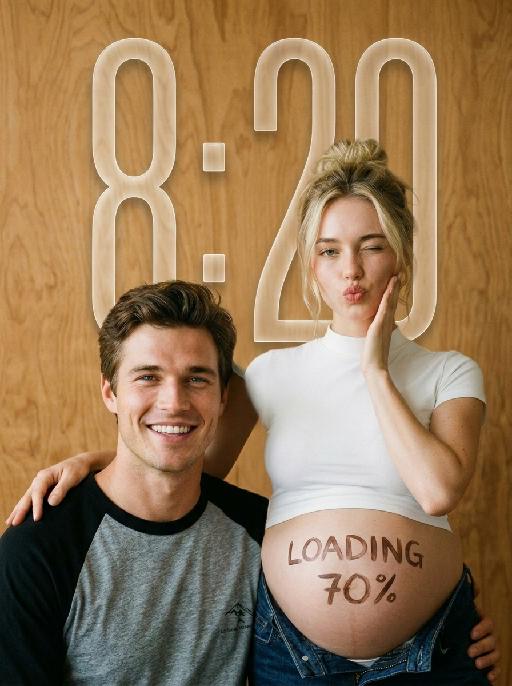
Little Promise

"Use the uploaded images as the only identity references for the two adult subjects. Create a photorealistic verticalmaternity couple portrait. Strictly preserve both subjects’ exact faces, ages, skin tones, facial features, face shapes, hairstyles, hairlines, hair lengths, hair textures, hair colors, bangs, overall appearance, body proportions, and overall recognizability. Follow the uploaded reference images closely. Do not replace either subject with a generic model face. Do not significantly change the hairstyle, hair color, or facial structure of either subject. COMPOSITION AND POSE: Use a warm indoor studio setting with a plain honey-brown plywood wall as the entire background. The pregnant woman stands slightly behind and to the right. The man sits lower in the foreground on the left, close beside her pregnant belly. The woman wears a fitted white short-sleeve mock-neck cropped T-shirt and dark indigo denim jeans lowered naturally beneath the belly. Her round pregnant belly is fully visible. She places one hand gently on the man’s shoulder. Her other hand rests lightly against her cheek. She winks one eye and makes a playful kissy expression toward the camera. The man sits casually in front of her, leaning slightly toward her body. He looks directly at the camera with a wide, bright, natural smile showing his teeth. IDENTITY AND HAIR PRESERVATION — STRICT: The woman’s hairstyle, hair color, hair volume, bangs or loose strands, and overall tied-up styling must remain consistent with the uploaded reference image. The man’s hairstyle, hair length, fringe shape, hair texture, and hair color must remain consistent with the uploaded reference image. Do not restyle either subject with a different haircut, different bangs, different hair color, or a different overall vibe. Keep both subjects looking like the exact same couple from the uploaded reference images. MALE CLOTHING — STRICTLY PRESERVE: The man wears a casual raglan baseball T-shirt with: * a heather-gray cotton body * solid black three-quarter raglan sleeves * a black ribbed crew neckline * relaxed youthful fit * soft slightly worn cotton texture * subtle natural fabric folds * no jacket * no button-up shirt * no plain black T-shirt * no formal clothing Add only a very small understated dark graphic or lettering near the lower front of the shirt if needed. Do not add a large logo. BELLY LETTERING: Write “LOADING 70%” by hand across the center of the pregnant belly using dark brown cosmetic paint or chocolate-colored body paint. The letters should look casually handwritten, slightly imperfect, playful, and clearly readable. Do not add any other text anywhere in the image. PHOTOGRAPHIC TEXTURE: Create the look of an intimate late-1990s or early-2000s analog studio portrait photographed on 35mm color film. Use: * warm honey-brown and amber tones * soft directional light from the upper-left * gentle natural shadows along the faces and bodies * slightly muted colors * soft highlight roll-off * subtle fine film grain * mild lens softness * natural skin texture * restrained contrast * slightly creamy skin tones * realistic cotton and denim texture * no glossy commercial retouching * no artificial HDR clarity * no plastic or porcelain skin The image should feel candid, youthful, intimate, playful, and emotionally warm, like a personal maternity portrait photographed in a small independent studio. IMPORTANT CONSTRAINTS: * keep the man seated lower than the woman * keep the pregnant belly prominent and unobstructed * preserve the gray-body black-sleeve raglan baseball T-shirt * strictly preserve both subjects’ hairstyles and hair colors from the reference image * strictly preserve both subjects’ facial identity and overall vibe * no extra people * no additional hands * no deformed fingers * no high-fashion styling * no luxury studio background * no modern bright-white beauty lighting * no excessive blur * no cartoon * no illustration * no logo * no watermark "

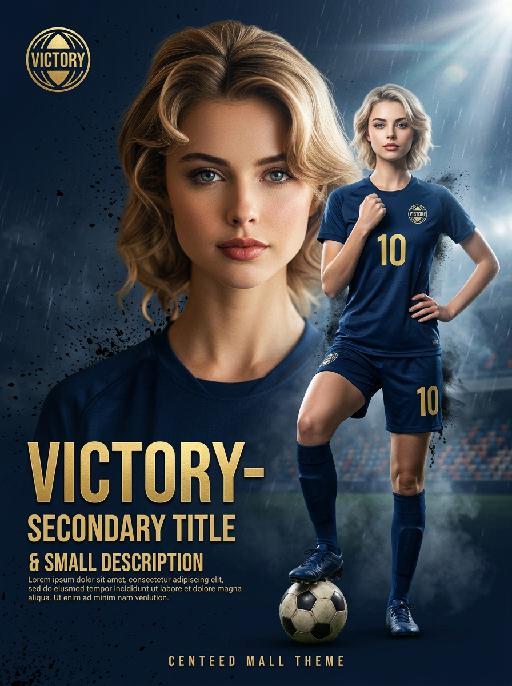
Field Champions AI effects generated image

Field Champions

"Vertical top-tier sports memorial montage poster, 8K ultra HD, commercial printing grade realistic portrait photography and digital art, Rembrandt cinematic lighting. Background: fixed navy blue (#0A1A2F), thick matte base with fine black brush splatter texture, rain particles, mist, stage light beams, lens flare and subtle film grain, 1:1 restore high-end sports poster texture. No watermarks, spots or template feel. 【Mandatory Subject Rule (Zero deviation lock, no modification allowed)】 All figures are one unified single character, with facial features, face shape and expressions must 100% follow the character in the reference image, no modification, deviation or replacement; Uniformly wear classic navy blue No.10 away soccer jersey with high-simulation heavy knitted fabric, three-dimensional texture and natural folds changing with body posture. Clear forward prints of minimalist ""VICTORY"" emblem and yellow No.10 number, no distortion or blurring. Complete details of matching navy blue shorts, long socks and professional soccer cleats, with intact clothing craft details. 【Composition & Layers (Accurately restore spatial relationship, no stiffness or unclear hierarchy)】 Three fixed layers in unchangeable order: Bottom layer: #0A1A2F navy blue background + hazy rainy night stadium, blurred audience seats, stage light beams, rain particles, mist, lens flare and film grain for full atmosphere; Middle layer: Full-body victory pose clip on the right (cinematic shallow depth of field blur + slight motion blur effect, full color retained, 30% reduced sharpness, ink-wash feathered/misty edges, 15% reduced brightness, cool soft light treatment, 1/2 size of the main portrait, located in the 30%-90% area on the right side of the frame, slightly covered by the left edge of the main portrait, no penetration, forming a triple contrast of virtual-real/light/sharpness with the foreground real image); Foreground layer: Oversized main portrait on the left (absolute foreground, highest resolution in the frame, occupying 65% horizontal width on the left, outline overlapping the middle layer clip to create strong three-dimensional depth; high saturation and contrast, warm hard light, vivid light and shadow, forming a clear level distinction with the rear blurred character, no duplication); Forbid disordered layers, character penetration and flat layout. 【Character Clip Details (Hyper-real skin & lighting & pose, match high-end sports photography)】 Foreground Main Portrait (Core on left, 65% horizontal width): Half-body close-up with calm and confident expression. Cinematic realistic human skin, restore original skin texture of reference image: distinct tiny pores, surface skin lines and natural skin tone transition. Delicate light and shadow layers on face, completely eliminate AI fake skin, over-smoothing and plastic feeling. Portrait texture matches professional sports portrait photography. Rembrandt side light shapes facial outline. Low-density black brush splatter and rain particles around edges to enhance design sense. Vivid color with normal saturation to separate from the background. Right Full-Body Victory Pose Clip (Middle layer): The same character adopts a standard handsome victory pose, one foot on the vintage soccer ball, center of gravity forward, one hand on the hip, one hand clenched and raised to the chest for a victory celebration gesture, chest out and head up, confident gaze, relaxed and confident posture, expression consistent with the main portrait. Uniform facial features, skin texture and lighting. Shallow depth of field blur + slight motion blur effect with full color retained, integrated into background mist, no stiff black-and-white/gray tone effect. Weakened leather texture of the soccer ball, ultra-low brightness blurred rainy night stadium in background, weak stage light illuminating the subject. Medium-density brush splatter and particle effects around the body to enhance dynamism. 【Text & Emblem Layout (1:1 restore high-end sports poster style, matte white/gold)】 All texts and emblems adopt matte gold foil/embossed texture, commercial sans-serif font, no stroke, glow, gradient or emboss. Visual effect equals physical printing. Position, size, character spacing and alignment strictly follow high-end sports poster design: Top left corner: Round golden ""VICTORY"" emblem with matte metallic texture, fixed size and position. Left text area: Large bold VICTORY-themed main title + secondary title + small description text, three levels of text with clear hierarchy, combined layout fully consistent with reference image style. Bottom center: Centered small theme text, concise and grand layout without obscuring the subject. 【Accurate Lighting, Color & Effects (Solve cheapness/uniform tone problem)】 Light source: Unified stage top and side light dual light source for the whole frame. Consistent light direction and contrast across the frame. Soft non-glare highlights, full details retained in shadow area, no pure black. The foreground main portrait uses warm hard light with high-contrast light and shadow; the rear blurred character uses cool soft light with low-contrast light and shadow to form a strong contrast. Color: Main tone #0A1A2F navy blue, auxiliary color #FFD700 gold/white, accent black brush colors. The foreground main portrait saturation is controlled at 30%, the background/rear character saturation is controlled at 25%, brightness reduced by 15%. The overall tone has levels and is not uniform, consistent with the cool premium style of high-end sports posters. Effects: Brush splatter is physical matte paint splatter effect, realistic rain, mist and lens flare, not electronic glowing particles. Density control: Medium density on full-body pose area, low density on main portrait area. Effects only attach to character outer outline, no full-screen diffusion, no occlusion on facial and clothing details. 【Ultimate Restrictions (Avoid AI defects, ensure 1:1 restoration)】 Forbid modifying the character's face in the reference image, replacing the subject, or appearance deviation; forbid inconsistent facial features in clips; forbid mirrored text/patterns; forbid over-smoothing/plastic/fake skin; forbid clear audience/stadium buildings in background; forbid full-screen effect diffusion; forbid text covering characters; forbid disordered layers; forbid blurred clothing/soccer ball texture; forbid color cast; forbid duplication or lack of distinction between front and rear characters; forbid flat pose without tension; forbid stiff blur without fusion; forbid cheap template feel."

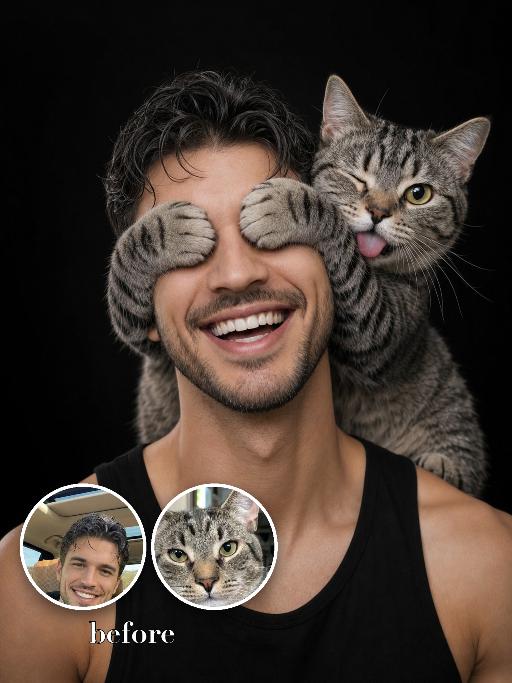
Cover Eyes Prank AI effects generated image

Cover Eyes Prank

Use the two uploaded images as the only identity references for the two main subjects. Create a photorealistic playful studio portrait of exactly two subjects: one uploaded human subject one uploaded cat The cat is sitting securely on the human subject’s shoulder, close to the human’s head, in a playful affectionate pose. The cat wraps both front paws across the human’s eyes, clearly covering the eyes. The cat is also sticking its tongue out, creating a funny and cheeky expression. The human subject is shown in a tight chest-up portrait, wearing a black sleeveless top, against a clean black studio background. The human is laughing broadly, with a joyful, natural, open smile. The human’s eyes must be hidden by the cat’s paws, not visible. The head may tilt slightly and naturally toward the cat, enhancing the playful and affectionate interaction. The composition should be tight and close, with both subjects filling most of the frame. The cat and the human must remain two clearly separate, fully recognizable subjects. Do not merge them, distort them, or create unnatural anatomy. Strictly preserve the identity and recognizable features of each uploaded subject. For the human subject, preserve facial identity, hair color, hairstyle, skin tone, facial structure, and general age. For the cat, preserve species, breed, coat color, fur pattern, markings, facial structure, eye color, and recognizable features. Do not preserve the original uploaded pose or expression. Actively change the pose, facial expression, gaze direction, and interaction so they match this playful shoulder portrait concept. Use soft studio lighting, crisp photorealistic detail, natural skin and fur texture, realistic anatomy, premium portrait photography quality, and a funny affectionate mood. Vertical 3:4 composition. Photorealistic, sharp detail, close framing. No extra people, no extra animals, no text, no logo, no watermark.

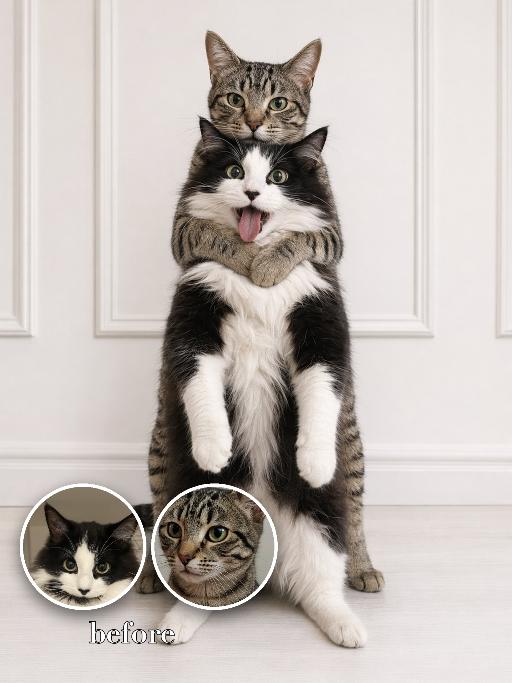
Back hug AI effects generated image

Back hug

Recreate the gameplay reference as a funny two-cat back-hug photo with matching expressions. The first uploaded cat stands upright in front, full body visible, front paws hanging down, eyes wide, mouth open with tongue sticking out clearly in a silly overwhelmed expression. The second uploaded cat stands directly behind, calm and slightly smug, wrapping both front paws around the front cat's upper chest/neck like a possessive hug. Clean white paneled wall and pale floor, simple indoor snapshot texture, both pets facing camera, vertical full-body crop. The tongue-out expression on the front pet is essential. Preserve each uploaded pet's actual species, breed, coat color, markings, ear shape, eye color, muzzle and facial structure. Do not assume a fixed breed, color, or species from the reference image; adapt the reference gameplay to the uploaded pet. Actively change pose, facial expression, gaze direction, camera angle and styling to match the gameplay reference. No extra animals beyond the requested uploaded pets. No human face unless explicitly requested; anonymous hands are allowed only when the gameplay needs hands. No brand logos, no watermark, no random readable text. Match the gameplay reference very closely in composition, crop, texture, lighting, pet expression, visible face angle, props, background, and image quality. Vertical 3:4, photorealistic unless the reference is a poster or sticker layout.

Load more

Next-Gen Multi-Model AI Video Architecture

Vivago AI isn't just one engine—it’s a unified hub for the world’s most advanced video AI. Whether you need cinematic realism or high-speed social content, we provide the right model for your creative vision.

Free Generate

Beauty and Dolphins

Vacation Time

Stellar Tear

Fish Tank Supervisor

Cinematic Quality & Precision Control

Enables 4K resolution with multi-lens motion control, generating delicate scene via text prompts for customized cinematography.​

TRY NOW

Dynamic AV Sync

Auto-generates original audio to avoid copyright issues. Build 3D immersive environments through layered sound design automatically.

TRY NOW

OpenAI Sora 2

​Advanced visual storytelling with unparalleled physics and consistency.

TRY NOW

Kling v2.6 Pro

Industry-leading cinematic image animation and motion control.

TRY NOW

Google Veo 3 & 3.1

Ultra-fast generation with enhanced realism for creative workflows.

TRY NOW

Vivago AI 2.0

Our proprietary model optimized for efficiency, speed, and cost-effective generation.

TRY NOW

Users' Voice

We listen carefully to the opinions of every user.
Free Generate
Contact Us
I tried the Lip Sync feature inside Vivago.ai’s AI Video Generator for my educational podcast, and the results were stunning! The avatar's lip movements perfectly matched my audio recording, creating a professional AI-generated video without complex editing. Compared with tools like OpenAI Sora 2 and Google Veo 3.1, Vivago Image-to-Video delivers fast, studio-quality results online. It saved me hours of post-production work.
ElenaM (Spain)
Vivago’s Image-to-Video AI transformed my marketing workflow. I uploaded a product image and described the launch scene in text, and it generated a 10-second cinematic AI video with background music and dynamic visuals. The output quality rivals Kling v2.6 Pro and Google Veo 3 Fast. It’s now my go-to AI video generator for social media ads and product campaigns.
KenjiT (Japan)
As a digital artist, I use Vivago.ai 2.0 daily for Image-to-Image and AI Image-to-Video creation. The e-book covers and animated visuals I generate for clients look cinematic and professional. Unlike many standalone AI tools, Vivago integrates multiple leading models into one platform, making it easier to create copyright-safe AI images and videos for publishing.
ChenL (China)
I tried the Lip Sync feature inside Vivago.ai’s AI Video Generator for my educational podcast, and the results were stunning! The avatar's lip movements perfectly matched my audio recording, creating a professional AI-generated video without complex editing. Compared with tools like OpenAI Sora 2 and Google Veo 3.1, Vivago Image-to-Video delivers fast, studio-quality results online. It saved me hours of post-production work.
ElenaM (Spain)
Vivago’s Image-to-Video AI transformed my marketing workflow. I uploaded a product image and described the launch scene in text, and it generated a 10-second cinematic AI video with background music and dynamic visuals. The output quality rivals Kling v2.6 Pro and Google Veo 3 Fast. It’s now my go-to AI video generator for social media ads and product campaigns.
KenjiT (Japan)
As a digital artist, I use Vivago.ai 2.0 daily for Image-to-Image and AI Image-to-Video creation. The e-book covers and animated visuals I generate for clients look cinematic and professional. Unlike many standalone AI tools, Vivago integrates multiple leading models into one platform, making it easier to create copyright-safe AI images and videos for publishing.
ChenL (China)
I absolutely love Vivago’s AI Image-to-Video Generator. As a travel blogger, static images often fail to capture real atmosphere, but Vivago helps me turn photos into vivid cinematic AI videos with motion effects. It feels comparable to OpenAI Sora 2 and Google Veo 3.1, but more accessible and faster for creators who need high-quality AI videos online.
LiamK (Australia)
I tried the Lip Sync feature inside Vivago.ai’s AI Video Generator for my educational podcast, and the results were stunning! The avatar's lip movements perfectly matched my audio recording, creating a professional AI-generated video without complex editing. Compared with tools like OpenAI Sora 2 and Google Veo 3.1, Vivago Image-to-Video delivers fast, studio-quality results online. It saved me hours of post-production work.
ElenaM (Spain)
Vivago’s Image-to-Video AI transformed my marketing workflow. I uploaded a product image and described the launch scene in text, and it generated a 10-second cinematic AI video with background music and dynamic visuals. The output quality rivals Kling v2.6 Pro and Google Veo 3 Fast. It’s now my go-to AI video generator for social media ads and product campaigns.
KenjiT (Japan)
As a digital artist, I use Vivago.ai 2.0 daily for Image-to-Image and AI Image-to-Video creation. The e-book covers and animated visuals I generate for clients look cinematic and professional. Unlike many standalone AI tools, Vivago integrates multiple leading models into one platform, making it easier to create copyright-safe AI images and videos for publishing.
ChenL (China)
I absolutely love Vivago’s AI Image-to-Video Generator. As a travel blogger, static images often fail to capture real atmosphere, but Vivago helps me turn photos into vivid cinematic AI videos with motion effects. It feels comparable to OpenAI Sora 2 and Google Veo 3.1, but more accessible and faster for creators who need high-quality AI videos online.
LiamK (Australia)
Using Vivago.ai’s Image-to-Video AI has greatly enhanced my classroom teaching. I transform textbook notes into historical AI videos with cinematic filters and dynamic animations. Compared with tools like Kling v2.6 Pro and Google Veo 3 Fast, Vivago offers faster generation and easier parameter control for educators who need reliable AI video creation.
RajivG (India)
I frequently create AI videos on Vivago and publish them on TikTok and YouTube Shorts. The AI video templates and trending content ideas help me produce viral-ready clips quickly. With Vivago’s integrated models—including advanced video engines similar to OpenAI Sora 2—I can generate anime-style and cinematic social media videos that drive high engagement.
MarieJ (Spain)
What attracts me most about Vivago.ai is not only the powerful AI Video Generator but also the active AIGC creator community. It combines AI Image-to-Video, Text-to-Video, and leading model integrations like Google Veo 3.1 into one creative platform.
TomW (India)
At first, I was hesitant about using AI video tools. But after trying Vivago Image-to-Video, I realized how easy it is to create professional AI-generated videos online. I just upload an image, add a short prompt, and adjust a few settings. The results are cinematic and copyright-safe, which is essential for commercial projects.
HectorC (Mexico)
Using Vivago.ai’s Image-to-Video AI has greatly enhanced my classroom teaching. I transform textbook notes into historical AI videos with cinematic filters and dynamic animations. Compared with tools like Kling v2.6 Pro and Google Veo 3 Fast, Vivago offers faster generation and easier parameter control for educators who need reliable AI video creation.
RajivG (India)
I frequently create AI videos on Vivago and publish them on TikTok and YouTube Shorts. The AI video templates and trending content ideas help me produce viral-ready clips quickly. With Vivago’s integrated models—including advanced video engines similar to OpenAI Sora 2—I can generate anime-style and cinematic social media videos that drive high engagement.
MarieJ (Spain)
What attracts me most about Vivago.ai is not only the powerful AI Video Generator but also the active AIGC creator community. It combines AI Image-to-Video, Text-to-Video, and leading model integrations like Google Veo 3.1 into one creative platform.
TomW (India)
At first, I was hesitant about using AI video tools. But after trying Vivago Image-to-Video, I realized how easy it is to create professional AI-generated videos online. I just upload an image, add a short prompt, and adjust a few settings. The results are cinematic and copyright-safe, which is essential for commercial projects.
HectorC (Mexico)