More From VIVAGO AI

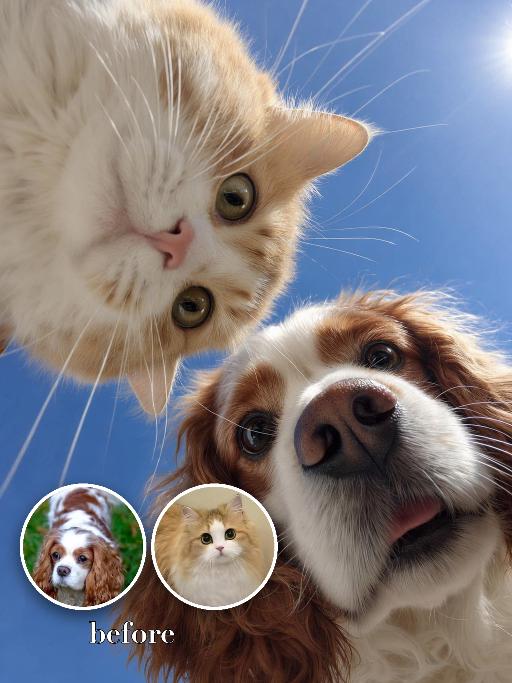
Looking Down AI effects generated image

Looking Down

"Use the two uploaded images as the only identity references for the two main subjects. Create a photorealistic low-angle upward-looking selfie portrait of exactly two uploaded subjects: the uploaded dog and the uploaded cat. The camera is positioned very low below them, pointing straight upward, so both subjects lean over the lens from opposite sides and look downward into it. Place the dog on one side of the frame and the cat on the other side, both leaning inward toward the center. Their noses are very close to the lens, creating a playful exaggerated perspective. Both subjects should have curious, funny, lively expressions, as if they are investigating the camera below them. Use an ultra-wide selfie perspective with slight fisheye-style lens distortion. The noses may appear larger and closer to the camera, while the eyes, muzzle, ears, and facial features remain clearly recognizable and natural. The distortion should feel playful and realistic, not broken or grotesque. Keep both uploaded subjects as two completely separate, fully recognizable individuals. Do not merge, morph, splice, fuse, or create any hybrid appearance. Strictly preserve each uploaded subject’s identity and recognizable features. For animal subjects, preserve species, breed, coat color, fur pattern, markings, eye color, ear shape, nose shape, muzzle structure, facial proportions, and overall recognizability. For human subjects, preserve facial identity, hair color, skin tone, facial structure, and general age. Do not preserve the original uploaded pose or expression. Actively change the facial expression, gaze direction, body pose, and interaction so both subjects fit this playful low-angle selfie composition naturally. Use a clean bright blue sky background with no distracting elements. The overall image should feel fresh, funny, dynamic, and visually striking."

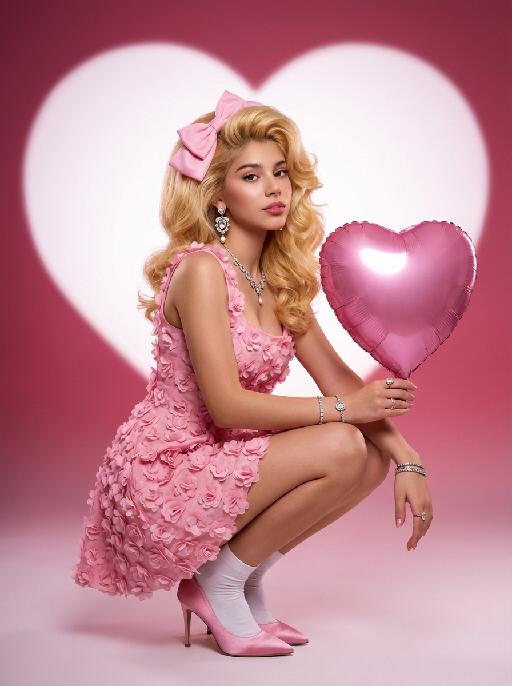
Heart Shape AI effects generated image

Heart Shape

Medium-close-up shot: An extremely charming portrait of a person. In the uploaded picture, the person's facial features, gender and age remain unchanged, but their hairstyle is changed to resemble Marilyn Monroe's golden hair. The facial makeup is exquisite, with natural skin smoothing, and they are wearing a large pink bow. They are gracefully squatting on the ground, holding a shiny pink heart-shaped balloon in their hand. They are wearing a pink retro one-piece dress with three-dimensional floral appliques, wearing white ankle socks, and standing on pink satin high heels. They are adorned with luxurious high-end custom accessories. The background is a gradient color from deep pink to light pink. Behind her is a huge, soft, bright white heart-shaped light projection in a film festival color scheme, with a super realistic style, representing avant-garde photography art.

Cool Commute AI effects generated image

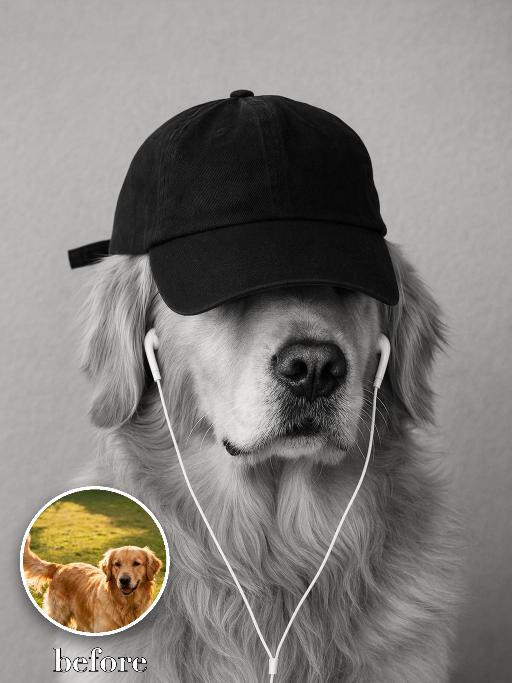
Cool Commute

"Recreate the reference as a black-and-white cool pet portrait. The uploaded dog faces forward wearing a black baseball cap pulled low over the eyes and white wired earbuds hanging down from both ears. Plain gray studio background, monochrome photo, calm serious expression, chest-up crop, soft fur detail, minimal streetwear attitude. Preserve each uploaded pet's actual species, breed, coat color, markings, ear shape, eye color, muzzle and facial structure. Do not assume a fixed breed, color, or species from the reference image; adapt the reference gameplay to the uploaded pet. Actively change pose, facial expression, gaze direction, camera angle and styling to match the gameplay reference. No extra animals beyond the requested uploaded pets. No human face unless explicitly requested; anonymous hands are allowed only when the gameplay needs hands. No brand logos, no watermark, no random readable text. Match the gameplay reference very closely in composition, crop, texture, lighting, pet expression, visible face angle, props, background, and image quality. Vertical 3:4, photorealistic unless the reference is a poster or sticker layout. "

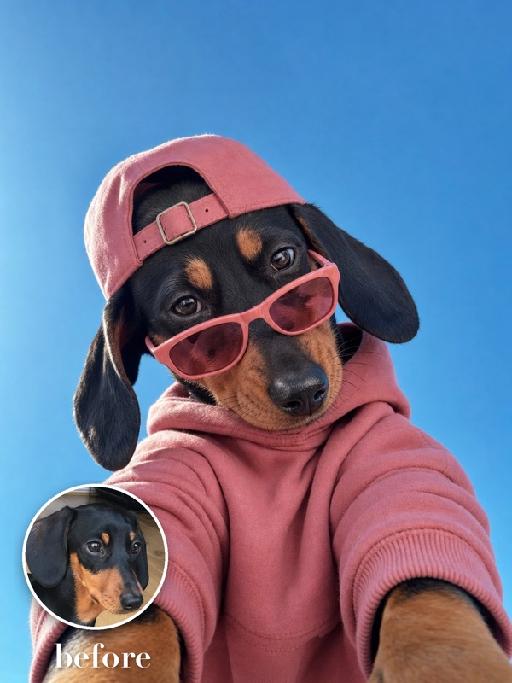
Pink Hoodie AI effects generated image

Pink Hoodie

Create an extreme low-angle wide-lens selfie matching the reference. The uploaded pet leans over the camera against a saturated blue sky, wearing a dusty-pink hoodie, a backwards pink baseball cap and narrow pink sunglasses lowered slightly on the nose. The head dominates the lower frame; playful cool expression and strong foreshortening. The subject remains an animal throughout. No people or human hands. No real brands, logos, watermarks or readable text. Accurately preserve the uploaded pet's species, breed, coat color and markings, ear shape, muzzle and face structure, eye color and body proportions. Keep it instantly recognisable as the same animal; change only pose, scene, clothing and accessories. Vertical 3:4, photorealistic, crisp detail, with the pet as the unmistakable main subject.

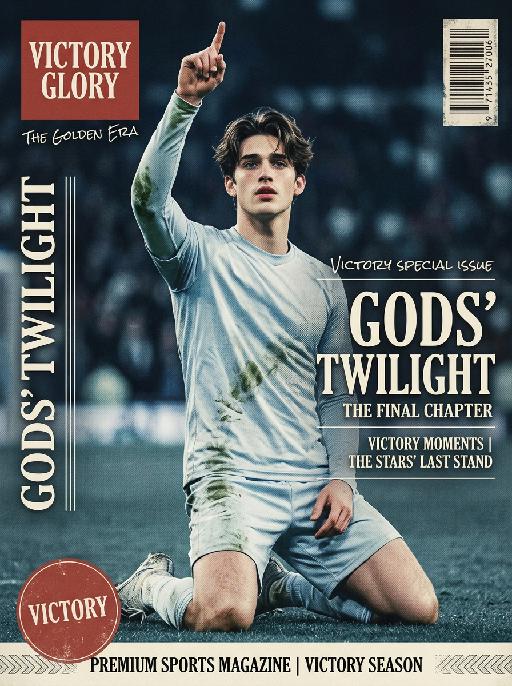
Soccer Glory AI effects generated image

Soccer Glory

"Vertical retro art sports magazine cover, vintage 1990s print aesthetic, professional stadium sports photography, 8K ultra-high definition, print-level textured matte finish, cool-toned vintage color grading (muted ice blue, faded red, off-white), soft cool stadium lighting, sharp focus on the central subject, shallow depth of field with blurred background, no lens distortion, retro offset print layout. Subject & Scene (unchanged): The subject retains 100% of the original facial features, hairstyle, skin tone, and physical characteristics, no gender-specific modifiers. Pose matches reference image 2 exactly: kneeling on the right knee, left leg bent for support, right arm raised with index finger pointing up, left hand resting naturally on the thigh. Wearing cold-toned long-sleeve jersey without any emblems or logos on the chest, subtle grass stains on the fabric. Background is a blurred cool-toned stadium night match scene with a subtle vintage grain effect, no tournament branding or official marks anywhere. Typography & Layout (Retro Print Art Style): Top Left: Vintage solid red square logo, printed with white serif text ""VICTORY GLORY"", paired with small handwritten-style text ""THE GOLDEN ERA"" below. Left Vertical Area: Vintage white serif uppercase letters ""GODS’ TWILIGHT"", arranged vertically with moderate letter spacing, paired with thin retro decorative lines, with subtle halftone print texture. Right Central Area: Scattered layout divided by thin retro decorative lines, three parts in total: Top: Small white handwritten-style text ""VICTORY SPECIAL ISSUE"" with subtle faded effect. Middle: Large vintage serif bold text ""GODS’ TWILIGHT"", paired with small English serif text ""THE FINAL CHAPTER"" below, with subtle halftone dot texture on the edges. Bottom: Two lines of small white serif text ""VICTORY MOMENTS | THE STARS’ LAST STAND"", separated by thin retro decorative lines. Bottom Left: Faded red circular logo, printed with white serif text ""VICTORY"" with subtle worn texture. Bottom Banner: Vintage off-white full-width strip, printed with black serif text ""PREMIUM SPORTS MAGAZINE | VICTORY SEASON"", paired with retro decorative patterns, with subtle embossed print texture. Top Right: Vintage worn barcode with subtle halftone texture. Technical Rules: No distorted text or AI artifacts, the vintage halftone effect is moderate and does not obscure the subject, the combination of serif and handwritten fonts is harmonious, the overall tone is retro and cool, with a high-end vintage print texture that is different from ordinary modern magazines, no official sports logos, event emblems, trophy symbols or brand sensitive marks present in the whole picture."

Load more

Next-Gen Multi-Model AI Video Architecture

Vivago AI isn't just one engine—it’s a unified hub for the world’s most advanced video AI. Whether you need cinematic realism or high-speed social content, we provide the right model for your creative vision.

Free Generate

Beauty and Dolphins

Vacation Time

Stellar Tear

Fish Tank Supervisor

Cinematic Quality & Precision Control

Enables 4K resolution with multi-lens motion control, generating delicate scene via text prompts for customized cinematography.​

TRY NOW

Dynamic AV Sync

Auto-generates original audio to avoid copyright issues. Build 3D immersive environments through layered sound design automatically.

TRY NOW

OpenAI Sora 2

​Advanced visual storytelling with unparalleled physics and consistency.

TRY NOW

Kling v2.6 Pro

Industry-leading cinematic image animation and motion control.

TRY NOW

Google Veo 3 & 3.1

Ultra-fast generation with enhanced realism for creative workflows.

TRY NOW

Vivago AI 2.0

Our proprietary model optimized for efficiency, speed, and cost-effective generation.

TRY NOW

Users' Voice

We listen carefully to the opinions of every user.
Free Generate
Contact Us
I tried the Lip Sync feature inside Vivago.ai’s AI Video Generator for my educational podcast, and the results were stunning! The avatar's lip movements perfectly matched my audio recording, creating a professional AI-generated video without complex editing. Compared with tools like OpenAI Sora 2 and Google Veo 3.1, Vivago Image-to-Video delivers fast, studio-quality results online. It saved me hours of post-production work.
ElenaM (Spain)
Vivago’s Image-to-Video AI transformed my marketing workflow. I uploaded a product image and described the launch scene in text, and it generated a 10-second cinematic AI video with background music and dynamic visuals. The output quality rivals Kling v2.6 Pro and Google Veo 3 Fast. It’s now my go-to AI video generator for social media ads and product campaigns.
KenjiT (Japan)
As a digital artist, I use Vivago.ai 2.0 daily for Image-to-Image and AI Image-to-Video creation. The e-book covers and animated visuals I generate for clients look cinematic and professional. Unlike many standalone AI tools, Vivago integrates multiple leading models into one platform, making it easier to create copyright-safe AI images and videos for publishing.
ChenL (China)
I tried the Lip Sync feature inside Vivago.ai’s AI Video Generator for my educational podcast, and the results were stunning! The avatar's lip movements perfectly matched my audio recording, creating a professional AI-generated video without complex editing. Compared with tools like OpenAI Sora 2 and Google Veo 3.1, Vivago Image-to-Video delivers fast, studio-quality results online. It saved me hours of post-production work.
ElenaM (Spain)
Vivago’s Image-to-Video AI transformed my marketing workflow. I uploaded a product image and described the launch scene in text, and it generated a 10-second cinematic AI video with background music and dynamic visuals. The output quality rivals Kling v2.6 Pro and Google Veo 3 Fast. It’s now my go-to AI video generator for social media ads and product campaigns.
KenjiT (Japan)
As a digital artist, I use Vivago.ai 2.0 daily for Image-to-Image and AI Image-to-Video creation. The e-book covers and animated visuals I generate for clients look cinematic and professional. Unlike many standalone AI tools, Vivago integrates multiple leading models into one platform, making it easier to create copyright-safe AI images and videos for publishing.
ChenL (China)
I absolutely love Vivago’s AI Image-to-Video Generator. As a travel blogger, static images often fail to capture real atmosphere, but Vivago helps me turn photos into vivid cinematic AI videos with motion effects. It feels comparable to OpenAI Sora 2 and Google Veo 3.1, but more accessible and faster for creators who need high-quality AI videos online.
LiamK (Australia)
I tried the Lip Sync feature inside Vivago.ai’s AI Video Generator for my educational podcast, and the results were stunning! The avatar's lip movements perfectly matched my audio recording, creating a professional AI-generated video without complex editing. Compared with tools like OpenAI Sora 2 and Google Veo 3.1, Vivago Image-to-Video delivers fast, studio-quality results online. It saved me hours of post-production work.
ElenaM (Spain)
Vivago’s Image-to-Video AI transformed my marketing workflow. I uploaded a product image and described the launch scene in text, and it generated a 10-second cinematic AI video with background music and dynamic visuals. The output quality rivals Kling v2.6 Pro and Google Veo 3 Fast. It’s now my go-to AI video generator for social media ads and product campaigns.
KenjiT (Japan)
As a digital artist, I use Vivago.ai 2.0 daily for Image-to-Image and AI Image-to-Video creation. The e-book covers and animated visuals I generate for clients look cinematic and professional. Unlike many standalone AI tools, Vivago integrates multiple leading models into one platform, making it easier to create copyright-safe AI images and videos for publishing.
ChenL (China)
I absolutely love Vivago’s AI Image-to-Video Generator. As a travel blogger, static images often fail to capture real atmosphere, but Vivago helps me turn photos into vivid cinematic AI videos with motion effects. It feels comparable to OpenAI Sora 2 and Google Veo 3.1, but more accessible and faster for creators who need high-quality AI videos online.
LiamK (Australia)
Using Vivago.ai’s Image-to-Video AI has greatly enhanced my classroom teaching. I transform textbook notes into historical AI videos with cinematic filters and dynamic animations. Compared with tools like Kling v2.6 Pro and Google Veo 3 Fast, Vivago offers faster generation and easier parameter control for educators who need reliable AI video creation.
RajivG (India)
I frequently create AI videos on Vivago and publish them on TikTok and YouTube Shorts. The AI video templates and trending content ideas help me produce viral-ready clips quickly. With Vivago’s integrated models—including advanced video engines similar to OpenAI Sora 2—I can generate anime-style and cinematic social media videos that drive high engagement.
MarieJ (Spain)
What attracts me most about Vivago.ai is not only the powerful AI Video Generator but also the active AIGC creator community. It combines AI Image-to-Video, Text-to-Video, and leading model integrations like Google Veo 3.1 into one creative platform.
TomW (India)
At first, I was hesitant about using AI video tools. But after trying Vivago Image-to-Video, I realized how easy it is to create professional AI-generated videos online. I just upload an image, add a short prompt, and adjust a few settings. The results are cinematic and copyright-safe, which is essential for commercial projects.
HectorC (Mexico)
Using Vivago.ai’s Image-to-Video AI has greatly enhanced my classroom teaching. I transform textbook notes into historical AI videos with cinematic filters and dynamic animations. Compared with tools like Kling v2.6 Pro and Google Veo 3 Fast, Vivago offers faster generation and easier parameter control for educators who need reliable AI video creation.
RajivG (India)
I frequently create AI videos on Vivago and publish them on TikTok and YouTube Shorts. The AI video templates and trending content ideas help me produce viral-ready clips quickly. With Vivago’s integrated models—including advanced video engines similar to OpenAI Sora 2—I can generate anime-style and cinematic social media videos that drive high engagement.
MarieJ (Spain)
What attracts me most about Vivago.ai is not only the powerful AI Video Generator but also the active AIGC creator community. It combines AI Image-to-Video, Text-to-Video, and leading model integrations like Google Veo 3.1 into one creative platform.
TomW (India)
At first, I was hesitant about using AI video tools. But after trying Vivago Image-to-Video, I realized how easy it is to create professional AI-generated videos online. I just upload an image, add a short prompt, and adjust a few settings. The results are cinematic and copyright-safe, which is essential for commercial projects.
HectorC (Mexico)