More From VIVAGO AI

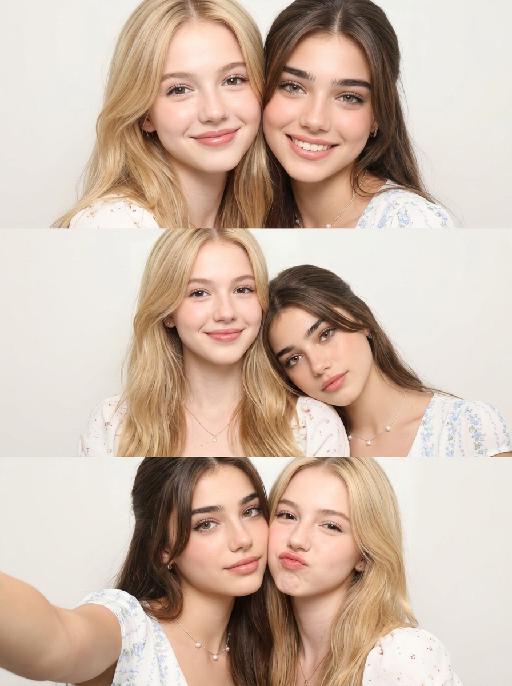
Studio Strip AI effects generated image

Studio Strip

"Use the uploaded image as the only identity reference. Create a Korean-style photo booth selfie collage featuring the same two people from the uploaded image. Show both people together in all three vertically stacked portrait shots. Arrange the three shots from top to bottom like a clean Korean photo booth strip. Do not separate them into individual solo portraits. Strictly preserve both people’s original identities, facial features, hairstyles, expressions, clothing style, relationship dynamic, and overall appearance. Style: Korean ID photo and selfie booth aesthetic, soft studio lighting, clean pale background, natural skin texture, gentle contrast, slightly cool and clean color tone, elegant intimate mood, minimal composition. Each of the three photo frames must show a different two-person pose and a different interaction. The poses should feel natural, close, and varied, like a real Korean photo booth session. Include a mix of close-up and half-body framing. The three shots should not look repetitive. Possible pose directions: - one shot can show both people side by side, shoulders close, looking at the camera - one shot can show one person slightly in front while the other leans in from behind or from the side - one shot can show a more playful or affectionate pose, such as cheek-to-cheek, head leaning together, one hand on the other person’s shoulder, or a soft hugging pose Allow each frame to have a clearly different pose, different closeness, and slightly different facial expression, while keeping the overall mood elegant, intimate, and natural. The three frames should be stacked vertically with clean spacing and no large blank area. Do not add any outer border, white frame, white margin, sticker edge, or extra blank canvas around the photo strip. The collage should feel tightly composed and clean. No text, no stickers, no logo, no watermark."


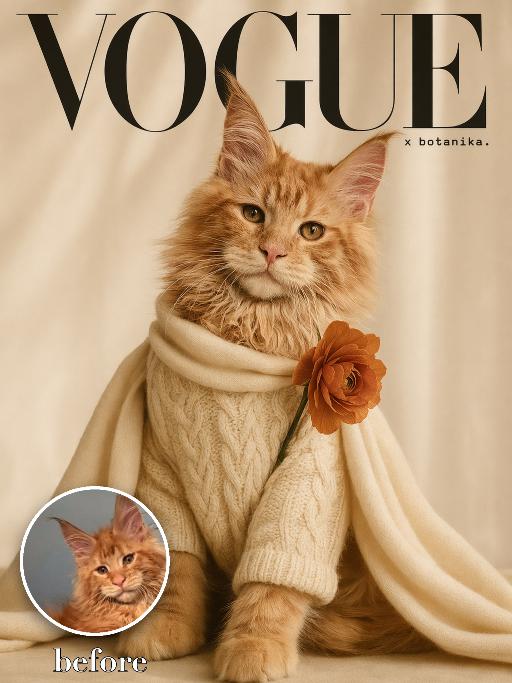
Flower Vogue AI effects generated image

Flower Vogue

Recreate the reference as a warm VOGUE botanical fashion cover. The uploaded cat sits three-quarter/front-facing in a cream knitted sweater and flowing ivory cape or shawl, one flower stem with an orange blossom held near the chest, regal calm expression. Soft golden studio lighting, cream curtain background, large black 'VOGUE' masthead at the top and tiny text 'x botanika.' near upper right. Dreamy editorial print texture, warm beige palette. Preserve the uploaded pet's actual species, breed, coat color, markings, ear shape, eye color, muzzle and facial structure. Do not assume a fixed breed, color, or species from the reference image; adapt the exact gameplay to the uploaded pet. Actively change pose, facial expression, gaze direction, camera angle, wardrobe and styling to match the gameplay reference. Match the gameplay reference very closely in composition, crop, texture, lighting, visible pet angle, props, background, graphic layout and image quality. Vertical 3:4. Keep only the text explicitly requested in the prompt; do not add unrelated logos, watermarks or random words.

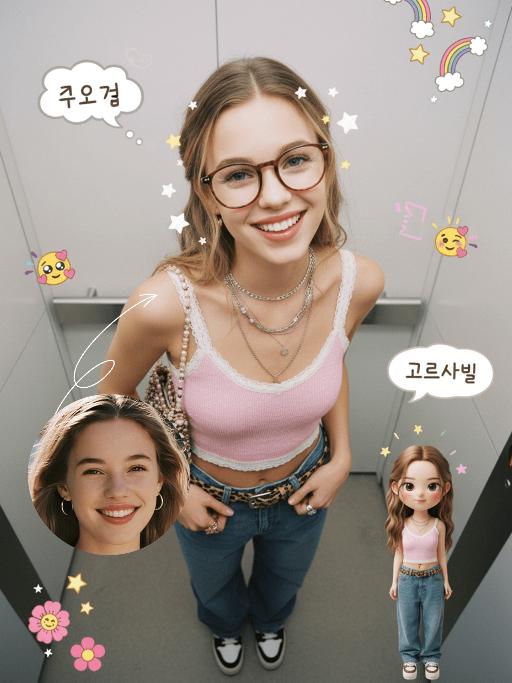
Emoji Plog AI effects generated image

Emoji Plog

"The figure from the uploaded image (unchanged facial features, age and gender), create an image in a portrait photography style: a realistic Korean-style sweet and cool young girl (wearing brown-framed glasses, trendy Y2K clothing, and Y2K accessories including necklaces and rings) stands in the center of the frame, shot from a bird’s-eye view, with natural facial retouching and a fresh sheer makeup look. Her head takes up a large proportion of the frame with a strong sense of perspective, featuring the style of casual Instagram selfies plus a subtle decorative texture of cute Instagram emojis. The figure occupies 70% of the frame as the main subject; the negative space is dotted with cute light decorations such as colorful stars and doodles (iPhone emojis). In the bottom right corner is a large, cute 3D cartoon doppelgänger of the girl with the same outfit and pose, accounting for a quarter of the entire frame. Add white/yellow star stickers, cloud emoji speech bubbles with cute Korean text, and a number of lovely emojis to the frame. The scene is set inside an elevator with soft indoor natural light; the decorative elements include white/yellow stars. The work features an avant-garde fashion photography style and a magazine art cover aesthetic, with even soft indoor natural light and no harsh shadows, creating a warm and daily atmosphere. The main color palette is a soft low-saturation scheme (white/light gray/black), accented with bright shades of pink/yellow/leopard brown. The overall image is clean and bright, with a fresh film-like filter effect."

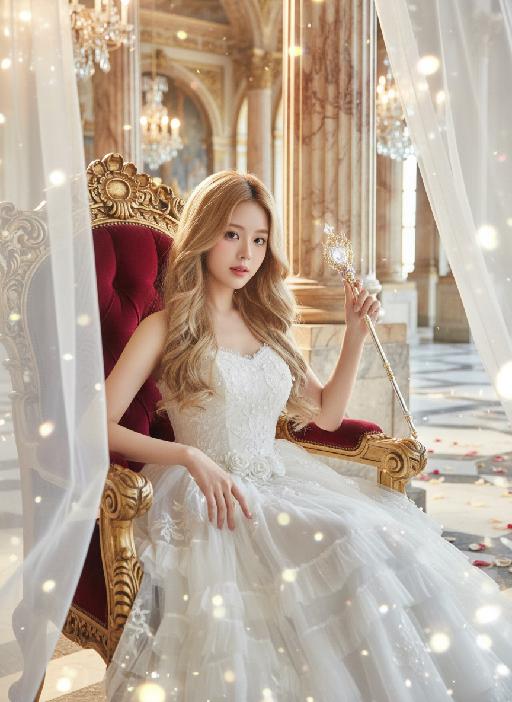
Princess AI effects generated image

Princess

Strictly lock the facial features of the uploaded portrait (completely preserve facial contours, native skin tone, hairstyle and age); medium shot (bust-up), young girl with light golden long curly hair, Korean sweet style looks, delicate facial features with clear nude makeup and light pink blush, proud and elegant princess demeanor, sitting gracefully on an ornate throne with one hand resting lightly on the armrest and the other gently holding a delicate scepter/flower, head tilted slightly with a haughty yet gentle gaze; wearing a white strapless tulle dress with multi-layered flowing tulle skirt, delicate white lace embroidery and subtle pearl decorations, exuding a noble and dreamy fairy-tale princess aura; background is a magnificent and dreamy royal palace hall with towering marble columns, intricate golden carvings, soft warm chandelier light casting a glowing halo around her, sheer white tulle curtains fluttering gently, scattered rose petals on the marble floor, distant palace arches blurred into a soft bokeh effect, air filled with sparkling light particles; overall **dreamy fairy-tale + French retro + royal palace princess atmosphere photo, soft and ethereal ambient light, warm romantic film texture, high saturation dreamy tones, cinematic lighting with glowing rim light, motion blur (light particles/curtains), rich texture details, 8K ultra-clear, realistic human photography, flawless, full of magical and noble royal princess charm

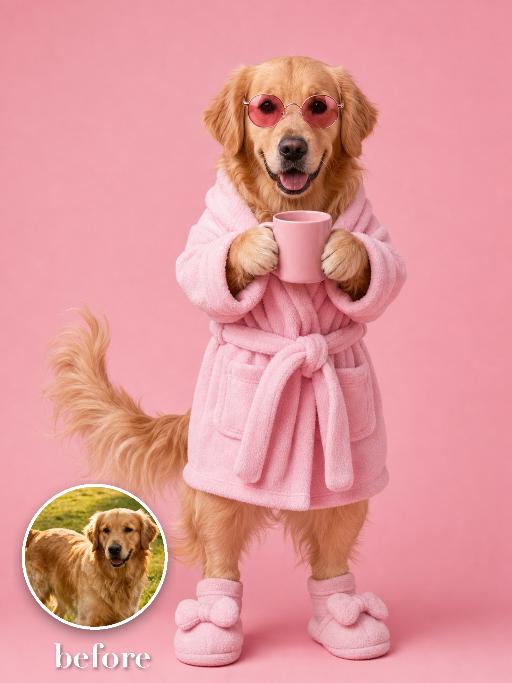
Bathroom Fashion AI effects generated image

Bathroom Fashion

Transform the uploaded pet into a full-body pastel pink fashion-doll portrait on a seamless pink background: the pet stands upright in a plush pink bathrobe or dress-like pet outfit, wearing small pink sunglasses, holding an unbranded pink cup with both front paws, with soft pink booties or plush lower-body styling if appropriate. Keep a cute toy-fashion editorial mood and make the whole outfit visible. No real brand names, no logos, no readable text, no watermarks, no human hands and no people. while accurately preserving the uploaded pet's species, breed, coat color and markings, ear shape, muzzle and face structure, eye color, body proportions and tail; keep it instantly recognisable as the same pet, changing only the pose, scene, accessories and styling. Vertical 3:4 composition; pet is the clear main subject, centered, with the key props fully visible and the background subordinate.

Bathroom Dance

The pet in the reference picture is standing on both feet with a happy expression. Strict movements: The pet's body quickly and slightly twists to the left 4 times, and then quickly and slightly twists to the right 4 times. The two front paws of the pet are slightly open, and the overall movement is smooth.The pet's head is wrapped in a white towel, and a short white towel is wrapped around the pet's waist, with a damp and furry water vapor texture left by bathing on the body. The background is a high-end bathroom, with clean light colored bathroom tiles behind pets and a semi transparent frosted glass door. There is a faint mist on the frosted glass shower door, which has a clean and warm texture.The camera adopts a frontal mid shot macro shooting, with a frontal perspective and a head up lens, capturing its cheerful dance moves, agile black eyes, and wet black nose, creating a warm and cozy image.

Image Quality Restoration

Retouch this image. Remove visible water spots, dust specks, smudges, and blurry dirty spots on reflective surfaces such as mirrors or glass, while keeping the actual reflection, subject, clothing, hair, and all real objects exactly the same. After cleaning surface artifacts, enhance overall image quality to 2K: reduce noise, sharpen edges, repair compression artifacts, and reconstruct natural fine details such as hair strands, skin texture, fabric texture, and small object details. Do not change the person's appearance, expression, identity, or pose. Do not add, remove, or alter any real objects. Do not change the overall colors, lighting style, or atmosphere. Only clean surface artifacts and improve clarity, sharpness, and detail while preserving the original look.

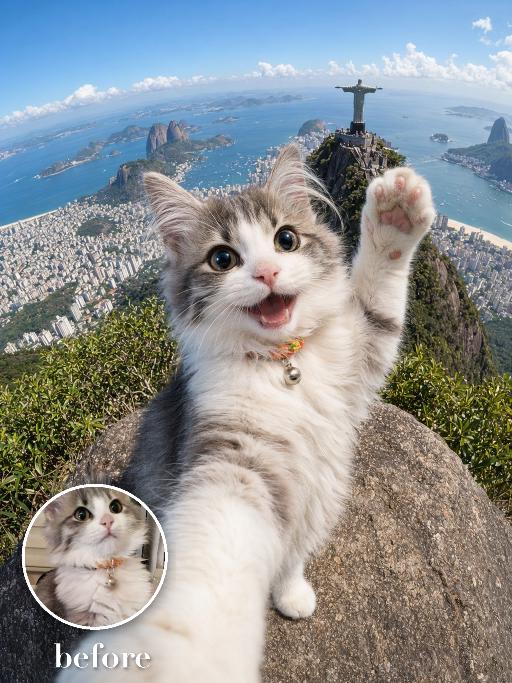
Check-in at Christ AI effects generated image

Check-in at Christ

Create an extreme wide-angle travel selfie of the uploaded pet at a high scenic landmark viewpoint: the pet is very close to the camera, smiling with one front paw raised as if waving, while a famous mountaintop city panorama, ocean bay and distant statue-like monument appear far behind. Use action-camera perspective, bright daylight, dramatic tourist snapshot energy, clear sky and depth. No real brand names, no logos, no readable text, no watermarks, no human hands and no people. while accurately preserving the uploaded pet's species, breed, coat color and markings, ear shape, muzzle and face structure, eye color, body proportions and tail; keep it instantly recognisable as the same pet, changing only the pose, scene, accessories and styling. Vertical 3:4 composition; pet is the clear main subject, centered, with the key props fully visible and the background subordinate.

Load more

Next-Gen Multi-Model AI Video Architecture

Vivago AI isn't just one engine—it’s a unified hub for the world’s most advanced video AI. Whether you need cinematic realism or high-speed social content, we provide the right model for your creative vision.

Free Generate

Beauty and Dolphins

Vacation Time

Stellar Tear

Fish Tank Supervisor

Cinematic Quality & Precision Control

Enables 4K resolution with multi-lens motion control, generating delicate scene via text prompts for customized cinematography.​

TRY NOW

Dynamic AV Sync

Auto-generates original audio to avoid copyright issues. Build 3D immersive environments through layered sound design automatically.

TRY NOW

OpenAI Sora 2

​Advanced visual storytelling with unparalleled physics and consistency.

TRY NOW

Kling v2.6 Pro

Industry-leading cinematic image animation and motion control.

TRY NOW

Google Veo 3 & 3.1

Ultra-fast generation with enhanced realism for creative workflows.

TRY NOW

Vivago AI 2.0

Our proprietary model optimized for efficiency, speed, and cost-effective generation.

TRY NOW

Users' Voice

We listen carefully to the opinions of every user.
Free Generate
Contact Us
I tried the Lip Sync feature inside Vivago.ai’s AI Video Generator for my educational podcast, and the results were stunning! The avatar's lip movements perfectly matched my audio recording, creating a professional AI-generated video without complex editing. Compared with tools like OpenAI Sora 2 and Google Veo 3.1, Vivago Image-to-Video delivers fast, studio-quality results online. It saved me hours of post-production work.
ElenaM (Spain)
Vivago’s Image-to-Video AI transformed my marketing workflow. I uploaded a product image and described the launch scene in text, and it generated a 10-second cinematic AI video with background music and dynamic visuals. The output quality rivals Kling v2.6 Pro and Google Veo 3 Fast. It’s now my go-to AI video generator for social media ads and product campaigns.
KenjiT (Japan)
As a digital artist, I use Vivago.ai 2.0 daily for Image-to-Image and AI Image-to-Video creation. The e-book covers and animated visuals I generate for clients look cinematic and professional. Unlike many standalone AI tools, Vivago integrates multiple leading models into one platform, making it easier to create copyright-safe AI images and videos for publishing.
ChenL (China)
I tried the Lip Sync feature inside Vivago.ai’s AI Video Generator for my educational podcast, and the results were stunning! The avatar's lip movements perfectly matched my audio recording, creating a professional AI-generated video without complex editing. Compared with tools like OpenAI Sora 2 and Google Veo 3.1, Vivago Image-to-Video delivers fast, studio-quality results online. It saved me hours of post-production work.
ElenaM (Spain)
Vivago’s Image-to-Video AI transformed my marketing workflow. I uploaded a product image and described the launch scene in text, and it generated a 10-second cinematic AI video with background music and dynamic visuals. The output quality rivals Kling v2.6 Pro and Google Veo 3 Fast. It’s now my go-to AI video generator for social media ads and product campaigns.
KenjiT (Japan)
As a digital artist, I use Vivago.ai 2.0 daily for Image-to-Image and AI Image-to-Video creation. The e-book covers and animated visuals I generate for clients look cinematic and professional. Unlike many standalone AI tools, Vivago integrates multiple leading models into one platform, making it easier to create copyright-safe AI images and videos for publishing.
ChenL (China)
I absolutely love Vivago’s AI Image-to-Video Generator. As a travel blogger, static images often fail to capture real atmosphere, but Vivago helps me turn photos into vivid cinematic AI videos with motion effects. It feels comparable to OpenAI Sora 2 and Google Veo 3.1, but more accessible and faster for creators who need high-quality AI videos online.
LiamK (Australia)
I tried the Lip Sync feature inside Vivago.ai’s AI Video Generator for my educational podcast, and the results were stunning! The avatar's lip movements perfectly matched my audio recording, creating a professional AI-generated video without complex editing. Compared with tools like OpenAI Sora 2 and Google Veo 3.1, Vivago Image-to-Video delivers fast, studio-quality results online. It saved me hours of post-production work.
ElenaM (Spain)
Vivago’s Image-to-Video AI transformed my marketing workflow. I uploaded a product image and described the launch scene in text, and it generated a 10-second cinematic AI video with background music and dynamic visuals. The output quality rivals Kling v2.6 Pro and Google Veo 3 Fast. It’s now my go-to AI video generator for social media ads and product campaigns.
KenjiT (Japan)
As a digital artist, I use Vivago.ai 2.0 daily for Image-to-Image and AI Image-to-Video creation. The e-book covers and animated visuals I generate for clients look cinematic and professional. Unlike many standalone AI tools, Vivago integrates multiple leading models into one platform, making it easier to create copyright-safe AI images and videos for publishing.
ChenL (China)
I absolutely love Vivago’s AI Image-to-Video Generator. As a travel blogger, static images often fail to capture real atmosphere, but Vivago helps me turn photos into vivid cinematic AI videos with motion effects. It feels comparable to OpenAI Sora 2 and Google Veo 3.1, but more accessible and faster for creators who need high-quality AI videos online.
LiamK (Australia)
Using Vivago.ai’s Image-to-Video AI has greatly enhanced my classroom teaching. I transform textbook notes into historical AI videos with cinematic filters and dynamic animations. Compared with tools like Kling v2.6 Pro and Google Veo 3 Fast, Vivago offers faster generation and easier parameter control for educators who need reliable AI video creation.
RajivG (India)
I frequently create AI videos on Vivago and publish them on TikTok and YouTube Shorts. The AI video templates and trending content ideas help me produce viral-ready clips quickly. With Vivago’s integrated models—including advanced video engines similar to OpenAI Sora 2—I can generate anime-style and cinematic social media videos that drive high engagement.
MarieJ (Spain)
What attracts me most about Vivago.ai is not only the powerful AI Video Generator but also the active AIGC creator community. It combines AI Image-to-Video, Text-to-Video, and leading model integrations like Google Veo 3.1 into one creative platform.
TomW (India)
At first, I was hesitant about using AI video tools. But after trying Vivago Image-to-Video, I realized how easy it is to create professional AI-generated videos online. I just upload an image, add a short prompt, and adjust a few settings. The results are cinematic and copyright-safe, which is essential for commercial projects.
HectorC (Mexico)
Using Vivago.ai’s Image-to-Video AI has greatly enhanced my classroom teaching. I transform textbook notes into historical AI videos with cinematic filters and dynamic animations. Compared with tools like Kling v2.6 Pro and Google Veo 3 Fast, Vivago offers faster generation and easier parameter control for educators who need reliable AI video creation.
RajivG (India)
I frequently create AI videos on Vivago and publish them on TikTok and YouTube Shorts. The AI video templates and trending content ideas help me produce viral-ready clips quickly. With Vivago’s integrated models—including advanced video engines similar to OpenAI Sora 2—I can generate anime-style and cinematic social media videos that drive high engagement.
MarieJ (Spain)
What attracts me most about Vivago.ai is not only the powerful AI Video Generator but also the active AIGC creator community. It combines AI Image-to-Video, Text-to-Video, and leading model integrations like Google Veo 3.1 into one creative platform.
TomW (India)
At first, I was hesitant about using AI video tools. But after trying Vivago Image-to-Video, I realized how easy it is to create professional AI-generated videos online. I just upload an image, add a short prompt, and adjust a few settings. The results are cinematic and copyright-safe, which is essential for commercial projects.
HectorC (Mexico)