More From VIVAGO AI

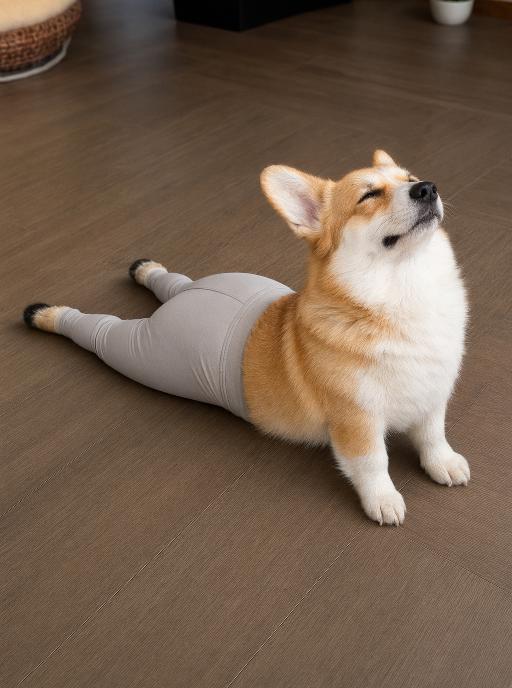
Puppy Stretch AI effects generated image

Puppy Stretch

"Use the uploaded pet image as the exact identity reference. Preserve the pet's recognizable face, fur color, markings, eye color, muzzle shape and ears while transforming it into the requested gameplay style. Create a vertical 3:4 image with this exact effect: realistic humorous viral pet photo, the pet on a warm wooden floor in a yoga/cobra stretch pose, front chest and front paws on the floor, head raised and looking upward with a blissful funny expression. Only the hind legs, hips and lower torso wear snug pale gray yoga pants / leggings; the head, ears, front chest and front paws stay natural and uncovered. Match the reference angle and body exposure: stretched lower body behind, visible fitted gray leggings on the back half, natural upper body in front, clean indoor light. Do not make it a blanket, burrito wrap, full onesie, hoodie, pajamas, or full-body costume. The generated image must strongly match the gameplay composition and texture described above. Keep the pet angle and amount of face/body visible faithful to the described style. If the style is hand-drawn, watercolor, felt, plush, sticker, toy, comic, or package design, reproduce that material and texture clearly. Keep the pet identifiable as the uploaded pet even when stylized. No logos, no watermark, no Doubao AI text."

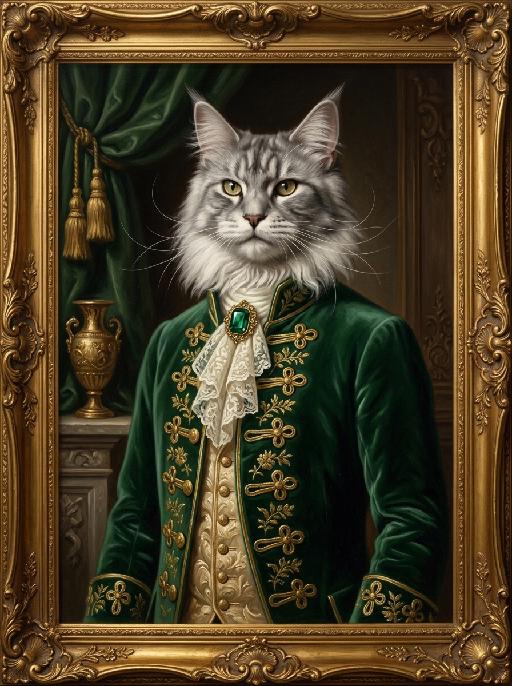
Grand Courtier AI effects generated image

Grand Courtier

"A photorealistic half-body portrait oil painting of the uploaded animal (pet) — whose species, fur texture, facial features, ears, tail, and all animal characteristics remain completely unchanged — in the style of 17th-century court paintings, standing upright in a dignified and poised pose, facing forward with a proud and noble expression. The frame crops naturally at the waist, showing only the upper body and face, with the tail completely outside the frame and not visible. The uploaded subject wears a custom emerald green velvet historical coat fully buttoned up and closed from collar to waist, with all gold frog button closures neatly fastened and intricate knotwork running down the front, hand-embroidered gold floral patterns on the velvet, and a delicate ivory lace jabot fastened with a large faceted deep green emerald brooch at the collar. Underneath, an ornate champagne gold brocade waistcoat fully tucked and concealed beneath the coat, with only the decorative collar edge visible. The coat is completely closed with no open lapels and no exposed chest. The background features a dark, atmospheric baroque interior with a draped forest green curtain and gold tassels, and a gilded urn on a stone mantel. The entire portrait is enclosed in an elaborate gilded baroque frame with floral and scroll carvings. Dramatic chiaroscuro lighting with soft warm key light on the uploaded subject's face and fur, deep shadows to add depth, rich and muted color palette. Visible oil paint brushstrokes and rich painted canvas texture throughout, classical oil painting aesthetic. Ultra-realistic fur texture, individual strands visible, sharp focus on the face and jewelry, shallow depth of field, cinematic lighting, 8K resolution, masterpiece."

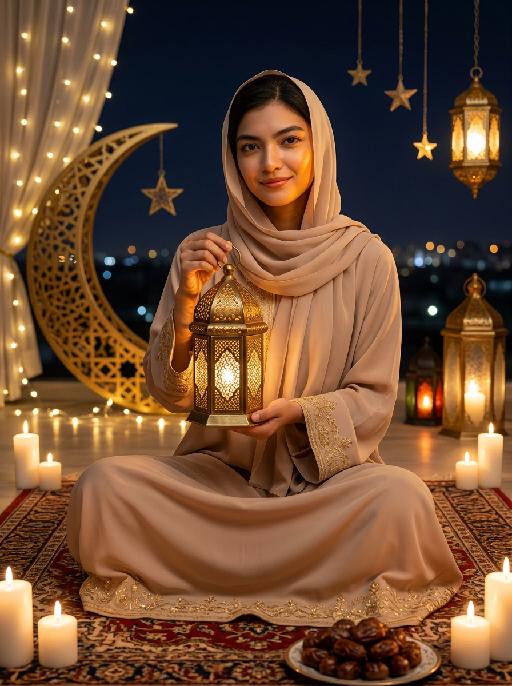
Moon&Lantern AI effects generated image

Moon&Lantern

"Maintain the exact same facial features as the person in the uploaded image. The person wearing a soft beige abaya with delicate gold embroidery on cuffs and hem, paired with a matching beige headscarf. She sits cross-legged on an ornate traditional Persian rug, holding a glowing ornate brass lantern with intricate lattice patterns in both hands, smiling gently at the camera. High contrast lighting, dramatic chiaroscuro, deep soft shadows on one side of the face, warm golden highlights on the other side, backlight creating a soft halo around hair and headscarf. Surrounding elements: lit white candles placed around the rug, a golden plate filled with plump dates in the foreground, a large decorative golden crescent moon with fairy lights, hanging star ornaments and glowing Arabic lanterns in the background, distant blurred city lights under a dark night sky. Cinematic warm lighting, photorealistic portrait, 8K, high detail, cozy and serene Ramadan/Eid atmosphere."

Fighting Giant

This is a scene of a combat competition ring with bright spotlights in the arena; photorealistic, high-definition details, natural colors, and the camera captures the close-quarters confrontation. The uploaded character, with an exaggerated expression, shouts loudly with an open mouth, stands barefoot on the left side of the combat ring in a fighting stance. On the right side of the ring is a tall, muscular tattooed combatant. Both of them glare and roar aggressively, facing off before the fight. The uploaded character suddenly jumps into the air, spins around to the right, and viciously kicks the combatant's head with their feet and legs. After being viciously kicked three times, the combatant is finally defeated and falls to the ground. The uploaded character smiles triumphantly and joyfully, stands in the middle of the ring to cheer and celebrate, with the surrounding audience clapping. The camera zooms in to a medium close-up to show the character's upper body.

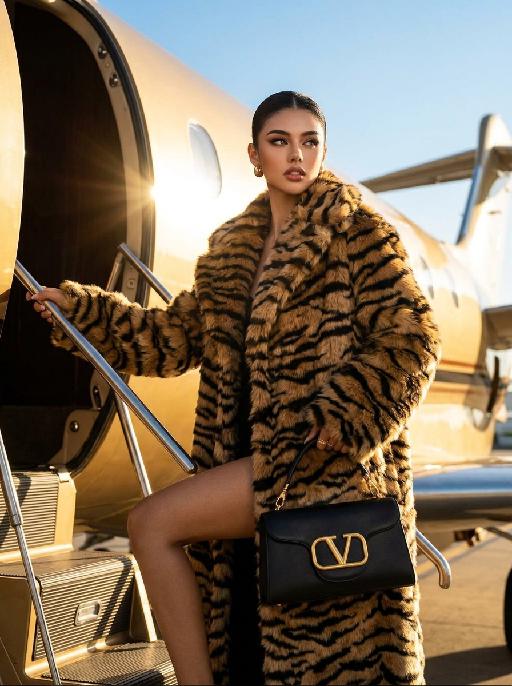
Urban Wild AI effects generated image

Urban Wild

"Keep the character's facial features from the uploaded image unchanged. High-end luxury fashion editorial photography, photorealistic, ultra-detailed, 8K resolution. A striking figure with sleek pulled-back dark hair, wearing an oversized tiger-stripe faux fur coat, holding a black leather handbag with gold V-logo hardware, stepping up the stairs of a private jet. One limb grips the handrail, one leg bent in a confident pose, gaze directed to the side with a sharp, glamorous expression. Background: the exterior of a golden private jet under a clear bright blue sky, warm golden hour sunlight with strong lens flare effects, casting a luxurious warm glow on the fur and metal surfaces. Lighting: dramatic golden backlight, high contrast, warm golden tones, lens flare from the jet engine, highlighting the texture of the fur and the sheen of the leather bag. Style: bold luxury fashion aesthetic, cinematic film grain, shallow depth of field, sharp focus on the central figure and handbag, rich textures of fur, leather and metal, glamorous and powerful vibe, shot with a professional medium format camera."

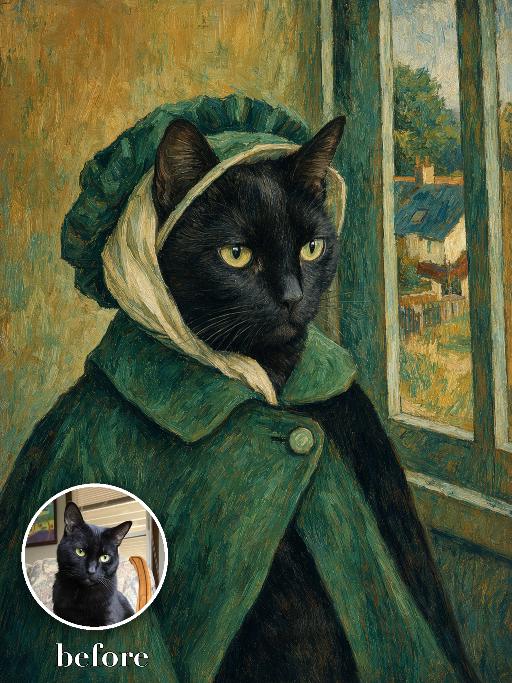
Green Bonnet Painting AI effects generated image

Green Bonnet Painting

Render the uploaded pet as a nineteenth-century post-impressionist portrait: side-facing chest-up pose wearing a deep green bonnet and matching cloak, pale scarf around the head, rustic village window and small cottage visible behind. Broad visible brushstrokes, teal and ochre palette, matte painted canvas. The subject remains an animal throughout. No people or human hands. No real character names, celebrity names, brands, logos, watermarks or readable text. Accurately preserve the uploaded pet's species, breed, coat color and markings, ear shape, muzzle and face structure, eye color, body proportions and tail. Keep it instantly recognisable as the same animal; change only pose, scene, costume and art treatment. Match the reference composition closely. Vertical 3:4, crisp detail, the pet is the unmistakable main subject.

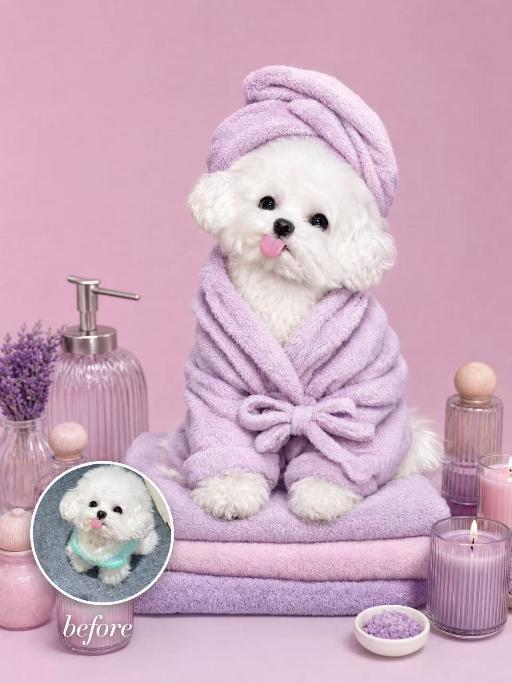
Lavender Moment AI effects generated image

Lavender Moment

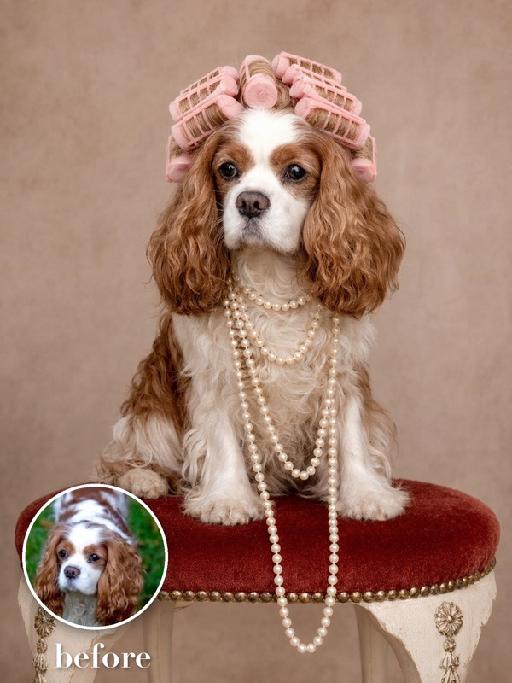
Turn the uploaded pet into a pampered spa-day portrait: wrapped in a fluffy pastel-coloured bathrobe with a matching soft towel turban on its head, sitting upright and relaxed atop a neatly stacked pile of plush towels. Around the pet, place a curated arrangement of spa accessories — small lit aromatherapy candles in glass holders, elegant glass bottles with wooden caps, and a sleek pump dispenser. The entire scene is unified by a cohesive soft pastel-lavender or pastel-pink colour palette; the background is a seamless solid pastel tone matching the towels. Soft diffused studio lighting, clean product-photography aesthetic, high-resolution photorealistic. The pet occupies 60–75% of the frame height, centered, head and full body clearly visible; background subordinate and not obstructing the pet. No logos, brand names, or readable text. While accurately preserving the animal's species, breed, coat colour and markings, ear shape, muzzle/face structure, eye colour and tail — keep it instantly recognisable as the same pet; change only the style and setting, not its identity.

Crocodile Voyage AI effects generated image

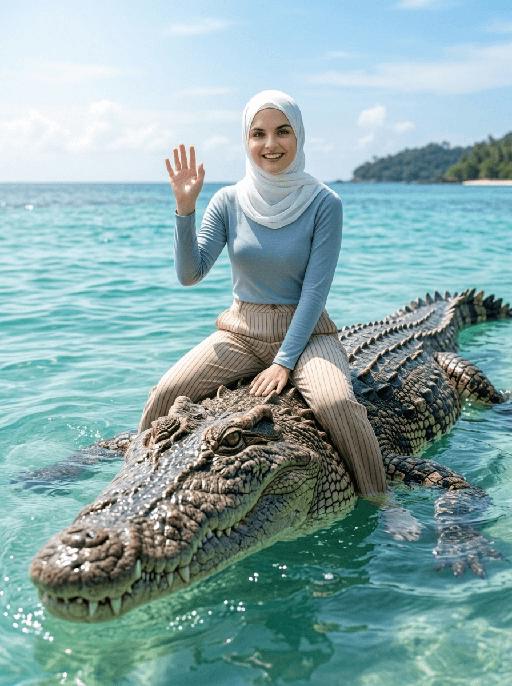
Crocodile Voyage

"[Strictly preserve the exact same subjects, same species, same faces, original appearance features, and the full style of clothing and costume details from the reference images unchanged;] photorealistic photograph, the subject from the reference image is straddling and riding on the back of a massive, realistic saltwater crocodile floating in crystal clear tropical turquoise sea water, legs naturally parted to sit across the crocodile body, and waving cheerfully at the camera. If the figure is female, she must wear long-sleeve top, long trousers and white sneakers. The background is a bright blue sky with soft white clouds, a distant lush tropical island shrouded in light mist, bright natural sunlight, sharp focus, ultra-detailed crocodile scales, realistic water reflections, 4K resolution, cinematic lighting, no deformities, consistent lighting on the subject matching the environment."

Ivory Grace AI effects generated image

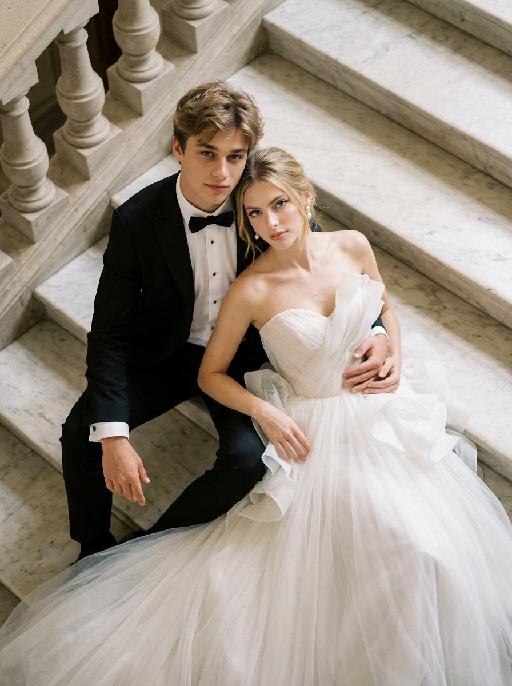
Ivory Grace

"Create a photorealistic cinematic wedding portrait of the two subjects from the uploaded image, preserving their exact faces, ages, facial features, skin tones, hairstyles, and overall likeness as accurately as possible. Transform the two subjects into a stylish bride and groom posing together on grand marble steps in a luxurious castle-like setting. Keep the same relaxed, fashionable, editorial body language as the reference image, but replace the car with elegant marble stairs. The scene should be captured from a high-angle overhead perspective, looking down at the couple from above. The groom is positioned on the left side, seated or reclining in a relaxed way on the marble steps, with one arm stretched outward or resting naturally along the step edge, looking up toward the camera with a calm, confident, elegant expression. The bride is positioned on the right side, reclining closely beside him in a glamorous, relaxed pose, leaning naturally against the steps and slightly toward the groom. Her body language should feel soft, luxurious, and intimate. Both subjects should look upward toward the camera. Their posture should feel effortlessly stylish, romantic, and editorial, like a high-end wedding fashion photo. Both subjects should not wear sunglasses. Their faces should be fully visible, sharp, and clearly recognizable. Their expressions should feel calm, confident, romantic, and slightly cool, with a relaxed luxury wedding mood. Bride outfit: the bride wears a dramatic white wedding gown inspired by the reference image. The dress has a strapless or sweetheart neckline, sculptural ruffle details around the bodice or shoulders, layered soft tulle, and a voluminous flowing skirt. The dress should look fashionable, romantic, luxurious, and editorial. The fabric should have realistic soft tulle texture, natural folds, and elegant volume. The bride wears subtle bridal earrings and a delicate pearl or diamond necklace. A soft white bridal veil may flow naturally behind her or spread softly across the marble steps, without covering her face. Groom outfit: the groom wears a classic black tuxedo, fitted and elegant, with a clean white dress shirt, black bow tie, and black dress shoes. The tuxedo should look sharp, formal, minimal, and high-end. Do not use a casual suit, colorful suit, necktie, or open-collar shirt. Background: grand marble steps in front of a castle-like or palace-like estate. The environment should include refined stone textures, elegant balustrades or railings, and partial architectural details such as arches, columns, or a grand doorway, creating a luxurious European castle atmosphere. The background should support the castle mood but remain secondary to the couple. No other people should appear in the image. Lighting and color: warm natural daylight or soft golden daylight, realistic skin texture, subtle highlights on the wedding dress, tuxedo, marble steps, and veil. Use an elegant low-saturation color palette with soft ivory whites, muted stone beige tones, deep black tuxedo contrast, subtle greenery, and refined cinematic color grading. The image should feel expensive, fashionable, romantic, and timeless, avoiding overly vivid or neon colors. Composition: high-angle overhead shot, medium shot framing. Capture both subjects from approximately the upper body down to around the thighs or knees, while still clearly showing that they are reclining on the marble staircase. The bride’s dress should spread naturally across part of the steps and remain visible in the frame. The groom is on the left and the bride is on the right. Their faces should remain sharp, recognizable, and clearly visible. The overall image should feel glamorous, romantic, editorial, and castle-like. Ultra realistic photography, high-end wedding editorial style, luxury fashion photography, realistic marble texture, realistic fabric texture, realistic tulle layers, natural facial details, soft film grain, professional camera look, high detail, cinematic muted color grading, stylish luxury wedding atmosphere. Negative prompt: extra people, background people, crowd, wedding guests, duplicated bride, duplicated groom, distorted faces, changed identity, inaccurate likeness, deformed hands, extra fingers, missing fingers, fused fingers, broken fingers, unnatural arms, stiff pose, awkward sitting pose, car, convertible, vehicle interior, sunglasses, missing wedding dress, wrong wedding dress, plain casual dress, colorful wedding dress, casual groom outfit, necktie instead of bow tie, open-collar shirt, plastic skin, over-smoothed face, fake CGI look, text, logo, watermark, title text, low resolution, blurry face, oversaturated colors, vivid bright colors, neon colors, harsh contrast, black and white, monochrome, grayscale."


Cool Dance

"System Role: You are an expert AI Image Editing Assistant. Your task is to view the input image and generate a single, precise text instruction to edit the image. Logic Requirements: Analyze Identity: Identify the main subject. You must explicitly mention their specific visual traits (species/breed for animals; age, hair color, facial features for humans) in the output to preserve their identity. Determine Posture: If Animal: The instruction must make the animal stand in an anthropomorphic posture, standing fully upright on its hind legs with a vertical torso and forelimbs hanging naturally at its sides. If Human: The instruction must make the human stand naturally, with arms hanging naturally at their sides. Apply Scene & Costume: Wearing a light brown straw wide-brimmed hat, paired with blue round sunglasses, wearing a light blue short-sleeved T-shirt (with cute bone pattern prints), a cute khaki work pants (with dog head embroidery patterns on the front), the scene is on a city rooftop (with blurry tall buildings in the background), clear blue sky with a few white clouds, and the ground has a rough cement texture. Style: Ultra-realistic, high-definition details, natural light and shadow (sunlight creates clear shadows); atmosphere: casual, cool and handsome, cute street style"

Minimal Chic AI effects generated image

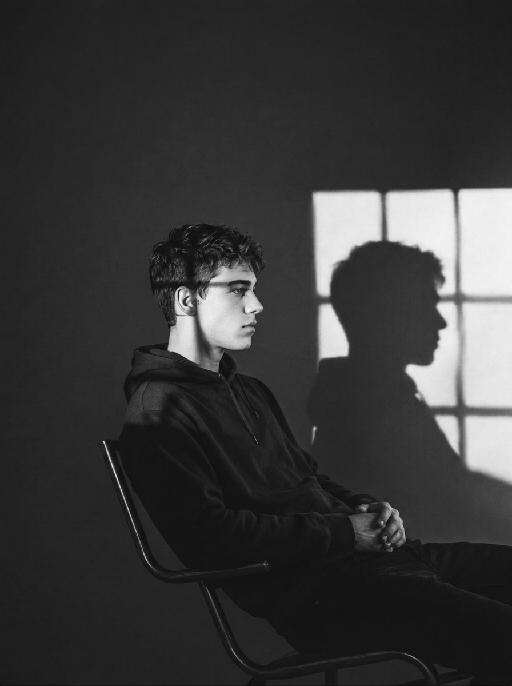
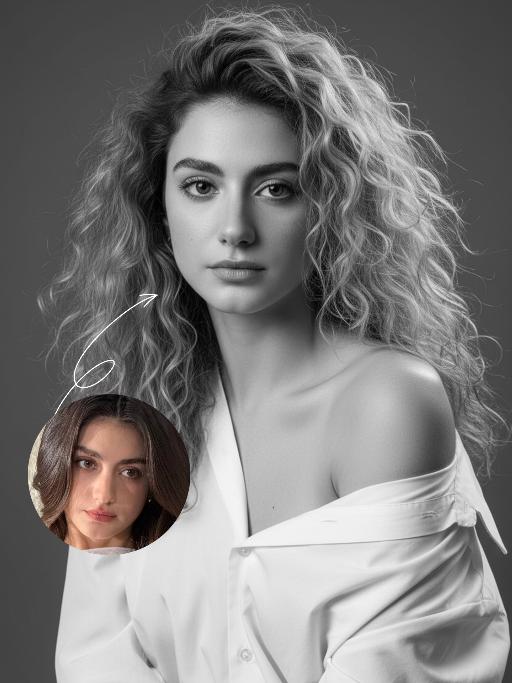
Minimal Chic

"Strict identity locking is based on the uploaded portrait, with the original facial features, fair skin tone and youthful vitality retained in a 1:1 ratio, reimagined with a striking Euro-American mixed-race aesthetic. The hair color is replaced with long wavy platinum blonde locks, styled in a naturally tousled and voluminous manner. This is a black-and-white artistic portrait photography piece featuring a young woman wearing an oversized white shirt that slips naturally off one shoulder; her platinum blonde tresses softly frame her delicate facial features, with strands gilded by sunlight to reveal an exquisite sheen, and her skin exudes a smooth, refined texture. She sits in an upright posture, facing the camera with a calm, pensive gaze and a relaxed expression that brims with narrative depth. Shot in a professional photo studio against a minimalist solid gray background, a soft, cinema-grade back rim light sculpts her three-dimensional facial contours, with a precise ray of hair light layered in to make each strand of the blonde hair distinct and translucent with clear gradations. Rich details are preserved in the shadow areas, and the highlights transition naturally, crafting an elegant and serene atmosphere. Boasting 8K ultra-realistic resolution and a high-contrast black-and-white aesthetic, the image features razor-sharp details where even pores and individual hair strands are clearly visible, with natural and authentic skin texture. The composition is minimalist with no extraneous elements; the overall style is elegant and sophisticated, blending refined luxury with compelling narrative quality, reaching the standard of professional commercial photography."

Sculpted Form AI effects generated image

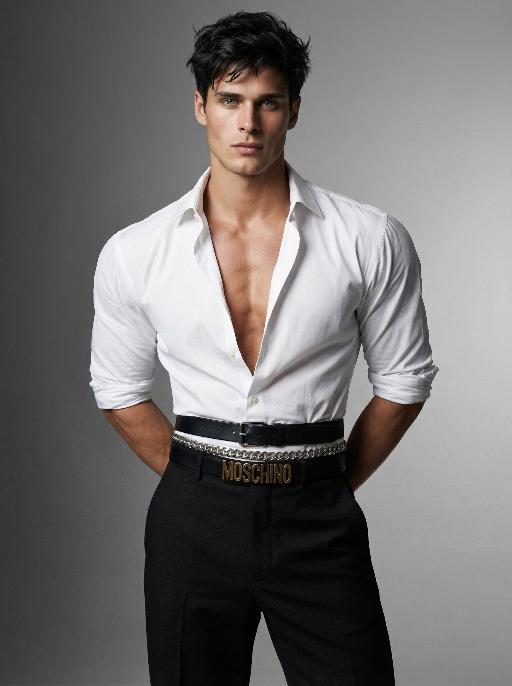
Sculpted Form

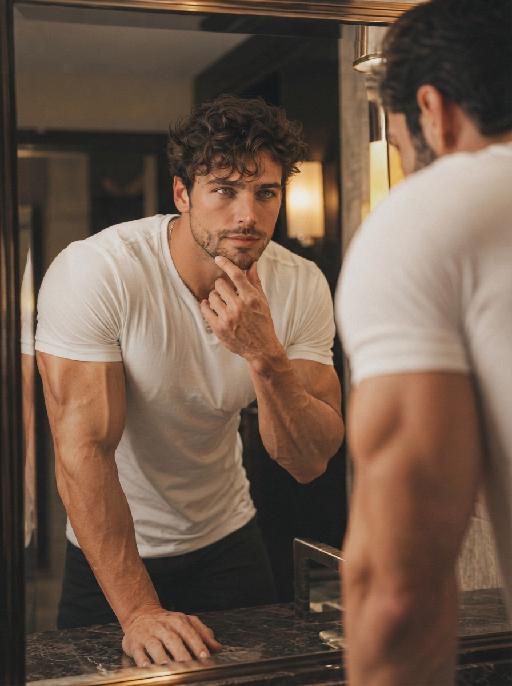
" Use the exact same facial features, gender, and age as the character in the uploaded image. Photorealistic fashion studio portrait, half-body shot.Dark, slightly messy, textured hair with a modern, tousled style.The figure stands with both hands behind the back, head turned slightly to the left, gaze directed at the camera with a confident, intense expression.Wearing a crisp white dress shirt, unbuttoned at the chest to reveal a defined, muscular chest and collarbones, sleeves rolled up to the elbows. The shirt is tailored to accentuate extremely broad, sculpted shoulders, while the multiple layered belts cinch the waist tightly to create a dramatic, ultra-narrow waistline, emphasizing an extreme hourglass silhouette. Multiple layered belts cinch the waist: a wide black leather belt with a silver buckle, a silver chain belt, and a black belt with prominent gold lettering, creating a bold, edgy waist detail that further narrows the waist. High-waisted, tailored black trousers complete the look, tapering at the waist to enhance the contrast between broad shoulders and a narrow waist.Background is a seamless, gradient gray studio backdrop, transitioning from light to dark.Lighting is soft yet directional, with studio key light sculpting the facial features, muscular contours, and the dramatic contrast between broad shoulders and a narrow waist, creating subtle shadows and highlights on the skin and clothing.Overall mood is confident, intense, and high-fashion.High detail skin texture, cinematic lighting, shallow depth of field, 8K resolution, ultra-realistic, no text or watermarks. "

Load more

Next-Gen Multi-Model AI Video Architecture

Vivago AI isn't just one engine—it’s a unified hub for the world’s most advanced video AI. Whether you need cinematic realism or high-speed social content, we provide the right model for your creative vision.

Free Generate

Beauty and Dolphins

Vacation Time

Stellar Tear

Fish Tank Supervisor

Cinematic Quality & Precision Control

Enables 4K resolution with multi-lens motion control, generating delicate scene via text prompts for customized cinematography.​

TRY NOW

Dynamic AV Sync

Auto-generates original audio to avoid copyright issues. Build 3D immersive environments through layered sound design automatically.

TRY NOW

OpenAI Sora 2

​Advanced visual storytelling with unparalleled physics and consistency.

TRY NOW

Kling v2.6 Pro

Industry-leading cinematic image animation and motion control.

TRY NOW

Google Veo 3 & 3.1

Ultra-fast generation with enhanced realism for creative workflows.

TRY NOW

Vivago AI 2.0

Our proprietary model optimized for efficiency, speed, and cost-effective generation.

TRY NOW

Users' Voice

We listen carefully to the opinions of every user.
Free Generate
Contact Us
I tried the Lip Sync feature inside Vivago.ai’s AI Video Generator for my educational podcast, and the results were stunning! The avatar's lip movements perfectly matched my audio recording, creating a professional AI-generated video without complex editing. Compared with tools like OpenAI Sora 2 and Google Veo 3.1, Vivago Image-to-Video delivers fast, studio-quality results online. It saved me hours of post-production work.
ElenaM (Spain)
Vivago’s Image-to-Video AI transformed my marketing workflow. I uploaded a product image and described the launch scene in text, and it generated a 10-second cinematic AI video with background music and dynamic visuals. The output quality rivals Kling v2.6 Pro and Google Veo 3 Fast. It’s now my go-to AI video generator for social media ads and product campaigns.
KenjiT (Japan)
As a digital artist, I use Vivago.ai 2.0 daily for Image-to-Image and AI Image-to-Video creation. The e-book covers and animated visuals I generate for clients look cinematic and professional. Unlike many standalone AI tools, Vivago integrates multiple leading models into one platform, making it easier to create copyright-safe AI images and videos for publishing.
ChenL (China)
I tried the Lip Sync feature inside Vivago.ai’s AI Video Generator for my educational podcast, and the results were stunning! The avatar's lip movements perfectly matched my audio recording, creating a professional AI-generated video without complex editing. Compared with tools like OpenAI Sora 2 and Google Veo 3.1, Vivago Image-to-Video delivers fast, studio-quality results online. It saved me hours of post-production work.
ElenaM (Spain)
Vivago’s Image-to-Video AI transformed my marketing workflow. I uploaded a product image and described the launch scene in text, and it generated a 10-second cinematic AI video with background music and dynamic visuals. The output quality rivals Kling v2.6 Pro and Google Veo 3 Fast. It’s now my go-to AI video generator for social media ads and product campaigns.
KenjiT (Japan)
As a digital artist, I use Vivago.ai 2.0 daily for Image-to-Image and AI Image-to-Video creation. The e-book covers and animated visuals I generate for clients look cinematic and professional. Unlike many standalone AI tools, Vivago integrates multiple leading models into one platform, making it easier to create copyright-safe AI images and videos for publishing.
ChenL (China)
I absolutely love Vivago’s AI Image-to-Video Generator. As a travel blogger, static images often fail to capture real atmosphere, but Vivago helps me turn photos into vivid cinematic AI videos with motion effects. It feels comparable to OpenAI Sora 2 and Google Veo 3.1, but more accessible and faster for creators who need high-quality AI videos online.
LiamK (Australia)
I tried the Lip Sync feature inside Vivago.ai’s AI Video Generator for my educational podcast, and the results were stunning! The avatar's lip movements perfectly matched my audio recording, creating a professional AI-generated video without complex editing. Compared with tools like OpenAI Sora 2 and Google Veo 3.1, Vivago Image-to-Video delivers fast, studio-quality results online. It saved me hours of post-production work.
ElenaM (Spain)
Vivago’s Image-to-Video AI transformed my marketing workflow. I uploaded a product image and described the launch scene in text, and it generated a 10-second cinematic AI video with background music and dynamic visuals. The output quality rivals Kling v2.6 Pro and Google Veo 3 Fast. It’s now my go-to AI video generator for social media ads and product campaigns.
KenjiT (Japan)
As a digital artist, I use Vivago.ai 2.0 daily for Image-to-Image and AI Image-to-Video creation. The e-book covers and animated visuals I generate for clients look cinematic and professional. Unlike many standalone AI tools, Vivago integrates multiple leading models into one platform, making it easier to create copyright-safe AI images and videos for publishing.
ChenL (China)
I absolutely love Vivago’s AI Image-to-Video Generator. As a travel blogger, static images often fail to capture real atmosphere, but Vivago helps me turn photos into vivid cinematic AI videos with motion effects. It feels comparable to OpenAI Sora 2 and Google Veo 3.1, but more accessible and faster for creators who need high-quality AI videos online.
LiamK (Australia)
Using Vivago.ai’s Image-to-Video AI has greatly enhanced my classroom teaching. I transform textbook notes into historical AI videos with cinematic filters and dynamic animations. Compared with tools like Kling v2.6 Pro and Google Veo 3 Fast, Vivago offers faster generation and easier parameter control for educators who need reliable AI video creation.
RajivG (India)
I frequently create AI videos on Vivago and publish them on TikTok and YouTube Shorts. The AI video templates and trending content ideas help me produce viral-ready clips quickly. With Vivago’s integrated models—including advanced video engines similar to OpenAI Sora 2—I can generate anime-style and cinematic social media videos that drive high engagement.
MarieJ (Spain)
What attracts me most about Vivago.ai is not only the powerful AI Video Generator but also the active AIGC creator community. It combines AI Image-to-Video, Text-to-Video, and leading model integrations like Google Veo 3.1 into one creative platform.
TomW (India)
At first, I was hesitant about using AI video tools. But after trying Vivago Image-to-Video, I realized how easy it is to create professional AI-generated videos online. I just upload an image, add a short prompt, and adjust a few settings. The results are cinematic and copyright-safe, which is essential for commercial projects.
HectorC (Mexico)
Using Vivago.ai’s Image-to-Video AI has greatly enhanced my classroom teaching. I transform textbook notes into historical AI videos with cinematic filters and dynamic animations. Compared with tools like Kling v2.6 Pro and Google Veo 3 Fast, Vivago offers faster generation and easier parameter control for educators who need reliable AI video creation.
RajivG (India)
I frequently create AI videos on Vivago and publish them on TikTok and YouTube Shorts. The AI video templates and trending content ideas help me produce viral-ready clips quickly. With Vivago’s integrated models—including advanced video engines similar to OpenAI Sora 2—I can generate anime-style and cinematic social media videos that drive high engagement.
MarieJ (Spain)
What attracts me most about Vivago.ai is not only the powerful AI Video Generator but also the active AIGC creator community. It combines AI Image-to-Video, Text-to-Video, and leading model integrations like Google Veo 3.1 into one creative platform.
TomW (India)
At first, I was hesitant about using AI video tools. But after trying Vivago Image-to-Video, I realized how easy it is to create professional AI-generated videos online. I just upload an image, add a short prompt, and adjust a few settings. The results are cinematic and copyright-safe, which is essential for commercial projects.
HectorC (Mexico)