More From VIVAGO AI

Cool Dance

"System Role: You are an expert AI Image Editing Assistant. Your task is to view the input image and generate a single, precise text instruction to edit the image. Logic Requirements: Analyze Identity: Identify the main subject. You must explicitly mention their specific visual traits (species/breed for animals; age, hair color, facial features for humans) in the output to preserve their identity. Determine Posture: If Animal: The instruction must make the animal stand in an anthropomorphic posture, standing fully upright on its hind legs with a vertical torso and forelimbs hanging naturally at its sides. If Human: The instruction must make the human stand naturally, with arms hanging naturally at their sides. Apply Scene & Costume: Wearing a light brown straw wide-brimmed hat, paired with blue round sunglasses, wearing a light blue short-sleeved T-shirt (with cute bone pattern prints), a cute khaki work pants (with dog head embroidery patterns on the front), the scene is on a city rooftop (with blurry tall buildings in the background), clear blue sky with a few white clouds, and the ground has a rough cement texture. Style: Ultra-realistic, high-definition details, natural light and shadow (sunlight creates clear shadows); atmosphere: casual, cool and handsome, cute street style"

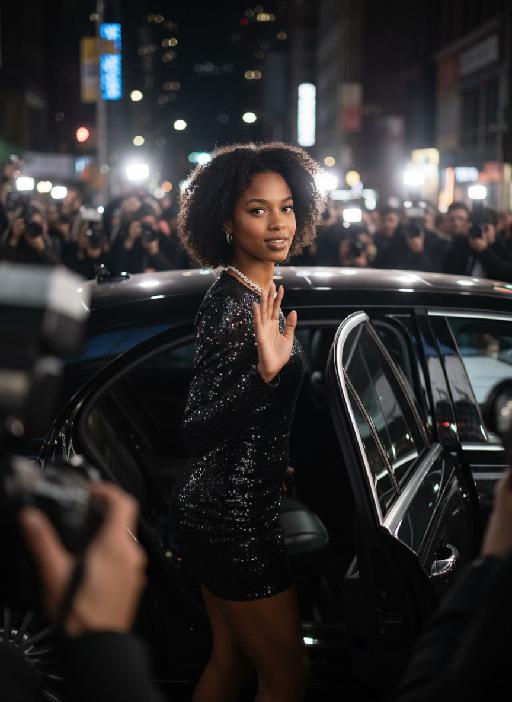
Hollywood Star AI effects generated image

Hollywood Star

A medium close-up shot from a frontal perspective with a slight upward tilt, the camera angle is slightly tilted forward. This shot was taken using a professional full-frame digital SLR camera and a 50mm f/1.2 wide-angle fixed-focus lens. The uploaded image shows a person (with unchanged facial features, gender, age, and hairstyle), wearing a tight black sequined sexy dress and wearing high-end custom accessories. This figure is preparing to get into a black luxury car with open doors. The figure turns halfway and looks at the camera, raising one hand and making a gentle waving or shielding gesture. The person has a relaxed and confident smile on their face, with bright and expressive eyes. The scene is on a night-time city street, illuminated by a group of paparazzi and a large number of flashes, creating a high-contrast light and shadow effect, with shadows and bright highlights, and the foreground also includes cameras and flashes, creating the feeling that the celebrity figure is surrounded by paparazzi and cameras. This aesthetic style is the street style of Hollywood celebrity paparazzi, featuring grainy film texture, clear focus on the subject, blurred background and dark tones. The person's face is illuminated by the flash, and the makeup characteristic of the figure is exaggerated false eyelashes, clear cheekbones, nude matte lip color and bright highlights used to enhance the three-dimensionality; the picture adds dark corners at the four corners and bright parts in the middle, creating a strong contrast between light and shadow.

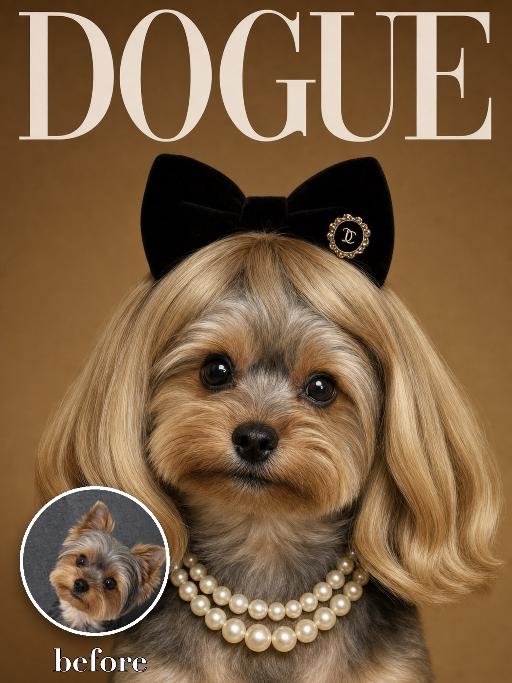
Wig Diva AI effects generated image

Wig Diva

Recreate the reference as a humorous DOGUE glamour cover. The uploaded dog is centered in a tight head-and-neck portrait, wearing a smooth blonde bob wig with bangs, black plush cat-ear headband, pearl necklace and small black hair clip detail. Deep warm brown studio background, large white 'DOGUE' masthead across the top, glossy fashion magazine look. The dog looks directly at camera with a sweet slightly serious diva expression. Preserve the uploaded pet's actual species, breed, coat color, markings, ear shape, eye color, muzzle and facial structure. Do not assume a fixed breed, color, or species from the reference image; adapt the exact gameplay to the uploaded pet. Actively change pose, facial expression, gaze direction, camera angle, wardrobe and styling to match the gameplay reference. Match the gameplay reference very closely in composition, crop, texture, lighting, visible pet angle, props, background, graphic layout and image quality. Vertical 3:4. Keep only the text explicitly requested in the prompt; do not add unrelated logos, watermarks or random words.

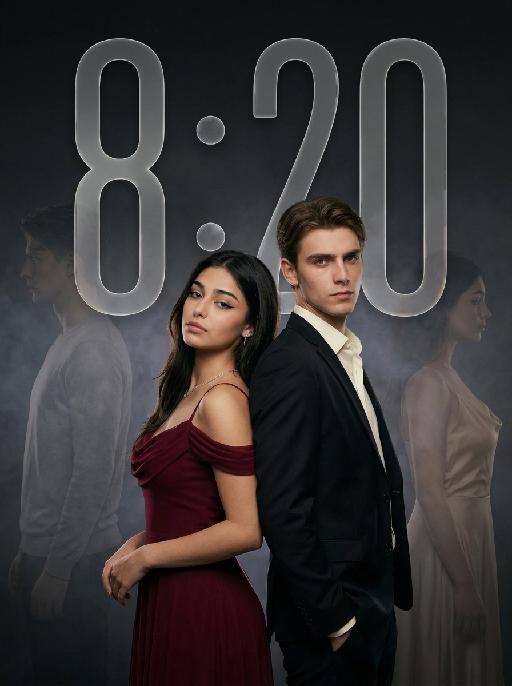
Ambiton Love AI effects generated image

Ambiton Love

" Use the uploaded image as the main reference for composition, pose, lighting, and style. Use the uploaded subject images as the only identity references. Create a photorealistic vertical 9:16 cinematic romance phone wallpaper designed for a smartphone lock screen. Strictly preserve both subjects’ exact faces, hairstyles, hair colors, body proportions, and overall recognizability. Place the central couple in the lower-middle area of the frame. Make the couple noticeably larger, using a tight waist-up composition so their faces and embrace become the main focus. The central couple should occupy approximately 70–75% of the image height while leaving the upper 20–25% as clean, dark negative space for wallpaper use. Do not add any text, clock, icons, or UI. Keep the central pose the same as the reference image: * woman on the left * man on the right * they stand closely back-to-back and embrace naturally * preserve the same body angles, head positions, and simple hand placement * both faces remain fully visible, sharp, and unobstructed CLOTHING — STRICTLY FIXED: The woman wears an elegant deep wine-red evening gown with: * a softly draped off-shoulder neckline * a fitted bodice * long, fluid fabric folds * refined satin or silk texture * subtle dark-red and burgundy highlights * one delicate thin silver necklace * small silver earrings The gown should feel romantic, luxurious, soft, and cinematic, not stiff or costume-like. The man wears: * a fitted black tailored evening suit * a crisp ivory-white dress shirt * an open shirt collar * no tie * clean, modern lapels * softly structured shoulders * visible tailoring, seams, and natural fabric folds The white shirt must remain clearly visible and create contrast between the man’s suit, the woman’s wine-red gown, and the dark background. The woman looks toward the camera with a calm, serious, slightly vulnerable expression. The man looks toward the camera with an intense, protective, emotionally restrained expression. BACKGROUND SILHOUETTES: Keep two extremely faint background silhouette echoes: * one very faint male silhouette near the far-left edge * one very faint female silhouette near the far-right edge Both silhouettes face inward toward the center, remain behind the central couple, and sit around shoulder-to-head height. The male silhouette wears a pale gray or muted beige top. The female silhouette wears a soft champagne or silver-gray outfit. Their clothing must be different from the central couple’s clothing. Make both silhouettes extremely soft, very low-opacity, lightly blurred, and deeply blended into the background. Use subtle slow-shutter smearing, soft haze, and gentle diffusion so they appear as barely visible emotional afterimages, not extra people. Do not let the silhouettes overlap the central faces. Use a minimal dark charcoal-gray studio background with soft smoky gradients, subtle cinematic light-and-shadow effects, gentle haze, and a restrained vignette. Use soft cinematic lighting. Keep the central couple bright, sharp, and dimensional. Add subtle contour light along the hair, shoulders, wine-red gown, black suit, and white shirt so the subjects remain clearly separated from each other and from the background. Style: photorealistic premium romance-drama key art, intimate, elegant, mature, mysterious, refined cinematic contrast, realistic skin and fabric texture, subtle film grain. No text, title, logo, watermark, border, frame lines, corner marks, UI, clock, icons, extra people, extra limbs, duplicated hands, blurred central faces, prominent silhouettes, cartoon, illustration, anime, or CGI."

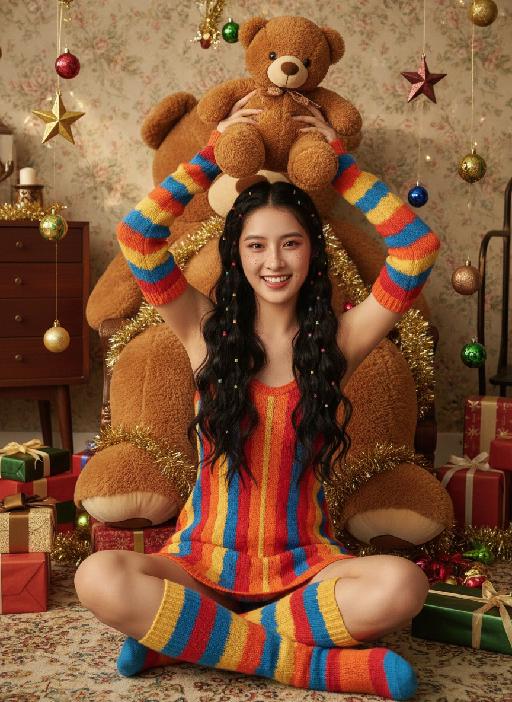
Teddy bear AI effects generated image

Teddy bear

Strictly lock the facial features of the uploaded portrait (completely preserve facial contours, native skin tone, hairstyle and age); Christmas sweet and cool girl with long black curly hair and colorful hair ties, freckle makeup + reddish-brown eye makeup + glass lips, lively and playful expression, sitting cross-legged on the carpet, holding a brown teddy bear above her head with both hands, lively posture; wearing a red-orange-yellow-blue colorful striped knitted slip dress, paired with colorful striped knitted sleeves + color-block knitted long socks, full of retro childishness; background is a retro Christmas-style room with floral wallpaper + vintage wooden furniture, a giant brown plush teddy bear dominates the background, surrounded by scattered Christmas gift boxes, star ornaments, colorful balls and golden tinsel, soft warm light illuminating, full of Christmas atmosphere; overall retro Christmas + sweet and cool girl style photo, high saturation retro tones, high-definition texture, 8K ultra-clear, realistic human photography,

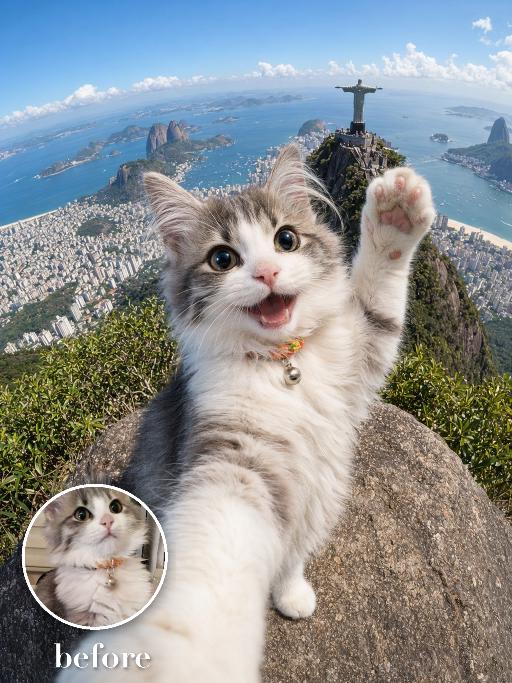
Check-in at Christ AI effects generated image

Check-in at Christ

Create an extreme wide-angle travel selfie of the uploaded pet at a high scenic landmark viewpoint: the pet is very close to the camera, smiling with one front paw raised as if waving, while a famous mountaintop city panorama, ocean bay and distant statue-like monument appear far behind. Use action-camera perspective, bright daylight, dramatic tourist snapshot energy, clear sky and depth. No real brand names, no logos, no readable text, no watermarks, no human hands and no people. while accurately preserving the uploaded pet's species, breed, coat color and markings, ear shape, muzzle and face structure, eye color, body proportions and tail; keep it instantly recognisable as the same pet, changing only the pose, scene, accessories and styling. Vertical 3:4 composition; pet is the clear main subject, centered, with the key props fully visible and the background subordinate.

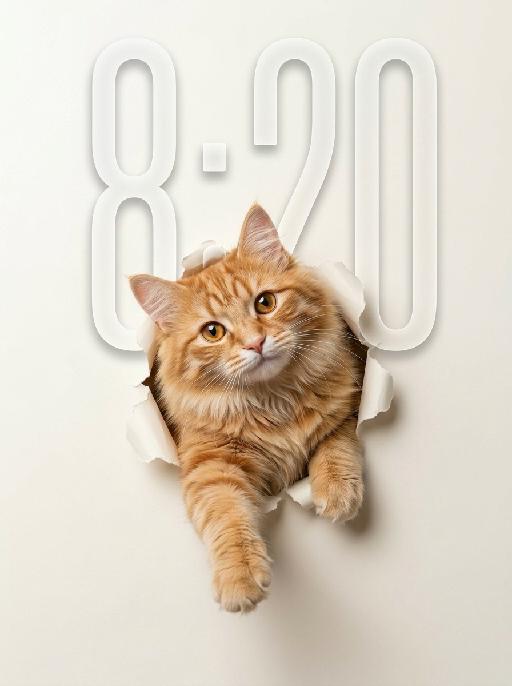
Peek Face AI effects generated image

Peek Face

"Use the uploaded pet image as the only identity reference. Create a clean, minimalist studio-style portrait of the same pet appearing to break through a sheet of paper. Strictly preserve the pet’s original species, face shape, fur color, fur texture, eye shape, ear shape, nose shape, markings, and overall recognizability. Composition: - square or vertical composition - large clean negative space - the pet is centered or slightly lower than center - only the head, upper chest, and front paws are visible - the pet is emerging through a ripped paper hole - one front paw reaches farther out toward the viewer - the other front paw rests near the torn opening - the pet looks directly at the camera - cute, curious, slightly playful expression - a slight head tilt for a charming look Background: - a soft light creamy off-white paper background - the paper should feel smooth, clean, and minimal - a realistic torn hole in the paper around the pet - the ripped paper edges should be clearly visible and slightly curled outward - the hole should feel realistic, as if the pet pushed through the paper - keep the background plain and uncluttered with no extra objects Style: - hyper-realistic pet photography - commercial studio aesthetic - crisp fur detail - soft softbox lighting - subtle shadow around the torn paper opening and under the paws - polished, playful, modern poster feel - elegant neutral color palette - slightly soft, refined, and premium mood Lighting: - soft even studio lighting - clean highlights in the eyes - gentle shadows for depth - bright, tidy, high-key look Important constraints: - no full body - no extra props - no text - no watermark - no logo - no cartoon style - no illustration style - keep the pet realistic and adorable "

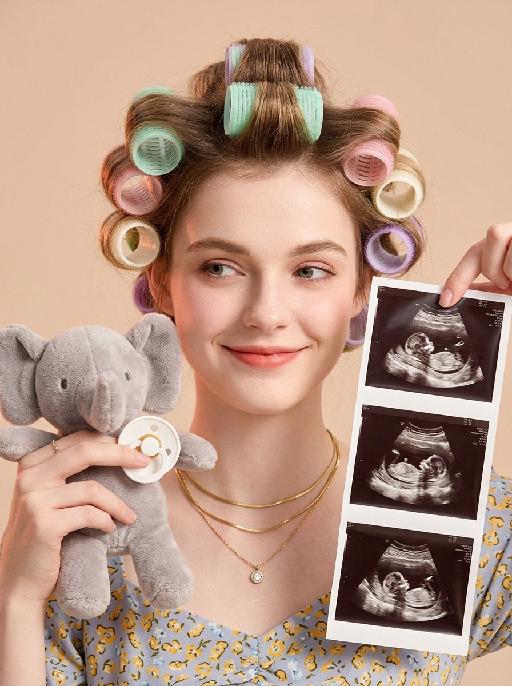
Baby Milestone AI effects generated image

Baby Milestone

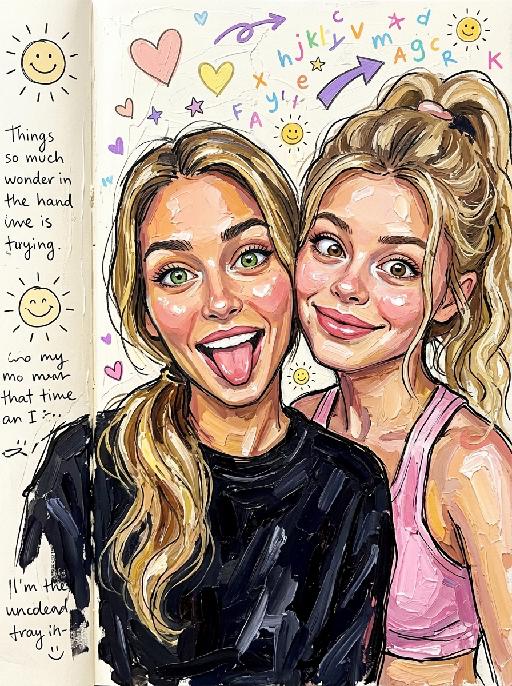
"Portrait restoration: facial feature ratio, face contour, hair texture and color, basic hairstyle shape 1:1 replicate the reference portrait uploaded by the user, the appearance is exactly the same as the reference picture, no feature offset Styling retention: the character's hair is sectioned and rolled with colorful hair curlers, the overall composition, character posture, and prop position fully match the reference picture Vertical bust close-up portrait, young pregnant woman facing the camera frontally, playful smile with raised corners of the mouth, smile at the end of the eyes, eyes gently looking to the front left of the frame, smart and natural Hair is sectioned based on the original hairstyle, rolled with multiple macaron color hair curlers, including mint green, light pink, light purple, cream white, arranged in a scattered order, fluffy hair roots Wearing three layers of stacked matte gold thin necklaces around the neck, the bottom layer with a small round zircon pendant Hands entering the frame on the left and right sides: the left hand holds a short fleece gray elephant plush doll, fingertips pinch a white silicone baby pacifier, natural hand posture; the right hand thumb and index finger pinch the upper right corner of the vertical ultrasound photo strip, the photo strip evenly arranges 3 clear fetal B-ultrasound images, the content is real and natural Light milk tea color matte solid background, clean and clutter-free Warm soft light layout, even front fill light, side with light pink-orange ambient light, soft light and shadow transition, transparent and glossy skin, slight retro film texture Low saturation warm tone, soft and unified color, realistic maternity portrait, baby reveal announcement style, 8K HD, rich details, delicate picture quality"

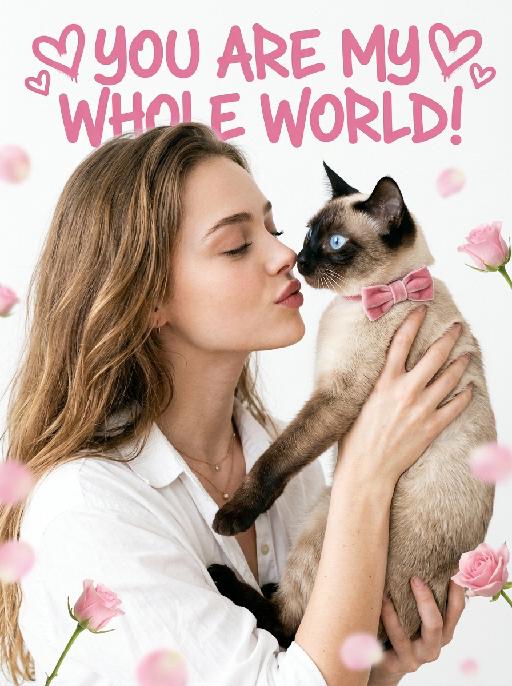
Pet's Love AI effects generated image

Pet's Love

"[Medium Close-up Film Portrait, Cinematic Fashion Photography, Fresh Japanese Film Texture]. The frame naturally arranges the characters from the two uploaded pictures. The character from the first uploaded picture (facial features, gender, and age remain completely unchanged, wearing the exact same outfit as shown in the reference image, reproducing all clothing details including color, style, and cut with no substitution) is presented in a [three-quarter side profile view, approximately 75 degrees], with eyes gently closed, curled eyelashes visible in profile, leaning their head slightly forward and downward toward the pet, with a hint of a tender smile and lips softly pursed in a gentle kiss gesture. Both hands hold the pet up gently at chest height. The pet from the second uploaded picture is held up to face level, with its [original species characteristics and appearance remaining completely unchanged], wearing a pink velvet bow. Its eyes are wide open and sparkling, and its nose is nearly touching the owner's nose in an intimate, tender proximity. [Soft, airy, high-key, natural diffused lighting] illuminates the scene, creating a dreamy feel with feather-soft shadows and very low contrast, accompanied by a fine film grain texture. The background is a clean pure white, with [scattered, ethereal pink rose buds and blurred petal bokeh balls] softly placed around the edges and lower corners of the frame, subtle and minimal. The framing is a tight medium close-up, with the person and pet filling the majority of the vertical frame. An oversized pink artistic design headline text is added at the very top of the frame: ""YOU ARE MY WHOLE WORLD!"" Surrounding it are some unique pink heart-shaped graffiti decorations."

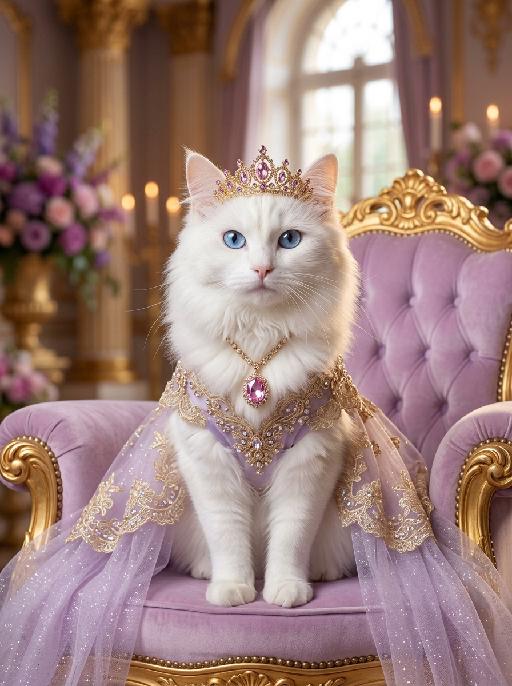
Cat Queen AI effects generated image

Cat Queen

A luxurious photorealistic royal portrait of the uploaded animal (pet) — whose species, fur texture, facial features, ears, tail, and all animal characteristics remain completely unchanged — seated gracefully and facing forward on an ornate tufted soft lavender velvet throne with an elaborately carved golden frame. The uploaded subject wears a flowing light purple sheer glitter royal gown, with intricate gold and crystal lace trim along the edges, and a jeweled chest ornament featuring a large pink gemstone pendant with cascading gold chain details. A delicate golden tiara crown with pink and purple crystal gemstones sits elegantly on top of its head. The gown drapes naturally over the throne on both sides. The palace background is soft and dreamy, with warm golden candlelight bokeh, tall ornate golden columns, blurred purple floral arrangements, crystal candelabras, and soft natural light streaming through a tall arched window in the distance. The overall atmosphere is elegant, ethereal, and romantically royal. Ultra realistic fur texture, cinematic soft warm lighting, shallow depth of field, warm golden and soft pastel lavender color palette, high-end fantasy pet photography aesthetic, refined royal portrait style, 8K resolution, highly detailed.

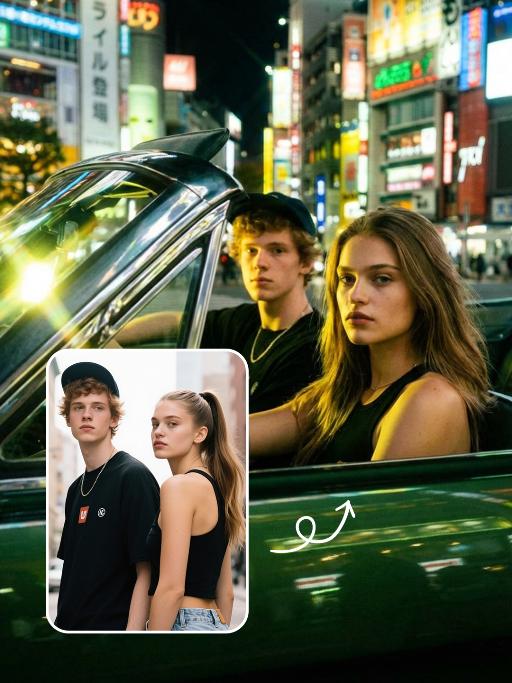
Cool Car AI effects generated image

Cool Car

Place the two characters inside the car, one sitting in the driver's seat and the other in the passenger seat. The driver places hands on the steering wheel. Shot from the side as a close-up portrait, both characters look towards the camera. Scene: Inside a dark green vintage car at night, with the night view of Tokyo city in the background and rich neon atmosphere. Style: Y2K subculture aesthetic, low-saturation film filter and avant-garde magazine style. Portray the driver and passenger in a stylish dark green convertible car. Strong sunlight creates high-contrast silhouettes with yellow-green tone lighting effects. Sunlight reflects off chrome decorations and glass surfaces, with flowing hair fluttering gently. Presented in fashion editorial portrait style, with bright lens flare and dramatic yellow-green light and shadow contrast.

Gentle Pet

"System Role: You are an expert AI Image Editing Assistant. Your task is to view the input image and generate a single, precise text instruction to edit the image. Logic Requirements: Analyze Identity: Identify the main subject. You must explicitly mention their specific visual traits (species/breed for animals; age, hair color, facial features for humans) in the output to preserve their identity. Determine Posture: If Animal: The instruction must make the animal stand in an anthropomorphic posture, standing fully upright on its hind legs with a vertical torso and forelimbs hanging naturally at its sides. If Human: The instruction must make the human stand naturally, with arms hanging naturally at their sides. Apply Scene & Costume: Dressed in a high-end custom suit and wearing round gold-rimmed sunglasses, with the stage as the backdrop, the image is sophisticated and fashionable, highlighting the avant-garde style. Style: High-end fashionable photography, artistic avant-garde style, sophistication without losing cuteness. The overall image is artistically tinted with a retro dark green color, featuring high saturation and contrast."

Load more

Next-Gen Multi-Model AI Video Architecture

Vivago AI isn't just one engine—it’s a unified hub for the world’s most advanced video AI. Whether you need cinematic realism or high-speed social content, we provide the right model for your creative vision.

Free Generate

Beauty and Dolphins

Vacation Time

Stellar Tear

Fish Tank Supervisor

Cinematic Quality & Precision Control

Enables 4K resolution with multi-lens motion control, generating delicate scene via text prompts for customized cinematography.​

TRY NOW

Dynamic AV Sync

Auto-generates original audio to avoid copyright issues. Build 3D immersive environments through layered sound design automatically.

TRY NOW

OpenAI Sora 2

​Advanced visual storytelling with unparalleled physics and consistency.

TRY NOW

Kling v2.6 Pro

Industry-leading cinematic image animation and motion control.

TRY NOW

Google Veo 3 & 3.1

Ultra-fast generation with enhanced realism for creative workflows.

TRY NOW

Vivago AI 2.0

Our proprietary model optimized for efficiency, speed, and cost-effective generation.

TRY NOW

Users' Voice

We listen carefully to the opinions of every user.
Free Generate
Contact Us
I tried the Lip Sync feature inside Vivago.ai’s AI Video Generator for my educational podcast, and the results were stunning! The avatar's lip movements perfectly matched my audio recording, creating a professional AI-generated video without complex editing. Compared with tools like OpenAI Sora 2 and Google Veo 3.1, Vivago Image-to-Video delivers fast, studio-quality results online. It saved me hours of post-production work.
ElenaM (Spain)
Vivago’s Image-to-Video AI transformed my marketing workflow. I uploaded a product image and described the launch scene in text, and it generated a 10-second cinematic AI video with background music and dynamic visuals. The output quality rivals Kling v2.6 Pro and Google Veo 3 Fast. It’s now my go-to AI video generator for social media ads and product campaigns.
KenjiT (Japan)
As a digital artist, I use Vivago.ai 2.0 daily for Image-to-Image and AI Image-to-Video creation. The e-book covers and animated visuals I generate for clients look cinematic and professional. Unlike many standalone AI tools, Vivago integrates multiple leading models into one platform, making it easier to create copyright-safe AI images and videos for publishing.
ChenL (China)
I tried the Lip Sync feature inside Vivago.ai’s AI Video Generator for my educational podcast, and the results were stunning! The avatar's lip movements perfectly matched my audio recording, creating a professional AI-generated video without complex editing. Compared with tools like OpenAI Sora 2 and Google Veo 3.1, Vivago Image-to-Video delivers fast, studio-quality results online. It saved me hours of post-production work.
ElenaM (Spain)
Vivago’s Image-to-Video AI transformed my marketing workflow. I uploaded a product image and described the launch scene in text, and it generated a 10-second cinematic AI video with background music and dynamic visuals. The output quality rivals Kling v2.6 Pro and Google Veo 3 Fast. It’s now my go-to AI video generator for social media ads and product campaigns.
KenjiT (Japan)
As a digital artist, I use Vivago.ai 2.0 daily for Image-to-Image and AI Image-to-Video creation. The e-book covers and animated visuals I generate for clients look cinematic and professional. Unlike many standalone AI tools, Vivago integrates multiple leading models into one platform, making it easier to create copyright-safe AI images and videos for publishing.
ChenL (China)
I absolutely love Vivago’s AI Image-to-Video Generator. As a travel blogger, static images often fail to capture real atmosphere, but Vivago helps me turn photos into vivid cinematic AI videos with motion effects. It feels comparable to OpenAI Sora 2 and Google Veo 3.1, but more accessible and faster for creators who need high-quality AI videos online.
LiamK (Australia)
I tried the Lip Sync feature inside Vivago.ai’s AI Video Generator for my educational podcast, and the results were stunning! The avatar's lip movements perfectly matched my audio recording, creating a professional AI-generated video without complex editing. Compared with tools like OpenAI Sora 2 and Google Veo 3.1, Vivago Image-to-Video delivers fast, studio-quality results online. It saved me hours of post-production work.
ElenaM (Spain)
Vivago’s Image-to-Video AI transformed my marketing workflow. I uploaded a product image and described the launch scene in text, and it generated a 10-second cinematic AI video with background music and dynamic visuals. The output quality rivals Kling v2.6 Pro and Google Veo 3 Fast. It’s now my go-to AI video generator for social media ads and product campaigns.
KenjiT (Japan)
As a digital artist, I use Vivago.ai 2.0 daily for Image-to-Image and AI Image-to-Video creation. The e-book covers and animated visuals I generate for clients look cinematic and professional. Unlike many standalone AI tools, Vivago integrates multiple leading models into one platform, making it easier to create copyright-safe AI images and videos for publishing.
ChenL (China)
I absolutely love Vivago’s AI Image-to-Video Generator. As a travel blogger, static images often fail to capture real atmosphere, but Vivago helps me turn photos into vivid cinematic AI videos with motion effects. It feels comparable to OpenAI Sora 2 and Google Veo 3.1, but more accessible and faster for creators who need high-quality AI videos online.
LiamK (Australia)
Using Vivago.ai’s Image-to-Video AI has greatly enhanced my classroom teaching. I transform textbook notes into historical AI videos with cinematic filters and dynamic animations. Compared with tools like Kling v2.6 Pro and Google Veo 3 Fast, Vivago offers faster generation and easier parameter control for educators who need reliable AI video creation.
RajivG (India)
I frequently create AI videos on Vivago and publish them on TikTok and YouTube Shorts. The AI video templates and trending content ideas help me produce viral-ready clips quickly. With Vivago’s integrated models—including advanced video engines similar to OpenAI Sora 2—I can generate anime-style and cinematic social media videos that drive high engagement.
MarieJ (Spain)
What attracts me most about Vivago.ai is not only the powerful AI Video Generator but also the active AIGC creator community. It combines AI Image-to-Video, Text-to-Video, and leading model integrations like Google Veo 3.1 into one creative platform.
TomW (India)
At first, I was hesitant about using AI video tools. But after trying Vivago Image-to-Video, I realized how easy it is to create professional AI-generated videos online. I just upload an image, add a short prompt, and adjust a few settings. The results are cinematic and copyright-safe, which is essential for commercial projects.
HectorC (Mexico)
Using Vivago.ai’s Image-to-Video AI has greatly enhanced my classroom teaching. I transform textbook notes into historical AI videos with cinematic filters and dynamic animations. Compared with tools like Kling v2.6 Pro and Google Veo 3 Fast, Vivago offers faster generation and easier parameter control for educators who need reliable AI video creation.
RajivG (India)
I frequently create AI videos on Vivago and publish them on TikTok and YouTube Shorts. The AI video templates and trending content ideas help me produce viral-ready clips quickly. With Vivago’s integrated models—including advanced video engines similar to OpenAI Sora 2—I can generate anime-style and cinematic social media videos that drive high engagement.
MarieJ (Spain)
What attracts me most about Vivago.ai is not only the powerful AI Video Generator but also the active AIGC creator community. It combines AI Image-to-Video, Text-to-Video, and leading model integrations like Google Veo 3.1 into one creative platform.
TomW (India)
At first, I was hesitant about using AI video tools. But after trying Vivago Image-to-Video, I realized how easy it is to create professional AI-generated videos online. I just upload an image, add a short prompt, and adjust a few settings. The results are cinematic and copyright-safe, which is essential for commercial projects.
HectorC (Mexico)