More From VIVAGO AI

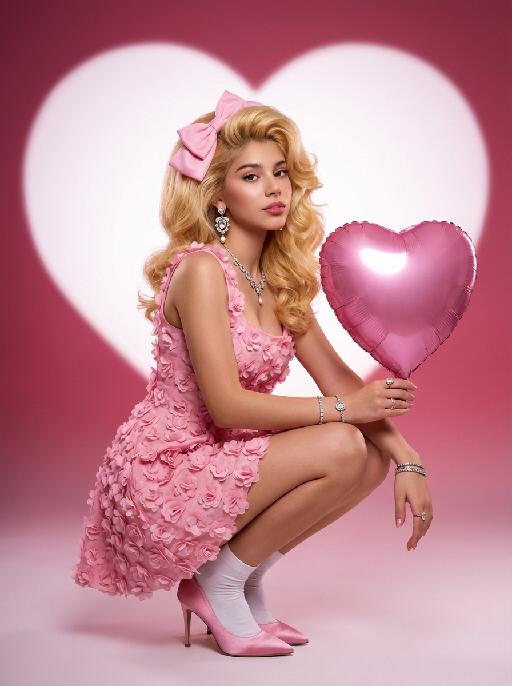
Heart Shape AI effects generated image

Heart Shape

Medium-close-up shot: An extremely charming portrait of a person. In the uploaded picture, the person's facial features, gender and age remain unchanged, but their hairstyle is changed to resemble Marilyn Monroe's golden hair. The facial makeup is exquisite, with natural skin smoothing, and they are wearing a large pink bow. They are gracefully squatting on the ground, holding a shiny pink heart-shaped balloon in their hand. They are wearing a pink retro one-piece dress with three-dimensional floral appliques, wearing white ankle socks, and standing on pink satin high heels. They are adorned with luxurious high-end custom accessories. The background is a gradient color from deep pink to light pink. Behind her is a huge, soft, bright white heart-shaped light projection in a film festival color scheme, with a super realistic style, representing avant-garde photography art.

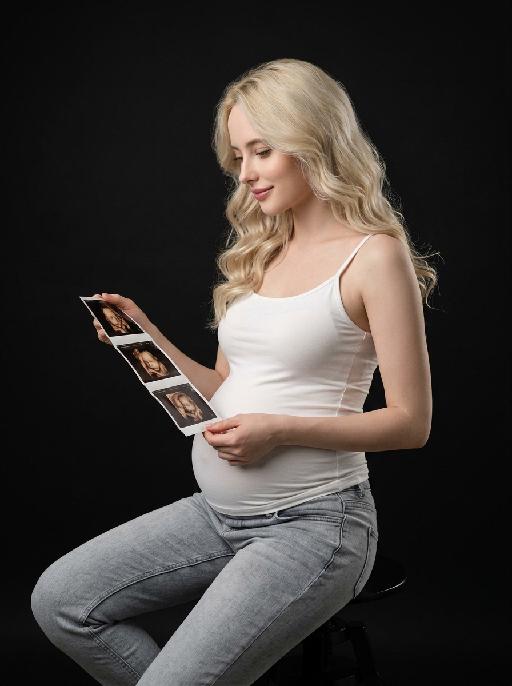
Life Bloom AI effects generated image

Life Bloom

"【Absolute rigid constraint · highest weight】 Face angle: The body maintains a sideways sitting posture facing the left side of the frame, the head is deflected 35° towards the camera, presenting a standard three-quarter side face, 70% of the face faces the camera, fully exposing both eyebrows, eyes and the bridge of the nose, full profile is absolutely prohibited, angle deviation does not exceed 5° Color standard: The whole picture is native natural color, unified low saturation adjustment, overall color gradation is soft, skin tone is restored real and natural, clothing color is elegant and matte, no high saturation bright colors, no black and white monochrome effect throughout Portrait replication: Facial features details, face contour, skull shape, hair curl, volume, parting position, hair color depth, hair texture 100% replicate the reference portrait uploaded by the user, the appearance is exactly the same as the reference picture, no any feature changes and offsets Commercial-grade vertical medium shot maternity portrait, young pregnant woman sitting sideways on a matte black simple high stool, the central axis of the body faces 45° left front of the frame, legs are naturally separated and relaxed, knees are naturally bent, upper body is stretched and straight, head is deflected towards the camera, presenting a three-quarter side angle, looking down with a gentle smile, eyes gently fall on the ultrasound image strip in hand, expression is gentle and full of maternal love Wearing skin-friendly stretch white crew neck camisole, matte and soft fabric, fits the body curve, naturally outlines the full and round pregnant belly contour, the belly shape is natural and real; lower body is light blue washed gray tone low-rise jeans, denim fabric with natural texture, loose and comfortable pants shape, waistband fits the hip Right hand is naturally raised, knuckles relax to pinch the top left edge of the ultrasound image strip, left hand supports the bottom right edge of the image strip at a low position, hands are in stretched and natural posture, finger bone structure is normal, nail shape is natural without exaggerated decoration; holding a long strip of matte photo paper material prenatal 4D ultrasound image strip, 4 clear fetal ultrasound images are arranged vertically on the image strip, the images have real medical B-ultrasound texture and grayscale hierarchy Pure black matte seamless studio background, without any sundries and textures, dark tone immersive atmosphere, clean and advanced picture Professional commercial portrait lighting, the main light is a 45° softbox in the side front, soft and even light quality, fill light weakens the shadows on the face and body dark parts, side rear rim light outlines the hair edge and the contour lines of the shoulder back and pregnant belly, light ratio 1:3, soft and natural light-dark transition, sufficient three-dimensional sense, no hard shadows and dead black areas, the skin presents a transparent and delicate native texture with natural skin texture Overall low-saturation advanced gray tone color, real and soft color restoration, no excessive color grading, unified and advanced tone, cinematic portrait texture 8K ultra HD resolution, extreme detail restoration, RAW photo straight out quality, moderate sharpness, transparent and clean picture, professional fashion maternity film quality, focus accurately on the character's eyes, natural depth of field, the overall atmosphere is advanced and healing"

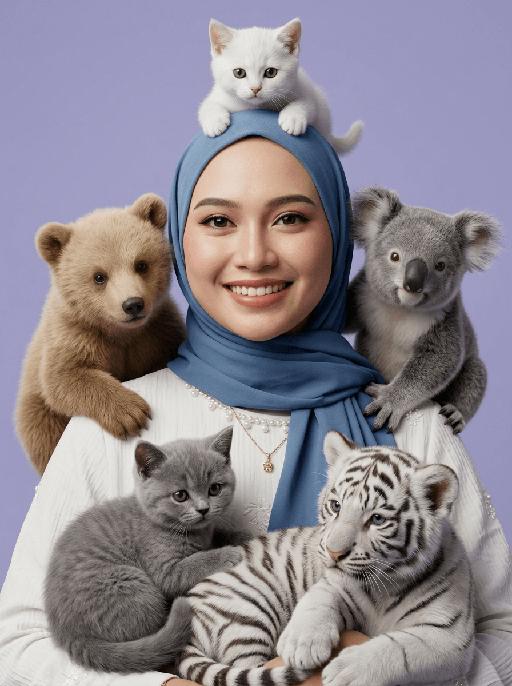
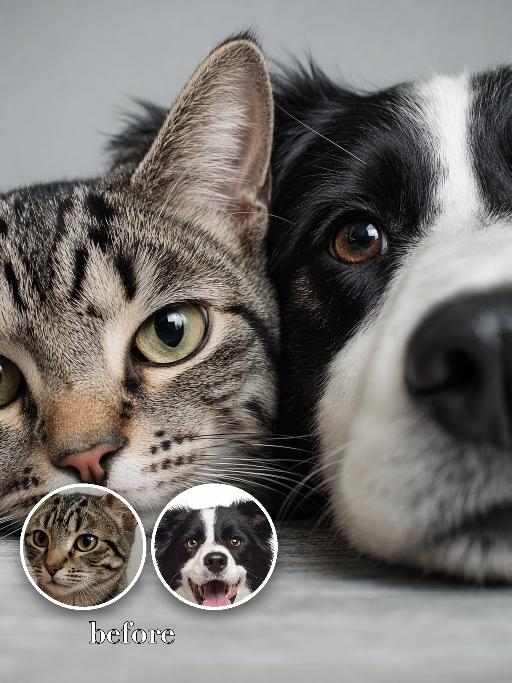
Furry Addict AI effects generated image

Furry Addict

"[Strictly preserve the exact same subjects, same species, same faces, original appearance features, and the full style of clothing and costume details from the reference images unchanged;] ultra-realistic 3D cinematic studio portrait, extreme narrow head-and-shoulders close-up only, ultra tight framing, central character and surrounding animals fill most of the frame with no empty margins, no spare corners, genuine 3D spatial depth, layered occlusion relationship, completely avoid flat 2D collage, avoid cutout sticker patchwork effect, soft even studio lighting, soft box key light, gentle fill light, natural ambient occlusion shadow, fixed rigid animal placement: white shorthair kitten perched on top of head, light brown bear cub sitting on left shoulder, gray koala cub sitting on right shoulder, gray British Shorthair kitten curled on front left chest, white tiger cub nestled on front right chest, animals tightly surround the head and shoulders with clear front-back layering, realistic fluffy fur with three-dimensional volume, natural shadow occlusion between character and animals, hyper-detailed skin and fur texture, 8K ultra HD, sharp focus, cinematic render, lifelike realistic texture, background: smooth, clean, soft matte pastel light purple studio backdrop, seamless, slightly blurred, neutral tone, no distractions, keeps full focus on the subject and animals "

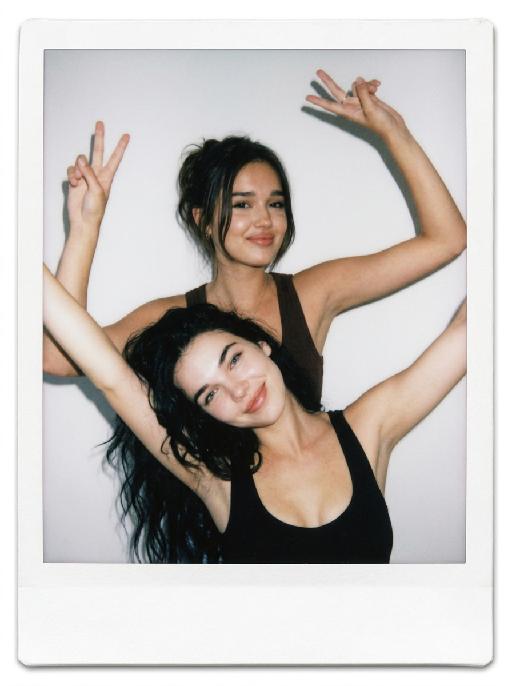
Close-Up AI effects generated image

Close-Up

"Use the two uploaded images as the only identity references for the two main subjects. Create a high-end, photorealistic studio portrait of two distinct uploaded subjects. Position the first uploaded subject on the left side of the frame and the second uploaded subject on the right side. Their faces are placed extremely close together, gently pressed side by side, creating an intimate, playful, and visually balanced portrait. Use a very tight extreme close-up crop, showing only part of each face while keeping both subjects clearly recognizable. Emphasize the eyes, facial contours, skin or fur texture, and other recognizable facial details appropriate to each subject. Both subjects look directly toward the camera with clearly joyful, lively, and affectionate expressions. Human subjects should show a bright natural smile, lifted cheeks, relaxed facial muscles, and sparkling eyes. Animal subjects should show a cheerful, alert, and playful expression, with bright eyes, relaxed ears, and a friendly open-mouth expression when anatomically natural. The overall emotion should feel visibly happy, energetic, cute, and warm, not merely calm, subtle, neutral, stiff, or blank. Their faces should fill the central and lower portions of the frame, with no object, ledge, table, or foreground element blocking the bottom of their faces. Keep the composition clean, direct, and focused entirely on the two subjects. Keep both uploaded subjects as two completely separate, fully recognizable individuals. Do not merge, morph, splice, fuse, or combine their faces. Do not create a split-face, hybrid creature, merged identity, or one face divided into two halves. The final image must clearly look like two real subjects positioned closely together in the same portrait. Strictly preserve the identity and recognizable features of each uploaded subject. For human subjects, preserve facial identity, face shape, facial structure, hairstyle, hair color, skin tone, eye shape, nose shape, lips, general age, and overall recognizability. For animal subjects, preserve species, breed, coat color, fur pattern, markings, eye color, ear shape, nose shape, muzzle structure, facial proportions, fur texture, and overall recognizability. Do not preserve the original uploaded expression or pose. Actively adjust the facial expression, gaze direction, head position, and interaction so both subjects fit this bright, joyful, cheek-to-cheek portrait naturally, while keeping their identities unchanged. Use a professional studio photography look with a clean soft-gray studio backdrop and a subtle natural tonal gradient. The background should be smooth, simple, and unobtrusive, with no visible floor line, no wall corner, no backdrop folds, no props, no furniture, and no environmental details. Use soft frontal key light and gentle fill light, with natural catchlights in the eyes, refined shadow transitions, realistic skin and fur texture, and crisp facial detail. Avoid dramatic rim lighting, artificial spotlight circles, strong halos, excessive glow, or strange background blur. Use a tight vertical 3:4 composition with minimal empty space. Both faces should fill most of the frame and remain clearly readable."


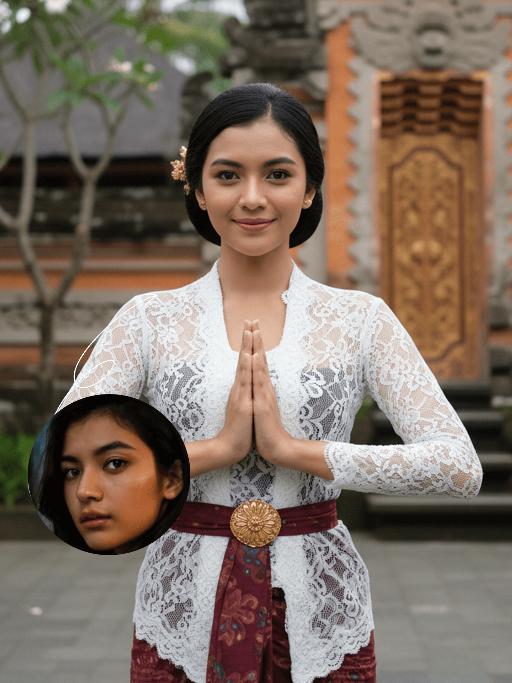
Kebaya Salute AI effects generated image

Kebaya Salute

Strictly lock the facial features of the uploaded portrait (preserve facial contours, native Indonesian skin tone, hairstyle and age). Half-body portrait photography, hyper-realistic style, 4K ultra-high definition, soft diffused tropical daylight, elegant Balinese cultural aesthetic | A young Indonesian Balinese woman with a gentle, warm smile, standing front-facing in a traditional Balinese greeting pose (hands pressed together in a 'salam' gesture). She wears a delicate white lace kebaya blouse with long sleeves, paired with a deep maroon batik-patterned sarong skirt, and an ornate golden embroidered waist sash (kemben) with a sunburst motif. Her hair is styled in a neat updo adorned with a small golden floral hairpin. The background is a softly blurred, authentic Balinese temple courtyard: weathered coral stone walls, lush tropical frangipani trees, and a glimpse of a carved wooden temple doorway, creating a serene, culturally immersive atmosphere. Focus on the intricate lace texture, the vibrant batik patterns, and her serene, welcoming expression

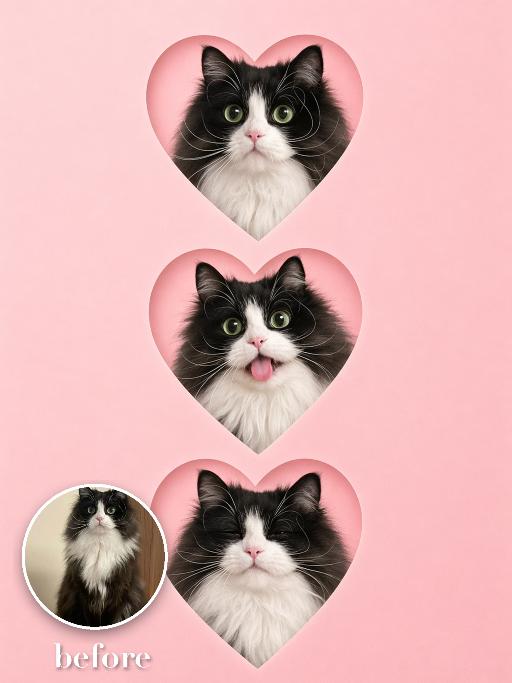
Pet Hearts AI effects generated image

Pet Hearts

Create a vertical social sticker collage on a soft pink background: three heart-shaped cutout portraits of the uploaded pet are stacked from top to bottom, each inside a crisp heart mask with a subtle paper edge. The same pet appears with three cute expressions: wide-eyed, tongue-out or playful, and calm smiling. Clean minimal layout, no other props, polished app-template look. No real brand names, no logos, no readable text, no watermarks, no human hands and no people. keep the uploaded pet recognisable by preserving its species, breed, coat color and markings, ear shape, muzzle and face structure, eye color and tail, even while stylising the body and expressions. Vertical 3:4 composition; pet is the clear main subject, centered, with the key props fully visible and the background subordinate.

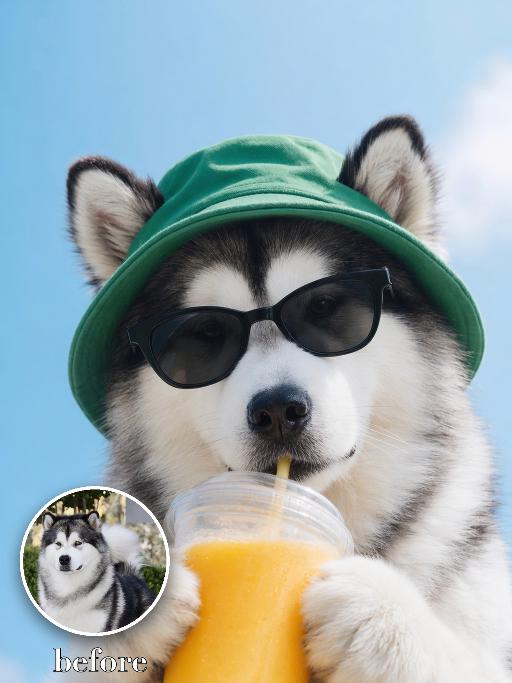
Juice Time AI effects generated image

Juice Time

Recreate the reference as a playful drink portrait. The uploaded dog wears a green bucket hat and black sunglasses, holding a large cup of orange juice close to the mouth with paws around the cup. Light blue background, bright sunny color palette, front-facing crop with the drink in the lower center, relaxed vacation expression. Preserve each uploaded pet's actual species, breed, coat color, markings, ear shape, eye color, muzzle and facial structure. Do not assume a fixed breed, color, or species from the reference image; adapt the reference gameplay to the uploaded pet. Actively change pose, facial expression, gaze direction, camera angle and styling to match the gameplay reference. No extra animals beyond the requested uploaded pets. No human face unless explicitly requested; anonymous hands are allowed only when the gameplay needs hands. No brand logos, no watermark, no random readable text. Match the gameplay reference very closely in composition, crop, texture, lighting, pet expression, visible face angle, props, background, and image quality. Vertical 3:4, photorealistic unless the reference is a poster or sticker layout.

Slow Grace

Strictly keep the subject exactly the same as the reference image, with absolutely no species change; keep the same face shape, facial features, eyes, nose, mouth, ears, fur/skin color, markings, body shape, and age impression exactly the same; no species swap, no face swap, no chibi, no cartoon style; change the subject into a full-body standing front-facing pose, looking at the camera, with both hands/paws naturally raised for display; add exaggerated fluffy curly hair; dress the subject in a bright tropical floral shirt and light shorts, fully covered, no nudity; if the subject is a pet or animal, it must wear a cute top and shorts; add colorful paint on the paws/hands; warm outdoor natural blurred background, centered subject, full body visible, realistic photography style, high-definition details, ultra cute.

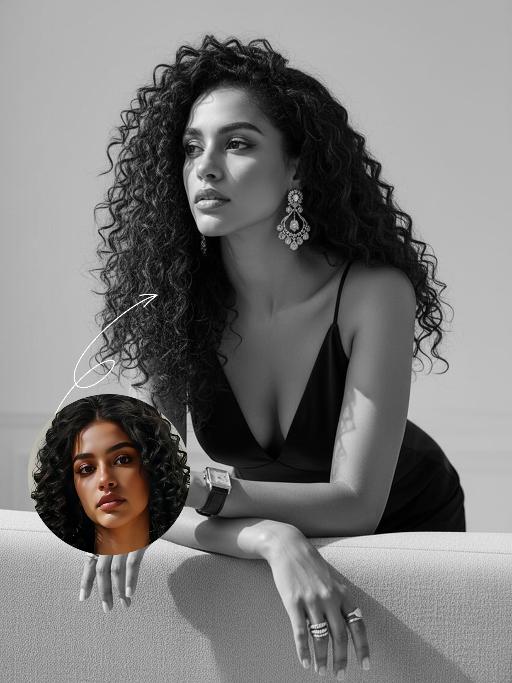
Stylish Lady AI effects generated image

Stylish Lady

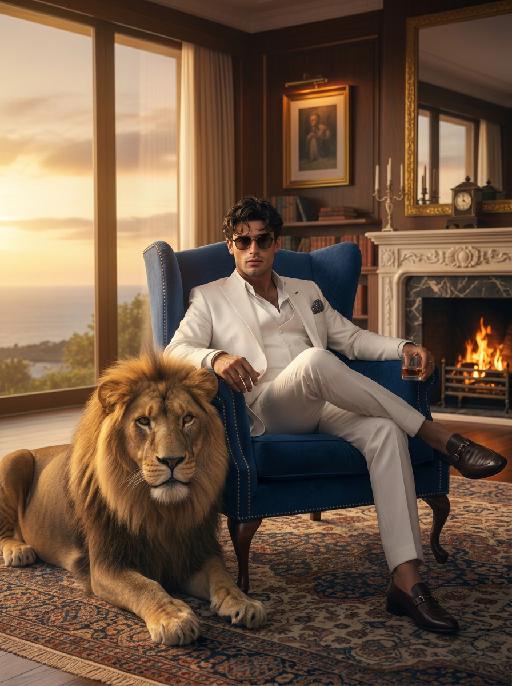
"Drawing on the overall facial structure, three-dimensional facial features, skin tone range and mature allure of the uploaded model's image (without strict identity replication), a new Western female figure is created: she exudes immense charm and sex appeal, with well-defined, sculpted facial features and a mature, self-assured demeanor that emanates a calm and sophisticated feminine aura. She has voluminous, layered long curly hair that falls naturally, with a few tendrils gently framing one side of her face; the hair is soft in texture with a natural sheen, styled in a way that looks effortless yet meticulously crafted. She is wearing a black silk deep V-neck top – the silk fabric boasts a distinct lustre and drape, with delicate light reflections on its surface that accentuate her elegant yet sensual temperament. She pairs the top with oversized yet exquisitely crafted statement earrings, multiple stacked rings on her fingers, and a vintage square wristwatch on her wrist, all accessories embodying a cohesive, retro and sophisticated style. Her posture is relaxed and unposed: her elbows rest casually on the back of a light grey fabric sofa, her arms slightly crossed, her body leaning lazily forward against the sofa back in a gesture that is informal yet captivating, conveying a natural, un-staged vibe. Her gaze drifts casually to one side of the frame, her expression calm and languid with a hint of subtle sensuality, creating an intimate yet restrained overall atmosphere. The background is a minimalist interior space in black, white or monochrome tones, simple and understated so as not to distract from the subject, fostering a private, quiet and introspective ambience with ample negative space in the frame. The entire image is in a pure black-and-white style (devoid of any color, rendered solely in grayscale), with dramatic contrast between light and shadow and sharp tonal definition. It places strong emphasis on the realistic texture of the skin, the fine details of the facial structure, and the lustre of the black silk garment. The photographic style leans into high-end fashion portraiture with a strong artistic flair; the frame is restrained and exquisitely detailed, ultimately presenting a sophisticated, polished and highly artistic feminine image that is cool, sensual, mature and powerful."

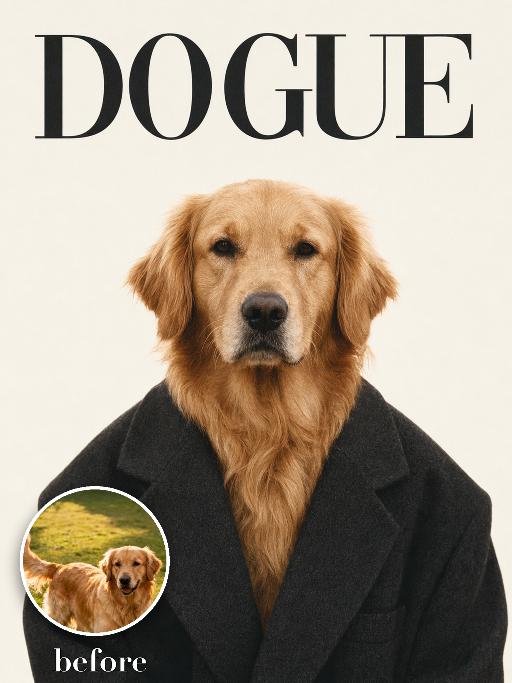
Dogue Blazer AI effects generated image

Dogue Blazer

Recreate the reference as a minimalist DOGUE fashion magazine cover. The uploaded dog is centered from chest up, facing forward with a calm serious editorial expression, wearing an oversized dark charcoal blazer with a deep V opening. Cream studio background, sparse elegant layout, large black Didot-style masthead text 'DOGUE' across the top, no other major text. High-fashion portrait texture, soft film grain, balanced negative space. Preserve the uploaded pet's actual species, breed, coat color, markings, ear shape, eye color, muzzle and facial structure. Do not assume a fixed breed, color, or species from the reference image; adapt the exact gameplay to the uploaded pet. Actively change pose, facial expression, gaze direction, camera angle, wardrobe and styling to match the gameplay reference. Match the gameplay reference very closely in composition, crop, texture, lighting, visible pet angle, props, background, graphic layout and image quality. Vertical 3:4. Keep only the text explicitly requested in the prompt; do not add unrelated logos, watermarks or random words.

Load more

Next-Gen Multi-Model AI Video Architecture

Vivago AI isn't just one engine—it’s a unified hub for the world’s most advanced video AI. Whether you need cinematic realism or high-speed social content, we provide the right model for your creative vision.

Free Generate

Beauty and Dolphins

Vacation Time

Stellar Tear

Fish Tank Supervisor

Cinematic Quality & Precision Control

Enables 4K resolution with multi-lens motion control, generating delicate scene via text prompts for customized cinematography.​

TRY NOW

Dynamic AV Sync

Auto-generates original audio to avoid copyright issues. Build 3D immersive environments through layered sound design automatically.

TRY NOW

OpenAI Sora 2

​Advanced visual storytelling with unparalleled physics and consistency.

TRY NOW

Kling v2.6 Pro

Industry-leading cinematic image animation and motion control.

TRY NOW

Google Veo 3 & 3.1

Ultra-fast generation with enhanced realism for creative workflows.

TRY NOW

Vivago AI 2.0

Our proprietary model optimized for efficiency, speed, and cost-effective generation.

TRY NOW

Users' Voice

We listen carefully to the opinions of every user.
Free Generate
Contact Us
I tried the Lip Sync feature inside Vivago.ai’s AI Video Generator for my educational podcast, and the results were stunning! The avatar's lip movements perfectly matched my audio recording, creating a professional AI-generated video without complex editing. Compared with tools like OpenAI Sora 2 and Google Veo 3.1, Vivago Image-to-Video delivers fast, studio-quality results online. It saved me hours of post-production work.
ElenaM (Spain)
Vivago’s Image-to-Video AI transformed my marketing workflow. I uploaded a product image and described the launch scene in text, and it generated a 10-second cinematic AI video with background music and dynamic visuals. The output quality rivals Kling v2.6 Pro and Google Veo 3 Fast. It’s now my go-to AI video generator for social media ads and product campaigns.
KenjiT (Japan)
As a digital artist, I use Vivago.ai 2.0 daily for Image-to-Image and AI Image-to-Video creation. The e-book covers and animated visuals I generate for clients look cinematic and professional. Unlike many standalone AI tools, Vivago integrates multiple leading models into one platform, making it easier to create copyright-safe AI images and videos for publishing.
ChenL (China)
I tried the Lip Sync feature inside Vivago.ai’s AI Video Generator for my educational podcast, and the results were stunning! The avatar's lip movements perfectly matched my audio recording, creating a professional AI-generated video without complex editing. Compared with tools like OpenAI Sora 2 and Google Veo 3.1, Vivago Image-to-Video delivers fast, studio-quality results online. It saved me hours of post-production work.
ElenaM (Spain)
Vivago’s Image-to-Video AI transformed my marketing workflow. I uploaded a product image and described the launch scene in text, and it generated a 10-second cinematic AI video with background music and dynamic visuals. The output quality rivals Kling v2.6 Pro and Google Veo 3 Fast. It’s now my go-to AI video generator for social media ads and product campaigns.
KenjiT (Japan)
As a digital artist, I use Vivago.ai 2.0 daily for Image-to-Image and AI Image-to-Video creation. The e-book covers and animated visuals I generate for clients look cinematic and professional. Unlike many standalone AI tools, Vivago integrates multiple leading models into one platform, making it easier to create copyright-safe AI images and videos for publishing.
ChenL (China)
I absolutely love Vivago’s AI Image-to-Video Generator. As a travel blogger, static images often fail to capture real atmosphere, but Vivago helps me turn photos into vivid cinematic AI videos with motion effects. It feels comparable to OpenAI Sora 2 and Google Veo 3.1, but more accessible and faster for creators who need high-quality AI videos online.
LiamK (Australia)
I tried the Lip Sync feature inside Vivago.ai’s AI Video Generator for my educational podcast, and the results were stunning! The avatar's lip movements perfectly matched my audio recording, creating a professional AI-generated video without complex editing. Compared with tools like OpenAI Sora 2 and Google Veo 3.1, Vivago Image-to-Video delivers fast, studio-quality results online. It saved me hours of post-production work.
ElenaM (Spain)
Vivago’s Image-to-Video AI transformed my marketing workflow. I uploaded a product image and described the launch scene in text, and it generated a 10-second cinematic AI video with background music and dynamic visuals. The output quality rivals Kling v2.6 Pro and Google Veo 3 Fast. It’s now my go-to AI video generator for social media ads and product campaigns.
KenjiT (Japan)
As a digital artist, I use Vivago.ai 2.0 daily for Image-to-Image and AI Image-to-Video creation. The e-book covers and animated visuals I generate for clients look cinematic and professional. Unlike many standalone AI tools, Vivago integrates multiple leading models into one platform, making it easier to create copyright-safe AI images and videos for publishing.
ChenL (China)
I absolutely love Vivago’s AI Image-to-Video Generator. As a travel blogger, static images often fail to capture real atmosphere, but Vivago helps me turn photos into vivid cinematic AI videos with motion effects. It feels comparable to OpenAI Sora 2 and Google Veo 3.1, but more accessible and faster for creators who need high-quality AI videos online.
LiamK (Australia)
Using Vivago.ai’s Image-to-Video AI has greatly enhanced my classroom teaching. I transform textbook notes into historical AI videos with cinematic filters and dynamic animations. Compared with tools like Kling v2.6 Pro and Google Veo 3 Fast, Vivago offers faster generation and easier parameter control for educators who need reliable AI video creation.
RajivG (India)
I frequently create AI videos on Vivago and publish them on TikTok and YouTube Shorts. The AI video templates and trending content ideas help me produce viral-ready clips quickly. With Vivago’s integrated models—including advanced video engines similar to OpenAI Sora 2—I can generate anime-style and cinematic social media videos that drive high engagement.
MarieJ (Spain)
What attracts me most about Vivago.ai is not only the powerful AI Video Generator but also the active AIGC creator community. It combines AI Image-to-Video, Text-to-Video, and leading model integrations like Google Veo 3.1 into one creative platform.
TomW (India)
At first, I was hesitant about using AI video tools. But after trying Vivago Image-to-Video, I realized how easy it is to create professional AI-generated videos online. I just upload an image, add a short prompt, and adjust a few settings. The results are cinematic and copyright-safe, which is essential for commercial projects.
HectorC (Mexico)
Using Vivago.ai’s Image-to-Video AI has greatly enhanced my classroom teaching. I transform textbook notes into historical AI videos with cinematic filters and dynamic animations. Compared with tools like Kling v2.6 Pro and Google Veo 3 Fast, Vivago offers faster generation and easier parameter control for educators who need reliable AI video creation.
RajivG (India)
I frequently create AI videos on Vivago and publish them on TikTok and YouTube Shorts. The AI video templates and trending content ideas help me produce viral-ready clips quickly. With Vivago’s integrated models—including advanced video engines similar to OpenAI Sora 2—I can generate anime-style and cinematic social media videos that drive high engagement.
MarieJ (Spain)
What attracts me most about Vivago.ai is not only the powerful AI Video Generator but also the active AIGC creator community. It combines AI Image-to-Video, Text-to-Video, and leading model integrations like Google Veo 3.1 into one creative platform.
TomW (India)
At first, I was hesitant about using AI video tools. But after trying Vivago Image-to-Video, I realized how easy it is to create professional AI-generated videos online. I just upload an image, add a short prompt, and adjust a few settings. The results are cinematic and copyright-safe, which is essential for commercial projects.
HectorC (Mexico)