Milk Splash

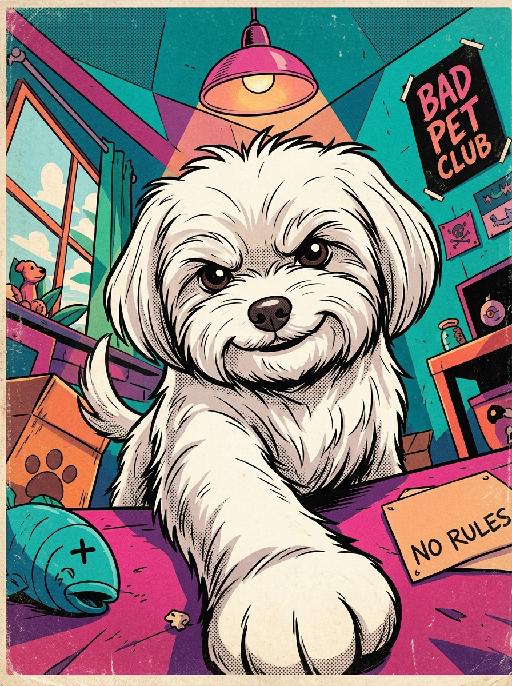
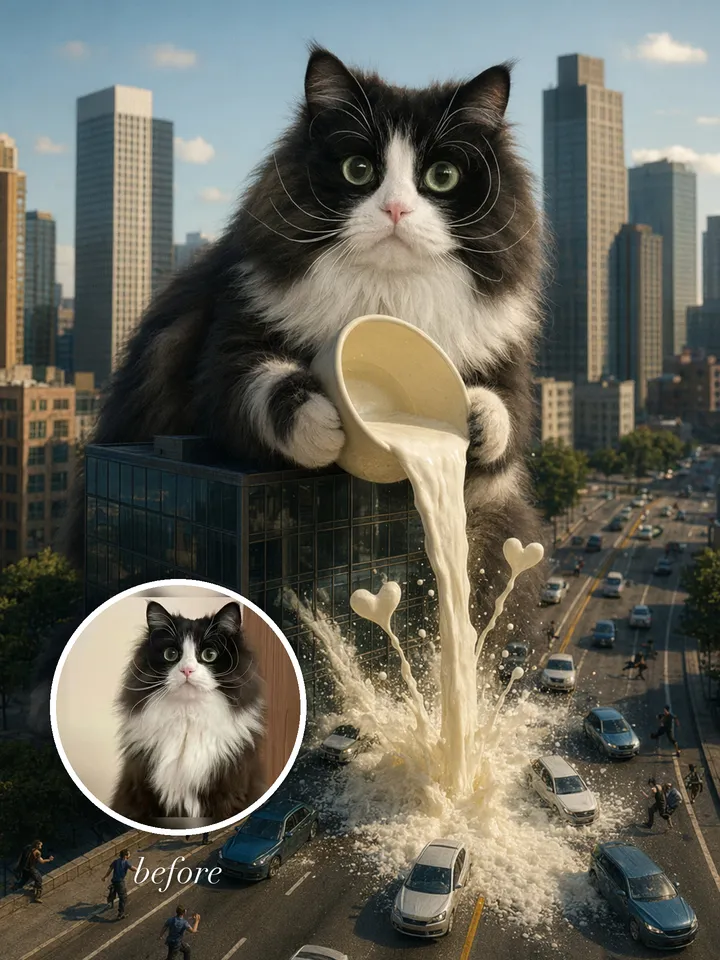
"Use the uploaded pet image as the exact identity reference. Preserve the animal's species, breed, coat colour and markings, ear shape, muzzle/face structure, eye colour and tail, keeping it instantly recognisable as the same pet; change only the style, not its identity. Create a vertical 3:4 image with this exact effect: surreal cinematic city scene, the uploaded pet becomes a huge kaiju-sized animal crouched between skyscrapers and pouring or splashing milk into the street below. Dramatic but cute, realistic fur, miniature cars and buildings for scale, golden evening light, high-detail photo-composite. Keep it playful, not scary; no text. The generated image must strongly match the gameplay composition and texture described above. Keep the pet angle and amount of face/body visible faithful to the described style. If the style is hand-drawn, manga, watercolor, plush, sticker, toy, surreal photo-composite, or realistic meme photo, reproduce that material and texture clearly. No logos, no watermark, no Doubao AI text."

Use Template
arrow
Milk Splash

More From VIVAGO AI

Morning Paws AI effects generated image

Morning Paws

Cute expression stickers featuring the image of the character from the uploaded picture, depicting the protagonist lazily stretching out her body in the gentle morning light. One paw holds a delicate coffee cup, presenting a sleepy and relaxed happy expression. The warm golden sunrise light, combined with the soft scattering effect of the sunlight, presents a warm color palette of peach and cream. In the center at the bottom, there are smooth and round Portuguese text, presented in a cute hand-drawn font: "Good morning, my love!" Add some cute hand-drawn doodles: clouds, the sun, relaxed lines, stars, etc.; this is a Brazilian-style daytime chat sticker, using a real photography style, soft and warm ambient light, delicate hair texture, creating a warm and romantic atmosphere. It has an irregular white border, a pure white background, and is presented in ultra-high-definition 8K format. It is suitable for posting as cute emoticons on social media and comes with a simple irregular white border sticker.

Heart Spotlight AI effects generated image

Heart Spotlight

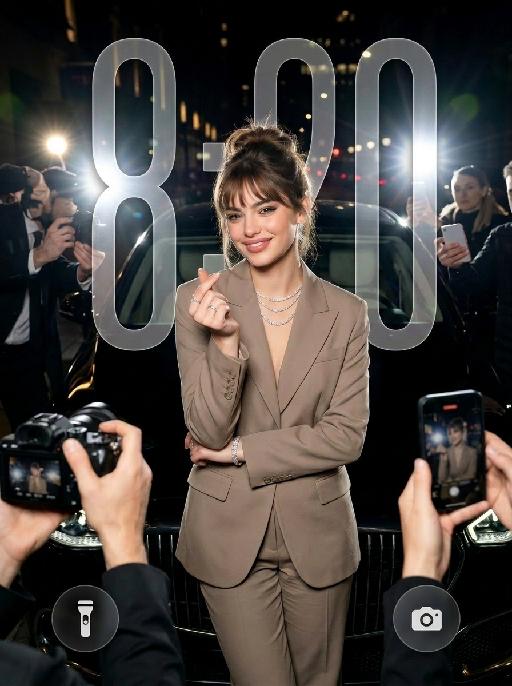
" Use the uploaded image as the only identity reference for the subject. Create a photorealistic vertical 4:5 high-fashion celebrity editorial portrait of the same subject. Strictly preserve the subject’s exact face, age, facial features, skin tone, hairstyle, hair color, and overall recognizability. Do not replace the face with a generic model face. SCENE: The subject stands confidently at night in front of a luxury black car, as if arriving at a high-profile fashion event or exclusive after-party. The setting feels like a glamorous city street at night, with a chic paparazzi atmosphere. POSE AND EXPRESSION: The subject stands centered in front of the car in a poised, fashion-forward stance. She raises both hands in front of her chest and forms a heart shape with her fingers. Her expression is stylish, playful, and confident, with a cool celebrity attitude. She can have softly closed eyes or a slightly squinting glamorous expression, with softly puckered lips or a chic subtle pout. STYLING: The subject wears a tailored taupe-beige or champagne-toned luxury suit with a sharp structured silhouette and elegant fitted waist. The outfit should feel like designer fashion, sleek, expensive, and editorial. Add sparkling high-end jewelry: - layered diamond necklace - statement earrings - bracelet - rings The styling should feel glamorous, feminine, modern, and celebrity-level luxurious. CAMERA AND PAPARAZZI ELEMENTS: Several hands holding professional cameras and smartphones appear around the edges of the frame, photographing the subject. Some phones may show the subject on their screens. Add strong paparazzi flash effects and bright camera flashes from multiple directions. The flashes should create a dramatic night-event atmosphere, with bright bursts of light, glossy highlights on the car, sparkling reflections on the jewelry, and a high-fashion celebrity feel. Keep the subject’s face and heart-hand gesture clearly visible. The surrounding cameras and phones should frame the subject without blocking her. BACKGROUND: - nighttime city-street setting - luxury black car directly behind the subject - dark elegant atmosphere - subtle out-of-focus city lights or event lights - refined red-carpet / fashion-event arrival mood - no cluttered street details LIGHTING: - strong flash photography aesthetic - multiple paparazzi flash bursts - subject brightly illuminated against a darker night background - glamorous high-contrast lighting - glossy highlights on hair, suit fabric, jewelry, and car surface - clean, premium editorial finish - cinematic night luxury mood STYLE: - photorealistic luxury fashion editorial photography - celebrity paparazzi aesthetic - high-end magazine campaign feel - glamorous night-event atmosphere - polished retouching - realistic skin texture - premium contrast - chic, stylish, expensive, and dramatic IMPORTANT CONSTRAINTS: - no text - no logo - no watermark - no distorted hands - no extra fingers - no deformed cameras - no blocked face - no cartoon - no illustration - no CGI appearance "

Pink Hoodie AI effects generated image

Pink Hoodie

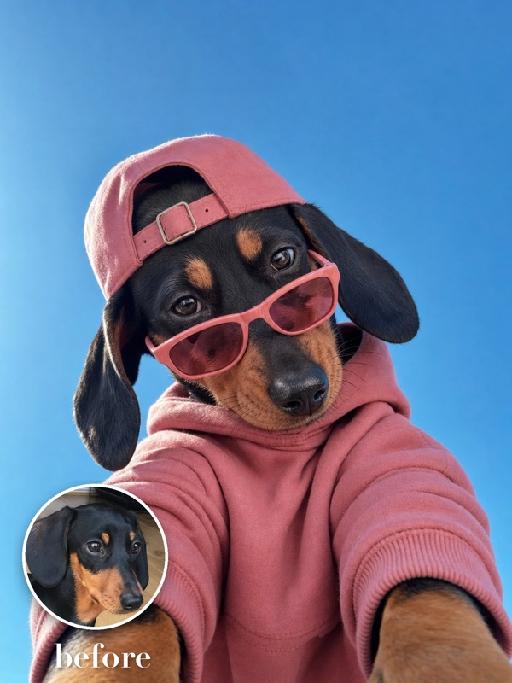
Create an extreme low-angle wide-lens selfie matching the reference. The uploaded pet leans over the camera against a saturated blue sky, wearing a dusty-pink hoodie, a backwards pink baseball cap and narrow pink sunglasses lowered slightly on the nose. The head dominates the lower frame; playful cool expression and strong foreshortening. The subject remains an animal throughout. No people or human hands. No real brands, logos, watermarks or readable text. Accurately preserve the uploaded pet's species, breed, coat color and markings, ear shape, muzzle and face structure, eye color and body proportions. Keep it instantly recognisable as the same animal; change only pose, scene, clothing and accessories. Vertical 3:4, photorealistic, crisp detail, with the pet as the unmistakable main subject.

Ambiton Love AI effects generated image

Ambiton Love

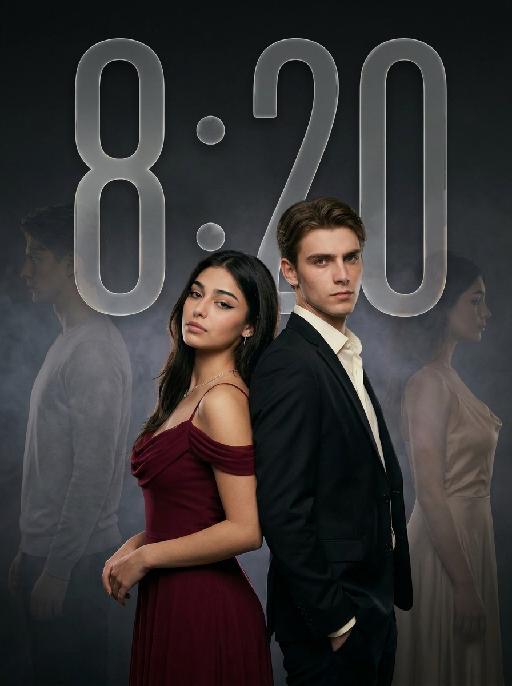
" Use the uploaded image as the main reference for composition, pose, lighting, and style. Use the uploaded subject images as the only identity references. Create a photorealistic vertical 9:16 cinematic romance phone wallpaper designed for a smartphone lock screen. Strictly preserve both subjects’ exact faces, hairstyles, hair colors, body proportions, and overall recognizability. Place the central couple in the lower-middle area of the frame. Make the couple noticeably larger, using a tight waist-up composition so their faces and embrace become the main focus. The central couple should occupy approximately 70–75% of the image height while leaving the upper 20–25% as clean, dark negative space for wallpaper use. Do not add any text, clock, icons, or UI. Keep the central pose the same as the reference image: * woman on the left * man on the right * they stand closely back-to-back and embrace naturally * preserve the same body angles, head positions, and simple hand placement * both faces remain fully visible, sharp, and unobstructed CLOTHING — STRICTLY FIXED: The woman wears an elegant deep wine-red evening gown with: * a softly draped off-shoulder neckline * a fitted bodice * long, fluid fabric folds * refined satin or silk texture * subtle dark-red and burgundy highlights * one delicate thin silver necklace * small silver earrings The gown should feel romantic, luxurious, soft, and cinematic, not stiff or costume-like. The man wears: * a fitted black tailored evening suit * a crisp ivory-white dress shirt * an open shirt collar * no tie * clean, modern lapels * softly structured shoulders * visible tailoring, seams, and natural fabric folds The white shirt must remain clearly visible and create contrast between the man’s suit, the woman’s wine-red gown, and the dark background. The woman looks toward the camera with a calm, serious, slightly vulnerable expression. The man looks toward the camera with an intense, protective, emotionally restrained expression. BACKGROUND SILHOUETTES: Keep two extremely faint background silhouette echoes: * one very faint male silhouette near the far-left edge * one very faint female silhouette near the far-right edge Both silhouettes face inward toward the center, remain behind the central couple, and sit around shoulder-to-head height. The male silhouette wears a pale gray or muted beige top. The female silhouette wears a soft champagne or silver-gray outfit. Their clothing must be different from the central couple’s clothing. Make both silhouettes extremely soft, very low-opacity, lightly blurred, and deeply blended into the background. Use subtle slow-shutter smearing, soft haze, and gentle diffusion so they appear as barely visible emotional afterimages, not extra people. Do not let the silhouettes overlap the central faces. Use a minimal dark charcoal-gray studio background with soft smoky gradients, subtle cinematic light-and-shadow effects, gentle haze, and a restrained vignette. Use soft cinematic lighting. Keep the central couple bright, sharp, and dimensional. Add subtle contour light along the hair, shoulders, wine-red gown, black suit, and white shirt so the subjects remain clearly separated from each other and from the background. Style: photorealistic premium romance-drama key art, intimate, elegant, mature, mysterious, refined cinematic contrast, realistic skin and fabric texture, subtle film grain. No text, title, logo, watermark, border, frame lines, corner marks, UI, clock, icons, extra people, extra limbs, duplicated hands, blurred central faces, prominent silhouettes, cartoon, illustration, anime, or CGI."

Cyber Couple AI effects generated image

Cyber Couple

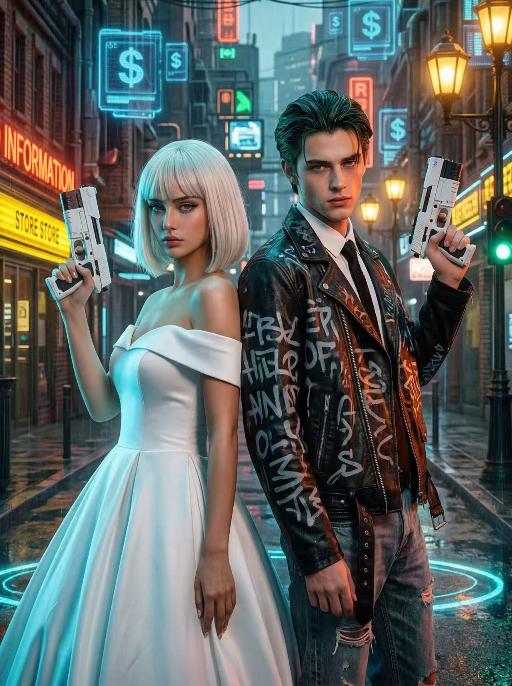
"High-end photorealistic cyberpunk-style portrait, strictly preserving the original facial features, gender, and age of the two individuals: The woman has short platinum-blonde hair with blunt bangs, delicate makeup, and a cold, sharp gaze; the man has dark greenish-black slicked-back hair, sharp facial features, and a stern expression. They stand back-to-back, each holding a futuristic white sci-fi firearm raised in their hands, looking directly at the camera with a cool, slightly detached demeanor. The woman wears a white off-the-shoulder ball gown wedding dress, elegant and minimalist, creating a stark contrast with the cyberpunk style. The man dons a black vintage riveted leather jacket printed with graffiti letters, layered over a white shirt and black tie, paired with vintage ripped jeans for a strong streetwear vibe. Background: A rainy neon-lit cyberpunk city street blending retro and futuristic elements: old brick buildings, glowing neon signs (red ""RED INFORMATION"", yellow reflective store signs, green traffic lights), floating blue holographic projections (dollar sign UI elements) in the air, warm yellow vintage street lamps interwoven with cool-toned electronic lights, and wet ground reflecting neon halos. Dense pipelines, electronic screens, and retro architectural details create a dystopian urban atmosphere. Lighting: High-contrast neon cyberpunk lighting, dominated by cyan-blue, orange-red, and warm yellow tones: cool side lighting outlines the figures, warm neon lights illuminate their faces, the ambient light is filled with grain and halos to simulate the diffuse reflection of humid rainy air, and strong light-dark contrast emphasizes the layering between the characters and the neon background. 8K ultra-realistic, cinematic quality, cyberpunk aesthetic, shot with a Sony A7R V camera paired with an 85mm f/1.4 lens, shallow depth of field, ultra-clear details of skin, hair, and clothing textures, with subtle film grain, no watermarks, no text, and no logos."

Chic Distortion

"Use the uploaded image as the only referen Transform the uploaded image into a vintage surreal editorial painting while preserving the subject’s identity, hairstyle, clothing, background, and overall composition. The human figure must be obviously and unmistakably surrealized. Give the person dramatically exaggerated body proportions: a very long stretched neck, a noticeably elongated and narrowed face, extra-long slender arms, elongated delicate fingers, and an unnaturally slim elongated upper body. The distortion should be strong, visible at first glance, and intentionally stylized. Make the deformation much more obvious than subtle. The figure should clearly look surreal and artistically distorted, while still remaining elegant, fashionable, and recognizable. Keep the face identifiable, but stylize the anatomy in a bold surreal way. The result should feel like a sophisticated, high-fashion surreal painting rather than a realistic portrait. Style: mid-century Riviera-inspired surreal fashion illustration, vintage editorial painting, expressive oil-painted brush texture, warm muted retro color palette, luxurious decorative atmosphere, elegant visual distortion, sophisticated absurdity, cinematic composition, and polished gallery-quality finish. Render the entire scene in the same cohesive surreal vintage style. No text, no logo, no watermark."

Bali Bride AI effects generated image

Bali Bride

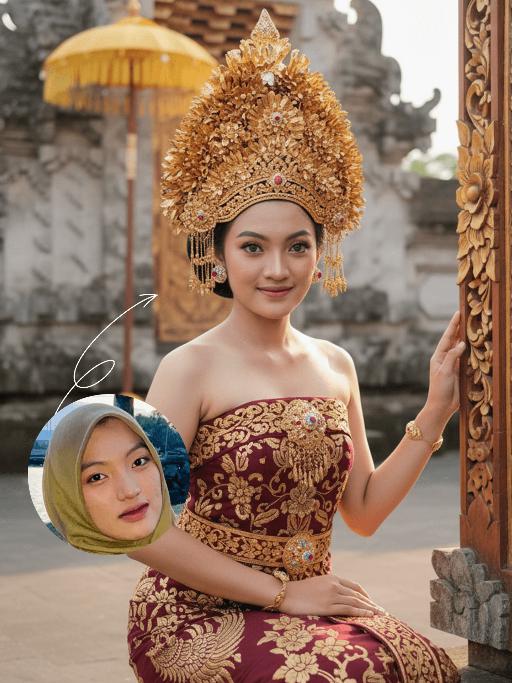
Strictly lock the facial features of the uploaded portrait (preserve facial contours, native Indonesian skin tone, hairstyle and age). Extremely minimal negative space, the subject occupies 90% of the vertical frame, tight half-body portrait photography, hyper-realistic style, 4K ultra-high definition, soft warm tropical daylight, authentic Balinese cultural ceremony atmosphere . A young Indonesian Balinese woman with delicate features and a gentle warm smile, half-squatting in a sacred Balinese temple courtyard (close framing) . She wears an elaborate traditional Balinese ceremonial outfit: deep maroon strapless dress with intricate golden floral & phoenix embroidery, ornate hand-carved golden headdress, golden necklace, drop earrings and bracelet . Her right hand rests on an intricately carved Balinese wooden frame decorated with gold, blue and pink floral motifs . Background (weathered temple stone walls, traditional yellow Balinese payung) is extremely softly blurred to highlight the subject. Warm diffused sunlight creates a glowing golden tone throughout the scene, sharp focus on her facial expression, the rich texture of the golden embroidery and intricate headdress details. Capture the vibrant authentic Balinese cultural ambiance

Gothic Scissor Glamour AI effects generated image

Gothic Scissor Glamour

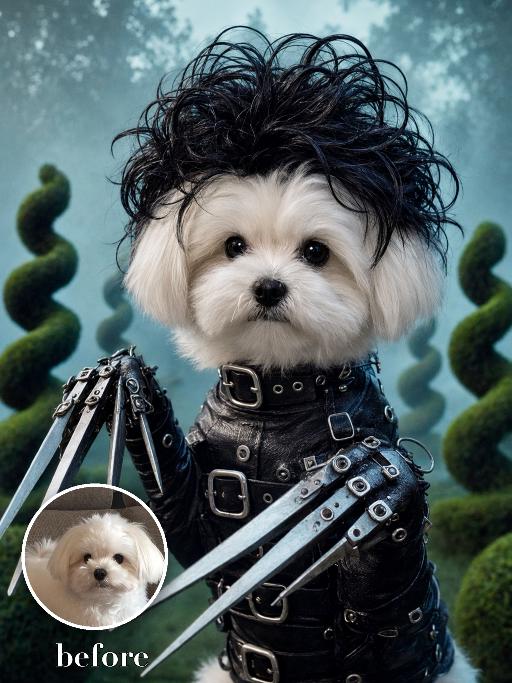
Recreate the exact whimsical gothic portrait: the uploaded pet has a tousled black wig-like fur accessory, a studded black leather costume with buckles, and stylized mechanical scissor-shaped glove props on both front paws. Misty blue-green topiary garden background, pale melancholy expression, centered chest-up fantasy film portrait. The subject remains an animal throughout. No people or human hands. No real character names, celebrity names, brands, logos, watermarks or readable text. Accurately preserve the uploaded pet's species, breed, coat color and markings, ear shape, muzzle and face structure, eye color, body proportions and tail. Keep it instantly recognisable as the same animal; change only pose, scene, costume and art treatment. Match the reference composition closely. Vertical 3:4, crisp detail, the pet is the unmistakable main subject.

Princess AI effects generated image

Princess

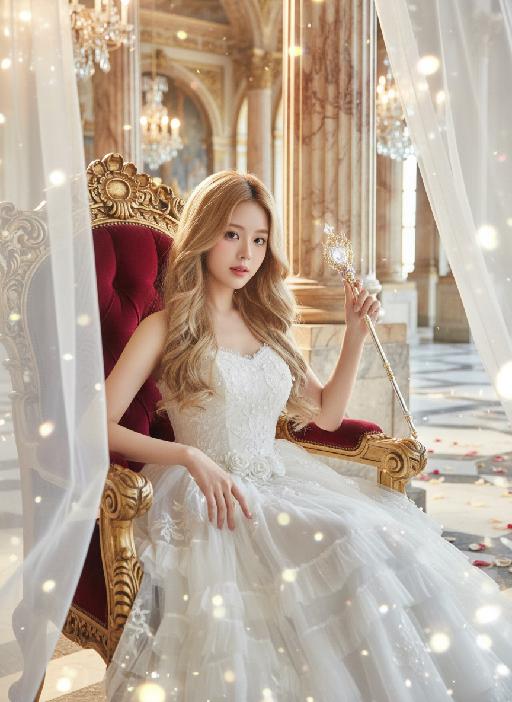
Strictly lock the facial features of the uploaded portrait (completely preserve facial contours, native skin tone, hairstyle and age); medium shot (bust-up), young girl with light golden long curly hair, Korean sweet style looks, delicate facial features with clear nude makeup and light pink blush, proud and elegant princess demeanor, sitting gracefully on an ornate throne with one hand resting lightly on the armrest and the other gently holding a delicate scepter/flower, head tilted slightly with a haughty yet gentle gaze; wearing a white strapless tulle dress with multi-layered flowing tulle skirt, delicate white lace embroidery and subtle pearl decorations, exuding a noble and dreamy fairy-tale princess aura; background is a magnificent and dreamy royal palace hall with towering marble columns, intricate golden carvings, soft warm chandelier light casting a glowing halo around her, sheer white tulle curtains fluttering gently, scattered rose petals on the marble floor, distant palace arches blurred into a soft bokeh effect, air filled with sparkling light particles; overall **dreamy fairy-tale + French retro + royal palace princess atmosphere photo, soft and ethereal ambient light, warm romantic film texture, high saturation dreamy tones, cinematic lighting with glowing rim light, motion blur (light particles/curtains), rich texture details, 8K ultra-clear, realistic human photography, flawless, full of magical and noble royal princess charm

AI One-Tap Beauty

Retouch this photo. Keep background, clothing, pose, framing, and head-to-body proportions identical. Do not crop or change layout. Skin: warm golden glow, rich and radiant. Even out pigmentation and remove blemishes. PRESERVE warm golden undertone — do NOT whiten or cool the skin. Face: keep full, natural face shape. Minimal slimming only. [if female:] Makeup: bold defined brows, kohl eyeliner, warm brown/copper eyeshadow, rich berry/red lips, warm terracotta blush. Dramatic and confident. [If full makeup: Do NOT change lip color, blush, or eyeshadow.] [if male:] No makeup. Bold neat brows, dramatic alert eyes. Body: preserve full, curvy figure. Minimal slimming. Emphasize healthy, confident presence. Hair: keep style, add glossy shine. Color: warm golden tones, rich and vibrant. Enhance the warmth naturally. Same person, same face, same scene, same resolution. Do not upscale, sharpen, or add detail not in the original.

Image Quality Restoration

Retouch this image. Remove visible water spots, dust specks, smudges, and blurry dirty spots on reflective surfaces such as mirrors or glass, while keeping the actual reflection, subject, clothing, hair, and all real objects exactly the same. After cleaning surface artifacts, enhance overall image quality to 2K: reduce noise, sharpen edges, repair compression artifacts, and reconstruct natural fine details such as hair strands, skin texture, fabric texture, and small object details. Do not change the person's appearance, expression, identity, or pose. Do not add, remove, or alter any real objects. Do not change the overall colors, lighting style, or atmosphere. Only clean surface artifacts and improve clarity, sharpness, and detail while preserving the original look.

Load more

Next-Gen Multi-Model AI Video Architecture

Vivago AI isn't just one engine—it’s a unified hub for the world’s most advanced video AI. Whether you need cinematic realism or high-speed social content, we provide the right model for your creative vision.

Free Generate

Beauty and Dolphins

Vacation Time

Stellar Tear

Fish Tank Supervisor

Cinematic Quality & Precision Control

Enables 4K resolution with multi-lens motion control, generating delicate scene via text prompts for customized cinematography.​

TRY NOW

Dynamic AV Sync

Auto-generates original audio to avoid copyright issues. Build 3D immersive environments through layered sound design automatically.

TRY NOW

OpenAI Sora 2

​Advanced visual storytelling with unparalleled physics and consistency.

TRY NOW

Kling v2.6 Pro

Industry-leading cinematic image animation and motion control.

TRY NOW

Google Veo 3 & 3.1

Ultra-fast generation with enhanced realism for creative workflows.

TRY NOW

Vivago AI 2.0

Our proprietary model optimized for efficiency, speed, and cost-effective generation.

TRY NOW

Users' Voice

We listen carefully to the opinions of every user.
Free Generate
Contact Us
I tried the Lip Sync feature inside Vivago.ai’s AI Video Generator for my educational podcast, and the results were stunning! The avatar's lip movements perfectly matched my audio recording, creating a professional AI-generated video without complex editing. Compared with tools like OpenAI Sora 2 and Google Veo 3.1, Vivago Image-to-Video delivers fast, studio-quality results online. It saved me hours of post-production work.
ElenaM (Spain)
Vivago’s Image-to-Video AI transformed my marketing workflow. I uploaded a product image and described the launch scene in text, and it generated a 10-second cinematic AI video with background music and dynamic visuals. The output quality rivals Kling v2.6 Pro and Google Veo 3 Fast. It’s now my go-to AI video generator for social media ads and product campaigns.
KenjiT (Japan)
As a digital artist, I use Vivago.ai 2.0 daily for Image-to-Image and AI Image-to-Video creation. The e-book covers and animated visuals I generate for clients look cinematic and professional. Unlike many standalone AI tools, Vivago integrates multiple leading models into one platform, making it easier to create copyright-safe AI images and videos for publishing.
ChenL (China)
I tried the Lip Sync feature inside Vivago.ai’s AI Video Generator for my educational podcast, and the results were stunning! The avatar's lip movements perfectly matched my audio recording, creating a professional AI-generated video without complex editing. Compared with tools like OpenAI Sora 2 and Google Veo 3.1, Vivago Image-to-Video delivers fast, studio-quality results online. It saved me hours of post-production work.
ElenaM (Spain)
Vivago’s Image-to-Video AI transformed my marketing workflow. I uploaded a product image and described the launch scene in text, and it generated a 10-second cinematic AI video with background music and dynamic visuals. The output quality rivals Kling v2.6 Pro and Google Veo 3 Fast. It’s now my go-to AI video generator for social media ads and product campaigns.
KenjiT (Japan)
As a digital artist, I use Vivago.ai 2.0 daily for Image-to-Image and AI Image-to-Video creation. The e-book covers and animated visuals I generate for clients look cinematic and professional. Unlike many standalone AI tools, Vivago integrates multiple leading models into one platform, making it easier to create copyright-safe AI images and videos for publishing.
ChenL (China)
I absolutely love Vivago’s AI Image-to-Video Generator. As a travel blogger, static images often fail to capture real atmosphere, but Vivago helps me turn photos into vivid cinematic AI videos with motion effects. It feels comparable to OpenAI Sora 2 and Google Veo 3.1, but more accessible and faster for creators who need high-quality AI videos online.
LiamK (Australia)
I tried the Lip Sync feature inside Vivago.ai’s AI Video Generator for my educational podcast, and the results were stunning! The avatar's lip movements perfectly matched my audio recording, creating a professional AI-generated video without complex editing. Compared with tools like OpenAI Sora 2 and Google Veo 3.1, Vivago Image-to-Video delivers fast, studio-quality results online. It saved me hours of post-production work.
ElenaM (Spain)
Vivago’s Image-to-Video AI transformed my marketing workflow. I uploaded a product image and described the launch scene in text, and it generated a 10-second cinematic AI video with background music and dynamic visuals. The output quality rivals Kling v2.6 Pro and Google Veo 3 Fast. It’s now my go-to AI video generator for social media ads and product campaigns.
KenjiT (Japan)
As a digital artist, I use Vivago.ai 2.0 daily for Image-to-Image and AI Image-to-Video creation. The e-book covers and animated visuals I generate for clients look cinematic and professional. Unlike many standalone AI tools, Vivago integrates multiple leading models into one platform, making it easier to create copyright-safe AI images and videos for publishing.
ChenL (China)
I absolutely love Vivago’s AI Image-to-Video Generator. As a travel blogger, static images often fail to capture real atmosphere, but Vivago helps me turn photos into vivid cinematic AI videos with motion effects. It feels comparable to OpenAI Sora 2 and Google Veo 3.1, but more accessible and faster for creators who need high-quality AI videos online.
LiamK (Australia)
Using Vivago.ai’s Image-to-Video AI has greatly enhanced my classroom teaching. I transform textbook notes into historical AI videos with cinematic filters and dynamic animations. Compared with tools like Kling v2.6 Pro and Google Veo 3 Fast, Vivago offers faster generation and easier parameter control for educators who need reliable AI video creation.
RajivG (India)
I frequently create AI videos on Vivago and publish them on TikTok and YouTube Shorts. The AI video templates and trending content ideas help me produce viral-ready clips quickly. With Vivago’s integrated models—including advanced video engines similar to OpenAI Sora 2—I can generate anime-style and cinematic social media videos that drive high engagement.
MarieJ (Spain)
What attracts me most about Vivago.ai is not only the powerful AI Video Generator but also the active AIGC creator community. It combines AI Image-to-Video, Text-to-Video, and leading model integrations like Google Veo 3.1 into one creative platform.
TomW (India)
At first, I was hesitant about using AI video tools. But after trying Vivago Image-to-Video, I realized how easy it is to create professional AI-generated videos online. I just upload an image, add a short prompt, and adjust a few settings. The results are cinematic and copyright-safe, which is essential for commercial projects.
HectorC (Mexico)
Using Vivago.ai’s Image-to-Video AI has greatly enhanced my classroom teaching. I transform textbook notes into historical AI videos with cinematic filters and dynamic animations. Compared with tools like Kling v2.6 Pro and Google Veo 3 Fast, Vivago offers faster generation and easier parameter control for educators who need reliable AI video creation.
RajivG (India)
I frequently create AI videos on Vivago and publish them on TikTok and YouTube Shorts. The AI video templates and trending content ideas help me produce viral-ready clips quickly. With Vivago’s integrated models—including advanced video engines similar to OpenAI Sora 2—I can generate anime-style and cinematic social media videos that drive high engagement.
MarieJ (Spain)
What attracts me most about Vivago.ai is not only the powerful AI Video Generator but also the active AIGC creator community. It combines AI Image-to-Video, Text-to-Video, and leading model integrations like Google Veo 3.1 into one creative platform.
TomW (India)
At first, I was hesitant about using AI video tools. But after trying Vivago Image-to-Video, I realized how easy it is to create professional AI-generated videos online. I just upload an image, add a short prompt, and adjust a few settings. The results are cinematic and copyright-safe, which is essential for commercial projects.
HectorC (Mexico)