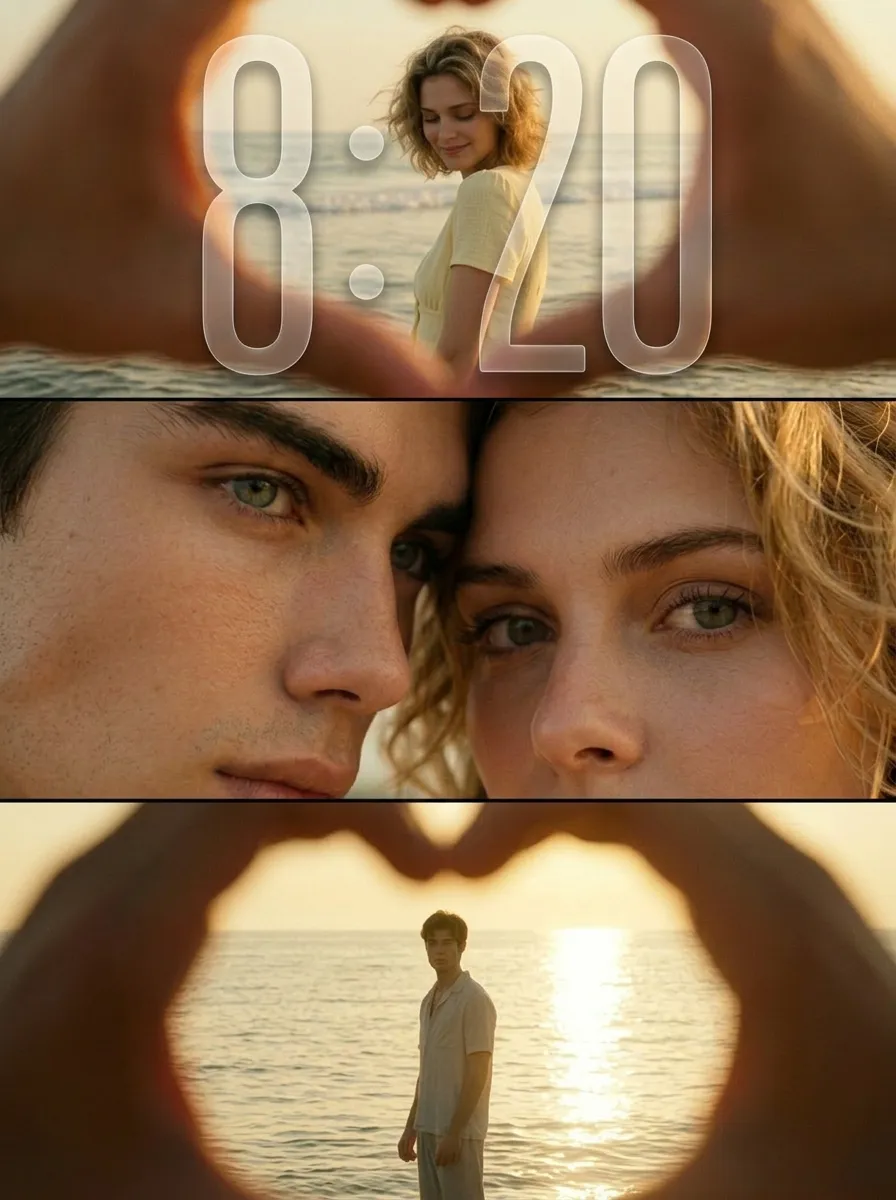
Endless Sunset

"Use the uploaded images as the only identity references for the two adult subjects. Create a photorealistic vertical 9:16 cinematic romantic triptych composed of three horizontal panels stacked from top to bottom. Strictly preserve both subjects’ exact faces, ages, facial features, skin tones, hairstyles, hair colors, body proportions, and overall recognizability. TOP PANEL: Show the female subject standing in shallow seawater near the beach during golden hour. View her through a large heart-shaped opening formed by two hands close to the camera. The hands remain heavily out of focus and occupy the outer edges of the frame, creating a natural foreground heart frame. The female subject stands in the center distance with gentle waves behind her. She turns slightly sideways and looks downward with a soft, shy, peaceful smile. She wears a simple pale yellow or cream short-sleeve summer top. Her hair falls naturally around her shoulders and moves slightly in the sea breeze. Keep the woman clearly recognizable but slightly softened by distance and warm atmospheric haze. MIDDLE PANEL: Create an extreme close-up of the couple’s faces pressed closely together. Show mainly: * the male subject’s eye, brow, nose bridge, and upper cheek on the left * the female subject’s eye, eyebrow, forehead, and upper cheek on the right Their foreheads and temples touch gently. The female subject looks directly toward the camera with a wide, emotional, intimate gaze. The male subject’s eye remains partially visible, calm and tender. The framing is extremely tight, with both faces filling the entire panel. Preserve realistic eyelashes, skin pores, freckles, eyebrows, and natural facial detail. BOTTOM PANEL: Show the male subject standing alone in shallow seawater during golden-hour backlight. View him through another large heart-shaped opening formed by hands close to the camera. The blurred hands occupy the outer foreground and create a soft heart-shaped frame. The male subject stands in the center distance, facing generally toward the camera with his body slightly turned. He appears as a warm, softly defined silhouette against bright sunlight reflecting across the water. He wears a simple light-colored short-sleeve summer shirt and relaxed light trousers. The sun reflection creates a long bright golden path across the water behind him. LAYOUT: * vertical 9:16 composition * exactly three horizontal cinematic panels * top panel: female subject at the beach * middle panel: extreme close-up of both faces and eyes * bottom panel: male subject standing in the sea * clean horizontal separation between panels * no decorative borders * balanced visual rhythm * intimate romantic storytelling LIGHTING AND COLOR: Use warm golden-hour sunlight with rich amber, honey, muted yellow, and soft olive tones. Create: * strong warm backlight * soft glowing highlights * gentle shadow detail * slightly faded colors * mild haze * subtle halation around bright areas * soft highlight roll-off * delicate analog film grain * slightly underexposed cinematic shadows * natural skin texture PHOTOGRAPHIC STYLE: * nostalgic summer romance film still * intimate cinematic couple photography * early-2000s analog film aesthetic * soft 35mm texture * dreamy but photorealistic * emotionally warm, private, tender, and poetic * natural candid expressions * no glossy commercial retouching * no plastic skin * no HDR look * no overly sharp digital texture IMPORTANT CONSTRAINTS: * preserve both subjects’ identities * exactly three panels * female only in the top beach panel * both subjects only in the middle close-up panel * male only in the bottom beach panel * hands forming heart-shaped foreground frames only in the top and bottom panels * hands must remain heavily blurred * no extra people * no extra fingers * no malformed heart shape * no merged eyes * no distorted faces * no text * no logo * no watermark * no UI * no cartoon * no illustration * no CGI appearance "

Use Template
arrow
Endless Sunset

More From VIVAGO AI

Viral Dance

"Photorealistic film portrait photography, horizontal rectangular frame, fixed composition rule: 【Character】 is strictly centered in frame, the bottom cropping edge of frame cuts exactly at the character's knees, a thin strip of light beige flat ceiling is reserved on the top of frame; Precise Scene Details Background structure: A vertical square cream solid partition pillar right behind 【Character】, two identical dark walnut solid wood full-height open bookshelves symmetrically placed on both sides of pillar, each shelf built with fixed 5 layers; every shelf densely packed with multicolored hardcover books, most books stand vertically, small stacks of horizontally placed thick books on right part of each shelf with mixed red, blue, brown, off-white book spines; Left side of frame: Off-white fabric single armchair at bottom-left with short dark timber legs, one light khaki square linen cushion leans against seat; a floor lamp with thin metal pole + tapered white fabric lampshade stands in the gap between sofa and left bookshelf; Right side of frame: Partial curved edge of matte white round low coffee table is visible behind character’s right hip; Floor design: Full floor covered with oat beige short loop pile carpet, soft subtle natural shadows from bookshelf and armchair on carpet surface; Lighting & Quality Soft diffused front indoor natural lighting, neutral warm white color temperature, no harsh sharp hard shadows, natural layered ambient shadow; 8K ultra-realistic high definition, intricate textures of wood grain, book spine print and fabric weave, minimalist American home study interior, no extra redundant ornaments inside the whole scene."

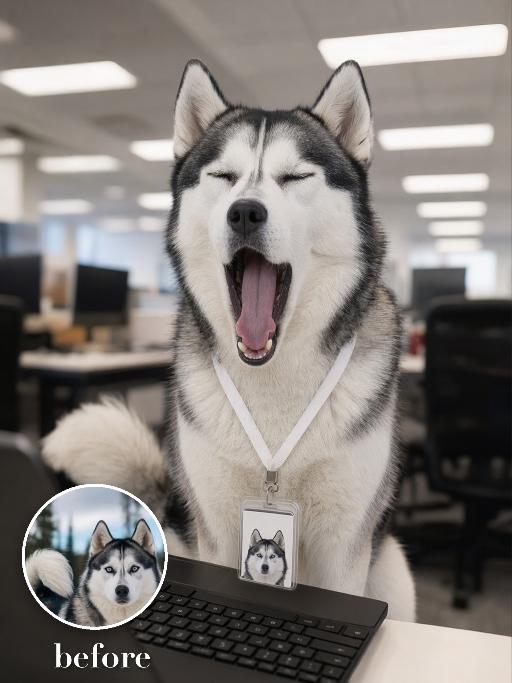
Yawn Time AI effects generated image

Yawn Time

Turn the uploaded pet into a tired corporate office worker pet: close-up behind a black laptop keyboard, mouth wide open in a big yawn, wearing a simple white lanyard ID badge that contains only a tiny photo-like pet icon and no readable text. Background is a blurred open-plan office with fluorescent ceiling panels. Candid photorealistic desk-level perspective, funny exhausted mood. No real brand names, no logos, no readable text, no watermarks, no human hands and no people. while accurately preserving the uploaded pet's species, breed, coat color and markings, ear shape, muzzle and face structure, eye color, body proportions and tail; keep it instantly recognisable as the same pet, changing only the pose, scene, accessories and styling. Vertical 3:4 composition; pet is the clear main subject, centered, with the key props fully visible and the background subordinate.

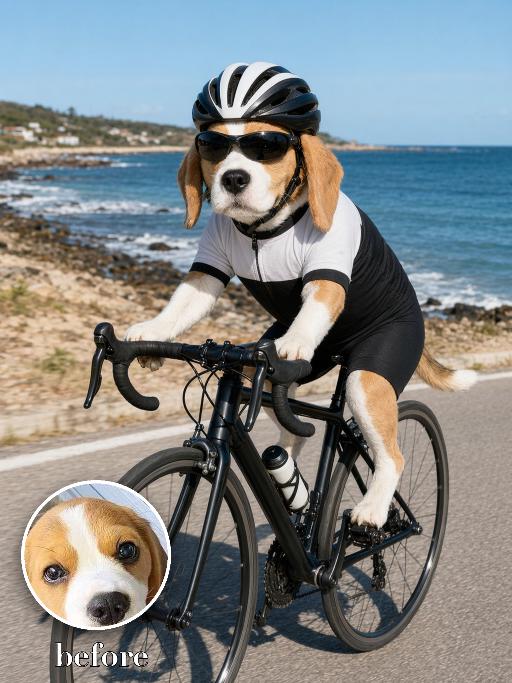
Beach Road Cyclist AI effects generated image

Beach Road Cyclist

Recreate a beach road cycling scene: the uploaded pet rides a black road bike on a coastal path, wearing a black-and-white cycling kit, helmet and sport sunglasses. Ocean and rocky shore behind, bright daylight, full body and bicycle visible, realistic action photo. The subject remains an animal throughout. No people or human hands. No real character names, celebrity names, brands, logos, watermarks or readable text. Accurately preserve the uploaded pet's species, breed, coat color and markings, ear shape, muzzle and face structure, eye color, body proportions and tail. Keep it instantly recognisable as the same animal; change only pose, scene, costume and art treatment. Match the provided gameplay reference very closely in composition, pose, colors, camera angle, props, and visual idea. Vertical 3:4, crisp detail, the pet is the unmistakable main subject.

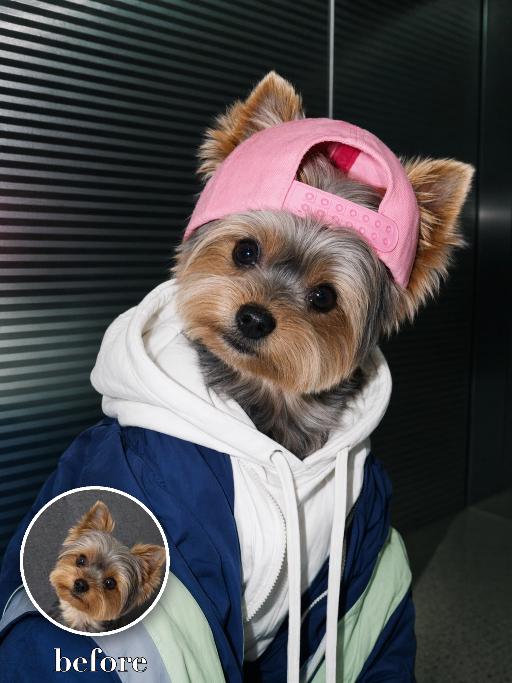
Street Pup AI effects generated image

Street Pup

Recreate the reference as a streetwear pet portrait. The uploaded dog wears a pink backwards cap, layered navy-and-white hoodie and jacket, sitting in front of a dark ribbed urban background. Three-quarter front view, head turned slightly to camera, fashionable serious expression, flash-lit editorial texture, tight vertical crop. Preserve each uploaded pet's actual species, breed, coat color, markings, ear shape, eye color, muzzle and facial structure. Do not assume a fixed breed, color, or species from the reference image; adapt the reference gameplay to the uploaded pet. Actively change pose, facial expression, gaze direction, camera angle and styling to match the gameplay reference. No extra animals beyond the requested uploaded pets. No human face unless explicitly requested; anonymous hands are allowed only when the gameplay needs hands. No brand logos, no watermark, no random readable text. Match the gameplay reference very closely in composition, crop, texture, lighting, pet expression, visible face angle, props, background, and image quality. Vertical 3:4, photorealistic unless the reference is a poster or sticker layout.

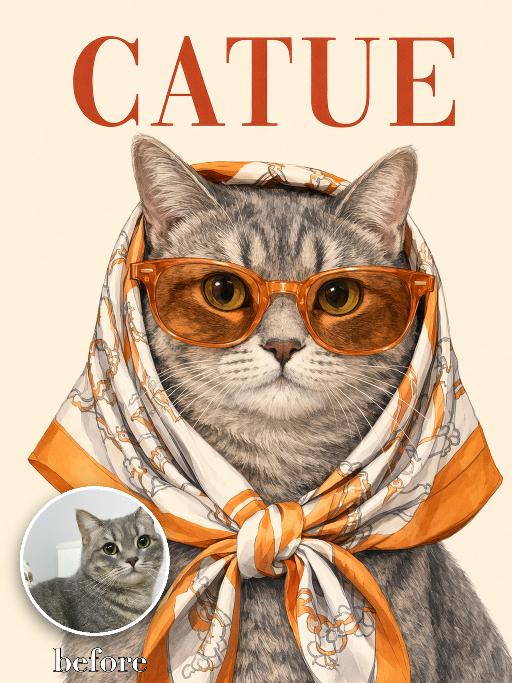
Catue Chic AI effects generated image

Catue Chic

Recreate the reference as an elegant illustrated CATUE fashion poster cover. Transform the uploaded pet into a refined vintage-style editorial illustration while strictly preserving the pet’s actual species, breed appearance, face shape, coat or fur color, markings, ear shape, eye color, muzzle structure, and overall recognizability. Do not assume the uploaded pet is a cat. Adapt the styling naturally to whatever animal appears in the uploaded image. Show the uploaded pet in a centered, front-facing tight head-and-chest portrait. Make the pet noticeably larger in the frame: * the head and face occupy most of the central image area * the pet fills approximately 75–85% of the image height * crop closely around the head, neck, and upper chest * keep the face, sunglasses, scarf, and expression as the dominant visual focus * leave only a small amount of clean background around the pet * do not create a distant or small subject * do not show the full body or large empty areas below the chest * keep the ears and scarf knot fully inside the frame The pet wears oversized translucent orange sunglasses and an orange, cream, and light-beige patterned silk headscarf wrapped over the head and tied neatly under the chin. Create a polished hand-drawn editorial illustration, not a cartoon and not a flat vector graphic. Use delicate linework, softly rendered shading, realistic fur or coat detail, elegant facial modeling, crisp graphic edges, and subtle paper grain. The result should feel like a sophisticated vintage fashion poster or luxury illustrated magazine cover. Use a clean warm pale cream background, minimal and uncluttered. Place a large rusty-red serif title “CATUE” across the top. Position the title behind or slightly overlapping the upper silhouette of the pet if needed, while keeping it readable. Keep only this requested text and do not add any other words, logos, cover lines, or watermarks. Match the reference closely in composition, close crop, scarf styling, sunglasses size, title placement, background simplicity, illustration texture, and overall poster quality. Vertical 3:4. No small or distant subject, no excessive empty space, no full body, no extra animals, no altered species, no generic pet face, no cartoon style, no flat minimalist vector style, no photorealistic photography, no random text, no logo, and no watermark.

Lavender Moment AI effects generated image

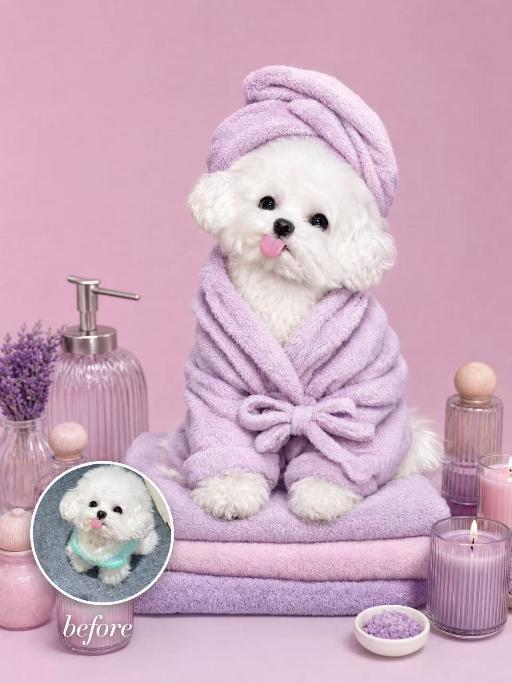
Lavender Moment

Turn the uploaded pet into a pampered spa-day portrait: wrapped in a fluffy pastel-coloured bathrobe with a matching soft towel turban on its head, sitting upright and relaxed atop a neatly stacked pile of plush towels. Around the pet, place a curated arrangement of spa accessories — small lit aromatherapy candles in glass holders, elegant glass bottles with wooden caps, and a sleek pump dispenser. The entire scene is unified by a cohesive soft pastel-lavender or pastel-pink colour palette; the background is a seamless solid pastel tone matching the towels. Soft diffused studio lighting, clean product-photography aesthetic, high-resolution photorealistic. The pet occupies 60–75% of the frame height, centered, head and full body clearly visible; background subordinate and not obstructing the pet. No logos, brand names, or readable text. While accurately preserving the animal's species, breed, coat colour and markings, ear shape, muzzle/face structure, eye colour and tail — keep it instantly recognisable as the same pet; change only the style and setting, not its identity.

Cool Hairstyle

"1. Basic scene and character settings: Refer to the picture where the characters are surrounded by a wide black hair salon cloth. (Mid shot) Ensure that the composition is above the person's legs. The person held a black smartphone in one hand and recorded the entire process from a first person selfie perspective. This person's expression remained unchanged throughout the entire process, uniform and natural, 4K ultra high definition, with movie like skin tone, obvious depth of field, and soft bokeh effects on the background neon lights and mirrors. 2. Core Consistency Control [Strict Lockdown]: Within 10 seconds of the entire video, the facial features of the character (facial proportions, eye color, skin texture) must remain absolutely consistent, without any distortion or deterioration. The position, grip posture, and gaze direction of the mobile phone should remain unchanged. The only change lies in the hair: each hairstyle transitions through a physical process of ""hair dissolution/natural growth"" to ensure that the texture, luster, and gravitational sagging of the hair feel realistic and natural. 3. Hairstyle Sequence and Transition (10 seconds, 8 hairstyles) Hairstyle 1 → 2 (0-1.5 seconds): Initially, the hairstyle was based on a reference person's hairstyle, gradually evolving into a modern messy hairstyle (dark brown, fluffy, ventilated feeling). Hairstyle 2 → 3 (1.5-3 seconds): Hair quickly softens, intertwines and lengthens, turning golden yellow and woven into light golden braids (hanging down to the forehead, with a street fashion vibe). Hairstyle 3 → 4 (3-4 seconds): Braids spread out like water, becoming longer and thinner, naturally hanging down, and the color deepens to jet black, forming shoulder length curly hair (smooth and glossy, velvet like curves, exuding artistic temperament). Hairstyle 4 → 5 (4-5 seconds): The long curly hair instantly shrinks and becomes shorter, the bangs slightly curl to cover the forehead, and then become short hair, with 6 long and thin braids hanging down from the edges of the hair. Hairstyle 5 → 6 (5-6 seconds): Comb and dissolve the hair, shave both sides clean, make the overall length uniform, and turn it into a tough round hairstyle (only a few millimeters, with delicate gradient contours at the back of the neck). Hairstyle 6 → 7 (6-7 seconds): Weave the hair into geometric lines close to the scalp (tie a small bun at the back with sharp lines). Then, loosen the braid and let the hair stand upright. Hairstyle 7 → 8 (7-8 seconds): The hair gradually turns silver white, the bangs are trimmed neatly, and it becomes a very short silver white spiky hairstyle. The silver white gradually disappeared, returning to dark brown, and the hair became fluffy and curly again. Hairstyle 8 → End (8-10 seconds): The hairstyle is perfectly restored to the initial reference image, and the video ends. 4. Rendering and technical features: ultra realistic rendering, ray tracing, hair level detail simulation, realistic physical dynamics, movie level lighting, 60fps, no stuttering, stable time consistency."

Grand Courtier AI effects generated image

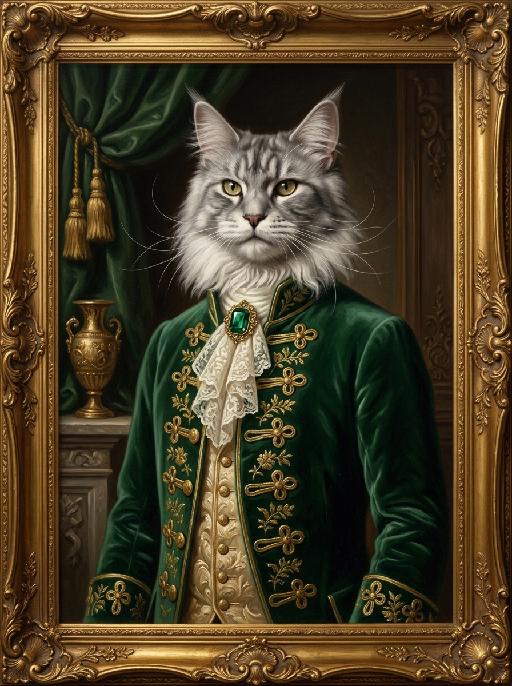
Grand Courtier

"A photorealistic half-body portrait oil painting of the uploaded animal (pet) — whose species, fur texture, facial features, ears, tail, and all animal characteristics remain completely unchanged — in the style of 17th-century court paintings, standing upright in a dignified and poised pose, facing forward with a proud and noble expression. The frame crops naturally at the waist, showing only the upper body and face, with the tail completely outside the frame and not visible. The uploaded subject wears a custom emerald green velvet historical coat fully buttoned up and closed from collar to waist, with all gold frog button closures neatly fastened and intricate knotwork running down the front, hand-embroidered gold floral patterns on the velvet, and a delicate ivory lace jabot fastened with a large faceted deep green emerald brooch at the collar. Underneath, an ornate champagne gold brocade waistcoat fully tucked and concealed beneath the coat, with only the decorative collar edge visible. The coat is completely closed with no open lapels and no exposed chest. The background features a dark, atmospheric baroque interior with a draped forest green curtain and gold tassels, and a gilded urn on a stone mantel. The entire portrait is enclosed in an elaborate gilded baroque frame with floral and scroll carvings. Dramatic chiaroscuro lighting with soft warm key light on the uploaded subject's face and fur, deep shadows to add depth, rich and muted color palette. Visible oil paint brushstrokes and rich painted canvas texture throughout, classical oil painting aesthetic. Ultra-realistic fur texture, individual strands visible, sharp focus on the face and jewelry, shallow depth of field, cinematic lighting, 8K resolution, masterpiece."

Whale Glide AI effects generated image

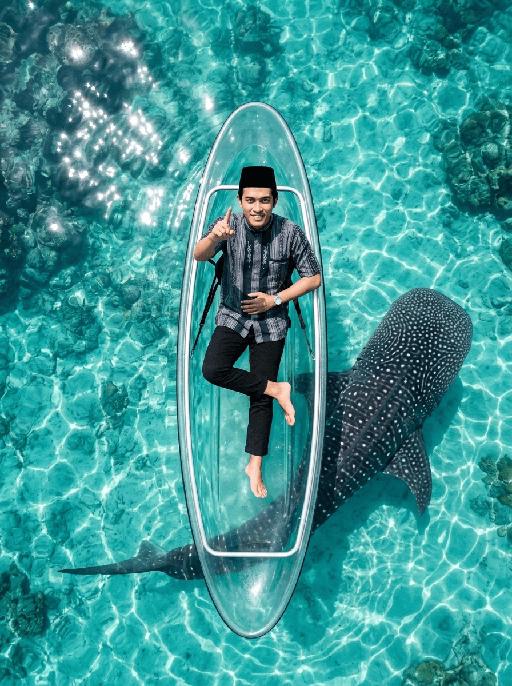
Whale Glide

"[Strictly preserve the exact same subjects, same species, same faces, original appearance features, and the full style of clothing and costume details from the reference images unchanged;] photorealistic top-down aerial shot, a clear transparent kayak floating on crystal clear turquoise tropical sea water. The subject from the reference image is sitting relaxed in the kayak, leaning back slightly, with the right leg bent and crossed over the left leg, right foot lifted slightly off the floor. Female character must wear long-sleeve top, long trousers and white sneakers. The subject smiles warmly and points directly at the camera with the right hand. Below the kayak, a massive whale shark swims diagonally, its body angled across the frame and only partially visible through the transparent boat and water—most of its body is exposed to the side, not fully hidden under the kayak. Bright natural sunlight creates sparkling reflections on the sea surface, cinematic overhead composition, ultra-detailed textures, sharp focus on both the subject and the whale shark, realistic water refraction and light rays, 8K resolution, no deformities, consistent lighting on the subject matching the bright sunny environment."

Soccer Glory AI effects generated image

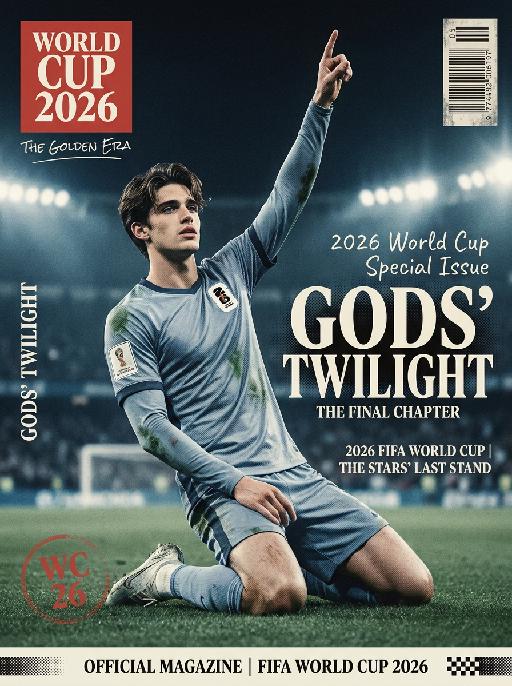
Soccer Glory

" Vertical 2026 FIFA World Cup themed retro art sports magazine cover, vintage 1990s print aesthetic, professional stadium sports photography, 8K ultra-high definition, print-level textured matte finish, cool-toned vintage color grading (muted ice blue, faded red, off-white), soft cool stadium lighting, sharp focus on the central subject, shallow depth of field with blurred background, no lens distortion, retro offset print layout. Subject & Scene (unchanged): The subject retains 100% of the original facial features, hairstyle, skin tone, and physical characteristics, no gender-specific modifiers. Pose matches reference image 2 exactly: kneeling on the right knee, left leg bent for support, right arm raised with index finger pointing up, left hand resting naturally on the thigh. Wearing 2026 FIFA World Cup official cold-toned long-sleeve jersey with the 2026 World Cup logo on the chest, subtle grass stains on the fabric. Background is a blurred cool-toned 2026 World Cup stadium night match scene with a subtle vintage grain effect. Typography & Layout (Retro Print Art Style): Top Left: Vintage solid red square logo, printed with white serif text ""WORLD CUP 2026"", paired with small handwritten-style text ""THE GOLDEN ERA"" below. Left Vertical Area: Vintage white serif uppercase letters ""GODS’ TWILIGHT"", arranged vertically with moderate letter spacing, paired with thin retro decorative lines, with subtle halftone print texture. Right Central Area: Scattered layout divided by thin retro decorative lines, three parts in total: Top: Small white handwritten-style text ""2026 World Cup Special Issue"" with subtle faded effect. Middle: Large vintage serif bold text ""GODS’ TWILIGHT"", paired with small English serif text ""THE FINAL CHAPTER"" below, with subtle halftone dot texture on the edges. Bottom: Two lines of small white serif text ""2026 FIFA WORLD CUP | THE STARS’ LAST STAND"", separated by thin retro decorative lines. Bottom Left: Faded red circular logo, printed with white serif text ""WC 26"" with subtle worn texture. Bottom Banner: Vintage off-white full-width strip, printed with black serif text ""OFFICIAL MAGAZINE | FIFA WORLD CUP 2026"", paired with retro decorative patterns, with subtle embossed print texture. Top Right: Vintage worn barcode with subtle halftone texture. Technical Rules: No distorted text or AI artifacts, the vintage halftone effect is moderate and does not obscure the subject, the combination of serif and handwritten fonts is harmonious, the overall tone is retro and cool, with a high-end vintage print texture that is different from ordinary modern magazines."

Load more

Next-Gen Multi-Model AI Video Architecture

Vivago AI isn't just one engine—it’s a unified hub for the world’s most advanced video AI. Whether you need cinematic realism or high-speed social content, we provide the right model for your creative vision.

Free Generate

Beauty and Dolphins

Vacation Time

Stellar Tear

Fish Tank Supervisor

Cinematic Quality & Precision Control

Enables 4K resolution with multi-lens motion control, generating delicate scene via text prompts for customized cinematography.​

TRY NOW

Dynamic AV Sync

Auto-generates original audio to avoid copyright issues. Build 3D immersive environments through layered sound design automatically.

TRY NOW

OpenAI Sora 2

​Advanced visual storytelling with unparalleled physics and consistency.

TRY NOW

Kling v2.6 Pro

Industry-leading cinematic image animation and motion control.

TRY NOW

Google Veo 3 & 3.1

Ultra-fast generation with enhanced realism for creative workflows.

TRY NOW

Vivago AI 2.0

Our proprietary model optimized for efficiency, speed, and cost-effective generation.

TRY NOW

Users' Voice

We listen carefully to the opinions of every user.
Free Generate
Contact Us
I tried the Lip Sync feature inside Vivago.ai’s AI Video Generator for my educational podcast, and the results were stunning! The avatar's lip movements perfectly matched my audio recording, creating a professional AI-generated video without complex editing. Compared with tools like OpenAI Sora 2 and Google Veo 3.1, Vivago Image-to-Video delivers fast, studio-quality results online. It saved me hours of post-production work.
ElenaM (Spain)
Vivago’s Image-to-Video AI transformed my marketing workflow. I uploaded a product image and described the launch scene in text, and it generated a 10-second cinematic AI video with background music and dynamic visuals. The output quality rivals Kling v2.6 Pro and Google Veo 3 Fast. It’s now my go-to AI video generator for social media ads and product campaigns.
KenjiT (Japan)
As a digital artist, I use Vivago.ai 2.0 daily for Image-to-Image and AI Image-to-Video creation. The e-book covers and animated visuals I generate for clients look cinematic and professional. Unlike many standalone AI tools, Vivago integrates multiple leading models into one platform, making it easier to create copyright-safe AI images and videos for publishing.
ChenL (China)
I tried the Lip Sync feature inside Vivago.ai’s AI Video Generator for my educational podcast, and the results were stunning! The avatar's lip movements perfectly matched my audio recording, creating a professional AI-generated video without complex editing. Compared with tools like OpenAI Sora 2 and Google Veo 3.1, Vivago Image-to-Video delivers fast, studio-quality results online. It saved me hours of post-production work.
ElenaM (Spain)
Vivago’s Image-to-Video AI transformed my marketing workflow. I uploaded a product image and described the launch scene in text, and it generated a 10-second cinematic AI video with background music and dynamic visuals. The output quality rivals Kling v2.6 Pro and Google Veo 3 Fast. It’s now my go-to AI video generator for social media ads and product campaigns.
KenjiT (Japan)
As a digital artist, I use Vivago.ai 2.0 daily for Image-to-Image and AI Image-to-Video creation. The e-book covers and animated visuals I generate for clients look cinematic and professional. Unlike many standalone AI tools, Vivago integrates multiple leading models into one platform, making it easier to create copyright-safe AI images and videos for publishing.
ChenL (China)
I absolutely love Vivago’s AI Image-to-Video Generator. As a travel blogger, static images often fail to capture real atmosphere, but Vivago helps me turn photos into vivid cinematic AI videos with motion effects. It feels comparable to OpenAI Sora 2 and Google Veo 3.1, but more accessible and faster for creators who need high-quality AI videos online.
LiamK (Australia)
I tried the Lip Sync feature inside Vivago.ai’s AI Video Generator for my educational podcast, and the results were stunning! The avatar's lip movements perfectly matched my audio recording, creating a professional AI-generated video without complex editing. Compared with tools like OpenAI Sora 2 and Google Veo 3.1, Vivago Image-to-Video delivers fast, studio-quality results online. It saved me hours of post-production work.
ElenaM (Spain)
Vivago’s Image-to-Video AI transformed my marketing workflow. I uploaded a product image and described the launch scene in text, and it generated a 10-second cinematic AI video with background music and dynamic visuals. The output quality rivals Kling v2.6 Pro and Google Veo 3 Fast. It’s now my go-to AI video generator for social media ads and product campaigns.
KenjiT (Japan)
As a digital artist, I use Vivago.ai 2.0 daily for Image-to-Image and AI Image-to-Video creation. The e-book covers and animated visuals I generate for clients look cinematic and professional. Unlike many standalone AI tools, Vivago integrates multiple leading models into one platform, making it easier to create copyright-safe AI images and videos for publishing.
ChenL (China)
I absolutely love Vivago’s AI Image-to-Video Generator. As a travel blogger, static images often fail to capture real atmosphere, but Vivago helps me turn photos into vivid cinematic AI videos with motion effects. It feels comparable to OpenAI Sora 2 and Google Veo 3.1, but more accessible and faster for creators who need high-quality AI videos online.
LiamK (Australia)
Using Vivago.ai’s Image-to-Video AI has greatly enhanced my classroom teaching. I transform textbook notes into historical AI videos with cinematic filters and dynamic animations. Compared with tools like Kling v2.6 Pro and Google Veo 3 Fast, Vivago offers faster generation and easier parameter control for educators who need reliable AI video creation.
RajivG (India)
I frequently create AI videos on Vivago and publish them on TikTok and YouTube Shorts. The AI video templates and trending content ideas help me produce viral-ready clips quickly. With Vivago’s integrated models—including advanced video engines similar to OpenAI Sora 2—I can generate anime-style and cinematic social media videos that drive high engagement.
MarieJ (Spain)
What attracts me most about Vivago.ai is not only the powerful AI Video Generator but also the active AIGC creator community. It combines AI Image-to-Video, Text-to-Video, and leading model integrations like Google Veo 3.1 into one creative platform.
TomW (India)
At first, I was hesitant about using AI video tools. But after trying Vivago Image-to-Video, I realized how easy it is to create professional AI-generated videos online. I just upload an image, add a short prompt, and adjust a few settings. The results are cinematic and copyright-safe, which is essential for commercial projects.
HectorC (Mexico)
Using Vivago.ai’s Image-to-Video AI has greatly enhanced my classroom teaching. I transform textbook notes into historical AI videos with cinematic filters and dynamic animations. Compared with tools like Kling v2.6 Pro and Google Veo 3 Fast, Vivago offers faster generation and easier parameter control for educators who need reliable AI video creation.
RajivG (India)
I frequently create AI videos on Vivago and publish them on TikTok and YouTube Shorts. The AI video templates and trending content ideas help me produce viral-ready clips quickly. With Vivago’s integrated models—including advanced video engines similar to OpenAI Sora 2—I can generate anime-style and cinematic social media videos that drive high engagement.
MarieJ (Spain)
What attracts me most about Vivago.ai is not only the powerful AI Video Generator but also the active AIGC creator community. It combines AI Image-to-Video, Text-to-Video, and leading model integrations like Google Veo 3.1 into one creative platform.
TomW (India)
At first, I was hesitant about using AI video tools. But after trying Vivago Image-to-Video, I realized how easy it is to create professional AI-generated videos online. I just upload an image, add a short prompt, and adjust a few settings. The results are cinematic and copyright-safe, which is essential for commercial projects.
HectorC (Mexico)